About digital sound. Digital sound


Free Download Mp4Gain
picture

About digital sound. Digital sound

digital sound

Recently, the capabilities of multimedia equipment have grown significantly, but for some reason this area has not received enough attention.
Digital sound

The average user suffers from a lack of information and is forced to learn only from his own experience and mistakes. With this article we will try to eliminate this annoying misunderstanding. This article is aimed at a common user and aims to help you understand the theoretical and practical foundations of digital sound, to identify the basic possibilities and techniques of its use.

What exactly do we know about the sound capabilities of a computer, other than the fact that our home computer has a sound card and two speakers? Unfortunately, probably due to insufficient literature or for some other reason, but the user, in most cases, is unfamiliar with anything other than the built-in Windows audio input / output mixer and recorder. The only use of a sound card that a common user finds is to play sound in games and listen to a collection of audio. And after all, even the simplest sound card installed in almost every computer can do much more: it opens up wide opportunities for everyone who loves and is interested in music and sound, and for those who want to create your own music, a sound card. it can become an omnipotent tool. To find out what the computer can do in the field of sound, you just need to take an interest, and you will be presented with opportunities that, perhaps, you did not even know about. And all this is not as difficult as it might seem at first glance.

Some facts and concepts that are difficult to do without:

According to the theory of the Fourier mathematician, a sound wave can be represented as a spectrum of frequencies included in it.

About digital audio (digital audio)

The frequency components of the spectrum are sinusoidal oscillations (so-called pure tones), each of which has its own amplitude and frequency. Therefore, any vibration, even the most complex shape (for example, a human voice), can be represented as the sum of the simplest sinusoidal vibrations of certain frequencies and amplitudes. And vice versa, generating different vibrations and superimposing them on each other (mixing, mixing), you can get different sounds.

Note: The hearing aid / human brain is capable of distinguishing between frequency components of 20 Hz and ~ 20 kHz (upper limit may vary based on age and other factors). Also, the lower limit fluctuates a lot depending on the intensity of the sound.

Digitization of sound and its storage on a digital carrier

“Normal” analog sound is represented on analog equipment by a continuous electrical signal. The computer operates with data in digital form. This means that the sound on the computer is also represented in digital form. How does the analog to digital conversion work?

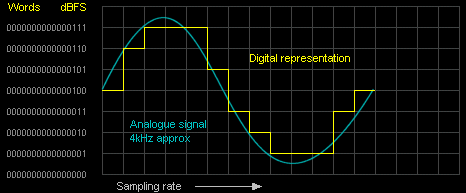
Digital sound is a way of representing an electrical signal using discrete numerical values ​​of its amplitude. Let’s say we have a good quality analog audio track (by saying “good quality” we will assume a silent recording that contains spectral components from the entire audible frequency range, roughly 20 Hz to 20 KHz) and we want to “feed” it into a computer. (that is, digitize) without loss of quality. How to achieve it and how does digitization occur? A sound wave is a kind of complex function, the dependence of the amplitude of a sound wave on time. It would seem that since it is a function, you can write it to a computer “as is,” that is, describe the mathematical form of the function and store it in the computer’s memory. However, this is practically impossible, since sound vibrations cannot be represented by an analytical formula (like y = x2, for example). There is only one way left: to describe the function by storing its discrete values ​​at certain points. In other words, at each moment you can measure the value of the amplitude of the signal and write it down as numbers. However, this method also has its drawbacks, as we cannot record the amplitude values ​​of the signal with infinite precision and we have to round them.


Free Download Mp4Gain
picture


Mp4Gain Main Window
picture


Mp4Gain Features
picture


Free Download Mp4Gain
picture

ADVANTAGES AND DISADVANTAGES OF DIGITAL SOUND

ADVANTAGES AND DISADVANTAGES OF DIGITAL SOUND

DIGITAL SOUND

Digital sound opens up truly endless possibilities. If the previous radio and sound studios were located on several tens of square meters, they can now be replaced by a good computer, which, in terms of capabilities, exceeds ten of those studios combined, and at a cost many times cheaper than one.

Digital sound

This removes many financial barriers and makes sound recording more accessible to both the professional and the amateur. Modern software lets you do what you want with sound. Previously, various sound effects were achieved with the help of ingenious devices that did not always live up to technical thinking or were simply handcrafted devices. Today, the most complex and hitherto unimaginable effects are achieved by pressing a couple of buttons. Of course,

From the point of view of an ordinary user, there are many benefits: the compactness of modern storage media allows you to transfer all disks and records to a digital representation and store them for many years on a small three-inch hard disk or a dozen or two CDs; you can use special software and thoroughly “clean” old records from reels and discs, removing noise and crackle from their sound; You can also not only correct the sound, but also beautify it, add richness, volume, restore frequencies. The Internet also comes to the rescue of the audio hobbyist: the network allows people to share music, listen to hundreds of thousands of different Internet radio stations and show their sonic creativity to the public, all that is needed is a computer and the Internet.

Of course, digital technology also has its drawbacks. Many people noticed that the analog sound was heard with more life. And this is not just a tribute to the past: the digitization process introduces a certain error in the sound, in addition, various digital amplifiers introduce the so-called “transistor noise” and other specific distortions. There is no precise definition of the term “transistor noise”, but we can say that they are chaotic oscillations in the high frequency region. Although the human hearing aid is capable of perceiving frequencies up to 20 kHz, it appears that the human brain picks up higher frequencies. And it is on a subconscious level that a person still feels analog sound cleaner than digital.

“Normal” analog sound is represented on analog equipment as a continuous electrical signal. The computer operates with data in digital form. This means that the sound on the computer is also represented in digital form.

Digital sound is a way of representing an electrical signal by means of discrete numerical values ​​of its amplitude; Signal digitization involves two processes: a sampling process (sampling) and a quantization process. The sampling process is the process of obtaining the values ​​of the converted signal values ​​at specific intervals. Digitization is fixing the amplitude of the signal at regular intervals and recording the amplitude values ​​obtained in the form of rounded digital values ​​(since the amplitude values ​​are continuous, it is not possible to record the exact value of the amplitude of the signal to a finite number, so we resort to rounding). The recorded signal amplitude values ​​are called samples. Obviously, the more often we take amplitude measurements (the higher the sampling frequency) and the less we round the obtained values ​​(more quantization levels), the more accurate the digital representation of the signal that we will obtain will be. The digitized signal can be saved as a set of successive amplitude values.

Quantization is the process of replacing the actual values ​​of the signal with approximate values ​​with some precision.

Sound processing should be understood as various transformations of sound information to change some characteristics of sound. Sound processing includes methods for creating various sound effects, filtering, as well as methods for cleaning the sound of unwanted noise, changing the timbre, etc. This whole huge set of transformations ultimately boils down to the following basic types:

1. Amplitude transformations. They are carried out on the amplitude of the signal and lead to its amplification / attenuation or change according to some law in certain parts of the signal;

2. Frequency conversions. They are performed on the frequency components of sound: the signal is presented in the form of a frequency spectrum at regular intervals, the necessary frequency components are processed, for example, filtering and inverse “folding” of the signal from the spectrum to the wave;

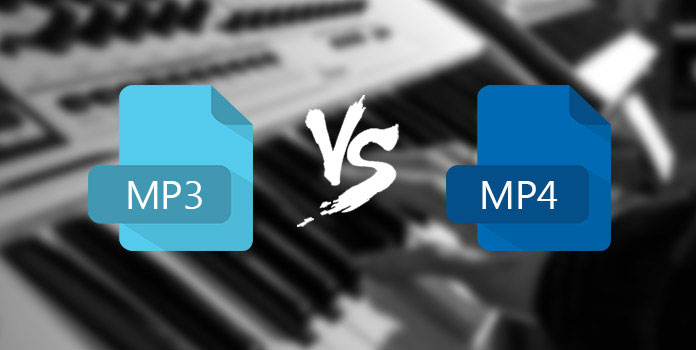
What is MP4? Difference between MP3 and MP4

What is MP4? Difference between MP3 and MP4

MP3 vs MP4

MP4 files are just a newer and better version of MP3 files, right?

MP3 vs MP4

Oh no.

This one-digit difference may give the impression that they are more or less the same, but nothing could be further from the truth. Each has its own uses, history, and benefits, so let me repeat, MP3 and MP4 are not the same.

In this article, we will explain some key differences that everyone should know about. When you finish reading, you will know exactly what type of file suits your needs.

Understanding MPEG
But before delving into the differences, it’s important to understand where the two types of files come from.

MP3 is the abbreviation for MPEG-1 Audio Layer 3. It was one of two formats that were considered for the MPEG audio standard in the early 1990s. The electronics firm Philips, the French research institute CCETT, and the German Institute of Broadcast Technology supported the format because of its simplicity. , without errors and computational efficiency.

The decision was made in 1991 and the MP3 files were made public in 1993.

MP4 stands for MPEG-4 part 14. This technology is based on Apple’s QuickTime MOV format, but adds support for other MPEG functions. The file type was first released in 2001, but it is a 2003 reissue that is now widely used when viewing MP4 files.

Audio only versus digital media

The most fundamental difference between MP3 and MP4 lies in the type of data they store.

MP3 files can only be used for audio, while MP4 files can store audio, video, still images, subtitles, and text. Technically speaking, MP3 is an “audio encoding” format and MP4 is a “digital media container.”

MP3: King of Audio
Because they store audio so well, MP3 files have become the de facto standard

for music software, digital audio players, and music streaming sites. No matter what operating system or device you have, you can be sure that MP3s will work without any problem.

See also: What is the refresh rate?
The main reason they are so popular is how the file type works. MP3 uses lossy compression

, which significantly reduces the size of the audio file, practically without affecting its quality. The process works by removing any data that is outside of the average person’s hearing range, and then compressing the rest as efficiently as possible.

MP3 files also allow users to find a balance between sound quality and file size.

If you are a music lover, you can choose a larger file size with a higher bit rate and better sound quality. On the other hand, if you want to include as much music on your portable device as possible, you can reduce the file size and sound quality accordingly.

Also, MP3s will always be smaller than equivalent MP4 files. If your audio player or smartphone fills up, you should convert any audio saved in MP4 format to MP3 format. Please note that it may affect sound quality in the process!

MP4: more options, more flexibility
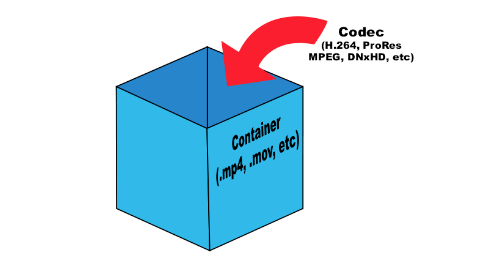
MP4 files are “containers”: instead of storing the file’s code, they store data. So MP4 files don’t have their own way of handling file encoding. They are based on specific codecs to determine how encoding and compression will be handled.

There are hundreds of codecs on the market today, but not many will work with normal MP4 players. For a player to be able to read and play an MP4 file, it must have the same codec. Most supported codecs:

video: MPEG-4 part 10 (H.264) and MPEG-4 part 2.
audio: AAC, ALS, SLS, TTSI, MP3 and ALAC.
Subtitles: MPEG-4 synchronized text.
These codecs give MP4 much more flexibility than MP3. For example, M4A files (which are MP4 files that only contain audio) can handle both Advanced Audio Coding (AAC) and Apple Lossless Audio Coding (ALAC). The choice of quality is up to the user. Either way, the file will appear as an MP4 file, but the data in that file will vary greatly.

See also: How does file compression work?
Besides audio, MP4 files can also contain video, images, and text. You will often see multiple file extensions indicating the type of data in the container. Some of the most common are:

MP4 – the only official extension.
M4A – Unprotected sound.
M4P – Audio encrypted by FairPlay Digital Rights Management.
M4B: audiobooks and podcasts.
M4V: MPEG-4 visual bitstreams.
Understand file metadata
MP3 and MP4 files support metadata.

Compression standard MPEG -4

Compression standard MPEG -4

MPEG  4

The video data compression scheme in the MPEG-4 standard is the same as in previous MPEG formats.

mpeg 4

During encoding, keyframes with a scene change are identified and saved, and information about changes in the current frame relative to the previous one is predicted with preservation. Also, the codec can work not only with squares, into which the image is divided, but also with objects of arbitrary shape. Of course, in this case, more important computing resources are required, but this is a characteristic of the format, which allows working with moving images (rectangular frames), arbitrarily shaped video objects, 2 D – and 3 D – synthesized objects. by a computer, animation objects and with objects from a still image.

The MPEG-4 format supports standards:

Digital television broadcasting, video information storage;
transmission of video streaming via the Internet and mobile communications;
standards for high-quality video products manufactured and distributed for studio use;
presentation of computer graphics in 2D and 3D geometry;
animation technology standards; and t. d.

It should not be thought that behind the external diversity and wide coverage of possibilities, MPEG-4 is a kind of special compression standard, since at its core it has a simple video encoding mechanism using block-based encoding with offset. movement. Furthermore, with subsequent DCT transformation, quantization and entropy coding. The basic encoding syntax, with some restrictions, is identical to that of the H. 263 standard. Most of the rest of the functionality comes from adding some details that are developed separately.

The audio part of MPEG-4 is also object-oriented. Here we use the description of the sound field in the BIFS language, which allows to place objects-sound sources in the three-dimensional space of the scene in the desired position, change the characteristics of the sound and add effects independently to each source, moving it together with the visual object.

When encoding audio objects in MPEG-4 technology, two languages ​​SAOL (Structured Audio Orchestra Language) and SASL (Structured Audio Score Language) are incorporated, with which any instrument and any program can be programmed to reproduce synthesized sound.

The peculiarity of MPEG-4 is that the final assembly of the overall picture takes place on a computer or other receiving device and the user can form the resulting picture himself, like a television director. User commands can be processed in the decoder or sent to the source, performing the function of interactivity.

Transition of digital broadcasting in the country from MPEG-2 to MPEG-4
Regarding the transition of digital broadcasting in the country from the MPEG-2 compression standard to the MPEG-4 standard, this process was manifested in 2015, when the satellite broadcasting operators Tricolor TV, Orion and NTV plus of 2016 years after preliminary preparation, we gradually began to replace both the transmitting and user equipment.

This process was also facilitated by the order of the Ministry of Telecommunications and Mass Communications “On the approval of the Requirements for the quality of sound and (or) image of the compulsory public television channels and (or) radio channels” dated 01.09 .2015, which required telecommunications operators to provide transmission of digital signals of the first and second multiplexes in digital format. worse than using the MPEG-4 standard.

Note that the operator Tricolor TV in 2015 to 2 million subscribers have changed their equipment in the new st. In 2016, 75% of subscribers have already made an exchange.

Globally, the transition from MPEG-2 to MPEG-4 has accelerated the adoption of HD streaming. In 2016, there were more than a hundred of them on the broadcast network.

The situation is similar for other satellite operators. To speed up the exchange of equipment, Orion and NTV plus have even introduced new rules to sell MPEG-4 reception equipment in installments for two years and at a reduced price. Although, of course, the transition from one standard to another was made gradually with the preservation of parallel transmission in the MPEG-2 format, all new channels are currently broadcast in the MPEG-4 format.

Moving Picture Experts Group MPEG

Moving Picture Experts Group MPEG

Moving Picture Experts Group, MPEG

The MPEG compression standards were developed by the Moving Picture Experts Group (MPEG).

MPEG

This technology defines compression standards for audio and video information and makes it suitable for broadcast transmission. Let’s describe the types of standards in sequence.

Compression standard MPEG -1
AND
The MPEG -1 standard assumes a transition from spatial to spectral representation of images. This allows the multidimensional structure of the image to be selectively processed to achieve its highest quality characteristics. In the MPEG -1 standard, for this the discrete cosine formation method (DCT) is used, which applies to all the same 8×8 blocks, into which the image is divided. The DCT application gives a matrix of 64 spectral components – coefficients. The sequential sum of coefficients during image reconstruction, starting from zero, determined by the average brightness of the original block, leads to restoration of the block to a satisfactory image. Experience shows that for the average image of images in more than 50% of all blocks, 8x 8 can be restored to a good coefficient state by adding approximately 20 spectral components of 64. This reduces the number of bits needed for encoding. The compression ratio reaches eight.

Searching for higher compression degrees up to hundreds of times when using DKM (8x 8) technology leads to strong distortion of the original image. Using 16×16 drives requires significant computational cost.

In accordance with the MPEG -1 standard, audio and video information (streams) is transmitted at a speed of 150 Kb / s. The flow control selects key video frames and fills only the areas that change between frames.

Simply put, MPEG -1 compression technology includes the following steps.

Before removing the temporal redundancy encoding, as we have described above, it occurs in temporal compression technology in a group of 12-frame images – GOP, where the selected I -frames (intra-frame – frame) which is compressed without modification, the P-frames (pre-directed frame), during encoding what part of the information is erased, and during playback, information from the previous I or P-frames is used. The most “compressed” frame type is B (bidirectional frame) – frames in which, during encoding, information losses are significant and, during playback, information from previous I or P frames is used. If we take the most typical frame chain IBBPBBPBBIBB formed during encoding, then the information compression process is obvious, since in the GOP chain the relationship between frames (I: P: B) is 2: 2: 8, that is prevalence of the most compressed frames by 4 times.

After framing is complete, the I-frames are divided into 8×8-pixel blocks and the P and B-frames are “compressed” using “motion prediction” technology. The motion prediction algorithm obtains a block from the current frame (8×8 pixels) and similar blocks from previous I or P frames as processed information.

After going through processing, eventually at this “compression” stage there is the following information:

the motion vector of the current block relative to the previous ones,
the difference between the present and past blocks, subject to additional coding.
The encoding process goes through three stages

DCT (discrete cosine preobazovanie – DCT (discrete cosine transformation);
quantization (quantization): the transfer of information from an analog to a discrete form;
conversion of the resulting blocks from matrix to linear form.
The MPEG -1 standard in the color television transmission system turned out to be of little use, since in the YUY format (see expressions (4) and (5) in Part I of this article) it is optimized for use with the parameters:

240 lines per frame (line per frame – lpf);
352 points on a line (point per line – ppl);
30 minute staff scan (frames per second – fps);
therefore, it provides a video quality lower than that transmitted according to the color television standard.

However, with the development of the MPEG -1 format, audio coding techniques have been developed. The result was presented as a series of Layer I, Layer II (Musicam), Layer III (MP 3) audio encoders.

Digital video encoding in surveillance systems

Digital video encoding in surveillance systems

video digital

The encoding or, more simply, the compression of the digital video signal is of great importance in video surveillance. To understand why, let’s go back to recent history.

Security video

The digital method of video recording was used for the first time in the 80s of the last century. Then it was a clean, uncompressed video that required a lot of memory to store and use. It is clear that at that time there were no devices to record such volumes of information, and then the first codecs were invented, specifically designed to compress the form.

Since then, compression and encoding have been used when recording any video information. Otherwise downloading, processing, editing, playing and storing video files will take a great deal of time and huge stores of data. Coding eliminates all of these problems.

The encoding process itself is quite simple. When special codecs are used, the video data stream is continuously analyzed by them and unnecessary / unimportant chunks of data are simply cut off, helping to significantly reduce video file size.

Today, there are two types of video compression: frame-by-frame (intra-frame) and inter-frame encoding.

Frame-by-frame compression treats each frame of the video as a separate still image, like a photograph. This technology allows good quality videos to be obtained, but at the same time the file size is slightly reduced so that with this encoding all the frames are saved, even if there are no changes in the frame. That is, for example, out of ten or hundreds of identical frames, all are saved, although only one is sufficient.

Compression between frames works on the opposite principle: when a signal is processed, the entire video image is analyzed, but only key changes are saved, for example the movement of an object, while the background and surrounding environment of the object remain the same. This allows you to significantly reduce the size of the video file compared to frame-by-frame compression.

However, even the most advanced video compression algorithms degrade the quality of the original image. It is true that today codecs have appeared that compress video in such a way that there is practically no loss of quality.

In this case, compression takes into account: video resolution, file size, method of transferring and downloading a video file, predominance of static or dynamic scenes, color, contrast, etc. The quality and size of the resulting video file depend on the codec used.

But that’s not all, because the file obtained when recording video from surveillance cameras must not only be compressed and encoded, it must, if necessary, be decompressed and decoded, and for this it is better to use the same codec as for the compression.

Currently, there are several important compression standards used in video surveillance. Consider them in more detail.

Compression standard M-JPEG (Motion JPEG)

It is a license-free encoding standard created and widely used in the 1990s. It uses intra-frame compression technology. The digital video sequence obtained with this codec is a full weight JPEG image matrix. Although this codec allows the use of a number of tools that reduce file size, today it is rarely used due to the low quality of the resulting image, as well as the minimum video compression ratio.

MPEG-4 compression standard

Licensed coding standard that uses object-oriented compression (between frames), that is, when the movement of each object in the frame is tracked separately and based on these movements, the video signal is recorded. The main advantage of this codec is the wide range of compression ratio settings that can be selected for any data transfer rate. This format is universal and is used to view sweat videos in real time. However, this standard is already out of date.

H.264 and H.264 + compression standards

Newer licensed encoding standards that significantly reduce the size of a digital video file. These codecs make minimal changes to video image quality and are designed to record video signals for a long time, as they require little network bandwidth and hard drive space.

The H.264 codec is one of the best tools for working in video surveillance systems, especially when shooting at high frame rates and high resolutions.

Codecs and media containers.

Codecs and media containers.

Codecs and Containers

Bitrate. Recommendations for video encoding.

Video Container and Video Codecs

To compress digital media files, special programs are used – codecs (encoders). This is a kind of “formula” that determines how audio and video content can be packaged. Codecs also perform the reverse decoding operation, in this case they are called decoders.

Encoder (encoder, encoder in English): a program and / or device used to convert information from one type to another (encoding).
A decoder is essentially the same as an encoder, but it converts in the opposite direction.

Codec (English codec): encoder and decoder in one block.
Compression ratio is the ratio of the size of the input file (not encoded) to the size of the output file (encoded). For example, a compression ratio of 11: 1 means that the encoded file is 12 times smaller than the original.
Bit rate: the number of bits allocated to record a unit of time of audio information. They are generally measured in kb / s, that is, kilobits per second (kb / s or kbps in English).
Most codecs for audio and visual data use lossy compression to obtain an acceptable final (compressed) file size. There are also lossless codecs. But for most applications, lossy codecs are more beneficial, as the subtle degradation in quality is justified by a significant reduction in data volume. Almost the only exception is when the data will undergo post-processing: in this case, repeated encoding / decoding losses will have a serious impact on quality.

The most popular are the following codecs:

psd, bmp, rle, dib, gif, eps, jpg, pcx, raw, png, tif, etc. – images.
flag, ogg, opus, wav, pcm, wma, mp3, aac, as3, dts, flac, etc. – Audio;
ffdshow, indeo, mjpeg, mpeg-1, mpeg-2, mpeg-4 (h.261, h.263, h.264), wmv – video.

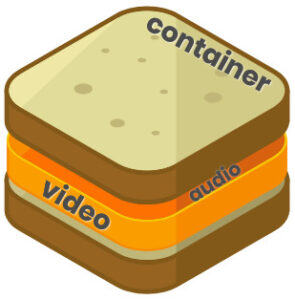
Any operating system initially contains a certain set of codecs, but these are generally not sufficient to play certain video file formats. The codecs convert the data into a special file called a container. A container is a special shell that stores information encrypted by codecs. Basically, media containers are video file formats that contain data about their internal structure. The container can store various information, in particular, images, audio, video and subtitles. Different types of containers determine the quantity and quality of information that can be stored in them, but they do not affect the way the data is encoded.

The most popular are the following containers:

ogg, mp3, mka, wav, wma, mp3, aac, dts, flac, etc. – Audio;
DivX, XviD, AVI, MP4, MPEG, WMV, MOV, VOB, MKV, FLV, MPG, dv, flv, ts, m2ts, mp4, etc. – video.
To determine which format to convert a video into, you must proceed from the task set. Imagine this situation: you have a beautiful video clip of the wedding photos and you want to play it on your TV screen (without HD). To do this, you can burn video in DVD format (as3 – audio, vob – video).

Next, let’s look at the most famous video file formats:
AVI (Audio-Video Interleaved) is one of the most common media containers for Windows operating systems. This format can contain four types of information: video, audio, text and midi. This container can contain video of various formats from MPEG-1 to MPEG-4. AVI has a large number of varieties in terms of internal structure and can be played on smartphones, communicators and other devices. The AVI media container does not impose any restrictions on the type of codec used.
WMV (Windows Media Video) is a digital video format created and controlled by Microsoft. WMV files can contain audio and video data packed with Windows Media Audio (WMA) and Windows Media Video (WMV) codecs.
MOV is a format developed by Apple for the QuickTime media player. To play such files, you must have a QuickTime player or players with MOV codecs already installed. The format can contain video, animation, graphics, 3D. This format supports any audio and video codecs.
ASF (Advanced Streaming Format) is a Microsoft streaming format. Based on MPEG-4 and used to transfer low and medium bit rate videos to the Internet. ASF is a multimedia container that supports almost all video codecs.
MPG or MPEG (Moving Picture Experts Group) – A video file containing video encoded with codecs:
mpeg1 – The standard was developed in 1992 with the capabilities of 2-speed CD-ROMs and 486 computers in mind
The mpeg2 standard was adopted in

High quality audio, what is it?

High quality audio, what is it?

High Quality Audio

When it comes to high definition audio played from a Blu-ray player on a computer, many tend to think that having an HDMI interface on the motherboard or video card automatically allows high definition audio formats like Dolby to be played on TV and Home Theater.

High Quality Audio

Digital Plus, High Resolution DTS-HD, Dolby TrueHD and DTS-HD Master Audio. However, with the exception of some interesting possibilities, in most cases this is not the case at all. Even relatively new high-end HDMI-equipped motherboards, video cards, and sound cards may not be able to handle such large audio streams on their own. Ultimately it all comes down to what kind of input signal they can receive and what kind of signal they can output.

In this review, we’ll take a look at all HD audio formats, their bitrate (streaming), and delivery requirements to the playback medium. In Part 2, we will continue to explore how digital audio streams can (or cannot) be handled in typical PC components. After reading both articles, you will need to understand in depth why so many home theater users use a variety of analog cables (three for 5.1 channels and four for 7.1) instead of HDMI to carry multi-channel audio wherever you need to go. … We will also talk about some of the workarounds associated with converting a digital to analog signal on a computer, rather than a receiver or preamplifier, often this option is the most affordable option for HD sound quality optimal. And finally, perhaps you understand why it is worth waiting a little longer to buy a Blu-ray player for your home theater system; This will allow you to take advantage of some of the new benefits that should appear before the end of 2008, but are not ready yet (at least they are not ready at the time of writing this article).

The bitrate (or stream) associated with each format, as well as the number of channels, sample rates, and bit depths used to encode the formats.
Whether the SPDIF connector can provide the required stream for each format and what types of HDMI interfaces each format works with.
In Part Two, we’ll look at PC software codecs to find out what formats they work with, as well as the types of interfaces that HDMI-equipped motherboards, video cards, and sound cards can support. And since new chipsets and interfaces are recently available (or will be available relatively soon), we’ll also explain how new and future hardware can provide simpler solutions for currently messed-up PC HD audio.

Introduction

High Definition Audio Formats (HD Audio)
Blu-ray discs can contain movie soundtracks in one of the following formats.

PCM (linear PCM or LPCM);
Dolby Digital;
DTS;
Dolby Digital Plus;
High resolution DTS-HD;
Dolby TrueHD;
DTS-HD master audio.
Before moving on to a detailed consideration of the above formats, we note that Dolby technologies originated from Dolby Laboratories, a recognized provider of professional, semi-professional, and consumer multi-channel surround sound technology and noise cancellation. DTS (also called Digital Theater Systems) is derived from DTS, Inc. is also a well-known provider of digital audio technology that competes with Dolby Labs.

PCM (linear PCM or LPCM)
PCM stands for Pulse Code Modulation and provides a digital representation of an analog signal that is sampled (digitized) at regular intervals (with a specified frequency in Hertz) and represented in binary form (with a specified precision – bit width). In addition to using PCM for computer digital audio and audio CDs, it is also used in some digital phone systems and in various digital video formats. In PCM format, audio amplitude values ​​are represented using different numbers of bits (length); the soundtrack is usually digitized in 12 to 24 bit, but most of the time 16 bit is used in PCM studio encoding for Blu-ray discs.

A PCM audio track can be an exact copy of a studio original encoded on an uncompressed disc if its bit depth is the same as the original. If the bit depth is reduced (as is often the case to save space allocated for storing audio on disk), this can cause a downgrade – for example, using 16-bit instead of 24-bit. From a technical point of view, downsampling is not the same as compression, although the precision of the resulting sound is decreased.

Varieties of digital audio formats.

Varieties of digital audio formats.

Audio Formats

There are several concepts of audio format.

Audio Format

The audio data presentation format in digital form depends on the quantization method of a digital-to-analog converter (DAC). The sound equipment at the present time the most common two types of quantization:

Pulse – code modulation
sigma – delta – modulation
Often bit quantization and frequency sampling point for various audio devices that record and play back as digital audio presentation format (24-bit / 192 kHz, 16-bit / 48 kHz).

The file format determines the structure and presentation of the audio characteristics of the data when stored on a PC storage device. To eliminate redundancy of audio data using audio codecs, with the help of which compression of audio data is carried out. There are three groups of audio file formats:

uncompressed audio formats, such as WAV, AIFF
lossless compressed audio formats (APE, FLAC)
audio formats, with the use of lossy compression (mp3, ogg)
There are only modular music format files. By synthetically or sampled pre-recorded live instruments, they are, in the main, used for the creation of modern electronic music (MOD). Also here the format of MIDI can be attributed, which is not a sound recording, but in this with the help of a sequencer it allows to record and play music, using a specific set of commands in the form of text.

Sound digital media formats are used as that of mass-propagated sound recordings (the CD, the SACD), so and in a professional recording (the DAT, MiniDisc).

For surround sound systems and you can select sound formats, in a multi-channel accompaniment largely without sound for movies. Such systems have a set family of two large formats that compete the companies of the Digital Theater then Systems Inc. – DTS and Dolby Laboratories Inc. – Dolby Digital.

Also called format the number of channels in multi-channel sound systems (5. 1; 7. 1). Initially, this system was designed for the cinema, but later it was extended to home theater systems.

Mp3, what exactly is an mp3?

Mp3, what exactly is an mp3?

MP3

MP3 (formally MPEG-1 Audio Layer III or MPEG-2 Audio Layer III) is an audio coding format for digital audio.

MP3

Originally defined as the third audio format of the MPEG-1 standard, it has been maintained and expanded to define additional bit rates and support more channels of audio as the third audio format of the upcoming MPEG-2 standard. A third version, known as MPEG 2.5, improved to better support lower bit rates, is commonly implemented, but is not a recognized standard.

MP3 (or mp3) as a file format generally refers to files that contain the elementary MPEG-1 data stream for audio and video, without the other complexities of the MP3 standard.

In the audio compression aspects of MP3, the most obvious standard aspect to end users (and the one best known for) is MP3 which uses lossy data compression to encode data using imprecise approximations and partial data discarding. This allows the file size to be significantly reduced compared to uncompressed audio. The combination of small size and acceptable fidelity led to a boom in music distribution over the Internet in the mid to late 1990s, as a provider technology when bandwidth and storage were still at their peak. The MP3 format was soon associated with controversy surrounding copyright infringement, music piracy, MP3.com and Napster ripping / sharing services, and others. With the advent of portable media players, a product category that includes smartphones,

MP3 compression works by reducing (or approximating) the precision of certain audio components that are believed to be superior to the hearing capacity of most people. This technique is commonly known as perceptual coding or psychoacoustic simulation. The remaining audio information is then recorded in a cost effective manner. Compared to the digital audio quality of a CD, MP3 compression can typically achieve a 75-95% reduction. For example, an MP3 encoded at a constant 128 kbps bit rate would result in a file approximately 9% the size of the original audio CD.

Also, designed as a broadcast format, broadcast segments can be lost without compromising the ability to decode subsequent segments.

MP3 was developed by Moving Picture Experts Group (MPEG) within the MPEG-1 and later MPEG-2 standards. The first audio subgroup was made up of various engineering teams from CCETT, Matsushita, Philips, Sony, AT & T-Bell Labs, Thomson-Brandt, and others. MPEG-1 Audio (MPEG-1 Part 3), which includes MPEG-1 Audio Layer I, II and III was approved as a draft of the ISO / IEC committee in 1991, finalized in 1992 and published in 1993 as ISO / IEC 11172 -3: 1993. In 1995, the opposite was published. an extension compatible with MPEG-2 Audio (MPEG-2 Part 3) with a lower bit rate and bit rate than ISO / IEC 13818-3: 1995.

Standardization
In 1991, two proposals were submitted and evaluated for the MPEG audio standard: MUSICAM (universal universal coding adapted to mask and subband multiplexing) and ASPEC (adaptive spectral perception of entropy coding). As proposed by the Dutch Philips corporation, the French research institute CCETT, and the German standards institute Broadcast Technology, MUSICAM was chosen for its simplicity and error reliability, as well as its high level of computational efficiency The MUSICAM format, based on Subband encoding became the basis for the MPEG Audio compression format, including, for example, its frame structure, header format, sample rate, etc.

Although most of the MUSICAM technologies and ideas were included in the definition of MPEG Audio Layer I and Layer II, only the filter bank and data structure based on 1152 frame samples (file format and stream-oriented bytes) of MUSICAM remained in Layer III (MP3). as part of a computationally inefficient hybrid filter bank. Under the chairmanship of Professor Musman from the University of Hannover, the edition of the standard was delivered to the Dutch Leon van de Kerhof, the German Gerhard Stoll, the Frenchman Yves-François Deri who works on levels I and II. ASPEC was a joint offering from AT&T Bell Laboratories, Thomson Consumer Electronics, Fraunhofer Society, and CNET. This ensured maximum encoding efficiency.