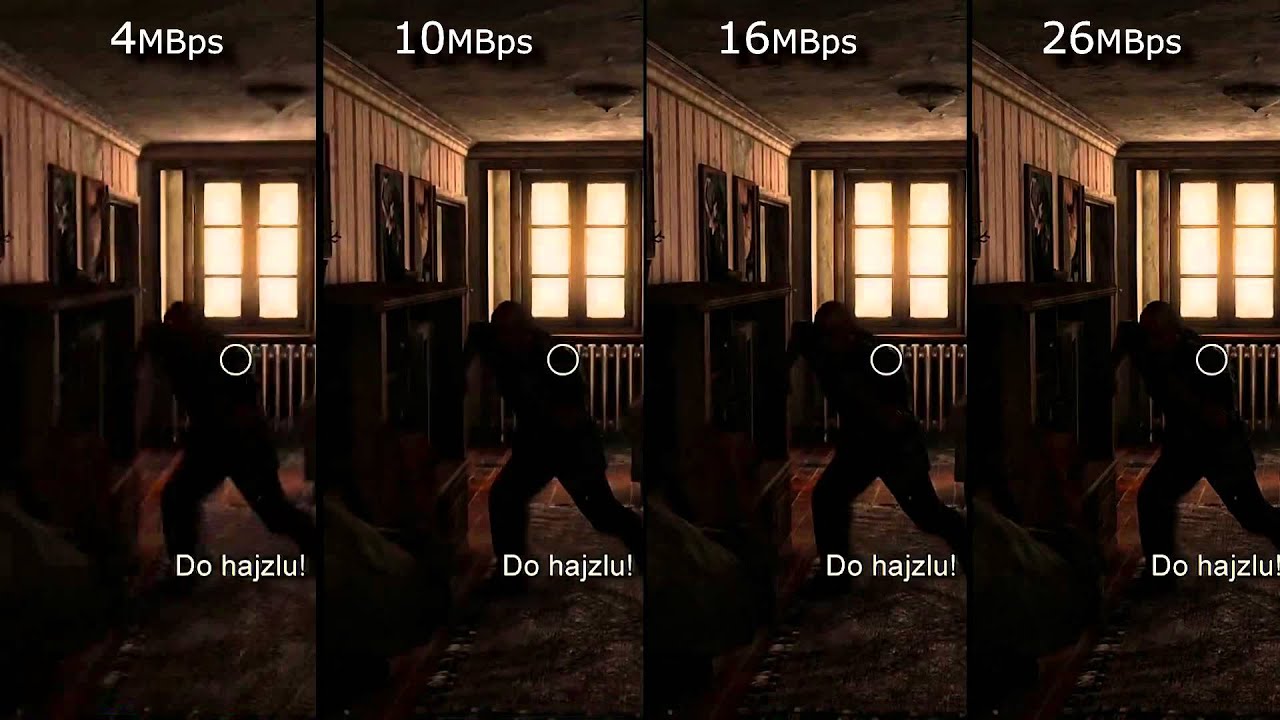
Relationship between bit rate and video quality


Free Download Mp4Gain
picture

Relationship between bit rate and video quality

Video Bitrate

Do you know the “bit rate” when recording movies?
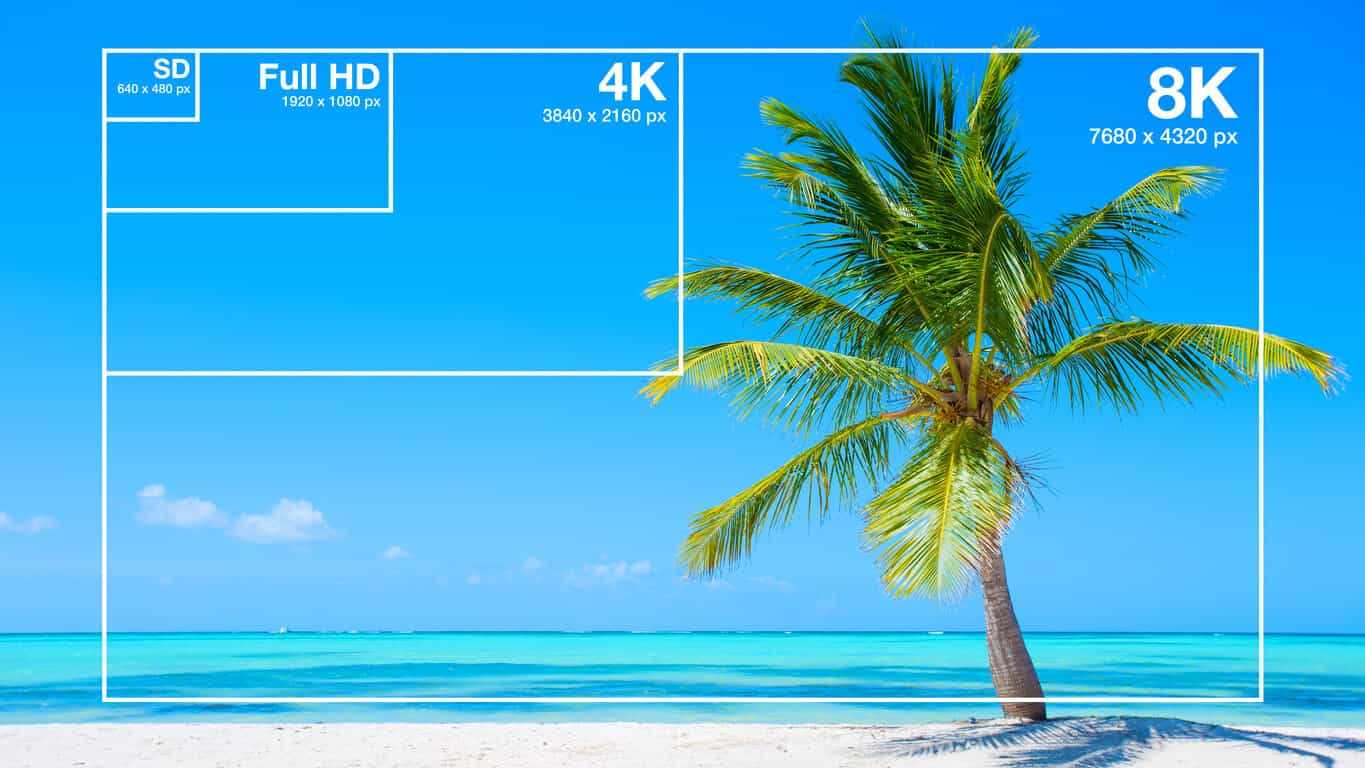
Video Bitrate

Bit rate is a value that indicates the speed of data transfer and is one of the factors that determines the image quality of video. Basically the larger the size, the higher the image quality.

Actually, I didn’t understand anything at first, so I tried to summarize it briefly this time.

Video camera image quality
In general, I think the following three are the main factors that determine the image quality of a video.

1. Image size (FHD, 4K, etc.) → Number of pixels in the photo. Larger images (more dots (number of pixels) that make up an image) look better when viewed on a compatible monitor.
2. Frame rate (24p, 60p, etc.) → How many frames are taken per second? The more, the smoother the movement will be (it does not mean it should be smooth).
3. Bit rate (100Mbps, 400Mbps, etc.) → Close to the JPEG compression rate in the photo. The higher the value, the more elements make up the video and the higher the image quality.

Of these, I think the image size and frame rate are relatively easy to understand, but what is the “bit rate”?

Simply put, how much data are you sending to the media per second? With the value of, the higher the data capacity, the better the image quality. It may be close to the compression rate of JPEG in photos. The lower the compression, the better the image quality, but the larger the data, right? On the contrary, a large amount of data means that the compression rate is low and the image quality is good.

This large amount of data means that the bit rate is high.

It is usually expressed in units of Mbps (megabit per second). I think there were many single lens digital cameras in the past at around 25-50Mbps, but recently, especially high-end models, many models with high bit rates exceeding 100Mbps have been lined up.

For example, the bit rate of the FUJIFILM X-T1 is not disclosed, but it is probably between 35 and 50 Mbps. On the other hand, the successor X-T2 has a significantly higher bit rate of 100 Mbps As a result, the image quality when recording movies has improved dramatically.

It’s more! On X-H1, it is 200 Mbps, which is double the value. I tried ETERNAL mode the other day and the FUJIFILM camera I received from the X-T10 I was using before is a high quality camera that completely nullifies the poor video performance image.

Image quality comparison based on different bit rates
Here, I would like to compare the image quality of two FUJIFILM X-T1 (probably around 40 Mbps) and X-H1 (100 Mbps: FHD / 30p) models to verify the effectiveness of high bit rates.

The X-H1 has a 100Mbps bit rate even when shooting at FHD 30P, so you must use a card with a UHS speed class 3 (V30) standard or higher that supports high speed bit rates.

SD card

First, let’s record the same time and compare the file sizes to see if there really is a difference in bitrate. This also means checking how different the bit rate is from the X-H1 because the bit rate of the X-T1 is private.


Free Download Mp4Gain
picture


Mp4Gain Main Window
picture


Mp4Gain Features
picture


Free Download Mp4Gain
picture

Detailed Explanation of Bitrates for Video and Music Files Part 3

What is a bit rate?

Detailed Explanation of Bitrates for Video and Music Files Part 3

bitrate

If you compare them closely, you can clearly see the difference. High-bit-rate video data is beautifully displayed on desktop wood grain and guitar string details, but on low-bit-rate video data, details are squashed and block noise appears on the front of the sofa. .

BITRATE

Setting a low bit rate reduces data capacity, but has the disadvantage of degrading image quality.

Block noise Noise
which appears as a square block when the display data is simplified into images.
Difference in sound quality based on bit rate
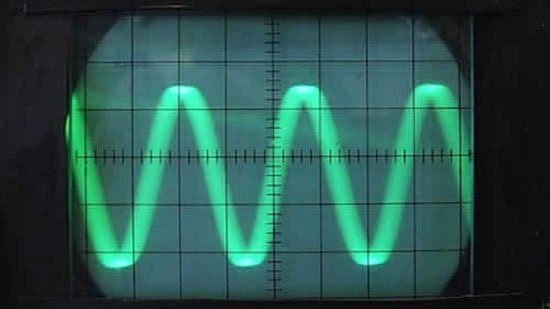
Waveform image with high audio bit rate
High bit rate audio file waveform (1536k bps)

Waveform image with low audio bit rate
Low bit rate audio file waveform (32k bps)

It is a comparison of two data with the same music data but with different bit rates. If you look at the waveform, you can clearly see that the height and density of the waveform are smaller for the music data with a lower bit rate because the data is removed.

Audio files with a low bit rate will sound like you are listening to a radio cassette player.

How does the image quality and sound quality change when the bit rate is converted?
The bit rate can be changed later by encoding work.

If you convert high bit rate video or audio data to a low bit rate, the image quality and sound quality will be reduced as the bit rate is set low for both image quality. as for sound quality. At this time, if the image quality and sound quality after conversion are within the allowable range, there is basically no problem.

Conversely, converting low bit rate video and audio data to high bit rate causes problems. If you check the converted data, the bit rate certainly becomes high, but there is no change in image quality or sound quality.

It should be noted here that it cannot be converted to a quality higher than the image quality and sound quality of the video and audio data that have already been converted to data.

If you want high image quality and high sound quality, you need to be careful about the timing of the video data creation and the setup of recording devices such as video cameras.

Note that you can basically reduce the high bitrate things, but not the low bitrate things.

Relationship between bit rate and frame rate
Simply increasing the frame rate will increase the bit rate.

For example, if you have 60fps and 30fps videos, the 60fps video will require twice the bit rate.

However, keep in mind that the actual bit rate may differ depending on the encoding method used when creating the video file. Keep it in mind as a guide.

Sponsor

Finally
To summarize the bit rate

Data flow for 1 second, unit is bps
The higher the bit rate, the more data will move
If the bit rate is high, the videos and music will be beautiful. But the file size also increases
The lower the bit rate, the smaller the file size. But the videos and music deteriorate
Even if you convert a low bit rate to a high bit rate later, the quality does not change, but the file size increases.
As the frame rate increases, so does the bit rate. Simply because the amount of information (amount of data) per second increases.
This concludes the explanation of bit rates.

Detailed explanation of bit rates for video and music files Part 2

What is a bit rate?

Detailed explanation of bit rates for video and music files Part 2

Bitrate

How to check the bit rate
You can check the bit rate by looking at the detailed information of video files and music files on both Windows and Mac.

BitRate

How to check bitrate in Windows 10
Click Properties on the context menu of the video or audio file for which you want to check the bit rate.

Video file properties
The properties window will open, so click the Details tab. The bitrate purification method is shown on the video and audio items.

In Windows 10 video file properties, you can see three bit rates. Check the red frame in the figure above.

Data rate is the bit rate of the video data.
Total bit rate is the bit rate of the video file, including video data and audio data.
The bit rate of the audio elements is the bit rate of the audio data, isn’t it?
Video file bit rate
As you can see from the image above, the video file contains both video data and audio data, so there is a bit rate for each of the video data and audio data.

How to check the bitrate on your Mac
Open the video file in QuickTime.

On the QuickTime menu, click Window> Show Movie Inspector.

Mac Video File Inspector
The inspector is displayed. The item called data rate is the bit rate of the video file.

Image quality comparison due to bit rate differences
Bit rate comparison, original image
This image was exported from the video data.

With this video data, we prepare a video data set with a high bit rate and a low bit rate.

Detailed explanation of bit rates for video and music files

What is a bit rate?

Detailed explanation of bit rates for video and music files

Bitrate

What is a bit rate?

Bitrate

Bitrate is an unavoidable experience in video editing and music production.

The word bit rate sounds a bit complicated, but of course, video and audio files. It is also often found in various situations, such as mobile phones and internet lines.

What is the bit rate? It’s surprisingly useful to remember it sensually, so remember it.

I think the person who visited this page is a beginner asking “What is bitrate?” So I hope I can explain it in the easiest and simplest way possible.

Bit rate basics
To briefly explain the bit rate, it refers to the amount of data per second for communication, such as video files, music files, and the Internet.

The so-called reproduction and communication are data streams. This stream uses a unit called bps (bit per second) to indicate how many bits flow in one second (per second).

I think it is easy to understand if you can imagine the road that a car passes by. The car is the data and the data stream is the road.

Taking into account that a road with many cars carries many people and luggage, it can be said that a lot of data (information) flows. This is called high bit rate.

On the contrary, if there are few cars in motion, it can be said that little data (information) flows. This is called a low bit rate.

Image of many cars on the road.
A state in which the amount of data is large and the bit rate of the stream is high

Image that there are not many cars on the road.
A state in which the amount of data is small and the bit rate is low

Should the bit rate be high?
A high bit rate means a lot of information. If there is a lot of information, it sounds great, like high image quality for videos and high sound quality for music, but it has a big disadvantage.

The disadvantage of a high bit rate is that it increases the data capacity of a single file. If the data capacity is too large, it can take time to send someone or move data between hard drives, making it difficult to manage.

Therefore, the codec was developed to reduce data capacity while maintaining high image quality and high sound quality. I’ll talk about codecs another time, but it is necessary to set the bitrate keeping in mind the balance between image quality, sound quality and file capacity so that the data capacity is easy to handle.

What is the standard bitrate for smartphone videos? Part 3

What is the standard bitrate for smartphone videos? Part 3

Smartphone

Estimated audio bit rate
In the case of audio bit rate, “128 kbps” is basically a guide.

Smartphone bit rate

Generally, for lossy codecs like MP3, AAC, WMA, AC3, Vorbis, a voice bit rate of around 128 kbps is sufficient. On the other hand, if the video is geared towards sound quality, it should be around “192-320kbps”.

Three Points to Consider When Considering the Bitrate of Smartphone Videos

There are a few things to keep in mind when considering the bitrate of your smartphone video.

When creating a video, you should use the appropriate bitrate for factors like size, but when considering bitrate, you need to keep three points in mind.

Here, we will introduce three points to keep in mind when considering the bitrate of smartphone videos, so why not refer to what kind of points to keep in mind?

Bit rate notes 1: The numbers are just a guide.
The proper bitrate for smartphone videos is just a guide.

The bitrate of a video involves multiple factors, not just the size of the image. For example, if you want to save a video with a lot of movement in high quality and a video with little movement that you want to save in medium quality, the appropriate bit rate will be different even if the image size is the same.

So, consider the bitrate you need as a guide only.

Bit rate note 2: consider the resolution according to your purpose
Let’s decide the optimal resolution according to the purpose of the smartphone video.

Even if you call it a smartphone video, it does not mean that a video with almost no motion and a video with high motion should have the same resolution. It is important to select the one that suits your purpose, such as high resolution for videos showing precise movements and low resolution for videos with little movement.

Therefore, when considering the resolution of a video, consider what the video is about.

For seminar videos
Since the seminar video is almost motionless, no high resolution is required.

The seminars and training videos aren’t particularly poignant videos, so lower resolutions won’t be a problem. For example, there is not a big difference between a low image quality of about 300 kbps and a high image quality of about 1500 Kbps, so it is recommended to make a light and low quality video.

For promotional videos
For promotional videos, it is a good idea to have a certain resolution.

It is not attractive that the resolution is low and that the video does not look beautiful in the video for internal promotion. However, it depends on the content of the video itself, so if you are not sure about the resolution, it is recommended to prepare a higher resolution and a slightly lower resolution and compare them.

For sports videos
High resolution is best for sports videos.

The bit rate has the characteristic that it is required since the difference with the previous frame is greater, and it is necessary to set it higher for videos with a lot of movement.

Therefore, if the resolution of the sports video is low, the outline will be broken and the color will fade, resulting in a stressful video.

Bit rate note 3: consider file size
The higher the bit rate, the larger the file size.

Of course, it depends on the content of the video, but as the bitrate increases, so does the file size, so this needs to be taken into account.

What is the standard bitrate for smartphone videos? Part 2

What is the standard bitrate for smartphone videos? Part 2

smartphone bit rate

Video Terms to Remember 1: Resolution
Resolution is the number of vertical and horizontal pixels in a video.

Smartphone BITRATE

The higher the resolution, the better the image will look. For example, if you prepare the same image with the same resolution of “640 x 360” and “2560 x 1440”, the latter will be clearer in detail.

Also, both the resolution and the pixel refer to vertical and horizontal pixels, but in the case of the number of pixels, it is expressed by the total number, so if the resolution is “1980 x 1080”, the number of pixels will be “2,138,400”.

Video term 2: frame rate to remember
Frame rate is the number of still images per second of video.

The frame rate unit is “FPS (Frames Per Second)”. Since a video is made up of a collection of continuous still images, the higher the frame rate, the smoother the video. However, the amount of data will increase accordingly.

Therefore, it is important to set the frame rate to the appropriate size according to the purpose of the video.

Video Term 3: Codec to Remember
A codec is a codec that compresses and decompresses audio and video data.

The larger the size of the video, the greater the amount of data, and the higher the quality, the larger the file size. Therefore, it is necessary to compress the data with a codec.

For example, there are types such as “MPEG-4” and “MPEG-2” for video codecs and “MP3”, “AAC” and “FLAC” for audio codecs.

Estimated bit rate suitable for smartphone videos

For smartphone videos, the standard bit rate is “300 kbps” or “600 kbps”.

Taking as an example the frame size that is often used for inline distribution, if the frame size is 480 x 270 px, 360 x 270 px, the bit rate is “300 kbps” and if the frame size is 640 x 360 px, 480 x 360 px, the bit rate is “600 kbps” will be a guide.

What is the standard bitrate for smartphone videos?

What is the standard bitrate for smartphone videos?

Bitrate

In this article, we’ll give you an overview of bit rates, guidelines for suitable bit rates for smartphone videos, and points to keep in mind when considering bit rates for smartphone videos, so check them out.

smartphone bit rate

What is the important bitrate for smartphone videos?
Bit rate is a term that refers to the amount of data per second.

The amount of data that can be sent and received in one second, and the unit is “bps (bit per second)”. For example, at 1 bps, 1 bit of data can be sent and received per second, and the higher the bit rate, the more data can be transferred.

Therefore, when making smartphone videos, it is necessary to consider the bit rate that viewers can comfortably watch.

Relationship to screen size
The larger the screen size, the greater the amount of data required and, conversely, the smaller the screen size, the less the amount of data.

Therefore, there is a reference bit rate for each screen size. If the screen size is 480 x 360, the bit rate is 500 to 700 Kbps, if it is HD 1280 x 720, it is around 2000 Kbps, and if it is full HD 1920 x 1080, it is around 4000 Kbps It is a guideline for the bit rate.

Three video terms to remember in advance

When creating a video, be aware of the video terminology.

In recent years, there have been many cases of video distribution in companies. However, there are many technical terms in the video, so you need to know the meaning of the terms in order to understand the video properly.

Here are three video terms to remember beforehand, so why not take a look at what they are?

What if the bit rate is high?

What if the bit rate is high?

Bitrate

High bit rate = a lot of data can be transferred per second

bitrate
.

Sounds like a good thing.

The network cameras managed by my company send the captured video data to a personal computer for viewing over the network.

If you want to see the video, you want to see a beautiful video that moves sharply with high image quality, right?
However, the amount of data in a beautiful image is surprisingly large …

In such case, if the bit rate is high, a lot of data can be transferred per second, so you can deliver beautiful images to your computer. On the other hand, if the bit rate is low, the amount of data that can be transferred per second is small, resulting in choppy and poor quality moving images.

“Then the bitrate should be high anyway!”

… That is not the case.
In fact, in a surveillance camera system, there are the following disadvantages to increasing the bit rate.

Disadvantages of high bit rate!
Transferring a large amount of data increases the load on the network line and equipment.

There is an upper limit to the bit rate that can be transferred depending on the network environment. This depends on the LAN cable you are using, the performance of the hub, etc., but it will be difficult so I will skip it. Just think that there is an upper limit for the bit rate depending on the environment.

“So what happens if it exceeds the upper limit?”

In the case of video from a network camera, the connection often drops. If you exceed the upper limit, the line will be punctured and you will lose connection with the camera. The image may be interrupted for a moment, but if it is too bad, you will not be able to see the image from the camera at all.
If this happens, it will be very troublesome …

Also, if the bit rate is high, a large amount of data will reach the browsing computer and the recording NVR. When a lot of data arrives, the computer or NVR will not be able to process the data, which may cause abnormal operation (reboot, etc.).

Therefore, the System Kay NVR defines the maximum bit rate that can be supported as a specification. The bit rate that the entire NVR can process such as performance and bandwidth limit per channel are described in the specifications.

Video distribution Advantages and disadvantages of a high bit rate

Video distribution Advantages and disadvantages of a high bit rate

bit rate

The video bit rate is calculated separately for video and audio and added together.

Bit Rate

The sum of the video and audio bit rates is called the oval bit rate (total bit rate).

Expressed in the formula
Oval bit rate = video bit rate + audio bit rate

Will be.

High bit rate benefits
The higher the bit rate, the better the picture and sound quality, and the lower the bit rate, the worse the picture and sound quality.
However, note that if the video bit rate is high, there are cases where the video bit rate is high and the image quality is good, but the audio bit rate is low and the sound quality is poor. On the contrary, there may be cases where the image quality is poor and the sound quality is good.

High bit rate video basically has the advantage of improving image quality and sound quality, but you also need to understand the disadvantages.

Disadvantages of high bit rate
The higher the bitrate, the more net bandwidth is consumed and the more playback load is applied.
For example, increasing the bit rate from 500 Kbps to 1000 Kbps doubles the net bandwidth usage and doubles the playback load or more.

It is easy to increase the bit rate for high image quality, but if you increase the bit rate too much, the CPU will become overloaded and you may not be able to reproduce it well, so be careful.

Especially when the radio wave of the smartphone is bad or the band is limited, it may not play smoothly at a high bit rate.

Even if the bit rate is increased, the image quality and sound quality do not improve above a certain level.
In fact, increasing the bit rate does not mean that the image quality and sound quality will increase without an upper limit.

For example, if the image quality of the original video material shot by the camera is 100, even if it is converted at a high bit rate by video editing software or encoding software, a high-quality video with a quality of 100 or more image of the original video will be created. You can not.

No matter how high the bit rate is, if the quality of the original video material is poor, the quality will not be better.

Let’s think about the optimal bitrate for each video.
When creating a video, you need to think about how to set the optimal codec, resolution, frame rate, and bit rate yourself.

Then
The higher the bit rate, the better the picture and sound quality.
If the bit rate is high, the network and the playback terminal will be overloaded.
Even if the bit rate is increased, the picture quality and sound quality should not be higher than that of the original video material.
It is useful to remember that.

Also, almost all video editing software, encoding software, YouTube, and other free video publishing services commonly used when creating and publishing videos have preset settings with preset codecs, resolutions, frame rates, and bit rates.

However, the image quality of the presets is not always optimal, so use this bit rate knowledge when you need to make fine adjustments.

What is a bit rate? Basic bit rate knowledge required for video distribution.

What is a bit rate? Basic bit rate knowledge required for video distribution.

Video Bitrate

Bit rate / bit rate

BitRate


Bit rate is the amount of data per second. Video quality is determined by factors such as “resolution”, “frame rate”, “bit rate” and “codec”. Bit rate is an important factor related to video quality. Therefore, this time, I will explain the basic knowledge of bit rates required for Internet video distribution.

” Table of Contents ”

1. What is a bit rate?
2. Relationship between video bit rate and video image quality
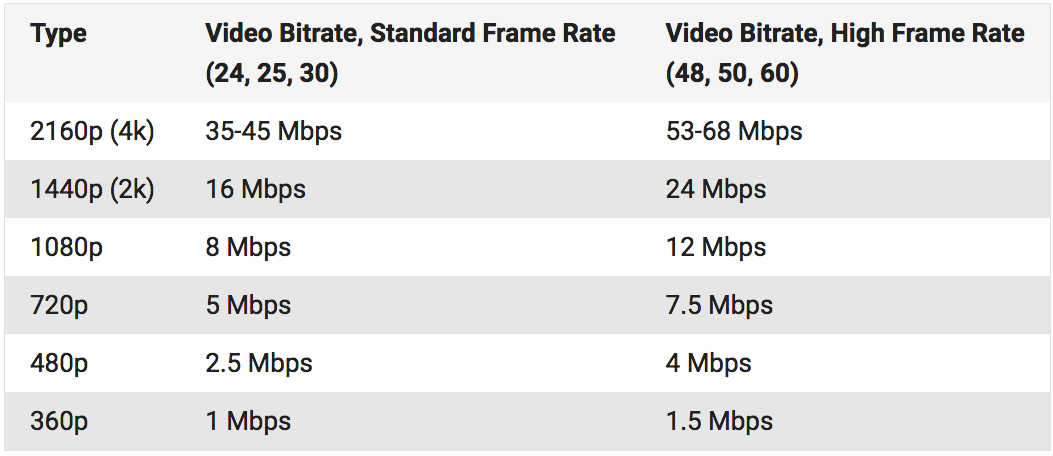
3. Estimated video bit rate
4. Advantages and disadvantages of a high video bit rate
1. What is a bit rate?
The amount of data per second is called the bit rate. Use bps as the unit. This is an abbreviation for Bit Per Second. For example, if it is written as 500 kbps, k is 1,000, which means “the amount of data of 500,000 bits per second.”

There are two types of video bit rates: “video bit rate” and “audio bit rate”. The total value of “video bit rate” and “audio bit rate” is the total bit rate (oval bit rate) of the video file.

Video Bit Rate / Audio Bit Rate

■ Voice bit rate
The audio bit rate is the bit rate associated with the audio in the video file. Generally, the audio bit rate is lower than the video bit rate.
The guideline for the audio bit rate is as follows.

Lossy codecs like MP3, AAC, WMA … 96kbps-128kbps
Sound quality oriented video … 192 to 320 kbps
A codec is a program that encodes (encodes) / decodes (decodes) video and audio data. A lossy codec is a codec that dilutes the data and reduces its weight without affecting it. For more information on codecs, see the following.

[Reference article] What is a codec? Basic knowledge of the codecs required for video distribution.
■ Video bit rate
The video bit rate is the bit rate of the video in the video file. Generally, the video bit rate value is higher than the audio bit rate. The appropriate video bit rate will differ depending on the size of the resolution and the content of the video, such as amount of movement / small amount of movement.

The guideline for video bit rate is explained in “3. Guideline for bit rate”, but the value varies depending on the image quality you want to deliver, such as 500 kps to 70 Mbps. Since the standard for audio is “approximately 96 kbps to 128 kbps”, the video bit rate occupies most of the bit rate of the entire video file.

It can be said that the higher the value of the video bitrate, the better the image quality, but that does not mean that “the higher the value, the better”. When displayed at a small resolution, the roughness is not as noticeable even if the bit rate is reduced. On the contrary, even if you encode at a high bit rate, you will not notice the difference in image quality, and in many cases the file size will only increase.

From now on, we will focus on the bitrate of the video.