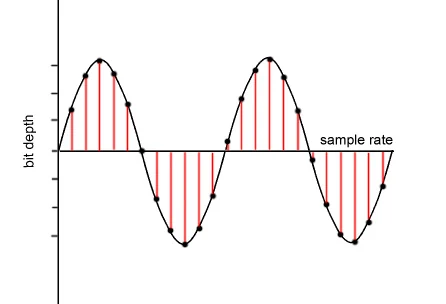
Lossless sound quality
This group of formats records, encodes the sound in such a way that by decoding it it can be restored exactly.

The most popular lossless encoding formats are:
FLAC (Free Lossless Audio Codec)
APE (mono audio)
ALAC (Apple Lossless Audio Codec)
Loss of sound quality (lossy)
Lossy compression modifies the sound. For example, frequencies inaudible to the human ear are eliminated. The decoded file will differ from the original in terms of the information recorded on it, but it will sound almost the same.
Popular lossy formats: MP3, WMA, OGG, AAC. [2]
Bit rate is the amount of information transmitted over a certain period of time. The essence of its principle is how much information we can dedicate to each second of the reproduction of our audio file. It is generally accepted to use Kbps (kilobits per second) or Mbps as units.
1. Constant Bit Rate Coding (CBR, Constant Bit Rate): An encoding mode in which the bit rate remains unchanged regardless of the nature of the music. The main task of the encoder in this case will be the need to obtain the highest possible file quality with a constant stream.
2. Average Bit Rate Coding (ABR, Average Bit Rate): intermediate coding mode between CBR and VBR. When encoding, the desired average bit rate is indicated. If necessary, the encoder can slightly increase or decrease the bit rate to achieve a higher quality / size ratio. The downside of ABR mode is the lower quality than VBR mode. The advantage is a more or less uniform flow and, as a result, an easily predictable file size.
3. Variable Bit Rate (VBR) Encoding – A mode of encoding in which the desired quality level is set at the encoder. When encoding, the codec chooses the bit rate required to compress each fragment of the recording, while the range of bit rates used can be very large. This mode allows you to achieve the highest quality / size ratio, but the size of the resulting file is often difficult to predict (for example, when compressing with musepack -normal, the average file bitrate can be 140 or 210). The disadvantage of VBR is the impossibility of using it for Internet broadcasts with a small channel width. [3]
SBR (Spectral Band Replication) is a technology that allows you to restore high frequencies using information contained in other regions of the spectrum and a small stream of additional data.
DRM (digital rights management) is a set of tools designed to protect a recording from illegal copies.
The digital audio format is a format for representing audio data used in digital audio recording, as well as for additional storage of recorded material on a computer and other electronic media, so-called audio media. [4]
An audio file (a file that contains a sound recording) is a computer file consisting of information about the amplitude and frequency of sound, saved for later playback on a computer or player.
The file format determines the structure and presentation characteristics of the audio data when stored on a PC storage device. To eliminate the redundancy of the audio data, audio codecs are used, with the help of which the audio data is compressed. There are three groups of audio file formats:
1.Uncompressed audio formats like WAV, AIFF
2.Lossless compressed audio formats (APE, FLAC)
3.audio formats using lossy compression (mp3, ogg)
Sound quality is a very subjective parameter and can vary greatly from person to person. If we are talking about the so-called music file encoding, when the audible differences between the original file and the file obtained by decoding a compressed audio file are not desirable, then it is assumed that the music will be played on Hi-Fi equipment (or even Hi-End) of high quality, and not at all. on computer speakers that cost $ 15-20. Modern codecs allow you to achieve the sound of an encoded file, which is indistinguishable to the ear from a CD, even with good equipment, with a compression ratio of about 1: 5. To listen to music every day on a computer, generally choose a higher audio compression ratio (up to 1:10 or even 1:20), as a result it is possible to create smaller files at the expense of lower quality. Subjectively, it may not change: in particular, ordinary computer speakers often introduce noticeably more distortion.