Advantages and Disadvantages of Popular Audio Formats Part 3


Free Download Mp4Gain
picture

Advantages and Disadvantages of Popular Audio Formats Part 3

Music File Formats

Ogg
An open container format that has proven its worth in transmitting music and speech, both at low and high bit rates.

Audio Formats

Pros:

– the best audio format in terms of quality-size ratio;
– many additional features;
– small size;
– free license.
Disadvantages:

– low quality;
– Limited support for players and browsers.
Streaming services where you can listen to music in Lossy format
Advantages and disadvantages of popular audio formats
Spotify is the most popular service in the world, which has become a kind of social network, it is distinguished by its speed and the presence of a large number of high-quality music with high bit rates;
Apple Music – 30+ million songs, convenient playlists, author’s picks;
YouTube Premium – a universal service with a large music collection, curated playlists, and easy access;
VK Music (Boom) – a service based on the VKontakte social network with a large collection of music, the ability to download tracks and automatically select music based on user preferences;

SoundCloud: more than 125 million audio recordings with real capacity to connect with artists;
What devices are best for playing audio formats?
Everything is simple here. You can listen to all the richness of the sound of the best audio formats with a high bit rate, for example,

on CD players
on network players
in modern home theater systems
There are many options. The main thing is to make sure that the selected device provides network connections and supports the appropriate formats. Lossy compression formats can be played on almost any device, including mobile.


Free Download Mp4Gain
picture


Mp4Gain Main Window
picture


Mp4Gain Features
picture


Free Download Mp4Gain
picture

Advantages and Disadvantages of Popular Audio Formats Part 2

Advantages and Disadvantages of Popular Audio Formats Part 2

Audio file formats

Wav
The waveform audio format is one of the oldest formats that was created by Microsoft together with IBM. It is the best audio format for processing and storing uncompressed audio data in CD-like quality. One minute of sound “weighs” about 10 MB. That is why it is not recommended to store a music library in .wav or send these audio files over the Internet.

audio formats

Pros:

– impeccable quality;
– Instant unpacking – “on the fly” with economical use of the processor;
– wide distribution and support of a large number of programs and audio devices.
Disadvantages:

– a lot of weight.
A THE C
To store lossless compressed information on Apple devices. In terms of compression ratio, it is slightly lower than free FLAC.

Pros:

– there is no loss of quality when copying from a CD;
– the ability to easily convert to any other audio file format with good quality;
– restoration of a collection of CDs by recording new ones with the same quality instead of damaged ones.
Disadvantages:

– big size;
– limitations on compatibility with audio devices.
BOW
Monkey’s Audio is a fairly popular format that is released for Windows, but it has several unofficial codecs for other platforms. The format supports 8-, 16- and 24-bit audio files, which is why it is widely used in the professional field.

Pros:

– high compression ratio and data processing speed;
– the possibility of direct reproduction of compressed information;
– support for information labels and, as a result, the ability to create convenient sound files.
Disadvantages:

– limited support.
Where can I find lossless music?
Listening to lossless music is a real treat. Also, if ordinary desktop speakers are used for a cheap computer or headphones, the full potential of lossless formats cannot be revealed. This requires high-end audio equipment: turntables, speakers, amplifiers, premium headphones, and even high-quality cables. At the same time, a question remains: where to get music in these formats?

Today, together with AudioCD, you can have high-quality music always at hand. This is facilitated by online music streaming services, which are constantly growing in popularity.

Advantages and disadvantages of popular audio formats
Among them are the following:

Deezer is a great selection of lossless music with bit rates up to 1411 Kbps.
Tidal is a popular service with a large collection of high-quality music.
Today, many online radio services have switched to high-quality audio formats. Among them are: Radio Paradise, AI Radio, Absolute Radio, Intense Radio, Frequence 3, Sector.

Lossy – Lossy file formats
MP3
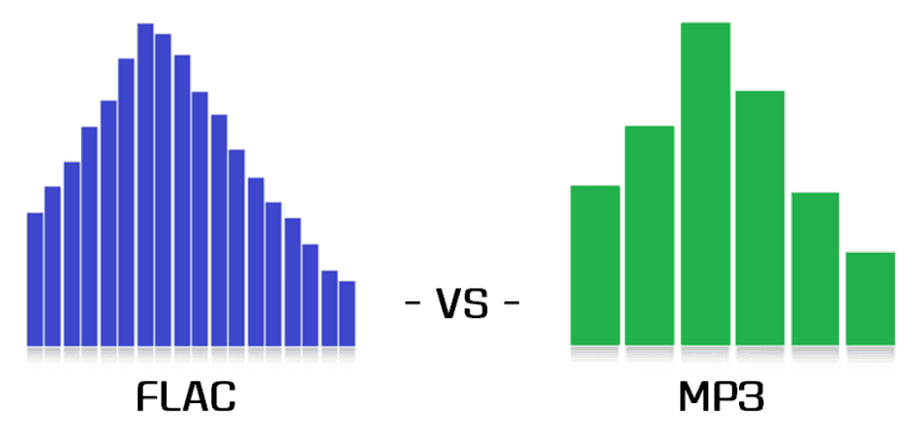
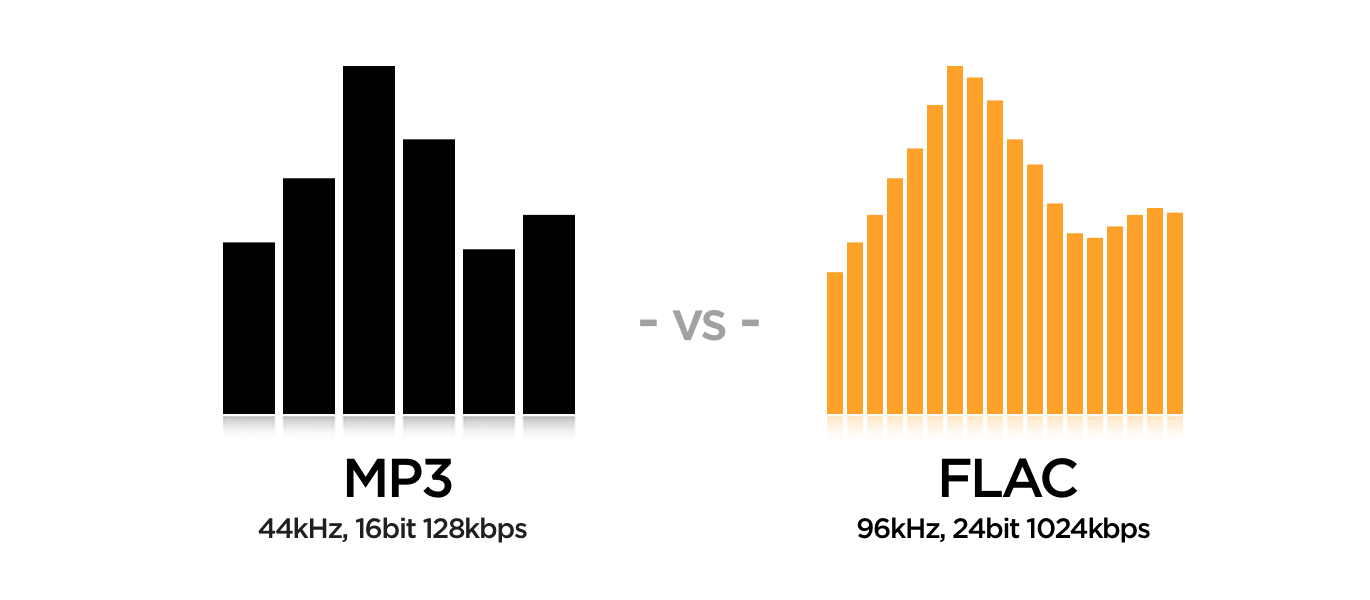
MPEG Layer-3 is one of the most common formats used in file-sharing networks today. The difference between MP3 and FLAC is fundamental. Poor sound quality is felt immediately. It is about the bit rate, which in flac can reach up to 1010 kbps, while in mp3 it only has an average of 128 kbps. This is the difference between flac and mp 3.

Pros:

– excellent compatibility with different programs and audio devices;
– small size.
Disadvantages:

– low quality;
– Very limited technical capabilities.

AAC
Patented format with less quality loss than MP3 and more encoding capabilities.

Pros:

– the presence of MDST technology, which provides good quality with a small bit rate;
– small size.
Disadvantages:

– limited distribution.

Advantages and disadvantages of popular audio formats

Advantages and disadvantages of popular audio formats

audio file formats

In the modern music world, there are a large number of audio file formats that are often confusing for the unprepared user.

Audio File Formats

To understand all this, to find out what they are and what they are used for, the presented review will help.

Advantages and disadvantages of popular audio formats

Types of audio formats

Today is the time that all music lovers, not to mention professional musicians and audio editors, need to understand concepts like audio file formats, bit rates, extensions, bit depth, sample rate and many others. for high-quality sound. Sound has gone digital, which means that it can be used for various purposes, for example, for listening to evidence, for presentations, video dubbing. In fact, digital sound, like an image, is a collection of individual pixels, and the more there are, the better the sound image itself. This “pixelated” sound can be edited and processed.

Advantages and disadvantages of popular audio formats
The figure shows an example of a sound wave recording, where the green curve denotes the original sound and the purple columns indicate its digital form. The number of segments per second is the sample rate. In this case, the digital representation of sound is as follows.

Advantages and disadvantages of popular audio formats
An important role in evaluating the quality of audio formats, and consequently sound quality, is a parameter such as bit rate, which shows how many bits or kilobits it takes to record one second of sound. Low bit rates mean low quality sound, large ones mean high quality sound.

Advantages and disadvantages of popular audio formats
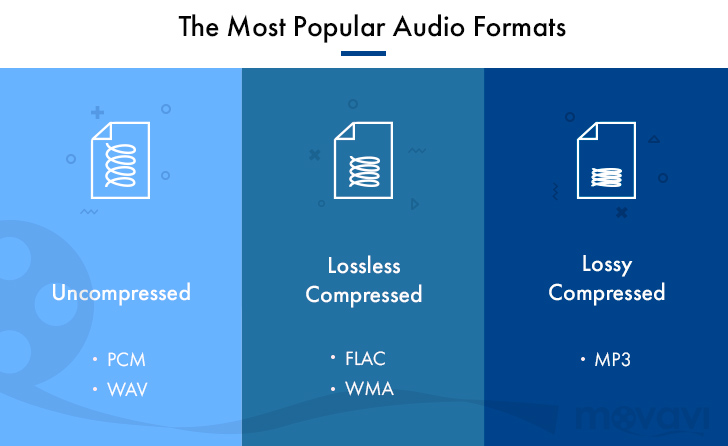
But for the storage and further use of audio in one form or another, audio formats are used – digital recordings of audio data. We can say that the format is a kind of container where the sound is stored. Virtually all audio formats can be divided into two broad categories: lossless compressed and lossy compressed.

No loss, no loss
To avoid as much as possible a decrease in sound quality during the compression of an audio file, special methods have been developed to store audio information, avoiding losses, which in fact can be compared with the file, when the information is simply packed in a zip file, the size of which is noticeably smaller than the original data. Subsequently, this data can be clearly restored on each bit. Also, the bit rate itself is not important for these files. These audio files are collectively called Lossless, Music As Is. These algorithms allow you to compress files two to three times. As a result, the size turns out quite large, but at the same time with the preservation of the original sound.

The most popular lossless formats are as follows.

FLAC
The abbreviation is the name “Free Lossless Audio Codec”. Provides complete security of all data in the audio stream, capable of 1.4 to 4x compression with 350-1010 kbps bit rate, used to create audio collections, and used for listening on premium equipment .

Pros:

– high quality;
– a large number of additional features;
– free license.
Disadvantages:

– quite large size;
– on older operating systems, you must additionally download the appropriate players.

What is a lossless audio format?

What is a lossless audio format?

lossless audio

You might think that the word “lossless” is used for audio formats that use no compression at all.

lossless audio

However, even lossless audio formats use compression to keep file sizes at an acceptable level.

Lossless formats use compression algorithms that preserve the audio data, so the sound is exactly the same as the original source. This is in contrast to lossy audio formats such as AAC, MP3, and WMA, which compress audio using algorithms that discard data. Audio files are made up of sound and silence. Lossless formats are capable of compressing pause to almost zero while retaining all audio data, making it smaller than uncompressed files.

What lossless formats are commonly used for digital music?
Examples of popular lossless formats used to store music:

Commercial

FLAC
Wav
A THE C
Lossless WMA
Impact of Lossless Formats on Music Quality
If you download a lossless music track from an HD music service, you expect the sound to be really high quality. On the other hand, if you convert low-quality music tapes by digitizing them using lossless audio formats, the sound quality will not improve.

Is it possible to convert a lossy song to a lossless song?
It is never a good idea to go from one loss to another. This is because a song that has already been compressed in a lossy format will always be like this. If you convert it to a lossless format, all you get is wasted space on your hard drive or mobile device. You cannot improve the quality of a lossy song using this method.

Commercial

Benefits of Using a Lossless Audio Format for Your Music Library
Using a lossy format like MP3 is still the most common method of storing your music collection. However, there are clear advantages to creating a lossless music library.

Perfect Music CD Backup: Lossless copy of audio files gives you a slightly exact copy of the original music CD. This means that no matter what audio formats come in the future, you will know that you have a perfect copy of the original.
Recovery of loss or damage. Having music in lossless format allows you to recover a damaged original CD or any that has been lost to a blank CD.
Convert to any format. Since your music is in a lossless format, you can convert it to any format and get the highest quality it can support.

Flac compared to Mp3
Flac compared to Mp3

FLAC vs MP3

Lossy vs lossless

Flac or MP3

For an introduction to the topic, let’s start with a simple reference that connoisseurs of audio formats can safely skip … Most of us today listen to music in a car in MP3 format. It is convenient: a huge music library fits in a fist, it is not afraid of scratches, bumps, dirt, it can be easily replenished and edited on a home computer, etc. The MP3 format suits almost everyone except those who are “boosted” due to its internal nature …

And the gist is that when the music stream is compressed, those sounds and frequencies are cut off according to a special algorithm, which, according to the algorithm’s creators, ALMOST does not affect the listener’s perception of the music. This “almost” is the reason for the compromise of the MP3 format … In the music of the club genres, the difference is barely perceptible, but in the good quality rock, instrumental, serious vocals and classics reproduced through a system of decent speakers, the Many may experience the difference between the “cut” MP3 format and the “uncut” WAV source.

MP3 does not convey the depth and fullness of the sound of music, it is perceived as a “poor relative” compared to uncompressed audio formats. All these are, of course, subjective characteristics, and not everyone, due to the physiological characteristics of hearing, is able to “taste” them at all, but the truth is that MP3 and other codecs that compress sound at a loss ( WMA, AAC, and others) degrade the quality of music for the sake of ease of use.

original-3.jpg20151019-2336-1k348sb.jpg
An alternative is “lossless” formats, which are commonly referred to as lossless. Codecs like FLAC and APE also compress music, but during playback the original data is fully restored from the compressed state, unlike MP3, from which compression algorithms remove “extra notes” at their discretion and without your knowledge …

FLAC in cars
Until recently, it was possible to listen without loss in the car mainly only in multimedia centers on Android, since for Android it is natural to install various playback programs that read all formats. But the sound quality was questionable, because most of the Android-based recorder manufacturers, with dubious Chinese ancestry and a blank space in the brand’s history place … Also, the serious restrictions on the distribution of these devices are the high price and two … din format, which also does not suit all.

And now, a year and a half ago, the first FLAC models started to appear in the segment of cheap radio tape recorders from famous brands, with good quality, one-din design and the usual “radio” design. Today, this market segment has taken place: a variety of inexpensive FLAC devices from all well-known brands such as Sony, Pioneer, Kenwood, etc. already strong. Consequently, you can try to draw some conclusions.

The main one will be the answer to the question: was the introduction of FLAC support in low-cost massive devices a breakthrough in the evolution of car audio, or is lossless relevant only to serious and expensive car audio systems, and a simple user in an inexpensive car with standard acoustics does not have different advantages of FLAC will not receive?

What are we testing
Today, the cost of the most affordable car radios with FLAC support is extremely democratic, and these devices are available to everyone: in the initial segment, their prices start at 3,000 rubles. Thus, such equipment leads many budget car owners to the idea that in a budget car, with consumer standard acoustics, you can significantly improve the sound quality simply by replacing the radio recorder and using a music source from high quality: FLAC. instead of MP3.

Advantages of the FLAC audio format

Advantages of the FLAC audio format

FLAC vs MP3

Wave is uncompressed or lossless format, while MP3 is compressed or lossy.

MP3 VS WAV

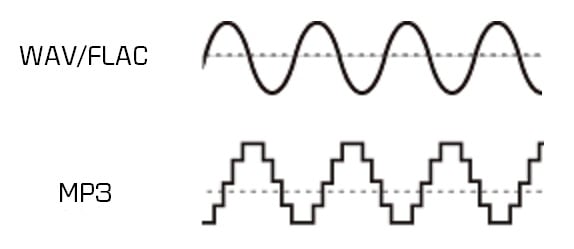
Technically .wav is just a container format and can contain various types of compressed or uncompressed audio, but you will usually find that it contains uncompressed LPCM audio (same as on audio CDs). With .waves files you essentially end up with a raw digital representation of the audio bitstream. Analog sound produced in the real world contains essentially an infinite amount of information because it is a constantly changing wave (see below). To digitize these sounds, you must sample the signal at different intervals to get an approximate sound. For .wav, the audio signal is typically sampled at 44,100 times per second or more, and each sampled value is recorded so that the audio wave can be played:

MP3s are compressed to compress the same audio information into a smaller file size. The .wav format is great for representing an analog signal very accurately, but generally at the expense of large files, as you probably know. Compressed audio (and video similarly) is designed to reduce file size while maintaining an acceptable level of fidelity. In simple terms, compression tries to remove unnecessary data from the stream and reduce the signal to its most necessary components. In MP3, the encoding and compression algorithms use a model of how we listen to analyze the sound in the frequency domain and remove any unnecessary information. For example, due to hearing disguise, if there are two sounds at close frequencies, we will often only hear a loud sound if the difference in volume between them is significant. Therefore, for MP3s, the lower volume sound may be lost and the sound will sound essentially the same as it does to our ears. Find out more about the technical aspect of MP3 encoding here.

In practice, both .wav and MP3 have their uses. For production, .wav is the standard because it will almost always be a 100% accurate, bit-level reproduction of the source material. MP3 can be a decent alternative at high enough bit rates. Bitrate is a measure of how many bits per second the MP3 encoding will use. This means that the higher the bit rate, the closer the MP3 will be to the original uncompressed stream. Bit rate is generally measured in kilobits per second (kbps). I like high-quality sound for my digital music collection, so when I get the chance, I usually encode MP3 at a constant 256 or 320 kbps. This is the upper limit of what MP3 can do, and unfortunately most digital music isn’t encoded that high there. When the bit rate drops, it is usually heard first in the high frequencies, like the cymbals of a drum set. 160 kbps is tolerable, but anything below and you’ll really start to notice. But again, with a fairly high bitrate, the differences between MP3 and .wav subtle, especially for an inexperienced listener (most listeners).

For .wav files, we mainly look at the bit depth and the frequency or sample rate. Bit depth is the number of bits used to encode each sample value. The sample rate indicates how many times per second the audio is sampled. CD (.wav) and MP3 are encoded at a sample rate of 44100 Hz (Hertz stands for “cycles per second”). Newer computers and audio hardware / software now support higher sample rates, including 48 kHz or 96 kHz. For .wav the bit depth is usually 16 or 24 bit on newer systems. For most purposes, 16-bit and 44.1 kHz is sufficient when using .wav, but if you have this capability, it’s generally worth switching to 24-bit, 48 kHz.

Some examples of file sizes for 5 minute stereo recording:

.wav, 16-bit, 44.1 kHz: 50 MB
.wav 24 bit 48 kHz: 82 MB
.wav 24 bit 96 kHz: 164 MB
MP3, 128 kbps, 44.1 kHz: 4.5 MB
MP3, 192 kbps, 44.1 kHz: 7 MB
MP3, 320 kbps, 44.1 kHz: 11 MB
FLAC, 24-bit, 44.1 kHz: 28 MB
FLAC, 24-bit, 48 kHz: 31 MB
24-bit 96 kHz FLAC: 61 MB
There is also a variable bitrate option for MP3 encoding, which should have a slightly smaller file size for the same quality. It uses an encoding scheme that changes (alters) the bit rate for different parts of the song, depending on the complexity and how many samples are needed to accurately recreate the section.

[FLAC] There is a third category: lossless compression. FLAC is a good example of this, and has the quality and fidelity of a .wav file, but with smaller file sizes

Differences between FLAC and MP3?

Differences between FLAC and MP3?

FLAC vs MP3

Lossless vs lossy

FLAC vs. MP3

“Here, of course, the question is not about the difference between MP3 and FLAC, it is broader: that lossy compression formats (MP3, AAC, WMA, Ogg Vorbis and others; that is, lossy) are They differ from “lossless.” ”(FLAC, ALAC, APE, WavPack and others; that is, no losses). Actually, with such wording, it becomes clear that in the first group of formats, the original data is not completely saved, and the second can be restored to the original format (for example, Wav or Aiff extracted from CD) without loss. What exactly is lost and in what proportions depends on the specific type of lossy files and their bit rate, that is, the degree of compression. But to say that all MP3s sound bad and that “flacks” are perfect is the height of arrogance and incompetence. Lossy audio formats have been developing for more than twenty years, and serious research laboratories (Fraunhofer Institute, for example, in addition to working on MP3, is also famous for the invention of the most efficient solar battery) and a group of enthusiasts. Mathematical encoding is constantly improving, and nowadays it is no longer so easy to distinguish files produced by different codecs by ear.

I would immediately make a reservation that not only the files themselves are important, but also the equipment they are to be tested on, the listening environment, and the examiner’s listening experience. In MP3 of any low bitrate, Ariel Pink will sing with the voice of Ariel Pink, of that there is no doubt. It is quite possible that a person listening to music as a melody through white headphones in a subway car will be enough for the eye, and the difference in codecs will come down to a file size comparison. A disc jockey who is embarrassed to buy or search without losses will also think that everything is in order with his MP3, as he prepares a set on the “Tractor” on the laptop’s built-in speakers. It is true that during a party in a big, loud and clear audio system of the club (sometimes they meet, believe me), it suddenly turns out that the guy who speaks immediately after for some reason, the music became big, clear and great . Lossy formats are developed for the convenience of transferring files over the Internet, for storage on portable audio players, and finally for personal playback. Okay, it’s silly to watch a gigabyte AVI movie on a big screen. Even in a home theater, this is not entirely decent. The same goes for MP3. On your iPod: listen to your health (although AAC from iTunes sounds better for sure), but if you go clubbing, don’t miss out, even if you start Skrillex. And when you’re listening to Christmas jazz with his girlfriend’s parents on their big lacquered speakers, buy FLAC or ALAC too. With MP3, you risk getting into an awkward situation. In theory, after a bit rate of 256 kbps, it will be quite difficult for your future audiophile father-in-law to know if he is lossy or not.

Usually when viewing an MP3 file, he isn’t paying attention to anything other than the bit rate. If he already considers himself a person with a taste for music and sound, he should look in the properties of the file for the data of the codec that was used during the conversion. Suppose you see “Lame 3.99” there, it means the latest MP3 codec was used and you’re in luck. But next to it is “Joint Stereo”, which is no longer great. This means that to save a couple of percent of the file size, the codec was allowed to add something to mono, although the recording is stereophonic and the sound image is slightly lost in depth and clarity. There are also fully botanical CBR or VBR, ABR and UBR, but if you’re ready to dig that seriously, do it yourself. Well, you figured out the properties of the file, everything is simple there. The difficulty is this: you hardly ever know what your 320 CBR Stereo is made of.
Scammed out of Internet radio? Made from an unremastered original Japanese CD? Recoded from 192? There is a lot of music on torrents or Soulseek, but there are few guarantees. Another complication is that lossy formats slightly increase the peak values ​​of the audio signal. The so-called overshoot: thousands of micro-overloads along the entire length of the file. Again, you won’t notice this on a train with an iPod. And the future father-in-law can hear ”. The so-called overshoot: thousands of micro-overloads along the entire length of the file. Again, you won’t notice this on a train with an iPod. And the future father-in-law can hear ”. The so-called overshoot: thousands of micro-overloads along the entire length of the file. Again, you won’t notice this on a train with an iPod. And the future father-in-law can hear. “

Lossless digital audio formats

Lossless digital audio formats

lossless audio

Uncompressed formats
The first digital audio formats encoded information, as they say, “as is”.

Lossless Audio

This format is, first of all, convenient for the computer itself: there is a simple correspondence between a sequence of digital signals and a sound waveform. Not surprisingly, despite the further development of compressed audio formats, uncompressed formats continue to be actively used in the field of professional (and amateur) sound work. What are these formats?

First, it is the audio CD format itself. For him everything is simple: this is the format in which most audio discs are recorded (unless, of course, several albums have been recorded on them at the same time – in this case, we are talking about a format obviously compressed). The Audio CD format uses Pulse Code Modulation (PCM) to convert “digital” to “analog.” This is the type of conversion that forms the basis of most other audio formats.

Everything is clear with CDs, but what about sound presentation formats on computers? Here, as you can imagine, the biggest computer and software manufacturers were the first to rush in, developing formats like AIFF (Apple) and WAV (Microsoft and IBM), known to computer and operating system users of these developers to this day. from today. Furthermore, Apple, being the undisputed leader in the field of computer multimedia at the time, introduced its format in 1988, ahead of the developers of the WAV format by three years. If you let the computer read the data on the audio CD and translate it into any of these formats, you will get an exact copy, which will take up the same amount of space on your computer’s hard drive as the original on the CD. The only difference will be in the format in which this data will be packed.

It is important to note that the capabilities of these formats exceed those of an audio disc. They allow much greater audio depth (up to 32 bits) and sample rates (AIFF up to 196 kHz, and in WAV, any). But even these parameters were not satisfied with the developers of ultra-high fidelity audio formats. These formats were first used on Super Audio CD (SACD) developed in 1999 by Sony and Philips, and were eventually installed on personal computers for lovers of high-quality sound.

The digital audio format used in SACD is called DSD (Direct Stream Digital). It uses a fundamentally different way of analog-to-digital and digital-to-analog conversion – the waveform is encoded with just one bit at a time. In other words, the “depth” of the sound is only one bit, but this information is updated much more frequently than in most other formats, that is, the sample rate is increased several times. This allows the algorithm to recreate the shape of the sound wave by estimating the density of these pulses in a given time interval.

This way of representing the signal made it possible to avoid non-linear quantization noise. It is true that the higher the frequency of the sound, the lower the number of pulses that encodes it, the precision of the encoding decreases, which means that the constant noise level in relation to the signal, that is, the hiss, increases . But at a high sampling frequency, the level of this hiss becomes critical already in the ultrasound region, which is imperceptible to the ear. At the same time, a much more important task has been accomplished: there is no quantization noise, a kind of “curse” of digital sound. They all “left” with the same inaudible noise. It is not surprising that this format fell in love with critics of “digital”, it seemed to bring it closer to “analog”, eliminating traces of discretion in its sound.

However, it turned out that DSD files are completely unsuitable for editing: they are edited only by converting to PCM (and vice versa when saved), and each such conversion multiplies the amount of noise that soon becomes critical for hearing. . It’s one thing when you record ready-to-use analog material in DSD, which has passed analog mastering. But what should you do when recording and editing new audio material? So, there were formats that went back to pulse code modulation with additional adjustments against quantization noise. Notable among these is DXD (Digital eXtreme Definition), which has found application not only for mastering source data for SACD, but also for listening to high-quality audio on a computer.

MAXIMUM SOUND QUALITY. LOSSLESS FORMAT

MAXIMUM SOUND QUALITY. LOSSLESS FORMAT: WHAT IS IT? HIGH QUALITY MUSIC IN LOSSLESS FORMAT

Lossless Audio

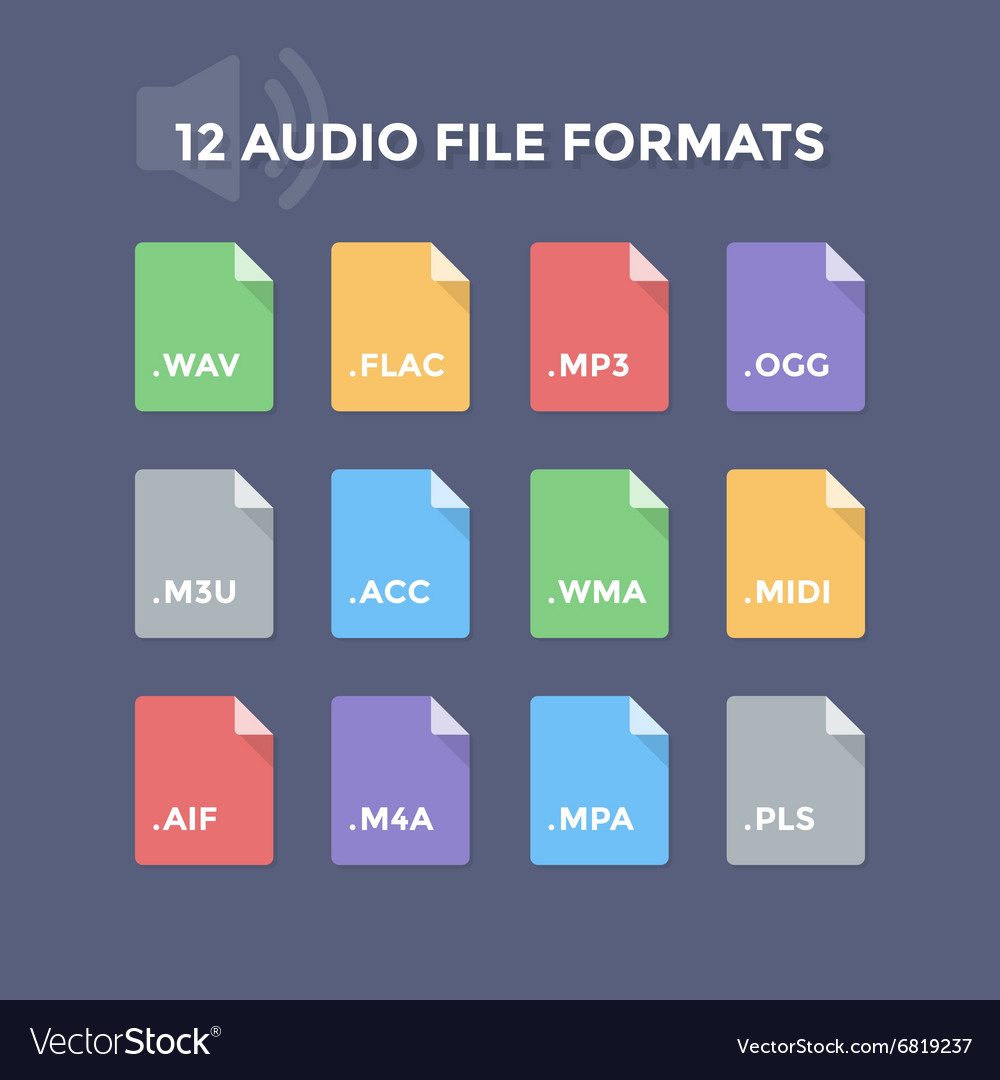
Today there are about three dozen common digital audio formats. Why you need to create so many types of sound files to store one type of content and how to manage all this, you will learn from this material.

Lossless Audio

Surely many users prefer to use their home computer not only as a workhorse, but also as a multimedia center, where they can watch movies or family photos, as well as listen to their favorite music. Although compact digital players or mobile phones are certainly more suitable for listening to musical compositions, but unlike them, a computer can not only play music.

No matter how big the built-in memory of your music player is, it will most likely be difficult to store your entire music library on it. Additionally, using a PC, you can create, edit, organize, and search for music. Also, don’t forget that there are around three dozen common digital audio formats today, and most players are far from omnivorous and can only play a few of them.

So why do you need to create so many music formats to store one type of content? The point is that in the vast majority of cases the sound is stored in a “compressed” form, since one minute of uncompressed composition occupies about 10 MB on the hard disk. On the one hand, this seems not to be much, but on the other, if you are a music lover and your collection consists of several hundred or even thousands of songs, then it is clear that the sound must be compressed to reduce the space it takes up electronic media.

Various special algorithms are used to compress music files, which subsequently determine the structure and presentation of the audio data, or so-called digital audio file formats. All audio formats can be divided into three groups: uncompressed audio formats, lossless compression, and lossy compression.

NO COMPRESSION

One of the most widespread formats related to this type is the well-known WAV. The sound of files with this extension is stored without compression or changes. It is true that much more space is required to store uncompressed files and therefore WAV is more widely used only in professional audio and video applications, where the sound should not have a loss of quality before processing. Storing ordinary musical compositions in this form is an unwarranted waste.

To play WAV files, you do not need any special software, as all media players understand this format, including the standard Windows Media audio player built into the Windows system.

Another format used to store uncompressed audio that is worth mentioning is Apple’s development called AIFF (Audio Interchange File Format). As you may have guessed, it is most commonly used on Macintosh computers running Mac OS X.

LOSSLESS COMPRESSION (NO LOSS)

Lossless compression algorithms for audio files work on the principle of conventional file cabinets. They do not provide the highest level of compression (40 to 60%), while they have virtually no effect on sound quality. It is also worth noting that in this case, the encrypted data can be fully restored to its original form. Therefore, the use of lossless compression is most often used in cases where it is important to preserve the identity of the compressed data with respect to the original.

The most popular audio formats in this group are FLAC (Free Lossless Audio Codec), APE (Monkey’s Audio), WMA (Windows Media Lossless), and ALAC (Apple Lossless Audio Codec). Each has its own pros and cons. For example, the APE codec offers slightly better compression gains, while FLAC is more common. In general, all true music lovers store their music collections in lossless formats, since they do not remove any data from the audio stream, and files created with these codecs can be listened to even on high-quality stereos.

Lossless formats: flac, ape, wv, dts, and other digital audio formats

Lossless formats: flac, ape, wv, dts, and other digital audio formats

Free Lossless Audio Codec

Recently, in the open spaces of the Russian Internet, music in Lossless formats has been found more and more often, which can not fail to delight connoisseurs of free real quality. But sadly, files with the flac, ape, wv, dts permission cause a “RAM” stupor for a common user and he walks in search of his usual mp3. Well what can I say, Epic Fail, comrades?

lossless  audio

This guide provides a detailed description of lossless formats and describes in detail how to read and write such files …

Theory: lossless formats

Lossless data compression is an information compression method, whereby encoded information can be retrieved with bit precision. This fully recovers the original data from the compressed state. This type of compression is diametrically different from lossy data compression. As a general rule, each type of digital information has its own lossless compression algorithms.

FLAC and APE codecs are the main Lossless formats today

FLAC (English Free Lossless Audio Codec) is a popular free codec for audio compression. Unlike the lossy Ogg Vorbis, MP3 and AAC codecs, it does not remove any information from the audio stream and is suitable for both daily listening and archiving an audio collection. Today, the FLAC format is compatible with many audio applications.

Monkey’s Audio (APE) is a popular lossless digital audio encoding format. It is distributed free of charge along with open source code and a suite of encoding and playback software, as well as plugins for popular players. Monkey’s audio files use the following extensions: .ape to store audio and .apl to store metadata. Despite being open source, Monkey’s Audio is not free, as its license imposes significant restrictions on its use.

After downloading music on Lossless, you can burn it to CD in the future and listen to it with Hi-Fi (or other) class acoustics, while normal CD quality will be.

For comparison, bitrate:

-mp3 ~ 320 kb / s

-FLAC and APE ~ 1000 kb / s

Theory:

SACD, DVD-Audio, DTS-CD and others multi-channel music formats.

SACD stands for Super Audio Compact Disc, an optical disc format for storing music. It looks like a normal CD, some discs can be seen with the naked eye: their working side is yellow. The sound in SACD is recorded in a completely different format: DSD (Direct Stream Digital) and they are reproduced only in special players.

features:

– Multichannel: 6 channels of audio can be recorded

– A completely different type of recording (DSD), which provides better sound quality compared to a CD.

– Conditional compatibility with older players: there can be two layers to a disc: normal CD (stereo) and one or two SACD variants (stereo / multichannel).

That is, if the disk:

Single Layer (“Single Layer”) – Read-only on SACD players.

Double Layer or “Hybrid” (“Double Layer” or “Hybrid”): Read on both conventional CD players and SACD players.

All SACDs have CD text – text information about album, artist, and track.