Audio and video analogic & digital


Free Download Mp4Gain
picture

Audio and video analogic & digital
Lossless and Lossy audio compression

The appearance of multimedia systems, of course, brought about revolutionary changes in areas such as education, computer training, in many areas of professional activity, science, art, computer games, etc. But, you must agree, it is impossible to imagine the modern. multimedia systems without sound or video. In this work, I would like to dwell on the consideration of the fundamental differences in the representation of digital signals from analog, the characteristics of digital audio and video information, their compression algorithms (compression).
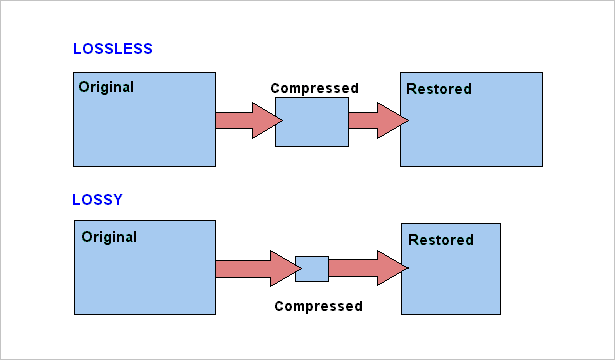
Lossy, and Lossless compression

2. Differences between the digital representation of analog signals.

The traditional analog representation of signals is based on the similarity (similarity) of electrical signals (current and voltage changes) with the original signals represented by them (sound pressure, temperature, speed, etc.), as well as on the similarity of electrical signals. signal forms at various points in the transmission or amplification path. The shape of the electrical curve that describes (also called transfer) the original signal is as close as possible to the shape of the curve of this signal.

Such a representation is the most accurate, however, the slightest distortion of the shape of the electrical carrier signal will inevitably involve the same distortion of the shape and signal of the carrier. In terms of information theory, the amount of information in the carrier signal is exactly equal to the amount of information in the original signal, and the electrical representation does not contain redundancy that could protect the carried signal from distortion during storage, transmission. and amplification.

The digital representation of electrical signals is designed to add redundancy to avoid unwanted interference. For this, serious restrictions are imposed on the carrier electrical signal: its amplitude can take only two limit values: 0 and 1.

In this case, the entire zone of possible amplitudes is divided into three zones: the lower one represents zero values, the upper one, individual, and the middle one is prohibited, only interferences can enter. Therefore, any interference, the amplitude of which is less than half the amplitude of the carrier signal, does not affect the correct transmission of the values ​​0 and 1. Interference with a higher amplitude also does not affect whether the duration of the interference pulse is significantly shorter than the duration of the information pulse, and a filter is installed at the pulse noise input of the receiver.

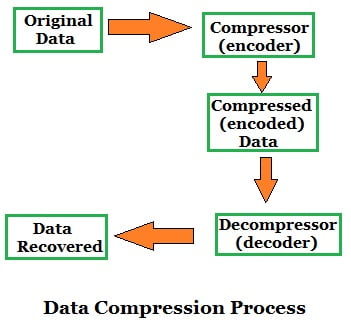
The digital signal formed in this way can carry any useful information that is encoded in the form of a sequence of bits: zeros and ones; Electrical and sound signals are a special case of such information. Here, the amount of information in the digital carrier signal is much greater than in the original encoded signal, so that the carrier signal has some redundancy with respect to the original, and any distortion in the waveform of the carrier signal, which it still retains the ability of the receiver to correctly distinguish between zeros and ones, it does not affect the reliability of the signal transmitted by this information signal. However, in the case of significant interference, the shape of the signal can become so distorted that the precise transmission of the information being carried becomes impossible: errors appear in it, which, with a simple coding method, the receiver does not you can only correct, but also detect. To further increase the resistance of a digital signal to interference and distortion, two types of redundant digital coding are used: verification codes (EDC – Error Detection Code) and correction (ECC – Error Correction Code) . Digital encoding is simply adding extra bits to the original information and / or converting the original bit string into a longer string and other structure. EDC allows you to simply detect the fact of an error: a distortion or loss of a useful one or the appearance of a false digit, but the information transferred in this case is also distorted; ECC allows you to immediately correct detected errors, keeping the information that is transferred unchanged.

Each type of EDC / ECC has its own capacity limit to detect and correct errors, after which undetected errors and distortions of the information being transferred start anew. An increase in the amount of EDC / ECC relative to the amount of initial information generally increases the detection and correction capabilities of these codes.

Like EDC, the popular cyclic redundancy code CRC (Cyclic Redundancy Check), whose essence is the complex mixture of the initial information in the block and the formation of short binary words, whose bits have u


Free Download Mp4Gain
picture


Mp4Gain Main Window
picture


Mp4Gain Features
picture


Free Download Mp4Gain
picture

Audio compression algorithms for streaming purposes

Audio compression algorithms for streaming purposes.

Lossy, and Lossless compression

The problem of transmitting the necessary number of audio channels through a network of limited capacity forces us to resort to audio compression.

Lossy and Lossless ata compresion in digital audio

Despite the use of modern digital technologies, compression negatively affects sound quality and causes additional delay in signal transmission.

Currently, there are two fundamentally different approaches to compressing audio signals. This article will provide a general comparison between these two different compression principles. Also presented are graphs of the frequency response (amplitude frequency characteristic) of the sound sample in its original uncompressed form and after one cycle of encoding and decoding using MPEG Layer II and Enhanced apt-X.

Algorithms like MPEG and AAC use encoding using a psychoacoustic model of sound perception. Another approach is time encoding using Adaptive Differential PCM (ADPCM) in algorithms like Enhanced apt-X.

Linear PCM audio
Before compression, the audio is generally digitized in linear PCM format at 32 kHz, 44.1 or 48 kHz with a resolution of 16 or 24 bits.

The analog signal will be digitized in uncompressed digital PCM. The digital inputs of the codecs use oversampling to ensure conversion without timing issues. The uncompressed PCM signal is our benchmark for comparing compressed audio files.

MPEG Layer ll compression
MPEG 1 Layer ll is a widely used format. This is a typical example of a psychoacoustic perception coding algorithm that analyzes the incoming signal and compares it to a theoretical model to determine what frequency and what time domain information can be lost. The need to analyze the audio signal results in a mandatory delay, typically greater than 30 ms.

In theory, high compression ratios can be achieved, but even with relatively low compression, MPEG can seriously degrade audio quality. In Fig. 2 shows the frequency response after one pass of MPEG encoding of the source file.

Be aware of frequencies that are lost or distorted compared to original PCM audio.

Compression Enhanced Apt-X
Enhanced apt-X uses ADPCM audio processing technology. The signal is divided into four frequency bands that can be processed at a quarter of the original sample rate using a variable bit rate and variable quantization step. Since all processing is based on the time domain method, there is no delay other than the actual processing time required.

As a result, a 4: 1 compression ratio preserves the entire frequency content of the original signal with a coding delay of less than 3 ms. Frequency response graph in Fig. 3 shows the result of one pass encoding / decoding using Enhanced apt-X at 256 kbps and illustrates the high fidelity of Enhanced apt-X compared to the original uncompressed signal.

How Enhanced apt-X Works
The improved apt-X encoding algorithm passes the original PCM data through a specially designed two-stage Q-mirror filter to divide the signal into four subbands and reduce the clock frequency to 1/4 of the original clock frequency. The quantization procedure consists of processing four sub-signals to reduce each signal from 16 bits to 7 bits in subband 1, 4 bits in subband 2, 3 bits in subband 3 and 2 in subband 4.

The inverse quantizer and prediction scheme uses the above values ​​to predict the size of the next signal. This value is compared to the actual signal and the “difference” is measured. The encoder transmits this measured “difference” signal to the decoder. Each subband is processed in parallel and the output of the string quantizer and predictor is encoded with a predetermined resolution. The processing output of the four subbands is multiplexed into a single 16- or 24-bit enhanced apt-X signal. Then additional data and sync data is added to it for streaming.

What is digital audio data compression?

What is digital audio data compression?

lossless and lossy compression

It could be said that there are two methods with which it is possible to compress the data in the case of digital audio.

lossless lossy compression

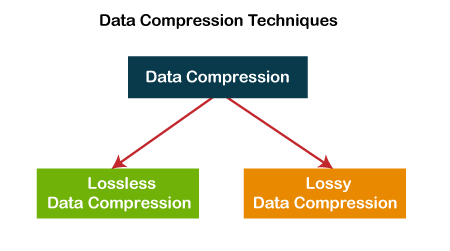
On the one hand, the method known as lossy compression is intended to reduce psychoacoustic redundancy and the other method is to reduce statistical redundancy. And this is known as lossless compression.

Lossless compression

Many people wonder how lossless compression can be achieved.
The Huffman code takes into account the probability that levels of different magnitudes will appear, for example, the most probable values ​​to appear frequently are assigned shorter codes and, on the other hand, the values ​​whose probability of appearance is small are assigned they use longer code words.

If we think about it, we will realize that by replacing the signal values ​​that will appear very frequently with shorter words, this will save us space but it does not imply any loss of quality because no information is being discarded.

If we put an example perhaps very simplified to be able to explain this method, we could imagine that we are going to compress a text. Now suppose this text contains some words that may be repeated very frequently.
For this explanation suppose that our text contains the word “statistically” many times and suppose that we substitute 3 characters for it: xx ÷.
So in each place where the word “statistically” should appear, we will replace it with the characters “xx ÷” And if this word appears enough times we will reduce the size of the text.
If we do this with each of the words that will appear several times, we will be able to make a significant reduction of the text without having to discard any information.

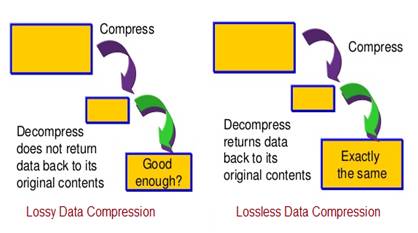
Therefore, when we rebuild or decompress our file, we will obtain a file exactly the same as the initial one, without any loss.

The other method where if there is a loss what is sought is to discard what is audio information the ear cannot distinguish, for example in the masking effect.
This masking what happens in our ears due to the imperfection of the human ear, supposes that two sounds do occur at approximately the same moment And these sounds have a close frequency But one of them has a much higher volume, the ear will only perceive the one who has higher volume and the one with the lowest volume will not perceive. Therefore, it can be discarded and the human ear will not perceive the difference.

This type of compression does use the technique of discarding information, which is why the resulting file has some information loss.

In general terms, today those systems that act without loss of information are being highly valued.

Lossless vs lossy, what is the difference?

Lossless vs lossy, what is the difference?

lossless and lossy compression

In a recent article on wireless audio, we addressed the topic of lossy and lossless digital audio encoding. Today we will dwell on this topic in more detail.

lossless vs lossy

So, we have analog sound, which, during digital sound recording and / or for later storage in a computer and other electronic media, is digitized into an audio file, an electronic document consisting of information about the amplitude and frequency of the sound, with the help of which the digital-analog inverse conversion and reproduction of the sound contained in the file.

The sound format depends on the quantization method using an analog-to-digital converter (ADC), two types of quantization are widespread:

pulse code modulation (PCM, most MP3 to FLAC formats)

sigma-delta modulation (Delta-sigma, DSD format)

The main parameters of digital audio are the quantization bit (bit) and the sample rate (kHz / MHz), which are indicated for various recording and playback devices as the format to represent digital audio, for example, 24 bit / 192 kHz.

There are uncompressed audio formats (eg WAV, AIFF), but for more convenient storage / distribution, codecs that compress audio data are often used. Data compression (data compression) is performed in order to reduce the volume occupied by files and is based on eliminating the redundancy contained in the original data. There are two types of compressed formats:

Lossless: lossless compression (FLAC, ALAC, APE)

Lossy: Lossy compression (MP3, Ogg, AAC)

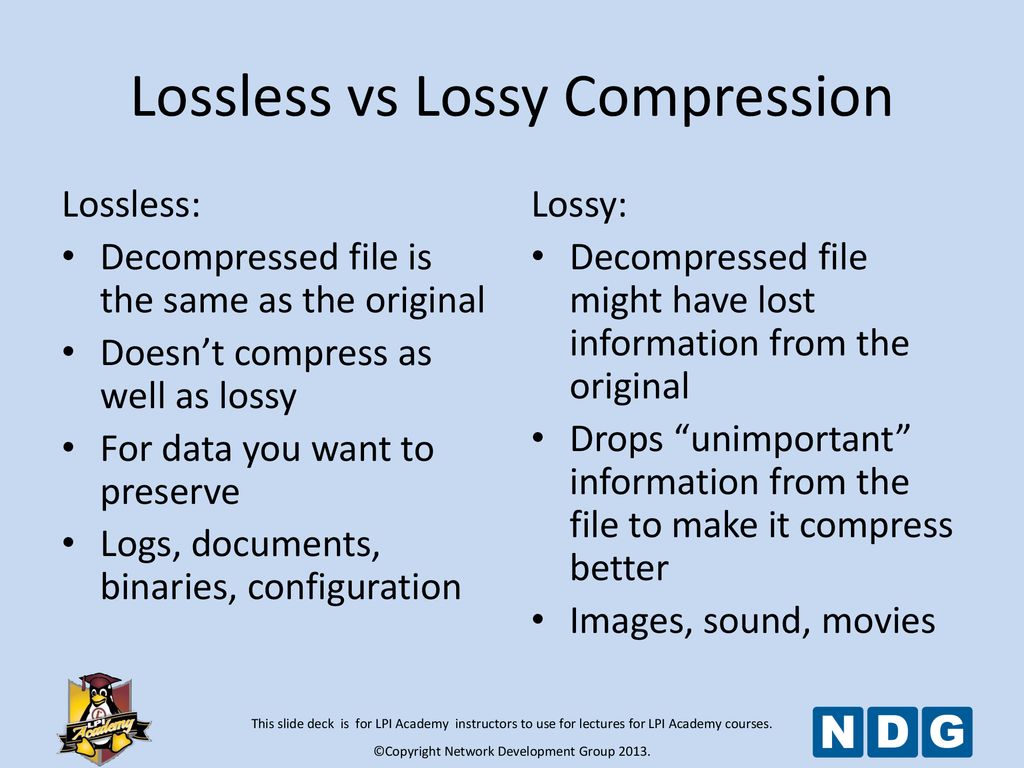
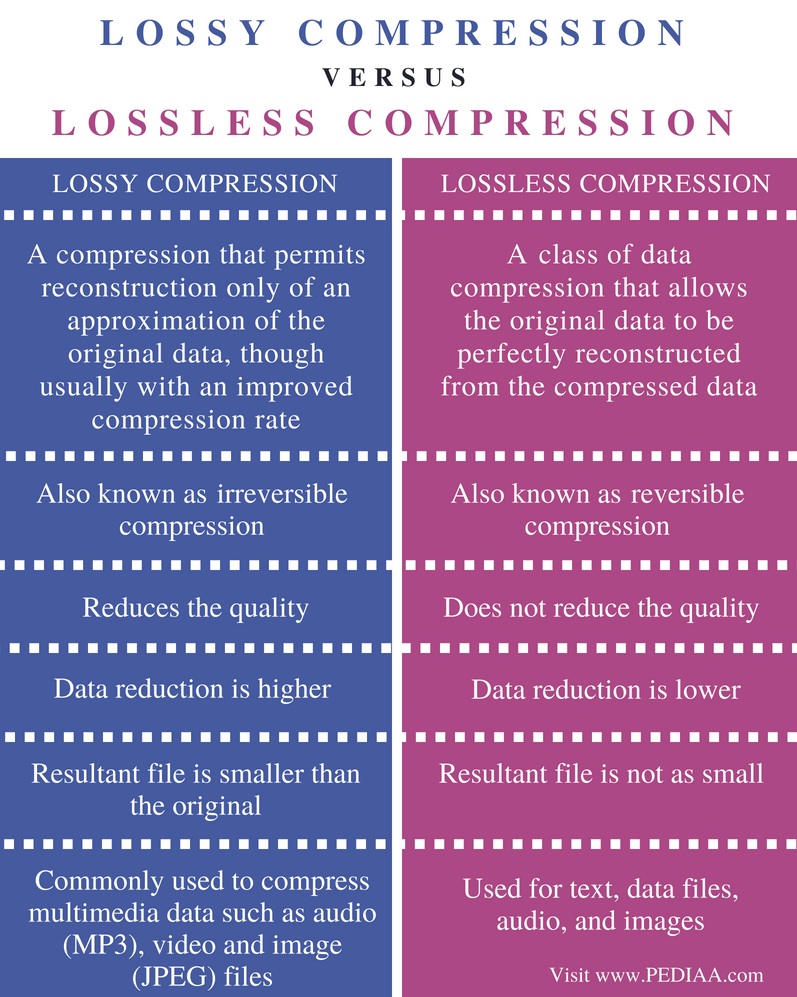
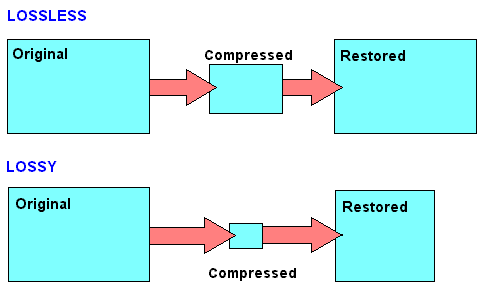
Lossless compression allows you to make a complete recovery of the original data, lossy compression allows you to recover data with certain distortions.

Lossy compression is significantly more efficient than lossless compression and is used when full compliance with original and recovered data is not required, and volume reduction is a priority.

A lossy encoded file is very different from the original on the level of byte comparison, but to an inexperienced human ear, the difference may not be as strong and sometimes even imperceptible. It does this by focusing lossy compression techniques on the physical characteristics of a person’s senses, such as a psychoacoustic model, which determines how much sound can be compressed without degrading the perceived quality of the person. Impairments caused by loss of compression that are perceptible to the human ear are considered compression artifacts.

MP3 spectrogram (left) and original file (right)

Examples of common lossy formats:
MP3: defined by the MPEG-1 specification, perhaps still the most common format

Ogg Vorbis: distinguished by the absence of patent restrictions and higher quality with the same bit rate as MP3

AAC, AAC + – Exists in various versions, defined by MPEG-2 and MPEG-4 specifications, it became widespread along with Apple technology

eAAC + is a format offered by Sony as an alternative to AAC and AAC +

WMA is a format developed by Microsoft

Dolby AC-3

DTS

Previously, lossless audio formats were most often used for archival data storage and in cases where distortion was unacceptable or undesirable, and most common listeners used music in lossy compressed formats. But the amount of memory in electronic devices is constantly growing and prices are falling, which is why more and more people are switching to listening to Lossless formats, which allow them to perceive music in its original form. In addition, the support for Lossless formats has now appeared on almost all consumer devices, even some streaming services are beginning to broadcast sound in lossless quality, for example, Deezer presented in Russia or Tidal, which is officially absent from us.

Examples of common lossless formats:
Free lossless audio codec: FLAC is the most common free format

ALAC – Apple Lossless Audio Codec – Apple variant

Lossless audio encoding, also known as MPEG-4 ALS

Direct Flow Transfer – DST

Dolby TrueHD

DTS-HD Master Audio

Meridian Lossless Packing – MLP

Monkey’s Audio – Monkey’s Audio APE

WavPack – Lossless WavPack

WMA Lossless – Windows Media Lossless

What are lossless file formats and why shouldn’t you convert lossy files to lossless files? Part 2
What are lossless file formats and why lossless comprssionshouldn’t you convert lossy files to lossless files? Part 2
 

Some of these lossless formats also provide compression. For example, a WAV file generally contains uncompressed audio and takes up a lot of space. A FLAC file can contain the same lossless audio as a WAV file, but uses compression to keep the file smaller. Formats like FLAC don’t discard any data, they store all the data and intelligently compress it, just like ZIP files. However, they are still significantly larger than MP3 files, which throw a lot of data.

Lossless Compression - Pediaa.Co

The conversion can be lossy even between lossless formats. For the conversion to be truly lossless, the data in the source file must fit inside the destination file. For example, lossless FLAC files only support 24-bit audio. If you convert a WAV file that contains 32-bit PCM audio to FLAC, some data will be removed during conversion. The process of converting a WAV file containing 24-bit PCM audio to FLAC will be lossless.

In the image below, the lower version of the photo is compressed using a low-quality lossy compression algorithm. The file size will be noticeably smaller than the image above.

Image via Wikimedia Commons

Why you should never turn a loss into a lossless
When you convert a file from a lossless format to a lossy format, such as ripping an audio CD (lossless format) to MP3 files (lossy format), you are discarding some of the data. The MP3 file is much smaller because most of the original audio data has been lost.

If you convert a lossy MP3 file to a lossless FLAC file, you will not recover any data. You will end up with a much larger FLAC file that is only as good as the MP3 file you converted from. You will never be able to recover your lost data. Think of it as making the perfect photocopy copy. Even if you could create a perfect photocopy copy, you would still end up with a photocopy that is not as good as the original document.

This is why converting lossy formats to other lossy formats is a bad idea. If you take an MP3 (lossy format) file and convert it to OGG (another lossy format), most of the data will be discarded. Think of it like making a photocopy of a photocopy: every time you photocopy a photocopy, you lose data and the quality degrades.

However, converting from lossless to lossless formats works fine. For example, if you rip an audio CD (lossless) to FLAC files (lossless), you will get files as good as the original audio CD. If you then convert those FLAC files into MP3 files, say, to shrink them to fit more on your MP3 player, you’ll end up with MP3 files that rival the quality of MP3 files ripped directly from an audio CD.

What should you use?
When you should use lossless formats and when you should use lossy formats depends on what you are using them for. If you want the perfect copy of your audio CD collection, you must convert them to lossless files. If you want a playable copy on your MP3 player and file size is more important, use a lossy format.

If you want to post a photo on the Internet, you must use a lossy format to reduce the size of the photo. (but keep a lossless backup of the original file). If you are printing a photo professionally, you probably want to use a lossless format during the editing process. (Note that for screenshots, PNG is a lossless format that can produce sharp and appropriately sized screenshots of spot colors on computer screens. However, PNG becomes much larger when used for photographs. containing many more mixed colors. Real world).

We will not be able to cover all the situations for which you choose the media file format. Just be aware of the pros and cons when choosing a file format.

To learn more about what type of image file to use and when, read What’s the difference between JPG, PNG, and GIF? Or, if you are curious about all the available audio file formats, read HTG’s explanations: What’s the difference between all these audio formats?

What are lossless file formats and why shouldn’t you convert lossy files to lossless files?

What are lossless file formats and why shouldn’t you convert lossy files to lossless files?

Lossless compression

Whether you’re dealing with image, music, or video files, it’s important to understand the difference between the different types of formats and when to use them.

lossless compression

Using the wrong format can spoil the quality of the file or make it unnecessarily large.

Some types of media file formats are lossy and some are not. We will explain what these terms mean, the benefits of each type of file format, and why you should never convert lossy formats to lossless formats.

Compression explanation
We use compression to reduce the size of files, allowing them to load faster and take up less disk space. For example, when you take a photo, your camera captures all the light it can receive and adds the image. If you save the image in RAW format, which stores all the light data captured by the camera’s sensor, the image can be up to 25MB in size. (This depends on the resolution of the image – a camera with more megapixels will produce a larger image.)

If we simply upload these files to a social network or post them to a website, we don’t want these image files to take up so much space. A photo gallery with RAW images can take up hundreds of megabytes of space. RAW formats can be used by professional photographers to maintain high image quality while editing, but they are not intended for the average person.

Instead, our camera or smartphone converts the image to a JPEG file. JPEG files are much smaller than RAW images. When you convert RAW to JPEG, some of the image data is “thrown away”, creating a much smaller file. The conversion process uses a compression algorithm that works well with photos, making them look pretty good despite being compressed. Depending on the quality setting, you may still see compression artifacts.

Note that lossy formats often have a parameter that controls their lossy quality. For example, JPEG is of variable quality. If the quality is poor, the JPEG image file becomes smaller, but the image quality is noticeably worse. Here is an enlarged example of a lossy JPEG – you can see various “compression artifacts”.

Lossless and lossy formats
We call RAW Lossless because it retains all the data from the original file, and JPEG Lossy because some data is lost when converting an image to JPEG. However, these are not the only lossy and lossless formats.

Images: RAW, BMP and PNG – all lossless image formats. JPEG and WebP are lossy image formats.
Audio: WAV is a container file often used for storing lossless audio, although it can contain lossy audio as well. FLAC is a lossless audio format and MP3 is a lossy audio format.
Video: Various lossless video formats are widely used by consumers as they can make video files take up a lot of space. All common formats, such as H.264 and H.265, are lossy. H.264 and H.265 can provide smaller files with higher quality than previous generations of video codecs because they have a “smarter” algorithm that better chooses data for deletion.

Explained bit rate

Explained bit rate

lossless

Bit rate is one of the most important metrics for measuring digital audio recordings. It is measured in kilobits per second (for short: kbps, just kilobits, kbps, kbps, kbps, etc.).

LOSSY AUDIO COMPRESSION

On the fingers: answer the question “how much memory occupies a second of audio”.

All kinds of transformations are already underway: there are eight bits in a byte, 1024 bits in a kilobit, 60 seconds in a minute, 60 minutes in an hour, and we arrive at the following empirical data:

bit rate 1400 = 1 hour takes 615 megabytes on disk
320 bitrate = 1 hour takes 141 megabytes on disk
bit rate 192 = 1 hour takes 84 megabytes on disk
bitrate 24 = 1 hour takes 11 megabytes on disk
Naturally, we all want to use disk space sparingly. This is where the format war begins. 11 MB is sixty times cheaper than 615 MB. Megabytes is the cost of storing audio recordings.

The price of storage can also be expressed in bills, dividing the cost of the disk by its capacity. For an archive of audio recordings, the price of storage is far from being as critical as for an archive of video recordings.

In addition, the price of storage can be conditionally expressed in man-hours, if the playback device has a much lower capacity than your general archive of audio recordings. It takes time to regularly download new tracks to the device.

The storage price can also be expressed in terms of square meters of work area. 500 audio CDs will take up a lot of space and require furnishing solutions, but a small external hard drive will fit in your pocket.

If there is a different price, then the question of quality arises: then we assume that the lowest bitrate has the lowest quality. So we come to the main question: where is the limit of reason, where is the ideal “price / quality” ratio.

The closest division of audio formats in descending order of average bitrate:

uncompressed audio
lossless compression
lossy compression

Uncompressed audio is the pure signal without conversion, “as is”, the equivalent of WAV or audio CD. Classic parameters: 1411 kbps, 44100 kHz sample rate, 16-bit audio.

Codec is an abbreviation for the words (KO der and DEC oder). An encoder is a program that packages a pure audio signal in the desired special format. A decoder is a program that converts a special format into a pure audio signal. In modern English, the two terms somewhat transform: is code continuation and dE below code, which corresponds to directing Russian counterparts to code and coding races. And do not confuse encryption and encryption: these are two very different processes, although externally there is a lot of similarity.

For an ordinary person, only a player that can work with this format (that is, has a decoder) is required. The “encoder” itself is only required to “create” such files.

Lossless Compression – Typically used for collectible audio material. In general, it is believed that this format can be exactly converted back to Audio CD.

Better is this compression:

Save disk space by about half
The file format assumes the storage of additional information (artist, album, track number, track name, etc.)
The compression formats themselves differ:

format openness and compression algorithms
player support
encoding, decoding overhead costs
compression ratio
The overhead is negligible for the average person and the compression ratio of the codecs differs only slightly. Main actors: FLAC, APE, WAVPACK, ALAC.

Lossy Compression – Provides a much higher compression ratio by discarding unimportant audio details. The smaller the size of the file we are trying to compress, the more details we will have to discard. In addition to details disappearing, technical artifacts also appear.

Main market players: MP3, OGG, AAC, WMA. They all have quality gradations – the higher the bit rate, the closer the quality is to the original. With the same bit rate, different codecs under different conditions can give different results.

You can explain with your fingers what lossy compression is using the example of compression of graphic files in JPEG format.

sample_jpg_100sample_jpg_090sample_jpg_080sample_jpg_070sample_jpg_060sample_jpg_050sample_jpg_040sample_jpg_030sample_jpg_020sample_jpg_010

At first, it is perfect and practically indistinguishable (no magnification).

In between, the quality drop is already visible to the naked eye, but you can still bear it.

In the end, the degradation of quality already goes beyond the limits of patience.

What is a lossless format?

What is a lossless format?

Lossless Audio

Whether it’s images, music, or video files, it’s important to understand the difference between the different types of formats and when they are used.

Lossless Audio

Using the wrong format can degrade the quality of the file or make it too large.

Some types of media file formats are “lossy” and others are “lossless.” We will explain what these terms mean, the benefits of each type of file format, and why you should never convert lossy formats to lossless formats.

Compression explained
We use compression to reduce the size of files, allowing them to load faster and take up less disk space. For example, when you take a photo, your camera captures all the light it can receive and collects the image. If you save an image in RAW format, which stores all the lighting data captured by the camera’s sensor, the image size can be up to 25MB. (This depends on the resolution of the image – a camera with more megapixels will create a larger image.)

If we simply upload these files to a social network or post them to a website, we don’t want these image files to take up so much space. A photo gallery with RAW images can take up hundreds of megabytes of space. RAW formats can be used by professional photographers to maintain high image quality while editing, but they are not intended for the average person.

Instead, our camera or smartphone converts the image to a JPEG file. JPEG files are much, much smaller than RAW images. When you convert RAW to JPEG, some of the image data is “thrown away”, creating a much smaller file. The conversion process uses a compression algorithm that works well for photos, making them look pretty good despite being compressed. You may still see compression artifacts, depending on the quality setting.

Note that lossy formats usually have a setting that controls their loss. For example, JPEG has a variable quality setting. Poor quality makes the JPEG image file smaller, but the image quality is noticeably worse. Here’s a great example of a lossy JPEG – you can see various “compression artifacts”.

Lossless and lossy formats
We call RAW a “lossless” format because it retains all the data in the original file, while we call JPEG a “lossy” format because some data is lost when the image is converted to JPEG. However, these are not the only lossy and lossless formats.

Images: RAW, BMP, and PNG are all lossless image formats. JPEG and WebP are lossy image formats.
Audio: WAV is a container file often used for storing lossless audio, although it can also contain lossy audio. FLAC is a lossless audio format and MP3 is a lossy audio format.
Video . Some lossless video formats are widely used by consumers as they make video files take up a large amount of space. Common formats like H.264 and H.265 are lossy. H.264 and H.265 can provide smaller files with higher quality than previous generations of video codecs because it has a “smarter” algorithm that better chooses the data to discard.

What are the benefits of the MKV format?

What are the benefits of the MKV format?

MKV

The Matroska format is a multimedia container envelope for video, audio, and subtitle files.

Matroska

A complete CD or DVD can fit in one file. The extension of a Matroska video file is MKV; only for MKA audio, and only for subtitles, MKS. The MKV format has many advantages over competing containers such as Microsoft® Audio Video Interleave (AVI), Apple® Quicktime® MOV, Moving Picture Experts Group (MPEG) and others.

While each of the container formats currently in use fulfills some or even many of the functions that the container format requires, Matroska aims to be the standard that meets all of them, standing out from almost all the others. Built in EBML (Extensible Binary Meta-Language), it is very flexible to meet future needs.

The first advantage of the MKV format is that it is open source, which makes the code freely available to developers around the world and to the general public. Most other container formats contain mostly proprietary code developed exclusively by the originating company and authorized parties. Open source software has the most potential for more creative solutions and wider implementation.

The MKV format supports menus such as DVDs, chapters, and multiple audio streams to include audio tracks in different languages. As with the DVD, you can choose the language of your choice, provided the creator has included several options.

Soft subtitles are also supported in MKV format. Soft captions are a separate subtitle track in a container that can be disabled or enabled by the user. If you ever downloaded an AVI file with unnecessary subtitles and couldn’t turn them off, you will appreciate this feature.

MKV can contain variable bit rate audio and variable frame rate video, as well as B-frame compression. But unlike most other containers, it also supports almost any video format, including MPEG-1, MPEG- 2, MPEG-4, MPEG-4 Part 2 (H.263), MPEG-4 Part 10 / Enhanced Encoding video (AVC). /H.264, Windows® Media Video (WMV), RealVideo and more.

The MKV format also supports almost any audio format, including lossless audio like FLAC and audio container formats like Ogg. It is also compatible with Speex, a lossy audio compression format for speech. The Matroska development team is confident that future video and audio formats will also be supported, thanks to the core EBML MKV format.

Not all audio players support MKV files. VLC Player, an open source and open source cross-platform audio and video player, supports MKV format without using any special plugins or codecs. Mastroska’s CorePlayer Pro and Mobile are other options. DirectShow® based Microsoft® players can play MKV files with the Community Combined Codec Pack (CCCP) installed. A full list of players, codecs, and plugins that support MKV is available on the Matroska website at the download link.

MKV support also extends offline. Manufacturers such as Samsung® and LG® already have dedicated HDTVs and Bluray® players that support MKV streaming.

What lossless audio format should I use to store music?

What lossless audio format should I use to store music?

FLAC Audio file format

I started a project to copy my large CD collection and store them. Since I care about sound quality, I decided to store them in a lossless format. Right now I have tried using FLAC. However, reading this article gives me some doubts.

Lossless audio

I have considered using vApple Lossless Files (m4a). It looks like Apple will support this format for years to come. However, I have not found a way to play them on my Playstation 3. The m4a format is compatible with Mac (of course) and on Windows FLAC, on the other hand, it is compatible with all major platforms. The advantage of the m4a format is the ability to import into iTunes. Today I connect my NAS and use VLC for playback (on my Mac computer).

My family has a Synology NAS, Mac Book Pro, Sony PS3, and several Windows computers. So I want to be able to play audio on all these platforms. Synology Server can transcode some formats like FLAC.

What lossless format do you recommend I use to store my audio files on my NAS? It should be a playable format on most platforms. This should be forward looking, but I understand that it is difficult to predict what will continue for many years to come.

One solution would be to keep my FLAC files. You could use them as long as FLAC is supported. When another fantastic lossless format comes out, I’ll have to convert them. As long as it is a lossless format, the sound quality is preserved.