
What are lossless file formats and why shouldn’t you convert lossy files to lossless files?
Whether you’re dealing with image, music, or video files, it’s important to understand the difference between the different types of formats and when to use them.

Using the wrong format can spoil the quality of the file or make it unnecessarily large.
Some types of media file formats are lossy and some are not. We will explain what these terms mean, the benefits of each type of file format, and why you should never convert lossy formats to lossless formats.
Compression explanation
We use compression to reduce the size of files, allowing them to load faster and take up less disk space. For example, when you take a photo, your camera captures all the light it can receive and adds the image. If you save the image in RAW format, which stores all the light data captured by the camera’s sensor, the image can be up to 25MB in size. (This depends on the resolution of the image – a camera with more megapixels will produce a larger image.)
If we simply upload these files to a social network or post them to a website, we don’t want these image files to take up so much space. A photo gallery with RAW images can take up hundreds of megabytes of space. RAW formats can be used by professional photographers to maintain high image quality while editing, but they are not intended for the average person.
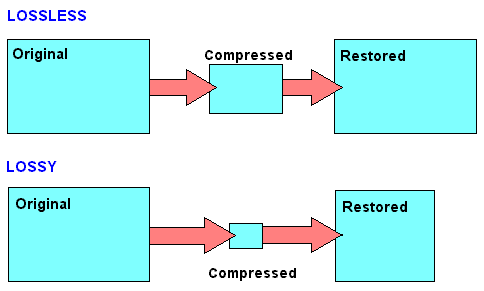
Instead, our camera or smartphone converts the image to a JPEG file. JPEG files are much smaller than RAW images. When you convert RAW to JPEG, some of the image data is “thrown away”, creating a much smaller file. The conversion process uses a compression algorithm that works well with photos, making them look pretty good despite being compressed. Depending on the quality setting, you may still see compression artifacts.
Note that lossy formats often have a parameter that controls their lossy quality. For example, JPEG is of variable quality. If the quality is poor, the JPEG image file becomes smaller, but the image quality is noticeably worse. Here is an enlarged example of a lossy JPEG – you can see various “compression artifacts”.
Lossless and lossy formats
We call RAW Lossless because it retains all the data from the original file, and JPEG Lossy because some data is lost when converting an image to JPEG. However, these are not the only lossy and lossless formats.
Images: RAW, BMP and PNG – all lossless image formats. JPEG and WebP are lossy image formats.
Audio: WAV is a container file often used for storing lossless audio, although it can contain lossy audio as well. FLAC is a lossless audio format and MP3 is a lossy audio format.
Video: Various lossless video formats are widely used by consumers as they can make video files take up a lot of space. All common formats, such as H.264 and H.265, are lossy. H.264 and H.265 can provide smaller files with higher quality than previous generations of video codecs because they have a “smarter” algorithm that better chooses data for deletion.


