Sample rate and bit depth


Free Download Mp4Gain
picture

The comparison with the digital or film camera is not completely random: the sampling frequency of the audio signals, that is, the frequency of the samples per unit of time (usually given per second), is comparable to the frame rate per second from a film camera. The number of pixels in each individual image could be equated with the bit depth: HD movies “look better” than Super 8 movies. The higher the number of pixels on the sensor and the more often a photo is taken, more precisely, the “light to be recorded”, the landscape, can be digitally reproduced.

Bit Depth

Bit depth

Fortunately for us, a certain Harry Nyquist inspired a certain Claude Shannon long ago to support him with a theorem (a theoretical statement or theorem) that stated that an audio signal at twice the frequency must be sampled uniformly to match. with the original signal. to be able to rebuild sufficiently. Limiting the bandwidth of audible frequencies practically frees us from our hearing, which is basically only capable of consciously perceiving frequencies between a maximum of 20 Hz and 20,000 Hz.

Sample rate

The expense of completely and exactly reconstructing the analog output signal is theoretically infinite, since digital signals are discontinuous by nature in any case, while analog signals are always continuous. Unfortunately, it is inevitable that digital information is only suitable for rough storage of analog signals. The starting signal is “rough”, good word, right? Nyquist’s theorem also applies to digital cameras: they also deal with frequencies, that is, those of light.

digital audio

For signals up to 20 kHz more or less relevant to humans, a sampling frequency of 40 kHz is sufficient according to the aforementioned theorem. The 44.1 kHz sample rate common for CD quality comes from the 1970s or Sony’s “pulse code modulation (PCM) process for storing digital signals on video tapes. Later, Sony developed the Red Book standard for audio CDs with Philips.

The frequency, which is slightly wider by an additional 4000 Hz than twice that audible to humans, has its origin in the simplest possible filters, which are intended to remove so-called aliasing effects from the audible range of the reconstructed analog signal. during digitization: the wider this “corridor”, the simpler the filter technology.

PCM pulse code modulation method

Exactly 44.1 kHz got out of this, because sample rate converters can be more easily designed (used for studio technology or data carrier transfer) if the sample rate is an integer multiple of the output frequency. The output frequency here was the 60 Hz network frequency used for video digitization with 525 lines to digitize the TV signal. Changing 60 Hz would have been very laborious, it stuck. It is not a coincidence that multiplying 525 by an integer factor results in a frequency greater than 44,000 Hz, which we want to achieve to keep filters for anti-aliasing simple: the next largest integer that is divisible by 525 is 44,100. The multiplication factor is 84, as a whole number is desired, which should not interest us otherwise.


Free Download Mp4Gain
picture


Mp4Gain Main Window
picture


Mp4Gain Features
picture


Free Download Mp4Gain
picture

What is the audio bit depth?

Understand what bit depth is, how it works, and how this feature will affect the quality of music during auditions;

Currently, many of those who are looking for quality audio or quality music keep mentioning “Hi-Res”, FLAC 24-bit, and MQA (Master Quality Audio) files. This is a growing trend in high-end smartphones that are trying to offer higher audio quality both in their DAC and in support of advanced Bluetooth audio codecs like LDAC, developed by Sony. Additionally, there are music streaming services that promise lossless audio quality, like Tidal.

BitDepth

The promise made by audio equipment manufacturers, developers of audio streaming and music streaming formats, is simple: superior audio quality due to the increased amount of data, also known as bit depth or English bit depth . There are 24 bits of 1 and 0 versus 16 bits on the CD. Of course, these high-resolution files are more expensive due to their quality, but the more bits, the better the result will be when listening to music, right?

Bitdepth

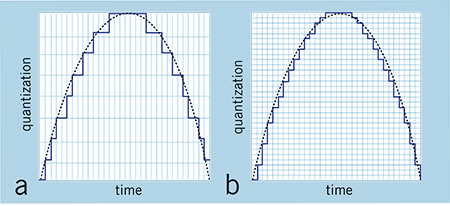
Low resolution audio is usually displayed using a jagged wave graph (with ladders). Source: soundguys
Well, the answer to the previous question is: not necessarily. The argument for a value in increasing bit depth is not based on something scientific, but on the distortion of what is actually happening and the exploitation of consumer ignorance about the media they are consuming. That is, it is a fact that stores selling 24-bit tracks reap far more benefits than a real improvement in promised sound quality.

Bit depth and sound quality.

The greatest example of companies selling 24-bit audio is the demonstration of a jagged sine wave, like stairs. When we look at a file that has a resolution of 16 bits, we see an irregular line, but when we look at the same song in 24 bits, it seems to be a practically smooth line, with better definition. It is a basic visual illustration, but depending on the person’s knowledge of the subject, he can be easily fooled.

Why use 24-bit or more audio files?

The utility of using a high-level bit depth applies to studios, because with each filter and conversion that is applied, the background noise increases. This increase in noise occurs due to the insertion of a new wave, as explained above. In other words, when using a higher bit depth level, the sound engineer prevents the original audio from generating noise by manipulating it for mixing and mastering.

However, remember that this will be more useful for audio production and not for the listener, as explained above.

conclusion
What will make the difference will be the balance between the sounds made in the mastering and not the bit depth itself, since the 16 bits of the CD are already more than enough for music listeners.

Multimedia formats: Digital audio


Sound is a continuous signal. To be stored with computer systems
it must be sampled, thus obtaining a digital signal.
The parameters that characterize the sampling are basically three:

 The sample rate
 Bit depth
 The number of channels
these parameters influence both the space occupied and the quality of the audio file
digital obtained.

Digital Audio

Sampling rate

The sampling frequency is the measurement expressed in Hertz (Hz) of the number
of times per second in which an analog signal is measured and stored
in digital form.

Sampling rate
The higher the sampling rate, the more the sequence of the samples
digital will be close to that of the original analog waveform.
Low sampling rates limit the frequency range that is
can record, which in turn can generate a recording that
poorly reproduces the original sound.
Two sampling frequencies:
A. Low sampling rate,
which distorts the wave of the original sound
B. High sampling rate,
which perfectly reproduces the wave of
original sound
To reproduce a certain frequency, the sampling frequency
it must be at least double it (Nyquist theorem).
For example, audio CDs have a sampling rate of 44.100 Hz,
so they can reproduce frequencies up to 22.050 Hz, which are hardly found
beyond the limit of human perception of 20,000 Hz.
The following table shows the most common sampling rates for
digital audio.

Bit depth

The bit depth represents the number of bits used to store a
single digital sample.
When a sound wave is sampled, each sample is assigned
the amplitude value closest to the original wave amplitude. A depth
in high bits it provides as many amplitude values ​​as possible, which results in a
greater dynamic range (the difference in decibels between the maximum volume that the component can sustain without
distort the waves and the background noise it produces), lower and higher background noise
fidelity.
For example if you use 8 bits you have 256 possible values ​​(28
) that, being
relatively few, offer less sound quality than a
tape; if instead 16 bits per sample are used, 65536 values ​​are obtained
possible (216).
The most common examples are the audio CD, recorded in 16 bit, and the DVD, which
supports up to 24 bit depth.

Compression formats

Hand in hand with the advent of digitalization, multimedia applications have
they are increasingly widespread until they become commonplace. One of
multimedia features is certainly the use of digital audio
vowel and sound. The biggest obstacle associated with digitizing audio is
the large size of the files that are produced, which puts them at
sector operators (especially those linked to the internet) the problem of
reduce the space occupied by the data to obtain the double advantage of:
 save in terms of memory occupation;
 save in terms of transfer time on the network.

For this reason, speaking of digitizing the audio, it is necessary to speak
also of data compression techniques. The compression techniques of the
data, of whatever nature they are, are divided into:
 lossless: compress data through a lossless process
of information that takes advantage of redundancies in data encoding
 lossy: compress data through a lossy process
of information that takes advantage of redundancies in the use of data.

Lossless formats

Lossless compression formats are more suitable for archiving rather than
to reproduction, since most of them require complete
decompression before they can be played.
One of the most common lossless compression formats is FLAC (Free Lossless Audio Codec).

Lossy formats

Lossy compression formats use compression algorithms capable of
drastically reduce the amount of data required to store a sound,
guaranteeing however an acceptable and faithful reproduction of the original file uncompressed.

The difference between 16 and 24 bit depth

Analog / Digital Conversion

When you record a guitar into digital audio, the guitar’s analog signal is converted to digital signal for storage on your computer.

Since the analog signal can take an infinite number of values ​​while computers have limited capacity, it is sampled according to two parameters:

Sample Rate: This is the number of times per second when measuring an analog signal (often we are at 44,100 Hz, or 44,100 times per second)
Resolution: defines the number of possible values ​​that the measured value can take and is measured in bits.
If its resolution is 1 bit, only two values ​​are possible: 0 and 1.

For each added resolution bit, the number of possible values ​​is multiplied by two:

2 bits = 4 values
3 bits = 8 values
16 bits = 65,536 values
24 bits = 16,777,216 values!
During recording, therefore, we will measure the incoming signal many times per second and complete this measurement according to the number of possible values.

Hypothetical example: Our resolution means that we can only store values ​​equal to 0 or 1. If the analog input signal is measured at 0.8, it will be rounded to 1. If it is measured at 0.2, then it will be rounded to 0.

Very simple, right?

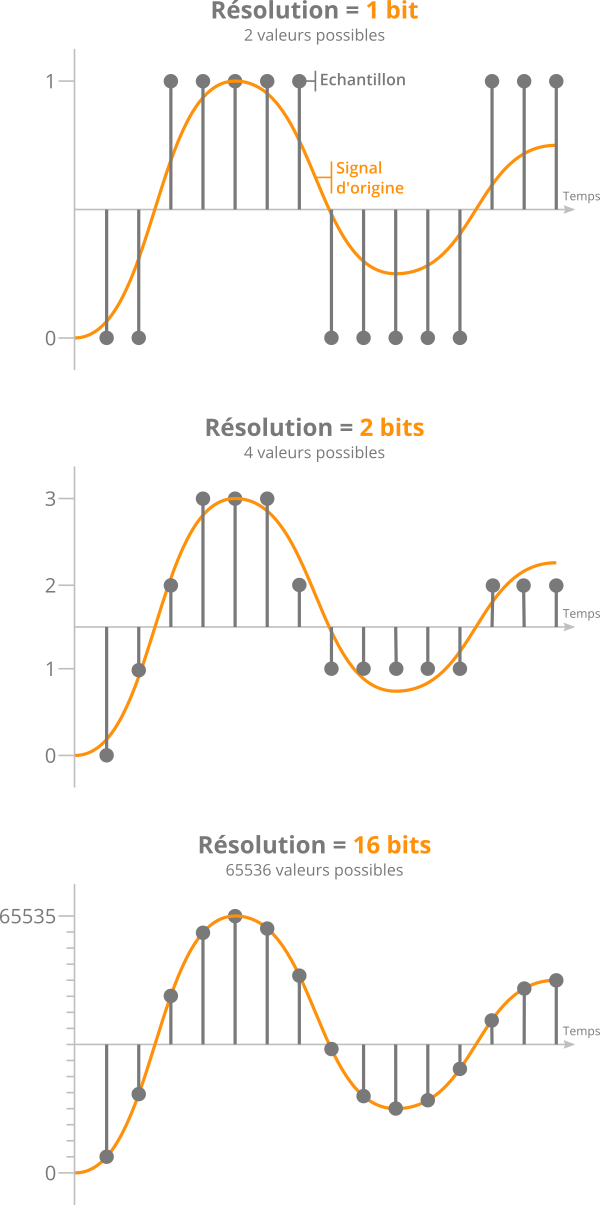
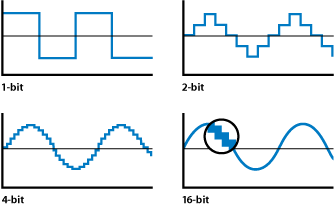
As a result, the higher the resolution, the closer the recorded signal will be to the original signal. This is what you see in the following image:

bit depth

Effect of different bit resolutions on sampling precision

Also, one might think that 24-bit recording provides better quality than 16-bit. In fact, the resolution seems more accurate and the final signal more realistic.

However, this is not really what it should look like …

A history of noise

Previously, we saw that the values ​​measured from the original signal were rounded off during analog-to-digital conversion.

If we rebuild the signal to listen to it again once the values ​​have been rounded, we will notice that it is slightly different from the initial signal.

Quantization errors when sampling an audio sample

This phenomenon is called quantification error and it is inevitable.

If we isolate this error, we realize that it is actually noise, which is added to the signal.

If you increase the resolution (English bit depth) by adding precision bits, the error will be less, and therefore the noise will be less.

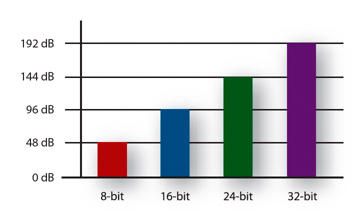
More precisely, for each bit added, the noise level is reduced by approximately -6 decibels (noise level = noise level).

In other words, for every 1 bit of resolution added, the dynamic range over which a signal can be correctly recorded increases by 6 dB.

Therefore, we deduce the following figures:

16 bit = 16 x 6 = 96 dB dynamic range
24 bit = 24 x 6 = 144 dB dynamic range
In the end, the only difference between 16 and 24 bits lies in the noise level. And therefore, in the dynamic range available for recording, “above” the noise level.

Bit depth, an important factor almost unknown

Bit depth, an important factor almost unknown

Very often we see people talking about topics that are important, like bitrate for example. Most of the time without understanding exactly what that means. Sometimes they even do trial and error and for various reasons it may be that the result they obtain is misleading, since they are not considering that modifying the bitrate without looking at the sample rate and the bit depth, is to act blindly and therefore the Results will always be misleading and we should not draw definitive conclusions from them.

We have detected that many people instead of giving a reading that allows them to understand what bitrate, sample rate or bit depth are, prefer to manipulate them without understanding them and, based on the result of one or two songs, they often reach conclusions. wrong about what is the right combination.

Bitrate

It is bitrate It is the amount of information that passes per second, that is, the amount of detail that an audio file can contain in a video. The bigger the bitrate means what will be passing more information per second; therefore the file will be bigger but it will contain more details, which will give it a higher quality. We will put an example to understand it very easily. Images that we have a great draftsman or painter and that we ask him to make a portrait of a person but we tell him that I can only use 5 colors and he cannot mix them.

As a result we will obtain practically a caricature and not a portrait itself. In other words, it will have less quality if we understand quality to be a faithful copy of the original.+

On the other hand, if that same painter asks you to make a portrait, but we stop using the entire color palette, you will be able to make a very realistic portrait, of very high quality, very faithful to the original.

Why did this happen? Because it contains much more information. There are many more shades. That explains exactly how bitrate affects the quality of a video or audio file.

Sample rate

When we record a video, for example, it is as if we were taking a series of photographs and then quickly saw them one after the other and that would give us the illusion of movement. In exactly the same way that cartoons worked in ancient times. Obviously if we only use three drawings per second the quality of the cartoon will be very low because you will see a series of jumps and not an action continues. If instead we use 24 drawings per second we will see a very high quality cartoon where we will seem to see an action continue without any Jump.

The sample rate is the number of samples per second that are taken to form a video or an audio file. Audio on a professional CD uses 44100 samples per second. If we lower that quantity we will notice a loss of quality and if we increase it to more than 44100 samples we will be able to obtain a very high quality HD.

Bit depth

The bit depth determines how many “steps” the curve or wave will contain that will contain our audio or video file. Obviously, the more steps the wave pattern has, it will be more faithful and, on the contrary, if it contains few steps, the wave pattern will be very rough.

So here we are understanding the importance of bit depth that for example in music affects even the dynamics of music. That is, how much can the volume of an instrument rise and fall in different passages. At different bit depth rates we will obtain different levels of decibels

Bit depth: definition

Bit depth: definition

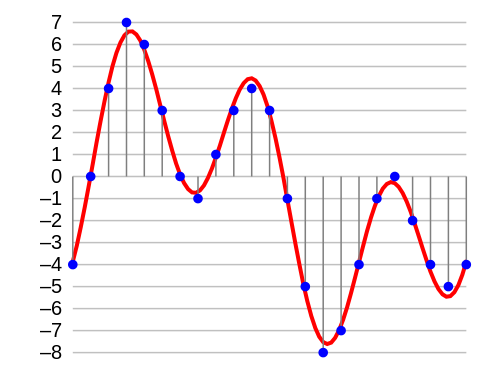
In digital audio, the bit depth is the number of bits of information in each sample and is closely linked to the resolution of the audio. Unlike an analog signal, which is periodic and is made up of infinite points, digital audio is a discrete signal since it is made up of a finite number of points. Use binary numbers (bits) to determine the number of states available to represent the strength of each audio sample and thus represent the signal. “The quality of the representation generally increases as this number of states increases. For example, […] recording of high-fidelity music is obtained on a CD with 65,536 levels of amplitude. The number of possible states of an n-digit (n-bit) binary system is E = 2 ^ n. ” 1. In summary, it is the resolution, in terms of amplitude, that a digitized signal will have. Determine the dynamic range that said signal has. In the following image we can see how a signal is represented in 4-bit depth. 4 bits generate 16 possible values ​​on the vertical axis.

Requirements

A very important aspect to keep in mind is that at a greater bit depth we are going to need more resources to process the audio and more memory to save it. This is because we will have more information. The size of our audio file will be given by the following account:

Number of bits * Sample rate * number of seconds in duration [* 2 (if it is a stereo signal)]

So, for example, the size of a second of audio on a CD, which works with a depth of 16 bits and a sampling rate of 44,100Hz / second is going to be given by the following account:

1 second = 16 * 44100 * 2 (since it is stereo)

1 second = 1411200 bits (0.1764 Mb)

Comparing different bit depths

In the following table we can compare the dynamic range (in decibels) and the number of possible amplitude values ​​of a digitized signal with different bit depths.


Obviously, the higher the number of bits, the higher the states are possible. The following example compares two pieces of music, leading them to a 16-bit to 4-bit transition. The first piece works in more depth, and the transition is much more noticeable, the result in 4-bits is perceived as the effect of “aliasing”. In the second piece, less dynamic range is used, so the transition it undergoes is almost imperceptible to the ear.

Bit Depth explanation

Definition

In digital audio, the bit depth is the number of information bits of each sample and is closely linked to the resolution of the audio. Unlike an analog signal, which is periodic and is composed of infinite points, digital audio is a discrete signal since it is composed of a finite number of points. Use binary numbers (bits) to determine the number of available states to represent the strength of each audio sample and thus represent the signal. “The quality of the representation increases, in general, when this number of states is increased. For example, […] high-fidelity music recording is obtained on a CD with 65,536 amplitude levels. The number of possible states of a binary system of n digits (n bits) is E = 2 ^ n. ” 1. In summary, it is the resolution, in terms of amplitude, that will have a digitized signal. Determine the dynamic range of that signal. In the following image we can see how a signal is represented in 4 bits of depth. 4 bits generate 16 possible values ​​on the vertical axis.

Aspects to consider

The accuracy of each sample is determined by its bit depth. Then, the higher the bit depth, the higher the resolution in the digitized signal. In addition, the greater the bit depth, the greater the dynamic range for the signal because it will have more points to represent the amplitude of each audio sample. It follows that low levels of bit depth can affect the shape of the wave and thus not achieve a good representation of the original wave because there are fewer possible points to represent it. For example, in the following graph we can see a sinusoid represented with different bit depths. A depth of 1 bit will generate a wave more similar to the square wave (depending on the quantification) because we only have two possible points on the vertical axis.

Requirements

A very important aspect to keep in mind is that at greater bit depth we will need more resources to process the audio and more memory to save it. This is because we will have more information. The size of our audio file will be given by the following account:

Bit number * Sample rate * number of seconds duration [* 2 (if stereo signal)]

Then, for example, the size of a second of audio on a CD, which works with a depth of 16 bits and a sampling frequency of 44,100Hz / second will be given by the following account:

1 second = 16 * 44100 * 2 (since it is stereo)

1 second = 1411200 bits (0.1764 Mb)

Sample Rate and Bit Depth

In sound and audio software and hardware specifications we are often told about processing capacities of up to 96kHz and 64bit operation, but what do these issues really mean? And how do they affect the quality of our sound?

Sample Rate and Frequency Range

The sampling rate is the frequency with which the A / D converter (analog to digital) measures the levels of a signal, the samples are broadly analogous to a series of snapshots. If the converter takes ten samples of the signal every second, it would have a sampling rate of 10 Hz.
The frequency range that an A / D converter (present on a sound card for example) can capture is determined by the sampling frequency, or sampling rate. However, in this there is a strict law that may seem unintuitive: the maximum frequency that can be captured is only half of the sampling frequency. A sampling rate of 10 Hz can capture a maximum frequency of 5 Hz, not 10 Hz. The reason is that, without double the samples of a sound source, some of the oscillations of the signal are lost.
But what happens if there are frequencies higher than the capacity of our sampling frequency in the captured analog audio signal? Aliasing then occurs, phenomena that occur when the highest sampling frequency that has been sampled is higher than the frequencies that can be accurately captured by the A / D converter. Aliasing adds distortion to the audio signal artificially, adding lower frequencies to higher partials. Aliasing can occur in a digital audio system as a result of a poorly designed A / D converter, but you are much more likely to hear it when you play high notes from a software-based synthesizer. If the synthesizer does not use an antialiasing technology, the high notes have the possibility of becoming random groups of tones that have no relation to the key note you are playing.

The researchers at Bell Laboratory are familiar with this problem since 1920 and conceptualized the principle as the Nyquist-Shannon sampling theorem. The theorem is simple: to sample the frequency value of x correctly, you need a sampling frequency of at least twice x. (The maximum frequency at which it can be sampled without aliasing at a certain sampling rate is thus the so-called Nyquist frequency.) So why do we need the sampling rate to be twice as fast as the most frequency? high to be recorded? Because each ordinary period of a waveform includes an upward and a downward oscillation. If the A / D converter takes less than two samples per period, it cannot capture the entire oscillation. In order to capture each “up” and “down” state, you need to take at least two samples from each period. Thus, the sampling rate has to be twice the highest frequency that must be recorded.

According to the Nyquist-Shannon theorem, to sample frequencies that are in the upper limit of the human ear (around 22000 Hz), you need a sampling frequency of around 44000 Hz, which is, not by chance, the rate Normal sampling for commercial audio CDs, 44100 Hz.

This obviously allows you to sample the frequencies from the top of the range of our ear, but what happens when the frequencies of the signal that reach the A / D converter exceed the maximum frequency limit of 22 kHz? They fold into the audible spectrum as distortion, so the A / D converters incorporate an anti-aliasing filter that eliminates these high partials, before the audio is converted to digital format.

AUDIO WHY SEND MY WAV FILES TO 16 BITS, 44,100HZ?

Many will ask, what do we mean by the technical term of 44,100Hz at 16 bits? That term refers to the coding standard with which the compact disc was marketed in the 80’s.

The quality of a compact disc has a depth (bit depth) of 16 bits and a sampling rate of 44.1 kHz, which means that it is the standard quality with which your music will be played from the physical format. But what is the depth and frequency of sampling? Why not handle a higher quality coding such as 24-bit at 96kHz?

Bit depth:

In digital audio using pulse code modulation (MIC or PCM by Pulse Code Modulation), it is the number of bits of information for each sampling and corresponds directly to the resolution of each sampling. Examples of this: The compact disc which uses 16 bits per sampling, DVD Audio and Blu Ray which support 24 bits per sampling. Bit depth is only applicable to lossless (loseless) files and not to compressed (lossy) files such as mp3, wma, etc. With 16-bit audio, there are 65,536 possible levels. With all the higher resolution bits, the number of levels is doubled. By the time we reach 24 bits, we actually have 16777216 levels. Remember that we are talking about a frozen audio segment in an instant of time.

Sample depth:

Pulse code modulation (MIC or PCM by Pulse Code Modulation) is a modulation procedure used to transform an analog signal into a bit sequence. The unit of measure commonly used is Hertz (Hz).

When it is necessary to capture the entire range of human ear capacity (20-20,000 Hz) such as recording studio music, or various types of acoustic events, audio waves are usually recorded at 44,100 Hz, 48,000 Hz, 88,200 Hz or 96,000 Hz. Sampling frequencies of more than 50,000 Hz or 60,000 Hz do not provide useful information to human ears, although the difference is small, in 96,000 Hz sampling it is effective eliminating distortion.

Why send my WAV files at 16 bits, 44,100Hz?

To hear the difference between your music in 16 bits at 44,100Hz and 24bits 96,000Hz you must have a decent professional audio system or professional headphones, have a well-trained ear and this without counting the noise or noise that exists around you, However, if you want to compare both formats, the difference is imperceptible in low-end headphones, speakers of a stereo coppel or the speakers of your macintosh.

It also greatly influences the mixing and production made during the recordings by the audio engineer when capturing the instruments in their raw state. This greatly influences your WAV files to be heard well in their final mix at 44.1KhZ 16 bits or 96kHz at 24 bits.

The society of audio engineers recommend 48,000 Hz for most applications however they give recognition to 44,1000 Hz for the compact disc and its various applications. In any case, it is recommended for its average consumption in digital media a coding at 44,100 Hz at 16 bits to make up your music in a compact disc format and also for digital distributions … although spotify, itunes, etc … compress your music in mp3 format to 128kbps, a minimum and lousy quality.

WAV is a lossless digital audio format (loseless) and are raw audio files which you can request from your audio engineer at no cost when you finish mixing your tracks.