What are the factors that affect video quality?


Free Download Mp4Gain
picture

What are the factors that affect video quality?
video quality
video quality

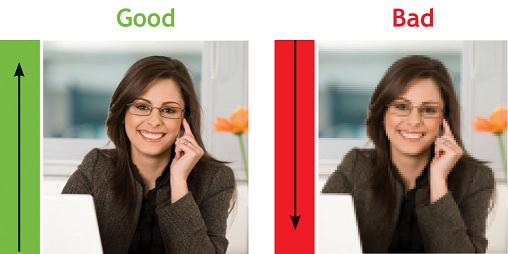
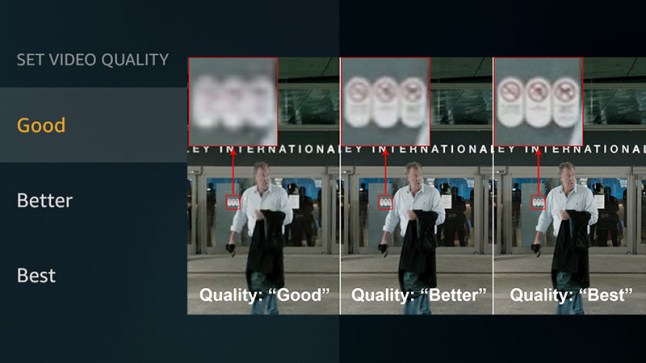
The “image quality” of a video is actually a very complicated topic.
video quality
video quality


Whether it is the fluidity of the image, the size of the image or the clarity of the image, it can be counted in the criteria of “image quality”.

Here we must first clarify some more important parameters

1. Bitrate

The bitrate affects the volume of the video, which is proportional to the final size of the video file. That is, the higher the bitrate, the larger the video file size. The lower the bitrate, the smaller the video file size. What role does the code rate play? In simple terms, bitrate size is the amount of data contained in one second of video. That is the sample rate. In this way, the higher the bitrate, the richer the content of the video file, the richer the image details, and the closer the overall image quality to the original material.

2. Frame rate

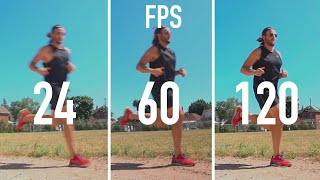
The frame rate affects the smoothness of the image. Under normal circumstances, if the video exceeds 24 frames per second, the human eye may assume that it is smooth by default. In most cases, the frame rate does not affect “image quality”, because the frame rate standards that can be selected are “scientific” and “effective”. Whether it is film (23.976), PAL (25), or NTSC (29.97), in these common formats, the frame rates shown in parentheses are the frame rates that can give people a good viewing experience. .

3. Resolution

The definition of resolution should be very familiar to everyone. N*M resolution essentially refers to the number of pixels. The resolution determines how fine the video is. If the original material can be guaranteed. The higher the resolution, the better the video content.

With that said, we can start to infer the image and video quality factors.

first priority

quality of original materials

The quality of good footage trumps everything, and the quality of footage can be hidden. That is, I have a 1920 x 1280 video in hand and downscale it to a 1280 x 720 video. If other parameters are reasonable, the image quality of this video can be guaranteed. For example, I only have a PAL material (720*576), I want to convert it to a 1920*1080 video, if the resolution of this material in this new video exceeds 720*576 (i.e. its original resolution), the quality of the video starts to drop off sharply and there is no way to compensate for this process.

Second, the code rate should be selected within a reasonable range. Under normal circumstances, the original 25M/s video material can still be viewed if it is compressed to 8M/s, but only if your display device is a common home device or general projector. Specific discussions are also required in the high definition environment.

The last and most problematic is the video format.


Free Download Mp4Gain
picture


Mp4Gain Main Window
picture


Mp4Gain Features
picture


Free Download Mp4Gain
picture

What are the factors that affect video quality? Part 2

What are the factors that affect video quality? Part 2

Video Quality
Video Quality

Which AVI WMV MKV MXF MOV M4V MP4 RMVB MPG FLV


It’s really stunning, isn’t it?

Next, let’s talk about ranking. AVI is similar to WAV in audio files. It has the most volume, but is usually the original material. The biggest advantage of AVI is that it can be streamed. Basically you can use NLE to edit in all office conditions Minus it is very inconvenient to wear

WMV is the Windows Media Video compression specification. MOV are the two QuickTime formats. These two formats are the most widely used HD encoding formats under current technical conditions.

MP4 is mpeg4 . We should all be very familiar with mpeg2 . Supported by excellent encoders, MP4 is also a format that can be frequently used in high-definition environments. Don’t underestimate mp4 because of the inherent concept. The uses of mp4 are many, very wide and very convenient. m4v is an mp4 file in some specific encoder environments, and m2v corresponds to mpeg2

MXF MKV is the package format. To put it bluntly, it’s the box brand. The decoders used in the box can be various and support a wide range of use and high efficiency. In general, finished products that do not require reprocessing can choose these two formats. Basically, this format is selected. It is equivalent to “packaged, ready to receive”. The degree of freedom is very large, and the encoder can be the common DivX, XviD, 3IVX, or even Real, Quicktime, WMV, etc.

RMVB, as the name suggests, is the RealVideo format, with a high compression rate and poor video quality.

FLV is basically the worst format.

What are the factors that affect video quality?

What are the factors that affect video quality?

Video Quality
Video Quality

Bit rate

Video Quality
Video Quality

Resolution

encoding type

frames per second

The “image quality” of a video is actually a very complicated topic. Whether it is the fluidity of the image, the size of the image or the clarity of the image, it can be counted in the criteria of “image quality”.

Here we must first clarify some more important parameters

1. Bit rate (also called bitrate)

The bitrate affects the volume of the video, which is proportional to the final size of the video file. That is, the higher the bitrate, the larger the video file size. The lower the bitrate, the smaller the video file size. What role does the code rate play? In simple terms, bitrate size is the amount of data contained in one second of video. That is the sample rate. In this way, the higher the bitrate, the richer the content of the video file, the richer the image details, and the closer the overall image quality to the original material.

2. Frame rate

The frame rate affects the smoothness of the image. Under normal circumstances, if the video exceeds 24 frames per second, the human eye may assume that it is smooth by default. In most cases, the frame rate does not affect “image quality”, because the frame rate standards that can be selected are “scientific” and “effective”. Whether it is film (23.976), PAL (25), or NTSC (29.97), in these common formats, the frame rates shown in parentheses are the frame rates that can give people a good viewing experience. .

3. Resolution

The definition of resolution should be very familiar to everyone. N*M resolution essentially refers to the number of pixels. The resolution determines how fine the video is. If the original material can be guaranteed. The higher the resolution, the better the video content.

With that said, we can start to infer the image and video quality factors.

first priority

quality of original materials

The quality of good footage trumps everything, and the quality of footage can be hidden. That is, I have a 1920 x 1280 video in hand and downscale it to a 1280 x 720 video. If other parameters are reasonable, the image quality of this video can be guaranteed. For example, I only have a PAL material (720*576), I want to convert it to a 1920*1080 video, if the resolution of this material in this new video exceeds 720*576 (i.e. its original resolution), the quality of the video starts to drop off sharply and there is no way to compensate for this process.

Second, the code rate should be selected within a reasonable range. Under normal circumstances, the original 25M/s video material can still be viewed if it is compressed to 8M/s, but only if your display device is a common home device or general projector. Specific discussions are also required in the high definition environment.

The last and most problematic is the video format.

There are endless video formats, and we are also dazzled in the process of practical application.

What is bit depth? part 2

What is bit depth? part 2

BIT DEPTH

Frequently used bit depth in videos
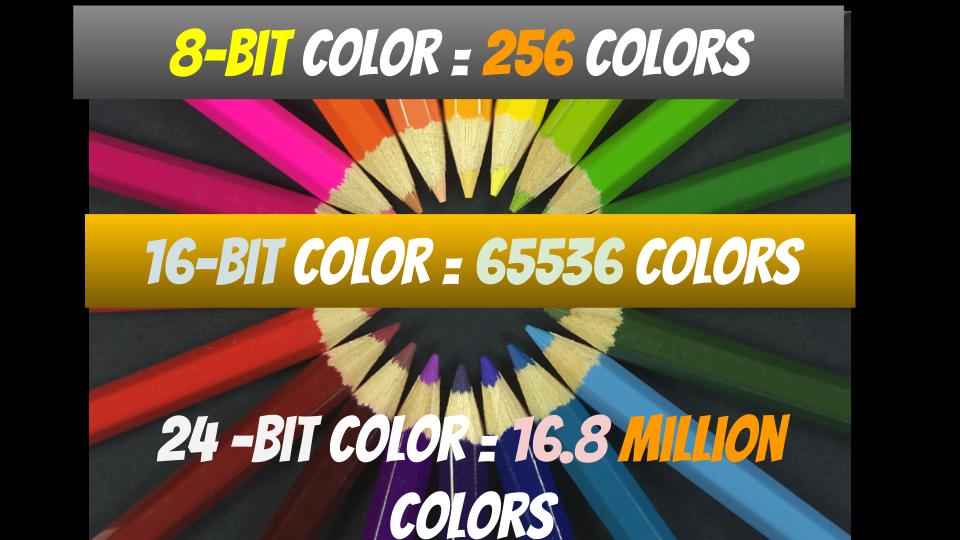
The commonly used bit depth for video is “24 bit” .

Video Bit Depth

We usually look

digital terrestrial broadcasting
BS/CS Broadcasting
Youtube
Nico Nico Douga
· · Etc.
Etc are all 24 bit.

All the encoders that we use regularly are also 24-bit encoded. (Although not shown in settings)

I think it’s good to recognize that “all the videos I usually watch are 24-bit!”.

Difference in the number of colors.
For example, in the case of 24bpp in RGB, 8 bits are assigned to R, G and B respectively.

A: 8 bit
G: 8 bit
B: 8 bit
8 bits is “256” in decimal.

In other words, you can see that “256 colors” can be expressed for each of R, G and B.

Also, there are as many color combinations as there are R, G, and B combinations, so

256 colors ✕ 256 colors ✕ 256 colors = 16777216 colors ≒ 16.77 million colors
Thus, you can see that a total of 16.77 million colors (in the 24-bit case) can be expressed.

By the way, most of the “maximum display colors” of general personal computer screens are 16.77 million colors.

screenshot_2971
▲ (Reference) Display I am using: DIOS-MF241XB specifications | Wide model | IODATA IO DATA DEVICE
As you can see from the specifications of the screen of the personal computer you are using, it probably has 16.77 million colors.

soon,

The number of colors in the videos we usually watch… “16.77 million colors”
Maximum number of colors for the screen we are using… “16.77 million colors”
That is, most of the images that we usually see are “16.77 million colors”, and the maximum number of colors on the screen that we usually use is also “16.77 million colors”.

Image quality comparison
Up to about 24 bpp, the difference in image quality is relatively visible.

2_bit 4_bit 8 bits True Color
▲2bpp ▲4bpp ▲8bpp ▲24bpp
Quote: Color depth – Wikipedia

For example, with an x264 encoder, you can encode at 24 bpp or more with a “high bit depth” setting of 30 bpp (10 bits each), but you can barely tell the difference from 24 bits.

x264_high bit depth
▲ In case of x264guiEx from AviUtl

Also, (as mentioned above) most PC screens can only express up to “16.77 million colors (24-bit)” in the first place.

Therefore, in most personal computer environments, it is (physically) impossible to distinguish between 30-bit and 24-bit.

However, in the case of “video originally shot at 24 bits or more”, such as “animation” and “movie”, when encoding with 30 bits (10 bits each), the color-related filter effect will be applied without problems. As a result, banding (the noise that occurs in continuous parts of color) is reduced, and image quality tends to improve.

▼ An image of an animation encoded in 24-bit and 30-bit and the same part of the same frame cropped (the original frame is this )
8bit– 10bit–
▲ 24bit
(You can see that the banding is noticeable compared to 30 bits) ▲ 30 bits
So that doesn’t mean it doesn’t mean anything at all.

You can check it in the following blogs.

rigaya diary and notepad image quality comparison 2015.01
X264 10 bit depth is effective in anime: Cute Leaf
Name
Frequently used bit depths (color depths) are named.

16 bpp (65,536 colors): high color
24 bpi (16,777,216 colors): Full color
32 bpp (16,777,216 colors + α channel): true color
48 bpi (281,474,976,710,656 colors): Deep Color
Reference : What is color depth? | Color Depth – Meaning / Definition: IT Glossary

How to check the bit depth of a video
If you use video identification software like MediaInfo ,

You can easily check the bit depth of the video.

screenshot_298 screenshot_298
▲ In this case, 8 bits is the number of bits assigned to Y, U, and V.
So the bit depth is 24 bits (however the effective bit is YUV420 so it is 12 bits).
resume
-Bit depth: the amount of data per pixel

-The higher the bit depth, the more colors can be represented (= resulting in higher image quality).

・ The bit depth (color depth) of most videos is 24bpp.

What is the bit rate of “video / audio”?

What is the bit rate of “video / audio”?

Video Encoding

Bitrate-min

Encoding Video

The bit rate in a video is the amount of data that can be sent and received per second.

Since the amount of data increases, the quality of the video improvement as it is used as video / audio data and increases the bit rate. On the contrary, the lower the bit rate, the worse the quality will be.

The unit is BPS. This is an abbreviation of bits per second. A 1 BPS, you can send and receive 1 data bit per second.

To make it easier to understand, it is the amount of data that is packaged in a video of a second.

How to check the “Windows” bits rate
Right-click on the video file you want to verify → Click on “Properties” → “Details”. The “Total Bit Rate” Here is the total bit rate included in the video.

Bit rate 2 min

“Data Speed” … Video Bit Speed
“Total bit rate” … All bits rates
“Frame rate” … Frame rate (FPS)
“Bit rate” … Audio Bit Rate
By the way, the “frame rate” is the rate of frames. At 60 fps, the image becomes viscous.

What is the optimum number of bit rates for video?
The quality of the video is proportional to this bit rate. So, it is not like that if we must increase this number. The higher the number, the greater the file size.
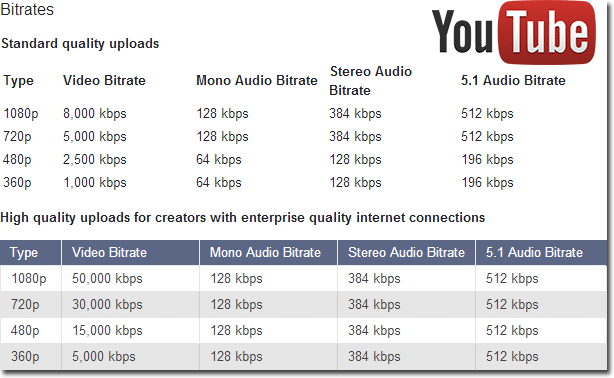
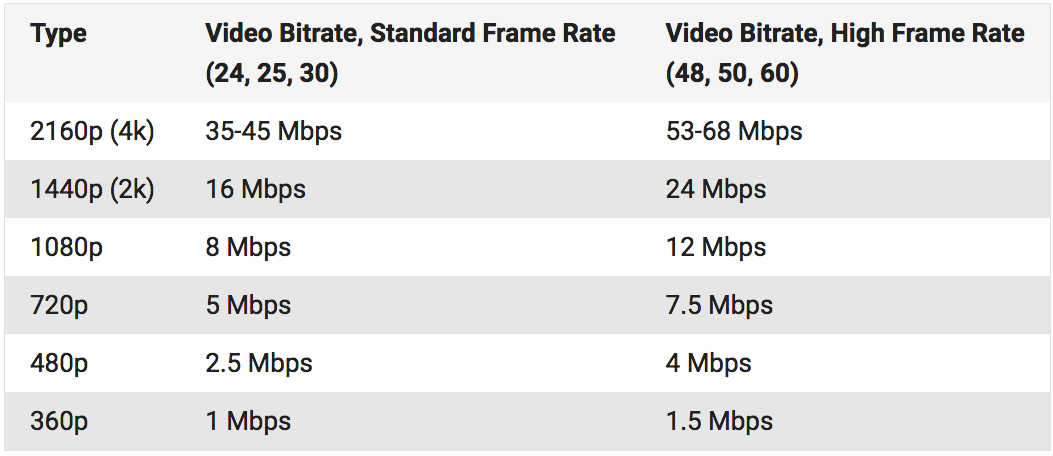
If the purpose is to give it to YouTube, the recommended bit rate is published, so it is good to consult it. (To August 2016)

Bit rate 3 min
Reference: Recommended coding configuration for loaded videos | YouTube help

Kbps and Mbps.
Both units refer to the amount of data that can be sent per second, but Kbps is a unit called KILOBIT per second Mbps is a unit called megabit per second.

1 kbps = 1000bps
1 Mbps = 1000 Kbps
is. Use as a reference when coding. That’s all for this time.

What is video coding? Explain how to generate video distribution and basic knowledge files. Part 2

What is video coding? Explain how to generate video distribution and basic knowledge files. Part 2

Video Encoding

What are the four points that must be checked before coding work?

Encoding

Although the size of the video file becomes clearer when the encoding process is done, there are some things to consider, such as the quality of the video image becomes lower. From here, I will explain 5 points to be taken into account before coding work.

1. Convert to a compatible file format
The appropriate file format change depending on the purpose of use of the video. Generally, MP4 and FLV versatile are suitable for creating videos for distribution of videos.
If you already have a video distribution service you are considering using, we recommend that you check what file format is recommended.

2. Terminate coding rarely
If the encoding process is done, the quality of picture and sound quality will deteriorate as the amount of data becomes clearer, it will be impossible to restore the original quality. With experience, you can understand what bit rate and resolution should be used for conversion to get quality picture and sound appropriate.
If you are a beginner, you can leave the original data separately as a countermeasure, so even if a video is not code, you can start again, so you can be sure.
Bit rate represents the amount of data that can be sent and received per second. The higher the bit rate, the better the picture quality and sound. However, the higher the bit rate, the larger the file size, so we recommend changing the bit rate according to whether you want to encode the video must have a high image quality.

Resolution: shows the number of pixels called pixels contained in the video frame and is usually expressed as the number of horizontal pixels x vertical.
Example. 4K: 2160p (3840 x 2160) HD: 1080p (1,920 x 1,080), HD 720p (1,280 x 720), etc. The
the file size increases as you increase the resolution, which is adequate considering that. We recommend changing the resolution.

3. Note that coding time-consuming.
The time it takes to encode depends on many factors. Encoding time will vary with the frame rate, resolution, effects used for video, the encoder used and the use of encryption software, such as CPU performance computer.
For video files that have a time and a fixed delivery period, it is a good idea to codify enough time to prepare.

4. Do not lay too time video.
The longer the video is, the greater the data of the video file, which can affect encoding time. If possible, divide the video that is too long in two or cut unnecessary scenes for the video time is not too long.
If you try to encode a long video, it will be a heavy burden depending on the specifications of your PC, and there is the possibility that the work is not complete.

It is important to codify according to the purpose of the video.
Coding work is needed to create and distribute video with ease.

If the frame rate are emphasized, the resolution of the image quality, bit rate, etc., the size of the file will be huge, which will be a burden on both the side of the poster as that of the viewer, and the viewer can not play the video. comfortably and will go halfway. It is possible that you do.
However, the video encode, you can convert a video with quality picture and sound suitable.

This is a must for anyone who wants to make a video for training of the company or an open campus. We crastream recommend a platform video distribution system based on the cloud provided by us.
Crastream is a platform video distribution system high performance for limited objectives, members and employees. Thanks to high security, you can edit and post videos with ease without worrying about filtering external information to the outside. You can request materials for free, so do not hesitate to contact us if you are interested.

What is the bit rate, which is said to be indispensable for video distribution?

What is the bit rate, which is said to be indispensable for video distribution?

Bitrate

1Bit rate is the number of bits that can be sent and received per second.

Bitrate

Advantages and Disadvantages of Setting a High Video Bitrate
# There are merits such as being able to offer clearer images
#There are disadvantages such as not being able to play fluently
Five What are the factors that affect the image quality of videos?

#frames per second
#resolution
#Codec
6 Relationship between YouTube and bit rate
7 Relationship between video conferencing and bit rate
8summary
One of the important factors affecting the image quality of a video is the “bit rate”. Generally, the higher the video bit rate, the better the image quality. But what is the bitrate of the video? How should I set the bitrate of the video? I wonder if there are a lot of people worried. In this article, we will discuss video and audio bit rates, video bit rate guidelines, advantages and disadvantages of setting a high video bit rate, factors that affect video quality, the relationship between YouTube and bit rates and video conferencing. about.

Bit rate is the number of bits that can be sent and received per second.

Bit rate refers to the number of bits that can be sent and received per second, and the unit is bps, which is short for Bit Per Second.

For example, if it is 100 bps, it means that 100 bits of data can be sent and received per second.

The higher the bit rate value, the more data can be sent and received per second. Video bit for bit rate

There are two types, audio bit rate and rate, and the value calculated by adding these two bit rates is called the oval bit rate.

# Voice bit rate

The audio bit rate refers to the bit rate related to the audio in the video file, and basically the value of the audio bit rate is less than the bit rate of the video. As a guideline for audio bit rate, it is approximately 96 to 128 kbps for lossy codecs such as MP3 and AAC, while it is approximately 192 to 320 kbps for high-quality video.

# Video Bitrate

Video bit rate refers to the bit rate associated with video in a video file. The video bit rate value is large compared to the audio bit rate. The guideline for video bit rate varies greatly depending on the quality of the image to be delivered, and the value varies, but it is also said to be 500 kps at 70 Mbps.

Since the standard audio bit rate is approximately 192 to 320 kbps, the video bit rate occupies most of the oval bit rate when watching the entire video file. Basically, the characteristic of video bitrate is that the higher the value, the better the image quality.

However, it does not mean that the video bit rate value should be high. When viewing an image on a small monitor screen, it can be said that the roughness of the image is not that noticeable even if the bitrate value is a bit low. Even if you increase the value of the video bit rate, you cannot get the feeling that the image quality has improved, and there are many cases where the file size just increases.

Estimated video bit rate
Even if the bit rate value is the same, the image quality will change depending on whether the video content is moving or not. Therefore, it is necessary to determine the bitrate that appears to be optimal for the video. The following is a guide to the proper bit rate for frequently used video resolution when distributing videos on YouTube.

Resolution SD (720 x 480px) 1-2 Mbps (video with a lot of movement) 500kps ~ 1Mbps (video with little movement)
HD resolution (1280 x 720px) 4.5-9Mbps (video with a lot of movement) 2.4-4.5Mbps (video with little movement)
Full HD resolution (1920 x 1080px) 9Mbps-18Mbps (high-motion video) 4.5-9Mbps (low-motion video)
4K resolution (4096 x 2160px) 35 ~ 70Mbps (high motion video) 25-35Mbps (low motion video)

H.266 video encoding method

H.266 video encoding method

H.266

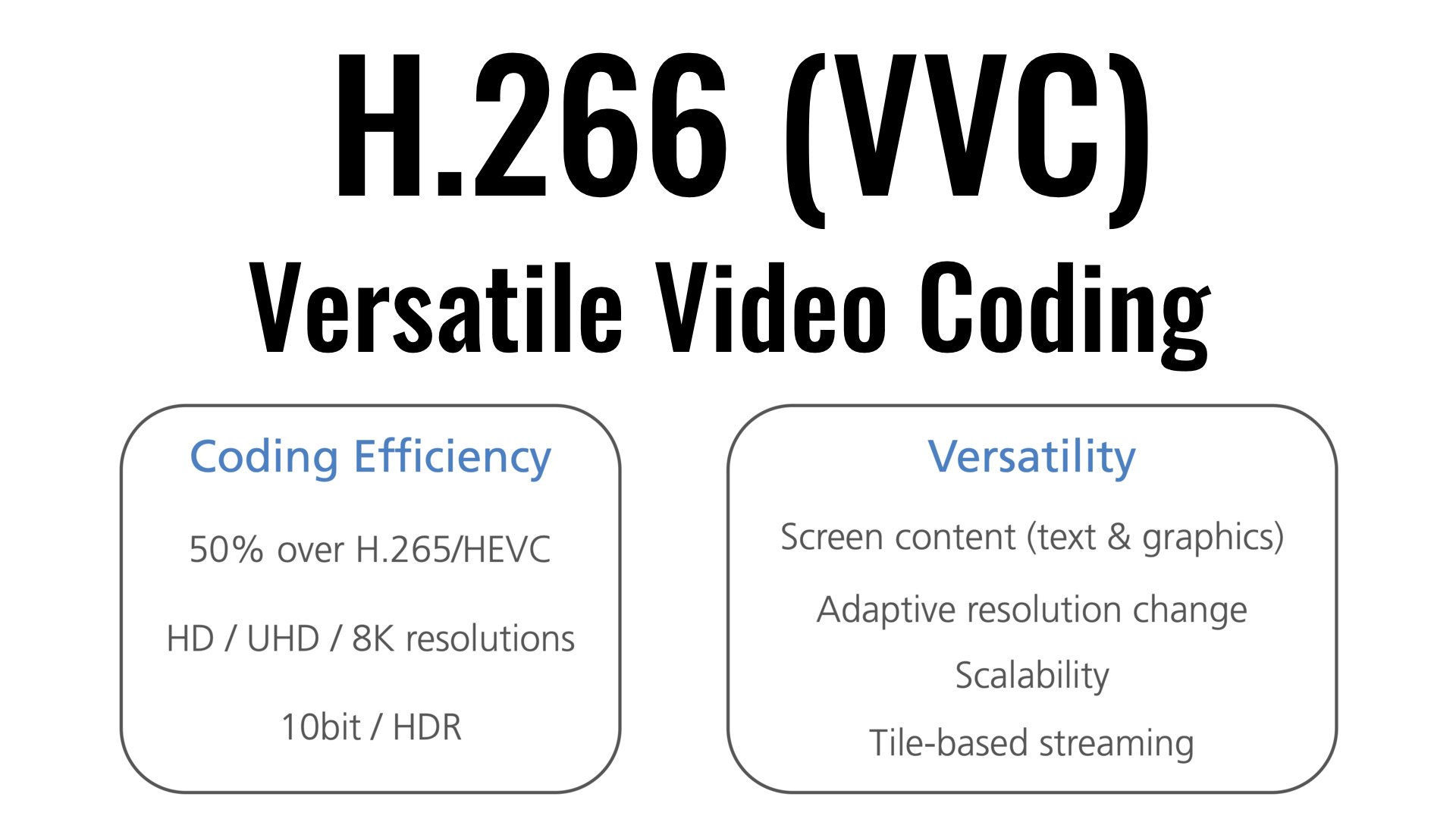
| It was successful in transmitting 4K / 60fps video using a VVC compliant real-time codec – It is possible to provide highly realistic video services at a bit rate less than half that of the method.

H.266/VCC

KDDI R&D Laboratories, Inc. (Headquarters: Fujimino City, Saitama Prefecture, Director: Gen Nakamura, hereinafter “KDDI R&D Laboratories”) is the latest international standard H.266 video encoding method | VVC (Versatile Video Coding) Using a real-time codec system (hereinafter “this system”) compatible with “VVC”), we achieved a demonstration experiment of streaming 4K video at a bit rate of 12 Mbps (megabit / sec) and a frame rate of 60fps (frames / sec.) We have confirmed that stable video quality can be maintained even if the bit rate is reduced to less than half that of the current stream.
Current 4K streaming video is streamed at a frame rate of 60fps, and by using this system, viewers can be provided with a highly realistic video service comparable to 4K streaming, including not only streaming but also mobile lines. . provide a more flexible network configuration.

[Background]
KDDI R&D Laboratories is dedicated to the research and development of compression technology with the aim of realizing a content experience that maintains a high sense of presence by providing the optimal transmission media according to the situation of the user who is viewing the video. Is working.

1. 1. This demo experiment follows the following two VVC research results announced by KDDI R&D Laboratories in September and December 2020.
・ Developed the world’s first newest video encoding method H.266 | VVC Compliant 4K Realtime Encoder (September 1, 2020)
・ The world’s first newest video encoding method H.266 | VVC Compatible Realtime Codec 4K Live Streaming Successful Demo Experiment (Dec 23, 2020)

2. VVC is the latest video encoding method, and is the international standard video encoding method widely used in today’s Internet 4K / 8K video transmission and distribution services. H.265 | HEVC (High Efficiency Video Coding, hereinafter “” Achieves twice the video compression performance of “HEVC”). It was standardized in August 2020 by the international standardization bodies ITU-T and ISO / IEC. In Japan, its adoption is being considered as one of the video coding methods in the sophistication of terrestrial digital television broadcasting, which is being studied by the Ministry of the Interior and Communications (Note 1).

The 3.4K video streaming has a frame rate of 60fps and is superior in reproducibility of high-speed moving scenes compared to 30fps, which is generally used for Internet video distribution, especially in sports scenes. It helps to improve the quality of the experience. In the experiments so far, it was aimed at 30fps and it was difficult to use it for streaming.

[Scheme and results of the demonstration experiment]
On December 21, 2021, a network line was used from Kansai Television Broadcasting Corporation (Kita-ku, Osaka) to the KDDI Research Workshop (Minato-ku, Tokyo) using this system developed by KDDI R&D Laboratories. a video streaming demonstration experiment over.

In the demo experiment, we managed to stream 4K video at 12 Mbps bit rate and 60 fps frame rate, and confirmed that stable video quality can be maintained even if the bit rate is reduced to less than half of the current one. transmission.
We have improved acceleration processing and parallelization processing that are effective for making VVC encoders on multi-core CPU platforms, and we have devised and realized technology that scales not only at a frame rate of 30fps but also at 60fps. .

Factors related to the quality of video and audio data Part 2

Factors related to the quality of video and audio data Part 2

Bit Rate

resolution
This is also an item dedicated to video.

Video Bitrate

Resolution is a numerical value that represents the density of pixels in an image. We use the unit “dpi (dots per inch)” or “ppi (pixels per inch)”. The “image” in digital is expressed by “a collection of very small colored dots (pixels).” The higher the resolution value, the higher the density of this point and the finer and more natural the image will be.

There is also a concept similar to this, which is the concept of resolution using pixels (dots, pixels). Uses pixels [pixel], dots [dot], or pixels as the unit. It is often written as “1920 x 1080 pixels” or “2 million pixels”, and in the case of this video, there are “1920 horizontal and 1080 vertical color points (pixels), and the total number of points is 2,073,600 ( approximately). It means “2 million pieces)”. (* Pixel = dot = pixel)

For resolutions that use “dpi”, it represents the density of pixels per 1 inch (= 0.0254 meters) of a straight line.
For resolutions that use “pixels”, it represents the total number of pixels used in the video.

The exact definition of resolution is the first. However, the latter is also widely recognized. Be careful not to get confused.

▲ Source: Wikipedia “Resolution”

Screen resolution / ratio
In the field of displays, there is also “screen resolution”. This is represented by pixels. Because it uses pixels, it represents the total number of pixels on the screen. You can also express the “screen aspect ratio (screen aspect ratio)” by multiplying it by something like “1920 x 1080 pixels”. If it is “1920 x 1080 pixels”, the aspect ratio of the screen is “16: 9”.

If the aspect ratio of the image and the aspect ratio of the screen do not match, black bands may appear at the top and bottom or left and right when the image is fully displayed (enlarged display), or the image may be to stretch.

Some screen aspect ratios have special names. The following are pixel counts, screen aspect ratios, and commonly used screen names. (* Since most pixel ratios are square, screen aspect ratio = screen aspect ratio)

Known as Horizontal x Vertical Ratio
(horizontal: vertical) Number of pixels
VGA 640 × 480 4: 3 307,200
SVGA 800 × 600 4: 3 480,000
XGA 1024 × 768 4: 3 786,432
SXGA 1280 × 1024 5: 4 1,310,720
WSXGA + 1680 × 1050 16:10 1,764,000
FHD (Full HD) 1920 × 1080 16: 9 2,073,600
WUXGA 1920 × 1200 16:10 2,304,000
Wikipedia: screen resolution that

By the way, continuing from last time, there is too much basic knowledge and it seems frustrating, but please do your best. Knowing this and not knowing it will make a big difference in your video and audio conversion and playback work. Remember it little by little as it is a necessary knowledge to be able to play and convert optimally while maintaining quality without waste.