Factors related to the quality of video and audio data


Free Download Mp4Gain
picture

Factors related to the quality of video and audio data
Video Bitrate

Last time, I wrote about “codecs” and “containers” that determine the format of the video and audio data. Now, I would like to write about each item related to the “quality” of that data.
Bit Rate

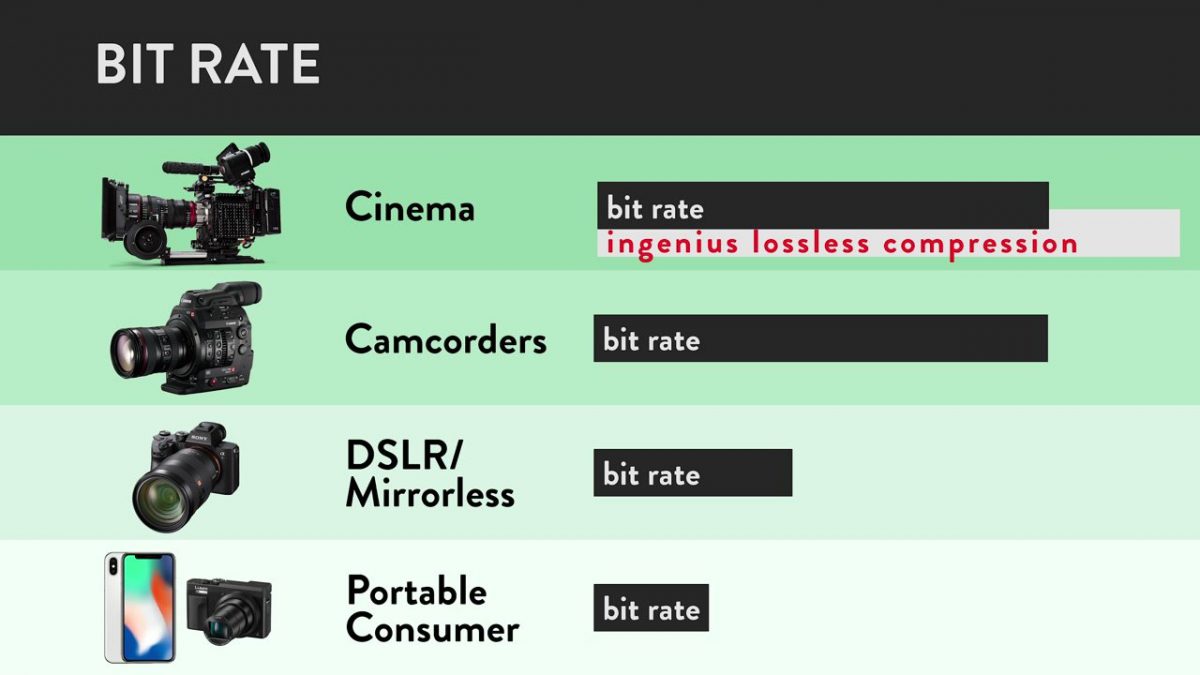
Bit rate
Bit rate [bit rate], or bits per second, is a unit of data transfer rate.
It is defined as the number of bits that have passed (transferred) at a given point on the data transfer path per second. Also known as bps [bits per second] and b / s. Other names include “bit rate” and “bit efficiency”, all of which have the same meaning.

In short, it is a unit that expresses “how much data (information) can be transferred”. A large number means that the amount of data passed at a certain point is large and the quality of the video and audio is improved. The greater the amount of data (that is, video / audio information), the higher the image quality and sound quality.

An SI prefix can also be added, and the unit is as follows.

Bits per second [bps: b / s]
Kilobit per second [kbps: kb / s]
Megabit per second [Mbps: Mb / s]
Gigabit per second [Gbps: Gb / s]
Since it is a unit of data transfer speed, it is also used for the speed of Internet lines. There is also a unit called bytes per second, which is expressed as “Bps” or “B / s” by capitalizing b. 1 byte = 8 bits.

For example, with MP3 audio data, the bit rate value can be increased up to “320 kbps”. The higher the number of bit rates, the greater the amount of data transferred and the greater the original data capacity.

The phrase “high bit rate” is essentially incorrect
I often hear the phrase “high / low bit rate”, but this phrase is really inappropriate.

The word bit rate is a unit, not a physical quantity. It is the same as the relationship between “length (physical quantity)” and “meter (unit)”. We say “long” but not “long meter”.

The physical quantities that represent bit rates are called “transfer rate”, “transfer speed”, “transfer efficiency”, “transmission rate”, “transmission speed”, “transmission efficiency”, and so on. However, the phrase “high bit rate” has become mainstream, so you don’t need to worry too much about it. Remember “To be exact …”.

frames per second
This is a value for video data only.

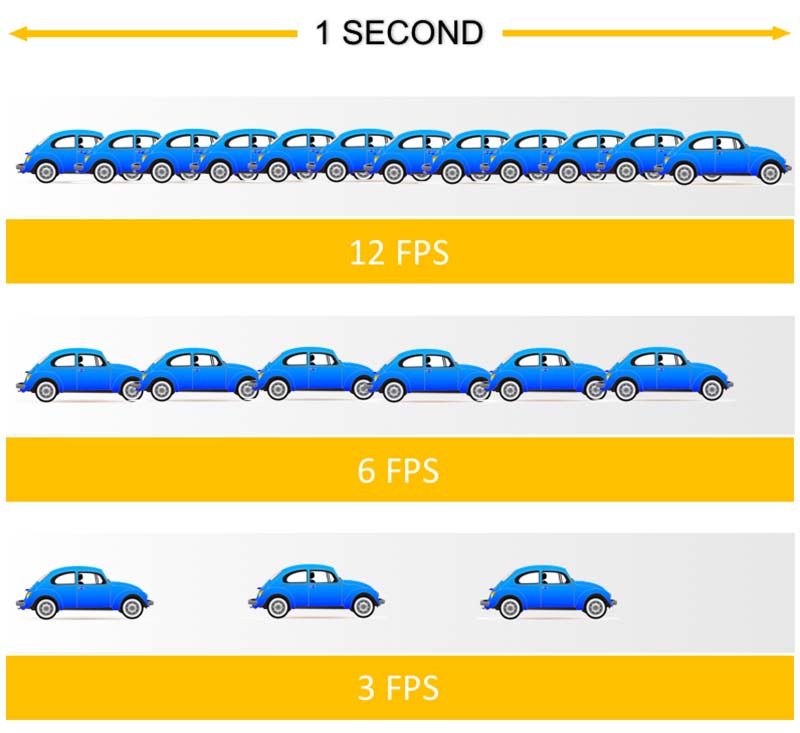
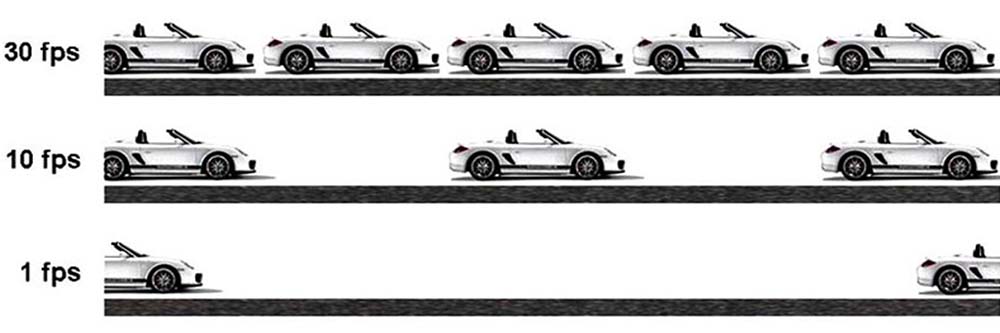
The frame rate [frame rate] is an index that shows how many frames (still images: frames) can be processed per unit of time. Use fps [frames per second] or f / s as the unit.

Digitally speaking, a video is not recorded as a continuous image, but is taken continuously and displayed at high speed like a flip book, so that it “appears to be moving.” I’m doing. It is a method that uses the effect of human residual image.

The “one-by-one still images” are called “frames” or “frames.”

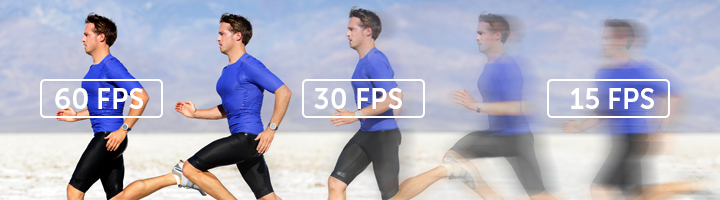
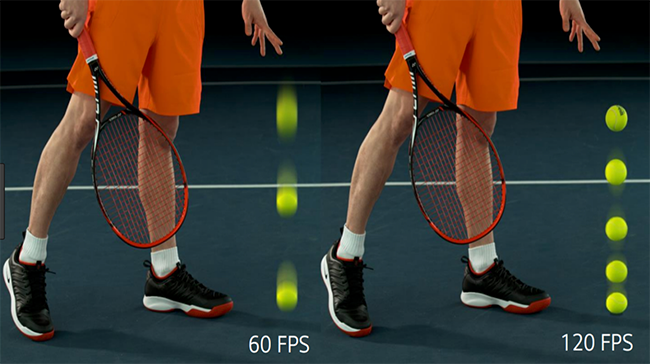
If the frame rate value is large, the number of processed frames per second will increase, resulting in smoother video. If it is 30 fps, 30 frames per second are processed.
Currently, “30 fps” or “29.97 fps” is very widespread. When you increase to 60fps, the video becomes smooth enough and when you decrease to 15fps or less, the video becomes jerky.

Increasing the value of the frame rate will result in a smoother video, but it will be heavier and of higher capacity.

There is no point in raising him innocently

There is no doubt that increasing the value of the frame rate will result in a smoother video, but if the value called “response speed” of the screen or monitor displaying the video is large (that is, slow), the frame rate value will be increased. It may not make sense to increase it.

Response speed is the time it takes for a signal to actually enter. The unit is milliseconds [ms: 1 ms is 1/1000 second of 1 second]. The “Response Speed” on a screen or monitor indicates the speed when changing from “black to white to black”. (Currently the definition is blurry because it handles colors other than black and white, but it is omitted here.)

If this response speed is high, it means that the video (color) change is fast. If the speed is high, the response speed value will be small and it will be able to display “smooth and clear video, even when moving fast.” At low speeds, the value increases and “residual images are likely to occur in videos being played.


Free Download Mp4Gain
picture


Mp4Gain Main Window
picture


Mp4Gain Features
picture


Free Download Mp4Gain
picture

What is a bit rate? Part 2

What is a bit rate? Part 2

Video Bitrate

What is oval bitrate?

Bitrate

Bit rates are assigned to video and audio respectively, and the sum of these is called the “oval bit rate” or “total bit rate”.

Windows video properties

The image above is an image of the details tab opened from the video properties, but the “data rate” of the video is the bit rate of the video, the “bit rate” of the audio is the bit rate of audio and the “total bit rate” of the video is the video. It is the oval bitrate that is the sum of the voice and the voice.

I think it is worth knowing that you can check the bitrate from the property, but there are some parts that are not very reliable, so if you want to know precise information, you should verify it with an analysis software like MediaInfo. .

See the following articles on MediaInfo.

How to use MediaInfo | I also checked the codec of the iPhone video | Tokukyu’s bastard K-team | Baseball

MediaInfo is software that can analyze audio and video file codecs, frame rates, bit rates, etc.

https: // Hamanasu Baseball Club.com/mediainfo/ https: // Hamanasu Baseball Club.com/mediainfo/

Relationship between bit rate and resolution
Regarding the relationship between bit rate and resolution, higher resolution videos require a greater amount of information, so inevitably higher bit rates are required.

If the image is just large, the amount of data it contains will also be large.

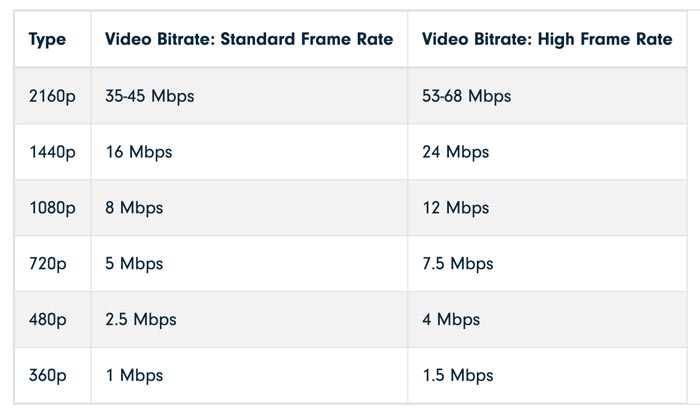
Regarding the relationship between resolution and bitrate when encoding a video, I think the recommended settings on Youtube will be helpful.

Recommended bit rate for Youtube
Note that, like resolution, frame rate increases in proportion to bit rate.

See the following article for the frame rate.

What is the frame rate? | What fps should be set when casting video? | Tokukyu’s bastard K-team | Baseball

Frame rate (fps) is a word that expresses the number of frames (frames) in a video, and it is expressed by the number of frames per second.

Relationship between bit rate and codec
Regarding the relationship between the bit rate and the codec, even if the bit rate is the same, the image quality will be different depending on the codec.

I mentioned earlier that the higher the bitrate, the better the image quality, but this assumes the same codec.

For example, the H.265 codec is said to provide the same image quality at a bit rate of about half that of H.264.

What is a bit rate?

What is a bit rate?

Bitrate

Relationship between encoding settings and image quality

Bitrate

Codec Eye Capture
Bit rate is considered to be the number of bits that can be transferred or processed per second, so the unit is expressed in bps (bits per second) and, in the case of moving images, the amount of data in video and audio contained in one second. It would be good.

In other words, if the bit rate is high, the video will have good picture and sound quality, but the data size will increase accordingly.

When considering video editing encoding, it’s basically better to set the bitrate as high as possible within the allowed range of data capacity, but how do you set the bitrate in the first place? I think there are also people who say that.

Filmora Bitrate Settings
The image above is the output screen of the Filmora editing software, but you can see that you can specify the bit rate in the detailed settings.

If the file format is MP4, you can specify a bitrate within the range of 5000 kbps and 2000-30000 kbps by default, but many people are not sure which setting is the best.

In this article, I would like to summarize the bitrate including the settings when editing the video.

What is a bit rate?
What is the difference between high and low bit rates?
What is oval bitrate?
Relationship between bit rate and resolution
Relationship between bit rate and codec
What is the set bitrate?
resume
Sponsor

What is a bit rate?
What is the difference between high and low bit rates?
As I wrote at the beginning, the bit rate is the amount of information per second, that is, a high bit rate can be interpreted as a large amount of data.

As I wrote earlier, a high bit rate means high image quality and high sound quality, and the data size increases accordingly.

Image quality and sound quality are related to the codec, but basically, the higher the bit rate, the better the image quality and sound quality.

However, it is not possible to improve the image quality of the original file in video encoding, so it is important to understand that increasing the bit rate will not improve the image quality of the original file.

What is the bit rate in a video?

What is the bit rate in a video?

Video Bitrate

Bit rate is the amount of data that can be processed within a certain period of time and the transmission speed of the communication, and is generally expressed as the number of bits processed / transmitted in one second (Bit per second / bps).

Video Bitrate


Since the video also shows an image that changes over time, there is a certain amount of data that needs to be processed / displayed within a certain period of time. This is also called the bit rate. Set the required / appropriate value for the video bit rate according to the video specifications (resolution, pitch, frame rate, compression performance, etc.).

That is, each of the video frames requires a large amount of information, because depending on the resolution, it will show many pixels, each with different brightness, colors, etc. There is also sound, which in itself is an important amount of information.

And since the duration of each frame in the video lasts a certain time, graphic information must be forwarded in addition to the audio. This implies that you need to send a number of bits every second to be able to obtain a video with good image and sound quality.

As the amount of bist is smaller, the quality will be less good.

Sampling frequency and depth of bits

Sampling frequency and depth of bits

Frame rate per second

What is the sampling frequency?

Frame Rate

What are the depth and speed of bits?
The sound quality is determined by the sampling frequency and the depth of bits.

When I read the history of sampling frequency and bits frequency on the network, I flood incorrect information.
Some people think subjectively about what frequency is better. There is a definition and a physics suitable for the frequency (sampling frequency) and the bit rate.
It is not something you can guess what is better (laughs)
, so why not study the sound quality mechanism and replace it for the quality of the video?

What is the sampling frequency?
There is something similar to the speed of frames in the world of sound.
That is the sampling frequency.
The sampling frequency is an index that indicates how many times a sound is converted per second when converting an analog signal into a digital signal.
In terms of video, 24 fps has 24 photos aligned in a video of 1 second.
In terms of voice, 44,100Hz means 44,100 digital sound samples are aligned in a second sound.
The unit is Hz.

Reference source: https://pixabay.com/en/equalizer-eq-sound-level-digital-255396/

By the way, the conversion is called AD conversion (analog to digital conversion abbreviation).
I think this meaning is difficult to understand and the information is complicated.

It is said to be standard only after converting the analog signal to digital 44,100 times per second, so the human ear is strange! That’s why.

By the way, the “sampling frequency” is the “frequency of frames” in the video.
To deepen the understanding of the sampling frequency, I will replace it with a video and continue with the story.

The frame rate of a video is called FPS (frames per second) and is expressed using the unit of how many photos are displayed per second.
And the video is more fluid at 30 fps and 60 fps than at 24 fps.

In other words, the greater the sampling frequency, the softer the sound will be.
The sound is the same and 48,000 Hz is softer than 44,100 Hz.

Before talking about what sound he prefers, first understand what sound the highest sound quality has by definition.
This is important.
By the way, it is important to understand the difference between 44,100Hz and 48,000Hz by making images.

VOOK article link “The difference between 44,100 Hz (music industry) and 48,000 Hz (video industry) that you get to know”

Did you know the sampling frequency?

What are the depth and speed of bits?
Remember only two more terms.
That is “depth of bits” and “bit speed”.
Be careful because names are similar but not equal.

These three words are simply expressed like that.

Sampling frequency (Hz) x Bit depth (bit) x Number of channels = BITS speed (BPS)

The best-known CD bit rate is 44,100 Hz x 16 bits x 2 channels (stereo sound) = 1411200 bits = 1411.2 Kbps

What is a frame rate? Part 2

What is a frame rate? Part 2

FPS

Video coding and bit rate

fps

The coding method is also related to the image quality of the video.

When compressed a video, the image quality of the video is determined by the amount of data processed per second, which is called a bit rate.
The same happens with the voice.
This includes both video and audio, so the video bit rate is the sum of the video bit rate and the Audio Bit Rate.
If you configure both at a high bit rate, you will get a beautiful video and video audio, but the size of the video will be great.
In addition, since the bit rate is fixed in a general compression method, if the frame rate increases at the same bit rate, the number of bits in the frame will be reduced accordingly and the quality of the image will deteriorate.

There is also a method called a variable bit rate, in which the bit rate increases when the movement is large and the bit rate decreases when the movement is small, but this requires a large amount of CPU processing for compression / decompression .
In any case, if you do not have enough bandwidth to send and receive, you must maintain the video bit rate at a certain level, and if you do something better, something will go wrong.

Video of the next web conference
First, starting in 2019, the bandwidth of the network is up to 2 Gbps even for domestic lines and optical lines.
Video compression methods are also evolving. For example, as of 2019, H.264, which is a general video compression method, it has double compression speed that MPEG-2, which is a conventional compression method for DVD, etc. That the compression rate will double in H.265, which will be formulated below.
In other words, it can be said that the environment to send and receive videos created at a higher bit rate is much better than the videos used in conventional web conferences.

In the future, it is expected that new systems and improved systems allow higher quality web conferences for both video and audio.
In addition, it will increase the number of people who can participate and the screen, and it will be possible to make a fairly large web conference.

What is WebP?

What is WebP?

WebP

Next generation image format!

WebP

WebP is a still image format recently developed by Google Inc. in the United States. WebP is also called the next generation image format, such as Apple recommended “JPEG 2000” and Microsoft recommended “JPEG XR” and has the following characteristics.

▼ Features of WebP

Development Goals: Reduce Display Speed ​​and Reduce Website Traffic
Superiority over JPEG – smaller file size and less deterioration in image quality
Maximum number of pixels: 16383 x 16383 pixels
Extension: “.webp”
The history of WebP! Refocused on the Core Web Vitals announcement
Although WebP is positioned as a next-generation image format, it has surprisingly been around since 2010.

▼ History of WebP

September 30, 2010: First WebP specification published on the official Google Chrome blog
2011: WebP support when Google Chrome 9.0 and Android 4.0 are released
2013: Opera 15 was announced to support WebP and not APNG when Opera 15 launches.
From the information above, we can see the fact that the history of WebP is surprisingly old and that the proportion of supported browsers has steadily increased. So why is WebP getting so much attention now?

The reason is the official announcement of Google on May 28, 2020! We announce that we will add Core Web Vitals, which includes image display speed as a component, as a UX index to assess search ranking starting in 2021.

So now is a good time to implement WebP, which was developed to reduce display speed and website traffic. Check out the following articles for details on vital web basics and how to improve usability.

What is the impact of Core Web Vitals, to be featured in 2021, on Google search results?
On May 28, 2020, Google will use Core Web Vitals as a UX indicator for existing signals when evaluating search rankings starting in 2021.

The usability of smartphone sites raises the search ranking! 7 effective improvement points for SEO
The “usability of smartphones” is becoming more important as the number of users of mobile browsing increases rather than PC. So in this article, why are you a smartphone user?
Benefits of WebP! Is it better than other image formats?
The biggest advantage of introducing WebP is, after all, the reduction in image weight. As shown below, in theory the image size is considerably smaller than JPEG and PNG.

▼ Slight WebP file size rate

Compared to JPEG: 25-34% smaller
Compared to PNG: about 28% smaller
Furthermore, it supports animation and can handle alpha channels even with lossy compression, making it suitable for exporting transparent images. In fact, when you compare the variety to other image formats, the excellence of WebP is obvious.

▼ Comparative table of 5 types of image formats

Format Compression performance Lossless compression Lossy compression Transparent animation
WebP Very expensive 〇 〇 〇 〇
Raised SVG 〇 × 〇 〇
Raised PNG 〇 × 〇 ×
High JPEG △ 〇 × ×
GIF usually 〇 〇 △ 〇

What is WebP?

What is WebP?

WebP

Google provides, lossless compression, lossy compression is the latest corresponding image format.
The file extension is “.webp”.

Webp

WebP’s momentum of the next-gen format war
Typical image formats are “JPEG,” “GIF,” and “PNG,” which have been used as the standard from the dawn of the expansion of the Web to the present. While they have continued to support the Web for a long time, each company has promoted the development and adoption of image compression technology. The most prominent are “JPEG XR” from Microsoft, “JPEG 2000” from Apple and “WebP” from Google that appear in this article. However, due to speculation of competition for market shares, penetration has only stagnated. WebP, which is said to be the next generation standard, will be available in September 2010, so you can see how fierce the conflict was. WebP is now available in most browsers, except IE / Safari, as of August 2020, perhaps due to the format war that had stalled. The following is the result of searching for WebP on the “Can I use …” site where you can check the browser’s compatibility with Web technology. Since Safari will also support WebP in the upcoming version 14, the latest state of supported browsers is IE JPEG only

XR, Safari only JPEG It can be said that 2000 has been completely removed. Especially for JPEG XR, it will be stopped because it is no longer available in the new Chromium-based Edge, and it will be boosted by the improvement of WebP. From this background, the attention of WebP is extremely high and is expected to become an essential knowledge in web production.
f: id: t-ookubo: 20200817172652j: simple

Benefits of using WebP
Advantage 1: file size can be reduced
Excellent compared to conventional key format algorithm Lossless or lossy compression is possible to handle both types, WebP lossless image PNG (lossless compression) about 26% compared to lossy compression image of WebP JPEG compared to File size can be reduced by approximately 25 to 34%. The following is a comparison of information saved in the same image in JPEG / WebP (lossy compression) format. The file size is reduced by approximately 40% to 314KB for WebP, compared to 520KB for JPEG. By reducing the image file size, the page display will be faster and SEO measures and usability (UX) are expected to improve. In the SEO measurement function “Lighthouse” installed in the Chrome development tools, it is evaluated whether or not the image is compatible with the next generation format, and if it does not support it, the “Performance” diagnostic is performed as follows. A warning will be displayed and the score will be deducted from the number of old format images. You can see that next-generation format support is no longer an overlooked item.

f: id: t-ookubo: 20200818202726p: simple

f: id: t-ookubo: 20200817175635j: simple

On the other hand, as you can see from the fact that the evaluation increases in the number of images compatible with the next generation format, richer websites that use more images can expect the benefits of weight reduction. Now that designs that capture the hearts of users with large images, such as hero images, are popular, it can be said that compatibility with WebP is a very effective site improvement measure.

Advantage 2: Supports alpha channel animation (transparent)
Since JPEG is lossy compression, it has a high compression ratio and is effective for saving photos with many colors, but it does not support transparency or animation. On the other hand, GIF and PNG can be transparent and animated, but the compression ratio is not high due to lossless compression. Due to these individual characteristics, it has traditionally been necessary to use different formats depending on the intended use of the image. WebP has removed this barrier.
Lossless compression WebP lossless images support transparency with an additional 22% file size and can be animated using tools. . Also, as mentioned in Merit (1), it has a compression rate that exceeds that of the previous format, so it may not be long before there are no errors as long as the image file is placed in WebP.

Disadvantages of using WebP
Disadvantage 1: some browsers are not supported

You can reduce the size of the image! Next-generation image format “WebP”

You can reduce the size of the image! Next-generation image format “WebP”

WebP

Next-generation image format “WebP”

Webp

Do you know “WebP”?

WebP is an image format developed by Google.

It has the characteristic that the size of the image can be reduced, and it can be said that it is a format that we would like to adopt to improve the speed of the page as an SEO measure.

This time, we would like to introduce “WebP”, which is called the next generation format.

■ What is WebP?

WebP is an image format developed by Google in the United States. The feature is that the image can be reduced in size, which is said to be “25 to 35% smaller than JPEG and PNG”.

Currently (as of July 2020), about 78% of browsers like Chrome, Edge, and Firefox support WebP, but Safari doesn’t support it yet.

For “Items for Enhancement” in Google Speed ​​Insight, if you use next generation formats such as “JPEG 2000”, “JPEG XR” and “WebP”, the compression rate is higher than PNG and JPEG and the file can be deleted, so the read speed is also high. Goes up “.

■ Advantages of WebP

The advantage of using WebP, as I mentioned earlier, is that it can reduce the size of the image.

As the size decreases, the page display speed increases, which is also a measure of SEO. In other words, WebP is an image format intended to reduce display speed.

In addition to “JavaScript”, “lightening the size of the image” is important to improve the speed of the page, so WebP is a format that we would like to incorporate.

Another advantage is that the image file formats are unified.

■ Disadvantages of WebP

The downside to WebP is that some browsers are not yet supported.

One of the things that is not supported is Safari. Especially in Japan, where the proportion of iPhone is large, many people use Safari, so it is necessary to set an alternative image format.

■ Safari also supports WebP

As of July 2020, “WebP” is not compatible with Safari, an Apple browser. However, it was announced that it will be compatible with the PC version and the iOS version of Safari 14.

This is a welcome update in Japan, which has a large part of the iPhone.

■ Notes and HTML description method when using WebP

Most browsers support images in WebP format, but not 100% of browsers support WebP.

Therefore, for unsupported browsers, it is necessary to describe how to display another image as shown below.

<picture>
<source type = “image / webp” srcset = “example.png.webp”>
<img src = “example.png”>
</ picture>

example.png.webp specifies two image formats for an image, and if the image in example.png.webp cannot be displayed, it is specified to display example.png.

What is WebP?

What is WebP?

WebP

WebP?

WebP

Webp? Wow? Many people read it by mistake, but the correct reading is “Weppy.”

WebP is a still image format developed by Google and the file extension is written as “.webp”.

Currently, it is said to be the “next generation format” and it is attracting attention, but it seems to have been around since 2010.

WebP was created with the purpose of reducing the volume of website traffic, and it is an image format that should be reviewed by those who are considering reducing the weight and speed of websites.

This time, we have summarized the advantages and disadvantages of using WebP.

Advantage 1 of WebP: file size can be reduced
After all, this is the best.

The most important feature of WebP is that the file size is said to be about 25-34% smaller than JPEG.

In fact, I made a WebP image and compared it.

Comparison of WebP and JPEG images

I am creating a WebP image with a compression ratio that does not seem so gross at first glance, but the file size has been reduced by 73%. This is incredible.

If you create a website using images created with WebP in this way, the loading of the site will speed up as the file size becomes lighter.

as a result

Lower user withdrawal rate = Improved UX (user experience)
It is also effective for SEO measures (the faster the site display speed, the higher the evaluation)
Use file capacity resources for other functions of your website
That’s very good.

WebP Advantage 2: Lossy Compression and Alpha Channel Handling
Lossy compression roughly refers to data that cannot be fully restored when compressed data is restored.

JPEG is lossy compression, but does not support alpha channels.

The alpha channel means that it can handle auxiliary data areas prepared to handle transparency information, that is, it can also handle transparent images.

GIF and PNG are lossless compression that supports alpha channel that can export transparent images, but the compression ratio is low.

Like JPEG, WebP is a special format that can export transparent images as GIF and PNG while using lossy compression with a high compression rate. Each format has a shape that makes up for the shortcomings and also supports animation and GIF, so that’s a good point.

Disadvantages of WebP: some browsers do not support it
This is the only downside.

There is only one, but it is a very important point.

As of April 2020, browsers such as Chrome, Edge, and Firefox support WebP.

However, Safari does not support it. Safari on iOS is also not supported.

I think Mac and especially iPhone users usually use Safari, but when they use WebP, they can’t see the images.

Regarding the share rate of the smartphone-only operating system, iPhone users account for more than 40% in Japan. it is. Safari, which is the default browser for 40% of people, cannot be easily ignored.