
Factors related to the quality of video and audio data
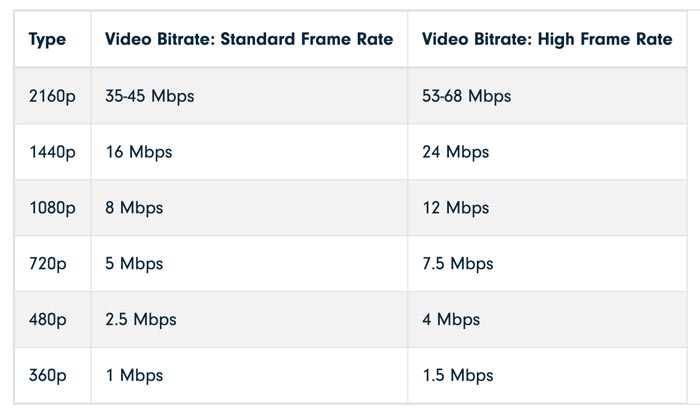
Last time, I wrote about “codecs” and “containers” that determine the format of the video and audio data. Now, I would like to write about each item related to the “quality” of that data.
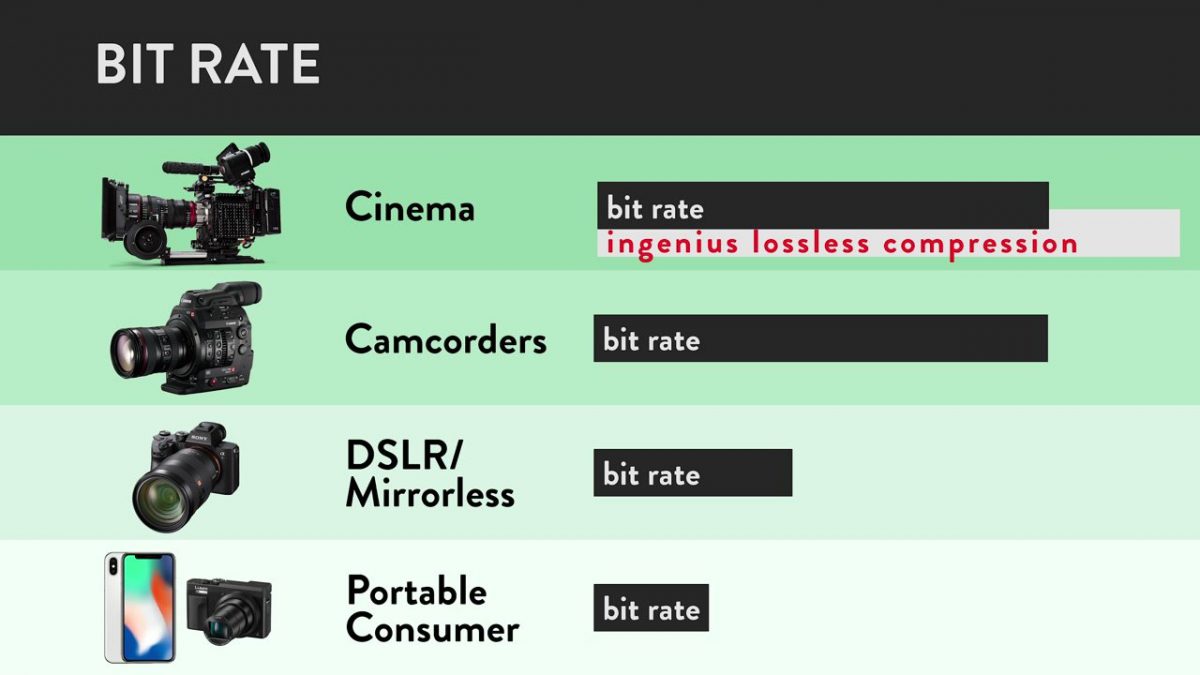
Bit rate
Bit rate [bit rate], or bits per second, is a unit of data transfer rate.
It is defined as the number of bits that have passed (transferred) at a given point on the data transfer path per second. Also known as bps [bits per second] and b / s. Other names include “bit rate” and “bit efficiency”, all of which have the same meaning.
In short, it is a unit that expresses “how much data (information) can be transferred”. A large number means that the amount of data passed at a certain point is large and the quality of the video and audio is improved. The greater the amount of data (that is, video / audio information), the higher the image quality and sound quality.
An SI prefix can also be added, and the unit is as follows.
Bits per second [bps: b / s]
Kilobit per second [kbps: kb / s]
Megabit per second [Mbps: Mb / s]
Gigabit per second [Gbps: Gb / s]
Since it is a unit of data transfer speed, it is also used for the speed of Internet lines. There is also a unit called bytes per second, which is expressed as “Bps” or “B / s” by capitalizing b. 1 byte = 8 bits.
For example, with MP3 audio data, the bit rate value can be increased up to “320 kbps”. The higher the number of bit rates, the greater the amount of data transferred and the greater the original data capacity.
The phrase “high bit rate” is essentially incorrect
I often hear the phrase “high / low bit rate”, but this phrase is really inappropriate.
The word bit rate is a unit, not a physical quantity. It is the same as the relationship between “length (physical quantity)” and “meter (unit)”. We say “long” but not “long meter”.
The physical quantities that represent bit rates are called “transfer rate”, “transfer speed”, “transfer efficiency”, “transmission rate”, “transmission speed”, “transmission efficiency”, and so on. However, the phrase “high bit rate” has become mainstream, so you don’t need to worry too much about it. Remember “To be exact …”.
frames per second
This is a value for video data only.
The frame rate [frame rate] is an index that shows how many frames (still images: frames) can be processed per unit of time. Use fps [frames per second] or f / s as the unit.
Digitally speaking, a video is not recorded as a continuous image, but is taken continuously and displayed at high speed like a flip book, so that it “appears to be moving.” I’m doing. It is a method that uses the effect of human residual image.
The “one-by-one still images” are called “frames” or “frames.”
If the frame rate value is large, the number of processed frames per second will increase, resulting in smoother video. If it is 30 fps, 30 frames per second are processed.
Currently, “30 fps” or “29.97 fps” is very widespread. When you increase to 60fps, the video becomes smooth enough and when you decrease to 15fps or less, the video becomes jerky.
Increasing the value of the frame rate will result in a smoother video, but it will be heavier and of higher capacity.
There is no point in raising him innocently
There is no doubt that increasing the value of the frame rate will result in a smoother video, but if the value called “response speed” of the screen or monitor displaying the video is large (that is, slow), the frame rate value will be increased. It may not make sense to increase it.
Response speed is the time it takes for a signal to actually enter. The unit is milliseconds [ms: 1 ms is 1/1000 second of 1 second]. The “Response Speed” on a screen or monitor indicates the speed when changing from “black to white to black”. (Currently the definition is blurry because it handles colors other than black and white, but it is omitted here.)
If this response speed is high, it means that the video (color) change is fast. If the speed is high, the response speed value will be small and it will be able to display “smooth and clear video, even when moving fast.” At low speeds, the value increases and “residual images are likely to occur in videos being played.


