
What is the bit rate, which is said to be indispensable for video distribution?
1Bit rate is the number of bits that can be sent and received per second.

Advantages and Disadvantages of Setting a High Video Bitrate
# There are merits such as being able to offer clearer images
#There are disadvantages such as not being able to play fluently
Five What are the factors that affect the image quality of videos?
#frames per second
#resolution
#Codec
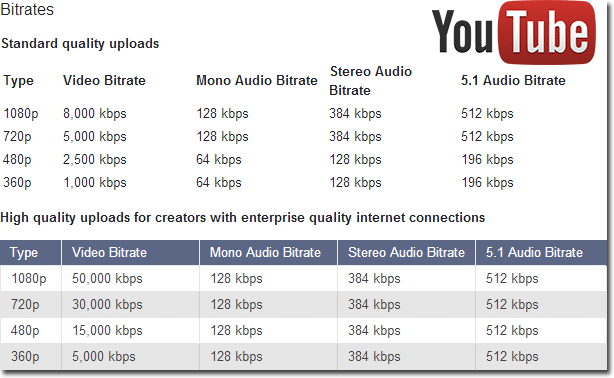
6 Relationship between YouTube and bit rate
7 Relationship between video conferencing and bit rate
8summary
One of the important factors affecting the image quality of a video is the “bit rate”. Generally, the higher the video bit rate, the better the image quality. But what is the bitrate of the video? How should I set the bitrate of the video? I wonder if there are a lot of people worried. In this article, we will discuss video and audio bit rates, video bit rate guidelines, advantages and disadvantages of setting a high video bit rate, factors that affect video quality, the relationship between YouTube and bit rates and video conferencing. about.
Bit rate is the number of bits that can be sent and received per second.
Bit rate refers to the number of bits that can be sent and received per second, and the unit is bps, which is short for Bit Per Second.
For example, if it is 100 bps, it means that 100 bits of data can be sent and received per second.
The higher the bit rate value, the more data can be sent and received per second. Video bit for bit rate
There are two types, audio bit rate and rate, and the value calculated by adding these two bit rates is called the oval bit rate.
# Voice bit rate
The audio bit rate refers to the bit rate related to the audio in the video file, and basically the value of the audio bit rate is less than the bit rate of the video. As a guideline for audio bit rate, it is approximately 96 to 128 kbps for lossy codecs such as MP3 and AAC, while it is approximately 192 to 320 kbps for high-quality video.
# Video Bitrate
Video bit rate refers to the bit rate associated with video in a video file. The video bit rate value is large compared to the audio bit rate. The guideline for video bit rate varies greatly depending on the quality of the image to be delivered, and the value varies, but it is also said to be 500 kps at 70 Mbps.
Since the standard audio bit rate is approximately 192 to 320 kbps, the video bit rate occupies most of the oval bit rate when watching the entire video file. Basically, the characteristic of video bitrate is that the higher the value, the better the image quality.
However, it does not mean that the video bit rate value should be high. When viewing an image on a small monitor screen, it can be said that the roughness of the image is not that noticeable even if the bitrate value is a bit low. Even if you increase the value of the video bit rate, you cannot get the feeling that the image quality has improved, and there are many cases where the file size just increases.
Estimated video bit rate
Even if the bit rate value is the same, the image quality will change depending on whether the video content is moving or not. Therefore, it is necessary to determine the bitrate that appears to be optimal for the video. The following is a guide to the proper bit rate for frequently used video resolution when distributing videos on YouTube.
Resolution SD (720 x 480px) 1-2 Mbps (video with a lot of movement) 500kps ~ 1Mbps (video with little movement)
HD resolution (1280 x 720px) 4.5-9Mbps (video with a lot of movement) 2.4-4.5Mbps (video with little movement)
Full HD resolution (1920 x 1080px) 9Mbps-18Mbps (high-motion video) 4.5-9Mbps (low-motion video)
4K resolution (4096 x 2160px) 35 ~ 70Mbps (high motion video) 25-35Mbps (low motion video)


