MP3 and FLAC Audio Formats Part 2


Free Download Mp4Gain
picture

MP3 and FLAC Audio Formats Part 2

Audio Formats

MP3 (MPEG-1 Layer 3) is historically the first and most widespread lossy compression format.

AUDIO FORMAT

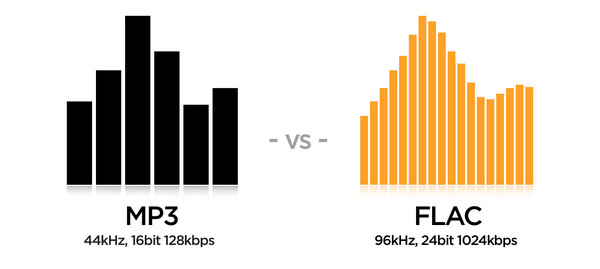
Despite the fact that, due to the era of MP3, today it does not shine with the efficiency of compression, its popularity is still very high due to its versatility: any plate can reproduce this format. At the same time, if a suitable encoder and decoder are used, the MP3 sound quality is at a very decent level. The combination of these two factors justifies the use of the format today. The MP3 compression ratio while maintaining high sound quality is 6 to 9 times. The average bit rate of such an MP3 with 16-bit / 44.1 kHz / stereo parameters is 150-240 kbps, the file size of a five-minute recording in this form is 6-9 MB.

FLAC (Free Lossless Audio Codec) is currently the most popular lossless audio compression format. If lossless support is claimed for any software or hardware, this software / hardware can almost certainly play FLAC. The format is the de facto standard among lovers of high-quality sound. The FLAC compression ratio is 1.2 to 3.5 times. FLAC bitrate with 16 bit / 44.1 kHz / stereo parameters – 400-1200 kbps, the file size of a five minute recording in this form is 15-44 MB. For lossless formats, of which FLAC is a representative, the rule “higher bit rate – higher sound quality” does not work, the quality always remains identical to the original. The compression ratio and bit rate vary depending on the complexity of the material to be compressed; for example, singing on a guitar lends itself to compression better than recording a symphony orchestra.

Is it possible to compress material without loss to loss, for example from FLAC to MP3?

It is possible and often necessary. For example, if you want to listen to music in “field” conditions from a portable device without audiophile habits, and your source material is stored in lossless format, then it makes sense to make the desired tracks lossy before transferring them to the laptop. . This will reduce the file size and save much more music on your mobile device. Most likely, you won’t feel the sound degradation from such a transformation at all.

Is it possible to compress material from lossy to lossless, eg from MP3 to FLAC?

This should not be done in any case, as the sound quality will not improve and the file size will increase significantly. Also, such a pseudo-lossless, then caught by other people, will deceive them. How to rule out such fakes when downloading losslessly from the network, read this article.

Is it possible to compress material from loss to loss, eg MP3 with lower bit rate to MP3 with higher bit rate?

If you want to get an improvement in the quality of such a clamp, then no, you do not need to do this: the sound will not only not improve, but will even slightly deteriorate. If your goal is to reduce file size and sound quality is not very critical, then compressing from a higher bit rate to a lower one is quite justified.

Which lossless format is the best in terms of sound quality: FLAC, Monkey’s Audio, WavPack?

As mentioned above, lossless formats compress data losslessly. This means that, in terms of sound quality, they are all absolutely identical. You should choose a lossless format to use in each specific case, focusing solely on its compatibility with the software / equipment and your personal preferences.

Is it possible to compress material without loss to loss, for example from FLAC to MP3?

It is possible and often necessary. For example, if you want to listen to music in “field” conditions from a portable device without audiophile habits, and your source material is stored in lossless format, then it makes sense to make the desired tracks lossy before transferring them to the laptop. . This will reduce the file size and save much more music on your mobile device. Most likely, you won’t feel the sound degradation from such a transformation at all.

Is it possible to compress material from lossy to lossless, eg from MP3 to FLAC?

This should not be done in any case, as the sound quality will not improve and the file size will increase significantly. Also, such a pseudo-lossless, then caught by other people, will deceive them. How to rule out such fakes when downloading losslessly from the network, read this article.


Free Download Mp4Gain
picture


Mp4Gain Main Window
picture


Mp4Gain Features
picture


Free Download Mp4Gain
picture

MP3 and FLAC audio formats

MP3 and FLAC audio formats

FLAC vs MP3

In this post, I want to talk about how to get the best results when compressing music in FLAC and MP3 formats.

FLAC vs MP3

In the age of mass distribution of audio and video streaming services, this topic may seem of little relevance, however, as practice shows, this is not the case. First of all, not everyone wants to depend on third-party resources, which at any time can behave as they please, from the introduction of various access restrictions to content to its complete removal. Second, there are many places in the world where the Internet is slow, dreary, and with lunch breaks. Third, the sound quality when listening online is generally quite acceptable to most users, but it can make sophisticated listeners with good equipment bleak. Taking into account all of the above, we can assume

Since this article will focus on Windows console applications, it is assumed that the reader is familiar with the basics of working on the command line on this operating system.

Basic concepts
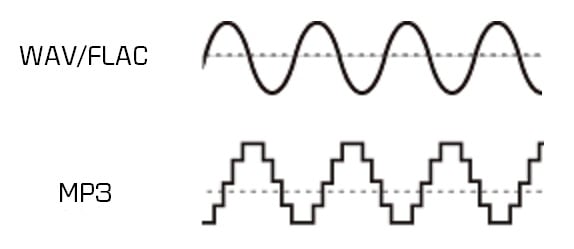
PCM (pulse code modulation), also known as PCM (pulse code modulation) is a method of representing an analog signal in digital form. It works like this: electrical oscillations are fed into the input of a device called ADC (analog to digital converter), which is an analog audio signal. The ADC measures the level of this signal with a certain frequency and transmits the obtained values ​​to the outside, where they are stored. Thus, a data matrix is ​​formed, which is a sequence of values ​​of the amplitude of the original signal. The process described is called “digitization”. The main problem with storing PCM data in “naked” form is its rather large volume, therefore, for a more rational use of space on the carrier, various digital audio compression algorithms are used.

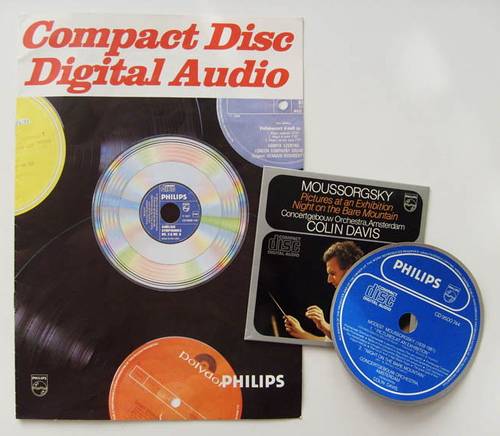
CDDA (Compact Disc Digital Audio) is a good old audio CD, historically the first mass digital media standard for audio recordings. Despite the fact that in our time the CDDA itself is no longer very relevant, the sound presentation parameters in it (PCM 16 bit / 44.1 kHz / stereo) are still basic for almost all published musical phonograms.

WAV is an audio format commonly used to store uncompressed PCM audio in Windows. The format can also contain compressed data, but in practice this is extremely rare and, one might say, rude. Playing WAV files requires minimal system resources, as no additional information processing is required for this. Saving material in this format is almost always an intermediate step in sound processing in audio editors, CD grabbers, and other similar software. The bit rate of uncompressed WAV with 16-bit / 44.1 kHz / stereo parameters is 1411 kbps, the file size of a five-minute recording in this form is approximately 52 MB.

Encoder (or “encoder” from English “encoder”) is software designed to convert WAV to any other format in order to reduce the amount of stored data.

Decoder – Software or hardware used to play files compressed in the appropriate format or convert them to uncompressed format.

Lossy is the generic name for a family of audio formats that use lossy data compression. Typical family members are MP3, AAC, WMA, Ogg Vorbis. The main characteristic of lossy formats is that when the material is compressed in any of them, a significant part of the original audio information is irretrievably lost and cannot be restored later in any way. Because of this, a high degree of compression is achieved, while the loss is barely perceptible or even invisible to the ear, as only data that is not critical to human perception is discarded.

Lossless is the generic name for a family of audio formats that use lossless data compression. Typical family members: FLAC, Monkey’s Audio (APE), ALAC, WavPack. Unlike lossy formats, here no information is lost during compression, everything happens in the same way as in normal filing cabinets. Paying for complete data security is a significantly lower compression ratio compared to loss.

Differences between FLAC or MP3 formats, which is better

Differences between FLAC or MP3 formats, which is better

FLAC vs MP3

With the advent of digital technologies in the world of music, the question arose about the choice of methods for digitizing, processing and storing sound. Many formats have been developed, most of which are still used successfully in certain situations. Conventionally, they are all divided into two large groups: lossless audio and lossy audio. Among the former, the FLAC format is in the lead, among the latter, the real monopoly was for MP3. So what are the main differences between FLAC and MP3, and are they really important to the listener?

FLAC vs. MP3

What is FLAC and MP3?

If the audio is recorded in FLAC format or converted to it from another lossless format, the entire frequency spectrum and additional information about the file content (metadata) is saved. The file structure looks like this:

four-byte identification string (FlaC);
Streaminfo metadata (required to configure playback equipment);
other metadata blocks (optional);
audiofrems.
It is common practice to directly record FLAC files while playing “live” music or from vinyl records.

Play music on iPhone

When developing algorithms for compressing MP3 files, the psychoacoustic model of a person was used. In short, during the conversion, those parts of the spectrum that our ears do not perceive or do not perceive completely will be “cut off” from the sound flow. Also, if the stereo broadcasts are similar in certain stages, they can be converted to mono sound. The main criterion for audio quality is the compression ratio – bit rate:

up to 160 kbit / s – low quality, a lot of third-party interference, frequency drops;
160-260 kbps – medium quality, mediocre peak frequency playback;
260-320 kbps – Deep, smooth, high-quality sound with minimal interference.
Sometimes a high bit rate is achieved when converting a low bit rate file. This will not improve the sound quality in any way – files converted from 128 to 320 bps will still sound like a 128-bit file.

Table: Comparison of characteristics and differences between audio formats
FLAC indicator MP3 low bit rate MP3 high bit rate
Lossless lossy compression format
Sound quality high low high
Volume of a song 25-200 Mb 2-5 Mb 4-15 Mb
Appointment listening to music on high-quality audio systems, creating a music file, installing ringtones, storing and playing files on devices with limited memory, home listening to music, storing the catalog on portable devices.

Compatibility PC, some smartphones and tablets, high-end players most electronic devices most electronic devices
To hear the difference between a quality MP3 and FLAC file, you must have an excellent ear for music or an “advanced” audio system. The MP3 format is more than enough for listening to music at home or on the road, and FLAC is still the plethora of musicians, DJs, and audiophiles.

MP3 VS FLAC. How do you hear the difference?

MP3 VS FLAC. How do you hear the difference?

FLAC vs MP3

Along with vinyl records and CDs, our music library is increasingly replenished with MP3 and Flac music files. Many consider these two formats to be irreconcilable enemies, while others are sure that the difference between them is small. Are?

FLAC vs. MP3

About formats.
A little history. The MP3 format (MPEG-1/2 / 2.5 Layer 3) appeared in 1994. Do you remember those days? There was no talk of gigabytes, hundreds of megabytes cost a lot of money and many still remembered the legendary phrase of Bill Gates: “640 KB of memory is enough for any computer”. And if the veracity of this phrase is still questioned, then as early as 94 no one doubted that music would be distributed over the Internet, and the files would be stored on a computer. Okay, keeping your entire music library on one hard drive and being able to take it with you wherever you go is a great idea. However, at that time the main carrier of “digital music” was the CD.

A standard CD contains 650 megabytes or 74 minutes of music at a bit rate of 1411.2 kbps. In order to preserve a dozen albums in pristine quality in the year 94, it was required to have a very solid quantity! Yes, and a personal computer cost a lot then, and the main task of the MP3 that appeared was the ability to transmit sound through channels with little bandwidth. At that time, transferring an entire CD over the Internet required tens of hours at best. Therefore, the developers were faced with the task of reducing the size of the audio file to the maximum, avoiding to a minimum the losses during the compression of the signal. However, the encoding technologies were not yet perfect, and the processors were not that fast, so it was decided to apply the psychoacoustic method, in which only part of the audio information is lost. For example, all “quiet” sounds above 17 kHz and all bass below 40 Hz. The developers have established various levels of compression for such files, taking the digital stream as the basis for measuring the quality: the more information is transmitted per second of time, the higher the sound quality, but also the larger the file size. The maximum bit rate in MP3 is considered to be 320 kbps, in which the sound is balanced and the quality is as close to the original as possible.

And this is the “closest” and tormented to good sound lovers so far. The fact is that listening to music on high-quality equipment allows you to fully feel the difference between the original recording and its MP3 version, even at 320 kbps.

In all honesty, we admit that you can listen to music even at 64 kbps. If you just want to hear your favorite tune, then no obstacle is terrible. You can even play the nearest musical instrument yourself, if you have the skill, or listen through the speaker phone. However, if you want to enjoy a work in which all the inherent nuances and emotions, its interpretation by the sound engineer and the way the performers play, will be preserved, then MP3 (as, indeed, any other format of lossy compression) will. It will not be a joy, as the playback is excellent.Cd recorded and edited on a mediocre device.

The developers of the Flac format thought about how to reproduce high-quality compressed audio in high-quality Hi-Fi. In fact, FLAC (Free Lossless Audio Codec – “free lossless audio codec”) appeared only 6 years after MP3. However, encoding technologies have come a long way during this time, making it possible to create codecs that compress the audio signal without loss. Of course, it wasn’t possible to make the file smaller than MP3, but users now have an order of magnitude more spacious storage, so a couple hundred megabytes per album is a mere trifle. It is not?

MP3 and FLAC: who wins?

MP3 and FLAC: who wins?

Mp3 & FLAC

Music lovers from all countries have been arguing for many years: is it possible to distinguish a high-quality MP3 from a lossless one in a blind test (FLAC, APE, etc.)? How much does compression loss affect the perception of music? Should you give up MP3? Let’s try to answer these questions.

FLAC vs MP3

A little history
In the early 1990s, experts understood that the future of music was digital. However, hard drives were expensive then and fans preferred to store their music collections on cassettes and CDs. The researchers faced a problem: they needed a suitable format to store records on computers. At the same time, every hundred kilobytes were counted – you can slightly sacrifice quality compared to CDs, but save precious hard drive space.

In the late 1980s, the first functional prototypes of a new lossy compressed audio storage format, MP3, were created. The first publicly available MP3 encoder appeared in 1994, and the first playback software soon followed. The first encoding algorithms made it possible to obtain files with slightly “chopped” high frequencies. The sound quality was not comparable to that of a CD, but the output file sizes were quite acceptable.

In the early 2000s, volumes on hard drives were growing rapidly and other audio formats that provide lossless compression began to appear. Relatively speaking, an audio track of this format can be restored to the original WAV from a lossless CD. Perhaps the most popular lossless compression format was FLAC, introduced in 2001. It is suitable for both storing home audio collections and playing music on professional computers. However, a FLAC file can be 6-10 times heavier than a good quality MP3 (256 or 320 kbps). But does file size and losslessness mean consistently high sound quality?

find 10 differences
Compare, for example, two spectrograms of the same song (DAT ADAM – Hydra 3D): it is easy to see that MP3 “cuts” high frequencies compared to lossless compression (left – MP3 320 kbps, right – FLAC spectrogram, obtained by digitizing CD). But the question is different: will you hear the difference?

A bit of anatomy: The human ear is theoretically capable of hearing sounds from 16 Hz to 20 kHz. However, much depends on the age and individual characteristics of the listener. The author of this article can hear sound with a frequency of 16 kHz, but not 17 kHz and above, but there are adults (25 years and older) who can still perceive 18 kHz. All of these frequencies are quite successfully supported by the MP3 format. If you are exceptionally clear, you will be able to hear some difference in the high frequencies, but the difference is almost subtle for most people.

Flac vs mp3

Flac vs mp3

FLAC vs MP3

Recently, FLAC-compatible players, which are highly appreciated by most audiophiles, have developed rapidly. What is the secret of the format? Why is the popular mp3 format not suitable for music lovers?

Mp3 vs Flac

The birth of mp3

In the early days of digital audio, the first music format was Wave, which was widely used on CD-Audio discs. There were no large hard drives at the time and the 700MB album seemed very large. With the advent of high-performance microcircuits, the mp3 format was invented, allowing music to take up 10 times less disk space (~ 70MB vs. 700MB). This made it possible to significantly increase the number of musical compositions stored by listeners at home on a computer and early Flash players. Due to its high weight, the original format was replaced by the mp3 boom.

Many people remember the incredibly popular iriver players that support mp3 and ogg, but the time for those players has passed and iriver has released Astel & Kern players that support FLAC in high resolution.

Compression of information in mp3 and quality How does mp3 take up less space? It is based on two technologies: archiving and psychoacoustic compression. The conventional file is not very efficient and is only used in lossless formats like flac, ape, and wavepack. Psychoacoustic compression is added to mp3 and this format belongs to the Lossy group (lossy compression).

Psychoacoustic compression dilutes data according to a simple principle: anything that the listener potentially does not hear (for example, quiet sounds against the background of loud sounds) is mercilessly discarded. There are many parallels with the video and the photos. For example, in the jpg format, pixels with similar colors are grouped into large squares of the same color and when forming an image, we usually do not notice that various hues have disappeared. But if we want to take a closer look, we will definitely see it!

The quality of the same mp3 bit rate is different

There are a large number of mp3 encoders, and each has its own priority level in the algorithm, what is least important in music and what to remove first with low compression and last with high. The higher the compression, the more meaningful information is removed and the easier it is to listen to on simple audio equipment.

Unfortunately, the sound quality of mp3 depends not only on the degree of compression expressed in bitrate, but also on the codec with which it was compressed and with what settings. Very often, a high bit rate on the order of 320 kB / s is used, but with the fast and less resource consuming encoding mode. The file encodes very quickly, but as a result, it subjectively sounds worse than encoded at 128 kB / s in long, resource-intensive mode.

Almost all “mp3 producers” in the form of websites and CD compilations use fast algorithms. They believe that most will not hear the difference on their phones anyway, and will be guided by the purchase only by the bitrate. Why spend the extra effort if they buy well?

The differences between the 320 kB / s mp3 encoded in high quality and resource intensive mode and the original Wave are actually very small and sometimes difficult to distinguish even with good audio equipment, but these mp3s are usually very few and far between. they just make them enthusiastic. Most of the mp3 leaves a depressing impression.

Much also depends on the decoder, which determines the quality of the final sound. There are still battles on the forums, which software or hardware player sounds better with which decoder.

At the height of mp3 development, the quality of players and sound cards left much to be desired, especially considering that the main mp3 users were those who could not afford to listen to music on a good hi-fi system. . Quality issues were hardly noticed, similar to JPG compression issues when viewed through a cell phone screen. But on a good audio route, it was obvious. Recently, technology has advanced and the quality of most fonts has increased and consequently the disadvantages of mp3 have become more obvious. What are the main disadvantages of mp3 sound?

The absence or unnaturalness of the high frequencies (due to the strong decimation of the high frequencies, which most supposedly cannot hear)
Wheezing and distortion in vocals, unnatural timbres of instruments
Violation of the location of sources in space.
But most importantly, you never know how high quality an mp3 will sound, how much information is actually lost on it.

What are the differences between MP3, FLAC and other audio formats? Part 2

What are the differences between MP3, FLAC and other audio formats? Part 2

FLAC vs MP3

Lossless formats: FLAC, ALAC, APE

FLAC vs MP3

Free Lossless Audio Codec, Apple Lossless Audio Codec, and Monkey’s Audio are all formats that compress audio in the same way as anything compressed in the digital world: using algorithms. The difference between compressed files and FLAC files is that FLAC is specifically designed for audio and therefore has a higher compression ratio without loss of data. It usually sees about half the size of the WAV. In other words, a FLAC file for “CD” quality stereo sound runs at approximately 5MB per minute.

On the plus side, if you want to do some audio manipulation, you can convert back to WAV with no quality loss. If you are a music lover and listen to a lot of music with dynamic ranges, these are the formats for you. If you have a large set of speakers, cans, or headphones, these formats will display tones for display.

Lossy formats: MP3, AAC, WMA, Vorbis

Most of the formats you see in everyday use are “lossy”; a certain degree of sound quality is sacrificed for a significant increase in file size. Average “CD quality” MP3 runs at around 1MB per minute. A big difference compared to PCM, right? It’s called compression, but unlike lossless formats, you can’t get that quality back if you understand lossy formats. Different lossy formats use different storage algorithms, so they generally differ in file size for comparable quality. Lossy formats also use bit rate to indicate audio quality, which is typically viewed as “192 kbps” or “192 kbps.” The higher the number, the more data is pumped in, so more detail is preserved.

MP3: MPEG 1 Audio Layer 3, the most common lossy audio codec today. Despite a ton of patent issues, it’s still incredibly popular. Who doesn’t have MP3 files?
Vorbis – A free, open source and lossy format that is most commonly used in PC games like Unreal Tournament 3. FOSS fans like many Linux users are sure to see a lot of this format.
AAC – Advanced Audio Coding, a standardized format now used with MPEG4 video. It is actively supported due to its DRM compatibility (such as Apple’s FairPlay), its improvements over mp3, and because no license is required to transmit or distribute content in this format. Apple fans will probably have a lot at AAC.
WMA: Windows Media Audio, a lossy audio format from Microsoft. It was designed and used to avoid MP3 licensing issues, but due to major enhancements and DRM support and lossless implementation, it still exists. It was very popular before iTunes became the DRMed music champion.
Lossy formats are what you use for everything you listen to and store. They are designed to save space on your hard drive. The format you choose depends on the type of digital audio player you are using, how much space you have, what quality objections you have, and a bunch of variables. Computers will play anything these days, most audio players (except of course Apple) support various lossy formats and more and more FLAC and APE. Apple sticks to MP3, ALAC, and AAC.

Is the sound quality subjective?

This is absolutely true. Ultimately, your ears consume most of your belongings, but this is another reason to give serious thought to quality. When I started to build my digital music collection, I couldn’t understand the difference between 128Kbps MP3 and Audio CD. In my opinion, there was not a noticeable difference. However, over time, I realized that 256 kbps sounds a lot better, and after getting some really good (and expensive!) Headphones, I went back to the Audio CD! It also depends on the musical genre.

There are a lot of variables here guys, make no mistake about it. It was a while before I decided to use FLAC for music and 320kbps MP3 for the rest. The point I’m trying to emphasize is that you have to experiment to see what works best for you and your music, but remember that as your tastes, your perceptions, your gear, and the importance of quality change. will also be.

And it all gets even more complicated when it comes to not only music, but also voice tracks, sound effects, white and brown noise, etc. There is a whole world of sound, so don’t be discouraged! If you learn what you can and listen to yourself, you can use this information in your future audio projects. I leave you with some of the best advice I’ve ever received: “do what sounds good.”

What are the differences between MP3, FLAC and other audio formats?

What are the differences between MP3, FLAC and other audio formats?

FLAC vs MP3

Digital audio has been around for a long time, so many audio formats can certainly be found. Here are some of the most common, what sets them apart and what to use them for.

FLAC vs. MP3

Before talking about everyday audio formats, it is important to understand the basics, what it means to understand PCM. After that, we will tackle compressed formats.

PCM audio: where it all begins

Pulse code modulation was created in 1937 and is the closest approximation to analog sound. That is, the analog signal approaches at regular intervals. PCM has two properties: sample rate and bit depth. The sample rate measures the frequency (per second) that the amplitude of the signal is taken and the bit depth measures the possible digital values. In terms of audio formats, this is pretty much the base.

True sound in the real world is continuous. This is not the case in the digital world. In some ways this is more confusing for audio than video, so let’s take a look at the video for comparison. What we interpret as “movement” or think as “fluid” and in constant motion is actually a series of still images. Also, the amplitude of digital sound waves is not “smooth” or constantly changing. It changes based on certain criteria at predetermined intervals.

I know there are a lot of things here that might not be second nature unless you’re an engineer, a physicist, or an audiophile, so let’s make a little analogy.

Let’s say the water coming out of an open tap is your “analog” sound source. We can compare the temperature of the water with the amplitude of a sound wave; It is a property that must be measured in order to enjoy it properly. Sampling is the number of times per second that you place your finger in plain water. The more often you put your finger on it, the more “continuous” the temperature changes will be. If you put your finger in running water 44,100 times per second, it’s like keeping your finger there all the time, right? This is the basic idea behind sampling.

Bit depth is a bit trickier. Instead of using your finger, let’s say you actually used a thermometer. Basically it said “Hot” for anything above room temperature and “Cold” for anything below. No matter how many times you put it in the water, it won’t give you much useful information. Now if instead of two choices, let’s say a thermometer has 16 possible values ​​that you can use to measure the temperature of the water. More useful, right? Bit depth works in the same way, as higher values ​​allow more dynamic changes in the amplitude of the sound to be accurately displayed.

As mentioned above, PCM is the foundation of digital audio, along with its variants. PCM tries to simulate the waveform of glory uncompressed as much as possible. It’s special, it’s ready to get stuck in a DSP and more or less universally playable. Most other formats manipulate the audio using algorithms, so they need to be decoded during playback. PCM audio is considered “lossless”, it is not compressed and therefore takes up a lot of hard disk space.

Uncompressed packet: WAV, AIFF

Both WAV and AIFF are PCM-based lossless audio container formats with minor changes to the data store. PCM audio for most people comes in these formats, depending on whether you are using Windows or OS X, and they can be converted to each other without any degradation in quality. Both are also considered “lossless”, they are uncompressed and a stereo PCM (2ch) audio file sampled at 44.1 kHz (or 44,100 times per second) with 16 bits (“CD quality”) is approximately 10 MB for a minute. If you are recording

MP3 and FLAC: who wins?

MP3 and FLAC: who wins?

FLAC vs MP3

Music lovers from all countries have been arguing for many years: is it possible to distinguish a high-quality MP3 from a lossless one in a blind test (FLAC, APE, etc.)? How much does compression loss affect the music experience? Should you give up MP3? Let’s try to answer these questions.

FLAC vs MP3 320 kbps
A little history

In the early 1990s, experts understood that the future of music was digital. However, hard drives were expensive then and fans preferred to store their music collections on cassettes and CDs. The researchers faced a problem: they needed a suitable format to store records on computers. At the same time, they were counted every hundred kilobytes – you can slightly sacrifice quality compared to CD discs, but save precious hard drive space.

In the late 1980s, the first functional prototypes of a new lossy compressed audio storage format, MP3, were created. The first publicly available MP3 encoder appeared in 1994, and the first playback software soon followed. The first encoding algorithms made it possible to obtain files with slightly “chopped” high frequencies. The sound quality was not comparable to that of a CD, but the output file sizes were quite acceptable.

In the early 2000s, the sizes of hard drives were growing rapidly and other audio formats that provide lossless compression began to appear. Relatively speaking, an audio track in this format can be restored to its original WAV from a lossless CD. Perhaps the most popular lossless compression format was FLAC, introduced in 2001. It is suitable both for storing home audio collections and for playing music on professional computers. However, a FLAC file can be 6-10 times heavier than a good quality MP3 (256 or 320 kbps). But does file size and losslessness mean consistently high sound quality?

A bit of anatomy: The human ear is theoretically capable of hearing sounds from 16 Hz to 20 kHz. However, much depends on the age and individual characteristics of the listener. The author of this article can hear sound with a frequency of 16 kHz, but not 17 kHz and above, but there are adults (25 years and older) who can still perceive 18 kHz. All of these frequencies are quite successfully supported by the MP3 format. If you are exceptionally clear, you will be able to hear some difference in the high frequencies, but the difference is almost subtle for most people.

Even if your favorite song in the spectrogram is clipped to 20 kHz, you won’t hear any distortion (unless of course you’re 8 years old).

The vast majority of people cannot, for natural anatomical reasons, distinguish between high-quality 320 kbps MP3 and FLAC (as long as both digital recordings are obtained from the same source). Of course, if you compress more MP3, for example, up to 96 kbps, the difference will be clearly audible even with cheap headphones. But in the age of terabyte drives, no one listens to music with such compression.

Of course, the equipment used for listening has a significant impact on the perception of music. It is impossible to listen to all the high frequencies in the recording of a symphony orchestra on headphones for 300 rubles, even if you have wonderful hearing and a high-quality recording. However, many specialists are dedicated to mixing music, taking into account the capabilities of the most popular audio equipment among consumers. Bill Ward (Black Sabbath drummer) said that while working on his solo album Accountable Beasts (2015), he first tried to achieve a clear and distinct sound from each note, but then realized that almost all listeners would use inexpensive equipment. and they wouldn’t hear all tones and halftones. As a result, Bill bought several relatively inexpensive headphones from a nearby store and mixed the album in them.

In the case of a file obtained from the Internet (even bought honestly), it is extremely difficult to understand which input was the original source. The sound quality of a file obtained by digitizing vinyl or CD (with or without remastering) will differ from a quality recording of Internet radio broadcasts, although all files can have the same bit rate.

Thus, we come to an obvious conclusion: the difference between high-quality MP3 and high-quality FLAC will only be heard by a trained music lover (most likely young, since after 40 years the range of audibility is reduced ). In addition, you will need quite expensive equipment to appreciate all the characteristics of the sound.

MP3 VS FLAC. Can you tell the difference?
MP3 VS FLAC. Can you tell the difference?

mp3 vs flac

Along with vinyl records and CDs, our music library is increasingly replenished with MP3 and Flac music files. Many consider these two formats to be irreconcilable enemies, while others are sure that the difference between them is small. Is it so?
MP3 vs FLAC

Pizza. Baked in a real wood oven, with a slight smell of haze, the unique flavor of two cheeses fused into one whole. This aromatic bread pancake is crisp on the edges. This incredibly fragrant filling simultaneously plays with various flavors and smells. This is a feast of flavor and satiety. Sometimes he wants pizza so badly that he takes ordinary bread from the store, slices it finely, puts finely chopped ham on top, and covers it with cheese. And put it in the microwave for a couple of minutes. Of course, you can eat even with this, but there will not be the delight that is present when eating pizza prepared by the master.

No, no, we are not baking a signature pizza or opening an Italian restaurant. With this visual example, we show the difference between compressed and uncompressed audio formats.

About formats.
A little history. The MP3 format (MPEG-1/2 / 2.5 Layer 3) appeared in 1994. Do you remember those days? There was no talk of gigabytes, hundreds of megabytes cost a lot of money and many still remembered the legendary phrase of Bill Gates: “640 KB of memory is enough for any computer”. And if the reliability of this phrase is still questioned, then as early as 94 no one doubted that music would be distributed over the Internet and files would be stored on a computer. Okay, keeping your entire music library on one hard drive and being able to take it with you wherever you go is a great idea. However, at that time the main carrier of “digital music” was the CD.

A standard CD contains 650 megabytes or 74 minutes of music at a bit rate of 1411.2 kbps. To preserve a dozen albums in their original quality in ’94, it took a very substantial quantity! Yes, and a personal computer cost a lot then, and the main task of the MP3 that appeared was the ability to transmit sound through channels with little bandwidth. At that time, transferring an entire CD over the Internet required tens of hours at best. Therefore, the developers were faced with the task of reducing the size of the audio file to the maximum, avoiding to a minimum the losses during the compression of the signal. However, the encoding technologies were not yet perfect, and the processors were not that fast, so it was decided to apply the psychoacoustic method, in which only part of the audio information is lost. For example, all “quiet” sounds above 17 kHz and all bass below 40 Hz. The developers have established various levels of compression for these files, taking the digital stream as the basis for measuring the quality: the more information is transmitted per second of time, the higher the sound quality, but also the larger the file size. The maximum bit rate in MP3 is considered to be 320 kbps, in which the sound is balanced and the quality is as close to the original as possible.

And this is the “closest” and tormented to good sound lovers so far. The fact is that listening to music on high-quality equipment allows you to fully feel the difference between the original recording and its MP3 version, even at 320 kbps.

In all honesty, we admit that you can listen to music even at 64 kbps. If you just want to hear your favorite tune, then no obstacle is terrible. You can even play the nearest musical instrument yourself, if you have the skill, or listen through the speaker phone. However, if you want to enjoy a work in which all the inherent nuances and emotions, its interpretation by the sound engineer and the way the performers play, will be preserved, then MP3 (as, indeed, any other format of lossy compression) will not be a pleasure, as well as the playback is excellent. CD recorded and edited on a mediocre device.

The developers of the Flac format thought about how to reproduce high-quality compressed audio in high-quality Hi-Fi. In fact, FLAC (Free Lossless Audio Codec – “free lossless audio codec”) appeared only 6 years after MP3. However, encoding technologies have come a long way during this time, making it possible to create codecs that compress the audio signal without loss. Of course, it wasn’t possible to make the file smaller than MP3, but users now have an order of magnitude more spacious storage, so a couple hundred megabytes per album is a mere trifle. It is not?

Both formats are quite widespread. Almost all operating systems can play them using standard or third-party players. МР3 is compatible with almost the entire line of sound reproduction devices, including those belonging to the High End class. With Flac (and its analogues), the situation is slightly different: some manufacturers still stubbornly ignore this compression method. Be that as it may, the simple music lover can always choose between these two formats. But, along with the choice, questions arise, but will you hear the difference between Flac and MP3? Let’s try to figure it out.

Mobile devices.
For music lovers who prefer to listen to music on mobile devices, there will be practically no difference. Modern smartphones, with rare exceptions, are not equipped with the highest quality audio path. Also, if you use normal in-ear headphones or a Bluetooth speaker. In both cases, the bandwidth of the audio path is not high, so all the recordings will be poor in micronance and dynamic recording. But! Manufacturers are gradually changing this situation. For example, the Korean company LG launched the launch of the V20 smartphone with a built-in Hi-Fi Quad DAC module, which has decoders to play all popular audio formats, including audiophiles and professionals. The smartphone comes with high-quality Bang & Olufsen headphones. On this device, the difference between MP3 and Flac sounds pretty good. In other cases, for a music lover, for those who want to listen to music from their phone, for now it is worth taking a closer look at a specialized external DAC and headphones. For example, FiiO’s line of portable headphone amps with built-in DACs are quite capable of capturing all the nuances of Flac recording when used in conjunction with good on-ear headphones. By the way, even “headphones” work, but not the cheap ones that are sold in all corners, but they are produced by major audio brands.

Alternative? If possible. This is not a multifunctional device, but a high-quality portable audio player. In such a device, as a rule, a high-quality digital-to-analog converter is installed and selected components are used in the audio section. And the entire structure is dedicated to one goal: high-quality sound reproduction. Therefore, other than strictly speaking a music player, there is nothing in the body to prevent you from distinguishing the Flac from the MP3.

Home Hi-Fi.
Everything here is much more prosaic. You can distinguish a high quality soundtrack from a poor quality one on any component of a modern audio system. Also, the more expensive the system, the more pronounced and unpleasant the sound artifacts inherent in lossy compressed compositions. And the brighter and more expressive the performance will be when playing files with lossless compression. If you can easily and immediately tell the difference between playing Flac and MP3, then your home system components are good. Another obstacle that prevents you from feeling it is the record player. The files can be played by directly connecting the hard drive with them to disc or multimedia players, as well as various receivers and amplifiers equipped with a built-in USB media player. As a general rule, in a low-quality device they save on everything therefore the base of the element is exposed to all kinds of interference from various operating units, and the digital-to-analog converter does not process the flow at the highest level, which allows many errors. All of this affects the final analog signal, which after all this can no longer be restored. Like covering your speakers with a towel or pillow. Who knows what the signal would be without it? So again we come to the conclusion that it will be impossible to distinguish between MP3 and Flac in such a system. Exit? Use only high-quality components in your home Hi-Fi systems, from the source and amplifier to acoustics and even cables. that after all this it is impossible to restore. Like covering your speakers with a towel or pillow. Who knows what the signal would be without it? So again we come to the conclusion that it will be impossible to distinguish between MP3 and Flac in such a system. Exit? Use only high-quality components in your home Hi-Fi systems, from the source and amplifier to acoustics and even cables. that after all this it is impossible to restore. Like covering your speakers with a towel or pillow. Who knows what the signal would be without it? So again we come to the conclusion that it will be impossible to distinguish between MP3 and Flac in such a system. Exit? Use only high-quality components in your home Hi-Fi systems, from the source and amplifier to acoustics and even cables.

The fact that almost all music is now stored at home as files that you can listen to on your home system or take it with you and listen to while traveling, on vacation, in class, or elsewhere is great. This is progress to take into account. However, we must not forget that we enjoy music in the first place. In addition to good pizza. And we do not recommend that you deny yourself these pleasures. They are an indicator of the quality of life and a source of our positive mood and positive emotions.