Audio Compression Techniques: Understanding the Basics


Free Download Mp4Gain
picture

Audio Compression Techniques: Understanding the Basics

Audio Compression
Audio Compression
Audio Compression
Audio Compression

What is Audio Compression?

Audio compression is the process of reducing the size of digital audio files by removing redundant or unnecessary information, while maintaining the perceived quality of the original sound. This is done by using various algorithms that analyze and modify the audio data in a way that reduces its file size.

Types of Audio Compression Techniques

There are two main types of audio compression techniques: lossy and lossless.

Lossy Compression

Lossy compression algorithms are used to achieve high compression rates, but at the cost of some loss in quality. In lossy compression, some of the original audio data is discarded or modified in a way that reduces its size. The amount of data that is removed or modified depends on the compression algorithm used.

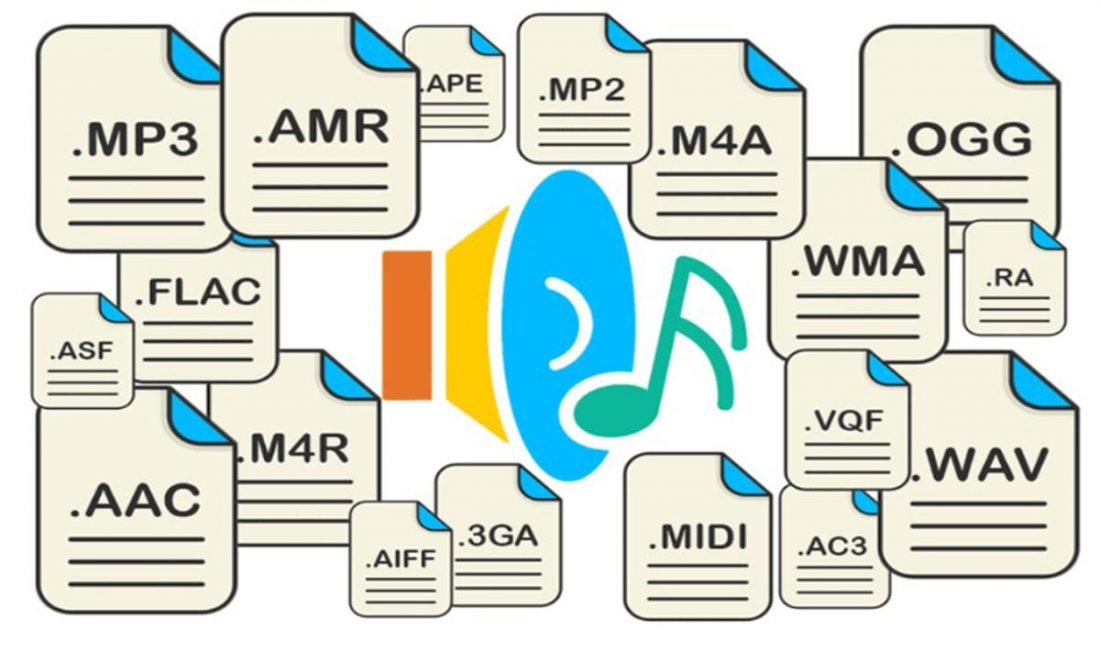
Some popular lossy compression algorithms include MP3, AAC, and WMA. These algorithms are commonly used for music streaming, online radio, and other applications where high compression rates are necessary.

Lossless Compression

Lossless compression algorithms are used to compress digital audio files without losing any information. These algorithms are designed to reduce the size of the file by removing redundancies in the data, but without modifying any of the original information.

Some popular lossless compression algorithms include FLAC, ALAC, and WAV. These algorithms are commonly used for high-quality music streaming and for archiving music collections.

How Audio Compression Works

Audio compression works by analyzing the original audio data and then modifying it in a way that reduces its size while maintaining its quality. This is done using various mathematical algorithms that compress the data.

The most common way to compress audio data is to use perceptual coding. This method takes advantage of the human ear’s limitations in hearing certain frequencies and sounds. By removing these sounds, the audio data can be compressed without the listener noticing any loss in quality.

Another method of audio compression is predictive coding. This method uses mathematical algorithms to predict the next sample in a waveform based on previous samples. The difference between the predicted sample and the actual sample is then compressed and stored.

Why Audio Compression is Important

Audio compression is important because it allows us to store and transmit audio data more efficiently. This means that we can store more audio files on our devices and transmit audio data faster over the internet. Without audio compression, it would be impossible to stream music or podcasts over the internet.

12 Common Questions About Audio Compression Techniques

1. What is the difference between lossy and lossless audio compression?

Lossy compression algorithms are designed to achieve high compression rates at the cost of some loss in quality, while lossless compression algorithms are designed to compress audio files without losing any information.

2. Which audio compression algorithm should I use?

The choice of audio compression algorithm depends on the intended use of the audio file. Lossy compression algorithms like MP3 and AAC are commonly used for music streaming and online radio, while lossless compression algorithms like FLAC and ALAC are commonly used for high-quality music streaming and archiving.

3. How much does audio compression affect the quality of the original sound?

The amount of quality loss in audio compression depends on the compression algorithm used and the degree of compression applied. Lossy compression algorithms generally result in some loss in quality, while lossless compression algorithms do not.

4. How can I tell if an audio file has been compressed?

You can usually tell if an audio file has been compressed by looking at its file extension. Lossy compressed files usually have extensions like MP3, AAC


Free Download Mp4Gain
picture


Mp4Gain Main Window
picture


Mp4Gain Features
picture


Free Download Mp4Gain
picture

The Science Behind Digital Audio Compression

The Science Behind Digital Audio Compression

Digital Audio Compression


Digital audio compression is a complex topic that is often misunderstood. It is a process that reduces the size of digital audio files without affecting the overall quality of the sound. The goal of this article is to provide a comprehensive overview of the science behind digital audio compression, including its history, the different types of compression, and how it affects the quality of the sound.

Digital Audio Compression

The History of Digital Audio Compression

The history of digital audio compression can be traced back to the early 1990s when the first MP3 encoder was developed. MP3 stands for MPEG-1 Audio Layer 3 and is a method of compressing digital audio files. This compression method quickly gained popularity due to its ability to reduce file size without compromising the quality of the sound.

Since then, many different types of digital audio compression have been developed, each with its own set of advantages and disadvantages. However, they all work on the same principle of reducing the amount of data in the audio file while maintaining the overall quality of the sound.

The Different Types of Digital Audio Compression

There are two main types of digital audio compression: lossy and lossless. Lossy compression is the most common type of compression and is used in formats like MP3, AAC, and WMA. It works by removing parts of the audio file that are deemed less important to the overall quality of the sound.

Lossless compression, on the other hand, is used in formats like FLAC and ALAC. This method of compression works by compressing the file in a way that allows it to be decompressed back to its original form without losing any of the data. This means that the sound quality is preserved, but the file size is still reduced.

The Science Behind Digital Audio Compression

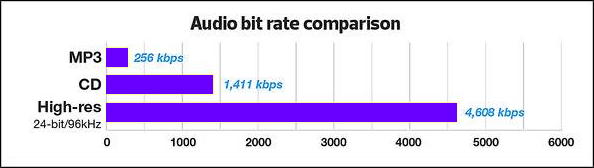
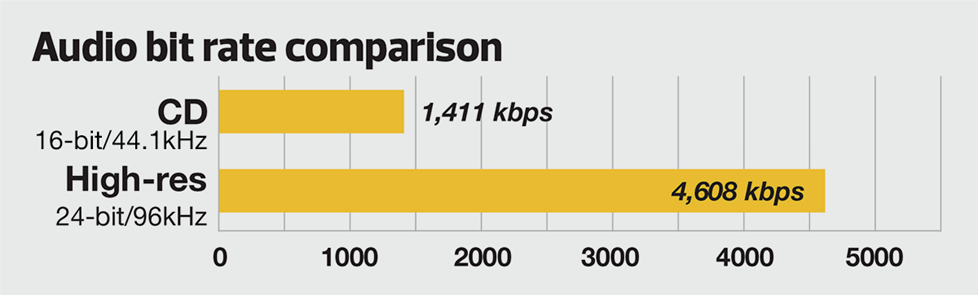
Digital audio compression works by reducing the amount of data in an audio file. The amount of data in an audio file is measured in bits per second (bps) or kilobits per second (kbps). The higher the bitrate, the better the quality of the sound. However, higher bitrates also mean larger file sizes.

Compression algorithms work by analyzing the audio data and removing parts that are not critical to the overall sound quality. These parts can include frequencies that are outside the range of human hearing or parts that are masked by other sounds in the file.

Once the compression algorithm has identified the parts of the file that can be removed, it uses a mathematical formula to compress the remaining data. This formula is designed to reduce the size of the file without affecting the overall quality of the sound.

The Effects of Compression on Sound Quality

The goal of digital audio compression is to reduce the size of the file without affecting the overall quality of the sound. However, compression can have some effects on sound quality, depending on the type of compression used and the bitrate of the original file.

Lossy compression, for example, can result in a loss of high-frequency information and dynamic range. This can lead to a loss of detail in the sound and a less natural-sounding reproduction of the original recording.

Lossless compression, on the other hand, preserves the original sound quality of the recording, but the resulting file sizes can still be quite large. This makes it less practical for use in situations where file size is a concern.

The Future of Digital Audio Compression

The future of digital audio compression is closely tied to the ongoing development of digital audio technology. As technology continues to improve, the potential for more efficient compression algorithms and higher quality sound reproduction is becoming a reality.

One of the most exciting developments in digital audio compression is the emergence of artificial intelligence (AI) and machine learning. These technologies have the potential to create compression

What does MP3 bitrate mean?

What does MP3 bitrate mean?

What does MP3 bitrate mean?

The rate at which a digital channel transmits digital signals is called the data transfer rate or bit rate.

What does MP3 bitrate mean?

The word bitrate has many translations, such as bitrate, etc., which indicates how many bits per second the encoded (compressed) audio data should be represented, and a bit is the smallest binary unit, either 0 or 0. 1. The relationship between bitrate and audio and video compression is simply that the higher the bitrate, the better the quality of the audio and video, but the larger the encoded file; if the bitrate is lower, the situation is reversed.

For example: encode audio and video at 500 Kbps.
where bps are bits 1K = 1010 = 1024
b is little
s is the second
p is for (for)
Therefore, encoding at 500 kbps means that the encoded audio and video data must be represented at 500 K bits per second.
In the baseband transmission system, the bit rate is used to represent the code rate of transmitted information.
The bit rate Rb refers to the unit of time
The number of binary bits transmitted within the unit, the unit is b/s. For example, the transmission speed of a computer serial port is up to 115200b/s.
The symbol rate or baud rate Rs refers to the number of modulation symbols transmitted per unit of time, that is, ternary and ternary
The information transmission rate of the multivariate digital code stream in the

In M-ary modulation, the relationship between the bit rate Rb and the baud rate Rs is:
Rb=Rslog2M
The sampling rate refers to the ratio of the sampling samples to the total number of samples, and the sampling rate refers to the number of samples per unit of time. If it is an instrument, the sampling rate is 40MSa/s, which means the number of samples per second is 40M, but it cannot be represented by 40MHz.

The process of converting analog audio to digital audio is called sampling. In a nutshell, how much data is needed to record a 1 second duration of sound via waveform sampling. A sound with a sample rate of 44 KHz requires 44,000 data points to describe a 1-second sound waveform. In principle, the higher the sample rate, the better the sound quality.

Bitrate refers to the sampling rate at which digital sound is converted from analog to digital format. The higher the sampling rate, the better the quality of the restored sound. The bit rate indicates the speed of the number of bits bps (bit per second, bits per second) transmitted per unit of time (1 second). We usually use kbps (colloquially speaking, 1000 bits per second) as the unit. 128 KBPS = tape (best setting for mobile phone stereo MP3 players, best setting for low-end MP3 players) 160 KBPS = HiFi HIFI (best setting for mid to high-end MP3 players )
192KBPS=CD (best setting for high-end MP3 players) 256KBPS=Studio Music Studio (for music enthusiasts).
The better the sound quality, the larger the file, and the worse the sound quality, the smaller the file. The MP3 on the Internet is 192KB and 128KB, so the file size is different.
The higher the bitrate, the higher the volume. The higher the bitrate, the better the sound quality.

Bitrate of the audio file

Bitrate of the audio file

Bitrate of the audio file

There is a parameter in the audio file properties that the bitrate unit is Kbps

Bitrate of the audio file

What parameter is this? Does the high or low of this parameter have any effect on the audio?

With the development of digital technology. The MP3 format is known for its small capacity. The path of good sound quality has won favor in this market. The best sound quality is CD. But the portability of CDs limited their development. At this time, compressed music allows us to find a balance between sound quality and capacity. Bitrate was born. Its size represents the compressed size of the audio file. The higher the bitrate. The lower the compression ratio.
The sound quality is also better. And the 128 bit rate represents a golden ratio point in sound quality. Because compressed music compresses highs and lows. So the music in this format is damaged in the bass and treble parts. However, the human ear is more sensitive to the middle frequency. So the compressed effect. Starting at 128 bitrates. There is almost no noticeable difference. So the general music is limited by the capacity of the machine.
We download music files with 128 bitrate for benefit. The larger the capacity. I can’t hear any difference. No matter how big it is, it means nothing to us. Of course, if the capacity of your machine is big enough. You can also download 320 KBPS or even more. Audiophiles probably still listen to CDs. But now there are lossless formats that sound close to CDs. The general bit rate is more than 600-1000 bit rates.
However, your machine must support lossless formats. Like FLAC. APE, etc. are all representatives of lossless formats. You can download the corresponding music files according to your own requirements.

What music file is the most recommended? Part 2

What music file is the most recommended? Part 2

audio file format
audio file format

FLAC is a well-known free audio compression codec, which is characterized by lossless compression.

audio file format
audio file format

Unlike other lossy compression codes such as MP3 and AAC, it does not destroy any original audio data, so it can restore the sound quality of music discs. It has been supported by many software and hardware audio products since 2012. Now major websites have FLAC music downloads, and publishers usually take the .cda audio track directly into .flac after buying the CD to ensure quality lossless original CD.

AAC, the full name for Advanced Audio Coding, is a file compression format designed for sound data. Unlike MP3, it uses a new encoding algorithm, which is more efficient and has a higher “price ratio”. Using the AAC format may make people feel that the sound quality is not significantly reduced and that it is more compact. Apple iPod and Nokia mobile phones support audio files in AAC format.

Ogg’s full name should be OGGVobis (oggVorbis) is a new audio compression format, similar to MP3 and other music formats. Ogg is completely free, open, and patent-free. OggVorbis files have the extension “.ogg”. The Ogg file format can be continually improved in size and sound quality without affecting older encoders or players.

In a nutshell, MP3 is an audio compression technology. Since the full name of this compression method is called MPEG Audio Layer3, people call it MP3 for short. Ability to compress files to a lesser degree with little loss of sound quality. And it keeps the original sound quality very well. It is precisely because of MP3’s small size and high sound quality that the MP3 format has become almost synonymous with online music.

WMA is a very common music file format, which is a convenient audio file for storage and can be used in files encoded in many formats. The outstanding feature of WMA is that it is smaller than MP3 (with the same sound quality), and it can also increase the copyright protection function. Some common WMA-enabled applications include Windows Media Player, Windows Media Encoder, RealPlayer, Winamp, and more. Other platforms such as Linux and hardware and software on mobile devices also support this format.

MIDI did not first appear on the computer, it was produced by electronic musical instrument manufacturers for the “communication” of different types of electronic musical instruments. Since it uses digital technology, of course, it is naturally easy to connect with the computer. . Today, MID files are mainly used for original instrumental compositions, amateur performances of popular songs, game soundtracks, and electronic cards.

What music file is the most recommended?

What music file is the most recommended?

Music File Format
Music File Format

Music is an art that reflects the real-life emotions of human beings.

Music File Format
Music File Format

The melody of music is slightly different between different countries and different ethnic groups due to cultural differences, but music can infect everyone. Friends who like to listen to music will download audio files on mobile phones and music players to listen to them. So how much do you know about music files? What are the common music file formats? Which is the most recommended? Let’s get to know it through this article.

APE is one of the popular lossless compression formats for digital music, especially in mainland China, which has a wide user base. The data after restoring APE is the same as the original file. APE is compressed by Monkey software audio. The developer is Matthew T. Ashland, the source code is open, and it is famous for its “monkey” logo on the frontend. . ape has error checking capability but does not provide error correction function.

WAV format is a sound file format developed by Microsoft, also known as wave sound file. It is the first digital audio format and is widely supported by the Windows platform and its applications. The WAV format supports many compression algorithms, supports a variety of audio bits, sample rates, and channels. It adopts a sampling frequency of 44.1 kHz and a quantization number of 16 bits. Therefore, the sound quality of WAV is almost the same as that of CD, but WAV format requires storage space Too large to facilitate communication and broadcast.

Audio Compression (Format) Part 2

Audio Compression (Format) Part 2

Audio Compression
Audio Compression

Lossy Audio Compression

Audio Compression
Audio Compression

Lossy compression, which approximates some of the information in the original file to obtain a smaller file.

The compressed file size is 5 to 20 percent of the original size (lossless file compression is 50 to 60 percent of the original size).

Lossy compression is an irreversible process, but lossy compression takes into account human psychology and the recognition of the auditory system in the compression results.

So even though the compressed file is small, it is almost indistinguishable to the listener.

Due to the unrecoverable nature of lossy compression, this format is not suitable for jobs that require repeated archiving and reading.

For example, when a musician modifies the content of a piece of music, lossy compression is more suitable for the end user, and the most common lossy compression algorithm is MP3 .

The compression method commonly used for lossy data compression is Modified Discrete Cosine (MDCT), which uses the characteristics of the human hearing threshold and auditory masking to discard unimportant sound information.

Research that combines the auditory recognition of the human brain with the hearing threshold of the human ear is called acoustic psychology.

It is important to note that while lossy compression theoretically causes loss of the original file, this loss is not necessarily noticeable to the human ear. [1]

Audio compression (format)

Audio compression (format)

Audio compression
Audio compression

Audio compression (different from dynamic compression) is a type of data compression used to reduce the transmission bandwidth requirements of streaming audio media and the storage size of audio files.

Audio compression
Audio compression

According to the compression method, it can be divided into lossless compression and lossy compression.

Lossless audio compression
Although lossless compression reduces the storage size of the audio, it can retain all the information of the original file and there is no difference between playback and the original file. It can be evaluated from the following aspects: compression speed, compression ratio, decoding speed, software and hardware support, stability, and error rate.

Lossless compression is a reversible process that uses information redundancy for data compression.

According to the source encoding theorem in information theory:

{\displaystyle R={\frac{K}{N))}

where is the length of the input message. north

kes the length of the output message.

If it is less than the mutual information of the two, the transmitted data will be incorrect, so lossless compression is impossible. R

However, messages transmitted in real life often have information redundancy, so lossless compression is still feasible.

An example of the use of information redundancy for compression is as follows:

Suppose the message to be delivered today is which seats in a classroom are vacant.

Instead of sending a series of messages with individual information for each seat, it saves message size by directly sending which rows of seats are free.

Therefore, the compression ratio of lossless compression is also related to the consistency of the data source. The higher the consistency, the higher the compression ratio.

Shorten is one of the first lossless compression formats; later came Free Lossless Audio Codec (FLAC), Apple Lossless (ALAC), Monkey’s Audio (APE), and WavPack (WV).

An Acceleration Method for Performing MPEG Audio Layer III Compression with DSP Part 2

An Acceleration Method for Performing MPEG Audio Layer III Compression with DSP Part 2

Method for Performing MPEG Audio Layer III Compression with DSP

The MPEG (Motion Picture Expert Group) audio compression standard provides a compression algorithm with high fidelity and high compression ratio.

Method for Performing MPEG Audio Layer III Compression with DSP

In the ISO11172-3 standard, subband audio coding schemes with different complexity and performance are described to suit various high-quality digital audio applications. According to the different coding computational complexity and coding efficiency, it is divided into three standards: Layer I, Layer II and Layer III.

The MPEG audio standard was originally derived from draft algorithms that were divided into four types: ASPEC Audio Spectral Perceptual Entropy Coding (ASPEC), Masking Mode Universal Subband Integrated Coding, and MUSICAM Multiplexing (Audio Spectral Perceptual Entropy Coding). masking pattern). Subband Integrated Multiplexing and Coding), Subband ADPCM SB/ADPCM (Subband Adaptive Difference PCM). After a series of objective and subjective sound quality tests, taking into account sound quality at different bit rates, sensitivity to transmission bit errors, encoding/decoding complexity, and encoding/decoding delays and other factors, at a low bit rate of around 100 kbit/s, ASPEC and MUSICAM showed the best sound quality. At a low bit rate (64 kbit/s), ASPEC shows better sound quality, while MUSICAM is slightly better at encoding and decoding complexity and delay. Based on various ASPEC algorithms, MUSICAM is enhanced, which increases computational complexity, but obtains a better compression ratio and sound quality, which is the ISO11172-3 Audio Layer III standard.

An acceleration method to perform MPEG Audio Layer III compression with DSP

An acceleration method to perform MPEG Audio Layer III compression with DSP

MPEG Audio Layer III compression with DSP

【Summary】MPEG audio layer III compression algorithm is a high fidelity and efficient compression coding algorithm specified by ISO11172-3 standard.

MPEG Audio Layer III compression with DSP

Due to the high complexity of the Layer III compression algorithm and the large amount of computation, a speedup measure is proposed to implement the key operations of the Layer III compression algorithm based on a Digital Signal Processor (DSP) in applications in real time. 【Key Words】Huffman MPEG DSP Compression Coding 1 Overview Digital audio compression technology provides people with greater

【Summary】MPEG Audio Layer III compression algorithm is a high-fidelity and efficient compression coding algorithm specified by the ISO11172-3 standard. Due to the high complexity of the Layer III compression algorithm and the large amount of computation, a speedup measure is proposed to implement the key operations of the Layer III compression algorithm based on a Digital Signal Processor (DSP) in applications in real time.
【Key Words】 DSP MPEG Huffman Compression Coding
1. General Information

Digital audio compression technology provides people with a more efficient method of transmitting and storing audio. There are many techniques for audio compression, and their complexity, audio compression quality, and compression ratio vary greatly. Such as: μ-law audio compression algorithm, its features are simple, but the compression ratio is very low, but the sound quality is average. According to CCITT G. 711 suggested that the natural log quantization process can provide relatively high precision quantization when the input amplitude is relatively small, while for large-scale signals with a relatively small probability of occurrence, the quantization noise it is relatively large. This quantization method makes the 8-bit digital quantization signal equivalent to 14-bit linear quantization in terms of quantization noise. ADPCM compression encoding takes full advantage of the relatively small amplitude variation characteristics of adjacent sample values, and the output result of the encoding is the difference between the current sample value and the predicted value. Although the fidelity of ADPCM encoding is high, its compression ratio is relatively small, and it can only reach a compression ratio of 4/1. The improved ADPCM encoding method includes the improved algorithm proposed by IMA (Interactive Multimedia Association), G. CCITT’s G. 721, g. 723 recommendations, etc