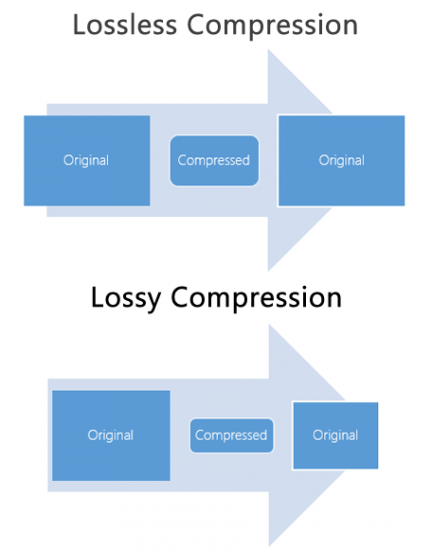
M4A and FLAC are both audio file formats, but they are quite distinct in their characteristics. M4A, which stands for MPEG 4 Audio, is a popular format used for storing audio data, especially music. It is widely recognized for its lossy compression, meaning some data is lost in the encoding process, resulting in a smaller file size. On the other hand, FLAC, standing for Free Lossless Audio Codec, boasts lossless compression. No data is discarded, maintaining the original audio quality.
“Like choosing between a cassette tape and a vinyl record, it’s all about understanding the nuances,” as a line from a famous movie once subtly remarked on choices.
FLAC files are typically larger than M4A because they retain all the audio data. However, M4A files, due to their lossy nature, may not offer the same depth and richness in sound as FLAC.
Which is better: M4A or FLAC?
Defining which format is “better” depends largely on the user’s needs. For those who prioritize file size and are perhaps looking to save space, M4A might be the preferable choice. Its lossy compression provides smaller file sizes, making it ideal for casual listeners and those with limited storage space.
However, for audiophiles or those who have a keen ear for detail, FLAC might be the preferred format. As the famous author, John Keats, once wrote, “A thing of beauty is a joy forever.” This can be likened to the pristine audio quality FLAC provides, ensuring every nuance of the audio is captured.
Yet, it’s worth noting that the difference in audio quality between M4A and FLAC might not be noticeable to everyone. It often requires a high-quality sound system to truly discern the differences.
What are the advantages of M4A over FLAC?
M4A does come with certain advantages. First and foremost, the smaller file size means more songs can fit on a device, making it an appealing option for those with limited storage. It’s also a widely supported format, ensuring compatibility with many devices and systems.
“Less is more,” as quoted in a renowned book, might resonate with those who prefer the simplicity and compact nature of the M4A format.
Additionally, M4A files tend to process faster due to their size. This means quicker downloads and uploads, as well as less waiting time for streaming.
How does FLAC’s quality compare to M4A?
FLAC’s quality is, objectively speaking, superior to M4A. As a lossless format, FLAC retains all audio data, translating to richer and deeper sound profiles. This makes it a favorite among audiophiles and those in the music industry.
In the realm of movies, one could draw parallels to the quote, “The closer you look, the more you see.” With FLAC, the closer you listen, the more you hear.
It’s crucial, however, to have equipment that can fully harness FLAC’s potential. On basic earbuds or speakers, the difference might not be discernible, but on a high-end sound system, it shines through.
Final Words
The battle between M4A and FLAC is akin to comparing two distinct art forms. Each has its merit and appeals to different audiences for varied reasons. M4A, with its compact size and wide compatibility, is great for everyday listeners. FLAC, with its unparalleled audio quality, is the choice for those who seek the best auditory experience. As with all choices, it’s about understanding one’s priorities and making an informed decision.
Audio compression is a critical component of modern audio production. It allows for the reduction of file sizes while maintaining an acceptable level of sound quality. Lossy audio compression is a popular method that achieves this by removing non-essential information from an audio file. In this article, we will dive deep into the technical details of lossy audio compression and explore its advantages and disadvantages, as well as the impact it has on audio quality.
Lossy Audio Compression
The Technical Basics of Lossy Audio Compression
Lossy audio compression works by removing information that is deemed non-essential to the human ear. This information is often in the form of high-frequency sounds or sounds that are below the threshold of human hearing. Lossy compression achieves this by analyzing the audio file and creating a model of the sounds that the human ear can and cannot hear. This model is then used to remove the non-essential information from the audio file.
There are several popular lossy audio compression formats and codecs, including MP3, AAC, and Ogg Vorbis. Each of these formats has its own strengths and weaknesses, and choosing the right one depends on the specific needs of the user.
The Trade-offs of Lossy Audio Compression
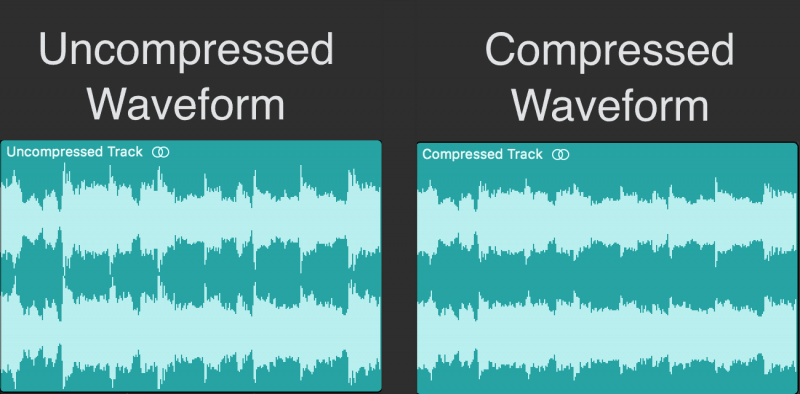
While lossy compression is an effective way to reduce file sizes, it does come with some trade-offs. The most significant trade-off is the loss of audio quality. As non-essential information is removed from the audio file, it can result in a loss of dynamic range and a decrease in overall sound quality. However, the degree of quality loss is often subjective and depends on the specific requirements of the user.
When comparing lossy and lossless compression formats, file size is often a significant factor. Lossy compression generally results in much smaller file sizes than lossless compression, but at the cost of some audio quality loss. However, the size difference between the two formats can be significant, making lossy compression a practical solution for many users.
Advanced Techniques for Lossy Audio Compression
Advanced techniques are available for lossy audio compression that can help to improve audio quality while still achieving significant file size reduction. Perceptual coding is one such technique that uses psychoacoustic models to analyze the audio and remove non-essential information in a way that minimizes the impact on sound quality. Another technique involves the use of metadata, which can help to provide additional information about the audio file that can be used to improve compression.
Best Practices for Lossy Audio Compression
There are several best practices that can be followed to achieve the best results when compressing audio files using a lossy format. Some of these practices include choosing the right codec for the specific needs of the user, ensuring that the encoding settings are appropriate for the file being compressed, and avoiding the use of excessive compression, which can result in a loss of sound quality. Additionally, it is important to avoid common mistakes when compressing audio files, such as encoding at too low of a bit rate or not checking the final output for artifacts or distortion.
Psychoacoustic Models
Psychoacoustic models are mathematical models that simulate the way that the human ear processes sound. They are used in perceptual coding to identify which audio signals can be safely removed without causing a noticeable loss in audio quality.
Psychoacoustic models take into account factors such as frequency masking, temporal masking, and the sensitivity of the human ear to different types of audio signals. They can also take into account more complex factors such as the interaction between different audio signals.
Metadata
Metadata is data that is embedded in an audio file and provides additional information about the audio content. In the context of lossy audio compression, metadata can be used to improve the compression process by providing additional information about the audio content.
One common use of metadata in lossy audio compression is to provide information about the target device or playback environment. For example, metadata can provide information about the type of headphones or speakers that the audio file is intended to be played through. This information can be used by perceptual coders to optimize the compression process for the target device or playback environment.
Another common use of metadata in lossy audio compression is to provide information about the audio content itself. For example, metadata can provide information about the genre, tempo, and key of a song. This information can be used to optimize the compression process for the specific characteristics of the audio content.
Best Practices for Lossy Audio Compression
To achieve the best results in lossy audio compression, there are several best practices that should be followed. These include:
Use the highest quality compression settings available
Use a well-supported and widely-used compression format
Use a lossless format for archiving and backup purposes
Avoid excessive compression, as this can lead to noticeable audio artifacts
Take into account the intended playback environment when compressing audio files
Include appropriate metadata to provide additional information about the audio content
Common Mistakes to Avoid
When compressing audio files, there are several common mistakes that should be avoided. These include:
Using excessively low compression settings, as this can lead to a noticeable loss in audio quality
Using an unsupported or proprietary compression format, as this can lead to compatibility issues
Not taking into account the intended playback environment, which can lead to suboptimal compression settings
Not including appropriate metadata, which can make it difficult to organize and manage large collections of audio files
Using excessive compression, as this can lead to noticeable audio artifacts
Explanation of Audio Compression and Lossy Audio Compression
Audio compression is the process of reducing the size of an audio file without significantly degrading the quality of the sound. Compression is necessary in the world of digital audio because it allows for more efficient storage and transmission of audio files. Without compression, audio files would be prohibitively large, making it difficult to store and share them over the internet.
Lossy audio compression is a specific type of audio compression that achieves a high degree of compression by discarding some of the audio data. This means that when you compress an audio file using a lossy compression algorithm, some of the data is permanently lost, and the resulting file is of lower quality than the original. Lossy compression is used widely because it allows for much higher compression ratios than lossless compression, making it more practical for everyday use.
Importance of Audio Compression in Modern Audio Production
Audio compression is an essential tool in modern audio production. The ability to compress audio files allows for more efficient use of storage space and bandwidth, which are essential resources in the world of digital media. Audio compression also makes it possible to stream high-quality audio over the internet, which has revolutionized the way we consume music and other audio content.
However, it’s important to remember that audio compression is not without its downsides. Lossy compression, in particular, can have a significant impact on the quality of the audio, and it’s essential to understand the trade-offs involved when choosing a compression format and level of compression.
The Technical Basics of Lossy Audio Compression
At its most basic level, lossy audio compression works by analyzing the audio file and discarding information that is deemed unnecessary for human perception. This information can include sounds that are too quiet to hear, or frequencies that are outside the range of human hearing. By discarding this information, the compression algorithm can significantly reduce the size of the audio file while still retaining much of the original sound quality.
The specific techniques used in lossy audio compression can vary, but most algorithms use some combination of frequency masking, quantization, and other mathematical techniques to achieve compression. The result is a smaller file size that can be easily stored or transmitted, but with some loss of audio quality.
The Most Commonly Used Lossy Audio Compression Formats and Codecs
There are many different lossy audio compression formats and codecs available, each with its own strengths and weaknesses. Some of the most commonly used formats and codecs include:
MP3 – one of the most widely used audio compression formats, with a high degree of compatibility and a good balance between file size and sound quality
AAC – a newer format that is widely used for streaming audio and has a better sound quality than MP3 at the same bitrate
OGG – an open-source format that is popular for internet radio and streaming
WMA – a format developed by Microsoft that is commonly used for streaming and downloading audio files from the internet
FLAC – a lossless audio compression format that is capable of compressing audio files without any loss of quality, but with larger file sizes than lossy formats
The Fascinating History of Lossy Compression
Lossy compression is a method of data compression that reduces the size of a file by discarding information that is deemed to be unnecessary. This technique has been used for decades in various fields, including image, audio, and video processing, to make files smaller and easier to share or store.
The first significant work on lossy image compression was done in the early 1970s by a group of researchers at the University of Southern California. They developed the first image compression algorithm, called the discrete cosine transform (DCT), which is still used today in the popular JPEG image format.
In the 1980s, the Moving Pictures Experts Group (MPEG) was established to develop standards for digital video compression. They introduced the MPEG-1 and MPEG-2 video formats, which became widely adopted in the industry. The success of these formats led to the creation of newer standards, such as MPEG-4 and H.264, which are still used in modern video streaming services.
Lossy compression has also been essential for audio processing. In the late 1980s, the MP3 format was developed by the Fraunhofer Society in Germany, which used a perceptual coding algorithm to remove information that the human ear cannot detect. MP3 quickly became the standard for digital music distribution, leading to the creation of newer formats such as AAC and OGG Vorbis.
However, lossy compression is not without its drawbacks. Because it removes data, it can lead to a loss of quality, especially if the compression is too aggressive. This can result in artifacts or distortions in the processed image, audio, or video.
Despite these limitations, lossy compression remains an important tool in the modern digital world. It allows for more efficient storage and sharing of multimedia content and has revolutionized industries such as music, film, and photography. As technology continues to evolve, it’s likely that new and more efficient lossy compression techniques will be developed, further enhancing the way we share and consume digital content.
In what format and with what quality is music heard on the radio?
In fact, we can say that there are currently two main audio formats: lossy (compressed) and lossless (uncompressed). They are classified into many types.
Lossy takes up less disk space, but degrades the quality of the audio track. When compressed using the MPEG protocol (hence the name mp3 – mp4 for files containing video sequences), the hues and transition tones, which are barely noticeable to the ear, are cut off. This makes the file clearer, but it also degrades it. The last place is occupied by the bit rate of that file: the degree of compression of each second of the audio track. The lower the bitrate, the less space the file will occupy and the worse the quality. Thus, a composition of three minutes in mp3 with a bit rate of 320 kilobits per second will occupy up to 3 megabytes on disk; a similar composition with a 96 kilobit bit rate will occupy about 400 kilobytes.
Lossless is as close to the original analog sound as possible *, making it much loved by sound engineers. Lossless formats take up much more disk space even compared to mp3-320. Among these formats, the most common are WAV (standard), FLAC (economic), AIFF (Apple). The former is used most often.
Professional sound recording is done only in uncompressed format. Only with him do sound engineers work.
On the radio, the situation is somewhat more complicated. This is due to the peculiarities of the work of the media, namely, efficiency and commercial profitability. The use of high-capacity servers is expensive and therefore most radio stations encode audio tracks in mp3 format at a bit rate of 256 kilobits per second. However, this is typical mainly of national stations. Equipment purchased from abroad has standard configurations that assume WAV encoding.
Why are software developers focusing on WAV? Because the radio signal cannot propagate without interference. Therefore, the listener still receives a small and sometimes significantly distorted signal. Therefore, broadcasters are faced with a reasonable question: what quality of sound will the listener perceive best: distorted ideal or distorted distortion? For this reason, in Europe and the United States, the WAV standard (AIFF, if the station operates with Apple equipment) is adopted, in Russia – mp3 with a bit rate of 256 kilobits per second.
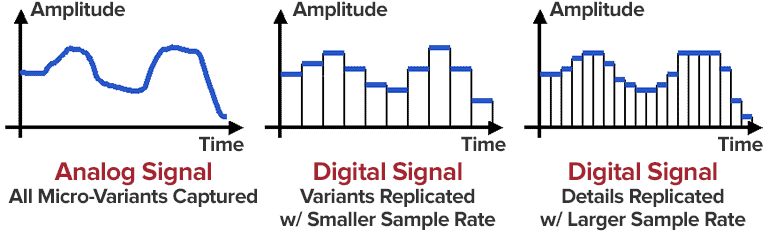
Analog data transmission is based on the physical properties of sound. The record-playback mechanism is based on the principles of human auditory perception. That is, the sound wave vibrates the membrane (by analogy with the tympanic membrane of the ear) and is fixed with a needle in the carrier in the form in which it was obtained. Reproduced, therefore, also without deviations and changes associated with digital conversion.
The Audio Files category includes compressed and uncompressed audio formats that contain a data signal and can be played by audio programs. This category also includes MIDI files, music scores, and audio project files, which generally do not contain audio data.
The most common extensions are .WAV, .AIF, .MP3, and .MID.
I’ll start with the well-known and widely used (though not always loved) MP3 format.
This audio format is actively used everywhere and everywhere, where it is needed and where it is not needed. But this does not mean that it is not worthy of the place it occupies in its niche. Very worthy. Although he has been “sitting” in his niche for about two decades, no one has “kicked” him out of there yet. And there were many who wanted to say it. And the main favorite of them is WMA (Windows Media Audio), which was conceived by Microsoft as an alternative to MP3. As a result, it is an alternative and it is, despite the best efforts of the developers. The next character is OGG. Despite the broader possibilities than MP3, for example, it never received widespread acceptance. Although it is compatible with many operating systems. Perhaps, it is worth mentioning the AAC audio format, which was supposed to replace MP3 in the relay. Encoding quality has been improved and compression loss reduced. But Ay.
The main advantage of these formats is their small size. The downside is the loss of quality.
Different formats
In today’s world, you can find a large number of different sound extensions. Let’s remember at a glance:
MP3 (Well where without it?)
WMA
OGG
CAA
And many others
Of course, each of these formats is good, especially MP3, which is probably the most popular format. But today we are not talking about popularity. MP3 and other similar formats, no matter how good they sound, are compressed originals. And even if you set the maximum quality to 320 btrate, it still won’t be of the highest quality. It was compressed, reduced, so there will be certain losses.