Improve quality of mp3s Part 3


Free Download Mp4Gain
picture

Improve quality of mp3s Part 3

MP3

Be aware of the difference between bit rate and bit depth!
Bit rate: amount of information per second
Bit depth: amount of information per sample divided by the sample rate
In other words, the calculation is “bit rate = bit depth x sample rate”.
What values ​​can be set when exporting MP3? What is the best export configuration?

MP3

~ What items can be set when exporting MP3? ~

When exporting MP3, you can set the following two items 💡

Bit rate: 16 kbit ~ 320 kbit
Sampling frequency: 32,000 Hz, 44,100 Hz, 48,000 Hz
For example, if there are no specifications in a competition and you want to export with good sound quality with mp3, let’s export with “320kbit, 48,000Hz” 💡

What is the best setting to reduce capacity and export with good sound quality?
The capacity is small!
Sound quality is good!
So if you want the capacity to be as small as possible but also the sound quality as best as possible, which setting is better to export?

The sample rate is generally 44,100 Hz.
Use ~ 44,100Hz! ~

In the video industry, 48,000Hz is mainstream, but in music, the sound quality is high enough if it is 44,100Hz, which is used for CD.

In the blind test, it is said that about half of the people can distinguish between them and in addition, there are two options, so even if you answer properly, there is a chance that you will win about half.

The bitrate is around 128 kbit, which is the limit between good and bad.
~ 128 kbit or more is recommended! ~

Even if the bit rate is reduced to around 128 kbit, the print does not change much and the roughness does not appear.

If you lower it to reduce capacity, “about 128 kbit is a guideline” 💡

If you want to reduce the capacity and stick to the sound quality, it is better to select 128 kbit ~ 192 kbit and 44,100 hz to export.
~ 44,100Hz 128kbit ~ is the best!

For those who want to reduce capacity and focus on sound quality, it is better to set the sample rate to 44,100hz and the bit rate to 128-192kbit 💡

MP3s also have export settings. What are the settings for exporting with even slightly better sound quality? summary of
MP3 stands for “MPEG 1 Layer 3” compression method
Depending on the compression settings, the capacity may be reduced by 1/10 or more.
MP3 removes sound components that are inaudible to humans, thus maintaining sound quality.
Set “bit rate” and “sample rate” when exporting
The sample rate is “number of samples per second”
Bit rate is “amount of information per second”
Bit depth is “amount of information per sample”
The best sound quality settings for MP3 export are 48,000hz, 320kbit
44,100Hz, 128 ~ 196kbit is the setting that balances capacity and sound quality when exporting MP3.
MP3s are often used to check demos and save space 💡

Even if you have exported it casually, put it in the corner of your head that there is a setting for MP3 export, and when you need it, remember it and use it


Free Download Mp4Gain
picture


Mp4Gain Main Window
picture


Mp4Gain Features
picture


Free Download Mp4Gain
picture

Improve quality of mp3s Part 2

Improve quality of mp3s Part 2

MP3

In other words, MP3 can be said to be a sound source file that was originally created by removing only the sounds that are difficult for humans to hear and without modifying the other sounds.

MP3

It is a commercially useful file format because it sounds very nice even if the capacity is small 💡

About MP3 Export Settings

When exporting MP3, the sound quality changes greatly depending on the bit rate (amount of data per second) and the sample rate (number of samples per second).

The sample rate determines how many divisions per second
~ How many divisions per second? ~

The sample rate determines how many divisions of information are handled per second.

At 44,100Hz, which is common, one second of information is divided into 44,100 samples, and at 44,800Hz, it is divided into 48,000 samples 💡

If you divide the sample into smaller samples, the information will be seamlessly connected, and if the information is approximate, it will be staggered.

Bit rate (kbit) determines the amount of information per second
~ Amount of information per second ~

On the other hand, the bit rate (bit) determines “the amount of information a sample has in one second”.

soon,

Bit rate = bit depth (1 sample information) x sample rate (number of samples per second)

For example, the bit rate of a 16-bit 44,100 hz wav file is 705.6 kbit.

Note that the bit rate is sometimes called “bps (bits per second)” because it is the number of bits per second 💡

caution!

* Bit depth is used in WAV export settings, etc. which is very similar, but the bit depth is the amount of information per sample. Be careful because it is confusing!

Improve quality of mp3s

Improve quality of mp3s

MP3 quality

MP3 is often used as a compressed sound source when the capacity of uncompressed files like WAV and AIFF is large and inconvenient, but in fact, you know that depending on the settings like bit rate and sample rate, it can “write with fairly high sound quality”. mosquito?

mp3 quality

This time about such MP3

Setting to export with high sound quality
Settings to export with good sound quality while saving space
Misleading Bitrate and Bit Depth Differences
I will also present on such things ^ – ^ No

1. What is MP3?
1.1 How do MP3s reduce their capacity?
2. About the MP3 export settings
2.1. The sample rate determines how many divisions per second
2.2. Bit rate (kbit) determines the amount of information per second
2.3 What values ​​can be set when exporting MP3? What is the best export configuration?
3. What is the best setting to reduce capacity and export with good sound quality?
3.1. The sample rate is generally 44,100 Hz.
3.2 The bit rate is around 128 kbit, which is the limit between good and bad.
3.3. If you want to reduce the capacity and stick to the sound quality, it is better to select 128kbit ~ 192kbit and 44,100hz to export.
4. MP3 also has export settings. What are the settings for exporting with even slightly better sound quality? summary of

What is MP3?
What is MP3?
MP3 is a compression technology (file format) that can reduce the capacity by 1/10 or more compared to the uncompressed compression method called “MPEG 1 Layer 3”.

It is also used when you want to save data capacity or when you collect a large number of songs in contests.

How do MP3s reduce their capacity?
~ How do MP3s reduce their capacity? ~

There are three reasons why MP3s can compress the capacity of a sound source 💡

Eliminate data in the “ultra high range (16 kHz or higher)” that is not as audible to humans at all frequencies.
It removes the data of small sounds that cannot be heard because they are erased by loud sounds for each frequency.
Humans cannot hear the small sound that plays immediately after the loud sound, so they cut it off.

Compress mp3 without losing quality

Compress mp3 without losing quality

Mp3

On lossless music compression, theory, practice, conclusions.
With this material, I want to open a series of articles with everything related to listening to music on a computer. The time has come to share experiences and summarize disparate articles on the Internet in one, although they are not intended to be precise, but relatively brief. In the first part, we will see the audio formats. What is FLAC, WavPack, TAK, Monkey’s Audio, OptimFROG, ALAC, WMA, Shorten, LA, TTA, LPAC, MPEG-4 ALS, MPEG-4 SLS, Real Lossless? Do you know how many types of audio files are registered today? So far, we are dealing with lossless compression formats for audio materials, and the answer to the question about the number of audio extensions is at the end of the article. Happy reading!

mp3

So first, let’s define the terms:

“An algorithm is a precise prescription that defines the computational process that goes from variable inputs to the desired result.”

“Codec (codec in English, of encoder / decoder – encoder / decoder – encoder / decoder or compressor / decompressor) is a device or program capable of converting data or signals. Codecs can encode a stream / signal (often for transmission, storage, or encryption) or decode, to view or change into a more suitable format for these operations. Codecs are often used in digital video and audio processing. Most codecs for audio and visual data use lossy compression to obtain an acceptable final (compressed) file size. There are also lossless codecs ”.

“Lossless data compress. – method of data compression, using encoded information that can be restored in one bit. This fully recovers the original data from the compressed state. As a rule, each type of digital information has its own lossless compression algorithms “.

Lossless data compression is used when the identity of the compressed data with the original is important. Common examples are executables, documents, and source code. Programs that use lossless compression formats are called archivers, everyone knows the most popular ZIP or RAR file formats, the Unix Gzip utility, etc. All these programs differ in the applied algorithms (one or more) and therefore in different compression properties of different files.

Part I. – THEORY:

Compression methods or lossless compression algorithms can be classified according to the type of data for which they were created. There are three main types of data: text, images, and sound. Basically any multipurpose lossless data compression algorithm (multipurpose means it can handle any type of binary data) can be used for any type of data, but most of them are inefficient for all basic types. Audio data, for example, cannot be compressed well with a text compression algorithm and vice versa.

Compression methods include the following: entropy compression, dictionary methods, statistical methods. Each method is good for a specific type of data and includes several algorithms.

Entropy compression: Huffman algorithm Adaptive Huffman algorithm Arithmetic coding (interval Shannon-Fano algorithm) Golomb codes Universal Delta code (Elias Fibonacci)

Dictionary methods: RLE Deflate LZ (LZ77 / LZ78 LZSS LZW LZWL LZO LZMA LZX LZRW LZJB LZT)

Statistical algorithm models for text (or textual binary data as executable) include: Burrows-Wheeler transform (block sort preprocessing that makes compression more efficient) LZ77 and LZ78 (used by DEFLATE) LZW.

Is it possible to improve the quality of an MP3?

Thanks to MP3 we can listen to our favorite music everywhere. When you put your MP3s on a USB stick, you can listen to your favorite music in the car, for example. But you can also put MP3 music on your smartphone. Allowing you to listen to music whenever possible.

MP3 quality

But sadly, it still happens that the quality of an MP3 is not really what it should be. In this article, we look at the options to solve that problem. So that you can not only listen to music everywhere, but also enjoy it everywhere.

Mp3 quality

What exactly is an MP3 music file?

Mp3 is a method of compressing digitally stored music. Uncompressed storage of a stereo digital music file takes up a lot of disk space. An average of 10MB of disk space per minute of recorded music.

However, compressing a music file and saving it as MP3 will leave only one-tenth the size of the original file.

Since the introduction of the CD, music has been recorded digitally in the form of samples or measurements. Sound is neither more nor less than vibrating air. These vibrations are also known as sound waves. Sound waves can be measured, recorded, and stored.

However, when sound waves are produced creatively, then it is music.

The number of vibrations per second determines the pitch of the sound. A large amount of vibrations creates a high tone, a small amount of vibrations for a low tone.

The number of vibrations per second is expressed in hertz. The human ear can perceive sounds between 20 Hz and 20,000 Hz.

It was once scientifically discovered that in order to record the highest pitch, a measurement must be taken 44,100 times per second. Therefore, the number 44,100 is the sample rate in hertz that is required for good quality recording.

In addition to high and low tones, a piece of music also contains high and soft passages. The difference between the loudest and the softest passages is called the dynamic range. For the dynamic range of a piece of music to be recorded digitally, you can choose 256 steps (8-bit) between the softest part and the hardest part or 65536 steps (16-bit).

The dynamic range is highest when recording with 16-bit samples or 65536 steps.

If we then do some math with this data, we see that 44,100 measurements are needed for one second of music. Each measurement (sample) is 16 bits (2 bytes) in size. That means 1 second of music takes up 88,200 bytes or 88Kb of disk space.

But since we like to listen to music in stereo, we can multiply that number by 2. For example, one second of music in stereo takes up 176 Kb of disk space and therefore 10 MB per minute.

When a compressed MP3 file is created from an original music file, this is done using a lossy compression method.

Lossy compression causes data loss. With an MP3 file, this means that information is omitted from the file that is beyond the reach of the human ear.

Humans are most sensitive to sounds between 2 kHz and 4 kHz. And we cannot hear loud and soft sounds simultaneously. Therefore, it is only necessary to keep the loud sound. In technical terms, this is called psychoacoustic masking.

What determines the quality of an MP3?
The MP3 format was developed by the German research institute Fraunhofer ISS. In addition to utilizing the limitations of human hearing just mentioned, the format consists of several mathematical formulas. This makes it possible to reduce the original file by a factor of 3 to 12.

The degree of compression is related to the bit rate. Bit rate is the amount of data that is processed per unit of time. This means, among other things, that the more data there is in one second of music, the larger the MP3 file will be. But also the better the sound quality of the MP3.

A bit rate of 64 to 96 kbps is enough to talk. A bit rate of 128 kbps is used for a good quality music file. Excellent quality can be achieved with a bit rate of 192 kbps or higher, with a maximum bit rate of 320 kbps.

A bit rate of 192 kbps or higher is only useful if the recording quality of the track is also excellent.

Obviously if you want the mp3 to sound even better, use Mp4Gain to mormalize mel volume, to correct the equalization and to make a series of changes or improvements.

MP3 quality – too compressed for hi-fi sound?

Audio quality

When it comes to the subject of “MP3 and sound quality”, one is entering a minefield. Hi-fi fundamentalists claim that many people no longer know what good sound really is because of MP3s. The accusation is not entirely unfounded, because MP3 is a lossy format. However, you shouldn’t make it too easy for him with judgment. After all, there is no uniform standard for MP3 quality. Another important question is: what about the sound quality of other formats?

audio quality

What “lossy” means for the sound quality of an MP3 file

MP3 and other lossy audio formats such as AAC may have been lost. to. designed with the aim of saving storage space. Because at the time of its development, the storage capacity of hard drives was much more limited than it is today, and the download and upload rates were also insufficient for large amounts of data. Today, the bandwidth for streaming and wireless transmission over Bluetooth are limiting factors. So compression still has to be. How is the amount of data reduced compared to the original recording?

On the one hand through compression and on the other hand through the omission of certain sound information. Because not everything that is captured in a recording also becomes the compressed file. To limit the effects of data loss on MP3 quality, only information that is acoustically insignificant is ignored. To be more precise: particularly low frequencies and particularly high tones are cut off. Because people can only perceive extreme highs and lows up to a certain point or not at all.

That’s how high MP3 quality really is

A general evaluation of the quality of MP3 sound is complicated by the fact that there are different levels of quality. They are the result of the respective bit rate (data rate, “bit rate”), specified in kilobits per second (“Kbit / s”). 64 Kbit / s as well as 128, 192, 256 or 320 Kbit / s can be implemented. The following applies: The higher the value, the less data loss will be compared to the source material.

A rule that is mentioned from time to time states that from a bit rate of 192 kbit / s data loss is no longer important for auditory impression. The file format alone says little about the quality of the audio signal.

But there is no clear limit. Factors like music genre, system, and last but not least individual hearing all play an important role when it comes to evaluating the quality of an MP3 file. There are also differences between the audio formats: a file encoded in AAC at 192 kbps tends to provide a better listening experience than an Ogg Vorbis file with the same data rate.

What is the sound quality on Spotify and other music streaming services?

Some 20 years after its invention, MP3 is still the most widely used audio format on the Internet. However, there are other formats that play an important role in music playback today. An example of this is the patent-free Ogg Vorbis format mentioned above. The streaming giant Spotify also relies on this.

Other audio formats used by streaming services are:

  • Apple Music: AAC
  • Spotify: Ogg Vorbis
  • Google Play Music: MP3
  • Deezer HiFi: FLAC

Streaming providers are quite reluctant to provide information on the respective data rates. When the service launched, Apple Music announced that the streams would be streamed at a bit rate of 256 kbps. With Spotify it is 320 Kbit / s with high sound quality, also with Google Play Music. At lower quality levels, the bit rate drops below 200 Kbit / s. However, providers of lossless transmission clearly exceed these values: Deezer, for example, announces its high fidelity subscription with 1,411 kbit / s. The stream here is in lossless FLAC format.

Placebo effect? Can you distinguish an mp3 320 kbs vs a FLAC?

Studies have shown that most people can NOT distinguish an mp3 at 323 kbs (That is, with the best quality) from a FLAC file.

MP3 vs FLAC

We all know that in theory an mp3 is a format that discards information to achieve a small size; or, indeed, due to this ability to take up little space on the disk, but sounding very similar to the original wav was what propelled fame to mp3.

The Mp3 is dead.

Dozens of times it has been written about the undeniable advantages of the formats that do not lose information (looseless), it could be thought that people would turn their backs on the mp3.

MP3 vs FLAC

Some have warned that it is not so likely that this will happen, since most of the audio players (for example, those that come from the factory with the cars) play mp3s but not Flac.

Placebo effect?

But others have pointed out that untrained human hatred CANNOT distinguish an mp3 recorded at its highest quality from the FLAC.
For which to show yourself as a lover of FLAC and a fanatic defender of that format, it is more a snobbery full of blah, blah blah and technicalities that ignore that the human ear is not a robot and that in reality most people they cannot distinguish between one and the other.

And we combine the convenience of using mp3s because the devices are designed for mp3 and not for FLAC, together with the fact that in reality most people cannot distinguish one from the other … this should explain that that the mp3 is dead, is more a product of fanaticism than realism.

Also, they forget another problem.

When digital music is recorded it requires using a compressor … which did not happen with music recorded on tape, that is, vinyl.

That is why there is another faction that does not proclaim and sing songs in favor of FLAC but rather the return to vinyl (forgetting all the advantages and comforts of digitization).

In other words, all these discussions seem more like a mixture of snobbery and puritanism than something realistic.

What studies have shown

What we cannot ignore is that undoubtedly 99% of people (including many experts, musicians, etc. who talk hours about bitdepth, bitrate, etc.) can NOT distinguish a WAV, from a FLAC, from an mp3 recorded at qualities superior to 160 kbs.

Personally, we celebrate that all these formats exist and that we are coming to the time where every person can use and love the format of their choice and even defenestrate and even hate other formats and discuss long hours about their technical knowledge.

But yes, it seems that it is basically a placebo effect.

What exactly is an MP3 music file?

Mp3 is a method of compressing digitally stored music. Uncompressed storage of a stereo digital music file takes up a lot of disk space. An average of 10 MB of disk space per minute of recorded music.

However, if you compress a music file and save it as MP3, only a tenth of the original file size remains.

mp3 quality

Since the introduction of the CD, music has been digitally recorded in the form of samples or measurements. Sound is no more or less than vibrating air. These vibrations are also known as sound waves. Sound waves can be measured, recorded and stored.

However, when creative sound waves are produced, there is music.

The number of vibrations per second determines the pitch of the sound. A large amount of vibration produces a high tone, a small amount of vibration produces a low tone.

The number of vibrations per second is expressed in Hertz. Human hearing can perceive sounds between 20 Hz and 20,000 Hz.

Once it has been scientifically established that to capture the highest tone, a measurement must be taken 44,100 times per second. Therefore, the number 44,100 is the sampling frequency expressed in hertz needed for a good quality recording.

In addition to the high and low tones, a piece of music also contains hard and smooth passages. The difference between the highest and smoothest passage is called the dynamic range. For dynamic range on a digitally recordable track, you can choose 256 steps (8 bits) between the softest and loudest part, or 65536 (16 bits).

The dynamic range is highest when recording with 16-bit samples or 65536 steps.

If we then add a calculation to this data, we see that it takes 44,100 measurements for a second of music. Each measurement (sample) is 16 bits (2 bytes) in size. That means that 1 second of music takes up 88,200 bytes or 88 KB of disk space.

But since we like to listen to music in stereo, we can multiply that number by 2. For example, a second of music in stereo already takes up 176 Kb of disk space and, as said, 10 MB per minute.

When a compressed MP3 file is made from an original music file, it is done with a lossy compression method.

Data is lost on lossy compression. With an MP3 file, this means that the information is outside the file that is beyond human hearing range.

For example, people are more sensitive to sounds between 2 kHz and 4 kHz. And we can’t hear loud, soft sounds at the same time. Therefore, only loud sound needs to be preserved. In technical terms, this is called psychoacoustic masking.

What determines the quality of an MP3?

The MP3 format was developed by the German research institute Fraunhofer ISS. In addition to taking advantage of the limitations of human hearing just mentioned, the format consists of a series of mathematical formulas. This allows you to reduce the original file by a factor of 3 to 12.

The amount of compression is related to the bit rate. Bit rate is the amount of data processed per unit time. This means, among other things, that the more data there is in a second, the larger the MP3 file will be. But also the sound quality of the mp3 will be better.

For speech, a bit rate of 64 to 96 kbps is sufficient. A bit rate of 128 kbps is used for a good quality music file. Excellent quality can be achieved with a bit rate of 192 kbps or higher, with a maximum bit rate of 320 kbps.

A bit rate of 192 kbps or higher is useful only if the recording quality of the track is also excellent.

Check the quality of an MP3

Unfortunately, the quality of MP3 music is not always good. This applies, for example, when an MP3 comes from a somewhat unknown source. But of course you can also make an MP3 from a recording that is not very good in itself.

Generally, if you create MP3s from music on your own CDs or other sound media, you can guarantee the quality of the MP3s simply by choosing the appropriate settings in the software you are using.

However, if you get MP3 music in other ways like downloading from the internet for free, it will be a slightly different story.

Then you have to settle for what you get. With the knowledge of this article, it is already much easier to distinguish a low quality MP3 from a good quality MP3.

Something that can be useful. Because there is not much good to do of poor quality.
In summary, we can say that a good MP3 meets the following requirements:

-The MP3 file must have a bit rate of 128 kbps.
A higher bit rate is only desirable for excellent recordings.
-The recording quality must be good.
-The recording quality can be checked by listening to each MP3 before buying and / or downloading it. Preferably with headphones. This gives you the best impression of sound quality.

The MP3s that you buy online, for example at the Apple Store, are usually of good quality. Usually, it is the MP3 files you download from other sources that you should carefully check and listen before using them.

Music you download from sources other than online stores will definitely end up in the Downloads folder.

You can check the MP3 music downloaded from the Internet as follows:

Launch File Explorer and navigate to the Downloads folder.
To display only MP3 files in File Explorer, type: * .mp3 in the search box. This search will show you all the files in the Downloads folder with the extension .mp3.
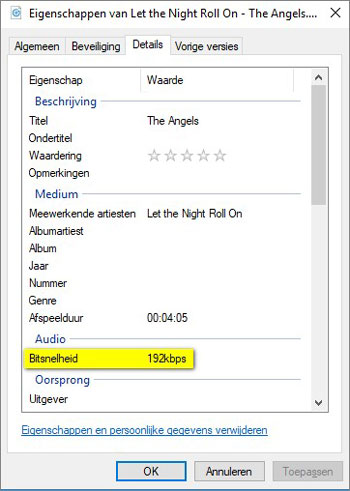
Right-click on the MP3 file you want to check and click Properties in the context menu that opens.
The [Music file name] property window is then displayed. The Details tab shows the exact bit rate of the MP3.

When you close the Properties window and double-click the selected MP3 file, the corresponding MP3 file will be loaded into your PC’s MP3 player and played.
That’s basically all you can do. A bad MP3 is impossible to improve on. Converting music to an MP3 file not only compresses but also removes data from the music file that you have been able to read.

And the lower the bit rate, the more data is generally lost and impossible to recover.

This means that when you have downloaded a low quality MP3 file, you have no choice but to search for a better quality MP3. The same goes for an MP3 whose recording quality is not very good.

Collecting the best possible MP3 files takes some effort. But this effort will be amply rewarded once you start listening to your favorite music, and the sound quality will certainly contribute to the actual enjoyment of the music.

Flac vs Mp3, differences

In today’s world, it is important to understand the difference between the different audio files available.

The most common and current files are practically the files in the formats MP3, Flac and WAV.

Is there really a difference between MP3, Flac and WAV files? The answer is absolutely yes.

flac vs mp3

The difference is in the audio quality that these files can play.

What is the difference between MP3, Flac and Wav files? MP3 files are of lower quality because they are more compact and smaller. Flac files are a kind of compromise. With files in Flac format, it can be of very good quality and remain true to the original, which in any case is compressed by a certain percentage. Finally, there are the WAV files that do not use compression.

Therefore, the quality is better, but the size of these files is quite large, it is not compatible with any device these days.

It may not be easy to understand which audio file to use for your work, especially if you are a beginner in this area.

However, you don’t have to be afraid of it.

flac vs mp3

Once you’ve learned all the differences between the three audio files, you can really fix the problems by always using the appropriate file.

What are the differences between the categories in detail and when should you use a specific audio file?

Here’s a complete analysis for each audio file format that really helps you understand everything you need to know about MP3, Flac, and WAV files.

What is an MP3 file?
It starts with one of the most common files in the world of information technology, namely the one called MP3.

MP3 files have been around for years, so their development is common.

But what an MP3 file really represents.

Well, a general audio file is a series of numbers obtained by sampling the analog signal.

This scan responds to some parameters, which are the frequency measured in Khz and the resolution expressed in bits.

The MP3 file represents the most compressed form of an audio file, so to speak.

Finally, you need to understand that the MP3 file can remove all unnecessary parts of the digital file from the sequence and the final sampling, taking advantage of some imperfections of the human body to give it a clear and clean melody.

On the other hand, the MP3 file significantly reduces the quality of the sounds played.

In fact, all the different nuances of a certain melody come to the bone.

An MP3 is small if you speak it from the perspective of the memory. You should think of it as a kind of concentrate that gives you a remarkable but not 100% complete end result.

In the most extreme cases, an MP3 file can reduce the original tones and nuances of music or melodies to a percentage of 90%.

However, these formats are widely appreciated and used because they are not only practical and direct, but are now compatible with all technological devices, e.g. B. MP3 players, for which we recommend that you read our guide.

This means you can take them with you at any time and any product you have can read an MP3 file.

What is a flac file?
So at this point you need to understand what a Flac file is.

Well, it should be said that the Flac file has some major differences from its MP3 counterpart.

In fact, a Flac file is much more complex than a regular file and can be reduced by 90%.

First, you need to understand that Flac is actually an acronym that stands for Free Lossless Audio Codec.

It is always a format that is somewhat compressed, but files with this name have a certain property.

In fact, the file is lossless with no loss and maintains higher fidelity than the original sound.

With a Flac file, you have a clearer quality of the audio file, so you can clearly hear some details that can be lost if you use a different audio format.

The limited storage space when using the Flac format is very small and can reach a maximum of 50%.

However, when using such files, you should be aware that their use on the storage hard drive is important.

Not surprisingly, Flac files take up a lot more space than regular MP3s. In some cases, a special reader must be downloaded to read them. Many home theaters and receivers support this compression format.

Audio quality in different formats (flac vs. mp3)

In this post I am going to talk about what differentiates music from mp3 and flac. First, and before you begin, go ahead with the following:

The quality of a musical hearing depends (and a lot) on the audio card and the musical equipment (amplifier, headphones / speakers) used, and on the other hand it also depends on the sensitivity of one’s ear. A newborn with perfect hearing can hear from 20 Hz to 20,000 Hz. The normal thing for a young person is to hear nothing above 18 kHz, although some people with exceptional hearing can hear 20 kHz or even more. , and a person 25 years of age or older begins to lose hearing from 15,000 – 16,000 Hz. In addition to the frequency response (quantitative aspect), the qualitative aspect is equally or more important: that the waves at each frequency are produced in the most similar way to the original source.

Having said that, we fully enter the subject at hand.

Many people think that an mp3 sounds like the quality of a CD. This is not exact. Apart from the fact that a CD sounds with the quality that those who have recorded it have given it, mp3s are formats with loss, and that means that a good part of the original information is discarded to save space. The trick is that the information that is discarded is, as a rule, information that is “hidden” among the rest of the information. To give a simple example so that the idea is understood, if a person is speaking to me at a normal volume and suddenly a helicopter passes in front of us, the sound of the helicopter will eclipse in my ears the voice of that person; the wave of his voice will continue to reach my ears but I will not perceive the sound. Another example, so that I am also understood: if we could play two very similar pianos at exactly the same time in such a way that their vibrations coincided, the mp3 would “say” that “one of the pianos is left over”. This type of operation (but, of course, at a much more subtle level, of microscopic changes) is what is done so that the initial 40 or 50 MB that a song occupies on the CD are reduced, at most, to 9 MB or less, depending on the bitrate (128, 160, 192, 256, 320 kbps) of the mp3.

But all that information that the mp3 removes at a stroke is information that, from the original source, would reach us, and it is information that would affect us emotionally (an mp3 violin can hardly give us goosebumps), although consciously most of the time we do not know how to express the difference in words. The same happens, for example, when a person is recreated in virtual reality: sooner or later we will know that this person is not real, because virtual reality technology has not yet managed to recreate the microscopic details that we are capable of capturing and that make us identify a person as real and not virtual.

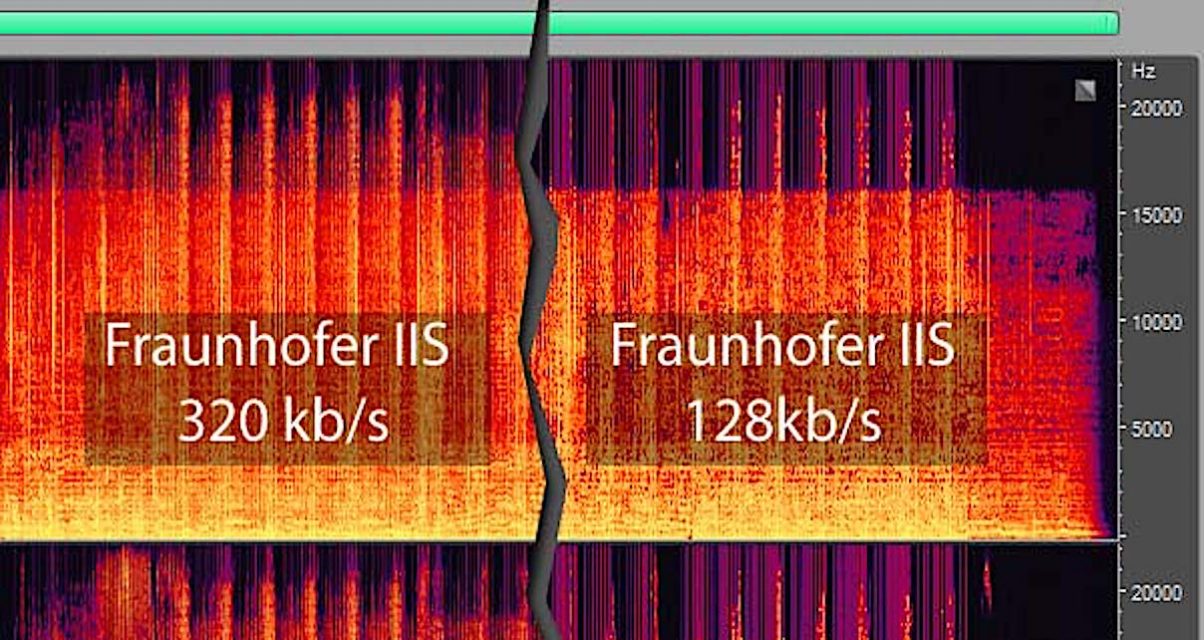
Other differences between an mp3 and a wav (Microsoft’s uncompressed wave file) or a flac (Free Lossless Audio Codec, free lossless audio codec) are noticeable after spending a long time listening to music. The mp3 ends up giving you a headache, while the original sound doesn’t. And to this we must add that there are certain songs that have the musical information arranged in such a way that the mp3 algorithm is not able to “guess” what it is that you are not going to be able to listen to, and the result is that there is a notable loss quality, especially in the treble. In fact, a 128 kbps mp3 cuts all frequencies starting at around 15 kHz, and this is something that most people with normal hearing can easily perceive.

So that you can hear the REAL differences that exist between the different audio formats, I have prepared several tracks in which I have done the following:

1) I have loaded the song from the original disc.

2) I have recorded it in different formats: flac, mp3 to 128, mp3 to 160, mp3 to 192, mp3 to 256 and mp3 to 320 kbps.

3) I have then loaded all the waves into the Sound Forge Pro 10.0 program.

4) I have synchronized all the waves bit by bit. This is necessary because the mp3 introduces a certain lag of milliseconds with respect to the original.

5) I have copied each mp3 wave (lossy quality) and mixed it on the flac wave (original quality, without loss) with the reverse polarity. If both waves were identical, the result would be silence. But instead, as the mp3 has less information (the wave has fewer resolution points, so that it is understood) there is a residual noise that corresponds, neither more nor less, to what the mp3 has less than the flac added to what the mp3 has more than the flac (the mp3 not only loses information; it also introduces noise that was not in the original recording).

6) I have recorded everything on flac. Contrary to what most people think, the fact of converting an mp3 to a higher quality format does not add quality, since the additional information “cannot be invented” by the mp3, and it is still absent. An mp3 transferred to CD continues to sound like an mp3.

Important note: In order to listen to the files, your player must be able to play flac. First of all, associate the files with the .flac extension to your player so that it opens them when you click on them. If they still don’t sound, then install the necessary codec or plugin.

As a player I recommend the AIMP2 or the Foobar2000; both are free and give exceptional audio quality (they reproduce the sound as it is recorded, without any attachments of any kind). For my taste, the best of the two is the Foobar2000, because it is also more stable and lightweight. The Winamp and the Windows Media Player color the sound (or in other words, they equalize it), which can be interesting if you have low-quality audio equipment and play mp3s at low bitrate (128 kbps), but, If the equipment is hi-fi and the music is encoded in a lossless format or played directly from the original CD, then the difference between Winamp or WMP and AIMP2 or Foobar2000 is quite noticeable.