What are the most popular audio formats?


Free Download Mp4Gain
picture

What are the most popular audio formats?

There are dozens of audio files that we can use to convert a song, but the really useful ones can be counted on the fingers of one hand.

losseless

When we think of an audio file, most of us immediately think of MP3. Without a doubt, it’s one of the most popular audio formats, but it’s not the only one. Let’s see what are the most popular audio formats and what are the differences in use. And we have to choose that according to our needs.

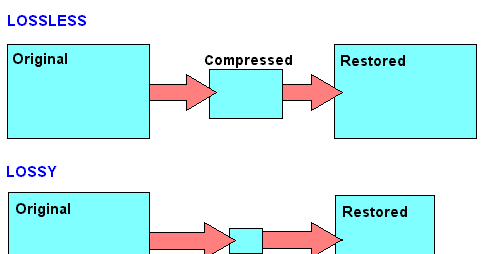
There are different categories of audio files. First we defined the formats as uncompressed. The word itself defines this section of the file. In this case, the recorded sound waves are actually converted into a digital format without further processing. What does it all mean? In files that are very difficult to save and take up a lot of space. In order to simplify the storage of audio files and to reduce the load, formats with lossy data compression were created. These sacrifice some quality in favor of the small storage space required.
losseless

To fix this error, which represents the loss of quality in favor of file size, compressed audio formats were created without loss of data. Obviously, they’re not small files like lossy compression, but they’re still smaller than uncompressed. However, it must be said that these types of formats are only widespread in certain cases.

PCM

PCM is the most common and widely used audio format on CDs and DVDs that we have at home. It is the faithful conversion of analog audio into a digital file. It is no coincidence that it is an uncompressed audio format. Remember that analog sounds exist as waveforms. In order to convert a sound wave into digital bits, the sound must be sampled and recorded at certain intervals.

WAV

WAV stands for Waveform Audio File Format (previously it was also called Audio for Windows, now it is no longer). It is a standard developed by Microsoft and IBM in 1991. WAV files can contain compressed and uncompressed audio formats. In most cases, however, they are used for uncompressed people. Although it was developed for Windows, it can also be safely opened on a Mac.

MP3

This is without a doubt the most popular audio format. It was released in 1993 and over the years its success has increased thanks to the combination with the pieces of music. Why are they used so often? Quite simply, these are lossy compressed files, and the generated files are so small that users can create a music library without taking up too much space. And the quality? It is much lower than other formats, but the human ear doesn’t always manage to notice the difference significantly. MP3 is also a universal file. It can be found on smartphones, computers, smart TVs, tablets and many other electronic devices.

WMA

WMA stands for Windows Media Audio. It was first published in 1999 and has gone through several developments since then, always keeping the same name. As you can easily guess, it is an audio format created by Microsoft. It was developed to replace MP3s. Unfortunately, there are very few platforms that support this, so the MP3 mastery has never been compromised.

OGG

OGG is not a real compression audio format. We can define it as a multi-purpose multimedia container. It can contain all types of audio formats, but is often used to contain Vorbis files. It is one of the best performing files to reduce size without losing quality.

FLAC

FLAC stands for Free Codec Lossless Audio. It is a lossless, compressed format that was created in 2001. A FLAC file can be compressed to 60% of its original size without minimal loss of sound quality. It is also an open source format. Because of this, it is compatible with most programs and devices. It is the best quality alternative to MP3.


Free Download Mp4Gain
picture


Mp4Gain Main Window
picture


Mp4Gain Features
picture


Free Download Mp4Gain
picture

Encoding digital audio with a loseless format?

Compressing a digital audio with loss is to reduce the size of an audio file.

Codecs are used to reduce the size of the files. Some of the operations that codecs can perform to reduce file sizes are as follows:

Reduce the bit rate of the original sound so that the audio takes up less space.
Remove sounds at frequencies that are not noticeable by the human ear.
Elimination of redundancies of the audio signal.
They can reduce the number of existing channels by transforming a surround sound to Stereo.
Reduce the number of bits per sample.
Etc.
Note: The compression process of an audio is extremely complex. In addition, each codec applies different methodologies to compress the size of an audio.

Obviously during the compression process there will be a loss in audio quality. The higher the weight reduction of the compressed file, the higher the loss of quality.

UTILITIES THAT YOU HAVE TO COMPRESS AN AUDIO

Obviously compressing an audio has certain utilities. Some of them are as detailed below:

The space needed to store the songs on our hard drive will be much smaller. Although hard drives are cheap and their storage capacity is large, it is not feasible and / or practical to store all of our songs without loss.
We can pass the audio files to third parties in a much more convenient and fast way. After compressing a music song we can pass it by email or other means without any problem.
It seems that the trend in the very near future will be to consume video and audio via streaming. Therefore the compression of video and audio is very important. If we offer a web service in which we provide streaming audio, it is essential to compress the audio to save bandwidth and so that customers can play it at home without problems.

Select the compressed audio file format

There are numerous types of compressed file format with loss. Some of the most popular are the following:

.mp3
.ogg
.wma
.m4a
.aac
Depending on the needs, it may be useful to select one format or another.

However in my case I recommend using the mp3 or ogg file format. The reasons are as follows:

The .mp3 files do not stand out for providing the best audio quality. However, the .mp3 format is the most universally extended.
Any music player is capable of playing the .mp3 file format. You cannot say the same of the other file formats.
Everyone is able to play audio in .mp3 format. Even people with little knowledge technologically speaking.
If someone does not want to use the .mp3 format because they think the quality is not enough, or because it is a proprietary format, I recommend using .ogg. In the following link you can find the advantages and disadvantages of the .ogg files with respect to the .mp3 files.
Select the audio compression codec (encoder)

Once the file format is selected we must be aware of the codec that we will use to perform the audio compression.

In the case that we want to compress in the .mp3 file format there are the following codecs:

FHC: It’s the first codec that existed. At present this codec has become obsolete. Its compression time is very high and does not support variable bit rate.

Xing: It is the fastest encoder and allows you to obtain files with a variable bit rate (VBR). However, the quality level offered by this type of encoder is lower than Blade and Lame.

Blade: Until Lame’s appearance was the best option. It is slightly slower than Xing, but the quality levels obtained are much better. Currently this host has a problem and it does not support variable bit rates.

Lame: It is available under the GNU license and is also the best host available today. It supports variable bit rates, is fast and the quality obtained is better than in the rest of the encoders.