Audio Codec Comparison: A Comprehensive Guide for Audio Geeks


Free Download Mp4Gain
picture

Audio Codec Comparison: A Comprehensive Guide for Audio Geeks
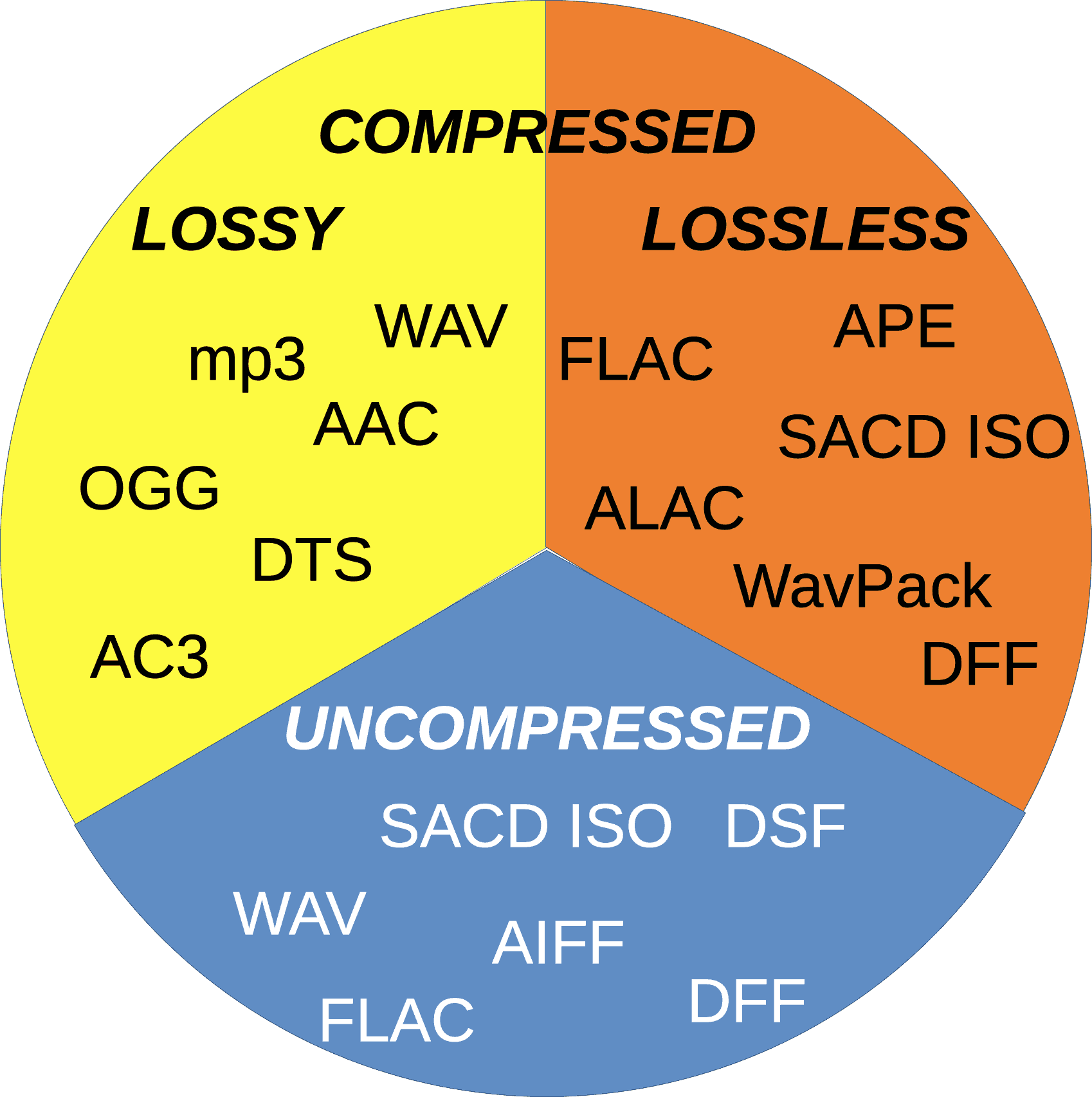
Audio Codec Comparison

Introduction

Audio codecs play a significant role in digital audio technology, as they are responsible for compressing and decompressing digital audio files. The use of audio codecs is essential to reduce the file size of audio files, making them easier to store, share, and transfer over the internet.

However, with the numerous audio codecs available in the market, it can be challenging to choose the right one for your needs. In this article, we will provide a comprehensive guide on the most popular audio codecs available today, their features, and their pros and cons.

What is an Audio Codec?

An audio codec is a software program or algorithm that compresses and decompresses digital audio data. The term codec stands for coder-decoder, and it is responsible for reducing the file size of digital audio files by removing redundant and irrelevant information from the file while retaining the original sound quality as much as possible.

Without an audio codec, digital audio files would be too large to store or transfer over the internet, which would be impractical. Therefore, audio codecs are essential for digital audio technology to function effectively.

Types of Audio Codecs

  • Lossy Audio Codecs

    Lossy audio codecs are designed to reduce the file size of digital audio files by discarding information that is considered irrelevant or redundant for human hearing. Lossy codecs achieve compression by applying psychoacoustic models that analyze the human auditory system’s limitations and remove sounds that are inaudible or less audible to the human ear. The most popular lossy audio codecs are:

    • MP3
    • AAC
    • OGG
    • WMA
  • Lossless Audio Codecs

    Lossless audio codecs compress digital audio files without discarding any information. Lossless codecs achieve compression by using sophisticated algorithms that analyze and encode the original audio data without affecting its quality. Lossless codecs are preferred for archiving or storing audio files that require the highest possible sound quality. The most popular lossless audio codecs are:

    • FLAC
    • ALAC
    • WAV
    • AIFF

Popular Audio Codecs

MP3

MP3 is the most popular audio codec in the world, and it has been around since the 1990s. MP3 stands for MPEG Audio Layer III, and it is a lossy audio codec that compresses digital audio files by removing sounds that are less audible to the human ear. MP3 is compatible with almost all audio players and devices and is widely used for music streaming, downloading, and sharing over the internet.

The main advantage of MP3 is its small file size, which makes it easy to store and transfer over the internet. However, MP3’s main drawback is its reduced sound quality, especially for audio files that contain a wide range of frequencies or dynamic range. MP3 files are prone to audio artifacts, such as compression artifacts, and they can sound flat or distorted compared to the original audio file.

AAC

AAC stands for Advanced Audio Coding, and it is a lossy audio codec that is widely used for music streaming and downloading. AAC is the default audio codec for Apple devices and is used by popular streaming services such as Spotify, Tidal, and YouTube. AAC is also used for high-definition digital television and radio broadcasting, as well as in various video formats such as MP4 and M4V.

FLAC

FLAC stands for Free Lossless Audio Codec, and as the name suggests, it is a lossless audio codec. FLAC is designed to compress audio files without losing any data or quality. It is an open-source codec that can be used on any platform and supports metadata, tagging, and album cover art. FLAC is a popular codec for archiving audio files and for audiophiles who want to preserve the original quality of their music. However, because FLAC files are larger than compressed audio files, they are less suitable for streaming and downloading over the internet.

ALAC

ALAC stands for Apple Lossless Audio Codec, and it is a lossless audio codec that is similar to FLAC. ALAC is the default audio codec for Apple devices and is supported by iTunes and other Apple software. Like FLAC, ALAC is designed to compress audio files without losing any data or quality. However, because ALAC is only supported by Apple devices and software, it is less widely used than FLAC.

Opus

Opus is a relatively new audio codec that was standardized by the Internet Engineering Task Force (IETF) in 2012. Opus is a versatile codec that can be used for a wide range of audio applications, including music streaming, voice chat, and video conferencing. It is designed to provide high-quality audio at low bitrates and can adapt to changing network conditions. Opus is an open-source codec that is supported by most modern web browsers and operating systems.

DSD

DSD stands for Direct Stream Digital, and it is a high-resolution audio codec that is used for digital recordings of analog audio sources. DSD uses a 1-bit sampling method that is different from traditional PCM-based codecs. DSD recordings have a high sampling rate and a wide frequency response, which allows them to capture more of the original sound than other codecs. DSD is used primarily by audiophiles and is supported by high-end audio equipment and software.

Conclusion

Choosing the right audio codec depends on your specific needs and preferences. If you want to compress your audio files for streaming or downloading, then lossy codecs such as MP3 or AAC are a good choice. If you want to preserve the original quality of your music, then lossless codecs such as FLAC or ALAC are a better option. Opus is a versatile codec that can be used for a wide range of audio applications, and DSD is a high-resolution codec that is ideal for audiophiles. Ultimately, the choice of codec depends on your personal preferences and the specific requirements of your project or application.

One tool that can be useful for managing and adjusting audio files is MP4Gain. MP4Gain is a software that allows you to normalize and adjust the volume of MP3, MP4, FLAC, and other audio files. It can be used to ensure that all of your audio files have the same volume level, which can be particularly useful for creating playlists or for streaming audio files. MP4Gain is available for Windows and it is a simple and effective tool for managing your audio files.


Free Download Mp4Gain
picture


Mp4Gain Main Window
picture


Mp4Gain Features
picture


Free Download Mp4Gain
picture

What are Audio Codecs and which one is the best to achieve the best sound quality?

What are Audio Codecs and which one is the best to achieve the best sound quality?

Audio Codecs
Audio Codecs

Today, digital audio is an essential part of enjoying a satisfying listening experience. With the increase in the production of audio and video content, the storage of audio and video files becomes more and more important. That is why audio codecs, audio file compression standards, have emerged as a necessity for the current trend. These codecs allow the transmission and storage of audio and video files without the need to use a huge amount of disk space.

Audio Codecs
Audio Codecs

What are Audio Codecs?

Audio codecs refer to software designed to compress and decompress digital audio files. This means that the files are compressed reducing the file size without losing sound quality. This compression becomes possible thanks to codec technology. Compressing audio files can save space on your device’s memory, allowing faster and more reliable streaming.

Advantages of Audio Codecs

There are many reasons why audio codecs are so powerful and popular. Audio codecs offer a number of advantages, such as:

  • Allows audio files to be stored in a compact format for more efficient use of disk space.
  • Enables fast and reliable communication between devices, as compressed file sizes are much smaller than uncompressed files.
  • Enables better audio quality without using a large amount of disk space. Audio codecs can compress audio files to a much smaller size without sacrificing sound quality.
  • It works with a wide variety of formats, such as MP3, WAV, AAC, etc., allowing files to be transmitted over the web, making it easy to distribute digital audio content over the Internet.</ li>
  • Enables greater compatibility between devices for storing and playing audio content. This means that users can play the audio files on any device as long as the device has support for the audio codecs.

What Are The Most Used Audio Codecs?

There are several types of audio codecs available for commercial use. The most common codecs are:

  • MP3 – MP3 is the most popular audio format today. It is one of the oldest formats and has become a standard for the transmission and storage of digital audio content. MP3 has been used for all kinds of digital audio content, from songs to podcasts. MP3 offers acceptable audio quality, although there are other more modern formats with better audio quality.
  • AAC (Advanced Audio Coding) – AAC is a newer digital audio format. It offers better audio quality than MP3 even though the compressed file size is much larger. AAC has become the preferred audio format for the transmission and storage of digital audio content.
  • WAV (Waveform Audio File Format) – WAV is an uncompressed audio format that offers excellent audio quality. This means that WAV files are not compressed. These files are ideal for audio editing as they have uncompromised audio quality. However, the size of WAV files is much larger than that of compressed files.

What is the Best Audio Codec?

Each audio format has its own advantages and disadvantages. The best audio codec for your purpose will depend on your needs for storing and streaming audio content. For example, if you want to edit an audio file for use in an audio production project, then the WAV format is the best choice. If you want to stream audio content over the web, then the AAC format is the best option.

What is Mp4Gain and What is its Importance?

Mp4Gain is a software tool used to normalize the volume of audio and video files. This tool allows you to adjust the volume of files so that all files are of the same volume. This is important for audio and video files that are being streamed over the web. With Mp4Gain, users can ensure that audio and video files are played at the same volume for a better listening experience.

Which audio codec for Bluetooth is better?

Which audio codec for Bluetooth is better?

Bluetooth Audio Codec

The best codec is the one that can deliver the best sound quality. But if they were considered among the popular formats, it was difficult to choose the right option. Each one has positive and negative characteristics that influence the final choice.

Bluetooth audio codec

Which audio codec is better?
When choosing codecs, the following nuances should be taken into account:

Experts believe that the sound quality should be similar to that of CD audio. The sampling frequency must be 44.1 kHz and 16 bits. These are average values, they are observed only in the rarely used LDAC algorithm;

The aptX codec has modest performance, but it provides high-quality audio files. It is popular as the only high-definition Bluetooth codec;

All algorithms perform audio compression. This is necessary to reduce the bitrate to the maximum allowed for a particular codec. This means that when using any algorithm, the music will sound a bit distorted, in some it will be more obvious (for example, in the SBC format), in others it will be almost invisible (LDAC, aptX);

When choosing codecs, do not forget about the model and operating system of the smartphone, tablet and other devices. For Android devices, SBC or aptX is better, but for Apple it is recommended to use Advanced Audio Coding with an improved algorithm.
Below is a table with the main indicators and supported formats of popular algorithms.

Codec Sampling frequency (kHz) Bit rate indicator (kbps) Audio formats
SBC 46-48 328 MP3
CAA 42-44,1 250 MP3, AAC
LDAC 94-96 990 Lossless Formats, Hi-Res Audio
aptX 42-44,1 352 Audio CD
aptX HD 46-48 576 Lossless Formats, Hi-Res Audio

The SBC format codec is considered obsolete and is rarely used for playing music and audio files. It was originally created for the transmission of voice and sound data via Bluetooth. Over time, improved algorithms have appeared. If you want to buy wireless headphones for normal use, then it is better to give them to aptX based devices, these will transmit sound without obvious distortion, noise, squeak.

If you are using Apple devices, only AAC headphones will work. The algorithm is adjusted for this technique, you will be able to transmit the quality of the music. But when using it for Android OS devices, the sound will be distorted with interference.

For music lovers who value sound quality, the aptX HD algorithm is suitable. It has good sample rates, bitrate levels, and supports modern audio file formats. The codec characteristics convey high quality sound, the acoustics are delivered without distortion.

But if the price is not an obstacle, you can afford wireless headphones, devices, smartphones, tablets, LDAC-based players from the famous Sony company. The technique is quite expensive, the cost can amount to several hundred dollars, but the characteristics of the algorithm fully justify it.

Codecs are an important prerequisite for high-quality sound reproduction when using Bluetooth-based wireless devices and headphones. Without them, the music will be poor quality, distorted, and constant interference will make the melody shrill and vague. When using popular brand devices (Huawei, Xiaomi, iPhone), it is worth applying suitable algorithms that suit the device and the device’s operating system.

What are audio codecs?

What are audio codecs?

Audio Codec

High-quality music without interruptions or interference is every music lover’s dream. Devices with a Bluetooth system are popular. Wireless headphones provide free, wire-free listening for lightness.

Audio Codecs

When using them, it is fashionable to do movements, running, playing sports, this will not affect the operation of the device. For its operation, the Bluetooth LDAC, AAC, APTX, SBC codecs are used. Each of them has distinctive characteristics, specific functions that must be considered in advance, this will help to break the principle of operation of these systems.

Why are codecs needed
Codecs are used to improve the quality of music file transfer via Bluetooth to wireless headphones. The system was originally created for data transmission, but it had problems with audio quality. The sound was distorted by noise and the development of codecs helped eliminate the annoying problems.

The operation of the algorithm is determined by the following criteria:

Sample rate indicator. Expressed in Hz. Indicates the data recording frequency for 1 second of sound. The higher the criteria, the better the sound quality;
The bitness of the recording ((Bit-depth). The bit is used for the measurement. If we consider a CD, then 16 bits is enough to record. The indicator is enough to record music up to 96 dB. But they have progressive recording methods , for which 24 to 32 bits are used.;
Bit rate. The indicator is expressed in kb / s. Reflects the amount of data the device processes to play 1 second of audio. A high value records a large amount of audio data for 1 second.
For reference! Voice transmission between carrier networks is regulated by the session border controller. This is carrier-class software that is part of carrier’s NGN networks. It issues signaling protocols and their dialects, analyzes the quality of the media channels through which voice traffic is routed.

Types of data storage and transmission formats
There are three formats for storing and transferring data: uncompressed, lossy (lossy compression), and lossless (lossless compression).

What audio codecs are common?

Audio Codecs

Depending on whether you want to burn your audio file to CD, make it available on the Internet, or edit it with an audio editor, the different audio formats are in question. Codecs are responsible for converting to and from the various formats:

Audio Formats

PCM (pulse code modulation)

Pulse code modulation is a coding process in which an analog signal can be digitized with almost no loss. Audio material encoded in this way is ideal for further processing because it is not compressed. Data generated with this method is generally saved as wave files with the extension “.wav”.

MP3 (MPEG-1 Audio Layer 3)

The encoding process is actually called MPEG-1 Audio Layer 3 or MPEG-2 Audio Layer 3 and was developed by the Fraunhofer Institute for Integrated Circuits. The name is derived from the associated MP3 file extension of the format. It is one of the first lossy compression processes to rely on psychoacoustic effects on perception to reduce the amount of data. In addition to the original codec from the Fraunhofer Institute, there is also the open source encoder LAME. Files containing data streams encoded in this way usually end in “.mp3”. There are also other container formats that can hold MP3 data streams, such as AVI or MP4.

AAC (advanced audio coding)

AAC is a lossy encoding method that can compress audio data (on a CD) to one-sixteenth of its original size. Compared to MP3, the process can demonstrate higher compression and improved sound quality. Therefore, various online music stores and online radio stations rely on this format. MP4 is designed as a container format to store compressed audio signals. Files containing such an audio track usually end in “.mp4” or “.m4a”.

Vorbis

This open source format is patent-free and therefore can be used by software developers without license fees. The format is also suitable for streaming. Compression is lossy and better than MP3. Although many hardware playback devices now support this format, it is not as widespread as MP3. The data stream is usually embedded in an OGG container. Associated files end in “.ogg” or “.oga”.

WMA (Windows Media Audio)

WMA is an encoding process developed by Microsoft and also offers lossy compression. Many hardware playback devices now support this format, because it is very popular in the music industry due to its built-in copy protection (Digital Rights Management (DRM)). If the file contains only audio data, it ends with “.wma”. ASF is used as the container format.

Why do you need “file formats”?

Digital data used to represent analog video or audio signals can be organized in different formats. The best way to explain this is with a single image – there are multiple options for storing individual pixels in a file. For example, if the image points are stored one after the other from left to right or first from top to bottom in the file it is of course a convention that must be specified. The way a color value is stored must also be clearly defined. These and many other definitions are determined by a specification, which is then implemented in the respective file format. To store the data, a predefined encoding rule is always followed, which is ultimately decisive for the data to be interpreted correctly. You can think of individual formats as different data carriers: CDs, large and small video cassettes, audio tapes, etc. can contain audio data; however, you cannot load a cassette in the CD player. WAV, MP4, WMA or MP3 file formats are equally different.

Many file formats are actually container formats. The term is intended to make it clear that different formats can be used within a convention. For example, an MP4 file can contain different video and audio formats that can also appear in the same file at the same time.

Types of audio codecs

Types of audio codecs:

-DST (Direct Stream Transfer)
-FLAC (Free Lossless Audio Codec)
-LA (Lossless Audio)
-LPAC (Lossless Predictive Audio Codec)
-LTAC (Lossless Transform Audio Codec)
-MLP (Meridial Lossless Packing)
-Monkey’s Audio (APE)

There is a huge amount of audio formats. The most common are formats such as MP3 (MPEG-2 Audio Layer III) and WAV. Usually, the type of format corresponds to the file extension (the letters of the file name after the period, for example .mp3, .wav, .ogg, .wma).

A codec is an algorithm for encoding and compressing data in an audio format. Some file types are assigned a specific codec. For example, the MP3 format always uses the MPEG Layer-3 codec, while the MP4 format can use a range of different codecs.

Many times, the notions of codec and format are used as interchangeable. Especially when a format always uses a single codec. However, it is necessary to understand the difference between a format and a codec. In simple terms, a format can be compared to a container in which a sound or a video signal that uses a particular codec can be stored.

Some formats, such as MP4 or FLV, can store both audio and video sequences.

In the general scope of codecs (for any type of data), we can classify them as follows, depending on whether the original signal can be recovered or not after coding:

With losses (lossy). In this type of codecs, after coding, it is impossible to recover the original signal. Most codecs manage to reduce the size of the bit stream to be transmitted or stored, due to the loss of information in said bit stream. Normally this loss does not produce a large decrease in the quality of the audio perceived by the end user, and if the decrease in quality is appreciable, it is that a lot of information has had to be lost to achieve a small bit stream size, that in many occasions it is necessary, especially in the transmission of audio at a distance (telephony, digital video, television …), although this is a compromise solution between the different codecs, an issue that we will discuss in the comparative section between codecs .
Lossless (loseless). In this type of codecs, after coding, the original signal can be recovered. These types of codecs are the least common. They are usually common especially in high quality audio applications, where the size of the bit stream or stream is not decisive. If the files are to be treated later, it is not advisable to perform loss coding, since one encoding with losses after another would significantly damage the audio quality.

There is another classification of codecs, depending on the type of algorithm used in the coding:

Waveform codecs:

used for all types of digital signals. The waveform of the encoded signal must be as similar to that of the original signal
Vocoders or source codecs: used only for coding voice signals. The original signal is analyzed and synthesized to give rise to the encoded signal
Hybrids: combine characteristics of the two previous types

The waveform codecs seek to produce a reconstructed signal of the signal to be encoded, whose waveform is as similar to that of the signal to be encoded. These codecs work without knowing how the signal to be encoded was generated, which implies that in theory its operation does not depend on the signal and can work well with all types of signals, even if they are not audio.

Hybrid Codecs

These types of codecs are a mix between waveform and source. Within the hybrid codecs, the most used are the codecs in the time domain of Analysis-by-Síntesi