How digital compression works. Part 4


Free Download Mp4Gain
picture

How digital compression works. Part 4
AUDIO COMPRESSION

Record labels are good too: contrary to what music lovers expected, they didn’t take full advantage of the new high-definition format. The studios did not record music from the master tape in DSD, instead taking a digital recording in PCM, remixing and processing everything in a row: limiters, compressors, noise-shaping dithering, and various digital filters. The result was a sound so sterile and dry that even CD Audio could have sounded much better. In this way, listeners’ trust in SACD and, at the same time, in new formats in general was undermined.
DIGITAL COMPRESSION

INFO
Unfortunately, with vinyl records, this vicious practice continues to this day: studios print vinyl from a digital recording, even if they have the recording on the master tape. So on modern vinyl it can easily be 44.1 x 16.

DSD
What is DSD? This is a one-bit stream with a very high sample rate compared to PCM. Also, DSD uses a different type of modulation, PDM (Pulse Density Modulation) – pulse density modulation. Sound recording in this format is done by a one-bit analog-to-digital converter, now these ADCs based on sigma-delta modulation are used everywhere. The recording process looks like this: while the amplitude of the wave increases, the ADC output is a logical unit, when the amplitude decreases, the output is a logical zero, there can be no average value. It is compared with the previous value of the wave amplitude.

DSD achieves significant advantages over PCM:

more precisely, draw a wave;
greater immunity to noise;
an easier way to switch and transmit a digital stream;
In theory, it is possible to reduce the cost by simplifying the DAC circuit, but due to backward compatibility, manufacturers are unlikely to accept it.
Originally, SACDs used the DSD x64 format with a sample rate of 2822.4 kHz. The 44.1 kHz audio CD sample rate was taken as the basis, increased 64 times, hence the name x64. The following DSDs are currently in use:

x64 = 2822.4 kHz;
x128 = 5644.8 kHz;
x256 = 11 289.6 kHz;
x512 = 22,579.2 kHz;
declared DSD x1024.

DXD
There is a certain intermediate format between PCM and DSD called DXD – Digital eXtreme Definition. This is, in fact, high definition PCM: 352.8 kHz or 384 kHz with 24 or 32 bit quantization. It is used in studies for the processing and subsequent mixing of materials.

But this approach is flawed: first, it doesn’t allow you to use all the benefits of DSD, and second, the file size is larger than DSD. Currently, flagship DACs on the I2S input accept a PCM data stream with a sample rate of up to 768 kHz and a bit depth of up to 32 bits. It’s scary to even consider how much hard drive space an album will take up at this resolution.

DSD has practically separated from SACD. Now, the DSD format can often be found packaged in files with the DSF and DFF extensions. Many turntables have been released with the ability to record in DSF and DFF, lovers of good sound are increasingly digitizing vinyl records in DSD format. But in recording studios, nobody wants to invest in unpopular formats, so they continue to rivet the sound with minimum wages: 44.1 × 16.

DSD switching and data transmission
To transfer a digital stream to DSD, a three-pin connection scheme is used:

DSD clock pin (DCLK) – sync;
Data input pin DSD Lch (DSDL) – left channel data;
Data input pin DSD Rch (DSDR): right channel data.

Unlike I2S, DSD data transmission is extremely simplified. DCLK sets the clock rate of the bit sync, and the left and right channel data is transmitted sequentially through the DSDL and DSDR pins, respectively. Here there are no adjustments, recording and playback in DSD is done little by little. This approach provides the closest approximation to the analog signal, and due to the high frequency, quantization noise is reduced and reproduction precision is increased by an order of magnitude.

PDO
DoP is often used to carry DSD data streams, so it is worth mentioning. DoP is an open standard for transferring DSD data over PCM frames (DSD over PCM). The standard was created to pass a stream through controllers and devices that do not support direct DSD streaming (not DSD native).

The principle of operation is as follows: in a 24-bit PCM frame, the upper 8 bits are padded with ones; this means that DSD data is currently being transmitted. The remaining 16 bits are sequentially filled with DSD data bits.


Free Download Mp4Gain
picture


Mp4Gain Main Window
picture


Mp4Gain Features
picture


Free Download Mp4Gain
picture

How digital compression works. Part 3

How digital compression works. Part 3

DIGITAL COMPRESSION

In most cases, there is another pin, Master Clock (MCLK or MCK), which is used to synchronize the transmitter and receiver from the same clock to reduce the transmission error rate.

DIGITAL COMPRESSION

For the external synchronization of the MCLK, two clock generators are used: with a frequency of 22 579 kHz and 24 576 kHz. The first, 22,579 kHz, is for frequencies that are multiples of 44.1 kHz (88.2, 176.4, 352.8 kHz), and the second, 24,576 kHz, is for frequencies that are multiples of 48 kHz (96, 192, 384 kHz). There may also be generators at 45,158.4 kHz and 49,152 kHz; You’ve probably already noticed how in the digital sound world they like to multiply everything by two.

Frame or I2S frame
Frame or I2S frame
In I2S, three contacts are necessarily used: SCK, WS, SD; the rest of the contacts are optional.

Synchronization pulses are transmitted through the SCK channel, under which the frames are synchronized.

The length of the “word” is transmitted over the WS channel and logical states are also used. If the WS pin is a logical unit, then the right channel data is transmitted, if it is zero, the left channel data is transmitted.

The data bits are transmitted via SD: the values ​​of the amplitude of the audio signal during quantization, the same 16, 24 or 32 bits. No checksums or service channels are provided on the I2S bus. If data is lost in transit, there is no way to get it back.

Expensive DACs often have external connectors to connect to the I2S. The use of such connectors and cables can have a bad effect on the sound, even the appearance of “artifacts” and stuttering, everything will depend on the quality and length of the cable. Still, I2S is a hard-wired connector and the length of the wires from the transmitter to the receiver should tend to zero.

Let’s see how the PCM data stream is transmitted through the I2S bus. For example, when transmitting PCM 44.1 kHz at 16 bits, the length of the word on the SD channel will be these sixteen bits and the length of the frame will be 32 bits (right + left). But most of the time, the transmitters use a 24-bit word length.

When playing PCM 44.1×16, the most significant bits are simply ignored as they are filled with zeros or, in the case of older multi-bit DACs, they can go to the next frame. The length of the “word” (WS) may also depend on the player through which the music is played, as well as the driver for the playback device.

An alternative to PCM and I2S would be to record the audio signal in DSD. This format was developed in parallel with PCM, although Kotelnikov’s theorem also played a role here. To improve sound quality compared to CDDA, the emphasis was not on increasing the quantization bit, as in the DVD Audio format, but on increasing the sample rate.

DSD
DSD stands for Direct Stream Digital. It originates from Sony and Philips labs, however, just like the other formats discussed in this article.

SACD
DSD first saw the light of day on Super Audio CDs in 2002.

At the time, SACD seemed like a masterpiece of engineering, it applied a completely new way of recording and playback, very close to analog devices. The implementation was simple and elegant at the same time.

The media was even equipped with copy protection, although without it, no pirate was afraid. Under the Sony and Philips brands, they began to produce “closed” devices exclusively for playback, with no possibility of copying discs. Manufacturers sold recording equipment to studios, but kept control over the SACD launch.

Who knows, perhaps the SACD format could gain popularity comparable to Audio CD, if it weren’t for the cost of the playback devices. By unreasonably selling out player prices, Sony and Philips’ own leaders hampered the popularity of their format. And the next mistake completely put an end to the sale of specialized devices. To promote Sony’s PlayStation, Sony engineers have added the ability to listen to SACD on it. Hackers immediately hacked the set-top box and began copying SACD discs into ISO images that can be burned to a regular DVD and played on any competing player; others simply ripped out tracks to play on a computer.

How digital compression works. Part 2

How digital compression works. Part 2

digital compression

The next after CDDA in 1987 appeared the DAT format – Digital Audio Tape.

digital compression

The sample rate was 48 kHz, the quantization bit did not change. And although the format failed, the 48 kHz sample rate took hold in recording studios, as they say, due to the convenience of digital processing.

In 1999, the DVD-Audio format was released, which made it possible to record on a disc six stereo tracks with a sampling frequency of 96 kHz and a 24-bit bit depth, or two stereo tracks with a frequency of 192 kHz, 24 bits.

In the same year, the SACD – Super Audio CD format was introduced, but the discs began to be produced only three years later. I will tell you more about this format in the DSD section.

These are the main formats that are considered the standard for digital audio recordings on media. Now let’s see how data is transmitted on a digital audio path.

The structure of the digital audio path.
When playing music, something like the following happens: the player, using a codec created in the form of a device or program, decompresses the file into a specific format (FLAC, MP3 and others) or reads data from a CD, DVD-Audio or disc SACD, receiving a standard PCM data stream … This stream is then transferred via USB, LAN, S / PDIF, PCI, etc., to the I2S converter. In turn, the converter converts the received data into so-called I2S data interface frames (not to be confused with I2C!)

I2S
I2S is a digital audio transmission serial bus. Now I2S is a standard for connecting a signal source (computer, turntable) to a digital-to-analog converter. It is through it that the vast majority of the DAC connects directly or indirectly. There are other digital audio transmission standards, but they are much less common.

I2S output (input) on PCB
Other articles in this issue:
Xakep # 256. Fight Linux
Broadcast content
Subscription to “Hacker”
The I2S bus can consist of three, four, or even five pins:

continuous serial clock (SCK) – bit sync clock (can be called BCK or BCLK);
word selection (WS) – frame sync clock (may be called LRCK or FSYNC);
Serial data (SD): transmitted data signal (can be called DATA, SDOUT, or SDATA). As a general rule, data is transmitted from a transmitter to a receiver, but there are devices that can act as a receiver and transmitter at the same time. In this case, another contact may be present;
Serial data in (SDIN): On this pin, data moves in the receive direction, not the transmit direction.
SD or SDOUT is used to connect a D / A converter, and SDIN is used to connect an A / D converter to the I2S bus.

How digital compression works.

How digital compression works.

Digital Compression

Have you ever wondered how sound is reproduced on digital devices?

Digital Compression

How is a sound signal formed from a combination of ones and zeros? I’m sure I was thinking, since I started reading! But often, even professionals only have a general idea of ​​the modern sound route. In this article, you will learn how the different formats appeared, what a digital-to-analog converter is, what types of DACs exist, and what determines the quality of sound reproduction.

PCM
As you know, in digital audio, almost any format, with rare exceptions, is recorded using a pulse code stream or a PCM stream – pulse code modulation. FLAC, MP3, WAV, Audio CD, DVD-Audio and other formats are just ways to package, “preserve” a PCM stream.

How it all began
The theoretical foundations of digital sound transmission were developed at the dawn of the 20th century, when scientists tried to transmit an audio signal over a long distance, but not by telephone, but in a rather strange way for that time.

By dividing the sound wave into small parts, it could be sent to the receiver in some kind of mathematical representation. The recipient, in turn, could restore the original waveform and listen to the recording. In addition, scientists were faced with the task of increasing the bandwidth of the “ether”.

In 1933, the theorem of V.A. Kotelnikov. In Western sources, it is called the Nyquist-Shannon theorem. Yes, Harry Nyquist was the first to raise this issue: in 1927 he calculated the minimum sampling frequency to transmit a waveform, which later got his name “Nyquist frequency”, but Kotelnikov’s theorem was published 16 years ago before.

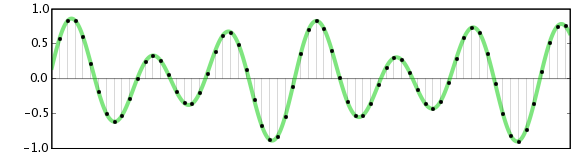
The essence of the theorem is simple: a continuous signal can be represented as an interpolation series consisting of discrete reports, from which the signal can be reconstructed. In order to roughly restore the original state of the signal, the sampling frequency must be at least twice the upper cutoff frequency of this signal.

For many years, the theorem was not in demand, until the advent of the digital age. It was then that it found a use. In particular, the theorem was useful when developing the CDDA (Compact Disc Digital Audio) format, in common people it is called Audio CD or Red Book. The format was released by engineers at Philips and Sony in 1980 and became the standard for audio CDs.

Format characteristics:

sampling frequency – 44.1 kHz;
quantization capacity – 16 bits.

INFO
The sampling rate is the number of signal samples taken during your sampling. Measured in Hertz.
Quantization bit: the number of binary bits that express the amplitude of the signal. Measured in bits.
The 44.1 kHz sampling frequency was calculated from Kotelnikov’s theorem. It is believed that the hearing of the average person cannot pick up sound beyond 19-22 kHz. The frequency was probably 22 kHz and was chosen as the upper limit.

22,000 × 2 = 44,000 + 100 = 44,100 Hertz

Where does 100 Hertz come from? There is a version that this is a small margin in case of errors or oversampling. In fact, Sony chose this frequency for its compatibility with the PAL transmission standard.

The bit depth of the CDDA format is 16 bits, or 65,536 samples, which equates to a dynamic range of approximately 96 dB. Such a large number of samples were not chosen by chance. Firstly, due to the strong influence of quantization noise, and secondly, to provide a formal dynamic range superior to that of the main competitors at the time – cassette records and vinyl records. I’ll cover this in more detail in the section on digital to analog converters.

The development of PCM continued on the principle of multiplying by two. Other sample rates appeared: first, the 48 kHz sample rate was added, and then the frequencies based on it were 96, 192, and 384 kHz. The 44.1 kHz frequency was also doubled to 88.2, 176.4, and 352.8 kHz. Bit depth increased from 16 to 24 and then to 32 bits.

Audio encoding: secrets revealed

Audio encoding: secrets revealed

Digital Audio

Audio settings for video capture and transmission.

Digital Audio

As people directly related to the AV sphere, we constantly talk about audio coding and audio codecs, but what is it? An audio codec is essentially a device or algorithm that can encode and decode a digital audio signal.

In practice, the audio waves that travel through the air are continuous analog signals. The signals are converted to digital form by a device called an analog-to-digital converter (ADC), and the reverse converter is called a digital-to-analog converter (DAC). The codec lies between these two functions and it is he who allows you to adjust some important parameters for the successful capture, recording and transmission of an audio signal: the codec algorithm, the sampling frequency, the bit width and the speed of the audio signal. data.

The three most popular audio codecs are Pulse-Code Modulation (PCM), MP3, and Advanced Audio Coding (AAC). The choice of codec determines the compression rate and the recording quality. PCM is a codec used by computers, CDs, digital phones, and sometimes SACD. The PCM signal source is sampled at regular intervals, and each sample is the digital amplitude of the analog signal. PCM is the simplest option for digitizing an analog signal.

With the correct parameters, this digitized signal can be fully converted to analog without any loss. But this codec, which provides almost complete identity with the original audio, is unfortunately not very cheap, which results in large files, and these files are not suitable for streaming. We recommend using PCM to record digital images for your sources or when doing audio post-processing.

Fortunately, we always have the option of choosing a different codec that can compress digital data (versus PCM) based on some helpful observations on the behavior of sound waves. But in this case, you have to make a compromise: all alternative algorithms are associated with “losses”, since it is impossible to completely restore the original signal, but nevertheless the result is still so good that most users will not be able to to catch the difference.

MP3 is an audio encoding format that uses a digital data compression algorithm that allows you to save the audio signal in smaller files. The MP3 codec is the most used by users to record and store music files. We recommend using MP3 to stream audio content as it requires less network bandwidth.

AAC is a newer audio encoding algorithm that is the successor to MP3. AAC has become the standard for MPEG-2 and MPEG-4 formats. In fact, this is also a digital data compression codec, but with less quality loss than MP3 when encoded with the same bit rate. We recommend using this codec for online streaming.

Sampling frequency (kHz, kHz)
Sample rate (or sample rate): the frequency with which the signal is digitized, stored, processed or converted from analog to digital. Time sampling means that the signal is represented by several of its samples (samples) taken at regular intervals.

Measured in hertz (Hz, Hz) or kilohertz (kHz, kHz,) 1 kHz equals 1000 Hz. For example, 44,100 samples per second can be labeled 44,100 Hz or 44.1 kHz. The selected sample rate will determine the maximum playback frequency and, as follows from Kotelnikov’s theorem, to fully restore the original signal, the sample rate must be twice the highest frequency in the signal spectrum.

As you know, the human ear is capable of picking up frequencies between 20 Hz and 20 kHz. Given these parameters and the values ​​shown in the following table, you can understand why 44.1 kHz was chosen as the sampling frequency for CD and is still considered a very good frequency for recording.

What are the problems with digital audio?

What are the problems with digital audio?

digital audio

As with many areas of technology, there is no single standard for digital audio.

DIGITAL AUDIO

It can be presented in various standards: AES / EBU 110 Ohm, AES-ID3 75 Ohm, S / PDIF 75 Ohm, Optical Toslink, among others. The sampling frequency can be from 32 kHz to 192 kHz with different bit depths. To work with all the variety of standards in a serious studio, you need to have an interface unit, better a digital audio converter or a sample rate converter.

What are the problems with digital video?
Digital video (SDI) is similar in some respects to analog video. In it, the quality of the cables and connectors is also important for normal operation, the loss of high frequencies of the signal in them also affects the quality of the signal. Due to many factors that affect the analog signal, fluctuations can appear in digital systems, at a certain level of which there is a complete blockage of the image (clipping effect *). A little lost in digital video can have far more serious consequences than a pixel lost in analog. When working with digital video, restoration of signal quality (equalization of the frequency spectrum and restoration of clock frequency) is often required. The format (“language”) of a digital signal is very important for its correct transmission, since the transmission protocols are very specific.
Level incompatibility is a rare problem in analog technology. Digital signals, however, can have different and incompatible levels: TTL, ECL or others. Another problem with digital signals is the adaptation of the load capacity of the digital inputs and outputs, which must also be addressed.

What is the easiest way to input a digital video signal into a computer?
The easiest and cheapest way is to use a DV video source and a Firewire® card on your computer (or the built-in interface on many modern computers). The entry procedure is simple and fast. For analog video, you can use an analog video capture card or an external analog video to DV converter connected to the Firewire® card.

Why do I sometimes have difficulties with the DV format?
The digital video format that uses a DV or mini-DV cassette and Firewire® technology has a very high bit rate, which limits the length of the connecting cable. Attempting to use long cables will cause many bit stream problems, such as clipping effect * when the image is completely lost. Another problem is a consequence of two-way communication between devices connected via Firewire® and manifests itself when trying to randomly connect multiple DV devices.

What is a device for embedding (extracting) digital audio into an SDI signal?
The total digital stream of digital serial video can include multiple channels of digital audio. An SDI embedder is used to insert digital audio into an SDI signal, and an SDI embedder is used to extract digital audio from a mixed stream.

MP3 finally goes into the public domain

MP3 finally goes into the public domain

mp3

Open Source

Mp3 Public Domain

Perhaps many did not think so, but the mp3 standard so well known to all had problems with the purity of patents. On April 23, 2017, the last patents expired and the format was finally free. Technicolor has officially stopped collecting royalties from manufacturers of software and embedded solutions.

License

Although hardware mp3 decoding is built into all other coffee machines, until recently its use in commercial projects required royalties from the developer: Fraunhofer Society. In 2005 alone, the amount paid was one hundred million euros. Most of the patents became invalid in the European Union in 2012. However, some of them continued to operate in the United States due to peculiarities of local law. What does this news bring to the community? At least now it will be possible to compile Gentoo and listen to music at the same time immediately on the base distribution. Many distributions will be able to provide support for the standard to the main repository. Now, for example, Ubuntu itself requires the installation of non-free components from a separate Ubuntu Restricted Extras meta-package to support mp3.

Bourbon vanilla vs vanillin

How does this standard, which has been the main standard in this area for 24 years, despite many more advanced free options? mp3 is in many ways similar in principle to its cousin in the photo world: JPEG. Due to the imperfection of our hearing aid and the peculiarities of psychoacoustics, it is possible to “discard” those parts of the audio spectrum that do not make a significant contribution to the musical pattern. In particular, in the illustration above, you can see how the amount of information encoded in the high-frequency region increases.

High frequencies are often sacrificed for the sake of preserving detail in the lower region – vocals, most instruments (thanks for the comment, KorDen32). Standard values ​​of cutoff frequencies for the lame encoder:

CBR 096 kbps: 14000 – 15000 Hz;
CBR 112 kbps: 15000-15600 Hz;
CBR 128 kbps: 16000 – 16500 Hz;
CBR 160 kbps: 16500-17500 Hz;
CBR 192 kbps: 18000-18700 Hz;
CBR 224 kbps: 19000-19400 Hz;
CBR 256 kbps: 19500-19700 Hz;
CBR 320 kbps: 20,000 – 21,000 Hz.

The method can be compared to the creativity of flavor chemists. You’ve probably noticed that strawberry gum is very conventionally strawberry, and there isn’t enough lemon in synthetic lemon tea. Any natural flavoring composition contains dozens and even hundreds of chemical compounds. But the main core generally creates only a very limited amount. So, for example, vanillin defines most of the aroma of natural vanilla, and if you don’t appreciate the subtle nuances too much, the remaining components can be neglected. mp3 uses the same principles, removing insignificant portions of the spectrum. Most people cannot tell the lossless formats by ear from the normally encoded 320kbps mp3s, which saves a lot of space when storing your media library.

Audio Coding: Secrets Revealed Part 2

Audio Coding: Secrets Revealed Part 2

Bit Depth

Bit depth

audio encoding

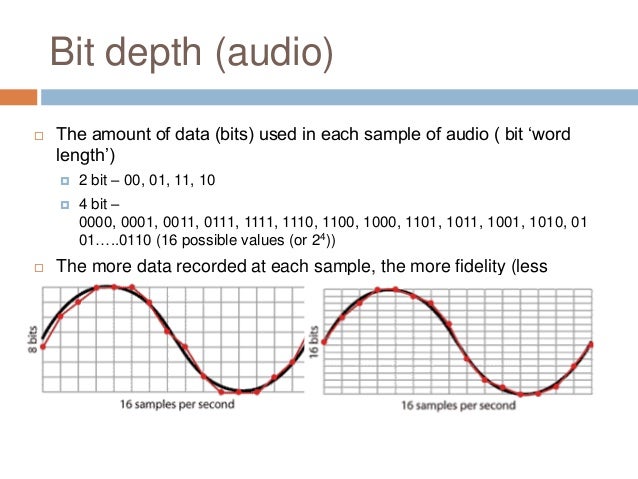
Along with the sample rate, there is the bit depth or depth of the sound. Bit depth is the number of bits of digital information to encode each sample. Simply put, the bit depth determines the “accuracy” of the input signal measurement. The larger the digit capacity, the smaller the error will be for each individual conversion from the magnitude of an electrical signal to a number and vice versa. With the smallest possible bit depth, there are only two options for measuring sound accuracy: 0 for full silence and 1 for full sound. If the bit width is 8 (16), then by measuring the input signal, 2 8 = 256 (2 16 = 65,536) different values ​​can be obtained.

Bit depth is fixed in the PCM codec, but for codecs that assume compression (eg MP3 and AAC), this parameter is calculated during encoding and may vary from sample to sample.

Bitrate
Bit rate is an indicator of the amount of information that one second of sound encodes. The higher it is, the less distortion and the closer the encoded composition is to the original. For linear PCM, the bit rate is very easy to calculate.

bitrate = sample rate × bit depth × channels

For systems like the Epiphan Pearl Mini that encode 16-bit (16-bit) linear PCM, this calculation can be used to determine how much additional bandwidth the PCM audio might require. For example, for stereo (two channels), the signal is digitized at 44.1 kHz at 16 bits and the bit rate is calculated as follows:

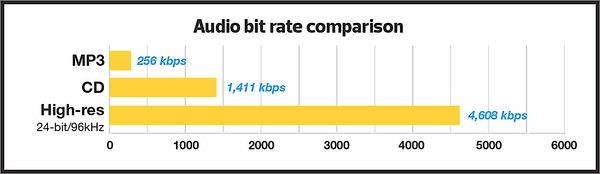
44.1 kHz × 16 bit × 2 = 1411.2 kbps

Meanwhile, audio compression algorithms like AAC and MP3 have fewer bits to transmit the signal (that’s their purpose), so they use low bit rates. Typically, the values ​​are in the range of 96 kbps to 320 kbps. For these codecs, the higher the bit rate you choose, the more audio bits you get per sample and the better the sound quality.

Sample rate, bit depth and bit rates in real life.
Audio CDs, one of the most popular early inventions for the general public for storing digital audio, used 44.1 kHz (20 Hz – 20 kHz, human ear range) and 16 bits. These values ​​were chosen to be able to save as much audio as possible to disk with good sound quality.

When video was added to audio and DVD and then Blu-ray discs came along, a new standard was created. DVD and Blu-Ray recordings typically use 48 kHz (stereo) or 96 kHz (5.1 surround) linear PCM format and 24-bit depth. These settings have been selected as ideal for keeping audio in sync with video while obtaining the best possible quality using the additional available disk space.

Our recommendations
CDs, DVDs, and Blu-Ray discs all have one goal: to provide the consumer with a high-quality playback engine. The goal of all developments was to provide high-quality audio and video without worrying about file size (if only it could fit on disk). Such quality could be provided by linear PCM.

In contrast, mobile media and streaming media have a completely different goal: to use the lowest bit rate, as low as possible, while still being sufficient to maintain acceptable quality for the listener. Compression algorithms are best suited for this task. You can follow the same principles for your records.

When recording audio from a video …
In case the record is used for the next on-ra-ki-bot, choose the 48 kHz PCM codec and the maximum bit depth (16 or 24) to provide the best audio quality. We recommend these parameters for Epiphan Pearl Mini.

When streaming audio from video …
With streaming or recording for later translation, good sound can be obtained with less bandwidth, using MP3 or AAC codecs with a frequency of 44.1 kHz and a bit rate of 128 kbit / s or higher. These parameters ensure that the sound is good enough without affecting the quality of the transmission.

Audio encoding: secrets revealed

Audio encoding: secrets revealed

Audio Encoding

Audio settings for video capture and transmission.

audio and video encoding

As people directly related to the AV sphere, we constantly talk about audio coding and audio codecs, but what is it? An audio codec is essentially a device or algorithm that can encode and decode a digital audio signal.

In practice, the audio waves that travel through the air are continuous analog signals. The signals are converted to digital form by a device called an analog-to-digital converter (ADC), and the reverse converter is called a digital-to-analog converter (DAC). The codec lies between these two functions and it is he who allows you to adjust some important parameters for the successful capture, recording and transmission of an audio signal: the codec algorithm, the sampling frequency, the bit width and the speed of the audio signal. data.

The three most popular audio codecs are Pulse-Code Modulation (PCM), MP3, and Advanced Audio Coding (AAC). The choice of codec determines the compression rate and the recording quality. PCM is a codec used by computers, CDs, digital phones, and sometimes SACD. The PCM signal source is sampled at regular intervals, and each sample is the digital amplitude of the analog signal. PCM is the simplest option for digitizing an analog signal.

With the correct parameters, this digitized signal can be completely converted back to analog without any loss. But this codec, which provides an almost complete identity with the original audio, is unfortunately not very cheap, which translates into very large file sizes, and such files are not suitable for streaming. We recommend using PCM to record digital images for your sources or when doing audio post-processing.

Fortunately, we always have the option of choosing a different codec that can compress digital data (rather than PCM) based on some helpful observations on the behavior of sound waves. But in this case, you have to make a compromise: all alternative algorithms are associated with “losses”, since it is impossible to completely restore the original signal, but nevertheless the result is still so good that most users will not be able to to catch the difference.

MP3 is an audio encoding format that uses a digital data compression algorithm that allows you to save the audio signal in smaller files. The MP3 codec is the most used by users to record and store music files. We recommend using MP3 to stream audio content as it requires less network bandwidth.

AAC is a newer audio encoding algorithm that is the successor to MP3. AAC has become the standard for MPEG-2 and MPEG-4 formats. In fact, this is also a digital data compression codec, but with less quality loss than MP3 when encoded with the same bit rate. We recommend using this codec for online streaming.

Sampling frequency (kHz, kHz)
Sample rate (or sample rate): the frequency with which the signal is digitized, stored, processed, or converted from analog to digital. Time sampling means that the signal is represented by several of its samples (samples) taken at regular intervals.

Measured in hertz (Hz, Hz) or kilohertz (kHz, kHz,) 1 kHz equals 1000 Hz. For example, 44,100 samples per second can be labeled 44,100 Hz or 44.1 kHz. The selected sample rate will determine the maximum playback frequency and, as follows from Kotelnikov’s theorem, to fully restore the original signal, the sample rate must be twice the highest frequency in the signal spectrum.

As you know, the human ear is capable of picking up frequencies between 20 Hz and 20 kHz. Given these parameters and the values ​​shown in the table below, you can understand why 44.1 kHz was chosen as the sampling frequency for CD and is still considered a very good frequency for recording.

There are several reasons for choosing a higher sample rate, although it may seem like a waste of time and effort to reproduce sound outside the range of human hearing. At the same time, 44.1 – 48 kHz will suffice for the average listener for a high-quality solution to most problems.

The Truth About High Bitrate Lossy Compression Part 3

The Truth About High Bitrate Lossy Compression Part 3

BITRATE

For most users of the MP3 format, the problem of high quality sound is usually phrased as follows: “256 or 320? Or maybe try VBR?”

Bitrate


And this question haunts them day after day. Not all recordings sound good at 256; there is a strong audible and visible (measured) loss in the high frequency range. When using VBR mode (the so-called variable bit rate stream), it often happens that music sounds better by ear than 256, but this should not be taken as a general rule of thumb. Encode low-value or poor-quality records – you can’t go wrong. I have selected the VBR parameters to get the highest quality for VBR.

For the commercial LQT format, there is only one encoder proprietary to the authors: Liquifier Pro. We push them. Note that the LQT format is originally based on VBR encoding, so there are simply multiple modes for it, such as “bad”, “good”, and “excellent”. Naturally, for our tests we took the “excellent” (audiophile) mode, which results in a stream of 192 to 256, most of the time 200-220 kbps. Let me remind you that the LQT format is based on the MPEG-2 AAC family of algorithms. Also, this is the highest quality AAC implementation to date (tested on analogs).

The OGG format is a relative of the MP3 format, but it contains a different psychoacoustic model and some technical innovations that MP3 does not have. For starters, OGG initially only supports VBR mode. The user sets the approximate bit rate and the encoder tries to compress as closely as possible. The range of variation is extremely wide: 8 to 512 kbps, and it is much more discreet than MP3. The top bar is up to 512 kbit / s, whereas nowadays MP3 encoders really only “pull” up to 320. You may ask “is it possible that even 320 is not enough?” Yes, it happens, but rarely.

Roxette samples
Well, we come to the most interesting part. Let’s start with my auditory sensations.

For MP3 in a 256 kbps stream, noise disturbances at high frequencies are clearly audible. Not only is a considerable part of them absent from the sound, but strong distortion, wheezing, clanging and other “charms” are also mixed in. This is a sign that 256 is clearly not enough, therefore you need to test higher. Let’s take a 320 compressed sample. The sound has changed significantly, this is a completely different matter: the upper part is in place, no differences by ear were found. For the purity of the experiment, let’s see what happens in floating flow mode. We obtain an average bit rate of 290 kbit / s, of which the conclusion suggests that 256 for the sample under study will not be enough. In fact, a sample encoded in VBR mode sounds a little better than 256, but it clearly falls short of 320. In the case of MP3, for high-quality compression, only encoding in 320 kbps mode is adequate, ie , to the maximum of opportunities.

Let’s take OGG as “modified MP3”. There are five approximate bit rates for the encoder: 128, 160, 192, 256 and 350. Well, let’s try 192 and 256. We will not take 350 bit rates, because we already know that MP3 at 320 kbps clearly transmits excellent quality, it seems that better not necessary. For 192 mode, we get an average stream of 226, and for 256 mode, up to 315 kbps. So far the precision. Such a large deviation from the reference point is a signal for sound material that is very difficult to encode; with a sample with a simpler density, the precision will be higher. To be honest, I tried to evaluate 320 MP3 and 315 OGG for a long time and came to the conclusion that they both sound almost identical to the original sound. But they are based on different psychoacoustic models and their sound coloration is different. Personally, I liked the MP3 a bit more. But, this is really a controversial issue; after all, the OGG encoder is just a beta version. When there is a release, I think it should surpass MP3 in quality. Comparing them separately to the original, I was inclined to believe that the OGG has an even closer sound to the original, but there is something wrong with the high frequencies of this encoder. Because of this, MP3 sounds a bit better. I don’t think it is necessary to say that in 350 mode (average bitrate was 365) OGG “perfectly” repeats the original.

Now we are talking about the little-known but widely advertised format as the “highest quality”: the LQT format. And most importantly, it sounds great overall, however after listening to it, I realized that I didn’t like its sound. It doesn’t distort high frequencies, like MP3 256 kbps, but it smears the sound and smears a lot. Loud sounds fade over time.