Highest quality music format.


Free Download Mp4Gain
picture

Highest quality music format.

Music File Formats

Audio Formats

audio formats

As a rule, today the term “audio” refers to everything that is connected with sound, whether it be playback, processing, mixing, mastering or listening to recordings. But few people know that since their inception, audio formats have constantly undergone many significant changes, sometimes for the better and then for the worse. The problem is that, compared to the original formats, the creators of the new formats tried to improve the sound quality, and this invariably affected the size of the played file. Downsizing, on the contrary, led to a loss of quality. But it was not always like this.

The first audio format in computer games
The first mention of computer sound came from the creation of primitive games at the time, in which sound was played through the system’s speaker. But no matter how hard the developers of such software (software) have been, the required quality could not be achieved, compatible with tape recorders or reel or cassette recordings.

That is why many manufacturers have started looking for solutions on how to change the audio format so that the sound is natural. Frankly, this has led to more competition than we have now. This applies not only to the material being played, but also to studio sound, live performances, quality or basic parameter settings in terms of knowledge of physics, acoustics, etc.

The appearance of the WAV format
It is believed that the first full quality of audio formats was associated with the appearance of the standard and the .wav file extension (this abbreviation was formed from the English word “wave” or wave). Anyway, he became the first-born that could be processed into computer programs on a professional level.

These files already had their own characteristics: sample rate, sound depth, bit rate, and much more. This sound was even compatible with what could be obtained after processing a conventional audio CD using certain instruments such as a conventional equalizer. But the size was clearly unjustified. For example, a three-minute track could be 20 to 50 MB.

CD discs
The audio CD format, or rather the .cda extension, appeared around the same time.

Unlike “wave” files saved on the hard disk, they cannot be edited. Today it can be opened in an audio processing program, reformatted by audio transcoding, and saved anywhere other than on a CD.

MP3 codec
With the advent of the LAME MP3 Encoder codec, the music industry experienced a real shock, because those files “weighed” dozens of times less than the same WAV file. Even a five minute compose at full compression rarely exceeds the size of 5-7MB. Agree, a significant advance, not to mention the fact, allowed not only to adjust the above characteristics, but also some additional parameters in the form of ID3 tags, which contained information, for example, about the artist, album name and tracks. , the release date.

This type has become the most popular. Look, almost the entire Internet is full of this universal format. In general, we can say that the MP3 audio format has become a true revolution in sound. It remains one of the most popular and in-demand so far, even though it is being replaced by other types of audio. But more on that later.

AIFF files
Audio formats have a different style. The so-called .aiff format was originally created for use on Macintosh computer systems.

Only much later did a transformation take place, which predetermined the compatibility of sound formats with their use on platforms of different operating systems.

OGG format
Music in audio.ogg format is also quite common. This standard was developed by Vorbis. However, it should be noted that it has a number of significant disadvantages. First of all, it is an unreasonable load on the computer’s system resources, despite the minimal size. Second, the use of your own codecs and decoders, which the system may not install automatically. For example, when working in the FL Studio Producer Edition (or XXL) program in versions prior to 9.xx, there was a folder with an installation file in .inf format, which had to be activated for installation after installing the main application manually. (Otherwise, presets in this format just won’t play.)

However, these types of audio formats are now found, and the sound itself looks great.


Free Download Mp4Gain
picture


Mp4Gain Main Window
picture


Mp4Gain Features
picture


Free Download Mp4Gain
picture

Audio formats. Understanding the differences

Audio formats. Understanding the differences

Audio File Format

There are many different audio formats.

audio file formats

You can’t even imagine how many audio formats there are. Now we will consider only the most popular ones, and if you need complete information, you can find it on Wikipedia.

Audio formats
Sound is itself an analog phenomenon. In order for it to register on a computer, it must be digitized. Digitized audio takes up a lot of space. Therefore, they use special algorithms to encode and compress data: codecs. Codecs provide encoding / decoding of audio / video data, as well as compression / decompression of such data. Download a set of codecs for Windows:

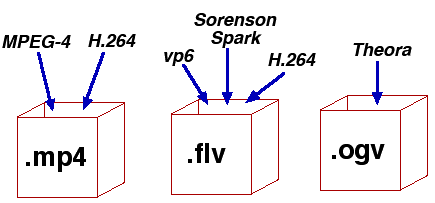
The type of media file format (audio or video, no difference) is determined by its extension. For example, MP3 files have the extension .mp3. The codec for this format is always the same: MPEG Layer-Ç. But for the MP4 format, the codecs may be different.

Some formats, such as MP4 and FLV, can contain streaming audio and video. So, if you see a file with the extension .mp4, you can’t definitely tell that it contains only music or only video, or a movie – audio and video. After all, initially in such formats, the possibility of transmitting both audio and video was raised.

We all know that once information is compressed, it can be lost. Therefore, all codecs can be divided into two groups: with loss of quality and without loss of quality. Don’t be intimidated by the word “lossy”: As a general rule, codecs cut off “unnecessary” information that is invisible to our eyes and ears (almost invisible).

Lossless compression codecs include:

FLAC (Free Lossless Audio Codec);
APE (Monkey’s Audio);
ALAC (Apple Lossless Audio Codec).
And here are the lossy codecs:

If you are a fan of sound then it makes sense to look for music in FLAG format. For normal home listening, the most popular MP3 format is sufficient. Also, to experience the total difference between MP3 and FLAC formats, you need professional sound reproduction equipment; unfortunately, the tablet does not belong to said team. So I don’t see any reason to download FLAC music to a tablet.

Now let’s take a quick look at the audio formats themselves:

WAV is the first (or one of the first) audio formats. It is used to store uncompressed audio recordings. One minute of recording in WAV format requires 10MB. An audio CD is usually copied in this format and then the resulting WAV files are compressed with an MP3 codec to save space.
MP3 (MPEG Layer-3) is the most widely used audio format. It reduces the sound with a loss of quality, but only the sound that is not heard by the human ear is cut off. As a result, a person does not hear the difference and the sound takes up less space. The main characteristic of this format is the bit rate. The higher the bit rate, the better the sound quality. Uncompressed audio CD has a bit rate of 1411.2 Kbps. The highest sound quality in the case of MP3 format is achieved at a bit rate of 320 Kbps. Anything below 320 Kbps is of worse quality . The difference between 128 Kbps and 320 Kbps is already felt by ear, so if you can download recordings with a higher bit rate, go for it.
WMA (Windows Media Audio) is a format developed by Microsoft for the Windows operating system. Microsoft tried to create a replacement for MP3, but, as time has shown, it failed.
OGG is an open format that supports encoding of audio with various codecs. The most widely used OGG codec is Vorbis. In terms of compression quality, the format is comparable to MP3, but less common in terms of media player and audio player support. If you can download music in MP3 and OGG format, you should choose MP3 because your audio player may not support OGG format.
AAC is a proprietary audio format that provides better sound quality than MP3. It is currently the best lossy audio coding algorithm. A file of this format can have the extensions aac, mp4, m4a, m4b, t4p, t4g.
FLAC is a lossless compression format. It does not make any changes to the audio stream, so the sound encoded with it is identical to the original. Used for listening to sound in high-level sound systems.
Video formats
There are no fewer video content formats and standards than audio formats. Let’s start with the international standards that define the data storage and encoding format of multimedia files:

Everything you need to know about video codecs and containers

Everything you need to know about video codecs and containers

Video Container Formats and Video Codecs

Today, everyone seems to be aiming to become filmmakers. People use a wide variety of gadgets and devices for filming, including mobile phones and digital cameras, as well as portable and professional video cameras. The latest generation of digital SLR cameras can record high definition video, which is being replaced by Ultra HD (4K) video.

Codecs and containers

It takes effort to learn how to make good videos, but it becomes even more difficult when you want to show your video masterpiece in all its glory to friends, family, or put it online for everyone to see. You may need to upload it to YouTube, you may want to burn your own Blu-ray Disc or DVD, or you may just want to upload a video to your mobile phone or tablet.

Everything you need to know about video codecs and containers

Let’s first understand the types of codecs. General concept of codecs

If you chat with people who are into video processing or visit the relevant web forums, one way or another, you will find yourself involved in the sometimes heated debate about which codec is better. In fact, the effectiveness of any codec is highly dependent on the compression mode used and the type of video material being processed. So it is worth considering different codecs, taking into account their specific use and the characteristics of the compressed material. Video codecs are mainly covered below, but the section on format containers also mentions the use of audio codecs. Video recording and archiving

Most modern consumer electronic devices receive content in some kind of already compressed format. As a general rule, only professional video operators work with uncompressed HD video. Of course, ideally, if possible, in the presence of a large-capacity storage system, the video files should be stored in the original recording format, because this ensures the highest quality. Transcoding a video from one type of compression to another can introduce subtle artifacts that can degrade image quality. (These errors are minimized with good software transcoding.)

Today, many codecs with specific specializations are offered. The average user may never find most of them. The next section is dedicated to codecs, such as compression / decompression systems, used as part of special software that is designed to encode or transcode video files.

x.264 / MPEG-4 AVC (Advanced Video Coding). This most common codec is used in modern digital video and still cameras, in which shooting results are saved as files on built-in hard drives, memory cards, etc.

H.265 (HEVC – High Efficiency Video Coding) the latest most efficient video compression standard developed in response to the need to migrate to ultra high definition video, known as Ultra HD or 4K.
H.265 was originally developed as HEVC (High Efficiency Video Coding). It was approved as the official successor to H.264 in April 2013.

MJPEG (Motion JPEG). This is an older format used by some older generation digital cameras and video equipment. It was developed by experts who participated in the development of the JPEG (Joint Picture Experts Group) codec to compress ordinary still images, hence the name of this codec.

DV and HDV The DV standard was developed by a consortium of video technology companies for tape storage systems and was often used in camcorders with a mini tape cassette slot. Some DV versions have been used successfully in professional camcorders, and the HDV version has been developed to support high definition tape cassettes.

Everything you need to know about video codecs and containers

Everything you need to know about video codecs and containers

Video Formats, Codecs and Containers

Sometimes it is quite difficult to figure out which codec and container are the best to create your video masterpiece.

Video Container,  Video Codec

Today, everyone seems to be striving to become filmmakers. People use a wide variety of devices and devices for filming, including mobile phones, digital cameras, portable and professional video cameras. And the latest generation of digital SLR cameras can record high definition video.

Making a good video takes a bit of effort, but it becomes even more difficult when you want to show your masterpiece to other people in all its glory. Maybe you need to upload it to YouTube, maybe you are going to burn your own Blu-ray or DVD, maybe you want to download the video to your mobile phone or tablet.

Sometimes it is difficult to figure out which codec and container is best for creating your video masterpiece. The material below can help you solve this problem.

What is the difference between a codec and a container?

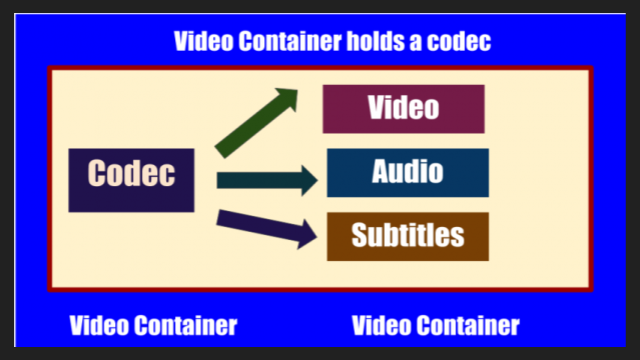
Novice users are often confused when trying to figure out the difference between codecs and containers. Now the word Codec has become commonplace, and initially the term was an abbreviation for the concept of KOMPRESSOR-DEKOMPRESSOR. What do codecs do?

They take data from digital media and compress it (for transmission and storage) or decompress it for viewing and transcoding. Each codec uses a specific method to encode and decode digital data.

Uncompressed video and audio (raw means unprocessed, or often “raw”) require a lot of storage space. Uncompressed 1080i HD video recorded at 50 frames per second consumes up to 410 gigabytes per hour. Audio on CDs, quite out of date by modern standards, plays for around 74 minutes with a 680 megabyte disk capacity. However, eight-channel audio encoded with a 24-bit resolution will require 16 megabits per second, or several gigabytes per hour. Even broadband internet connectivity is sometimes not enough to listen to music in full audio resolution. This is the reason why digital video and audio recordings must be compressed for transmission and storage.

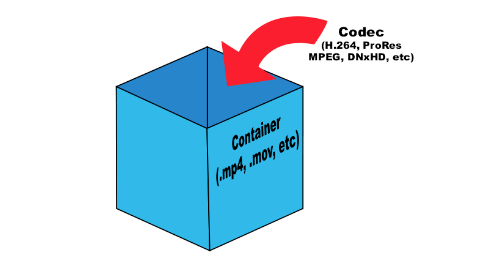
Once the media is compressed within reasonable limits, it must be packaged for shipping and later viewing. For this, container formats are used that act as a “black box” filled with various multimedia formats. Good container formats can accommodate files compressed with different codecs.

Let’s take a look at the types of codecs.

General concept of codecs

If you chat with people who are into video processing or visit the relevant web forums, one way or another, you will find yourself involved in the sometimes heated debate about which codec is better. In fact, the effectiveness of any codec is highly dependent on the compression mode used and the type of video material being processed. Therefore, it is worth considering various codecs and taking into account their specific use and the characteristics of the compressed material. Video codecs are mainly covered below, but the section on format containers also mentions the use of audio codecs.

Capture and archive videos

Most modern consumer electronic devices receive content in some kind of already compressed format. Usually only professional videographers work with uncompressed HD video. Of course, ideally, if possible, in the presence of a large-capacity storage system, the video files should be stored in the original recording format, because this ensures the highest quality. Transcoding a video from one type of compression to another can introduce subtle artifacts that can degrade image quality. (These errors are minimized with good software transcoding.) Many codecs with specific specializations are currently offered. The average user may never find most of them. The next section is dedicated to codecs as compression / decompression systems,

x.264 / MPEG-4 AVC (Advanced Video Coding). This most common codec is used in modern digital video and digital cameras, where shooting results are saved as files on built-in hard drives, memory cards, etc.

MJPEG (Motion JPEG). This is an older format used by some older generation digital cameras and video equipment. It was developed by the same specialists (Joint Picture Experts Group), who participated in the earlier development of the JPEG codec for compressing ordinary still images, hence the name of this codec.

DV and HDV. The DV standard was developed by a consortium of companies from

Digital audio formats

Digital audio formats

DIGITAL AUDIO FORMATS

Digital sound “format” means not only the format of the audio file (which can be determined by its extension), but also, for example, the data presentation format, which depends on the digitization method and parameters. In addition to the computer file formats of various operating systems, there are audio media formats, streaming audio formats, and multi-channel audio formats.

digital audio formats

Furthermore, the “sound” file can be not only an audio recording, but also a project file from an audio editor, DAW, or any other program for working with sound. The project file can contain embedded audio and only links to multimedia data.

A standard MIDI file does not contain any audio data, it is a set of commands that control synthesizers and other devices.

There are also several patch and sample formats that are used on synthesizers.

Presentation format
The format for representing audio data in digital form depends on how the analog-to-digital converter (ADC) quantizes. There are two types of quantization that are commonly used:

pulse code modulation
sigma delta modulation
Bit depth and sampling frequency (quantization) are also indicated for various audio recording and playback devices as the format for representing digital audio (24-bit / 192 kHz; 16-bit / 48 kHz).

Digital audio file formats
There are three groups of file formats:

uncompressed audio formats like WAV, AIFF, RAW (raw (unprocessed) measurements without any header or sync)
lossless compressed audio formats (APE, FLAC)
lossy compressed audio formats (MP3, AAC, Ogg, WMA (lossless version available))
Comparison of digital audio formats

Lossless data compression is a data compression method by which encoded data can be recovered unambiguously with bit precision. This type of compression is fundamentally different from lossy data compression.

When lossy compression is used, the decompressed data differs from the original, but the degree of difference is not significant from the point of view of its perception or later use. The advantage of lossy compression is that it allows a higher compression ratio with acceptable distortion. When using lossy compression, be aware that recompression tends to degrade quality. However, if the recompression is done using the same algorithm and without changes to the compressed data, the quality does not change. But in general, when editing the decoded data, it is advisable to save the original uncompressed (or compress without data loss).

Audio formats for sound quality.

Audio formats for sound quality.

Audio Formats

The term “audio” today means everything that is somehow connected with sound. This is processing, playing, mixing and simply listening to audio recordings. Few people know that during their existence, all popular audio formats have undergone significant changes, sometimes for the better, and sometimes even for the worse.

audio formats

The problem is that when the creators tried to improve the recording quality by using the new format, the size of the result increased significantly. Reducing the size of the final file resulted in a significant loss of quality. But this was not always the case.
The first audio format used in computer games.

The first mention of computer sound is associated with the creation of several primitive video games. Then the sound was played back using the speaker of the system. As the software developers of that time did not try, it was impossible to achieve the level of quality that would be compatible with tape and reel recorders. This is what got many developers thinking about how to change the audio format to make the sound more natural and natural. It is this problem that has led to the current competition in the audio market. As a result, the formats used strongly affect the quality of the reproduced material and the configuration of the basic playback parameters.

WAV format

The first full quality of audio formats is associated with this particular format. The WAV extension designation was derived from the English word “wave”, which means wave in Russian. It was this format that became the first audio format to be processed with computer programs at a highly professional level. Files with a WAV extension had the following characteristics:

– depth of sound;
– sampling frequency;
– bit rate, etc.

This format was even compatible with the sound that could be obtained after processing an audio CD with an equalizer and other tools. However, the file size in this case was completely unwarranted. For example, the most common 3 minute long track could be up to 50 megabytes long.

CD

Audio CDs, or more exactly the .cda extension, appeared almost at the same time as the wav format. But unlike files with the wav extension, .cda cannot be edited. But it can be opened in any audio processing program, transcoded and formatted, and saved to your hard drive. Of course, you will not be able to save your changes to the CD.

MP3 codec

After the introduction of the LAME MP3 Encoder codec in the music industry, there was a real revolution in the audio world. Now the audio files are ten times smaller. At maximum compression, the size of a five minute composition rarely exceeds 7MB. This was a significant advance. Also, this extension finally implemented the ability to tweak some features and configure additional parameters, such as ID3 tags. They can contain information about the track title, artist, album, and release date.

Of course, this format immediately became widespread. Almost the entire Internet community uses this universal format. Therefore, we can say that the MP3 format has been a real revolution in the field of computer sound. Today it is one of the most demanded and popular audio formats. Although today it is already being replaced by other audio formats. But we will talk about this a bit later.

AIFF files

There are other types of audio files. This is the so-called aiff format. This format was originally created for use on Macintosh computers. A little later, a transformation occurred, as a result of which it was possible to achieve the compatibility of various audio formats and the possibility of their use on different platforms and operating systems.

OGG format

This audio format is also quite common. It was developed by the specialists of the Vorbis company. Please note that this format has several disadvantages. First of all, despite the small size of the files, using this format places a heavy load on the computer’s system resources.

Also, to work with this audio format, you must use your own decoders and codecs, which may not be installed automatically. For example, those who worked with the FL Studio Producer Edition program had to manually activate the installation file in .inf format to work with this format. Otherwise this app just won’t play OGG files. Despite all these shortcomings, OGG audio files are quite common nowadays and they sound good.

Audio formats: rating and benefits

Audio formats: rating and benefits

Audio Formats

As actual field studies have shown, a good idea to rank the top ten audio formats turned out to be an impossible task at first.

Audio formats

Competition conditions too different for unequal participants. In addition, some corruption schemes or lobbyists of transnational companies in the field of audio recording interfere in our good cause to help people choose the best sound product.

The world’s most popular MP3 format reached the leaders of popular love solely due to multi-million dollar promotional investments. And if you take the sound quality, then regular. And even in terms of compression and disk space savings, it’s not the highest compression either.

Therefore, a compromise decision was made: divide the test subjects into three groups and compare and identify the leaders by groups.

Three types of audio formats
No compression.
Lossless compression.
Lossy compression.
Uncompressed audio recording formats show their best performance only on high-quality professional audio equipment.

If you have an inexpensive tablet or smartphone in your hands, then wonderful music will sound on your device, but you will not hear it simply because the hardware and software resource and the speakers or headphones cannot reproduce such high sound quality.

On the other hand, if you start MP3 sound recording through professional stereos and amplifiers, you will hear such noise and rattle from the speakers that, again, this type of use is completely meaningless.

Audio classification by type of sound reproduction equipment
For professional equipment, uncompressed audio formats.
For semi-professional teams, compressed audio formats. But without loss.
For inexpensive equipment: lossy and compressed audio formats.
In the first case, the hardware is so expensive that it is ridiculous to worry about saving money on media.

In the second case, the owner of an Apple device for a thousand dollars will obviously be able to call himself and spend a couple of hundred dollars on a bulky memory.

In the third case, since it has hardly been possible to raise money for a cheap smartphone, saving on the size of the stored music is very important. Well, no one is going to listen to a symphony orchestra in Hi-Fi on the phone anyway. Unless you can download a ringtone from the classics for fun to make it look like a fresh bell pepper to the eyes of tomatoes.

With this concludes the overture, we begin to present the subject.

Audio formats for high quality sound
This includes uncompressed formats.

PCM – Pulse Code Modulation. The original analog audio is sampled as is, without any modification.
PCM is the most common audio recording format used on CDs and DVDs. Dolby multi-channel, surround, subject to high-quality speakers, sounding almost one-on-one with a live performance.

If you like to sit in front of a home theater and immerse yourself in empathy for the main and supporting characters in the movie, this is it.

Wav
A fairly old format, developed as early as 1991. Well, the old masters always thought of high quality.

Many people consider WAV to be an uncompressed format. But it is actually a container and it can also contain compressed files.

In most cases, WAV contains uncompressed PCM audio. Therefore, the quality is high. But even for one minute of recording, approximately 32MB of memory is wasted.

Good enough compatibility with Windows and Mac.

AIFF
WAV analog from Apple developers. This is also a container and also usually contains sound in PCM format. Good compatibility with Windows.

Lossy compressed audio formats
Truly popular formats for everyone.

MP3
In accordance with the MPEG-1 Audio Layer 3 standard, it appeared in 1993 and instantly won universal love precisely because of its economy in memory consumption.

A CD can store the complete discography of your favorite band.
Throw some records in the glove compartment and you can enjoy music from Kaliningrad to Vladivostok.
During this time, you can listen to all the books by all the writers worth listening to.
The MP3 format is such a solid eunuch, from which they cut the most reluctant, but began to show the ability to store and save. So MP3 is a very inexpensive format.

The main advantage is that he leans on everything that he just plays and sings.

AAC
An advanced form of audio encoding. The younger but advanced brother of MP3. It has slightly improved sound characteristics and a higher compression ratio.

Applies to Android, iOS, iTunes, YouTube, Nintendo, and the latest versions of PlayStation.

MP3, AAC, WAV, FLAC: we talk about all audio file formats

MP3, AAC, WAV, FLAC: we talk about all audio file formats

Audio Formats

As you organize your digital music collection, you can dive into a variety of audio file formats. Almost everyone has heard of MP3, but what is OGG, AIFF, or MQA?

audio file formats

If, after reading the list, you have the suspicion that all these formats for obtaining such chic abbreviations were studied in different universities, we will help to dispel it. This material will clarify the essence of some popular music formats, the difference between them and why it is important to know them.

Regardless of what you’re listening to, low-bitrate MP3, slightly better tracks in AAC, or high-resolution audio in FLAC or WAV, it’s time to find out exactly what you get in each case and how to choose the optimal format.

Let’s evaluate the pros and cons of each.

A quick overview of file formats and codecs

In order not to beat around the bush, we’ll provide a quick guide to all file formats and the differences between them at first. If you want to know more, here is a more detailed description of the differences in size, sound quality and compatibility.

–AAC (not high resolution audio format). Apple’s popular alternative to MP3. Compressed and lossy, but with higher sound quality. Used to download from iTunes and stream from Apple Music.

–AIFF (high resolution). Apple’s alternative to WAV with more complete metadata. It is not an uncompressed and lossy format very popular with large files.

–DSD (high resolution). One-bit format used in Super Audio CD. Available in 2.8 MHz, 5.6 MHz and 11.2 MHz sample rates. Due to the use of a high quality codec, it is not currently used for transmission. Uncompressed format.

–FLAC (high resolution). Lossless compression format supporting high-resolution supporting sample rates and metadata storage; the file size is half that of WAV. Due to the absence of royalties, it is considered the best format for downloading and storing albums in high resolution audio. Its main drawback is the lack of support for Apple devices (and therefore the incompatibility with iTunes).

–MP3 (not high resolution audio format). Popular compression and lossy format with small file size and far from the highest sound quality. Convenient for storing music on smartphones and iPods.

–MQA (high resolution). Compressed format for storing high resolution files in an easier way to transmit. Used by the Tidal Masters service for high resolution audio streaming.

–OGG (not high resolution audio format). He is sometimes known as his full name: Ogg Vorbis. An open source alternative to MP3 and AAC that is not covered by patents. This 320 kbps format is used in Spotify broadcasts.

–WAV (high resolution). The standard format in which all CDs are recorded. Great sound quality, but large files due to lack of compression. Weak support for metadata (versions, song titles and artists).

–WMA Lossless (high resolution). An uncompressed version of Windows Media Audio, the compatibility of which is not often found on smartphones and tablets.

Compressed and uncompressed audio files

Let’s start by looking at three categories into which all audio file formats can be grouped. They are determined by the degree of data compression and the associated loss of sound quality.

If a special algorithm (or codec) was not used to compress the audio in your file, this will lead to a double result: first, there will be no loss of sound quality, and second, your space will soon be exhausted. HDD.

In essence, the uncompressed recording corresponds completely to the original audio file, in which real sound signals are recorded in digital representation.

WAV, AIFF or FLAC: uncompressed formats

WAV and AIFF are the most popular uncompressed audio file formats. Both are based on PCM (Pulse Code Modulation), a known mechanism for directly converting audio to digital format. WAV and AIFF use similar technologies, but the storage methods are slightly different. In these formats, you can record CD-quality files with higher resolution.

The WAV format was developed by Microsoft and IBM, and is therefore used on Windows-based platforms; it is the standard CD recording format.

The AIFF format was created by Apple as an alternative to WAV; And while AIFF files are less common, they provide more comprehensive metadata support, allowing you to store album art, song titles, and the like.

These fortmats take up a lot of space.

Description of the main audio formats

Description of the main audio formats

audio formats

In the world of music there are a large number of music formats, their modifications and versions, created by the giants of the music industry and small companies that have received public recognition in the electronic world.

audio formats

Various physical methods have been developed to store audio data for these purposes, such as vinyl records, magnetic tape, CD, DAT, MD (minidisc), DVD, or converting music scores to music (MIDI), in the same way that they have many different computing methods emerged. audio data storage – digital: OGG, Mp3, Flac, Wav formats.

It is impossible to consider and discuss all audio formats, codecs, their advantages and disadvantages, so in my article I will try to tell you about the most popular audio file extensions that you find.

Why can’t we use any universal audio file encoding format? Because implementing multiple functions requires a different format. For example: to play CDs in a CD-ROM drive, to record music or sound effects in video games, to record a movie track or video clip, to play on mobile phones or to transfer files over the Internet, in addition, there are various operating systems that are the most widely used in the world … These include: Amiga, Macintosh, NEXT, and Windows PC.

Also, the work of a dj, sound engineer, cj, video engineer, or a simple music lover is quite different in nature. This may require that your audio data be saved in your own way. For example, the audio of a CD must be saved using 16 bits and a sampling frequency of 44.1 kHz. However, to download sound over the Internet, we’d better use a different bit depth and sample rate, as each minute of 16-bit, 44-kilohertz audio takes up about 10MB, i.e. an average track of 5 minutes will be 50 meters, too much data for the average user. This article provides an overview of the most popular music formats.

AA (Audible Audio Book File) is a proprietary format developed by Audible. It is used to record audiobooks sold through the Audible and iTunes services. It is possible to reduce or accelerate the speed of listening to files: digital tone, the ability to leave bookmarks when listening to audio books, file protection, when delivering sound recordings over the Internet.

AAC (Advanced Audio Coding) is an audio file format with less quality loss when encoding than MP3 in the same sizes. Lossless music encoding of original quality using the ALAC profile. AAC is a family of MPEG4 audio coding algorithms. Unlike the hybrid mp3 filter bank, AAC uses MDST (Modified Cosine Transform) technology, which means that the listener gets better sound quality than MP3 encoding with the same or lower bit rate. Possible AAC file extensions: [.m4a], [.m4b], [.m4p].

Additionally, AAC is a wideband audio coding algorithm that uses two basic coding principles to dramatically reduce the amount of data required to transmit high-quality digital audio. This format is one of the highest quality, uses lossy compression, compatible with most modern equipment, including notebooks.

For 2009, it is much less common than MP3 and other workarounds. AAC (Advanced Audio Coding) was originally created as a successor to MP3 with improved encoding quality. The AAC format, officially known as ISO / IEC 13818-7, was released in 1997 as the new seventh part of the MPEG-2 family. There is also the AAC format known as MPEG-4 Part 3.

Benefits of AAC over MP3:

– up to 48 audio channels;

– high coding efficiency with constant and variable bit rate;

– sampling frequencies from 8 Hz to 96 kHz (MP3: 8 Hz – 48 kHz);

– More flexible set stereo mode.

ADX is a proprietary ADICM-based lossy compression and storage format developed by CRI Middleware specifically for use in video games. The most characteristic feature is the ability to repeat the sound recording, which makes using the format convenient to use as background music in various games that support this media container. It is compatible with many SEGA Dreamcast games, some PlayStation 2 games and GameCube.

Unlike MP3, it does not use the psychoacoustic model of reducing the volume of sound data (reducing its complexity). Instead, the ADPCM model uses a prediction function relative error data record to store samples.

Sound under pressure

Sound under pressure

Audio File Formats

Computer sound has long since emerged from that embryonic state, when it was only present for the show, unable to compete with specialized equipment. Today, many sound cards, even middle class, are far above their rivals in the face of not so mediocre hi-fi. Recently, there are also fewer and fewer problems with acoustics; At such a rate, in a few years, the entire breeding road will finally turn into a true hi-hi. But in addition to the path, there is also a file format, in the choice of which, due to ignorance, users are often really limited. The purpose of this article is to get rid of these limitations.

Audio File Formats

Gone are the days when it was impossible to distinguish a violin from a cello in computer acoustics, but the saying “CD Quality – MP3 128 kbps” has remained, and for some it is not so archaic. Meanwhile, the most common formats are Wav (also known as CDA) or MP3. However, uncompressed PCM (Wav and CDA) has too large a file size and MP3 is compressed with loss of quality. But there are alternatives and more than one. Let’s take a look at the most popular and high-quality formats / codecs.

First, let’s divide all codecs into two groups based on compression: lossless and lossy. The former operate on the principle of filing cabinets, for example RAR: a file compressed in this way loses weight by up to 50%, and the entire original is reproduced during playback, before compression. Lossy compression algorithms exclude “unnecessary” information from the original signal and then compress it, which is why the original signal cannot be fully restored; JPEG compression is an example. Now in more detail.

At a loss

MP3

Perhaps, as with the most popular ones, let’s start with MP3, also known as MPEG-1 layer 3. We compress test snippets with lame, the highest quality of all MP3 codecs. In the snippet with the classics, we see that there is no upper cutoff frequency as such, that’s great! However, in the most “powerful” (noisy) places, the upper part (from 18 kHz) is consumed. Such dynamics processing is quite strange for hearing and auditory logic, but for a computer it is easy to explain: just as the overall signal density increases, it grows almost throughout the entire range and therefore one more channel is required. wide to pass all the flow. But since the channel is fixed (we compress in CBR, with a constant bit rate, 320 kbps), for normal encoding of the mids and bass, you need to reduce the treble. A snippet with modern music is practically indistinguishable from the original, just a small cut in the frequencies for which real high fidelity is needed, in which you will definitely not remember the MP3, in addition to the frequency response, there are still many characteristics spoiled by compression. Compressed file size: classic – 6.11 MB, modern music – 6.11 MB.

WMA 9

The format promoted by Bill Gates is not yet popular: firstly, it supports DRM (copy protection), and secondly, of all the lossy codecs considered here, it provides the weakest sound quality. With almost the same dimensions as with other formats, making a hard cut at the top above 20 kHz, as well as cutting the top based on the overall level (similar in effect to Dolby noise suppressors) is not very good in our opinion. Compressed at 320 kbps, WMA 9 (non-professional). Compressed file size: classic – 6.14 MB, modern music – 6.12 MB.

OGG Vorbis

Open source codec with good sound quality and safely taking second place. It has a floating cutoff frequency (but within reasonable limits) of the order of 20 kHz. It is true that in this case we set the bit rate at 350 kbps … It has one more drawback: longer encoding time. Compressed file size: classic – 6.70 MB, modern music – 6.65 MB.

The winner of this nomination is the one with the closest sonogram to the wav file sonogram. Therefore, MP3 is still the winner. However, it should be noted that the codec is different, and even those that work according to the same algorithm. For example, the same MP3 is lame, there is Fraunhofer and Xing, the latter being the fastest, but also with the most terrible sound quality (the cutoff is 16 kHz).

No loss of quality, no loss

FLAC (Lossless Audio Compressor)

One of the most popular formats for lossless audio compression is the FLAC codec. The main advantages of this audio codec are its constant updating and, of course, multiplatform: FLAC is ported to many platforms.