Methods of compression and compression of audio signals Part 3


Free Download Mp4Gain
picture

Methods of compression and compression of audio signals Part 3
Audio Compression

The most popular compression format today is MP3.

The MP3 (MPEG Layer 3) format was developed, after several intermediate formats, by the Fraunhofer Institute in Germany. Actually, the .MP3 format relies on fooling the human ear. After some research, it turned out that human hearing tends to adapt to the appearance of new sounds, which is expressed in an increase in the hearing threshold. Therefore, some sounds are capable of masking (that is, making them subjectively inaudible) others. So in this format, some of the sounds that, according to the corresponding theory, are made inaudible, are simply removed from the general sound. The resulting “semi-finished product” is then encoded using the Hoffman method. Be sure to note that in the MP3 format, programs that compress the sound of the original are not standardized, that is, each competent programmer can implement their own compression scheme. And only the decoders obey the standards, which leads to the fact that the quality of MP3 playback does not always depend on the player that plays this file. Due to the different abilities and predilections of implementers of various encoders, some of them are better at handling symphonic music, some at rock and metal, some at rap and rave, etc.

JointStereo, which is one of the features of MP3, means that instead of encoding stereo as two independent channels, it encodes the call. center channel and the difference from the original stereo channels. Many stereo channel audio components are the same, and encoding them on the common channel allows you to free up additional bandwidth for more detailed encoding of the difference, leading to improved quality.

Be sure to mention the variable bit rate or VBR. This means that the encoder changes the compression ratio on the fly, depending on the nature of the sound. This approach results in a reduction in the final file size or, if quality requirements increase, the same file size produces better sound.

MP3 Pro – Introduced in 2001, the MP3 Pro codec was developed by Coding Technologies in association with Thomson Multimedia. It is MP3 based and as a result it turned out to be fully MP3 backward compatible and only partially forward compatible. It uses SBR (Spectral Band Replication) technology, so the codec provides good quality at low bit rates. However, the encoding quality at medium to high bit rates is inferior to almost all other codecs. As a result, MP3 Pro is used more for streaming on the Internet and demonstrating snippets of new musical compositions.

The MPEG-4 audio standard does not require a single or small set of highly efficient compression schemes, but rather a complex set to perform a wide range of operations, from low-quality speech coding to high-quality music and audio synthesis.

The MPEG-4 family of audio coding algorithms ranges from low quality voice (up to 2 kbps) to high quality audio (64 kbps per channel and higher).

RAW – Yes, it is not just the image format in which some digital cameras write photographs. In fact, RAW is the so-called. “Pure digitization”, which does not contain a title and contains only a sequence of samples of a sound wave. Typically, the scan is stored in 16-bit format.

Shorten is one of the first lossless codecs to appear. For a long time the project “slept sweetly.” However, in 2007, it began to develop again.

TTA (True Audio) – Finally about the most interesting. TTA is being developed by a team of our compatriots. And, I must say, the result of their work is impressive. All in order.

The codec is still quite young, but despite this it contains all the necessary features. We won’t list them again, we’ll just note that the format only lacks support for streaming audio over the network.

The format is open, as well as the source codes of the encoder program. There are compiled versions for Mac and Linux. There should be no compatibility issues during playback either, because there are already plugins for all popular players, as well as DirectShow filters for Windows Media Player. There is a plugin for Adobe Audition, which is important for musicians. For the past 4 years, hardware support has even appeared on players!

WAV – This is the primary audio format for many, many digital audio playback systems and is used as a standard audio file format on personal computers.


Free Download Mp4Gain
picture


Mp4Gain Main Window
picture


Mp4Gain Features
picture


Free Download Mp4Gain
picture

Compression and compression methods for audio signals Part 2

Compression and compression methods for audio signals Part 2

audio compression

FLAC is a member of the Xiph.Org codec family. By the way, it also includes the well-known ogg vorbis, one of the best lossy music compression algorithms. As a container for audio data, of course, OGG (files with the extension .ogg) and another open source container – Matroska (files with the extension .mka) are used.

It should be noted right away that both the FLAC format and algorithm are fully open. They are not patented, so they can be used completely free of charge in any program. This is the reason for the wide support for FLAC in players – any serious gamer has a plugin for FLAC. In addition, there are hardware mp3 players that support the FLAC codec.

The FLAC encoder is compiled for most platforms in use, so there should be no compatibility issues on alternative Windows operating systems.

FLAC supports tags in its own “FlacTags” format. There is the ability to encode multi-channel audio, a great advantage over Monkey’s Audio. The format supports any sample rate in the range of 1 Hz (!) To 65,535 Hz. Audio bit depth from 4 (!) To 32 bits.

FLAC is believed to be the most efficient use of system resources when decoding (playing) audio compared to other lossless codecs. Unfortunately, this is achieved at the expense of a significant increase in encoding (compression) time.

The FLAC website is regularly updated and new versions of the codec are released. Overall, FLAC is without a doubt the leader in terms of development activity. This may make it the main format in the future. Well, let’s see …

FLAC is the best option for storing high quality music.

MIDI (Musical Instrument Digital Interface) is a standard for hardware and software that allows you to play (and record) music by executing / recording special commands, as well as the format of the files that contain those commands. The playback device or program is called a MIDI synthesizer (sequencer) and is actually an automatic musical instrument.

Unlike other formats, it does not store the digitized sound, but sets of commands (played notes, links to played instruments, variable sound parameter values) that can be played differently depending on the playback device. The convenience of the MIDI format as a data representation format enables devices that produce automatic arrangements according to given chords, as well as 3D sound visualization applications. Additionally, these files tend to be orders of magnitude smaller than digitized audio of comparable quality.

Monkey’s Audio is a popular lossless digital audio encoding format. Distributed for free along with open source and a suite of encoding and playback software, as well as plugins for popular players. Monkey’s audio files use the following extensions: .ape to store audio and .apl to store metadata. Despite being open source, Monkey’s Audio is not free, as its license imposes significant restrictions on its use.

Audio files compressed with the Monkey audio codec have the extension ‘APE’; As you can see, the monkeys are present not only in the logo or the name (from English monkey: monkey, primate).

The average bit rate in an audio file is 600 to 700 kbps; compare with 128 kbps in MP3. Average compression is 40-50%, depending on the genre of music: if classical or jazz pieces are compressed in the best way, then compositions in the style of trash-metal or something similar “electronic noise” will show the worst result. . For codecs with acceptable quality loss, compression is approximately 80%.

There are four levels of compression. Maximum compression may seem like the only correct solution, although the compression time is quite long. However, you must also take into account the resource consumption of the system that plays the file; for the most compressed file, it is relatively high.

The .APE format provides tag support for searching for songs in your music collection. Another advantage is the verification of the integrity of the file during decoding. Recovery of original compressed .APE wav files is supported.

Monkey’s Audio has a graphical interface for Windows, in other words, a convenient window program to manage the encoding process. The rest of the codecs require the use of the command line or third-party interfaces.

Compression and compression methods of audio signals

Compression and compression methods of audio signals (types, differences, use)

Audio Compression

Basics of the analog-to-digital conversion principle, sound conversion and compression method, existing sound storage formats. Programs to convert and process sound and audio files. Application of these programs in linguistic research.

Bit rate is the amount of information per unit of time. In general, the bit rate is the number of bits that we spend encoding a sound with a duration of 1 second.

Analog-to-digital converter (ADC): A device that converts an input analog signal into a binary code (digital signal). The reverse conversion is done using a DAC (digital-to-analog converter, DAC). Typically, an ADC is an electronic device that converts voltage into a binary digital code. However, some non-electronic devices with digital output must also be classified as ADCs, such as some types of angle-to-code converters. The simplest one-bit binary ADC is a comparator.

The circuit to convert an audio signal from analog to digital:

Sampling is the transformation of continuous images and sound into a set of discrete values ​​in the form of codes.

Quantization is the process of aligning a set of musical notes to a grid.

Compression (compression) of audio data is a process of lowering the bit rate by reducing the statistical and psychoacoustic redundancy of a digital audio signal.

The underlying idea behind all lossy audio compression techniques is to neglect the subtle details of the original sound that are beyond the reach of the human ear.

Codec (CoDec) is an abbreviation for compressor and decompressor. Basically, a codec is a collection of files, drivers, and libraries required to package a video or audio file into a compressed format and play the compressed file.

Formats:

AAC (Advanced Audio Coding) is an audio file format with less quality loss when encoding than MP3 of the same size. The format also allows you to compress without losing the quality of the source (ALAC AAC profile).

AAC (Advanced Audio Coding) was originally created as a successor to MP3 with improved encoding quality. The AAC format, officially known as ISO / IEC 13818-7, was released in 1997 as the new seventh part of the MPEG-2 family. There is also the AAC format known as MPEG-4

Apple AIFF: This file type is standard for Apple Macintosh systems and sound processing systems built on top of it. Apple AIFF stands for Audio Interchange File Format, an audio interchange file format, it is somewhat similar to WAV. Its peculiarity is that it allows you to place additional information along with the sound wave, in particular WaveTable samples (examples of the instrument sound together with synthesizer parameters), which improves the quality of the final result. Although today Apple computers are capable of playing files of almost any format, including MP3.

FLAC (Free Lossless Audio Codec) is a popular free codec for audio compression. Unlike lossy Ogg Vorbis, MP3 and AAC codecs, it does not remove any information from the audio stream and is suitable for both daily listening and archiving of audio collection. Today, the FLAC format is compatible with many audio applications.

Digital audio compression methods

Digital audio compression methods

audio compression

Lossless compression

AUDIO COMPRESSION

Generally speaking, the meaning of lossless compression is as follows: some pattern is found in the original data, and taking this pattern into account, a second stream is generated, uniquely describing the original. For example, to encode binary sequences in which there are many zeros and few ones, we can use the following replacement:

00> 0
01> 10
10> 110
11> 111

In this case, sixteen bits:
00 01 00 00 11 10 00 00

will be converted to thirteen bits:
0 10 0 0 111 110 0 0

If we write a compressed string without spaces, we can still add spaces in it, which means restoring the original sequence.

FLAC (Free Lossless Audio Codec)
Coding principle: the algorithm tries to describe the signal with this function so that the result obtained after subtracting it from the original (called difference, remainder, error) can be encoded with the minimum number of bits.

When the model is fitted, the algorithm subtracts the approximation from the original to obtain a residual signal (error), which is then losslessly encoded.

Lossy compression (MP3, AAC, WMA, OGG)
Using a lossy compression algorithm, the size of an MP3 file with an average bit rate of 128 kbps is approximately 1/11 of the original file of an Audio CD (uncompressed audio in CD-Audio format has a rate bit rate of 1411.2 kbps). MP3 files can be created at high or low bit rates, which affects the quality of the result.

The principle of compression is to reduce the precision of some parts of the sound flow, which is almost indistinguishable for most people. The audio signal is divided into segments of equal length, each of which, after processing, is packed into its own frame (frame). Spectral decomposition requires continuity of the input signal; therefore the table above and below are also used for calculations. The audio signal contains harmonics with a lower amplitude and harmonics that are close to the strongest; Such harmonics are cut off, as the average human ear will not always be able to determine the presence or absence of such harmonics. This characteristic of hearing is called the masking effect. It is also possible to replace two or more nearby peaks with an averaged one (which, as a rule, leads to sound distortion). The cutoff criterion is determined by the outflow requirement. Since the entire spectrum is relevant, the high-frequency harmonics are not cut off, but are only selectively removed to reduce information flow due to spectrum sparsity. After spectral removal, mathematical compression and frame packing methods are applied.

Masking effect
In certain cases, a sound can be hidden by another sound. For example, talking near the railroad tracks can be completely impossible if a train passes. This type of effect is called masking. A weak sound is said to be masked if it becomes indistinguishable in the presence of a louder sound.

Simultaneous masking
Any two sounds when heard simultaneously have an impact on the perception of the relative volume between them. A louder sound reduces the perception of a weaker one, until the disappearance of your hearing. The closer the frequency of the masked sound is to the frequency of the masker, the more it will be hidden. The masking effect is not the same when the masked sound is shifted down or up in frequency with respect to masking. Low-frequency sound masks high-frequency sound. However, it is important to note that high-frequency sounds cannot mask low-frequency sounds.

Time masking
This phenomenon is similar to frequency masking, but time masking occurs here. When the masking sound is stopped, the masking remains inaudible for some time. Under normal conditions, the temporary masking effect lasts significantly less. The masking time depends on the frequency and amplitude of the signal and can be up to 100 ms.
In the case where the masking tone appears at a time after masking, the effect is called post-masking. When the masking tone appears before the masking (this is also possible), the effect is called premasking.

Post-stimulus fatigue
Often after exposure to loud, high-intensity sounds, a person’s hearing sensitivity drops dramatically. Recovery to normal thresholds can take up to 16 hours. This process is called “temporary change in hearing sensitivity threshold” or “post-stimulus fatigue.”

Audio compression

Audio compression

Audio Compression

Well-established data compression methods such as RLE, statistical and dictionary methods can be used to compress lossless audio files, but the result is highly dependent on the specific audio data. Some sounds will compress well with RLE, but poorly with statistical algorithms. Statistical compression is more suitable for other sounds, but with a dictionary approach, on the contrary, expansion can occur. Here is a brief overview of the effectiveness of these three methods for compressing audio files.

Audio Compression

RLE works well with sounds that contain long series of repeating sound chunks – samples. With 8-bit sampling, this can happen quite often. Remember that the voltage difference between two 8-bit samples n and n – 1 is approximately 4 mV. A few seconds of homogeneous music, in which the sound wave changes by less than 4 mV, will generate a sequence of thousands of identical samples. With 16-bit sampling, obviously long repeats are less common and therefore the RLE algorithm will be less efficient.

Statistical methods assign variable length codes to audio samples according to their frequency. With 8-bit sampling, there are only 256 different samples, so the samples can be distributed evenly in a large audio file. A file of this type cannot be compressed well with the Huffman method. With 16-bit sampling, more than 65,000 sound bites are allowed. In this case, some samples may be more common and others less common. With a strong probability skew, good results can be achieved with the help of arithmetic coding.

Dictionary-based methods assume that some phrases will appear frequently throughout the file. This occurs in a text file in which individual words or sequences of them are repeated many times. However, the sound is an analog signal and the values ​​of the specific generated samples are highly dependent on the operation of the ADC. For example, with 8-bit sampling, an 8 mV waveform becomes a numeric sample of 2, but a nearby wave of, say 7.6 mV or 8.5 mV, can be converted to a different number. For this reason, voice snippets that contain overlapping phrases and sound the same to us may differ slightly when digitized. Then they will enter the dictionary in the form of different phrases, which will not give the expected compression. Therefore, dictionary methods are not very suitable for audio compression.

You can achieve better results in lossy audio compression by developing compression techniques that take into account the perception of sound. They remove the part of the data that remains inaudible to the audience. It is like compressing images, discarding information invisible to the eye. In both cases, we assume that the original information (image or sound) is analog, that is, part of the information has already been lost during quantization and digitization. Allowing a little more loss with care will not affect the quality of the uncompressed sound reproduction, which will not differ much from the original. We will briefly describe two approaches called silence suppression and compaction.

The idea behind silence suppression is to treat small samples as if they were not there (i.e. they are zero). Such a zeroing will generate a series of zeros, so the method of suppressing pauses is, in fact, a variant of RLE adapted to audio compression. This method is based on the peculiarity of sound perception, which consists of the tolerance of the human ear to rule out barely audible sounds. Audio files containing long stretches of quiet sound will be better compressed using the silence suppression method than files full of loud sounds. This method requires the participation of the user, who will control the parameters that establish the loudness threshold for the samples. This requires two more parameters, which are not necessarily controlled by the user. One parameter is used to determine the shortest sequences of silent samples, usually 2 or 3. And the second sets the smallest number of consecutive strong samples, when silence or pause occurs. For example, 15 silent samples can be followed by 2 strong and then 13 silent,

Consolidation is based on the property that the ear better distinguishes changes in the amplitude of soft sounds than loud sounds. A typical ADC for computer sound cards uses a linear conversion to convert the voltage into a numerical form. If the amplitude a became n, then the amplitude 2 a will become 2 n.

Does MP3 affect the sound quality?

The compression of songs affects the quality, but the losses are not necessarily audible.

mp3 audio quality

Is compression of MP3 songs harmful to the sound quality? Whether it is HD music or “normal” definition, the question of compression remains. The advantage is that the weight of the songs is reduced, so they take up less space in the memory of a phone or a portable music player. With standard MP3 compression, a music album ranges from 500 MB to 45 MB.

But by the way, the music is damaged. The sound seems a little less natural, less precise, less dynamic. Some of the audio information is literally destroyed. It doesn’t always sound good, but for some songs the difference is clear until everyone will notice.

mp3 quality

Fortunately, you can improve the quality of an MP3 song by compressing it with less force. The loss of sound quality becomes less clear, but in return the song weighs more. MP3 isn’t the only compressed music format that corrupts music. The most famous competitors are AAC, Ogg Vorbis and WMA. MP3 is not the most efficient compression format, this title applies to the Ogg Vorbis, but it is still a good option. All music players can play MP3 and online record stores prefer this format.

Lossless compression

However, some music lovers are reluctant to MP3. They swear by “nondestructive” compression, which does not remove sound information. The music has been completely preserved: we hear absolutely no difference. The best known non-destructive formats are Flac, APE and Alac. Unfortunately, not all electronic devices can play music recorded in these formats. Few artists offer their music in “non-destructive” compression. And the weight of the parts thus compressed is still very heavy. An album quickly reaches several hundred megabytes. However, the Flac stands out as the reference format for the most demanding music lovers.

Is it reasonable to keep using MP3? This remains a smart choice for most music lovers, as long as they choose an appropriate compression ratio. Which one to choose: 192 kbit / s, 256 kbit / s or 320 kbit / s? The stronger the compression, the lighter the number, but the lower the quality. With 128 kbit / s, the sound has clearly deteriorated, most of us can hear it. At 192 kbit / s, degradation becomes difficult for most of us to observe except for some rare numbers.

With 256 kbit / s, you have to have a musical ear and good sound equipment to make the difference. With 320 kbit / s, you need a well-trained ear and highly accurate audio equipment to make a difference. We only see a difference in quality in certain titles and only in certain passages. Therefore, most of us can settle for 192 kbit / s recording. Music lovers should expect a minimum of 256 kbit / s. And professionals will choose formats of 320 kbit / s or ‘lossless’.

Data compression techniques

It is evident that coding techniques for multimedia information contain large amounts of data that require memory space for recording and high transmission speed for transfer to other digital systems.

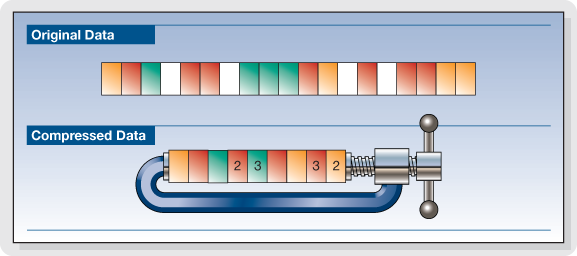
These needs can be met by reducing the space occupied by the data with special compression techniques. Compressed data cannot be used directly for processing, viewing, or playback. Compression techniques are used by special programs immediately before data storage or transmission. During the read or receive phase, similar programs perform decompression. Compression can be done on the basis that information encoding techniques dedicate an always equal amount of memory to each information element (be it a character, a pixel or a sound sample), regardless of their statistical frequency and its significance.

The compression techniques developed so far are more than a hundred but grouped into two categories:

Compression without loss of information.

Lossless compression techniques are based on compact coding of the same data streams or coding with a small number of bits of the most statistically frequent data.

Picture
This compression is completely reversible and the decompression program returns the exact bit sequence as it originally was. For this reason, loss-free technique is applicable to any type of data, including executable texts and programs, although the achievable compression factor is not very high: values ​​usually range from 2: 1 to 4: 1. Of course, these results vary depending on the type of input data.

RLE encoding

Data Compression

The RLE (Run Length Encoding) compression technique is oriented to equal byte sequences. In the original version, it provides the introduction of a special character that indicates the beginning of a sequence, and instead of encoding the same characters in the sequence one by one, it encodes only the first one, followed by a number indicating where many times drawn and repeated. Specifies with the Sc character at the beginning of the sequence, the statement

these ******** are eight stars… these Sc * 8 are eight stars

where 8 is not encoded as an ASCII character but as a binary number.

The decompression program interprets the next byte as a counter and rebuilds the original sequence.

For image compression, RLE encoding only works well with images that contain large areas of uniform color, but are not very effective with complex images.

Compression with loss of information.

Loss-free compression techniques are not sufficient to solve the problem of the huge amount of data generated by encoding multimedia information, e.g. Video images while allowing better use of memory space on disks or data transmission lines. High resolution. , audio or video.

However, to try to solve this problem, it is necessary to remember that multimedia information, although subject to transformation, can remain understandable; This allows for compression factors that are higher in some orders of magnitude than those observed.

These interventions can be studied based on the behavior (vision and hearing) of our sensory systems to reduce the required memory without obvious changes in information content. Compression techniques that do this are called “lossy” since the least significant piece of information is irreversibly suppressed. Therefore, it appears that the bitstream after decompression is different from the original, and therefore these techniques cannot be used for other types of information, e.g. Text. Furthermore, the information thus compressed is not suitable for further processing as the loss introduced with each subsequent step becomes more and more apparent.

What is video encoding and how does it work?

The technique of compressing videos

What do we mean when we talk about video coding or, as industry experts generally call it, video coding?

YOUTUBE VIDEO FORMAT

Simply put, video encoding is the process of compressing and converting video content. The ultimate goal is to use less storage space, use less bandwidth, and make the user experience smoother. It goes without saying that the compression process causes a significant loss of information. The more data that is applied, the more data is deleted in the video. The result is a different version of the original due to missing data.

mp4 videos

Why is video coding so important?

Video encoding is essential for transmission because it simplifies the transmission of video on the Internet through a compression process. Compression reduces the bandwidth required while providing a high quality experience. Without this, raw video content would not allow many users to view content on the Internet due to insufficient connection speeds. The protagonist of this process is the bit rate or the speed of digital data transmission that can be transmitted in a certain time interval in a communication channel. When streaming, the bit rate determines whether users can easily view the content or are exposed to video buffering.

Another fundamental aspect of video coding is compatibility. Indeed, sometimes the content is already compressed to an appropriate size, but it still needs to be encoded to be compatible with different devices and applications, although this is often referred to as transcoding.

The video encoding process is governed by video codecs, which are compression standards that are created through software or hardware applications. Each codec consists of an encoder for compressing the video and a decoder for restoring an approximation of the video for playback. The name codec is actually derived from the merging of the words “encoder” and “decoder”.

But what is the best codec?

It depends on the type of video. On this occasion we will describe the most commonly used.

To stream high quality video over the Internet, H.264 is arguably the most widely used codec for most multimedia traffic. This codec is considered to be of excellent quality, coding speed and compression efficiency, although it is not as efficient as the later HEVC (High Efficiency Video Coding) compression standard, also known as H.265. H.264 also supports 4K video streaming, a real advance for a codec created in 2003.

Now that we have an overview of codecs, let’s look at some compression techniques.

Compression techniques

The most common compression technique is scaling the resolution. The higher the resolution of a video, the more information is contained in each picture. One way to reduce the amount of data is to reduce the size of the image and then scan it again. As a result, fewer pixels are generated, which reduces the level of detail of the image, which has a positive effect on the amount of information required. This process allows you to set multiple quality levels for a video that correspond to different resolutions created. A practical example is if you are watching a movie in streaming before playing it, you can actually choose the resolution at which you want to watch it, provided your device
Support him

One video compression technique that may not be widely used is the interframe. This process reduces “redundant” information from one frame to another.

Another technique is the P-frame, short for predictive frame, which means that it can look back at an i-frame or another P-frame and understand whether the same images are present. In this case, this part is excluded for reasons of space.

B-Frame, on the other hand, is the bidirectional predictive frame that offers good compression without affecting the viewing experience. However, this technique requires a higher coding profile.

Another technique is that which makes it possible to intervene in the color. This process, called “chroma subsampling”, tries to maintain the brightness of the image, which affects the quality of the color. Finally, another method of compressing videos is to reduce the number of frames per second.

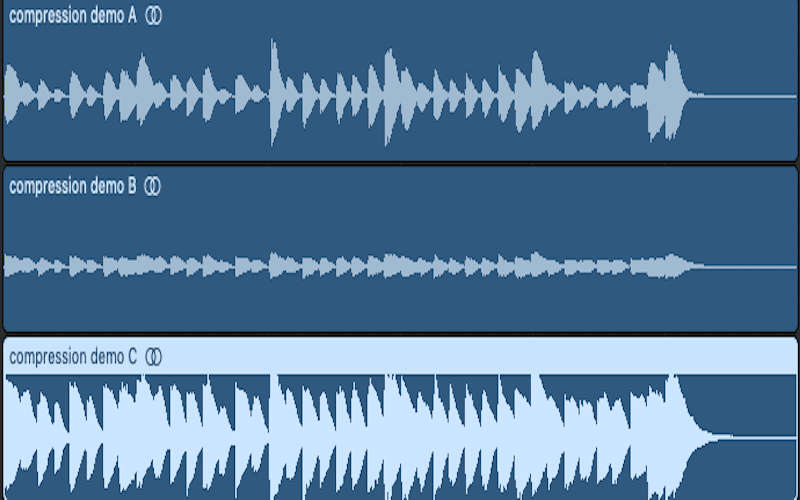
Audio compression, an explanation

Audio compression can be somewhat confusing at first due to the fact that the tools to implement it often have many elements that interact with each other and can be a headache.

Added to all this is the fact that audio / sound compression is often confused with compression in terms of digital formats (MP3 for example), which is a much more complex principle.

That is why we made this guide that aims to attack the most common doubts regarding compressors. The ones I had and the ones you probably have at the moment.

Let’s move on to the important:

What are compressors?

They are essentially an automatic volume or level control.

Let me explain: They are the equivalent of the fader of a console operated by a person in real time, that person has the function of lowering the fader when the volume of an element suddenly rises excessively. All this to control the dynamic range of said element and prevent it from going out of plane.

So what the compressor does in essence is reduce the level of a signal with parameters that are set by the user and that modify how it behaves.

How do they work?

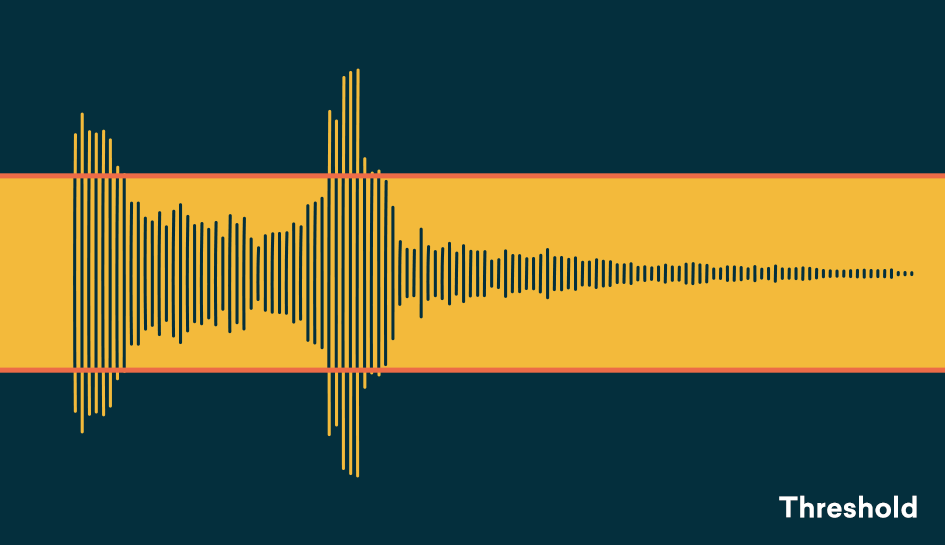
Threshold and knee audio compression
An example of an acting audio compressor showing a 4: 1 reduction contrasting it with the signal without any reduction (1: 1)

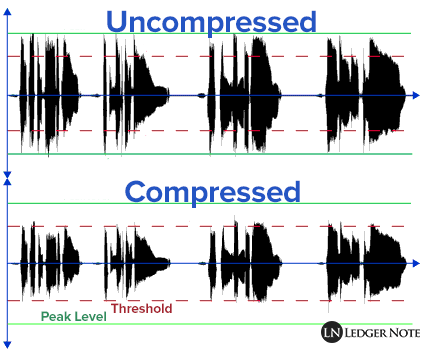
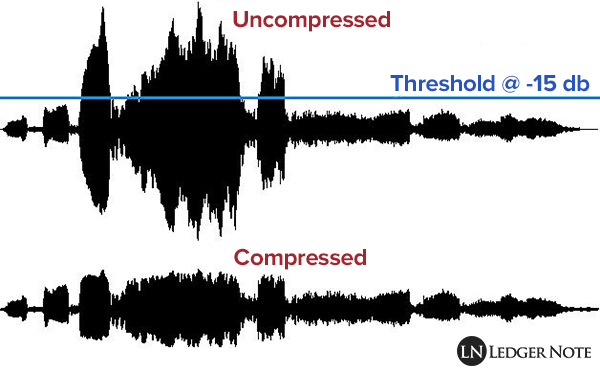
Comparing signals, that is to say: a signal enters the compressor, for example the voice we were talking about before and we set a certain level (threshold or treshold) which, if exceeded, causes the compressor to act reducing the level of said voice at the output as if it were the fader on a console.

So the compressor is all the time comparing the input signal against this threshold and reducing the signal at the output if it passes it. On the other hand, the amount of reduction at the output is not always the same, but can be modified by the user with another parameter.

What are all those knobs?

Compressors have various user-modifiable parameters that appear in the form of knobs on both digital and hardware models. Let’s see what they are:

Threshold or Treshold: we tell the compressor that if the signal goes above a certain level, it reduces it in gain. The lower the amount of signal enters the compression and therefore there will be greater reduction in gain. A detail to keep in mind is that in digital models the threshold will appear as a negative number, in essence the more negative that number is, the lower the threshold and the more signal is compressed.
Compression ratio or Ratio: here we tell the compressor to reduce the signal that exceeds the threshold by a certain proportion established by us. For example, if our signal passes the threshold by 10 decibels and we want it to decrease by 5 decibels, we put a ratio of 2: 1 (it works as a division). At higher rates, there will be a greater reduction, but also the compression may start to be noticeable, which that we generally don’t want to happen. What is sought is that it be transparent so that the listener does not realize that the signal was manipulated.

Attack or Attack: it is the time in seconds (generally in the order of milli seconds) that the compressor takes from the moment the signal passes the threshold to the complete reduction in gain that we set with the compression ratio. Keep in mind that the compressor essentially acts immediately, but it is this time that determines how it interacts with the envelope of the signal to be compressed.

Release: is the time in milli seconds that the compressor takes to return to unity gain once the signal stops being above the set threshold. In the same way that with the attack the release can modify the envelope of the sound in question and therefore is very important in the operation of the compressor.

Knee: it is a parameter found in some compressors that modifies the way in which the compressor begins to act, the name is due to the fact that the curve that describes the way in which the compressor begins to act is similar to a knee (knee in English ).
So that we understand better when we talk about soft knee we are talking about that the compressor starts to act gradually before the set threshold and reaches its compression ratio established in this way. Instead, a hard knee compressor will only act when the signal goes beyond the established threshold and therefore more aggressively.

Make up gain or output gain: is the parameter that controls the compressor’s output gain, after having activated and reduced the signal by a number of decibels. What is sought in general is that what was reduced in level is re-gained and therefore make the parts that had less volume now approach those that were compressed.