How to Address Issues Related to MP3 Frame Synchronization


Free Download Mp4Gain
picture

How to Address Issues Related to MP3 Frame Synchronization


Let’s Talk About MP3 Frame Synchronization

As a specialist with extensive experience in the field of audio compression and synchronization, I understand the importance of addressing issues related to MP3 frame synchronization. MP3 is a widely used audio format, and its proper synchronization is crucial to ensuring the seamless playback of audio files. In this comprehensive guide, we will explore the intricacies of MP3 frame synchronization, common problems that arise, and effective solutions to tackle these issues.

The Basics of MP3 Frame Synchronization

To comprehend MP3 frame synchronization, think of an audio file as a puzzle composed of numerous pieces. Each piece represents an MP3 frame, and these frames must fit together perfectly to create a seamless audio experience. Just like putting together a jigsaw puzzle, when even one piece is misplaced, the entire picture can become distorted.

In the world of MP3, a frame is a fundamental unit of audio data, typically consisting of 1152 samples. These frames are aligned in a specific sequence to form an audio stream. If the frames aren’t synchronized correctly, you may experience audio artifacts, dropouts, or even complete audio distortion during playback. This can be particularly frustrating, akin to listening to a scratched vinyl record that skips and distorts the music you love.

Common Issues with MP3 Frame Synchronization

Let’s delve deeper into some of the common issues that plague MP3 frame synchronization:

1. Jitter and Timing Mismatches

One of the main culprits behind synchronization issues is jitter. Imagine trying to put together a puzzle where the pieces keep changing size and shape. Jitter in MP3 files can lead to timing mismatches between frames, causing audio playback to be out of sync. This often results in the unpleasant experience of hearing voices or instruments that seem slightly off, akin to watching a movie with poorly dubbed audio.

2. Bitstream Errors

MP3 frames have headers with crucial information about the audio data they contain. Bitstream errors, such as corrupted headers, can disrupt frame synchronization. It’s like trying to read a book with pages missing or scrambled. Without the correct headers, your audio player may struggle to interpret the audio data, leading to distortion or silence.

3. Frame Loss and Overlapping

Frame loss occurs when an MP3 player encounters difficulty in processing frames, leading to skipped frames during playback. Overlapping, on the other hand, results from frames being duplicated or played out of order. Both issues disrupt the seamless flow of audio, creating a disjointed listening experience similar to a scratched CD that repeats or skips segments.

Effective Solutions to MP3 Frame Synchronization Issues

Now that we understand the common problems related to MP3 frame synchronization, let’s explore effective solutions to address these issues:

1. Error Detection and Correction

To combat bitstream errors, specialized software can be used to detect and correct these issues. Just as spell checkers help fix typos in text, error detection and correction tools can repair damaged MP3 frames, ensuring smoother playback. Think of it as having a grammar tool that corrects your writing errors automatically.

2. Buffering and Jitter Control

Buffering and jitter control mechanisms can be applied to manage timing mismatches caused by jitter. This is similar to using shock absorbers in a car to ensure a smooth ride even on bumpy roads. These mechanisms help maintain a consistent flow of audio data, reducing synchronization issues.

3. Redundancy and Frame Reordering

For addressing frame loss and overlapping, redundancy and frame reordering techniques can be employed. Redundancy adds extra information to frames, reducing the impact of lost frames, while frame reordering ensures frames are played in the correct sequence. Picture this as a backup plan that ensures you don’t lose the plot when a few pages of your book are missing.

Latest Words on MP3 Frame Synchronization

In the ever-evolving world of audio technology, MP3 frame synchronization remains a critical aspect. As a specialist, my experience has taught me that understanding the intricacies of MP3 frame synchronization is vital to enjoy a seamless audio experience. By addressing issues related to synchronization, you can ensure that your favorite songs, podcasts, or audiobooks are played without interruptions, just like a well-preserved vinyl record or a pristine novel.

Comments:

Comment 1: Hey, great article! I’ve had my fair share of MP3 synchronization issues, and your explanations with real-life comparisons were super helpful. Thanks!

Comment 2: This article is alright, but I was hoping for more in-depth technical details about MP3 synchronization. Can you provide more advanced information?

Comment 3: I had no idea about these synchronization problems in MP3 files. Your article opened my eyes. Now I know why my music sometimes sounds weird.

Comment 4: I wish you’d talked more about the software solutions for MP3 synchronization. What tools can I use to fix these issues?

Comment 5: Your comparison to puzzles and books really made the concepts clear. I appreciate how approachable you’ve made this topic.

Comment 6: Great job on breaking down the complex topic of MP3 synchronization! Your real-life examples made it easy to grasp.

Comment 7: I agree with Comment 2; I wanted more technical details too. Can you elaborate on the error correction methods?

Comment 8: This article needs a bit more depth. I’m still a bit confused about how buffering works in MP3 synchronization.

Comment 9: Kudos to the author for simplifying a complex topic. It’s nice to have a resource that makes audio tech accessible to everyone.

Comment 10: I had no idea MP3s could be so finicky. Your article was an eye-opener. I’ll be more patient with my music now.


Free Download Mp4Gain
picture


Mp4Gain Main Window
picture


Mp4Gain Features
picture


Free Download Mp4Gain
picture

Perceptual Entropy in an MP3 File

How to Measure the Perceptual Entropy in an MP3 File?

Perceptual Entropy
Perceptual Entropy

Introduction to Perceptual Entropy in an Mp3

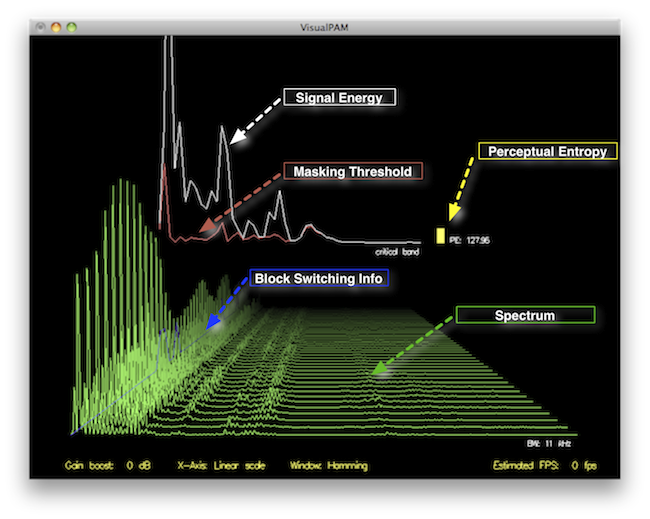
In the realm of audio compression, the concept of perceptual entropy may seem like an esoteric term. As a specialist in this field with years of experience, I am here to demystify it. Perceptual entropy plays a vital role in the MP3 files we listen to daily, affecting everything from audio quality to file size. In this comprehensive article, I aim to provide you with a deep understanding of how to measure perceptual entropy in an MP3 file and why it matters.

Understanding Perceptual Entropy

Definition of Perceptual Entropy

Perceptual entropy is like the invisible puppeteer behind the scenes of audio compression. Imagine you have a favorite storybook with many repetitive sentences. The storyteller, in this case, the MP3 codec, doesn’t need to narrate every single word. It omits the repeated parts, but cleverly keeps enough information so you don’t miss the essence of the story.

Importance in Audio Compression

The significance of perceptual entropy in audio compression is akin to sorting out your wardrobe. You don’t need to keep every single pair of socks. You retain a representative selection while saving space. Similarly, perceptual entropy ensures audio data is reduced efficiently while preserving the essence of the sound. It’s all about maintaining quality while optimizing storage.

Measuring Perceptual Entropy</h2

Methods for Measurement

The tools used to measure perceptual entropy are like detectives scrutinizing every page of your storybook. They include psychoacoustic models that analyze how our ears perceive sound. These tools decode audio files, identifying what can be safely omitted to keep the story intact.

Tools and Software

Consider these tools like a set of magic glasses that allow you to see the hidden patterns in your storybook. Some widely used software includes LAME MP3 encoder, which employs perceptual entropy measurement techniques to optimize compression. Others, like FFmpeg, offer valuable insights into perceptual entropy.

The Role of Bit Rate

Think of bit rate as the quality slider for your audio file. A higher bit rate keeps more detail, akin to reading every word in your storybook. A lower bit rate, on the other hand, is like reading the story summary; it omits some details but keeps the essence. Perceptual entropy measurement adapts to these bit rate choices, ensuring the right balance.

Significance of Perceptual Entropy in Audio Compression</h2

Effect on Compression Efficiency

Imagine you have a suitcase, and you want to pack it efficiently. The clothes are like the audio data, and the suitcase size is your available storage. Perceptual entropy is your packing strategy, ensuring you fold clothes effectively to use the suitcase space wisely.

Impact on Audio Quality

When you send a letter, you want it to be both light and readable. Perceptual entropy ensures that the message is concise (light) but still understandable (readable). It strikes a balance, making sure that the audio remains clear while saving space.

Real-world Examples

To illustrate perceptual entropy, think of a colorful painting. Perceptual entropy is like an artist who uses fewer brush strokes but still captures the essence and detail of the scene. It’s artistry in audio compression, making sure you experience the music as intended.

Evaluating Audio Quality</h2

Criteria for Audio Quality

Audio quality assessment is similar to a taste test. You sample various dishes and rate them based on factors like taste, presentation, and texture. Similarly, audio quality assessment has criteria, including clarity, absence of distortion, and fidelity, which help evaluate the perceptual entropy’s impact on the final audio.

Striking a Balance

It’s like baking a cake; you need the right ingredients in the right proportions. Perceptual entropy is one of those ingredients. Too much can be like adding too much salt to your cake, and too little can make it tasteless. Striking the right balance is the key to maintaining audio quality.

Tools for Evaluation

To assess audio quality, experts employ tools like spectrograms, waveform comparisons, and listening tests. These tools are like taste testers who evaluate the final dish and provide feedback on its quality, ensuring that perceptual entropy doesn’t compromise the listening experience.

Practical Applications</h2

Music Production

In the world of music production, perceptual entropy is like a sound engineer’s palette of colors. It allows them to maintain high-quality audio while conserving space. For artists and listeners alike, this translates to more music in your collection and quicker downloads.

Streaming Services

Streaming services optimize audio files for efficient delivery. Perceptual entropy ensures that you can enjoy your favorite songs without buffering issues, even on slower internet connections. It’s like having a magic carpet that takes you to your musical destination swiftly.

Industry Insights

To provide insight from industry professionals, it’s as if we’re sitting with renowned chefs to discuss their culinary secrets. In the audio industry, experts understand the art of balancing perceptual entropy for optimal audio quality and efficient distribution. It’s the heart of what makes your listening experience exceptional.

Last Words about Perceptual Entropy Measurement in MP3 Files

In concluding our exploration of perceptual entropy in MP3 files, it’s essential to remember that this invisible force has a profound impact on the way we experience audio. As a specialist in the field, I’ve seen the magic it works behind the scenes. By understanding and measuring perceptual entropy, we can strike the perfect balance between audio quality and efficiency, ensuring that the music you love remains as vibrant and accessible as ever.