Video codecs, video formats – what does this all mean?

If you are puzzled by the endless list of export options in your video editing software, this article is for you. Let’s first look at the definition of a codec.
Then we will look at the concept of video format, and then we will look at some of the most common codecs and their uses.
If you are recording or editing video, you will almost immediately come across the term “codec”. Since there are so many and it’s hard to tell them apart, I’ve made a quick overview to help you get started. Once you understand certain terms, you can better decide which one suits your needs. Let’s start with a simple definition.
The video codec is.
A codec is actually a combination of two words: an encoder and a decoder (co / dec). What are they doing? Simply put, because video files are so large, you need a way to make them smaller. The codec encodes, compresses data to store or send it, and then decompresses it for playback or editing.
A codec is a computer code that performs its function each time the software calls a file. Codecs can also be used on physical equipment, such as a camera, to digitize incoming video and audio.
This happens in real time, either at the point of capture or at the point of playback. However, if you are not a broadcast engineer, you will have to rely on your computer or device to select the codec. Hardware compresses your video and audio data for viewing, streaming, or storage.
The video format is.
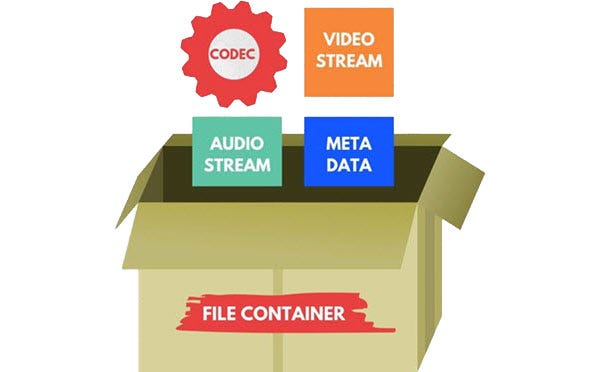
The file format is similar to a container. The container contains data that has been compressed by a specific codec. And sometimes they have the same name.
For example, a file format such as Windows Media Audio contains data compressed with the Windows Media Audio codec. However, a file format such as Audio Video Interleaved (AVI) can contain data compressed with any of several different codecs, including MPEG-2, DivX, or XviD codecs.
AVI files can also contain data that is not compressed by any codec. Therefore, depending on the codecs installed on your system, some AVI files will play fine, while other AVI files, despite having the same file extension, will not play.
It also affects the audio. There is often a situation where when playing a video, the sound plays, but the video does not. This means that the appropriate video codec is installed on your device.