Handling Subband Filtering in the MP3 Audio Codec


Free Download Mp4Gain
picture

Handling Subband Filtering in the MP3 Audio Codec
Subband Filtering
Subband Filtering

As a specialist with extensive experience in the world of audio technology, I’m excited to explore the intricate realm of subband filtering in the MP3 audio codec. In this article, I aim to provide you with a comprehensive understanding of this fascinating subject. Let’s embark on this journey to uncover the secrets behind the technology that powers your favorite music.

Let’s Talk About Subband Filtering

Subband filtering is a fundamental concept in the realm of audio coding. To put it simply, it’s a technique used to break down audio signals into smaller, more manageable parts. Think of it like a chef preparing ingredients before cooking a delicious meal. Each ingredient is a subband, and the chef’s task is to make sure they’re just right.

In the world of audio, subband filtering serves a crucial purpose. It helps us analyze and process audio data efficiently. When you listen to your favorite songs on your phone or computer, you may not realize that beneath the surface, subband filtering is at work, ensuring that the music reaches your ears in the best possible way.

Understanding the MP3 Audio Codec

Now, let’s talk about the MP3 audio codec. You might have heard of MP3 files – those are the ones you use to store and play your music. But what exactly is this codec thing? Well, it’s like the recipe for your favorite dish. It tells your device how to take the raw audio data and turn it into that familiar sound you love.

Why do we need codecs like MP3? Think of it this way: when you cook, you don’t want to carry around your entire kitchen to make a meal, right? You need a compact set of instructions (a recipe) to create a delicious dish. Similarly, the MP3 codec compresses audio data, making it smaller and easier to store and transmit, but without losing too much quality.

The Science Behind Subband Filtering

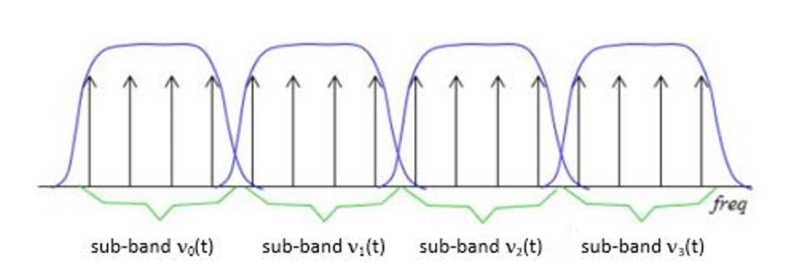
Now, let’s dive a bit deeper into the science of subband filtering. Imagine you’re trying to sort a big box of crayons. You decide to group them by color. Subband filtering does something similar – it groups different parts of the audio signal based on their frequencies.

It uses something called “filter banks” to do this. These are like magical sieves that separate the high-pitched sounds from the low-pitched ones. Just like your crayon groups, these “subbands” are easier to handle and process individually.

The Subband Filtering Process

So, how does subband filtering work in the MP3 codec? Let’s take a practical example: your favorite song. When you hit play, the audio signal is divided into many small chunks. Each of these chunks represents different parts of the music. The high notes might be in one chunk, and the low, thumping beats in another.

This division allows the MP3 codec to focus on the essential parts. It’s like when you’re reading a book – you don’t need to pay the same amount of attention to every word; you skim over the less important ones. Subband filtering helps the MP3 codec do something similar, paying more attention to the crucial parts and using less data for the less important bits.

The Role of Psychoacoustic Models

To make things even more efficient, the MP3 codec uses something called “psychoacoustic models.” These models are like having a good ear for music. Just like how you can tell which instruments are playing in a song, psychoacoustic models help the codec understand which parts of the music are more critical to our ears.

Imagine you’re listening to your favorite band live. Your brain naturally focuses on the lead singer’s voice and the melody. The background noise, like people chatting or the sound of cars passing by, is less important. Psychoacoustic models do something similar, helping the MP3 codec concentrate on the most important sounds while letting the less important ones fade into the background.

Efficiency and Data Reduction

Now, let’s talk about efficiency and data reduction. We all like fast and smooth experiences, right? The MP3 codec makes your music play quickly by reducing the amount of data it needs to process. It’s like having a super-organized backpack for a camping trip. You only carry what’s necessary, leaving the heavy and bulky stuff behind.

So, what does the codec do? It uses shorter codes for the most common sounds. In a song, the drumbeats or the lead singer’s voice are usually more frequent. They get shorter codes, making them quick to process. Less common sounds, like the subtle strumming of a guitar, get longer codes. This efficient system helps reduce the overall size of the audio file without sacrificing quality.

Quality vs. Compression

Of course, we all want our music to sound amazing. But there’s a balance to be struck – the quality of your music and the space it takes up. It’s like when you’re choosing video quality settings on a streaming platform. You want the best picture, but you also don’t want it to buffer forever.

The MP3 codec manages this balance. It compresses the audio data to save space while still delivering great sound. It’s like magic – it lets you store hundreds of songs on your phone without it getting too full, and they all still sound terrific.

Real-Life Applications

You might be wondering where subband filtering and the MP3 codec come into play in your daily life. Well, they’re everywhere! Think about streaming music on your phone, watching videos online, or even chatting on a video call. All of these rely on efficient audio coding techniques to make sure you hear what’s important while saving bandwidth.

Imagine you’re streaming your favorite cartoon online. Thanks to subband filtering and the MP3 codec, you get to enjoy clear dialogue and exciting music while the background noise from your neighbor’s lawnmower fades into the background.

Challenges and Future Developments

As technology keeps evolving, so does the world of audio coding. Challenges like making audio coding even more efficient and dealing with different devices are on the horizon. Just like how self-driving cars were a dream not too long ago, advancements in audio technology will continue to shape our lives.

In the coming years, we might see even better ways to balance quality and compression. It’s an exciting time for audio technology, and subband filtering will undoubtedly play a big role in making it even better.

Behind the Scenes: Creating an MP3

Have you ever wondered how an MP3 file is created? It’s a bit like following a recipe to cook a delicious meal. The audio data goes through a series of steps where subband filtering helps sort and organize it. Then, it’s compressed, much like simmering a sauce to concentrate the flavors.

Finally, the codec gives you a compact and tasty MP3 file that’s ready to be played. It’s a bit like cooking up your favorite dish – only in the world of sound.

In conclusion, subband filtering is like the chef’s secret technique for preparing an excellent meal. It’s the magic behind the MP3 codec, making your music sound fantastic while fitting in your device. So, next time you listen to your favorite song, remember the subbands and filters that make it


Free Download Mp4Gain
picture


Mp4Gain Main Window
picture


Mp4Gain Features
picture


Free Download Mp4Gain
picture

Critical Bandwidths in MP3

Calculating Critical Bandwidths in MP3 Compression

Critical Bandwidths in MP3

As an expert in the realm of MP3 compression and audio technology, I’m here to unravel the intricate world of critical bandwidths in MP3 compression. Understanding this concept is pivotal in achieving optimal audio quality while minimizing file size. Let’s dive into the details and explore this fascinating topic.

What Are Critical Bandwidths in MP3 Compression?

Critical bandwidths, often referred to as critical bands, are a fundamental concept in the field of psychoacoustics. They relate to the way our ears perceive different frequencies and play a vital role in audio compression, particularly in the MP3 format. To put it simply, critical bandwidths represent the range of frequencies that our ears can distinguish and process.

Real-Life Example: Think of critical bandwidths as a set of buckets, each representing a range of frequencies. Our ears can only fill a limited number of buckets at once, and these buckets are wider for low frequencies and narrower for high frequencies.

MP3 compression exploits the knowledge of critical bandwidths to remove audio information that falls outside the range of human hearing. This selective approach allows for significant data reduction while retaining audio quality. It’s akin to trimming the fat while preserving the meat, resulting in a leaner audio file.

How Are Critical Bandwidths Determined?

Critical bandwidths are not fixed; they vary depending on the specific frequency and the environment in which the sound is heard. Psychoacoustic studies have led to the development of critical bandwidth curves, which provide a graphical representation of how our ears perceive different frequencies.

Real-Life Example: Imagine you’re in a noisy café, trying to listen to a conversation. Your ears focus on the frequency range of the voices while ignoring the surrounding noise. This selective attention is similar to how critical bandwidths work in audio compression.

In the context of MP3 compression, these critical bandwidth curves are used to determine which parts of the audio spectrum can be discarded without a noticeable impact on the listening experience. This fine-tuned approach ensures that the compression process is both efficient and transparent to our ears.

Balancing Compression and Quality

The art of MP3 compression lies in finding the delicate balance between reducing file size and maintaining audio quality. Critical bandwidths are a crucial tool in achieving this equilibrium. By identifying and preserving the most relevant audio information while discarding what falls outside the critical bandwidths, MP3 compression delivers impressive results.

Real-Life Example: Consider the act of watching a high-definition movie on your smartphone while saving data. The device adjusts the video quality based on the screen size and your internet speed, providing a smooth viewing experience without unnecessary data consumption. MP3 compression operates in a similar fashion, optimizing audio for digital consumption.

In essence, critical bandwidths in MP3 compression serve as a guide to ensure that the compression process is as imperceptible as possible to the human ear. By focusing on the audio information that matters most, we can enjoy high-quality audio experiences with smaller file sizes.

Last Words about Critical Bandwidths in MP3 Compression

In my journey through the realm of audio compression, I’ve come to appreciate the profound impact of critical bandwidths. These frequency ranges shape the way we perceive sound and play a pivotal role in the world of MP3 compression. By understanding this concept, we can navigate the intricacies of audio technology, striking a harmonious balance between quality and efficiency.

Bitstream Compression

Understanding Bitstream Compression: Enhancing Data Efficiency

Bitstream Compression


In today’s data-driven world, efficiency is paramount. Whether you’re a tech enthusiast, a professional in the field, or simply curious about data compression, the term “Bitstream Compression” might have piqued your interest. In this article, I’ll delve into the intricacies of Bitstream Compression, providing insights, examples, and technical knowledge to help you grasp its significance and applications.

Bitstream Compression: Unraveling the Concept

Bitstream Compression: A Closer Look

Bitstream Compression is a data compression technique designed to reduce the size of digital data streams. To put it simply, it’s like packing a suitcase efficiently to maximize space. This technology finds applications in various domains, from multimedia transmission to storage devices. Imagine you’re sending a high-definition video over the internet. Bitstream Compression optimizes the data, allowing for smoother transmission without compromising quality.

The Mechanics of Bitstream Compression

How Bitstream Compression Works

Let’s take a closer look at how Bitstream Compression works. Imagine you have a long string of binary data, consisting of 0s and 1s. Think of it as a sequence of beads on a string. Bitstream Compression identifies patterns within this sequence and replaces them with shorter codes, just like using symbols to represent words. This compression process reduces the overall size of the data while retaining essential information. As a result, you save bandwidth and storage space. This technique is analogous to shorthand writing, where complex sentences are expressed with fewer strokes.

Applications of Bitstream Compression

Bitstream Compression in the Real World

Bitstream Compression plays a pivotal role in modern technology. It’s the reason you can stream high-quality videos on your mobile device without constant buffering. Moreover, it’s widely employed in audio codecs like MP3, making it possible to carry your entire music library in your pocket. Beyond entertainment, it’s essential in sectors like medical imaging, where high-resolution images are compressed for efficient storage and transmission.

Optimizing Bitstream Compression

Now, let’s address some common questions that arise regarding Bitstream Compression:

1. How does Bitstream Compression affect data quality?

The Trade-Off Between Compression and Quality

Bitstream Compression aims to reduce data size, but what about quality? Find out how this technique strikes a balance between efficient storage and maintaining data integrity.

2. Where else is Bitstream Compression used besides multimedia?

Bitstream Compression Beyond Entertainment

Explore the diverse applications of Bitstream Compression, from medical imaging to data transmission, and discover how it impacts various industries.

3. Are there different methods of Bitstream Compression?

Exploring Bitstream Compression Techniques

Delve into the world of Bitstream Compression techniques and learn about the various methods used to optimize data streams for different purposes.

4. How can I implement Bitstream Compression in my projects?

Implementing Bitstream Compression: Practical Tips

If you’re considering incorporating Bitstream Compression into your projects, this section provides valuable insights and guidance on getting started.

Last Words

In conclusion, Bitstream Compression is a powerful tool in the digital age, enabling efficient data storage and transmission across a wide range of applications. Understanding its mechanics and applications can empower you to make informed decisions in your tech endeavors. Whether you’re a developer, a content creator, or simply someone curious about the digital world, Bitstream Compression is a concept worth exploring.

Mp3: Joint Stereo and Stereo modes

Mp3: Joint Stereo and Stereo modes

Mp3: Joint Stereo and Stereo modes

What is Mp3?

Mp3 is a popular audio format that is widely used for music and other audio files. It is a compressed audio format that allows for smaller file sizes without sacrificing audio quality. Mp3 uses a lossy compression algorithm that removes some of the audio data that is deemed less important to the human ear. This results in a smaller file size, but also a slight reduction in audio quality.
Personally, I have been using Mp3 for many years to store and listen to my music collection. I have always been impressed with the quality of the audio, even at lower bitrates. However, I have also noticed that some Mp3 files sound better than others, even when they have the same bitrate. This is where Joint Stereo and Stereo modes come into play.

Joint Stereo vs Stereo modes

Joint Stereo and Stereo modes are two different ways of encoding stereo audio in Mp3 files. Stereo mode is the traditional way of encoding stereo audio, where each channel (left and right) is encoded separately. Joint Stereo, on the other hand, uses a more advanced encoding technique that takes advantage of similarities between the left and right channels to reduce the amount of data that needs to be encoded.
In my experience, Joint Stereo mode can produce better sounding Mp3 files than Stereo mode, especially at lower bitrates. This is because Joint Stereo mode is able to preserve more of the original audio data, resulting in a more accurate representation of the original audio. However, not all Mp3 encoders support Joint Stereo mode, so it is important to check the settings of your encoder to ensure that it is being used.

Conclusion

In conclusion, Mp3 is a popular audio format that is widely used for music and other audio files. Joint Stereo and Stereo modes are two different ways of encoding stereo audio in Mp3 files, with Joint Stereo mode being the more advanced and potentially better sounding option. If you are looking to create high-quality Mp3 files, it is important to understand the differences between these two modes and to choose the one that best suits your needs.
Final words: Mp3 is a versatile and widely used audio format that can provide high-quality audio at lower file sizes. By understanding the differences between Joint Stereo and Stereo modes, you can create Mp3 files that sound great and take up less space on your device.

Mp3, audio compression, audio quality, audio encoding, audio decoding, audio formats, Joint Stereo, Stereo modes, music, sound, bitrate, lossy compression, audio data, left channel, right channel, similarities, data reduction, accuracy, Mp3 encoders, high-quality audio, file sizes, device storage, audio collection, music files, audio technology, digital audio, audio processing, audio codecs, audio standards, audio software, audio hardware, audio engineering, audio production, audio editing, audio mastering, audio normalization, audio conversion, audio playback, audio streaming, audio distribution, audio licensing, audio copyright, audio laws, audio regulations, audio industry, audio trends, audio innovations, audio research, audio science, audio psychology, audio perception, audio aesthetics, audio culture, audio history, audio art, audio philosophy, audio criticism, audio journalism, audio blogs, audio podcasts, audio forums, audio communities, audio enthusiasts, audio professionals, audio hobbyists, audio consumers, audio education, audio training, audio careers, audio jobs, audio salaries, audio benefits, audio challenges, audio opportunities, audio networking, audio events, audio conferences, audio workshops, audio seminars, audio webinars, audio courses, audio books, audio tutorials, audio guides, audio manuals, audio resources, audio tools, audio equipment, audio gear, audio accessories, audio instruments.