What is the bit rate?


Free Download Mp4Gain
picture

What is the bit rate?
Bitrate

Bitrate, or as they say the width of the sequence

Bitrate

It is the amount of data transmitted or processed in 1 second. The concept mainly applies to multimedia content, for example, video bit rate is nothing more than the amount of video information that is displayed on the screen in one second. To measure the bit rate, the designation “Kbit / s (kbps)” is used, that is, kilobits per second, less frequently Mbit / s, and so on. The more information that is transmitted during a specific period of time, the higher the quality of the image.

When people say “low bit rate video” they are generally referring to low quality video. Blur, opacity, and pixelation are characteristic of such video, while high-bit-rate video has a detailed image with rich colors. Like video, audio also comes with low and high bit rates. Music with a low bit rate loses in the frequency range, words and chords become less distinguishable, and itself takes on an unnatural sound, as if it were an electronic sound.

Bit rate types
When compressing video, you have 3 modes to choose from: constant, variable, and average. Let’s start in order:

Constant Bit Rate (CBR). Sets the desired value and does not change throughout the video. The advantage of this option is that you know in advance what the size of the final file will be. But there is also a downside, especially in relation to sound. It may grow during playback, which may require changing the bit rate. Since you don’t get what you want, quality suffers.
Changes in sound level

Variable (VBR). In this case, you are working in conjunction with a codec. Your task is to set the maximum bitrate and programs must select the required value for each scene. Thus, the “minus” of the previous regime has been eliminated. Also, the file size may be even smaller than expected, but the outcome is impossible to predict.
Average (ABR). From the name it is clear: this is a cross between the first and second mode. Here you set not only the maximum, but also the minimum bitrate, and the codec itself selects it within these limits, based on the dynamics of the video. Its quality is better than that of the variable option, because the bit rate does not fall below the set value.
YI 4K video bit rate increase
Although action cameras have been in our lives for a long time, not everyone understands their true purpose. More than once I have come across the fact that people see them as a compact analog of ordinary consumer camcorders and make corresponding demands on them. First of all, it comes down to the quality of the footage shot. “I just want to take the camera out of my pocket, start recording, and get a picture like on film.”

… This is impossible in principle. And it is doubly impossible in an action camera, since it is a compromise between “action” (a set of characteristics for operation in extreme conditions) and the quality of the shot: improving one thing, the other will deteriorate proportionally.

However, you can do something. For example, replace the lens or increase the video bit rate. What will increase the bit rate? Some improvement in image quality. It should be understood that although the camera shoots at a fairly high bit rate (up to 60 Mbps), the built-in codec uses a fast profile. In other words, video recorded with a 60 Mbps camera will be worse than video recorded on a computer with the same bit rate. First of all, areas of almost uniform color and “jerky” undergo such coding. For example, grass, ripples in the water, or foliage. Increasing the bitrate is not a panacea here, but a tangible step forward. It is true that you need to understand that the developer set a limit of 60 Mbit / s for a reason and that increasing the bit rate is done at your own risk and risk. Also, this increases the requirements for the memory card used and the writing speed on it.

If you use a camera, for example, for video blogs with video uploading to YouTube, you don’t need to change anything, as the video host will recode your video by itself, regardless of the initial parameters. If you’re post-processing the footage, it makes sense to give it a try as there is minimal body movement.
DISCLAIMER OF LIABILITY
In many respects, this article expresses the subjective opinion of the author. Furthermore, the author is not responsible for possible damage to the camera.


Free Download Mp4Gain
picture


Mp4Gain Main Window
picture


Mp4Gain Features
picture


Free Download Mp4Gain
picture

What is bit rate and why is it important?

What is bit rate and why is it important?

What is bitrate?

With today’s technology, we can expect high speed and quality in everything we do on our computers, our smartphones, and any other newer devices. However, although this increase in speed and quality has several factors, many of them have to do with what is called the bit rate.

Bit rate

What bitrate means depends on the context you’re using it in, but it’s very important to know what it is and what benefits it might bring you (or what to expect instead).

What is the bit rate?

Bit rate is a term used to describe the amount of data that is transferred over a period of time. Depending on the context, common bitrate measures include kbps and Mbps, respectively, which means kilobits per second and megabits per second. Regardless of which drives are used, a higher number is usually good, indicating high speed or high quality.

However, it is also important to understand that smaller numbers can reduce the load on your hardware, which can be important for devices such as smartphones and netbooks.

When it comes to internet speed, a higher bit rate is always desirable – it doesn’t overload your own hardware, it just sends you the content you want faster. With higher bit rates, you can do more with an Internet connection – stream HD movies, play online games with minimal latency, and download large files in just seconds.

You can find out what bitrate you are getting by visiting a website like speedtest.net and running your tests. The numbers are good to compare with others, but generally don’t expect the expected number (other than the number your ISP announced). Certain parts of the world and Google Fiber users can get speeds of up to 1 Gbps (1000 Mbps), while typical cable broadband users in the US can get as low as 10 Mbps.

There has been a lot of discussion in online communities like Reddit about high internet prices in the US due to how slow speeds are, and initiatives like Google Fiber are starting to pay off.

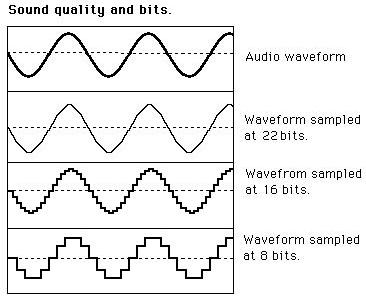
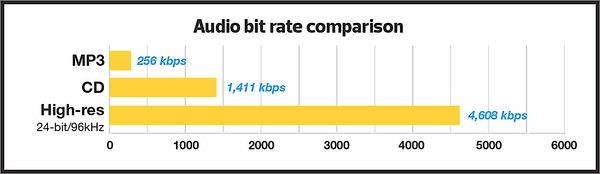
When it comes to audio and video, bit rates take on a different definition. In this context, bit rates refer to the amount of data stored per second of multimedia playback. For example, a 320 kbps MP3 audio file has a higher quality than the same file at just 128 kbps, as long as both files were created from the same ideal source. You will have to remember that you cannot improve an audio file that sounds bad by copying it to an audio file with a higher bit rate, as the source was bad from the beginning. So a higher bit rate is a general rule of thumb, but it is not 100% correct.

The same is true for video: a higher bitrate will have a higher quality when comparing the same video with the same resolution. The bit rate is expected to increase as the resolution increases as more data is processed. Consequently, high bit rates for audio and video can provide superior quality, but can also put a lot of pressure on your hardware, which can lead to stuttering.

Also, keep in mind that different file formats use different compression algorithms, which can result in lower bit rates and higher quality. However, for these algorithms, the processing load tends to increase.

MP3 Bit Rate Guide – Quality and Differences Explained

Bit rate Quality

When compressing audio and video files, the MP3 bit rate indicates how many bits are available to the decoder to encode exactly one second of a track. The higher the bit rate of the MP3 file, the better the quality achieved. The bit rate can be constant (constant bit rate, CBR) or variable (variable bit rate, VBR). Our guide explains the differences.

Bitrate  Quality

MP3 has established itself as a leading music format on the Internet in recent years and all popular MP3 players support this format. It was developed by the Fraunhofer Institute and is now considered the best known standard for Audiocodierun g. But where are the differences in the jungle of MP3 bit rates?

What MP3 bitrates are there anyway?

A distinction is made between the following common bit rates for MP3 files:

32, 40, 48, 56, 64, 80, 96, 112, 128, 160, 192, 224, 256 and 320 kBit / s.

This increases the quality of MP3s, but also the size of the files created. Compared to the original, an MP3 file only requires about 10 percent of the original storage space.

Starting at a bit rate of 192 kbit / s, you can hardly hear any difference from the quality of the original CD in many pieces of music.

Low bit rates: 32 to 128 kBit / s
Average bit rates: between 128 and 192 kBit / s
High bit rates: more than 192 kBit / s

What is the best bit rate for MP3 compression?

Again and again the question arises of what bit rate to select when converting songs to MP3 to achieve roughly CD quality. An MP3 compression with 192 kbit / s variable bit rate here is an ideal compromise between size and quality.

At just 128 kb / s, you can often hear a distinct difference from the original songs on CD. Music pieces with a lot of dynamics suffer more if the compression is too high (weak bass, lack of treble). So here it is better to use a higher bit rate.

How does the quality of bit rates differ depending on the compression method?

Constant Bit Rate (CBR)

With constant bit rate, each unit of time (for example, one second) is always allocated the same amount of storage space in the entire MP3 file. Therefore, the quality may vary depending on the piece of music. For this, the size of the resulting file can be calculated more precisely.

Variable Bit Rate (VBR)

Variable bit rate is usually the best compression method for normal use, as it can be used to produce consistent high quality. With Acapella parts, 320 kBit / s are not required, as only a few complex frequencies need to be encoded here. However, if you are playing a full orchestra, 128 kBit / s is usually not enough to cover the entire frequency spectrum of the various instruments. Depending on the piece of music, more bits are used when they are important, or those that are not can be omitted. In return, the file size varies more.

Average Bit Rate (ABR)

Some MP3 encoders also support average data rates. Technically, this variant is almost identical to Variable Bit Rate (VBR). Here, too, the encoder software always tries to achieve a uniform quality of the musical piece. However, the bit rate achieved often deviates slightly.

As an example: if you want a target bit rate of 128 kBit / s, then the bandwidth of the achieved bit rate is between 120 and 140 kBit / s. To achieve the desired average bit rate as accurately as possible, some codecs offer a two-pass compression process. The material is analyzed first and is only encoded in the second run. The ABR mode corresponds to a mix of CBR and VBR and is therefore qualitatively more in the middle.