What is bit rate? Knowledge of the MP3 audio format. Part 2


Free Download Mp4Gain
picture

What is bit rate? Knowledge of the MP3 audio format. Part 2

bit rate
bit rate

Bitrate is a benchmark indicator of the efficiency of digital music compression.

bit rate.
bit rate

The bit rate represents the number of bits bps (bit per second, bits per second) transmitted per unit of time (1 second). We usually use kbps (in simple terms, it is per second) clock 1000 bits) as the unit. The bit rate of digital music on CD is 1411.2 kbps (ie recording 1 second of CD music requires 1411.2 × 1024 bits of data). The higher the bit rate of the music file, the more data (Bit) must be processed in a unit of time (1 second), and the better the sound quality of the music file. However, when the bit rate is high, the file size increases, which will occupy a large amount of storage capacity. 8 to 320 kbps.

1. WMA (Windows Media Audio, Windows Media Audio)

As a Microsoft media compression method, it is a part of the technology that only compresses audio data in Windows Media Technologies. The sound quality is similar to MP3 and can be compressed with half the technology of MP3. It has the copyrighted Windows Media Rights Manager and can be played by installing it in WMP (Windows Media Player, Windows Media Player). Due to the strong influence of Microsoft and Windows, as well as major copyright reasons, the major American record companies, EMI and BMG, officially confirmed that they use the WMA method developed and produced by Microsoft. It is believed that this advanced method will become even more popular in the future.

2. MP3 (CBR, VBR, ABR)

MP3 is currently the most widely used and widely used lossy compressed digital audio format. It has been explained above and will not be repeated here.

CBR (constant bit rate)

CBR is the oldest and simplest MP3 encoding (compression) method. When this method is used for encoding, the bit rate of the entire file is the same, in other words, the bit rate used by the MP3 file per second is the same. Although the music file has sections of varying complexity, the encoder always keeps the bitrate constant, unless you use the highest sound quality; otherwise the sound quality of the different sections of the MP3 file will vary. The more complex the passage, the worse the sound quality. Its biggest advantage is that the file size is fixed, which is convenient for calculating storage space.

VBR (Variable Bit Rate, Variable Bit Rate)

VBR is a variable encoding rate MP3 compression method. Its principle is to encode the complex part of a song with a high bit rate and the simple part with a low bit rate. Through this dynamic adjustment of the encoding rate, the sound quality can be improved. additionally obtained and the size of the file. Its main advantage is that the entire song can approximately meet our sound quality requirements, but the disadvantage is that the size of the compressed file cannot be estimated during encoding.

Most MP3 players released now support VBR, but although some machines can play songs in VBR format, they can’t display the playing time correctly. Nowadays, a lot of high-quality MP3 music is encoded in VBR.


Free Download Mp4Gain
picture


Mp4Gain Main Window
picture


Mp4Gain Features
picture


Free Download Mp4Gain
picture

What is bit rate? Knowledge of the MP3 audio format.

What is bit rate? Knowledge of the MP3 audio format.


bit rate
bit rate

Digital audio formats are audio signals that are recorded, processed, and reproduced in digital form.

bit rate
bit rate

The emergence of digital audio formats is to meet the needs of high-fidelity playback, storage and transmission. Simply put, early analog audio formats had issues with playback distortion and glitches due to media wear. Since the advent of the CD, digital format audio files have become popular, but another problem has arisen: the limitation of the storage volume, and the CD still has the phenomenon of wear. Saving to hard drive (relatively longer storage time) is not a good solution when storage media (mainly hard drives) are still expensive at the time. The rise of the Internet has created a requirement for long-distance file transmission. Under the restriction of bandwidth, the demand to reduce file size has become more intense. All this has led to the generation of lossy compressed digital audio formats from external factors!

In terms of internal factors, with the improvement of computing and coding capabilities, the progress of various acoustic psychological models has promoted the emergence of various lossy compressed digital audio formats. Some of the most commonly used audio formats in MP3 players are briefly introduced below: MP3 (CBR, VBR, ABR), WMA, WAV, ADPCM, and the emerging audio formats AAC, ASF, and OGG.

Before introducing various digital audio formats, let’s clarify one concept: bitrate.

In the field of computing, all information is digitized. Bit is the smallest unit of data in a computer, it refers to a number of 0 or 1, which is a mathematical binary number, a “0” or “1” , is a bit. For example, when we say a 2-digit number, it means that it is a two-digit binary number, and there are 4 combinations of “00”, “01”, “10” and “11”, which represent 0, 1, 2 and 3 is four numbers.

What is the difference between bitrate 128 and 320.

What is the difference between bitrate 128 and 320.

128 kbps vs 320 kbps MP3

Have you ever wondered what exactly you lose by compressing from lossless to 128kbps or 320kbps mp3?

128 kbps and 320 kbps MP3

I checked it and the result seemed interesting to me. First of all, I propose to take a survey to understand for yourself if you hear the difference. If you are not sure what you are hearing or you are sure you are not listening, then I bring you a simple and elegant idea: you should take and collide with your forehead two sound waves, one of which will be in antiphase, respectively, when you mix two. tracks, you will mainly hear what is not extinguished. I don’t promise cool graphics yet, but on your own system you can hear exactly what sounds were lost when compressed from flac to mp3 128 \ 320 kbps, file with examples at the end of the article.

You need to download and listen to 12 tracks for 30 seconds. Then specify one of the 3 options for each of the 4 songs (128 kbps, 320 kbps, or lossless).
The survey is anonymous, but you can specify a unique hash and tell me, as a last resort, post your opinion here, but always under the spoiler. The survey will last until February 25, after you publish the key and statistics.
Files on Yandex Disk, mirror on Dropbox (~ 80Mb).

Description of the experiment

Source files are cut into 10-second chunks, each chunk is exported to wav. After importing the resulting tracks, 2 seconds of silence and a second tone signal are added at the beginning of each, then converted to mp3. After importing mp3 files, it turns out that relative to the original, the resulting file “went ahead”. This is not a bug, it is. We sync against the given pitch signal from the original (I tried various values ​​for each mp3 file, which I then refined to get the best result), remove the pitch signal, mute, and export the resulting tracks to wav. Now it remains to invert the tracks so that we obtain multidirectional peaks, and mix with the original.

Outcome

Yes, there is a difference. Yes, especially when compressing up to 128 kbps. Yes, it depends on the music. Yes, even more of the audio path.
You can draw an independent conclusion and hear the difference by downloading the files at
Bit rate is indicated as one of the main characteristics of video and audio recordings. Most users are used to thinking that it determines the quality of the downloaded file. But what are bit rates and how do they really characterize music files and videos?

What is the Bit Rate or Bitrate in the audio?

Do you want to change the bit rate in your MP3 files? This can be useful if you need to reduce the size of your MP3 files, for example. A 320 kbps MP3 file, the highest bit rate allowed for MP3 files, could be reduced to 192 kbps to significantly reduce the size of the MP3 file.

bitrate

There would be a loss of quality, but the difference would be insignificant for most listeners who use standard speakers or headphones. If you are an audiophile, in addition to having expensive audio equipment, you probably never use the MP3 format anyway.

Most likely, you will use a compressed or uncompressed lossless format such as PCM Audio, WAV, AIFF, FLAC, ALAC or APE. An uncompressed PCM audio file is approximately 10 times larger than a CD-quality MP3 file.

The MP3 format is a lossy format, which means that the audio quality is sacrificed to maintain the relatively small size of the files. Almost all sites will tell you that you should never convert an audio file from lossless format to MP3 format unless you are well with the loss of audio quality.

BITRATE

What is the normal bit rate in an MP3?

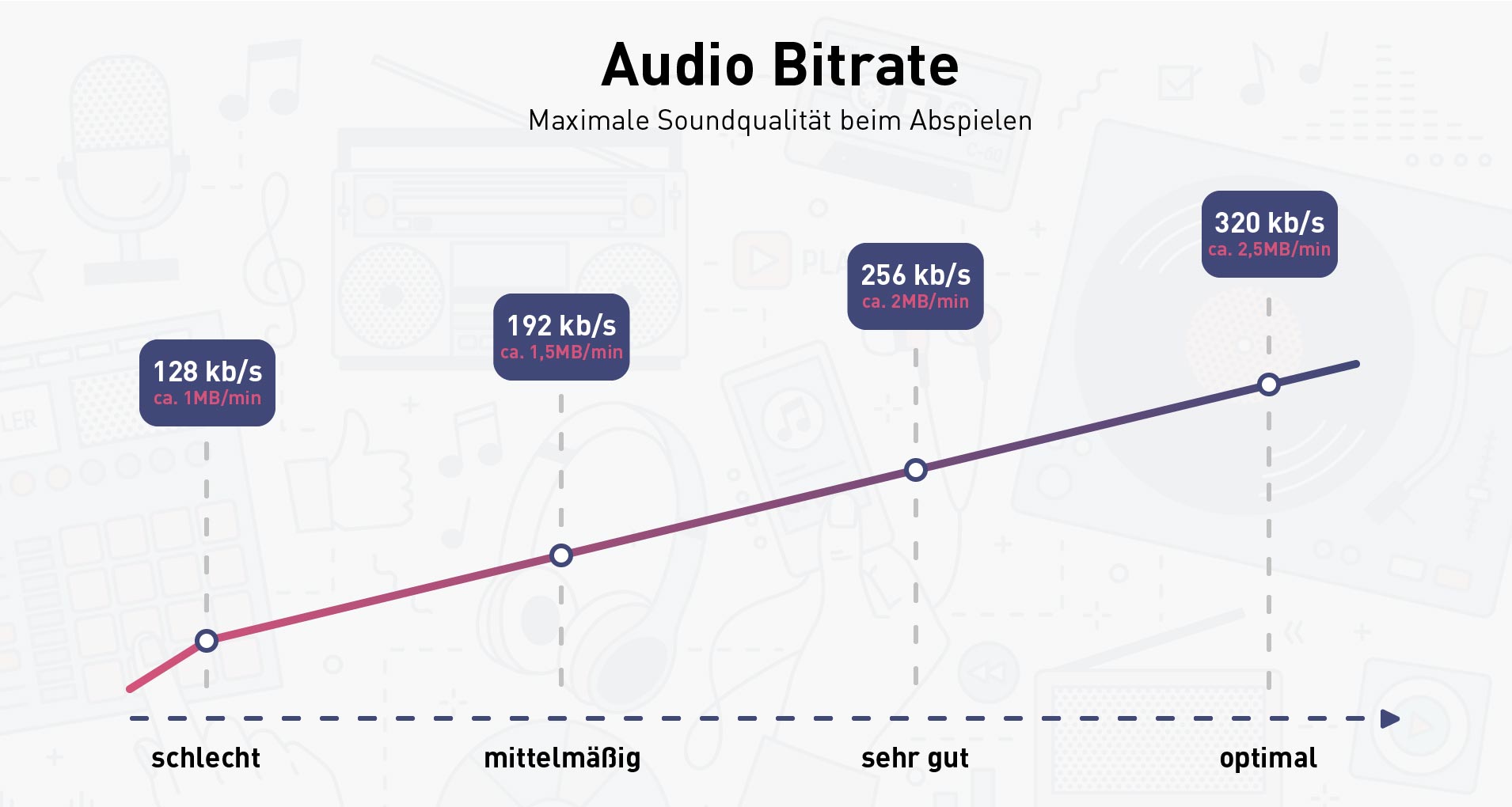
A normal bit rate for an MP3 is between 128 kilobits per second, or kbps, and 320 kbps. Different bit rates in this range have different advantages; To extract music from a CD to MP3, choose the bit rate that best suits your purposes. In general, the higher the bit rate of an MP3, the better the audio quality, but the larger the file size. The most common bit rates in MP3s are 128 kbps, 192 kbps and 320 kbps.

BitRate

Bit rate

The bit rate of an MP3 indicates the density of the audio information contained in the file. Therefore, every second in a 192 kbps MP3 contains 192 kilobits (24 bytes) of data. The higher the bit rate, the more information the MP3 contains; The more information it contains, the quality is closer to the original audio recording. The bit rate also determines the size of the MP3 file: a four-minute song encoded at 128 kbps occupies a little more than 3.5 MB, while the same song encoded at 320 kbps requires more than 9 MB of space.

Choice of a bit rate

When you convert a sound file or extract your CD collection to MP3, you must specify the bit rate you want the encoder to use. Choose a bit rate based on the type of audio you are encoding and on your desired purpose. If you are converting a conference or other piece of vocal audio, a bit rate of 128 kbps is more than enough. If you are encoding MP3 files for use with a portable media player, a bit rate of 192 kbps usually provides a good balance between audio quality and file size. If you are converting your CD collection to MP3 for archiving, encode the files with a bit rate of 320 kbps.

Variable bit rate VBR

Coding with a variable bit rate changes the bit rate of the MP3 depending on the type of data present at a certain point in the audio. For example, a variable bit rate encoder could encode a portion of dense information from an MP3 at 320 kbps; however, when the audio contains a silent section the encoder lowers the bit rate to 32 kbps. If the bit rate of an MP3 has an unusual number (for example, 204 kbps), this indicates that the creator of the MP3 encoded it with a variable bit rate.

Bit Rate Conversion

Although most MP3 conversion and encoding programs can modify an MP3 at a different bit rate, this is not a good idea, generally speaking. Converting an MP3 to a higher bit rate does not add audio information to the file, so the sound quality does not increase. Converting an MP3 to a lower bit rate reduces the size of the file, but it could also introduce audio defects, since the encoder is compressing a file that is already compressed. If you need an MP3 file to have a different bit rate, re-encode an MP3 from the original audio CD or WAV file.