Audio formats for sound quality.


Free Download Mp4Gain
picture

Audio formats for sound quality.

Audio Formats

The term “audio” today means everything that is somehow connected with sound. This is processing, playing, mixing and simply listening to audio recordings. Few people know that during their existence, all popular audio formats have undergone significant changes, sometimes for the better, and sometimes even for the worse.

audio formats

The problem is that when the creators tried to improve the recording quality by using the new format, the size of the result increased significantly. Reducing the size of the final file resulted in a significant loss of quality. But this was not always the case.
The first audio format used in computer games.

The first mention of computer sound is associated with the creation of several primitive video games. Then the sound was played back using the speaker of the system. As the software developers of that time did not try, it was impossible to achieve the level of quality that would be compatible with tape and reel recorders. This is what got many developers thinking about how to change the audio format to make the sound more natural and natural. It is this problem that has led to the current competition in the audio market. As a result, the formats used strongly affect the quality of the reproduced material and the configuration of the basic playback parameters.

WAV format

The first full quality of audio formats is associated with this particular format. The WAV extension designation was derived from the English word “wave”, which means wave in Russian. It was this format that became the first audio format to be processed with computer programs at a highly professional level. Files with a WAV extension had the following characteristics:

– depth of sound;
– sampling frequency;
– bit rate, etc.

This format was even compatible with the sound that could be obtained after processing an audio CD with an equalizer and other tools. However, the file size in this case was completely unwarranted. For example, the most common 3 minute long track could be up to 50 megabytes long.

CD

Audio CDs, or more exactly the .cda extension, appeared almost at the same time as the wav format. But unlike files with the wav extension, .cda cannot be edited. But it can be opened in any audio processing program, transcoded and formatted, and saved to your hard drive. Of course, you will not be able to save your changes to the CD.

MP3 codec

After the introduction of the LAME MP3 Encoder codec in the music industry, there was a real revolution in the audio world. Now the audio files are ten times smaller. At maximum compression, the size of a five minute composition rarely exceeds 7MB. This was a significant advance. Also, this extension finally implemented the ability to tweak some features and configure additional parameters, such as ID3 tags. They can contain information about the track title, artist, album, and release date.

Of course, this format immediately became widespread. Almost the entire Internet community uses this universal format. Therefore, we can say that the MP3 format has been a real revolution in the field of computer sound. Today it is one of the most demanded and popular audio formats. Although today it is already being replaced by other audio formats. But we will talk about this a bit later.

AIFF files

There are other types of audio files. This is the so-called aiff format. This format was originally created for use on Macintosh computers. A little later, a transformation occurred, as a result of which it was possible to achieve the compatibility of various audio formats and the possibility of their use on different platforms and operating systems.

OGG format

This audio format is also quite common. It was developed by the specialists of the Vorbis company. Please note that this format has several disadvantages. First of all, despite the small size of the files, using this format places a heavy load on the computer’s system resources.

Also, to work with this audio format, you must use your own decoders and codecs, which may not be installed automatically. For example, those who worked with the FL Studio Producer Edition program had to manually activate the installation file in .inf format to work with this format. Otherwise this app just won’t play OGG files. Despite all these shortcomings, OGG audio files are quite common nowadays and they sound good.


Free Download Mp4Gain
picture


Mp4Gain Main Window
picture


Mp4Gain Features
picture


Free Download Mp4Gain
picture

Variety of digital formats.

Variety of digital formats.

audio formats

Surely many users prefer to use their home computer not only as a workhorse, but also as a multimedia center, where they can watch movies or family photos, as well as listen to their favorite music. Although compact digital players or mobile phones are certainly more suitable for listening to musical compositions, but unlike them, a computer can not only play music.

Audio Formats

No matter how big the built-in memory of your music player is, it will most likely be difficult to store your entire music library on it. Plus, you can create, edit, organize, and search for music with your PC. Also, don’t forget that there are around three dozen common digital audio formats today, and most players are far from omnivorous and can only play a few of them.

So why do you need to create so many music formats to store one type of content? The fact is that, in the vast majority of cases, the sound is stored in “compressed” form, since one minute of uncompressed composition occupies about 10 MB on the hard disk. On the one hand, this seems not to be much, but on the other, if you are a music lover and your collection consists of several hundred or even thousands of songs, then it is clear that the sound must be compressed to reduce the space it occupies in electronic media.

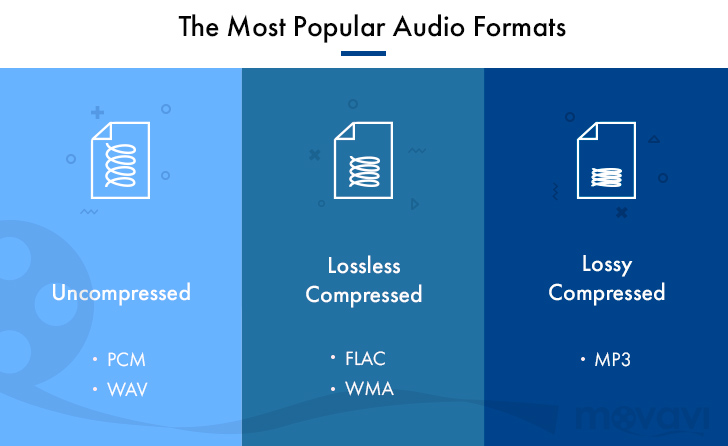
Various special algorithms are used to compress music files, which subsequently determine the structure and presentation of the audio data, or so-called digital audio file formats. All audio formats can be divided into three groups: uncompressed audio formats, lossless compression, and lossy compression.

No compression
One of the most widespread formats related to this type is the well-known WAV. The sound of files with this extension is stored without compression or changes. It is true that much more space is required to store uncompressed files and therefore WAV is more widely used only in professional audio and video applications, where the sound should not have a loss of quality before processing. Keeping ordinary musical compositions in this form is unwarranted waste.

To play WAV files, you do not need any special software, as all media players understand this format, including the standard Windows Media audio player built into the Windows system.

Another format used to store uncompressed audio that is worth mentioning is Apple’s development called AIFF (Audio Interchange File Format). As you may have guessed, it is most commonly used on Macintosh computers running Mac OS X.

Lossless compression (lossless)
Lossless compression algorithms for audio files work on the principle of conventional file cabinets. They do not provide the highest level of compression (40 to 60%), while they have virtually no effect on sound quality. It is also worth noting that in this case, the encrypted data can be fully restored to its original form. Therefore, the use of lossless compression is most often used in cases where it is important to preserve the identity of the compressed data with respect to the original.

The most popular audio formats in this group are FLAC (Free Lossless Audio Codec), APE (Monkey’s Audio), WMA (Windows Media Lossless), and ALAC (Apple Lossless Audio Codec). Each has its own pros and cons. For example, the APE codec offers slightly better compression gains, while FLAC is more common. In general, all true music lovers store their music collections in lossless formats, since they do not remove any data from the audio stream and files created with these codecs can be listened to even on high-quality stereos.

To play lossless compressed formats, as a rule, third-party players (except WMA) are used, such as MPlayer, foobar, AIMP, Winamp, VLC and others, since all the necessary codecs are already built into them. Another option is to separately install an additional codec pack (for example, K-Lite), after which you can listen to files in lossless format from almost any audio player.

Lossy compression
This is the most popular group of algorithms that provides the maximum audio compression ratio (up to 10 times or more). However, unlike previous formats, the audio file loses quality here, and how much depends directly on the degree of compression.

To determine the quality of digitized sound, the most commonly used indicator is the bit rate, the speed of the audio stream obtained after compression and measured in kilobits per second (kbps).

MP3, AAC, WAV, FLAC: we talk about all audio file formats

MP3, AAC, WAV, FLAC: we talk about all audio file formats

Audio Formats

As you organize your digital music collection, you can dive into a variety of audio file formats. Almost everyone has heard of MP3, but what is OGG, AIFF, or MQA?

audio file formats

If, after reading the list, you have the suspicion that all these formats for obtaining such chic abbreviations were studied in different universities, we will help to dispel it. This material will clarify the essence of some popular music formats, the difference between them and why it is important to know them.

Regardless of what you’re listening to, low-bitrate MP3, slightly better tracks in AAC, or high-resolution audio in FLAC or WAV, it’s time to find out exactly what you get in each case and how to choose the optimal format.

Let’s evaluate the pros and cons of each.

A quick overview of file formats and codecs

In order not to beat around the bush, we’ll provide a quick guide to all file formats and the differences between them at first. If you want to know more, here is a more detailed description of the differences in size, sound quality and compatibility.

–AAC (not high resolution audio format). Apple’s popular alternative to MP3. Compressed and lossy, but with higher sound quality. Used to download from iTunes and stream from Apple Music.

–AIFF (high resolution). Apple’s alternative to WAV with more complete metadata. It is not an uncompressed and lossy format very popular with large files.

–DSD (high resolution). One-bit format used in Super Audio CD. Available in 2.8 MHz, 5.6 MHz and 11.2 MHz sample rates. Due to the use of a high quality codec, it is not currently used for transmission. Uncompressed format.

–FLAC (high resolution). Lossless compression format supporting high-resolution supporting sample rates and metadata storage; the file size is half that of WAV. Due to the absence of royalties, it is considered the best format for downloading and storing albums in high resolution audio. Its main drawback is the lack of support for Apple devices (and therefore the incompatibility with iTunes).

–MP3 (not high resolution audio format). Popular compression and lossy format with small file size and far from the highest sound quality. Convenient for storing music on smartphones and iPods.

–MQA (high resolution). Compressed format for storing high resolution files in an easier way to transmit. Used by the Tidal Masters service for high resolution audio streaming.

–OGG (not high resolution audio format). He is sometimes known as his full name: Ogg Vorbis. An open source alternative to MP3 and AAC that is not covered by patents. This 320 kbps format is used in Spotify broadcasts.

–WAV (high resolution). The standard format in which all CDs are recorded. Great sound quality, but large files due to lack of compression. Weak support for metadata (versions, song titles and artists).

–WMA Lossless (high resolution). An uncompressed version of Windows Media Audio, the compatibility of which is not often found on smartphones and tablets.

Compressed and uncompressed audio files

Let’s start by looking at three categories into which all audio file formats can be grouped. They are determined by the degree of data compression and the associated loss of sound quality.

If a special algorithm (or codec) was not used to compress the audio in your file, this will lead to a double result: first, there will be no loss of sound quality, and second, your space will soon be exhausted. HDD.

In essence, the uncompressed recording corresponds completely to the original audio file, in which real sound signals are recorded in digital representation.

WAV, AIFF or FLAC: uncompressed formats

WAV and AIFF are the most popular uncompressed audio file formats. Both are based on PCM (Pulse Code Modulation), a known mechanism for directly converting audio to digital format. WAV and AIFF use similar technologies, but the storage methods are slightly different. In these formats, you can record CD-quality files with higher resolution.

The WAV format was developed by Microsoft and IBM, and is therefore used on Windows-based platforms; it is the standard CD recording format.

The AIFF format was created by Apple as an alternative to WAV; And while AIFF files are less common, they provide more comprehensive metadata support, allowing you to store album art, song titles, and the like.

These fortmats take up a lot of space.

What are the most common video formats?

The choice of audio and video codecs and containers affects video quality and file size. Here we show you how to find the format that best suits your needs.

Decades and decades of developments in the audiovisual field have led to a result that can be seen as strange in a way. While in other sectors the continuous development has led to a very pronounced standardization (think of the DOC or PDF format), the situation in multimedia is at least worse.

audio file formats

One example is the world of audio formats, which is animated by strong “competition” and a variety of available options. Indeed, it is no less than that of video formats. In this case, we actually have to deal with a separation between codecs and containers (we’ll see what they are and what role they play) that will make things even more complicated. So when converting a movie, you need to be careful to choose the right codec and video format to avoid creating files that are too large or simply unreadable. In short, the mistake is just around the corner.

Differences between containers and codecs

Before analyzing the situation and determining the most commonly used video formats, some basic concepts need to be clarified: First: What is the difference between the codec and the container? In the audio world, if the codec used to digitize the audio track matches the “final” file format, the codecs used in the video differ from the file format that the video file will adopt at the end of the digitization process. The reason will be explained soon and is in the multimedia nature of a video.

audio format

A film actually contains video and audio data: the conversion or playback software must be able to analyze both multimedia transmissions and therefore requires different algorithms that work with one or the other type of data transmission. This is exactly what codecs do: Since the name, code and decoding of data (audio and video) consist of films, you can convert them to another video format or play them back with a media player. Even with regard to containers, it is enough to use the literal meaning of the word: These are files that contain both the video and audio sequences and “provide” codecs for reading and playback.

What are the most common codecs?

As already mentioned, a codec is responsible for compressing and decompressing the video files and determines how they are played on the screen of the PC or smart TV. Each operating system provides the user with dozens and dozens of different codecs, each useful for encoding and decoding a particular type of file, even if new ones can be installed by downloading special software or packages from the Internet. Among the most commonly used codecs we find FFmpeg, Divx, Xvid, H.264 and its development H.265, VP9 and VP 10 (also known as the name of the Google codec).

What are the most commonly used containers?

Containers, on the other hand, have the task of “bundling” the audio and video stream processed by the codecs and can therefore be used for the media player software. Containers are determined, among other things, by the “final” video file format. The most common are: Avi, Wmv, Mov, Flav and Mp4.

-Avi. The AVI video format (short for Audio Video Interleave), developed by Microsoft and introduced in 1992 as part of its video for Windows technology, is one of the oldest used today. It is so widespread and used that many consider it to be the de facto industry standard. Its simple infrastructure (elementary, one would almost say) makes it easy to use on different operating systems (Windows, MacOS, Linux, Android and the most popular browsers) and enables the “storage” of streams that are processed by different codecs
Flv. This is the video format that resulted from compression by Adobe Flash software and was developed almost exclusively for playing movies on the Internet. If it could be seen as the de facto standard for video file formats on the web until a few years ago, this is no longer the case today: The spread of HTML 5 and the discovery of some bugs in the software caused it to change a bit On the one hand, however, the FLV video file format remains a favorite for those who generally create video for the network: with its compression algorithms, you can indeed get good quality small videos