Audio compression: facts, myths, and a blind test


Free Download Mp4Gain
picture

Audio compression

When compressing, for example with MP3, there is a loss. But do you hear that? Where does good hearing end and where does esotericism begin? We verify the theory with a blind test, which you can do yourself.
Audio compression is a constant part of everyday life – almost always when you listen to music, it gets compressed. However, audio signal processing is difficult to understand for people who do not work in this field and who have adequate basic training. Consequently, in my impression, most people do not care at all or demonize MP3 and everything that has to do with compression.

MUSIC PRODUCTION WEEK: DAY 2, Compressor Tuesday: How to use compressors  and why? — Steemit

The question is: Are we depriving ourselves of a pleasant pleasure if we only listen to music on Spotify or YouTube? Or don’t you notice a difference with the best possible quality?

Numbers and what they say

Different measurement parameters say something about sound quality, but what exactly is it? The following is an overview of the factors as brief and clear as possible.

1. Bit rate

Bit rate tells you how many bits are processed per second. It is also called data transfer speed or bandwidth.

It makes intuitive sense: the more data that flows, the higher the sound quality. Bit rate is the most important measured variable in everyday life. However, the bitrate alone doesn’t say much about sound quality.

There are variable and constant bit rates. Today variable bit rates (abbreviated VBR) are mainly used. In “little happens” passages, more data can be compressed without audible loss, whereas a relatively large amount of data is stored in complex passages. The result is higher sound quality with the same file size. In the case of variable bit rates, the average is given as a value, sometimes also the maximum allowed.

2. Compression method

CAA compresses more efficiently than MP3, making it better quality than MP3 at the same bit rate. The same goes for Ogg Vorbis, which is used on Spotify.

Also the compression software that Encoder, has an impact on the quality. In the early days of MP3, 128 kbit / s songs often sounded terrible. Now they sound so much better because bad encoders are no longer used.

3. bit depth

Bit depth tells you how many bits a sample has. Therefore, it is also called the sampling depth. The more bits per sample, the more different volume levels can be stored.

This may remind you of photos and videos – there are bit depths too and they mean something similar.

The LG V30 can record * 10-bit videos **. What is the point? A direct comparison with our system camera VIDEO
mobile background
The LG V30 can record 10-bit videos. What is the point? A direct comparison with our system camera.
Which is better: * RAW or JPEG? **
background photo + video
Which is better: RAW or JPEG?
A CD has 16 bits per stereo channel. There is no fixed bit depth with MP3 and other compressed audio files. Bit depth hardly plays a role in normal everyday life, only in studio recordings. Sometimes 24-bit is also used there to get more out of the sound processing. However, in the end, the music is reduced to 16-bit because it can see the difference, according to acoustics experts I can’t hear anything.

.
4. Sampling frequency

The sample rate (also called the sample rate) is also irrelevant for normal music listeners. But it is important to understand how digital sound storage works in the first place. A CD has a sampling frequency of 44100 Hz or 44.1 kHz. Hertz is a unit of measurement that indicates something like “frequency per second”. In audio sampling, it means that the sound level is measured 44,100 times per second. The same applies here: when recording in the studio, higher values ​​make sense, but not in the final format.

Nyquist’s theorem: Many people believe that digital music is fundamentally a loss compared to a “real” (analog) sound wave. These discussions began when the CD was invented and immediately ridiculed by audio snobs as inferior to the record. But that can be refuted. The Nyquiste Theorem states that an audio curve can be completely reconstructed from individual points without any loss if the sample rate is high enough. And it also says how high the rate should be: twice the bandwidth. Since the human ear reaches a maximum of 20,000 Hz, this bandwidth is roughly selected. Hence the sample rate of just over 40,000 Hz.

5. Other factors

With all the technical measurement parameters, it should not be forgotten that the best values ​​are useless if the sound is already badly recorded. For example, if the sound engineer has not set the volume level high enough, dynamism is lost. The recording starts to creak when it gets louder afterwards. If the level is too high, the result is even worse: the recording is cluttered, rattles and scratches. Or a dynamic compressor alienates the result. Bad recordings are ubiquitous on YouTube and are also sold on CDs, for example for very old studio recordings or live concert recordings.

The quality of your headphones or speakers also has an influence. With faulty minijacks, you will barely hear a difference between 128 kbit / s MP3 and uncompressed music. Most likely with good boxes.


Free Download Mp4Gain
picture


Mp4Gain Main Window
picture


Mp4Gain Features
picture


Free Download Mp4Gain
picture

How is music encoded?

First of all, let’s understand why music should be compressed.

Uncompressed files like AIFF and WAV take up a lot of space. This causes that it is not comfortable to transfer them on phones or players, or even store them on the hard drive of our computer.

Lossy audio encoding

Even trying to send them online would be very difficult, due to their large size.
,
This has forced the creation of various formats of audio files that take up less space. Of course, the important thing is that they sound practically the same as the original, although they take up less space.

lossless lossy audio

This is where compression enters the picture.

On the one hand, ZIP or RAR compression is used, but it is not enough. So other techniques are used, namely:

– An uncompressed file contains a lot of information about sounds (even silence) that is inaudible to the human ear and that information is discarded. With that one, it is possible to save a lot of space, since there is little point in occupying space in storing information about sounds that our hatred cannot perceive.

-On the other hand, there is a perfectly known phenomenon regarding the human ear, which is based on the idea that if two sounds occur more or less simultaneously and these sounds occupy similar or close frequencies and one of them sounds louder, the ear You will NOT hear the less loud sound.

This is other information that can also be discarded, since it is generally not audible or the brain does not process it.

Once discarding both types of information, the file has been much less large and therefore does not occupy the same space.

Practically what remains is to apply some composition algorithm, something similar to ZIP. And then you will have a compressed file, for example the mp3.

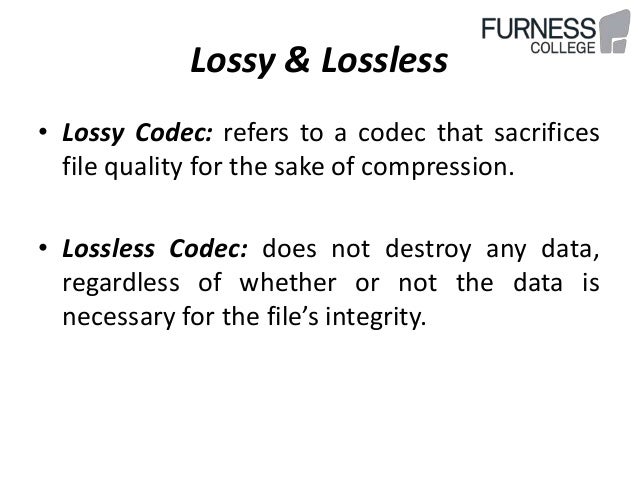
This is called the lossy method.

There is another method, without loss, where it is only compressed with a method similar to ZIP, but without discarding information.

Is there really a difference between the two? Practically no. the human ear practically cannot distinguish between the two.

A file with loss, that has a good sample rate (minimum 44,100) and a good bit rate, it is almost impossible to distinguish it from the original and therefore, from the file without loss.

Many experiments have been done allowing people to listen to both types of files (those with loss and those without loss) and more than 90% have not been able to distinguish between them, as long as the one with loss has a good samplerate and a good bit rate.

Audio compression basics

Audio compression basics

Today we use music almost exclusively digitally. It has become quite normal for us too that we always carry our music collections, often many thousands of titles, with us. Stored on a chip somewhere in our smartphone or MP3 player. It is thanks to the so-called audio compression that this was possible in the first place.
initial situation

audio compression

Noises and tones, such as birdsong or the ringing of church bells, are analog events with an extremely wide spectrum. A good example of this is a bell. If it is struck, we think we only hear one note. In fact, its ringing consists of around 200 individual tones. These contain soft and strong tones, as well as frequencies that are outside our hearing range.

Audio Compressor

It is no different with music. However, the human ear can only perceive tones above a certain basic volume, so the thresholds for low, medium and high tones are very different. The ear is most sensitive in the tone range of human speech at around 3 kilohertz (kHz). The lower or higher tones have to be much louder for us to perceive them. The volume threshold, at which we begin to perceive sounds, is called the silent hearing threshold. A strong sound covers a lower one if its pitch is the same or similar.

For example, a 1 kHz high tone from an organ pipe can be heard clearly, while one or more soft tones that are close to each other in frequency are masked by higher ones. Although they are there, we still cannot perceive them. The secret that many hifi fans still trust the old record is that it stores all the tones and frequencies just as they are emitted by 1: 1 musical instruments. It also contains those tones that, strictly speaking, we cannot even perceive consciously. we still cannot perceive them.

The secret that many hifi fans still trust the old record is that it stores all the tones and frequencies just as they are emitted by 1: 1 musical instruments. It also contains those tones that, strictly speaking, we cannot even perceive consciously. we still cannot perceive them. The secret that many hifi fans still trust the old record is that it stores all the tones and frequencies just as they are emitted by 1: 1 musical instruments. It also contains those tones that, strictly speaking, we cannot even perceive consciously.

The essential

There are many standards for audio compression, such as MP3, AAC, or WMA. They are all based on the same fundamentals. The processes use the psychoacoustic effects of human auditory perception. All audio information that the human ear cannot perceive is filtered out of the data stream and therefore not saved. MP3 and Co make use of these human hearing effects by using mathematical analysis methods to determine and filter the imperceptible sound information.

An example: if you want to talk to a second person in a very noisy environment, they will hardly hear each other. In such cases, the energy level of the noise (or music at the disco, for example) is higher than that of your voices. This effect is also known as frequency masking. These masked tones are removed. In the same way, tones are filtered in the frequency range outside of our perception.
Another criterion is the so-called silent hearing threshold. All existing tones that are below it, here we talk about threshold masking, are also filtered through a compression process. Time masking is particularly exciting. With it, tones that are drowned out by other signals are also filtered. The timing of the tones is also taken into account. Our hearing is partially receptive to sounds and needs a short recovery phase before it can become receptive again.
This post masking takes about 200 milliseconds. There is also a pre-masking. It is caused by the fact that our brains take a little longer to process soft sounds than loud ones. The pre-masking time is approximately 20 milliseconds. Time masking alone ensures a relevant reduction in audio signals. True to the motto: everything nobody needs comes out. This reduces the music to a fraction of its original volume.

Does MP3 affect the sound quality?

The compression of songs affects the quality, but the losses are not necessarily audible.

mp3 audio quality

Is compression of MP3 songs harmful to the sound quality? Whether it is HD music or “normal” definition, the question of compression remains. The advantage is that the weight of the songs is reduced, so they take up less space in the memory of a phone or a portable music player. With standard MP3 compression, a music album ranges from 500 MB to 45 MB.

But by the way, the music is damaged. The sound seems a little less natural, less precise, less dynamic. Some of the audio information is literally destroyed. It doesn’t always sound good, but for some songs the difference is clear until everyone will notice.

mp3 quality

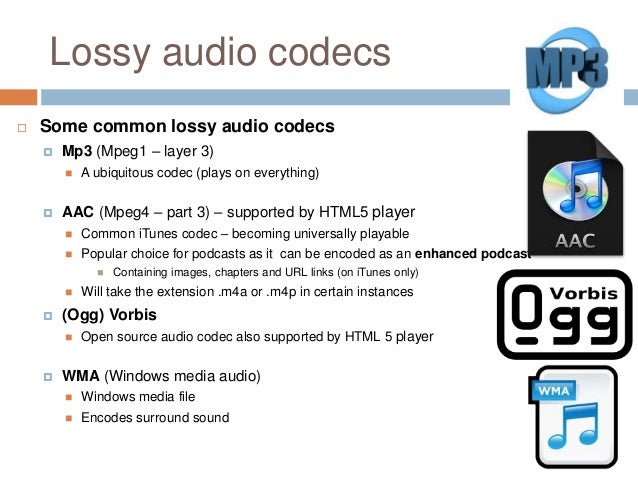
Fortunately, you can improve the quality of an MP3 song by compressing it with less force. The loss of sound quality becomes less clear, but in return the song weighs more. MP3 isn’t the only compressed music format that corrupts music. The most famous competitors are AAC, Ogg Vorbis and WMA. MP3 is not the most efficient compression format, this title applies to the Ogg Vorbis, but it is still a good option. All music players can play MP3 and online record stores prefer this format.

Lossless compression

However, some music lovers are reluctant to MP3. They swear by “nondestructive” compression, which does not remove sound information. The music has been completely preserved: we hear absolutely no difference. The best known non-destructive formats are Flac, APE and Alac. Unfortunately, not all electronic devices can play music recorded in these formats. Few artists offer their music in “non-destructive” compression. And the weight of the parts thus compressed is still very heavy. An album quickly reaches several hundred megabytes. However, the Flac stands out as the reference format for the most demanding music lovers.

Is it reasonable to keep using MP3? This remains a smart choice for most music lovers, as long as they choose an appropriate compression ratio. Which one to choose: 192 kbit / s, 256 kbit / s or 320 kbit / s? The stronger the compression, the lighter the number, but the lower the quality. With 128 kbit / s, the sound has clearly deteriorated, most of us can hear it. At 192 kbit / s, degradation becomes difficult for most of us to observe except for some rare numbers.

With 256 kbit / s, you have to have a musical ear and good sound equipment to make the difference. With 320 kbit / s, you need a well-trained ear and highly accurate audio equipment to make a difference. We only see a difference in quality in certain titles and only in certain passages. Therefore, most of us can settle for 192 kbit / s recording. Music lovers should expect a minimum of 256 kbit / s. And professionals will choose formats of 320 kbit / s or ‘lossless’.

Data compression techniques

It is evident that coding techniques for multimedia information contain large amounts of data that require memory space for recording and high transmission speed for transfer to other digital systems.

These needs can be met by reducing the space occupied by the data with special compression techniques. Compressed data cannot be used directly for processing, viewing, or playback. Compression techniques are used by special programs immediately before data storage or transmission. During the read or receive phase, similar programs perform decompression. Compression can be done on the basis that information encoding techniques dedicate an always equal amount of memory to each information element (be it a character, a pixel or a sound sample), regardless of their statistical frequency and its significance.

The compression techniques developed so far are more than a hundred but grouped into two categories:

Compression without loss of information.

Lossless compression techniques are based on compact coding of the same data streams or coding with a small number of bits of the most statistically frequent data.

Picture
This compression is completely reversible and the decompression program returns the exact bit sequence as it originally was. For this reason, loss-free technique is applicable to any type of data, including executable texts and programs, although the achievable compression factor is not very high: values ​​usually range from 2: 1 to 4: 1. Of course, these results vary depending on the type of input data.

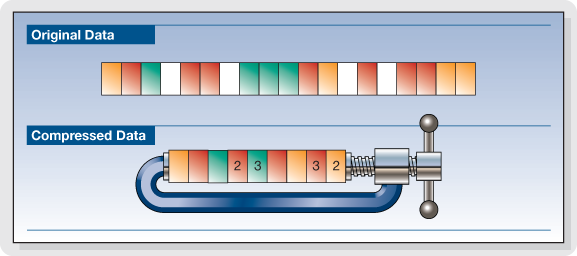
RLE encoding

Data Compression

The RLE (Run Length Encoding) compression technique is oriented to equal byte sequences. In the original version, it provides the introduction of a special character that indicates the beginning of a sequence, and instead of encoding the same characters in the sequence one by one, it encodes only the first one, followed by a number indicating where many times drawn and repeated. Specifies with the Sc character at the beginning of the sequence, the statement

these ******** are eight stars… these Sc * 8 are eight stars

where 8 is not encoded as an ASCII character but as a binary number.

The decompression program interprets the next byte as a counter and rebuilds the original sequence.

For image compression, RLE encoding only works well with images that contain large areas of uniform color, but are not very effective with complex images.

Compression with loss of information.

Loss-free compression techniques are not sufficient to solve the problem of the huge amount of data generated by encoding multimedia information, e.g. Video images while allowing better use of memory space on disks or data transmission lines. High resolution. , audio or video.

However, to try to solve this problem, it is necessary to remember that multimedia information, although subject to transformation, can remain understandable; This allows for compression factors that are higher in some orders of magnitude than those observed.

These interventions can be studied based on the behavior (vision and hearing) of our sensory systems to reduce the required memory without obvious changes in information content. Compression techniques that do this are called “lossy” since the least significant piece of information is irreversibly suppressed. Therefore, it appears that the bitstream after decompression is different from the original, and therefore these techniques cannot be used for other types of information, e.g. Text. Furthermore, the information thus compressed is not suitable for further processing as the loss introduced with each subsequent step becomes more and more apparent.

What is video encoding and how does it work?

The technique of compressing videos

What do we mean when we talk about video coding or, as industry experts generally call it, video coding?

YOUTUBE VIDEO FORMAT

Simply put, video encoding is the process of compressing and converting video content. The ultimate goal is to use less storage space, use less bandwidth, and make the user experience smoother. It goes without saying that the compression process causes a significant loss of information. The more data that is applied, the more data is deleted in the video. The result is a different version of the original due to missing data.

mp4 videos

Why is video coding so important?

Video encoding is essential for transmission because it simplifies the transmission of video on the Internet through a compression process. Compression reduces the bandwidth required while providing a high quality experience. Without this, raw video content would not allow many users to view content on the Internet due to insufficient connection speeds. The protagonist of this process is the bit rate or the speed of digital data transmission that can be transmitted in a certain time interval in a communication channel. When streaming, the bit rate determines whether users can easily view the content or are exposed to video buffering.

Another fundamental aspect of video coding is compatibility. Indeed, sometimes the content is already compressed to an appropriate size, but it still needs to be encoded to be compatible with different devices and applications, although this is often referred to as transcoding.

The video encoding process is governed by video codecs, which are compression standards that are created through software or hardware applications. Each codec consists of an encoder for compressing the video and a decoder for restoring an approximation of the video for playback. The name codec is actually derived from the merging of the words “encoder” and “decoder”.

But what is the best codec?

It depends on the type of video. On this occasion we will describe the most commonly used.

To stream high quality video over the Internet, H.264 is arguably the most widely used codec for most multimedia traffic. This codec is considered to be of excellent quality, coding speed and compression efficiency, although it is not as efficient as the later HEVC (High Efficiency Video Coding) compression standard, also known as H.265. H.264 also supports 4K video streaming, a real advance for a codec created in 2003.

Now that we have an overview of codecs, let’s look at some compression techniques.

Compression techniques

The most common compression technique is scaling the resolution. The higher the resolution of a video, the more information is contained in each picture. One way to reduce the amount of data is to reduce the size of the image and then scan it again. As a result, fewer pixels are generated, which reduces the level of detail of the image, which has a positive effect on the amount of information required. This process allows you to set multiple quality levels for a video that correspond to different resolutions created. A practical example is if you are watching a movie in streaming before playing it, you can actually choose the resolution at which you want to watch it, provided your device
Support him

One video compression technique that may not be widely used is the interframe. This process reduces “redundant” information from one frame to another.

Another technique is the P-frame, short for predictive frame, which means that it can look back at an i-frame or another P-frame and understand whether the same images are present. In this case, this part is excluded for reasons of space.

B-Frame, on the other hand, is the bidirectional predictive frame that offers good compression without affecting the viewing experience. However, this technique requires a higher coding profile.

Another technique is that which makes it possible to intervene in the color. This process, called “chroma subsampling”, tries to maintain the brightness of the image, which affects the quality of the color. Finally, another method of compressing videos is to reduce the number of frames per second.

Audio compression, an explanation

Audio compression can be somewhat confusing at first due to the fact that the tools to implement it often have many elements that interact with each other and can be a headache.

Added to all this is the fact that audio / sound compression is often confused with compression in terms of digital formats (MP3 for example), which is a much more complex principle.

That is why we made this guide that aims to attack the most common doubts regarding compressors. The ones I had and the ones you probably have at the moment.

Let’s move on to the important:

What are compressors?

They are essentially an automatic volume or level control.

Let me explain: They are the equivalent of the fader of a console operated by a person in real time, that person has the function of lowering the fader when the volume of an element suddenly rises excessively. All this to control the dynamic range of said element and prevent it from going out of plane.

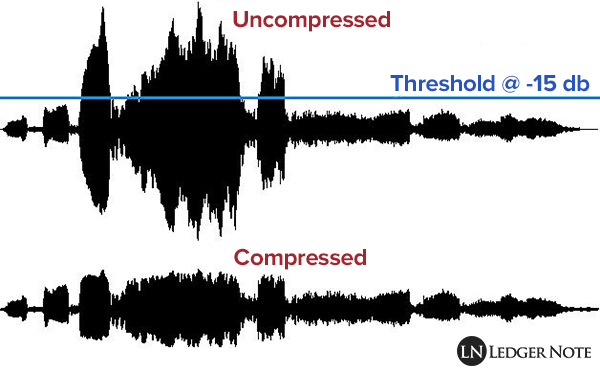
So what the compressor does in essence is reduce the level of a signal with parameters that are set by the user and that modify how it behaves.

How do they work?

Threshold and knee audio compression
An example of an acting audio compressor showing a 4: 1 reduction contrasting it with the signal without any reduction (1: 1)

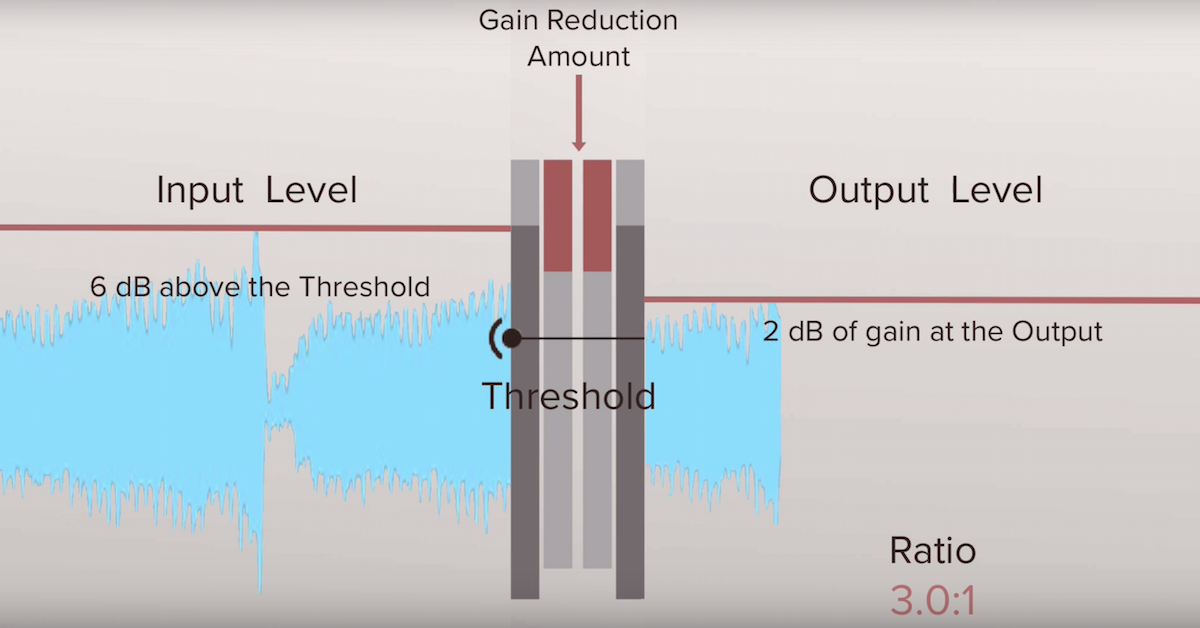
Comparing signals, that is to say: a signal enters the compressor, for example the voice we were talking about before and we set a certain level (threshold or treshold) which, if exceeded, causes the compressor to act reducing the level of said voice at the output as if it were the fader on a console.

So the compressor is all the time comparing the input signal against this threshold and reducing the signal at the output if it passes it. On the other hand, the amount of reduction at the output is not always the same, but can be modified by the user with another parameter.

What are all those knobs?

Compressors have various user-modifiable parameters that appear in the form of knobs on both digital and hardware models. Let’s see what they are:

Threshold or Treshold: we tell the compressor that if the signal goes above a certain level, it reduces it in gain. The lower the amount of signal enters the compression and therefore there will be greater reduction in gain. A detail to keep in mind is that in digital models the threshold will appear as a negative number, in essence the more negative that number is, the lower the threshold and the more signal is compressed.
Compression ratio or Ratio: here we tell the compressor to reduce the signal that exceeds the threshold by a certain proportion established by us. For example, if our signal passes the threshold by 10 decibels and we want it to decrease by 5 decibels, we put a ratio of 2: 1 (it works as a division). At higher rates, there will be a greater reduction, but also the compression may start to be noticeable, which that we generally don’t want to happen. What is sought is that it be transparent so that the listener does not realize that the signal was manipulated.

Attack or Attack: it is the time in seconds (generally in the order of milli seconds) that the compressor takes from the moment the signal passes the threshold to the complete reduction in gain that we set with the compression ratio. Keep in mind that the compressor essentially acts immediately, but it is this time that determines how it interacts with the envelope of the signal to be compressed.

Release: is the time in milli seconds that the compressor takes to return to unity gain once the signal stops being above the set threshold. In the same way that with the attack the release can modify the envelope of the sound in question and therefore is very important in the operation of the compressor.

Knee: it is a parameter found in some compressors that modifies the way in which the compressor begins to act, the name is due to the fact that the curve that describes the way in which the compressor begins to act is similar to a knee (knee in English ).
So that we understand better when we talk about soft knee we are talking about that the compressor starts to act gradually before the set threshold and reaches its compression ratio established in this way. Instead, a hard knee compressor will only act when the signal goes beyond the established threshold and therefore more aggressively.

Make up gain or output gain: is the parameter that controls the compressor’s output gain, after having activated and reduced the signal by a number of decibels. What is sought in general is that what was reduced in level is re-gained and therefore make the parts that had less volume now approach those that were compressed.