Audio quality: Bitrate in MP3 files


Free Download Mp4Gain
picture

In many cases, the term Bitrate is used, which is the bit rate per second that a multimedia file (Audio or Video) has. Currently the MP3 music format is one of the most widespread (Although there are currently other more current formats such as OGG Vorbis, AAC, Flac, Monkey Audio, …) however the audio quality is variable, this is due to the characteristics with which the MP3 in question has been compressed, including:

Mode: It can be of two types mainly:

Mono: With a single channel (The right and left channel go together, not separated which gives worse audio quality).

Stereo: Two channels (Right and Left, improve audio quality).

Sampling frequency:

Audio CDs use 44,100 Hz (22,050 Hz per channel), although there are higher frequencies such as 48,000 Hz used in DVDs and lower, the higher the frequency, the higher the quality.
Bits: Audio CDs have 16 Bits (Although MP3 can be compressed at a lower quality such as 8 Bits).
Bitrate (Bit Rate per second): Audio CDs have about 1,400 Kbps (44100 Hz * 16 Bits * 2 channels), meaning that an Audio CD would have a bitrate of 1,400 Kbps (In MP3 format the maximum Bitrate is 320 Kbps, however, it is assumed that an MP3 with a 128 Kbps Bitrate has a quality similar to CD, although in many cases to achieve a quality similar to CD it is necessary to use a Bitrate of 192 Kbps, and to obtain CD quality it is necessary use 256 Kbps or 320 Kbps).

Some of the most common Bitrates are:

8 Kbps Mono: Telephone Sound.
16 Kbps Mono: Better quality than shortwave.
32 Kbps Mono: Better quality than AM.
64 Kbps Stereo: Better quality than FM.
112 – 128 Kbps: Quality close to CD.
160 Kbps: Quality closer to CD.
192 Kbps: Virtually CD quality.
256 Kbps: Quality CD practically undisputed from an original CD.
320 Kbps: CD quality.

Coding method: It can be of two types:

VBR (Variable Bit Rate, Bit Rate Variable): Encodes the file in MP3 with a variable Bitrate.
CBR (Constant Bit Rate, Constant Bit Rate): Encodes the MP3 file with a fixed Bitrate.

In addition, another factor that influences the encoding of the MP3 file is the CODEC (Encoder-Decoder) used, one of the most common and the best result is LAME (Lame Ain’t an MP3 Encoder) which is also free.

One point to keep in mind is that if we recompress an MP3 file that originally has a 128 Kbps bitrate and convert them to 192 Kbps for example, audio quality is not really gained because the MP3 format has some quality loss (MP3 is a loss algorithm, also called lossy). which has occurred when converting the original file (Ex: CD Audio or a 320 Kbps MP3 to a 128 Kbps MP3) so this recompression does not make much sense since we will not gain in audio quality (As they say where there is no one can not get) and the only thing we will achieve in any case is to increase the initial size of the file.

The opposite case (Recompress a 320 Kbps MP3 file for example at 192 Kbps) if it makes some sense because in this case although we lose some audio quality we reduce the weight (Kilobytes or Megabytes) of each MP3 file somewhat.


In conclusion, it can be said that if we need to encode / compress an MP3 file with good quality, the “ideal” would be to do so:

To be able to start from an Audio CD, although an MP3 at 320 or 256 Kbps could also be valid for a recompression of the file.
In stereo mode (With two channels, right and left).
With at least 44100 Khz sampling rate and 16 Bits.
With a minimum bitrate of 192 Kbps or at most 256 Kbps (Using 320 Kbps would give higher quality but also increase the file size considerably).
Use the LAME Codec (Lame Ain’t an MP3 Encoder).


Free Download Mp4Gain
picture


Mp4Gain Main Window
picture


Mp4Gain Features
picture


Free Download Mp4Gain
picture

What it is and how to perform a volume normalization on your MP3


What it is and how to perform a volume normalization on your MP3

Have you ever heard the term audio normalization, without being sure of what it meant? As a lover of music and technology, I also encountered such a doubt many years ago. Basically, giving a short definition, it is about the standardization of the volume, or rather, of the audio spectrum with respect to other subjects, usually of the same disc.

And that, to put it more simply, is the equalization of the volume of the different tracks on a disc. The reasons are many, and usually if the tracks are extracted from the same job they already have the same volume and gain, but what happens if we want to make a mixtape? For example, we decided to make a compilation called The Best 100 Rock Songs in History. Surely have songs from The Beatles or The Rolling Stones, and therefore from different albums. Depending on the year, type of mastering, etc. etc., we can end up with a CD that contains many different volumes, something that can be annoying when listening. That is just one of the reasons to normalize our MP3 collection.

There are add-ons for players that allow us to normalize on the fly. In fact we can say that programs like Spotify already do this by means of the option to equalize volume of all the songs, however the application that I present below allows us to permanently normalize modifying MP3 files and many other formats, both audio and Of video..

This is Mp4Gain, which stands out for its simplicity of use and is presented under an interface that is ideal to understand exactly what a normalization is and see the before and after. When we open the application we find a window in which we have a grid, which will be populated when we add files or folders, and a keypad with various options.

How do we normalize? Simply change the gain through the specific menu for this.

By pressing OK the application will start working and save our files with the same gain, so it is ideal that before doing the first tests we make a backup. It must also be taken into account that it is an operation that can take time, something that depends on the speed of our processor, the number of issues to normalize and also the size and quality of them.

Audio normalization

Audio normalization

audio normalization

The normalization of the audio level is something that is achieved by applying a constant and maintained amount of gain, in volume, to an audio recording to bring the average peak amplitude to a desired level that has been previously defined. To which the same amount of gain is applied to the entire range, the signal-to-noise ratio generally does not change. Normalization differs from dynamic range compression, which applies different levels of gain to a recording so that the amplitude is within a minimum and maximum range. Standardization is one of the most common functions provided by a digital audio workstation.

Peak normalization

One type of normalization is peak normalization, in which the gain is changed to bring the highest PCM value or the highest peak of an analog signal to a given level.1

Since it only searches for the highest level, it does not take into account the apparent volume of the content. As such, peak normalization is generally used to change the volume in such a way as to ensure optimum use of the distribution medium in the mastering stage of a recording. loudness normalization.

Normalization of loudness

Another type of normalization is based on a loudness measure, in which the gain is changed to bring the average amplitude to an objective level. This average may be a simple measurement of average power, such as the RMS value, or it may be a measure of the loudness perceived by humans, such as that offered by ReplayGain.

Depending on the dynamic range of the content and the target level, the normalization of the loudness can lead to peaks that exceed the limits of the recording medium. Some software has the option of using dynamic range compression to avoid saturation when this happens. In this situation, the signal-to-noise ratio is altered.

volume booster

Modern Audio Normalization

Currently Mp4Gain uses an audio normalizationn that is more similar to that used in modern recording studios or live music group recitals.

It is a normalization of volume focused from a new perspective.

Under this new paradigm, not only does it achieve that all songs have the gain of loudness at the best possible level, but it also achieves that each instrument and / or voice obtains a level of gain that makes it audible. Achieve an optimized level of volume gain normalization.

There is no other normalizer in the market that obtains this level of result. People with training in hearing listening can easily notice the difference., very similar to that obtained with expensive hardware in radio stations or in recording studios or in recital consoles, combining limiters, modern compressors and other processors.
All these results that offer expensive hardware equipment, Mp4Gain does for a few dollars.

In fact, the opposite result is achieved than that achieved with masking, because with masking, which is a method used to compress music, you can no longer perceive some sounds that are behind a more audible sound, that is what is called masking, which leads to the loss of audio quality.

Mp4Gain manages to highlight hidden instruments and sounds, performing an audio normalization by frequency bands to achieve this.

That is why we say that Mp4Gain achieves the same results as those obtained through a series of hardware equipment (limiters, compressors, normalizers, etc.) that are very expensive, while Mp4Gain costs only a few dollars.

Digital Audio – Beginners guide

The Cost of a High Sampling Rate

Although it is true that high sampling rates produce better sound quality … that comes at a price.

That price translates into:

Higher processing load.
Less number of tracks.
Heavier audio files.
So you always give something in return. Professional studies can support higher sampling rates because they use better equipment.

But for most home studios, people often find that the standard 48 kHz configuration is the best.

Following…

4. Bit Depth

In order to understand what bit depth is, we first have to know what bits are.

A bit (or binary digit) is a single unit of binary code, with a value of 1 or 0.

The more bits, the more possible combinations. For example…

As you can see in the diagram below, 4 bits allow a total of 16 combinations.

4 bits

When used to encode information, each of these numbers is assigned a specific value.

As the number of bits increases, the possible values ​​grow exponentially.

4 Bits = 16 possible values
8 Bits = 256 possible values
16 Bits = 16,536 possible values
24 Bits = 16,777,215 possible values
With the bit depth in the digital audio, each value is assigned a specific amplitude of the waveform.

The greater the bit depth, the greater the volume increase between high and low … and a greater dynamic range in the recording.

A good rule of thumb is: for every extra bit, the dynamic range increases by 6dB.

For example:

4 Bits = 24 dB
8 Bits = 48 dB
16 Bits = 96 dB
24 Bits = 144 dB
In the end, what this means is that… the greater the bit depth, the less noise.

Because by adding more processing margin (or headroom), the useful signal (at the high end of the spectrum) can be recorded higher above the background noise (at the low end of the spectrum).

small vs large bit depths

Following…

5. Quantization Noise

Impressive that a 24-bit recording can result in almost 17 million possible values, right?

However, that remains much less than the infinite number of possible values ​​that exist in an analog signal.

Therefore, in almost all samples, the actual value is somewhere between two possible values. The solution of the converter is simply to round it or “quantify” it to the nearest value.

The resulting distortion, known as quantization noise, takes place in 2 phases of the recording process:

at the beginning, during the A / D conversion, and
at the end, during mastering
With mastering, the sampling frequency / bit depth of the final track is usually reduced by converting to the final digital format (CD, mp3, etc.).

When that happens, some of the information is erased and “re-quantized”, generating more distortion in the sound.

The most frequent solution to deal with this problem is …

6. Dither

When reducing a 24-bit file to 16 bits, the screen is used to mask much of the resulting distortion …

Adding a low level of “random noise” to the audio signal.

As it can be difficult to visualize the concept in audio, to explain it, we usually turn to the popular analogy of the screen plot.

Is that how it works:

When a color photo is converted to black and white, a mathematical estimate is made to determine if each color pixel should be “quantized” in a black pixel, or a white one …

As is the case when digital audio samples are quantized.

As you can see in this picture, the “before” photo is pretty bad, right?

dither

But with the plot …

a small number of white pixels are randomly distributed in black parts, and …
a small number of black pixels are randomly distributed in white parts …
By adding that “random noise” to the image, the “after” photo looks much better. Well, the screen in the audio works very similarly.

Following…

7. Latency

The GREAT PROBLEM of current digital studies is the amount of latency that accumulates in the signal chain, especially with DAWs.

With all the calculations that are processed, the audio signal takes time to leave the system between a few milliseconds and a few DOCENAS of milliseconds.

Between 0-11 ms of latency – it is short enough, so a normal person does not notice it.
Between 11-22 ms – an annoying delay is heard which it is difficult to get used to.
More than 22 ms – there is so much delay that it is impossible to play or sing at tempo with the track.
In a normal digital signal chain there are usually 4 phases that contribute to the total latency:

A / D conversion
DAW Buffer
Delay of the Plugins
A / D conversion
The A / D and D / A conversion are the least harmful, contributing to total latency with less than 5 ms.

But nevertheless…

The DAW buffer and certain plugins (including compressors and virtual instruments) can add up to 20, 30 or 40 ms or

Beginner’s Guide to Digital Audio for Recording Music

62c-digital audio When recording at home began to become popular …

It happened for a simple reason:

The analog equipment of the past decades was being slowly but inexorably replaced …

For a new generation of audio interfaces and other digital equipment that was cheaper and easier to use.

And that trend has continued since then.

Today … digital audio is the standard in almost all studios, both professional and amateur.

However, surprisingly, there are few people who really understand what it is about.

So let’s see what it is about:

1. The Rise of the Digital Age

binary code Although digital audio is the standard in today’s music …

It has not always been that way.

Originally, music information only existed as sound waves in the air.

Then, as technology progressed, people discovered new ways to convert that information to other formats, including:

notes on a page
electrical signals inside a cable
radio waves in the atmosphere
relief on vinyl records
But in the end, with the rise of computers, digital audio ended up being the dominant format in the music production industry, since it allowed copying and transporting songs in a simple and free way.

And the device that made all that possible was … the digital converter.

Let’s see how they work …

2. Digital Converters

In recording studios there are 2 types of digital converters:

Those that are an independent device, which are normally seen in more advanced studies, or …
Those that are integrated into the audio interfaces, which are usually seen in home studios.
To convert the audio to binary code, they take tens of thousands of samples (samples) per second to make an “approximate” image of the analog waveform.

The image is not accurate because in the intervals between samples, the converter basically has to guess what is happening.

Digital waveform

As you can see in the diagram, in which:

the red line is the analog signal, and …
the black line is the conversion …
The results are not perfect, but they are good enough to generate excellent sound quality.

How excellent? That depends largely on …

3. Sample Rate

Check out this image:

sample rate diagram

As you can see…

When taking more samples per second, the highest sampling rate:

Collect more real information,
Go less to the estimate, and
It generates a much more accurate image of the analog signal.
Logically, the end result is … better sound quality.

Let’s talk about specific data:

Normal sampling frequencies in professional audio range around:

44.1 kHz (audio CD)
48 kHz
88.2 kHz
96 kHz
192 kHz
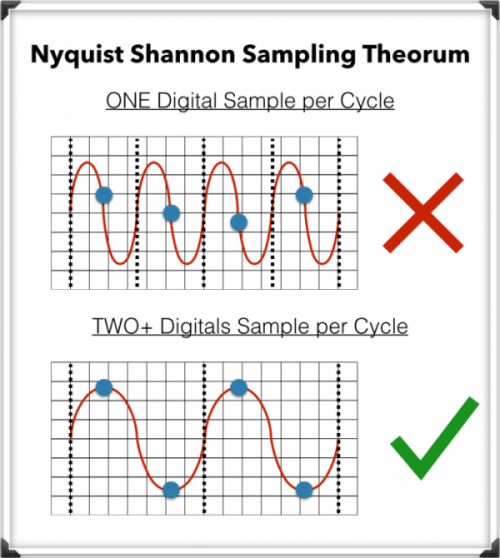
The minimum of 44.1kHz is due to a mathematical principle known as …

The Nyquist-Shannon Sampling Theorem

To record digital audio accurately, converters have to capture the entire human listening spectrum, which is between 20Hz – 20kHz.

According to the Nyquist-Shannon Sampling Theorem …

To capture a specific frequency, at least 2 samples are needed for each cycle … to measure both the upper and lower points of the sound wave.

That means that recording frequencies of up to 20kHz require a sampling rate of 40kHz or more, which explains why the audio CDs are just above that minimum, at 44.1kHz.

What is an audio compressor.

In the field of professional sound, a compressor is an electronic sound processor designed to reduce the dynamic range of the signal without noticing its presence too much. This task is done by reducing the system gain, when the signal exceeds a certain threshold.

Traditionally, compressors have been electronic equipment with one or two rack units, but software versions of them have appeared for some years.

A compressor acts in such a way that it attenuates the electrical signal by a certain amount (normally measured in decibels) and from a certain input level. The objective is to ensure that the resulting dynamic excursion is lower than the original, to protect certain equipment against possible signal peaks or, if it is a saturated sound, to try to hide the error.

Reasons to compress a signal

-Control the energy of the signal: The human ear is very sensitive, so the compression must be smooth and subtle so as not to capture it. This type of compression is used when there is a signal in which the intensity varies, so it is compressed to achieve a more constant signal within the values ​​assigned to it.

-Control the peak level of the signal: Often the equipment is limited, so the amplifiers can saturate and therefore be damaged. In this case the compression is used to control the signal and thus protect the equipment.

-Reduce the dynamic range of the signal: By attenuating the peaks of a signal, we reduce its dynamic range. Many devices are limited by the peaks, and this allows the RMS level of the signal to be raised.

Compressor Uses

In the field of music, its use ranges from applications for musical recordings to live sound. For example, it is often used to add more glued to the sound, an effect that is achieved by compressing the signal to subsequently apply a gain to the output of the device, which usually conceals possible interpretation failures by the artist, at least as Dynamic control refers. A compressor is highly recommended (and with certain musical styles, indispensable) for when using an electric bass. The slapping effect (hitting the strings with the finger) produces extremely high output peaks (20 dB or 10 times more than normal), which at low output levels generate distortion, and at high volumes (as in recitals) they can cause serious damage to the amplifier, and even the speaker (an excess of “excursion” can cause the speaker to tear from its suspension). Even in the (theoretical) case of a musical system with an infinite dynamic range, the difference, auditory speaking, using or not the compressor is imperceptible. Its use is also very frequent in voices, since not all singers use the appropriate technique so the signal level varies constantly.

-It is widely used in broadcasting, to improve the speaker’s diction.
-Compress during mastering improves the sound definition of the final mix.
-To protect the equipment (speakers).

Sound formats and audio normalization


WAV: It is the “pure” sound format, without any compression. Its weight is huge, as is its quality. Only recommended for professional works or to edit the audio before transferring it to a format with compression.
MP3: We’ve talked about him in the previous pages. Without a doubt, it is the most popular and widespread format. His appearance changed the way we listen to music.
OGG: It is the audio format of GNU / Linux, the free software MP3 version. It has all the virtues of MP3 (and more), but not all portable players can use it, but it is getting more and more.
WMA: Microsoft format, your own version of the MP3. It compresses quite well, but it is not as widespread as the MP3. Nor can all portable players use it.
MID: It is the audio format also known as MIDI (Musical Instrument Digital Interface). It is the only format that can not play more than music simply because what it contains inside are not sounds. Simplifying, it contains a series of instructions for special software included in all systems, a kind of digital synthesizer that can generate sounds like those of many musical instruments. The MID has inside what notes they have to sound and with what instruments: a score.

It is important to clarify the distinction between audio format and audio codec. The codec encodes and decodes the audio data while this data is archived in a file that has a specific audio format.

Most of the formats listed below are container formats, formats that group different types of data. Most of these container formats have only one codec associated, next to which metadata is stored. However, there are formats that group audio and video data produced by different codecs. Some of these container formats that group different types of data are: MP4, Ogg, WAV, QuickTime Format, AVI.

In this article we talk about audio formats, but we are really discussing the properties of the codec associated with the format.

When classifying audio formats we can distinguish three large groups.

No data compression: These are real sound waves that have been captured and converted to digital format without further processing. As a result, uncompressed audio files tend to be the most accurate.
With compression, without loss of data: Compression algorithms are used to reduce file sizes; It basically works by eliminating redundancy.
With compression and data loss: It is a form of compression that loses data during the compression process. In the context of audio, that means sacrificing quality and fidelity to decrease file size. The good news is that, in most cases, we will not notice the difference when listening.

volume booster

Compression

Compression is a process that involves reducing the dynamic range of an audio signal.

An apparatus, called a compressor, analyzes the gain of the input signal and, according to certain parameters set, those parts that exceed a level or threshold determined according to the desired configuration are attenuated.

In principle, compression is perceived a decrease in overall volume; In fact, this is because the compressor reduces the gain of the “peaks”, that is, of the parts that accumulate greater sound energy.

However, several very interesting objectives are achieved:

The resulting sound sounds more balanced and compensated, there is not much difference between the soft and strong parts of the signal
We gain headroom space (the difference between the nominal level and the saturation point) and we can increase the overall volume of the signal a little more without “touching the ceiling” (the peaks were attenuated). As a consequence, the parts that previously sounded with little force will now be heard better.
It will allow to integrate the signal with greater ease and clarity in the general mix.

Standardization

Normalization is an atypical dynamic process, very different from compression, limitation, expansion or noise reduction:

It does not reduce the relative dynamic range of the audio signal.
It is not applied in “real time”, or at the moment, but it is a process that is carried out “a posteriori”, on the previously recorded material.
The process to normalize audio is summarized as follows:

Normalization analyzes the material and detects its highest volume peak. It then increases its gain to the maximum possible without exceeding the reference level (from which distortion would occur).
Taking as reference the same proportion of increase applied in the previous step increases the level of the rest.
The signal, in general, will sound with a greater volume. The maximum volume level that we can reach depends on the limit marked by the highest peak.

CBR and VBR What are they and what is the difference?


Both acronyms correspond to two coding modes used for audio and video and their meaning is as follows:

CBR (Constant Bit Rate): Constant bit rate.
VBR (Variable Bit Rate): Variable bit rate.
Constant bit rate
In CBR mode, the bit rate per second that will be used in the coding process is set numerically and this will be maintained constantly for the entire duration of the audio or video clip.

Variable bit rate

When we use VBR, an average of the bit rate per second that will be used in the coding process is established numerically and this, according to analysis of the characteristics of each image frame, varies decreasing and increasing according to the information needs that occur during the audio or video clip.

Which of the two is recommended to use?
The use of one method or another depends fundamentally on two factors that cannot be analyzed separately since they are co-dependent:

The intended quality
available capacity

Let’s say we are going to make a video compilation on a double layer DVD with the capacity to store 8.5 GB. The video clips are in HD (720p) and although the figures that will be used for the example cannot be precise because they depend on the type of compression used, we will assume that in total, putting together all the clips we add 10 minutes.

The result of the compilation made in VBR to the standard commonly used for this quality (6-8 Mbit / s), would only be occupying 0.7GB of the total capacity of the disk, then then, according to our capacity budget, we can still increase the bit rate to increase the amount of information and consequently the image quality.

In this specific case, we could use the CBR mode to the maximum quality that the software / hardware that we are using allows us to increase and increase the bit rate for example to 9 Mbit / s, thus maintaining a constant good quality at all times of the film without any risk that the disc is not enough to record the total 10 minutes.

Returning to the example, suppose now that instead of 10 minutes, our clips total 90 minutes. Beforehand, we know that the 8.5GB disk will not be enough to hold that amount of information at constant maximum quality and that is when we use the VBR mode to compile.

Modality of one and two passes

The VBR mode can be configured in one or two pass mode and this refers to the fact that if we choose 1 pass, each image frame will be analyzed in fractions of a second (on the fly) and according to the information obtained, the rate of bits to apply during a certain number of frames in the sequence. This method encodes more quickly but sometimes, you get to notice the variations in image quality because in some way, the program tries to “guess” the behavior of the pixels during the following frames and when it varies unexpectedly in a cut of scene, sudden color variations or an increase in the action of the image, the bit rate applied is lower than required.

In the 2-pass mode, the first one dedicated exclusively to image analysis, then the software makes a budget and applies during the second pass the bit rate variation with much better result and virtually imperceptible quality transitions. When the scenes are relatively stable and static, the bit rate decreases and when variations in the intensity of brightness, colors or the action on the screen intensify, the bit rate increases. In this way, the coding program makes an optimal distribution by subtracting information where it is not necessary and adding it where the image requires it to finally be able to make the highest quality compilation in less capacity.

What is bitrate?

What is bitrate?

You will surely have heard the word bitrate on many occasions when an expert talks about digital format videos. But, if you don’t know what bitrate is or what it is, we tell you in this article so that from now on you will be clear about what is being talked about when bitrate is mentioned.

Like the resolution and the final format of the digital video, another of the determining factors to obtain an excellent image quality is bitrate. Specifically, bitrate is the flow or data rate, that is, the amount of information when playing a video that reads our computer per second.

By resolution we mean the size, that is, the amount of information you have for each centimeter or for every inch (although they are not really technically measured in centimeters or inches, but we explain it this way to be clear). That is why a low quality video looks pixelated if we enlarge them, it is because it lacks information, it lacks greater quality of details.

For that reason, and in the same way that happens with the size of the image, the greater the data flow, the greater the quality of the material.

The bitrate can be even more decisive than the size of the image to define its quality. The reason? Although we have a large video, if the data flow is poor, the material will be of poor quality.

For example, a VCD of 352×288 resolution and 1150 kbits / s will be of higher quality than one of 720×576 and 300 kbits / s.

In this same example, if one of them has a larger screen size, its bandwidth is low, since this data stores the information related to the luminaire and the color of the video.

For that reason, when the data flow is poor, the computer must group a large number of pixels that contain the same information, generating a redundancy that affects the quality of the video.

Because, although the video is large, the computer only gets few data with which to “fill in” that large space. It has little detail again, because it has little information for the space it should detail.

Bitrate implies the amount of details or data that flows through each period of time. The more data we have, the more detail can be obtained and in greater detail, we will obtain a higher quality.

The equation is that simple: quality depends on detail. Just as in a camera the number of megapixels matters, in the same way a higher bitrate will give us more details per second and that will directly impact the quality of the video.

What is bitrate? Bitrate video, audio, internet and more

HomeAudio Y VideoWhat is Bitrate? Bitrate video, audio, internet and more …
What is bitrate? Bitrate video, audio, internet and more …

Surely we have heard the word bitrate countless times when an expert user refers to a video or audio in digital format, and we have come to know that it is the element that defines the flow of data. But what exactly is bitrate? The question arises because not only in these fields is this parameter used.

Like the resolution and the final format of the digital video or audio, another determining factor to obtain excellent quality in an image or sound is, without a doubt, bitrate, a parameter that perhaps is not always taken into account and that not only applies to the field of audio or video. That is why in this article we will find a lot of information to perfectly understand what bitrate is.

Bitrate: Why it is so important in our digital life

Electronic devices have reached unthinkable operating speeds just a few years ago, and that is why today we hope that our device, be it a smartphone or a tablet, a computer or a hard disk, will respond to us at the moment and without hesitation. In this they have to see many and varied factors, but one of the most important is the bit rate at which it can exchange or process information.

The term bit rate, used in computing and telecommunications systems, basically refers to the amount of bits that can be transmitted in a given unit of time through a transmission system or between two digital devices. Depending on the context in which the term is used, the bit rate, or bitrate in English, is measured in Kbit / s or Mbps, kilobits per second or megabits per second, respectively.

Regardless of the unit of measurement for defining bitrate, higher numbers always mean better and higher quality values, although we must not forget that low bit rate values ​​can also mean less signal processing by the hardware, very convenient in equipment such as smartphones, tablets or netbooks.

Bit rate on the Internet

In the case of the bit rate applicable to the Internet, the higher bit rate is better, since the content we receive from the network arrives faster. In other words, the higher the bitrate we get from our ISP, the better the connection and we can work much more comfortably.

A higher bitrate in an Internet connection means streaming movies and video in high definition, playing online with no delay and downloading really large files without problems and in a few seconds.

In the event that we want to know exactly what the bitrate of our connection is, we can do so easily and comfortably by accessing with our browser a site that is responsible for performing this test. One of the best in the market is speedtest.net.

Bit rate in audio and video

If we talk about audio and video, the meaning of the term bit rate differs a bit from what we use for the Internet. In this context, the bit rate refers to the amount of data stored for every second of data that they reproduce. To take an example, an MP3 file of a 320 kbps song offers a much higher quality than the same 128 kbps encoded file, obviously as long as both files have been created from the same source.

But we must always remember that if the source from which we obtained the files was of poor quality, then the copy will also be of poor quality, it has been encoded at 128 kbps or 320 kbps.

This also happens with videos, a much higher bit rate will offer a much better viewing quality than a video with the same resolution but at a lower bit rate.

The bit rate could be expected to increase each time the resolution grows as a larger amount of data is being processed. This means that while high bitrate rates can offer excellent display quality, they also require much more effort to process part of the hardware, forcing it, especially in modest and older hardware, to produce pauses and cuts.

Another aspect that we must also take into account since it is very important, is that video file formats use different sets of compression algorithms, which could also offer high quality with a more discrete bit rate. However, the extra process load for these types of videos can also complicate the processor and the systems involved in decoding.