High resolution sound source


Free Download Mp4Gain
picture

High resolution sound source

Sample Rate

It can be said that “USB-DAC” is a secret weapon for playing music files on a computer with high sound quality.

44100 Hz and 48000 Hz

Just add “USB-DAC” to the audio you use all the time, and you can enjoy very high quality sound! Therefore, this time, Sarah visited Onkyo Co., Ltd., which developed the most advanced “USB-DAC” that supports high-quality sound sources called “high resolution”, which has been released more and more in the last years. We also visited the audition room and asked Mr. Kurosawa, director of the high-quality music distribution site “e-onkyo music”, to teach us how to enjoy high-quality sound!
“Sample rate” and “bit rate”

Sara-chan: Hello! Wow, it’s a nice listening room! I’m excited!

Kurosawa: Hi Sarah! Today, I’m thinking about getting you to experience high-quality sound in a number of ways.

Sara-chan: Thank you! To enjoy music on your PC with high sound quality, “USB-DAC” is definitely important! But there are many “USB-DACs” and I don’t know what to choose.

Mr. Kurosawa: When choosing “USB-DAC”, it is a good idea to check the “sample rate” and the “bit rate”.

Sara-chan: Sa, Samp … Call frequency ?? What the hell is that ??

Kurosawa-san: “USB-DAC” is a device that converts sound from digital signals to analog signals, right? The “sample rate” indicates the number of digital samples of the audio signal acquired per second during the conversion. The “sample rate” determines the frequency range of the audio file. The higher this number, the closer the digital waveform will be to the original analog waveform and the softer the sound will be. On the other hand, “bit rate” indicates the amount of information per second. They are expressed in units of “Hz” and “bit”, respectively. By the way, do you know what the CD standard is?

Sara-chan: Well I’m sure it’s “44.1 kHz / 16 bit”!

Mr. Kurosawa: That’s right! It is said that the sound in the ultra high range above 20 kHz cannot be heard by the human ear, so the CD cuts off the inaudible sound. But even if you think you can’t hear it, you actually feel the vibrations in the air and it affects the sound of the frequencies you hear.
Since the high resolution sound source also records that part, it can be said that it is closer to a more realistic sound. First, at the music-making stage, work is often done at 96 kHz / 24-bit, which is why high-resolution sound sources are sometimes referred to as “studio master quality.” Recently, even more informational sound sources such as “192kHz / 24bit” have appeared. There are “44.1 kHz / 16 bit” and “96 kHz / 24 bit” sound sources here, so let’s compare them using ONKYO’s “DAC-1000 (S)”!

Sara-chan: Wow! You can feel the difference more than you imagined! It feels like a live performance is taking place right in front of you! I feel like the sound is expansive and I feel like I’m surrounded by sound! Anyway, it seems like I’ve never heard it on audio before! Impressed!

Mr. Kurosawa: Fufufu. Can you see the difference! However, even if you have a high resolution sound source such as “96 kHz / 24 bit”, there is no point in using a “USB-DAC” that does not support “96 kHz / 24 bit”. Therefore, when choosing “USB-DAC”, it is important to check the “sample rate” and “bit rate” to see if it is compatible with the sound quality you want to hear. By the way, recently there is even a “USB-DAC” that has a function to change the frequency called “upsampling”.


Free Download Mp4Gain
picture


Mp4Gain Main Window
picture


Mp4Gain Features
picture


Free Download Mp4Gain
picture

The difference between 44,100 Hz (music industry) and 48,000 Hz (video industry) part 2

The difference between 44,100 Hz (music industry) and 48,000 Hz (video industry) part 2

sample rate

2) When recording a 48 kHz music video to match the music played at 44.1 kHz on the site. In this case, it can be very difficult to match performance lips to post-production due to the different sample rates of the sound being played. It’s called sink drift.

SAMPLE RATE

3) Another point It seems that this is a problem that occurs at the time of recording, but there is a problem that the sound changes gradually when the sound recorded separately using a cheap recorder is synchronized with the sound recorded in the reference of the video. it seems that there are moments. In this case, it seems that it is necessary to manually and quickly advance the video a bit and match it with the audio file, or extract some frames at the important points of the audio and synchronize it. It seems that this has nothing to do with the sample rate, so I will describe it so as not to cause misunderstandings.

The difference between 44,100 Hz (music industry) and 48,000 Hz (video industry)

The difference between 44,100 Hz (music industry) and 48,000 Hz (video industry)

44100 Hz vs 48000

In video production, record the frame rate for shooting and the sample rate for recording. Remember this is one of the basics for shooting and recording.

44100 48000

First, about the difference in sampling frequency. Generally speaking

44,100Hz (44.1kHz) is the standard in the music industry

48,000Hz (48kHz) is the sound standard in the video industry

The difference between the two sample rates is just that. I spoke of the sample rate as
the frame rate in video in another article, “Sound Principles Required for Video Production,” Sample Rate and Bit Depth. ”
In other words, the higher the sample rate in Hz, the softer the sound will be.

There are several theories about the historical background of 44,100Hz.
I would like to introduce you to one of the most logical.

First, when sampling sound, you need a sample rate that is at least twice the highest frequency you are recording. This is the sample rate required to obtain a minimum of the waveform. This is because it is not possible to record a sound that has the character of a wave if there is only one place to take a sample. Most people say that the audible range is 50 Hz to 16,000 Hz. Double is 32 kHz, but it seems that the harmonic components that make up the tone need to be recorded in order to record the voice correctly. Only when this is taken into account does it appear that up to 44,100Hz is required. Click here for more details.

Sound Processing “I want to hear my voice clearly” (link outside Vook’s site)

What happens when the sample rate is low?
When digitizing analog information, if the sample rate is not high, the high-frequency information will be hidden in the low-frequency information.
Then the high-frequency sound will be recorded as low-frequency sound. Specifically, see the following illustration.
This is called aliasing.

See also: Wikipedia https://en.wikipedia.org/wiki/Aliasing#/media/File:AliasingSines.svg

In any case, by definition, 48,000 Hz has better sound quality than 44,100 Hz. The video industry has introduced 48,000 Hz.

One problem that sometimes occurs is that “I was recording a video at 48 kHz and the separately recorded microphone was set to 44.1 kHz.” At first I thought that different sample rates would be a big deal, but it doesn’t really seem to be the case.

Audio recorded at a small sample rate just has a small number of samples per second, but since there is almost no difference between 44.1 kHz and 48 kHz, I think the difference is barely noticeable when listening to the sound regularly. At 96 kHz, the sound quality is even higher, but the number of samples is so large that ordinary people cannot hear it at all.

In some cases, the sample rate is really important.

1) By writing the audio actually recorded with a different sample number as a video file. This is because the sample rate must be converted to a video sample rate that is different from the conventional 44.1 kHz and 96 kHz sample rates, that is, 48 ​​kHz. Software that specializes in video editing seems to have sound distortion at this point.

About the frequencies used for audio (sample rate, PCM, DSD, etc.)

About the frequencies used for audio (sample rate, PCM, DSD, etc.)

Sample Rate

On this occasion, I would like to explain the frequencies used in digital audio and their meanings.

Audio Sample Rate

Recently, the high-resolution sound source has increased, such as 192KHz Toka, 11.2MHz, as the frequency has been written or will, what frequency?

I would like to explain the frequency used for said audio taking as an example the Combo384 installed in the USB-DAC used in LV2.0.

1. 1. What is the sampling frequency?

Music distribution is becoming mainstream these days, but audio was first digitized on CDs, which are still on the market.

You often hear that the sample rate of a CD is 44.1 KHz. Since digital signals are basically 0 or 1, to reproduce up to the 20 KHz limit that can be heard by the human ear, a resolution of twice that frequency is required. Furthermore, the frequency was decided to be 44.1 KHz taking into account the digital signal processing margin. Since the music signal is a set of sine waves, it is 44.1 KHz that can be shaken at the maximum frequency of 20 KHz.

2. What are 16 bits and 24 bits?

As you often hear, CDs are sometimes described as 44.1KHz / 16bit. This 16 bit is the volume of the sound. Since 16 bits can express the size of 2 raised to 16, there are 65536 different sizes.

If this is converted to dB at 20LOG (65536), it will be approximately 96dB. The dynamic range of a CD (the difference between low and loud sounds) is 96 dB.

For DVD and Hi-Res, it can be 24-bit, but in this case, it’s 144 dB in 16.77 million steps.

3. 3. PCM format

So what is the actual signal? In the case of the PCM format, the standard called I2S, which can support up to 32 bits in sample rate, is common. In the case of a CD, being stereo, the data has a frequency of 44.1 KHz with 32 bits of 2 channels (L, R) alternately (although in reality 16 bits are used).

Therefore, to process this digitally, a processing capacity of 44.1KHz x 2CH x 32bit = 2.8224MHz is required.

Sample rate and bit rate Part 2

Sample rate and bit rate Part 2

sample rate and bit rate

Sampling theorem

Sample Rate & Bit Rate

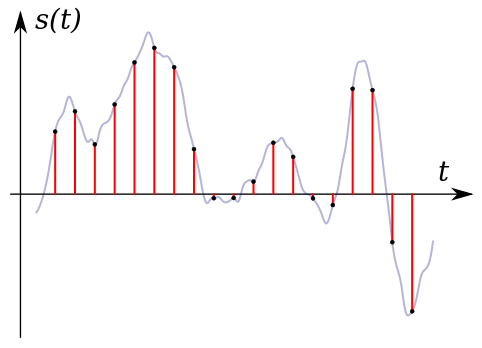
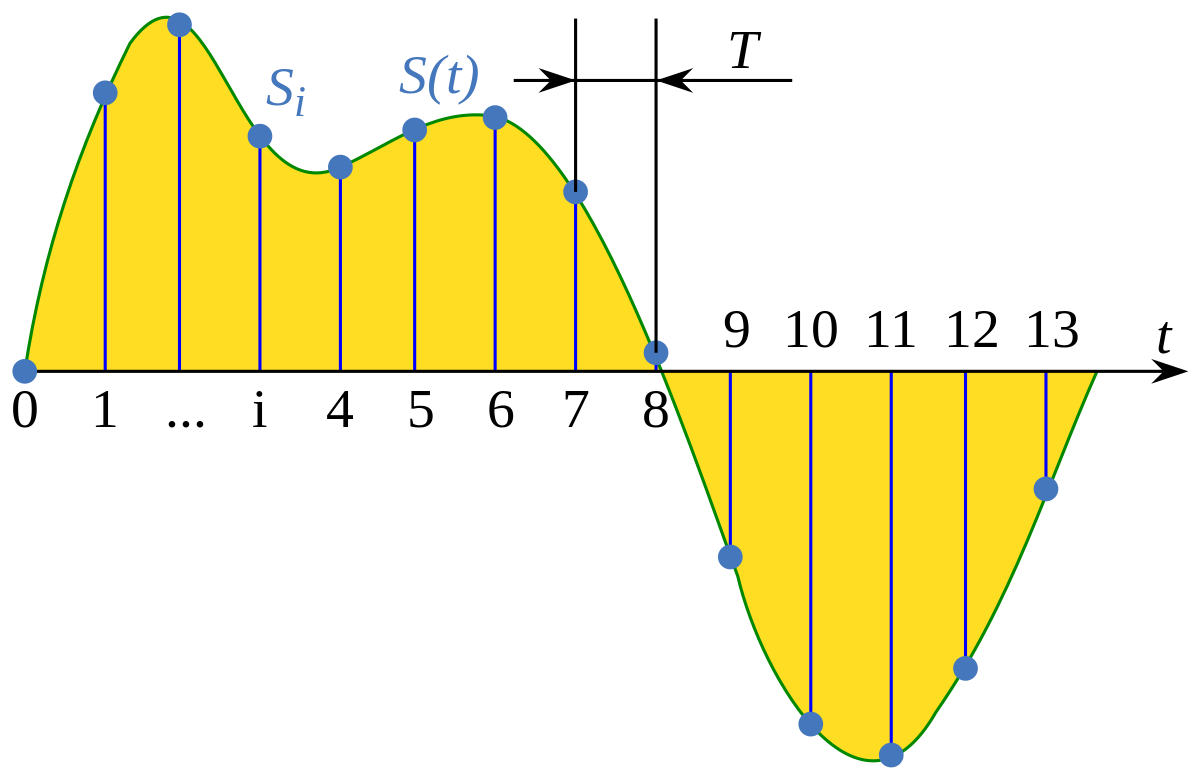
It is a very simple explanation, but it can express up to half the sample rate. When sampling a signal, if the interval is small, it can be restored close to the original signal, but if it is too thick, it cannot be restored (I would like to write a little more detail when talking about signal processing or other timing) .

44.1 kHz

Why is there a poorly separated rate of 44.1? .. ..

Didn’t technicians deliberately make cumbersome clocks to prevent music CDs from being easily copied? I heard something like that. When I searched, it seems this happened (?) Due to the convenience of an old PCM recorder. In this age, it is difficult to know what 44.1 kHz is in development. The 44.1 kHz ↔ 48 kHz sampling conversion is a headache. For example, USB audio (USB audio device class) exchanges data at 1 ms intervals. In the case of 48kHz, the data is 48 samples, but when considering 44.1kHz, it will be 44 samples (x9) and 45 samples (x1) in 10ms. If you cheat on a sample when there are 45 samples (tentatively), it will be 44.0kHz. I think it’s more like that with voice and music, and the human ear usually cheats (it’s just my personal opinion).
However, the objective evaluation method will soon come to an end. For example, you can clearly see that you were fooled by a sine wave (sine wave) (maybe you are unexpectedly on the market).

Number of quantization bits

The sampling had to take a value in the direction of time (discretization), but the quantization had to take a value in the direction of amplitude. The range that it is possible to display the volume of the sound, which is often heard, “96 dB dynamic range” means that the number of quantization bits is 16 bits, and the musical signal is reproduced in the range of 0 to 65535. dog. The number of quantization bits is also called the bit depth or bit depth.

Bitrate

In communication, it indicates how many bits of data are transferred per hour and is generally expressed in bps (bit / s) of how many bits are transferred (processed) per second. If it is low, the size when saving as a file is small and there is space on the transmission line for communication. For example, when an audio (1 channel) is compressed to 1/3, the 3 channel audio can be sent at the same bit rate. Excuse the old story, but considering from the age of analog communication (analog mobile phone), digitization + compression will be able to support multiple calls with the same radio wave.

Finally

I often hear what is called Hi-Res Audio. The sampling frequency is said to be 96 kHz or 192 kHz, which is over 48 kHz, the number of quantization bits is 24 bits, and the limit (high range) of human hearing is about 20 kHz, but it expresses frequencies higher than that. It will be. It is the same bit rate as the image from a long time ago. .. ..
By the way, it seems that dogs can hear up to 60 kHz and cats up to about 64 kHz.

Hi-res audio example
Sampling frequency Number of quantization bits Number of channels bit rate Frequency that can be expressed
192 kHz 24 2 9,216 kbps 96 kHz
192 kHz 16 2 6,144 kbps 96 kHz
96 kHz twenty-four 2 4.608 kbps 48 kHz
96 kHz 16 2 3,072 kbps 48 kHz
48 kHz twenty-four 2 2,304 kbps 24 kHz
Considering the limit of human hearing (about 20 kHz), according to the sampling theorem, 48 kHz or 44.1 kHz is a sufficient frequency, but what about all of them? .. ..
In my case, I cannot distinguish the high resolution range, but it should be able to reproduce the discarded frequency at 48 kHz to 96 kHz, and when the number of quantization bits is in the 24-bit range, the sound pressure (dB) is a little. Feels like it’s going up (?) (It’s just a story from my ears).
I’d like to make a comparison if I get the chance, but I don’t think I can tell by ear without a proper regenerator (like an expensive analog amp).

Is it time for cats and dogs to get verified in the acoustic industry? .. ..

Sample rate and bit rate

Sample rate and bit rate

Sample Rate and Bit rate

If the file size is reduced (code at a lower bit rate), the sound quality tends to deteriorate. How much should it really be? .. ..

sample rate bit rate

When compressing using audio encoding (AAC, MP3, etc.), the compression rate is determined by the bit rate at the time of encoding. Specifically, if you set a low bitrate, the compression rate will be high and the file size when saved will be small, but what is the bitrate for the original sound source (PCM) without compression in the first place?

If you save it as PCM, the sound quality of the original sound will be obtained, but it can be a little inconvenient to save it without worrying about the file size. Also, depending on the application, I think the original sound size has enough memory capacity and the communication speed is correct. Therefore, I would like to write about the sample rate and bit rate that are often heard in digital audio.

The bit rate of digital audio is determined by the sampling frequency, the number of bits assigned to a sample (number of quantization bits), and the number of channels (stereo, monaural, etc.).

PCM bit rate (uncompressed) = sample rate x number of quantization bits x number of channels
As I wrote a bit last time, in file containers like wav and mp4 format, this information is attached as a header, so that the application can see the header and play it back. The compression rate of the encoding is determined by the bit rate specified at the time of encoding for this PCM (uncompressed) bit rate.
For example, as many of you know about music CDs, with 44.1 kHz stereo, this is the next bit rate.

Music CD bit rate: 44100Hz x 16bit x 2ch (stereo) = 1411.2kbps
When encoding this with MP3, AAC, etc., you will naturally need to specify a bitrate less than 1,411.2 kbps. For example, when encoding at 256 kbps, the compression rate is approximately 18% and the file size is 1/5 or less when the original sound is 100%.

Encode Music CDs at 256 kbps: 256 kbps / 1,411.2 kbps = approximately 18%
Generally, the sample rates of audio devices actually connected to a PC are 48 kHz and 44.1 kHz for music, 16 kHz and 8 kHz for audio such as microphones and headphones, and 32 kHz, 24 kHz, 22.05 kHz. , etc.

The bit rate of PCM (uncompressed sound source) with 16-bit quantization bits is as follows.

Stereo (for music) PCM 16-bit bit rate (example)
Sampling frequency Number of quantization bits Number of channels Bit rate Comments
48 kHz 16 2 1,536 kbps
44.1 kHz 16 2 1,411.2 kbps Music CD
32 kHz 16 2 1,024 kbps
24 kHz 16 2 768 kbps
22.05 kHz 16 2 705.6 kbps
16-bit monaural PCM bit rate (for audio) (example)
Sampling frequency Number of quantization bits Number of channels Bit rate Comments
32 kHz 16 1 512 kbps Super Wide Band
24 kHz 16 1 384 kbps
16 kHz 16 1 256 kbps Broadband
8 kHz 16 1 128 kbps Narrowband

Sampling rate

If you check the web, there are explanations such as the sampling required to convert analog waveforms to digital conversion. For example, it shows how many samples of an audio signal input from a microphone are taken per second and digitized. The larger the sample, the greater the range that can be recorded. When an analog waveform is digitized, the frequency that can be expressed is half the sampling frequency (sampling theorem). For example, with a sampling frequency of 48 kHz, it can be expressed up to 24 kHz. At 8 kHz (narrow band) and 16 kHz (wide band), which are often used for audio, you can only hear up to 4 kHz and 8 kHz, respectively. The higher the sample rate, the higher the bit rate.

Sample rate and bit rate Part 2

Sample rate and bit rate Part 2

Sample Rate  Bit Rate

Listen and compare

sample rate and bit rate

Why don’t you really ask? In my memory, when I checked it in the past, I remember that it was difficult to distinguish it from the original sound (PCM) at 128 kbps of AAC under the conditions in the table above. I think this varies from person to person, and although I am involved with the audio and sound, I am aware that my ears are not a big problem, so even at a slightly higher rate, it is the same as the sound. original. I’m sure there are people who can tell the difference. At the low 32 kbps, you can clearly see the difference in sound quality. In terms of music, you can understand the metallic sound of the drum hi-hat.
Personally, I think that 44.1 Hz 16-bit (stereo) music CDs can be saved even at 128 kbps (1/10 compression or less) without losing sound quality. About 128 kbps is enough for my ears for both MP3 and AAC.

The bit rate is the compression rate
What happens if you set the encoding bit rate to 256 kbps for 16 kHz audio (monaural with 16 quantization bits)? .. .. Since the compression rate is 100%, it will be the same as the original sound. The sound quality should be the same as the original sound, but it may cause strange behavior depending on the encoders that are available for free (a configuration error may occur).

Sampling frequency Number of quantization bits Number of channels Original sound bit rate (PCM) Remarks
32 kHz 16 1 512 kbps Super Wide Band
24 kHz 16 1 384 kbps
16 kHz 16 1 256 kbps Broadband
8 kHz 16 1 128 kbps Narrowband
Regarding lossy compression of AAC and MP3, I think it is the result of research on how to encode at a low rate, so I personally think that setting a bitrate of 50% or more is not good. Lossless is recommended for compression ratios around 50% (lossless compression, MPEG-4 ALS, etc.). If you only think about saving, even if you compress it as is in PCM, it seems like it’s about half for audio with quiet sections. For lossy compression AAC, MP3, etc., if sound quality is important, about 15-20%, and if high compression is important, about 10% is sufficient sound quality.
Also, for audio purposes less than 10% and 5% is fine, but for audio it is recommended to lower the sample rate rather than suppress the bit rate to 48 kHz or 44.1 kHz (8 kHz or 16 kHz).

Stereo M / S (middle side)
The left and right signals are sum / difference signals. When encoding the sum signal (L + R) and the difference signal (LR) of both channels, the code is used when the correlation between channels is high, such as in stereo. The conversion efficiency is improved. For example, you can improve the coding efficiency of musical voices (L / R in phase, same amplitude).

Intensity stereo
When listening to high frequencies, the bit rate is reduced by combining the high frequency information (quantization coefficient) into one using the property that it is more susceptible to loudness than the L / R time difference.

In the end
Although bit rate may seem like a measure of sound quality, the digital audio field does not specify an encoded bit rate that exceeds the original sound bit rate. In short, I think it is important to use the proper bitrate for each encoder (encoder).

Sample rate and bit rate

Sample rate and bit rate

Sample Rates and Bit Depth

The compression ratio of audio encoding is determined by the bit rate at the time of encoding.

Sample Rate and Bit Depth

Last time I mainly wrote about the original sound bit rate (PCM), but this time I would like to write about the bit rate and compression rate of the encoding.

Specifically, setting a lower bitrate will increase the compression ratio and reduce the size of the file when it is saved. As I wrote last time, the bit rate of the sound source (PCM) before compression is as follows.

PCM bit rate = sample rate (Hz) x number of quantization bits x number of channels
For example, a music CD has the following 44.1 kHz stereo bit rate.

Music CD bit rate: 44100Hz x 16bit x 2ch (stereo) = 1411.2kbps
If it is encoded with MP3, AAC, etc., for example 256 kbps, the compression rate (assuming the original sound is 100%) is approximately 18% and the file size is 1/5 or less.

Encode Music CDs at 256 kbps: 256 kbps / 1,411.2 kbps = approximately 18%
If it’s 4 minutes of music, the file size is as follows.

Original sound: 1,411.2 kbps x 240 seconds = approximately 40.4 MB
Encode at 256 kbps: 256 kbps x 240 seconds = approximately 7.3 MB (+ header)
If a song is about 4 minutes long, 16 songs can be saved on CD650MB as original sound, but if it is encoded at 256 kbps as MP3 or AAC, 89 songs can be recorded.

Original sound: CD650MB / 40.4MB = about 16 songs
256 kbps encoded: CD650MB / 7.3MB = approximately 89 songs
If you check the web, you can compare the sound quality due to the difference in the bit rate. I think all the conditions are the same except the bit rate, but first of all there is a difference in the sound quality depending on the sample rate of the original sound source (PCM) and the number of quantization bits (the bit rate of the original sound changes). At the time of analog to digital conversion (ADC), the sound quality is determined by the conditions. No matter how high the bit rate is encoded for a sound source in poor condition, the sound quality is still poor. Even with the same bit rate, the compression rate changes depending on the number of channels (stereo or monaural). Therefore, strictly speaking, the evaluation of the sound quality cannot be judged only by the difference in the bit rate.
For example, when 48 kHz and 44.1 kHz 16-bit PCM is encoded at 32 kbps to 320 kbps, the compression ratio is as follows.

16-bit PCM compression ratio (when original sound is 100%)
Encoded bit rate 48 kHz stereo (1,536 kbps) 48 kHz monaural (768 kbps) 44.1 kHz stereo (1,411.2 kbps) 44.1 kHz monaural (705.6 kbps)
320 kbps 320/1536 = about 21% About 42% 320 / 1,411.2 = about 23% About 45%
256 kbps 256/1536 = about 17% About 33% 256 / 1,411.2 = about 18% About 36%
192 kbps 192/1536 = about 13% About 25% 192 / 1,411.2 = about 14% About 27%
160 kbps 160/1536 = about 10% About 21% 160 / 1,411.2 = about 11% About 23%
128 kbps 128/1536 = about 8% About 17% 128 / 1,411.2 = about 9% About 18%
64 kbps 64/1536 = about 4% About 8% 64 / 1,411.2 = about 5% About 9%
32 kbps 32/1536 = about 2% About 4% 32 / 1,411.2 = about 2% About 5%
Comparison with the original sound
It’s a bit of a twisted idea, but for example, which one is closer to the original sound, stereo or monaural in the above conditions?
Considering the compression ratio, it is the latter. Of course, stereo is superior to monaural in terms of expression, like expressing the depth of sound, so it makes sense to compare this and evaluate the sound quality, but in encoding, compression is done efficiently using stereo. Since there are algorithms (Stereo M / S and Stereo Intensity), the quality is not half that of monaural and the stereo is compressed efficiently.

What is the best way to use compressed sound sources like MP3, AAC and WMA correctly?

What is the best way to use compressed sound sources like MP3, AAC and WMA correctly?

Audio Compression

When listening to music on a smartphone or iPod, what you seem to know but not understand is digitally compressed sound sources like MP3, AAC, and WMA. Let’s think again about “in what format” and “how much bit rate” is good.

You all know that there are various formats of “digital sound sources”.

The best known is the WAV format, which is also used for CDs. Since it is an uncompressed format, there is no deterioration in sound quality and it is very versatile, but the capacity is not small, just over 50MB in 5 minutes.

Therefore, when used with a portable music player such as a smartphone, iPod, or Walkman, it is common to convert (= encode) from WAV to compressed sound sources such as MP3, AAC (M4A / M4P), and WMA.

By the way, compressed sound sources are used from the beginning for download distribution like iTunes. AAC for iTunes, MP3 for Amazon, and WMA for major national distribution sites are mainstream.

・ MP3 …… The oldest compression format established in 1995. There are many supported products, and it is the de facto standard that can be used in any case. “MP4” is a video standard, so don’t get it confused.

・ AAC (M4A / M4P) …… A standard established after MP3, which is a standard format for Apple products such as iPod and iPhone. M4P is a file protected by copyright. AAC is also used for audio on digital terrestrial broadcasts and digital BS on television.

・ WMA …… A format advocated by Microsoft. It has a strong affinity for Windows and many products are also used in voice recorders.

Based on these characteristics, let’s consider the compression format depending on the device used.

Frame rate

Frame rate

Frame Rate

Frame rate is an important setting factor that affects the “smoothness” and file size of a video.

frame rate

The unit is fps (frames / second). You can also tell how many still image frames are embedded per second.

A moving image uses the image persistence phenomenon of the human eye to display still images continuously so that they can be recognized as a moving image. It is said that the ability of the human eye can recognize up to 60 fps. So if you create a video at 60fps, you can tell that the video doesn’t look jerky.
On the other hand, this frame rate has a great effect on file size. Since it is necessary to save 60 still images in 1 second at 60 fps and 1 still image in 1 second at 1 fps, the file size varies greatly depending on the frame rate.
Generally, TVs and DVDs use 30 fps (29.97 fps) and most of them are set to 30 fps (29.97 fps) or less.
Unless you really need to reduce the file size, specify 30 fps (29.97 fps).
For reference when setting less than 30fps (29.97fps), the movie is 24fps and the 1Seg TV is 15fps. It is said that it can be lowered to 15 fps for videos with little movement, such as a person sitting and talking. If you set it to 10fps or less, it will no longer be a video but a slideshow level, and it will definitely look jerky. The minimum line for video is around 15 fps.

On the other hand, for videos with a lot of motion, such as sports and action, you may feel that 30 fps (29.97 fps) at the TV or DVD level is not enough. The file size will be large and it will be difficult to send and receive it over the Internet, but if image quality is prioritized, it is worth setting it to 60fps.
Current playback devices that support 120 fps are still rare, but next-gen TV streaming standards, 4K and 8K streams are specified up to 120 fps.
2. 2. Resolution (angle of view)
It can also be said that it is the size of the area to display videos. In terms of TV streaming,
1Seg → SD → HD → Full HD → 2K → 4K → 8K How much
The higher the resolution, the larger the rendering area, so naturally the video file size will increase accordingly.

Resolution (angle of view) TV broadcast Compatible storage devices
SD (720 px x 480 px) Analog broadcast DVD
HD (1280px x 720px) HDTV broadcast
* mainly in Europe —
Full HD (1920px x 1080px) High definition transmission
* Japan, strictly speaking,
High Definition BS: 1920px x 1080px Transmission
digital terrestrial: 1440px x 1080px Blu-ray Disc
(BD)
4K UHD (3840px x 2160px) 4K UHD streaming means Ultra HD.
Streaming started on December 1, 2018 with the Next Generation Streaming Standard. Ultra HD Blu-ray Disc
(UHD BD)
8K UHD (7680px x 4320px) 8K Transmission As with
4K, streaming started on December 1, 2018. Unknown current status

When considering Internet video usage, YouTube’s maximum resolution is Full HD (HD1080). With reference to this, if resolution is prioritized, it is set to Full HD, and if file size is prioritized, it is set to SD or less.

aspect ratio
It is the aspect ratio of the resolution (angle of view). 16: 9 is the standard for televisions, and 16: 9 monitors have become mainstream for personal computers, but there are still products with aspect ratios such as 16:10 and 4: 3, iPhone 3: 2, and Andoroid 16. : is not unified like 9.
Therefore, if the prepared video file has an aspect ratio of 16: 9 and the aspect ratio of the playback device is different, it will be played back by adjusting, expanding or contracting it on the side of the playback device.
When uploaded to YouTube, videos other than 16: 9 are automatically rendered with black frames at the top, bottom, left, and right.
For those who create and prepare videos, it is very kind to prepare video files with every aspect ratio, but if you can’t take the trouble, it’s usually fine to just create a 16: 9 aspect ratio.