If there is an instrument in the audio field that says everything and the opposite of everything, and whose very function may be almost incomprehensible to novices, this is the compressor.
What is it and especially what is a compressor for?
Let’s try to get some clarity. A compressor is an instrument, analog or digital, hardware or software, that allows to intervene in the dynamics of the audio; The way it intervenes is regulated by a series of parameters that modify its operation.
In general, the use of a compressor aims to reduce the dynamic extension of the audio on which it acts, to subsequently increase its volume.
Let’s take any audio track as a reference.
What is meant by dynamics of an audio track?
The dynamics of an audio track defines the amplitude of the variation, in terms of volume, of the track itself: in practice, the difference between the maximum and minimum volume.
Let’s take an example.
Considering that we are in the digital environment, the volume of an audio track could vary, for example, between -50 dB (light background noise) and -5 dB (high volume): the dynamics (that is, the difference between the minimum value and the highest peak (highest) in this case would be 45 dB.
Track compression can reduce high peaks, for example by reducing them to -10 dB, with a decrease in overall dynamics to 40 dB: therefore, the dynamic spread decreases, i.e. by attenuating signal levels higher, we have limited the difference in volume of the same with the lower.
But why would you want to reduce the dynamics of a track?
Basically, because I lowered the highest peaks, I could now increase the overall volume of the entire track, causing audible sounds to be heard that were previously too low (or too hidden by too loud sounds).
How a compressor works
The compressor generally works on the basis of some user defined parameters:
– threshold: generally expressed in dB, it sets the volume level from which you want the compressor to start operating.
For example, by setting a threshold of -10 dB, the compressor will act on all sounds that exceed this threshold in volume.
– compression ratio (ratio): Sets how much the signal beyond the threshold should be compressed.
The ratio is expressed as a ratio: for example, a 2: 1 ratio means that a signal that exceeded the 10 dB threshold, after compression, will only exceed it by 5 dB.
That is, a 2: 1 ratio tells the compressor to reduce the signal overshoot beyond the threshold to 1/2.
When using very high compression ratios (over 10: 1), we are talking about limitation (and the compressor can be defined as a limiter), which is extreme compression that practically doesn’t allow anything or almost to cross the threshold.
When, on the other hand, we use an inverse compression ratio (for example, 1: 3), we talk about expander instead of compressor: the expander has an opposite action, that is, it tries to increase the dynamics of an audio track reducing the volume of the signals below a certain threshold. For example, an expander can be used as a noise reduction, zeroing signals below a very low threshold (that is, effectively eliminating background noise).
In computer science and telecommunications, the term data compression (data compression) will indicate the data processing techniques that allow the reduction of the quantity of bits necessary for the representation of the information in digital form. In practice, for example, data compression makes it possible to reduce the number of bits required for the transmission of a video transmission, allowing it to be viewed on the Internet even in the presence of a connection that is not fast enough.
For files, data compression allows you to reduce the size (number of bits) of the file – this is advantageous because it reduces the space occupied by the file on disk and allows you to transfer the file more quickly (for example, by email).
Compression techniques fall into two main categories:
lossless compression (lossless):
in this case it is possible to rebuild the file from the compressed without loss of information;
lossy compression (loss)
compression occurs to the detriment of information quality, for example, through loss of image definition or sound quality of an audio file; in this case it is not possible to rebuild the file from the compressed file before compression.
The two techniques are used in different areas. As already mentioned, lossy compression is often applied to images, sounds and videos as it enables significant reductions to be made from the original data, at the price of an often negligible loss in quality. In addition, lossy techniques can be applied during data transmission (runtime), that is, it is not necessary to know all the data to be compressed to apply them: this is obviously an advantage in the transmission of transmissions over the Internet . Among the best known lossless algorithms, we mention jpeg for images and mp3 for audio and mpeg for videos.
In contrast, lossless compression is used when you want to compress text documents, programs, databases, circuit diagrams, etc. and in any case where the loss of the original data is not accepted. The lossless compression category includes .zip and .rar formats, often used to compress files and file folders.
Later we will discuss lossy compression techniques, talking about multimedia formats. Here, instead, we want to deepen the understanding of lossless compression.
Lossless compression algorithms
Lossless compression techniques (algorithms) can be divided into two main categories:
statistical compression;
replacement compression
.
Statistical compression is based on the input study to be compressed. Statistical studies are carried out on the input format to obtain a good compression. For example, in a text file to compress, the relative frequency of each character is studied and then the shortest code is associated with the character present several times in the text; vice versa, characters present with low frequency are associated with a longer code. Codes like Huffman’s are part of this class, which we will discuss in the next lesson.
As for substitution compression, this is based on the idea of replacing, in a file, all occurrences of repeated strings with pointers to previous copies of the same string. Compression is due to the fact that the length of a pointer is usually less than the length of the string being replaced. As a result, the higher the repetitions of string occurrences in the file to be compressed, the greater the degree of compression achieved.
CBR vs VBR: A Detailed Comparison of Video Encoding
CBR (Constant Bit Rate) and VBR (Variable Bit Rate) are two popular video encoding methods used in digital multimedia applications. CBR, as the name suggests, maintains a consistent bit rate throughout the entire video, ensuring predictable file sizes but potentially sacrificing video quality in complex scenes. On the other hand, VBR adjusts the bit rate dynamically based on the complexity of each frame, resulting in higher quality in visually demanding scenes while optimizing file size during less complex parts. When deciding between CBR and VBR, content creators need to consider their specific needs and the trade-offs between consistent file sizes and varying video quality.
CBR vs VBR: The Impact on Video Quality and File Size
The CBR vs VBR debate often centers around video quality and file sizes. CBR ensures a stable bit rate, which can be beneficial for streaming applications where a consistent connection speed is required. However, this uniform bit rate might lead to over-allocating bits for simple frames, resulting in a lack of efficiency. On the other hand, VBR allocates more bits to visually complex scenes, leading to improved video quality and reduced file sizes in comparison to CBR. For applications where storage or bandwidth is a concern, VBR offers a compelling advantage, as it maximizes video quality while minimizing the overall file size. However, VBR’s dynamic nature can lead to challenges for real-time streaming or constrained network conditions, where a constant bit rate might be preferred for smoother playback.
CBR vs VBR: Choosing the Right Encoding Method for Your Video Content
When selecting between CBR and VBR, content creators must carefully assess their specific video content and its intended use. CBR is well-suited for scenarios where maintaining a constant bit rate is essential, such as video conferencing or live broadcasting, as it ensures consistent playback quality despite varying network conditions. On the other hand, VBR excels in applications where video quality and file size optimization are key considerations. This makes VBR an excellent choice for online streaming platforms, video distribution services, and media content with varying complexities. Ultimately, the decision between CBR and VBR will depend on the target audience, the platform of delivery, and the desired balance between consistent bit rates and varying video quality to deliver the best possible viewing experience.
Do you have a music CD and copy it to output in MP3, AAC, WMA, etc.? Or do you just need to convert one file format to another? In this case, we recommend reading this comparison between CBR and VBR first.
First we learn what exactly these abbreviations mean. It would also be useful to know their functionality, the significant difference between these file formats and encoding methods.
Important:
Please note that the terms CBR and VBR represent different aspects. For example, CBR for comic files saved on CDisplay and VBR for the volume boot record. However, you should know that none of these terms describe what we explain in this article comparison between CBR and VBR.
Coding of the CBR file format
CBR is the abbreviation that describes the term “constant bit rate”. In fact, it is an encoding method that allows the file bit rate to be maintained without changes. In the event that audio data is encoded (this is done by the codec), the file uses a fixed value for its bit rate. For example, the bit rate would be approximately 128 Kbit / s, 256 Kbit / s or 320 Kbit / s.
The most notable advantage of the CBR file format is that it offers faster data processing. This means that when comparing CBR and VBR in terms of data processing speed, CBR wins. However, when it comes to Quality Score, CBR output files don’t offer a better optimization. Again, VBR is better if CBR is compared to VBR in terms of quality. In short, it’s basically about choosing quality instead of speed, or vice versa.
If you need to stream multimedia files, CBR can be seen as a useful option. Suppose your connection supports only a certain bit rate (e.g. 320 kbit / s) for steam streaming. In this case, a constant bit rate (300 Kbit / s) or less makes sense. Compared to a format that constantly changes the bit rate during transmission, a format with a constant bit rate is better. If the bit rate exceeds the compatible bit rate value of the respective network, the transmission is interrupted. Therefore, it makes more sense to have a CBR file when it comes to activities like online streaming.
Encoding of the VBR file format
The abbreviation VBR refers to the term “variable bit rate”. Well, the term itself indicates its functionality. You just have to understand the difference between the terms “constant” and “variable”. In other words, the constant bit rate and the variable bit rate are concepts with exactly opposite meanings. VBR is an encoding method that increases or decreases the bit rate of audio files as needed. There is a target area when it comes to bit rates. For example, the range can be between 65 kbit / s and 320 kbit / s. VBR supports audio file formats such as MP3, WMA, OGG and many other formats.
VBR file formats have a special sound quality function compared to the file size ratio. In fact, this is the main advantage of VBR files over CBR. Because of this aspect, it is possible to get smaller files to match the quality of the video. For example, if the original sound quality of the file is low enough, VBR will resize the file. This way, low quality files are lightweight and high quality files do the opposite.
Under the VBR mechanism, the file bit rate for inaudible segments is significantly reduced. What about the more complex parts of the track (where there is a mix of frequencies)? Well, the bit rate of these segments automatically increases to a maximum of 320 kbps. Therefore, the sound quality is preserved in areas where this is absolutely necessary. Overall, this is a great way to get a relatively small file capacity while maintaining quality. All in all, you need less space to store VBR files than CBR.
The main disadvantage of VBR, however, is a compatibility problem. With floating bit rates in the encoding process, VBR is considered a more complex file format. As a result, this file format may not be compatible with some older devices. On the other hand, CBR files are compatible with practically all devices, including older ones.
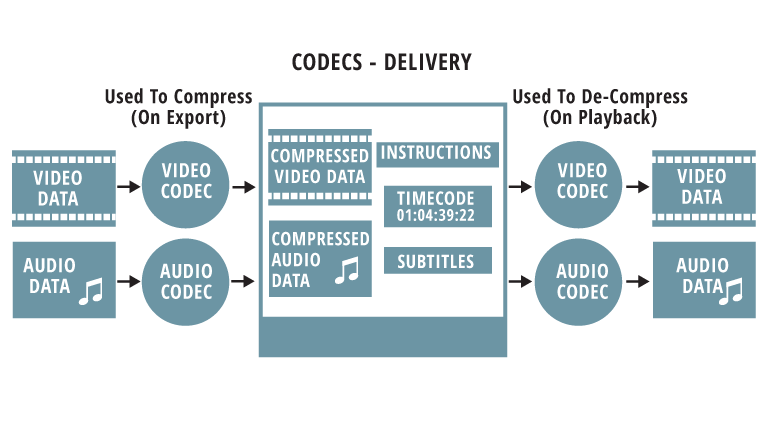
The best format for YouTube videos is codec. The codec is the part of the software that deals with the encoding and decoding of the information that make up the transmission of audio or video. The newer codecs also deal with compression and decompression. Therefore, when coding and decoding the signal, they use mathematical algorithms that can save space at the cost of quality.
compression
When playing video files, compression is performed using mathematical functions that reduce the number of frames per second or the resolution of the pixels that make up the image. In audio files, compression is done by removing the frequencies that cannot be fully perceived by the human ear and the number of bits that make up the sound information.
Container
The best option for the extension is mp4. The frame rate should match the recorded and edited one. The most popular container formats are MKV or AVI.
Video formats
Youtube uses the HD 1080p streaming format and MPEG-2 Steam supports the DVD format and is saved with an .MPG extension. If you cannot send the video in MPEG-2 format, select MPEG-4 format.
MPEG-2
Audio codec: MPEG Layer II and Dolby AC-3
Audio bit rate: 128 kbps or higher
MPEG-4
Video codec: H.264
Audio codec: AAC
Audio bit rate: 128 kbps or higher
Minimal audiovisual duration
The minimum duration is 33 seconds, excluding black and static images on the video channel and silence and background noise on the audio channel.
Frame rates
Videos must have the native frame rate without resampling. For film originals, a progressive master with 24 or 25 frames per second delivers the best results. Frame rates are typically set at 24, 25, or 30 frames per second.
It is not advisable to use resampling techniques as they vibrate the images and often result in poor video quality. Examples: Sampling and transmission like “Telecine Pulldown”.
Dimensions
Videos must use native aspect ratios, and uploaded videos should never contain the black letterbox and pillarbox stripes. The YouTube player uses frames that allow you to view videos correctly without cutting or stretching images.
Video resolution
YouTube wants high-definition videos.
For videos intended for sale and rental, you must specify a minimum resolution of 1920 x 1080 with an aspect ratio of 16: 9.
YouTube does not require a minimum resolution for free content or advertising content, but recommends a resolution of at least 1280 x 720 for videos with an aspect ratio of 16: 9 and a resolution of at least 640 x 480 for videos with an aspect ratio. 4: 3.
If the videos are of poor quality, they will not be visible to the public on YouTube and will be used as a reference for the content ID. These videos generally have a “quarter” (320 x 240) resolution. However, the videos must contain more than 200 lines to create effective references.
Bit rate
The bit rates depend on the codec. This is the number of bits per unit of time (attention! We are talking about bits, not bytes), which is generally measured in kilobits per second. With more format, the quality or resolution of the film or audio, the higher the more information per second. Videos should be optimized based on frame rate, aspect ratio, and resolution, not bit rate.
Wondering what is the best YouTube video format? We see this in this guide!
Hello, Today we’ll see what format you can keep the highest quality when you upload a video to YouTube. If you didn’t know that YouTube captured the video on its servers when it was uploaded, it will be encoded again. It is therefore important that we provide you with the highest quality file with our required specifications.
CODEC
Let’s start with CODEC. The choice is obvious and falls into the ubiquitous H264. It is widely used in both the shooting and distribution stages of many cameras and is the best choice even if we want to share movies online. The reason is very simple: having the same file size, it offers the best quality. Select it in your app to edit or encode. Of course, it would be great if it ended here. In fact, there may be variations in this algorithm that I will not explain in detail because it is a very complex and lengthy language.
What you need to know is that the H264 profile that YouTube requires of us is HIGH, its entropy mode is CABAC, and of course it has to be progressive, not intertwined, because we’ll upload the video, which will be on your computer, smartphone, and on a tablet instead of old TVs. In terms of bit rate, i. Y. The amount of data per second, YouTube tells us that we can leave it automatically, even if it shows that we want to choose 8000 Kbit / s for FullHD movies and 5000 HD movies.
We can increase this number, but keep in mind that as files grow, it will take longer to upload files and there will be more space for archiving.
CONTAINER
For an extension, ie a container, mp4 is the best choice. Obviously, the frame rate, i.e. the number of frames per second, should match the one you captured and edited.
FRAMES PR SECOND
For example, if you select 25 frames per second in these two phases, make sure they are the same when loading.
SOUND QUALTY
Okay, as far as the video part is concerned. What about the sound?
The choice depends on the AAC-LC codec, which is obviously stereo and has a sampling rate or sampling rate of 48 kHz.
I know this may sound complicated, but once you have dictated and saved these settings in your encoder, you just need to select them after export and forget about them. Maybe you think: But my app already has an Export to Youtube feature. I can’t use it? Quick Answer: You can do this, because in any case, they usually have settings that more or less meet YouTube’s needs.
However, for maximum control and quality, create a preset with the parameters I’ve given you before, which I’ll summarize quickly:
-H264 codec with high profile, CABAC entropy mode and bit rate, which can be automatic or 8000 Kbit / s for FullHD movies and 5000 Kbit / s for HD movies
-Extension mp4
– Frame rate per second corresponding to recorded and edited, provided it is between 24 and 60 frames per second
– Progressive and non-interlaced movies (e.g. 1080p instead of 1080i)
-48 kHz audio compressed with AAC-LC
Most digital audio systems encode analog sound, ie perceived sound, in digital form for archiving and transmission using a system called pulse code modulation. The quality of the digital recording is determined by two factors: Bit depth and sampling rate: The bit depth determines the number of “passes” available to describe the sound: the more bits used, the greater the dynamic range (the difference between the loudest and the lowest Sound) to be recorded.
At the same time, the higher the sampling rate (ie how often a “snapshot” of the sound is recorded per second), the more precisely music can be analyzed and converted into digital data. The sampling rate refers to the frequency range of the audio from the lowest to the highest pitch that can be stored.
The higher the bit depth and the higher the sampling rate, the more information can be saved.
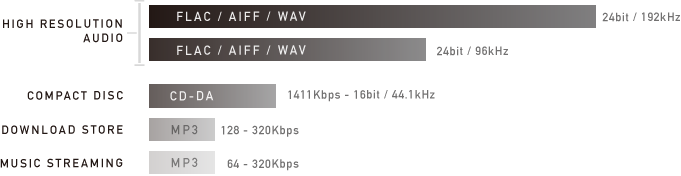
The CD uses 16-bit / 44.1 kHz encoding, which was best available at the time the CD was introduced in the early 1980s. However, progress has been made since then, and it is now possible to record and distribute music at bit depth and bit rates at higher sample rates. These formats have been used for recordings and recordings for several years, but are now also available to all households.
High Resolution Audio (HRA) is any format that goes beyond the standard 16-bit / 44.1 kHz CD, and HRA recordings generally use 24-bit encoding, which enables a very dynamic range. wider than CD and sampling rates up to 192 kHz, which is the maximum level for commercial HRA recordings. All of this aims to achieve a sound that is as similar as possible to that of the recording studio.
High resolution audio formats
There is a wide range of HRA formats, so it is important that the HRA team supports them as fully as possible. Technics products are compatible with all common HRA formats (some are still in the introductory phase) and will ensure simple, practical and sustainable HRA reproduction in the future as the market develops.
CD quality music is also available in various formats. Below is a list of the most common formats used for CD quality music as well as music with loss of quality and for HRA playback.
FLAC: Studio Master sound quality (24 bit) and CD quality (16 bit)
Most music files available online (HRA and CD quality) are in FLAC (Free Lossless Audio Codec) format (the format is free, no music). 24-bit FLAC files are generally available in 96 kHz and 192 kHz, although some albums are in 24-bit / 44.1 kHz or 24-bit / 48 kHz format. These 24 bit / 192 kHz are usually the best files available and identical to the Studio Master version.
Unlike MP3, which reduces size at the expense of content, the FLAC format is lossless and works like a zip file on your computer. It is unpacked “on the fly” during playback and offers exactly the same data as in the file before compression.
Apple has its own format that means no loss: Apple Lossless (ALAC) works like FLAC, but is compatible with iTunes. Some companies that provide Studio Master downloads offer these in FLAC and ALAC formats.
An additional advantage of the FLAC and ALAC formats is that they store information about music in the form of metadata, including general parameters such as artist, album title, title / track number, music genre, composer, catalog number, etc.
This information is contained in Studio Master or HRA files that can be purchased online or added when creating a personal CD: the burning software uses a search in the Internet database to identify the hard drive to be archived and provides all the information. You can also edit this data or enter it manually.
WAV / AIFF: uncompressed file
You can also copy CDs as files without compression, e.g. B. as a direct copy of data to the hard drive. Windows computers save them as WAV files (Waveform Audio File Format), Macs as AIFF (Audio Interchange File Format), but the two formats are interchangeable and, of course, Technics systems are both reproduced.
Are you looking for answers to the best format for YouTube? There are many online guides, but sometimes they misuse terms and cause confusion. It is advisable to clarify a little about the best video and audio formats for videos for YouTube. In this post I will explain what is the best format for YouTube and what the most commonly used terms mean when it comes to audio and video formats.
Before you choose the best format for YouTube videos, let’s clarify a bit the concepts and terms related to manipulating audio and video files on the computer.
The codec is the part of the software that deals with the encoding and decoding of the information that make up the transmission of audio or video. The newer codecs also deal with compression and decompression. Therefore, when encoding or decoding the signal, they use mathematical algorithms that save storage space at the cost of quality. Therefore, the codecs are divided into lossless (lossless data) or lossy (lossless data) depending on whether they use compression or not.
The best format for YouTube
compression
When playing video files, compression is performed using mathematical functions that reduce the number of frames per second or the resolution of the pixels that make up the image. In audio files, compression is done by removing the frequencies that cannot be fully perceived by the human ear and the number of bits that make up the sound information.
BitRate
It is the number of bits per unit of time (Attention! We are talking about bits and not bytes). It is usually measured in kilobits per second, which is abbreviated to KBit / s or KBit / s. With more format, the more information there is per second, the higher the quality or resolution of the film or audio.
Format is a code that specifies how information is stored in a file (compressed or not). The best format for YouTube so far is undoubtedly H264, which offers higher quality due to the same size. As with most video formats, there are variants that are as high as the sub-formats for certain purposes. Youtube recommends using H264 HIGH with an automatic bit rate or 8000 Kbit / s for Full HD films and 5000 Kbit / s for HD films.
And the container?
The container is a file format that can contain independent audio and video transmissions encoded with different codecs. The most popular container formats are MKV or AVI, but the length does not indicate film quality.
YouTube came to change the world in many ways.
But at this time we will focus on talking about how the access we have to find almost any song, from almost any musical genre, and almost any country or geographic region, from almost any time, regardless of whether it is from the 1950s or 60s or 70s or 2000 or 2019 or any other year.
And having this almost immediate access there is even more than one version, because often from a single artist we find live versions and versions recorded in the studio, we also find versions by other artists.
In other words, someone who wants to dedicate himself to getting music from a certain artist or a certain musical genre will only need to spend some time in front of YouTube to locate this music.
Of course the idea that goes through the minds of many is to be able to download that music in MP3 format to be able to listen to it on the computer in the car or anywhere else.
The dream of achieving almost any song and downloading it as MP3 has been fulfilled by many by downloading the songs in YouTube in MP3 format.
There are a number of users who have hundreds or even thousands of MP3 songs on their computer to listen to in the car or anywhere else and this has been done based on YouTube’s search to convert YouTube to MP3.
And people precisely use the MP3 format because it is the best known, because it has good enough audio quality for the average user AND why it became the standard So it is easy to find MP3 players in the car, portable devices and so on .
Bpm: is it possible to modify the Beats per minute of an mp3?
Before answering this question it would be important to understand what bpm means, because although most of them know what Beats per minute means, it is not always clear exactly what it means.
All music has a rhythm that is being marked by a certain speed and it is possible to measure how many bits fit in a minute of that particular rhythm.
For example a slow ballad can be 60 bpm or go up to 90 bpm. Reggaeton is normally between 95 bpm and 120 bpm. Most of the dance music is at 120 bpm or more.
This Beat per minute is the beat that we feel and that we can accompany with Las Palmas when we listen to a song. Obviously we could take a clock and count how many palms we could give in a minute and so we would know what the bpm of that particular song is.
For classical music I usually refer to bpm in a more identifiable way. Using Italian or Latin, it was said that a slow piece of music was played at a speed similar to that of walking steps, for example. Or it could be lighthearted which meant the Beat was faster. The metronome with which to play music is rehearsed can be given exactly how many beats per minute we want to try to determine the musical piece.
So we are now fully understanding what bpm or beats per minute means and what specifically refers to speed or beats to call it somehow, what specific time piece of music does it have.
The question that heads the title of this article asks if it is possible to modify the Beats per minute into an mp3. Obviously in a very naive way Someone might think that Playing the song faster is enough for it to have more bits per minute. But that would produce that the song will sound like the chipmunks, that is to say the Pitch would be modified.
And that is not what we are looking for when we want to Modify the bpm or bits per minute of an mp3. What we are looking for is to be able to alter either accelerating or re-slowing a song but without modifying the Pitch.
And this is something perfectly possible, although it requires a rather complex and well-developed algorithm like the one used by the mp4gain program that allows you to speed up or slow down a song contained in an mp3, but which maintains its pitch.
And the result is quite surprising. Actually, the song is perfectly recognizable since it maintains its tonality and Pitch but it sounds at a different speed than we are used to. And that has various uses. Many times it is used by DJs to make special versions or to mix music or to create remixes and another one without end of possibilities that offers an interesting tool like this one that offers mp4gain.Bpm: it is possible to modify the Beats per minute of an mp3 ?
Before answering this question it would be important to understand what bpm means, because although most of them know what Beats per minute means, it is not always clear exactly what it means.
All music has a rhythm that is being marked by a certain speed and it is possible to measure how many bits fit in a minute of that particular rhythm.
For example a slow ballad can be 60 bpm or go up to 90 bpm. Reggaeton is normally between 95 bpm and 120 bpm. Most of the dance music is at 120 bpm or more.
This Beat per minute is the beat that we feel and that we can accompany with Las Palmas when we listen to a song. Obviously we could take a clock and count how many palms we could give in a minute and so we would know what the bpm of that particular song is.
For classical music I usually refer to bpm in a more identifiable way. Using Italian or Latin, it was said that a slow piece of music was played at a speed similar to that of walking steps, for example. Or it could be lighthearted which meant the Beat was faster. The metronome with which to play music is rehearsed can be given exactly how many beats per minute we want to try to determine the musical piece.
So we are now fully understanding what bpm or beats per minute means and what specifically refers to speed or beats to call it somehow, what specific time piece of music does it have.
The question that heads the title of this article asks if it is possible to modify the Beats per minute into an mp3. Obviously in a very naive way Someone might think that Playing the song faster is enough for it to have more bits per minute. But that would produce that the song will sound like the chipmunks, that is to say the Pitch would be modified.
And that is not what we are looking for when we want to Modify the bpm or bits per minute of an mp3. What we are looking for is to be able to alter either accelerating or re-slowing a song but without modifying the Pitch.
And this is something perfectly possible, although it requires a rather complex and well-developed algorithm like the one used by the mp4gain program that allows you to speed up or slow down a song contained in an mp3, but which maintains its pitch.
And the result is quite surprising. Actually, the song is perfectly recognizable since it maintains its tonality and Pitch but it sounds at a different speed than we are used to. And that has various uses. Many times it is used by DJs to make special versions or to mix music or to create remixes and another one with no end of possibilities that offers an interesting tool like this that mp4gain offers.
A normal bit rate for an MP3 is between 128 kilobits per second, or kbps, and 320 kbps. Different bit rates in this range have different advantages; To extract music from a CD to MP3, choose the bit rate that best suits your purposes. In general, the higher the bit rate of an MP3, the better the audio quality, but the larger the file size. The most common bit rates in MP3s are 128 kbps, 192 kbps and 320 kbps.
Bit rate
The bit rate of an MP3 indicates the density of the audio information contained in the file. Therefore, every second in a 192 kbps MP3 contains 192 kilobits (24 bytes) of data. The higher the bit rate, the more information the MP3 contains; The more information it contains, the quality is closer to the original audio recording. The bit rate also determines the size of the MP3 file: a four-minute song encoded at 128 kbps occupies a little more than 3.5 MB, while the same song encoded at 320 kbps requires more than 9 MB of space.
Choice of a bit rate
When you convert a sound file or extract your CD collection to MP3, you must specify the bit rate you want the encoder to use. Choose a bit rate based on the type of audio you are encoding and on your desired purpose. If you are converting a conference or other piece of vocal audio, a bit rate of 128 kbps is more than enough. If you are encoding MP3 files for use with a portable media player, a bit rate of 192 kbps usually provides a good balance between audio quality and file size. If you are converting your CD collection to MP3 for archiving, encode the files with a bit rate of 320 kbps.
Variable bit rate
Coding with a variable bit rate changes the bit rate of the MP3 depending on the type of data present at a certain point in the audio. For example, a variable bit rate encoder could encode a portion of dense information from an MP3 at 320 kbps; however, when the audio contains a silent section the encoder lowers the bit rate to 32 kbps. If the bit rate of an MP3 has an unusual number (for example, 204 kbps), this indicates that the creator of the MP3 encoded it with a variable bit rate.
Bit Rate Conversion
Although most MP3 conversion and encoding programs can modify an MP3 at a different bit rate, this is not a good idea, generally speaking. Converting an MP3 to a higher bit rate does not add audio information to the file, so the sound quality does not increase. Converting an MP3 to a lower bit rate reduces the file size, but it could also introduce audio defects, since the encoder is compressing a file that is already compressed. If you need an MP3 file to have a different bit rate, re-encode an MP3 from the original audio CD or WAV file.



:max_bytes(150000):strip_icc()/CBR-vs-VBR-069b3b5e6d554d53841e7e525092d25b.jpg)