What is a good bitrate guide for mp3 files?


Free Download Mp4Gain
picture

What is a good bitrate guide for mp3 files?

Mp3 Bit Rate
Mp3 Bit Rate

(a good bitrate guideline for mp3 files?)

Mp3 Bit Rate
Mp3 Bit Rate

MP3 files are compressed audio files created from audio formats such as wave (.wav). Wave files replicate analog recordings and digital sound files at the expense of large file size, while MP3 files sacrifice some quality for a smaller footprint. There are several factors that mitigate the quality sacrifice during the conversion process. With the correct bitrate and settings, MP3 files can provide very high quality results, making them very close to the original wave files when played on portable audio players.

An mp3 player.

The balance between file size and quality is somewhat subjective. For audiophiles, any difference is noticeable. Others may simply not be able to tell the difference between a high quality MP3 file and a raw wave source. In many cases, the nuances of the sound environment will only become clearer when played through a high-quality stereo system.

MP3s are compressed digital music files that sacrifice quality for file size.
MP3 files are primarily targeted at portable audio players. In this field, high-quality MP3 files are played with incredible sound due to their small file size. With the limited memory of portable players, it makes sense that one would want MP3 files to be as small as possible while maintaining the highest possible quality.

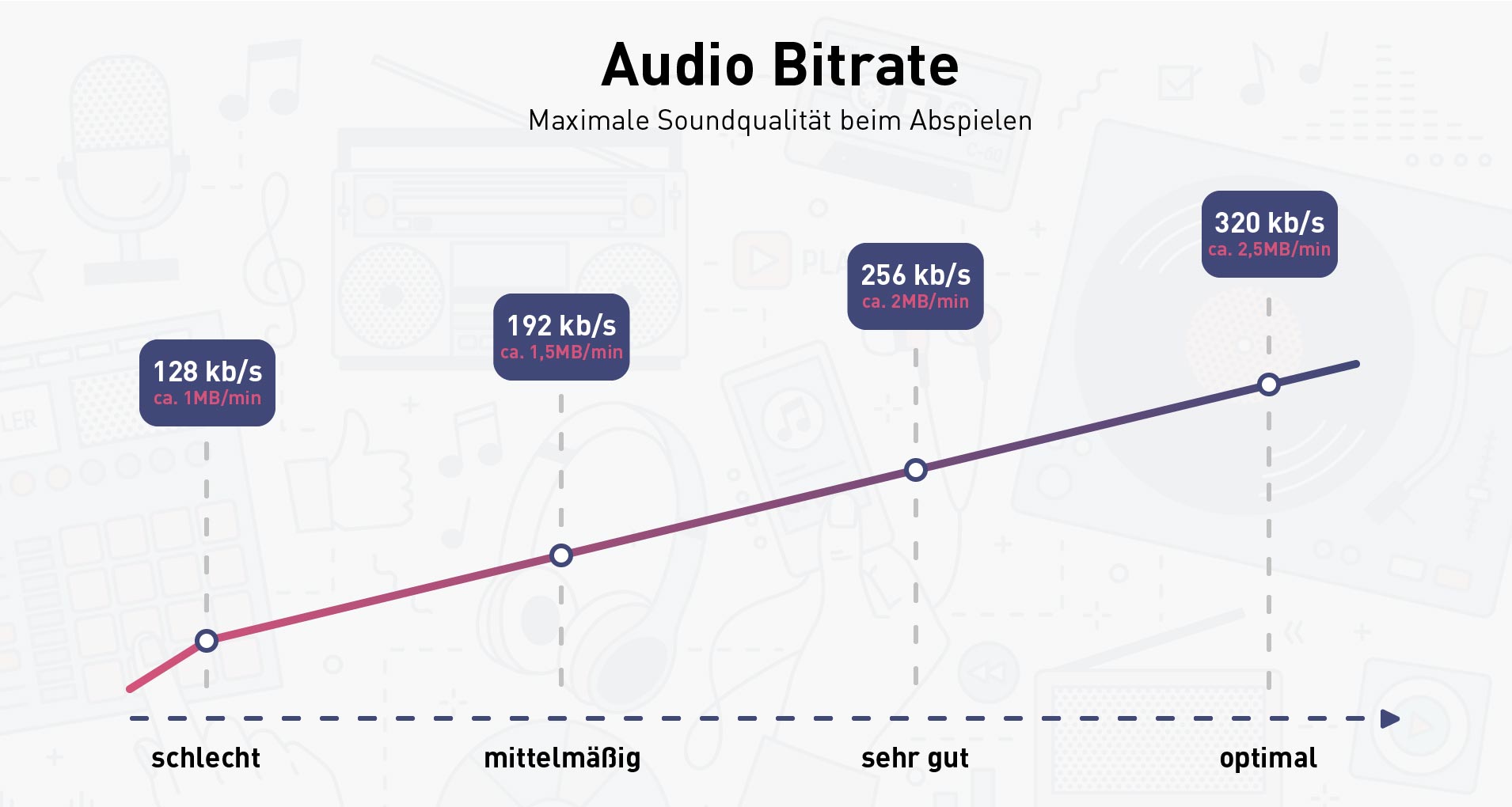
For this, one of the most important factors when creating MP3 files is the bit rate. In general, the more bits per second that are preserved from the original file, the higher the quality of the MP3 and the larger the file size. Lower bit rates reduce size and quality. The idea is to use the bitrate for maximum realism without saving unnecessary data, which just creates larger files with no noticeable difference to the ear.

For voice recordings such as lectures or language lessons saved to waveforms, a bit rate of 32 kilobits per second (kbps) is acceptable, although 64 kbps may offer better quality, depending on the source. At 32 kbps, the sound may sound “flat”, but that’s understandable. A 64 kbps MP3 file created from a voice recording should sound nearly identical to the original.

Desaturated acoustic music with simple arrangements should work fine at 192kbps bitrate. You can choose 256 kbps if the music will be played on a high quality device. Music that falls into this category includes folk, boy band songs, easy listening, and folk music. There are also works by many classic artists such as James Taylor, Linda Longstadt, Jonny Mitchell, and Simon Garfunkel.



Free Download Mp4Gain
picture


Mp4Gain Main Window
picture


Mp4Gain Features
picture


Free Download Mp4Gain
picture

Audio Intro Part 3

Audio Intro Part 3

Audio Intro
Audio Intro

WAV

Audio Intro
Audio Intro

structure
file header
The WAV format follows the RIFF Resource Interchange File Format, so the WAV format is actually a three-layer relationship, which is simplified here. Its file header format is as follows:

Address Carving type content
00H-03H 4 character * 4 RIFF resource file exchange flag
04H-07H 4 unsigned int The number of bytes from the next address to the end of the file.
08H-0BH 4 character * 4 WAV file WAVE logo
0CH-0FH 4 character * 4 fmt wave file flag, the last digit is 0x20 space
10H-13H 4 unsigned int The size of the subchunk file header. For the WAV subfragment, the value is 0x10.
14H-15H 2 short unsigned Format type, when the value is 1, it means the data is linear PCM encoding
16H-17H 2 short unsigned number of channels
18H-1BH 4 int unsigned Sampling rate
1CH-1FH 4 int unsigned Wave file bytes per second = sample rate Bit depth PCM / 8 channels
20H-21H 2 short unsigned DATA data block unit length = number of channels * PCM bit depth / 8
22H-23H 2 short unsigned Bit depth PCM
24H-27H 4 character * 4 data stamp data
28H-2BH 4 unsigned int Total length of data part (bytes)
struct WAVHeader
{ char RIFF[ 4 ]; ///Resource file exchange flag RIFF unsigned LEN; ///Number of bytes from the next address to the end of the file char WAV[ 4 ]; ///WAV file flag WAVE char FMT [ 4 ]; ///Wave fmt file pointer, last digit is 0x20 space unsigned SubchunkSize; ///The size of the sub-chunk file header, for WAV this sub-chunk, the value is 0x10 DATATYPE short unsigned; / //Format type, when the value is 1, it means the data is unsigned linear PCM encoding short CH ; ///Number of unsigned channels F; ///Unsigned sample rate BYTERATE; ///Number of bytes per second of wave file = sample rate*PCM bit depth/8*Number of unsigned channels

short DATAUNITLEN; ///DATA block unit length=channel number*Bit depth PCM/8 unsigned short BITDEPTH; ///Bit depth character PCM DATA[ 4 ]; ///Data flag data unsigned DATALEN ; ///Data partial total length (bytes) };

data organization
After the file header is the data part of the WAV file. Its data organization is: the left channel value of the first sample point, the right channel value of the first sample point, …, the left channel value of the last sample point, the right channel value of the last sample point value. Each value has a bit depth of bits.

Generate a simple wav
First complete the Wav header.

WAVHeader getHeader ( int number )
{
WAV Header res; memcpy (res.RIFF, “RIFF” , sizeof (res.RIFF)); memcpy (res.WAV, “WAVE” , sizeof (res.WAV)); memcpy (res.FMT, “fmt ” , size of ( res.FMT )); res.SubchunkSize= 0x10 ; res.DATATYPE= 1 ; res.CH= 2 ; res.F=F; res.BITDEPTH=DEPTH; res.BYTERATE=res.F*res.BITDEPTH/ 8 *res.CH; res.DATAUNITLEN=res.CH*res.BITDEPTH/ 8 ; memcpy(res.DATA, “data”


, size of ( res.DATA ));
res.DATALEN=num*res.DATAUNITLEN;
res.LEN=res.DATALEN+ 44 -8 ; returnres; }

First, define the key name – frequency comparison table.

const double keyf[]=
{ 27.5 , 29.1352 , 30.8677 , 32.7032 , 34.6478 , 36.7081 , 38.8909 , 41.2034 , 43.6535 , 46.2493 , 48.9994 , 51.9131 , 55 , 58.2705 , 61.7354 , 65.4064 , 69.2957 , 73.4162 , 77.7817 , 82.4069 , 87.3071 , 92.4986 , 97.9989 ,

103.826 , 110 , 116.541 , 123.471 , 130.813 , 138.591 , 146.832 , 155.563 , 164.814 , 174.614 , 184.997 , 195.998 , 207.652 , 220 , 233.082 , 246.942 , 261.626 , 277.183 , 293.665 , 311.127 , 329.628 , 349.228 , 369.994 , 391.995 , 415.305 , 440

, 466.164 , 493.883 , 523.251 , 554.365 , 587.33 , 622.254 , 659.255 , 698.456 , 739.989 , 783.991 , 830.609 , 880 , 932.328 , 987.767 , 1046.5 , 1108.73 , 1174.66 , 1244.51 , 1318.51 , 1396.91 , 1479.98 , 1567.98 , 1661.22 , 1760 , 1864.66 ,

1975.53 , 2093 , 2217.46 , 2349.32 , 2489.02 , 2637.02 , 2793.83 , 2959.96 , 3135.96 , 3322.44 , 3729.31 , 3951.07 , 4186.01 } ___ { “A-0” , “A#0” , “B- 0” , “C-1” , “C#1” , “D-1” , “D#1” , “E-1” , “F-1”, “F#1”


, “G-1” , “G#1” , “A-1” , “A#1” , “B-1” , “C-2” , “C#2” , “D-2″ , ” D#2″ , “E-2” , “F-2” , “F#2” , “G-2” , “G#2” , “A-2” , “A#2” , “B- 2” , “C-3” , “C#3” , “D-3” , “D#3” , “E-3” , “F-3” , “F#3” , “G-3” , “sun#3” ,

Audio Intro Part 2

Audio Intro Part 2

Audio Intro
Audio Intro


A wav is 44100 Hz 16-bit stereo or 22050 Hz 8-bit mono, what does that mean? stereo/mono refers to dual/mono.

Audio Intro
Audio Intro


For monophonic sound files, the sample data is an eight-bit short integer (short int 00H-FFH); for two-channel stereo sound files, each sample data is a 16-bit integer (int) and the upper eight bits (left channel) and lower eight bits (right channel) represent the two channels, respectively.

Sound is a mechanical wave, produced by the vibration of an object, and requires a medium to propagate. So, in essence, a sound is a waveform on an axis over time.

Sound has three elements: pitch, volume, and timbre:

Pitch is determined by the frequency of the sound wave, the higher the frequency, the higher the pitch.
The volume is determined by the amplitude of the sound wave, the larger the amplitude, the louder the sound.
The timbre is determined by the “shape” of the waveform (sounds like square, triangle, and sawtooth are called impulse waves and sound individual).
An audio file is a file obtained by converting an analog signal to a digital signal. In general, there are five important parameters: encoding method, number of channels, sampling rate, bit depth, and bit rate.

Encoding: how this format organizes binary data and how it is compressed.
Number of channels: mono, dual or 5.1 channels, etc.
Sampling rate: The number of samples per second.
Bit Depth: The number of binary bits used to store the y value of the sample point.
Bitrate – The desired number of bits per second for the file.
We know that there is no compression in the WAV format, so its encoding method is to directly write all the sampled points to the file in order.

WAV file size (B) = number of channels * sample rate (Hz) * bit depth (bit) / 8 + file header size (B, it’s 44B)

Implementation
When you open an mp3 or wav file with a text editor, you see numbers like this:

4944 3303 0000 0000 3d48 5459 4552 0000
0006 0000 0032 3031 3800 5444 4154 0000
0006 0000 0032 3230 3300 5449 4d45 0000
0006 0000 0031 3430 3600 5052 4956 0000
168e 0000 584d 5000 3c3f 7870 6163 6b65
7420 6265 6769 6e3d 22ef bbbf 2220 6964
3d22 5735 4D30 4D70 4365 6869 487A 7265
537A 4E54 637A 6B63 3964 223F 3E0A 3A78
6D70 6D65 7461 2078 6D6C 6E78 3D22
6F62 653A 6574 612F
5249 4646 2e3d 0e05 5741 5645 666d 7420
1200 0000 0300 0200 44ac 0000 2062 0500
0800 2000 0000 6461 7461 a026 0e05 8089
00bc 00e8 f0bb c09e 8dbc 00c2 87bc 80f1
d3bc 8063 ccbc c030 fcbc 8012 f4bc 20bb
13bd e051 0fbd c0b0 2dbd 6079 28bd 4012
46bd 6032 40bd c0e3 5dbd 6040 57bd c015
7cbd e035 74bd b058 8dbd 50e2 88bd f0a7 9dbd e0dd 98bd 70d3 acbd e0a9 a7bd
d043 b8bd b0da b2bd
00e3 c4bd 605c bfbd

This one above is the mp3/wav format of the same song. What is the difference between them?

Audio intro

Audio intro

Audio intro
Audio intro

An mp3 is 320kbps, 44100hz, what does this mean?

Audio intro
Audio intro

44100Hz represents the sample rate of the signal. The so-called sampling consists of obtaining the value y of the sound wave at the current moment every unit of time. Sampling is the process of discretizing continuous data (converting an analog signal to a digital signal).
image source

The sampling method mentioned above is called PCM (Pulse Code Modulation). According to the Nyquist-Shannon sampling law, the sampling rate must be at least twice the highest target frequency. The hearing range of the human ear is about 20Hz-20,000Hz (if you’re curious how loud you can hear, you can click here to test your ears), although recording software often has a 48,000 option Hz, but we can safely conclude: 44100Hz can meet almost all our needs, higher is just a waste of your memory and CPU. More than 48,000 samples are meaningless to the human ear, which is similar to 24 frames per second on a movie. 44100Hz happens to be the standard sample rate for almost all music released. In fact, for vocals and many instruments, high-frequency sounds are noise, so high sample rates can sometimes worsen sound quality (which is why we need to adjust the equalizer).

320 kbps represents your bitrate/bitrate, which is shorthand for kilobits per second, which represents the size of the data used to describe sound. In CD (uncompressed audio file), the bit rate is 1411.2kbps, and the mp3 sound quality to achieve CD quality should be higher than 128kbps/44100Hz (128kbps can be said to be the most common bit rate). Generally, a higher number means better quality. The quality depends on many factors (such as the encoding algorithm). Many times we don’t need too high bitrate: our device can play mp3 and CD without difference (sound/sound card is normal).

What is bit rate? Knowledge of the MP3 audio format. Part 2

What is bit rate? Knowledge of the MP3 audio format. Part 2

bit rate
bit rate

Bitrate is a benchmark indicator of the efficiency of digital music compression.

bit rate.
bit rate

The bit rate represents the number of bits bps (bit per second, bits per second) transmitted per unit of time (1 second). We usually use kbps (in simple terms, it is per second) clock 1000 bits) as the unit. The bit rate of digital music on CD is 1411.2 kbps (ie recording 1 second of CD music requires 1411.2 × 1024 bits of data). The higher the bit rate of the music file, the more data (Bit) must be processed in a unit of time (1 second), and the better the sound quality of the music file. However, when the bit rate is high, the file size increases, which will occupy a large amount of storage capacity. 8 to 320 kbps.

1. WMA (Windows Media Audio, Windows Media Audio)

As a Microsoft media compression method, it is a part of the technology that only compresses audio data in Windows Media Technologies. The sound quality is similar to MP3 and can be compressed with half the technology of MP3. It has the copyrighted Windows Media Rights Manager and can be played by installing it in WMP (Windows Media Player, Windows Media Player). Due to the strong influence of Microsoft and Windows, as well as major copyright reasons, the major American record companies, EMI and BMG, officially confirmed that they use the WMA method developed and produced by Microsoft. It is believed that this advanced method will become even more popular in the future.

2. MP3 (CBR, VBR, ABR)

MP3 is currently the most widely used and widely used lossy compressed digital audio format. It has been explained above and will not be repeated here.

CBR (constant bit rate)

CBR is the oldest and simplest MP3 encoding (compression) method. When this method is used for encoding, the bit rate of the entire file is the same, in other words, the bit rate used by the MP3 file per second is the same. Although the music file has sections of varying complexity, the encoder always keeps the bitrate constant, unless you use the highest sound quality; otherwise the sound quality of the different sections of the MP3 file will vary. The more complex the passage, the worse the sound quality. Its biggest advantage is that the file size is fixed, which is convenient for calculating storage space.

VBR (Variable Bit Rate, Variable Bit Rate)

VBR is a variable encoding rate MP3 compression method. Its principle is to encode the complex part of a song with a high bit rate and the simple part with a low bit rate. Through this dynamic adjustment of the encoding rate, the sound quality can be improved. additionally obtained and the size of the file. Its main advantage is that the entire song can approximately meet our sound quality requirements, but the disadvantage is that the size of the compressed file cannot be estimated during encoding.

Most MP3 players released now support VBR, but although some machines can play songs in VBR format, they can’t display the playing time correctly. Nowadays, a lot of high-quality MP3 music is encoded in VBR.

What is bit rate? Knowledge of the MP3 audio format.

What is bit rate? Knowledge of the MP3 audio format.


bit rate
bit rate

Digital audio formats are audio signals that are recorded, processed, and reproduced in digital form.

bit rate
bit rate

The emergence of digital audio formats is to meet the needs of high-fidelity playback, storage and transmission. Simply put, early analog audio formats had issues with playback distortion and glitches due to media wear. Since the advent of the CD, digital format audio files have become popular, but another problem has arisen: the limitation of the storage volume, and the CD still has the phenomenon of wear. Saving to hard drive (relatively longer storage time) is not a good solution when storage media (mainly hard drives) are still expensive at the time. The rise of the Internet has created a requirement for long-distance file transmission. Under the restriction of bandwidth, the demand to reduce file size has become more intense. All this has led to the generation of lossy compressed digital audio formats from external factors!

In terms of internal factors, with the improvement of computing and coding capabilities, the progress of various acoustic psychological models has promoted the emergence of various lossy compressed digital audio formats. Some of the most commonly used audio formats in MP3 players are briefly introduced below: MP3 (CBR, VBR, ABR), WMA, WAV, ADPCM, and the emerging audio formats AAC, ASF, and OGG.

Before introducing various digital audio formats, let’s clarify one concept: bitrate.

In the field of computing, all information is digitized. Bit is the smallest unit of data in a computer, it refers to a number of 0 or 1, which is a mathematical binary number, a “0” or “1” , is a bit. For example, when we say a 2-digit number, it means that it is a two-digit binary number, and there are 4 combinations of “00”, “01”, “10” and “11”, which represent 0, 1, 2 and 3 is four numbers.

The video format conversion bit rate

The video format conversion bit rate

video format conversion bit rate

Image quality, i.e. clarity, is a combination of several factors, in addition to bit rate and resolution, including frame rate.

video format conversion bit rate

Video formats basic knowledge quote: We tell you about MKV, MP4, H.265, bitrate, color depth, etc. – 4K Knowledge Encyclopedia – 4K China Forum – 4K123!

This tutorial is meant to cover some basic video and audio concepts and terminology. You can answer the following frequently asked questions in more detail:
do
What is the difference between these MP4/MKV formats? Which image is better?
How is the video bitrate calculated? Why is it the same 1080p video, some big and some small?
In what format is the image information stored in the video? Is it the same red, green and blue as the monitor?
What exactly does 8bit/10bit mean? Why is it necessary to watch 10-bit video on an 8-bit monitor?
yuv420/444 What do these signs mean? Which is better?
What exactly do lines, planes, textures mean? Why does the video have high and low frequency?
The higher the bitrate, the better the video quality?
This tutorial will be described in detail in the following modules:
1. Encapsulation format (MP4/MKV…) vs media format (H.264/FLAC/AAC…)
2. Basic video parameters: resolution, frame rate and bit rate
3 Image rendering method: RGB model vs YUV model
4, color depth
5, medium chroma sampling
6, low frequency and high frequency in space: plane, texture and line
7, low frequency and high frequency over time: dynamic8
, clarity and brief description

image quality 1. Packet format (MP4/MKV…) vs. media format (H.264/FLAC/AAC…)
MP4+MKV is the most common type of video files you download. These files are actually similar to a package and their suffix is ​​the packaging method of the package. These packages contain video (image only), audio (sound only), subtitles, etc. When the player is playing, please unpack the package first.(The professional term is called separation/division), take out the video, audio, etc., and then play it.

Since they’re just one package, that means the suffix doesn’t guarantee what’s inside or how much. Each element of the package, we call it a track, generally has the following:

Video (Video): In general, there should be, but there are exceptions, such as external audio track in mka format, in fact, there is no mkv video. Please note that when we talk about video, we do not include sound.
Audio (audio): Generally speaking, there should be, but in some cases it is muted, so there is no need to bring it.
Chapter: The segment information that came with the original Blu-ray disc. If the file is checked out, you can see the effect with the chapters in the player:
.potplayer right click screen, option-play-show marker/chapter marker in progress bar.mpc -hc
right click screen, option-setting-on Progress bar shows chapter mark subtitles
(Subtitles): Sometimes the file comes with subtitles, and the subtitles are not directly embedded in the hard subtitles of the video, so they are packed together in the packing container.
Others may have attachments etc which are not listed one by one. There is not necessarily a single track for each type, as MKVs with multiple audio tracks are often seen.

Each track has its own format. For example, it is often said that the video is H.264, the audio is AAC, these are the formats of each track.
Common video formats are H.264 (can be subdivided into 8bit/10bit), H.265 (currently also subdivided into 8bit/10bit), RealVideo (common in early rm/rmvb), VC- 1 (Microsoft-led, common in wmv). Basically H.264=AVC=AVC1, H.265=HEVC.
There are four common audio formats: FLAC/ALAC/TrueHD/DTS-HD MA, which are lossless, and AAC/MP3/AC3/DTS (Core), which are four lossy.

MKV vs MP4, the main differences are:

1. MKV supports encapsulation of FLAC as audio, while MP4 does not. But MP4 can also encapsulate lossless audio tracks (like ALAC, although it is generally believed that the efficiency of ALAC is not as good as FLAC)
2. MKV supports encapsulation of subtitles in ASS/SSA format, but MP4 does not. The subtitles produced by the general subtitle group are in ASS format, so internal subtitles are more common in the MKV format.
3. MP4 is an industry standard and its compatibility with video editing software and playback devices is generally better than MKV. That’s why vcb-s basically chooses the MP4 package for those videos that are optimized for mobile devices.
Beyond that, the two formats are largely interchangeable. For example, they all admit

What is the bitrate of the mp4 video?

What is the bitrate of the mp4 video?

Mp4 Bitrate

The mp4 video bitrate is usually set to around 800.

mp4 bit rate

The basic algorithm is: bit rate (kbps) = file size (KB) * 8 / time (seconds), for example, D5 disk, the capacity is 4.3G, which takes into account the different audio formats, it is calculated as 600M, (so the remaining capacity is 4.3*1024-600=3803.2M), so the video file should be no more than 3.7G.

And if the capacity of the video file is 3.446G and the length of the video is 100 minutes (6000 seconds), the calculation result: the bit rate is approximately equal to 4818kbps (3.446*1024*1024*8/6000= 4817,857).

Bit Efficiency:

1. The bit rate in sound refers to the amount of binary data per unit time after converting the analog sound signal into a digital sound signal, which is an indicator to indirectly measure the audio quality. The principle of bitrate in video is the same as in sound, both refer to the amount of binary data per unit of time after the analog signal is converted to a digital signal.

2. In channel coding, a source data block of symbol size K is mapped to a codeword of symbol size N through coding, and K/N becomes the code rate, where assumes that the symbol table before and after encoding does not change.

The frame rate of 29.97 is the best.

usually:

1080*720 split resolution is about 5000K;

720*576 resolution is about 3500K;

640*480 resolution is about 1500K.

Extended information:

Some code rate principles:

1. Bitrate is proportional to quality, but file size is also proportional to bitrate.

2. If the bitrate exceeds a certain value, it has little effect on the image quality.

3. DVD capacity is limited, whether it is 4.3G standard, overdubbed or D9, there are limits. The information in the computer is represented by binary 0 and 1, and each 0 or 1 is called a bit, which is represented by a lowercase b, that is, bit (bit); uppercase B is byte, ie byte, one byte = Eight bits, ie 1B=8b; the capital K in front means 1024, that is, 1024 bits (Kb) or 1024 bytes (KB). Indicates the size of the file, usually using bytes (KB) to indicate the size of the file.