Digital sound. Digital audio encoding


Free Download Mp4Gain
picture

Digital sound. Digital audio encoding

Digital audio

What determines the quality of an audio signal?

Digital Audio

The purity and timbre of the sound are mainly determined by the audio codec, or rather, by its bit depth and sample rate (the higher they are, the better the sound). This processing can be done in hardware with a special chip, an audio processor, or in software that uses controllers, which consumes CPU resources.

What is AC’97, HDA?
AC’97 and HDA (High Definition Audio) are Intel’s proposed standards for audio codecs. AC’97 was introduced in 1997 and then improved several times, but eventually became obsolete and is now replaced by HDA. HDA is fully AC’97 compliant with improved performance and enhanced capabilities.
What is the difference between AC’97 and HDA?
AC’97 defines the maximum bit depth of a 16-bit audio codec at a sampling rate of 48 kHz, HDA – 32-bit / 192 kHz. Additionally, HDA devices support 8-channel (7.1) audio, DVD-Audio, Dolby surround sound technologies, and other advanced features.
What is the sample rate and bit depth of the codec?
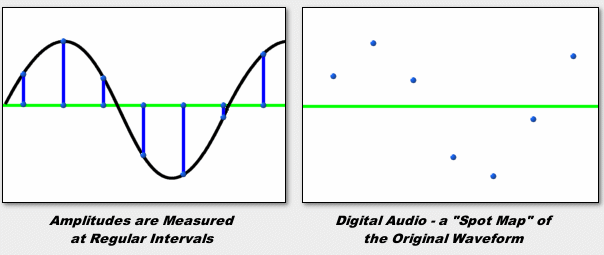
Sampling is the acquisition of instantaneous values ​​(samples) of an analog signal with a certain time step in the digitization process. The frequency of this step is called the sample rate (it is also the sample or sample rate). The larger it is, the better the sound recorded and reproduced. In studio equipment, the frequency is 48 kHz, in home systems – 44.1 kHz.
Bit depth determines the quality of the recorded audio. Higher is better. The bit value, for example 32, denotes the number of bits that are allocated to record the amplitude of the signal at the time of its measurement.
Consequently, the more often (sample rate) and more accurately (bit depth) the audio signal is measured, the higher quality audio file is obtained.
What is the signal-to-noise ratio?
The ratio of the pure audio signal to the noise generated by the device itself. The higher the value (in dB), the better. The Sound Blaster X-Fi sound card has a signal-to-noise ratio of 118 dB. Most audio codecs are 80-95 dB.
What is DAC and ADC?

The DAC (digital to analog converter) and ADC (analog to digital converter) are part of the codec and directly perform sampling: during playback, the DAC converts the digital code to an analog signal, while recording, the ADC performs the reverse conversion. The better the ADC, the clearer and more detailed the sound that will flow from the speakers. The better the DAC, the more accurately the analog signal will be converted to digital.
Codecs for multi-channel audio support include various DACs and ADCs.

What is the bit rate?
The bit rate (literally, the information bit rate) determines the maximum amount of information that can be transmitted through the audio channel per unit of time. A high bit rate is needed to transmit a rich sound image and is not required when encoding speech. Audio recordings with a 128 Kbps bit rate are suitable for inexpensive speakers, but when accessing expensive equipment, it makes sense to get music at a 192-256 Kbps bit rate.
Convenient solution: variable bit rate encoding, change the bandwidth of the audio channel according to the quality and saturation of the musical fragment.


Free Download Mp4Gain
picture


Mp4Gain Main Window
picture


Mp4Gain Features
picture


Free Download Mp4Gain
picture

MP3 and audio digitization.

MP3 and audio digitization.

audio digitalization

All of humanity has become accustomed to such everyday things as recording and reproducing sound, be it a voice recorder, an answering machine, or musical recordings of their favorite artists. And people who spend most of their time near the computer probably can’t imagine life without sound. This article will focus on such a common encoding format as MP3.
audio digitalization

Well, Thomas Alva Edison started recording when he yelled the words “Mary had a lamb” on his “Talking Machine”. The “talking machine” was the world’s first device to record and reproduce sound: a phonograph that mechanically recorded a soundtrack on a wax roller. At the time, this was certainly a huge step forward, as at that time, and this was in 1877, no one came up with the idea of ​​creating something similar.

However, the biggest disadvantage of this sound carrier was the fragility of the recording. With the development of science and technology, people learned to record sound not only mechanically, as Edison did, but also electromechanically and photoelectrically, and with the advent of computers, it became possible to record sound in digital form. The main advantage of this recording method is the preservation of sound quality, regardless of how many times it has been played or rewritten, and since digital information can be processed on a computer, this opened wide doors of possibilities for working with sound. . But since in the early stage of digital sound development, recording a composition cost a lot of disk space and magnetic media had a small capacity, software developers began to baffle the fact. how to put a lot of music on a small hard drive. This led to the appearance of various programs – compressors, which reduced the size of the audio file. Compression algorithms provided the removal of certain frequencies, which led to a loss in sound quality, and then the user was faced with the choice of spending money buying additional megabytes and storing uncompressed music files, or saving money. and use compressors.

First, let’s find out what “sound” is in real life. The transmission of information at a distance using acoustic vibrations is only possible due to the properties of the acoustic environment in which these same sound vibrations occur. They are possible due to the presence of elastic bonds between particles in the conductive medium. The sound source creates an area of ​​pressure by compressing air molecules. These molecules transfer their energy to others that are nearby, and these, in turn, to others, etc., which leads to the appearance of areas of increased and decreased pressure in relation to the ambient pressure. This creates a sound wave that is continuous in nature. One of the parameters of the wave is amplitude. Let’s take a simple example: a guitar string. Everyone knows that to increase the volume of the sound it is necessary to pull the string with more force, thus increasing the amplitude of its vibration, which will lead to an increase in the pressure deviation. But a wave is not enough to transmit a sound that can be perceived by the human ear. Another important point is the vibration frequency, that is, the frequency with which the sound source creates a pressure change, and it is this frequency that determines the pitch of the transmitted sound. On a guitar, to change the pitch, you need to hold down the string at a certain fret, that is, change the length of the string and, as a consequence, the frequency of its vibrations. Another important point is the vibration frequency, that is, the frequency with which the sound source creates a pressure change, and it is this frequency that determines the pitch of the transmitted sound. On a guitar, to change the pitch, you need to hold down the string at a certain fret, that is, change the length of the string and, as a consequence, the frequency of its vibrations. Another important point is the vibration frequency, that is, the frequency with which the sound source creates a pressure change, and it is this frequency that determines the pitch of the transmitted sound. On a guitar, to change the pitch, you need to hold down the string at a certain fret, that is, change the length of the string and, as a consequence, the frequency of its vibrations.

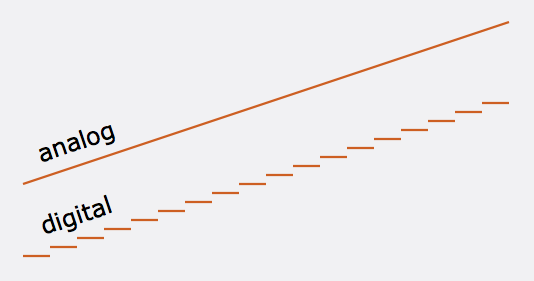
Now that we understand the nature of sound a bit, let’s move from analog to digital. To digitize “natural” sound, you must first convert it to an analog electrical signal. In this case, the analog of the amplitude of the sound wave is the amplitude of the voltage change. As mentioned above, the wave and the analog electrical signal are continuous functions, but for digitization they must be represented in discrete form. For this, an ADC (analog-digital converter) is used, which breaks the continuous wave into sections (Sample) and represents the amplitude of the wave in these sections as a number, that is, it quantifies. It is clear that for greater precision and purity of sound, the number of samples must tend to infinity and their size must go to zero. The number of samples per second is called the sample rate or sample rate and is measured in Hz. The question arises, what sample rate to use when digitizing so that the result is the most natural? It is theoretically known that for the most accurate reconstruction of a continuous analog signal from discrete values, it is necessary to use a sampling frequency at least 2 times higher than the frequency of sound (Nyquist’s theorem). It is known that the human ear can perceive sounds with a frequency of 18 to 20,000 Hz. Therefore, the optimal sampling frequency is 40 kHz or more. The most common sampling frequencies are 44.1 kHz, 48 kHz. However, due to the fact that harmonics above 20 kHz also affect the overall sound, encoders with sample rates of 96 and 192 kHz are also used. Also, the sound quality depends on the number of digits used to record the measured amplitude. The quantization error is inversely proportional to the bit width. Therefore, with 8-bit quantization, the sound level is recorded using numbers in the range [-128; 128], with 16 bits from [-32768; 32768]. For example, when recording audio CDs, exactly 16-bit quantization is used, so they have high sound quality.

Let’s make a middle conclusion: the ADC converts the analog signal into numbers and writes them as a sequence. Then comes Wave, a sound format. Note that audio CDs record sound in the same format. However, this storage method is not economical. Many people probably prefer an MP3 disc, which can contain more than 200 songs, than a regular CD. It does this by compressing the Wave file at the expense of quality. But don’t be alarmed, as the human ear is virtually incapable of recognizing the loss of sound quality after compression. Let me explain now. It all started when, in the late 1980s, the International Organization for Standardization (ISO) created the Moving Pictrures Experts Group, whose task was to develop an international standard for the presentation of digital video and audio data. The result of the group’s work is the MPEG-1 Layer 3 format, or MP3 for short, which compresses audio data by 1/12 with virtually no loss of quality. The audio compression algorithm in this format is based on the psychoacoustic characteristics of the human hearing organ, and therefore the removal of elements that are not perceived by the ear does not affect the noticeable deterioration in quality. Suppose there are many people in the room and they are all talking to each other at the top of their voices, and if you try to call a person who is only a few feet from you without raising your voice, don’t expect them to answer your call. , since due to the noise generated, it will not hear you. This is because sounds of the same frequency with higher amplitude mask other frequencies with lower amplitude. However, this unfortunate effect is happily used to compress digitized audio. The wave stream will contain all sound information, even masked, that is not audible to the ear, but after compression this information will be removed, reducing the file size. Another important characteristic of the human hearing organ used for compression is inertia. The ear, to put it vulgarly, is an inertial device, therefore, at the limit of the difference in sound level from highest to lowest for a certain time (~ 100 ms), a person cannot hear a sound of lower amplitude Therefore, the sound in this period may not be saved. It is also possible not to save the sound that is beyond the sensitivity threshold, that is, the sound level of which is below a certain value and is therefore inaudible to a person. Another interesting property used for encoding (but not by ”

Together, therefore, all of this leads to significant savings in the disk space occupied by the audio file. An average music file that occupies 30-40 MB in “full” form, after encoding it in MP3, already occupies 3-4 MB, allowing you to record more than 11 hours of music on a disc. However, this is not the limit. In 2001, the MP3 format had a successor: the MP3Pro format. Its creators are Thomson Multimedia and the Fraunhofer Institute in Germany. A distinctive feature of the new improved format is that, with the same quality, the files in the new format take up 2 times less space compared to normal MP3s. For example, an MP3Pro file with 128 kbps sound quality will be the same size as a 64 kbps MP3 file. Another advantage is

Let’s see how this is achieved. The working principle of the MP3Pro format is quite simple. When encoding, the audio stream is divided into two parts, two streams. The first is the low-frequency one, which is encoded in the usual MP3 format, which, by the way, makes the formats backward compatible, because normal players only play this part of the file. The second stream is high frequency, which is encoded in the part of the MP3 stream that older players ignore. The new decoder combines these two streams, leading to full sound across the entire frequency band.
Regarding the promotion of the new format in the market, compared to its older brother, MP3Pro has not received such a wide distribution. Thomson Multimedia offers a free version of the MP3Pro Player / Encoder for download from their website. The limitations of this version are that only 64 kbps quality is available for encoding. WinAmp lovers have a plugin to play MP3Pro files

Of course, the light did not converge on MP3, there are other digital encoding formats, but despite this, it is still the most popular.

How sound is stored on a computer

How sound is stored on a computer

Digital Audio

Today there are about three dozen common digital audio formats. Why you need to create so many types of sound files to store one type of content and how to manage all this, you will learn from this material.

digital audio

Introduction
Surely many users prefer to use their home computer not only as a workhorse, but also as a multimedia center, where they can watch movies or family photos, as well as listen to their favorite music. Although compact digital players or mobile phones are certainly more suitable for listening to musical compositions, but unlike them, a computer can not only play music.

No matter how big the built-in memory of your music player is, it will most likely be difficult to store your entire music library on it. Additionally, using a PC, you can create, edit, organize, and search for music. Also, don’t forget that there are around three dozen common digital audio formats today, and most players are far from omnivorous and can only play a few of them.

So why do you need to create so many music formats to store one type of content? The point is that in the vast majority of cases the sound is stored in a “compressed” form, since one minute of uncompressed composition occupies about 10 MB on the hard disk. On the one hand, this seems not to be much, but on the other, if you are a music lover and your collection consists of several hundred or even thousands of songs, then it is clear that the sound must be compressed to reduce the space it occupies in electronic media.

Various special algorithms are used to compress music files, which subsequently determine the structure and presentation of the audio data, or so-called digital audio file formats. All audio formats can be divided into three groups: uncompressed audio formats, lossless compression, and lossy compression.

No compression
One of the most widespread formats related to this type is the well-known WAV. The sound of files with this extension is stored without compression or changes. It is true that much more space is required to store uncompressed files and therefore WAV is more widely used only in professional audio and video applications, where the sound should not have a loss of quality before processing. Storing ordinary musical compositions in this form is an unwarranted waste.

To play WAV files, you do not need any special software, as all media players understand this format, including the standard Windows Media audio player built into the Windows system.

Another format used to store uncompressed audio that is worth mentioning is Apple’s development called AIFF (Audio Interchange File Format). As you may have guessed, it is most commonly used on Macintosh computers running Mac OS X.

Lossless compression (lossless)
Lossless compression algorithms for audio files work on the principle of conventional file cabinets. They do not provide the highest level of compression (40 to 60%), while they have virtually no effect on sound quality. It is also worth noting that in this case, the encrypted data can be fully restored to its original form. Therefore, the use of lossless compression is most often used in cases where it is important to preserve the identity of the compressed data with respect to the original.

The most popular audio formats in this group are FLAC (Free Lossless Audio Codec), APE (Monkey’s Audio), WMA (Windows Media Lossless), and ALAC (Apple Lossless Audio Codec). Each has its own pros and cons. For example, the APE codec offers slightly better compression gains, while FLAC is more common. In general, all true music lovers store their music collections in lossless formats, since they do not remove any data from the audio stream and files created with these codecs can be listened to even on high-quality stereos.

To play lossless compressed formats, as a rule, third-party players (except WMA) are used, such as MPlayer, foobar, AIMP, Winamp, VLC and others, since all the necessary codecs are already built into them. Another option is to separately install an additional codec pack (for example, K-Lite), after which you can listen to files in lossless format from almost any audio player.

Lossy compression
This is the most popular group of algorithms that provides the maximum audio compression ratio (up to 10 times or more). However, the audio file loses quality.

What are the pros and cons of digital audio?

What are the pros and cons of digital audio?

Pros and Cons of  Digital Audio

The digital representation of sound is valuable, first of all, for the possibility of endless storage and reproduction without loss of quality, but the conversion from analog to digital form and vice versa inevitably leads to its partial loss.

Gaming Headsets: Everything you need to know - Gaming Lifestyle Secrets

The most unpleasant distortions introduced in the digitizing stage are the granular noise that occurs when the signal is quantized by level due to rounding of the amplitude to the nearest discrete value. Unlike simple broadband noise introduced by quantization errors, granular noise is the harmonic distortion of the signal, most noticeable in the upper part of the spectrum.

The power of the granular noise is inversely proportional to the number of quantization steps; However, due to the logarithmic characteristic of hearing with linear quantization (constant step value), quiet sounds have fewer quantization steps than loud sounds, and as a result, the main density of non-linear distortions falls in the region of sounds. silent. This leads to a limitation of the dynamic range, which ideally (without taking into account harmonic distortion) would be equal to the signal-to-noise ratio, but the need to limit this distortion reduces the dynamic range for 16-bit encoding to 50-60 dB. The situation could have been saved by logarithmic quantification, but its implementation in real time is very difficult and expensive.

The distortion introduced by granular noise can be reduced by adding normal white noise (random or pseudo-random signal) to the signal, with an amplitude of half the least significant bit; such an operation is called dithering. This leads to a slight increase in the noise level, but weakens the correlation of quantization errors with the components of the high-frequency signal and improves subjective perception. Anti-aliasing is also applied before rounding the samples by decreasing their bit depth. Essentially, dithering and noise shaping are special cases of the same technology, with the difference that, in the first case, white noise with a flat spectrum is used and, in the second, noise with a spectrum with a “shape “special.

When restoring audio from digital to analog, there is the problem of smoothing the stepped waveform and suppressing the harmonics introduced by the sample rate. Due to the imperfection of the frequency response of the filters, insufficient suppression of this interference or excessive attenuation of useful high-frequency components may occur. Poorly suppressed sample rate harmonics distort the shape of the analog signal (especially in the high frequency region), resulting in a “rough” and “dirty” sound.

What methods are used to effectively compress digital audio?

Currently, the most famous are Audio MPEG, PASC and ATRAC. They all use the so-called “perception coding” (perceptual coding), in which information barely perceptible to the ear is removed from the sound signal. As a result, despite the change in the shape and spectrum of the signal, your hearing perception is practically unchanged and the compression ratio justifies a slight decrease in quality. Such encoding refers to lossy compression methods, when it is no longer possible to accurately restore the original waveform from the compressed signal.

Techniques to remove some of the information are based on a characteristic of human hearing, called masking: if there are pronounced peaks (dominant harmonics) in the sound spectrum, the weakest frequency components in the immediate vicinity of them are practically not perceived (masked) by ear. During encoding, the entire audio stream is divided into small frames, each of which is converted into a spectral representation and divided into several frequency bands. Within bands, masked sounds are detected and removed, after which each frame undergoes adaptive coding directly in spectral form. All these operations make it possible to significantly reduce (several times) the amount of data while maintaining the quality acceptable to most listeners.

Each of the described encoding methods is characterized by the bit rate at which the compressed information must enter the decoder when the audio signal is recovered. The decoder converts a series of compressed instantaneous signal spectra into a conventional digital waveform.

Audio MPEG is a group of audio compression techniques standardized by MPEG (Moving Pictures Experts Group).

Misconceptions about digital audio

Misconceptions about digital audio

Digital Audio

The higher the bitrate, the better the track

This is not always the case. For starters, let me remind you what bitrate t (bitrate, instead of bitraid). In fact, this is the data rate in kilobits per second during playback. That is, if we take the size of the track in kilobits and divide it by its duration in seconds, we get its bit rate, the call. File-based bitrate (FBR), usually not too different from the bitrate of the audio stream (the reason for the differences is the presence of metadata on the track: tags, “embedded” images, etc.) .

Digital audio

Now let’s take an example: the uncompressed PCM audio bit rate recorded on a normal audio CD is calculated as follows: 2 (channels) × 16 (bits per sample) × 44100 (samples per second) = 1411200 (bps ) = 1411.2 kbps … Now let’s grab and compress the track with any lossless codec (“lossless” – “lossless”, that is, one that does not lead to data loss), for example, the FLAC codec. As a result, we will get a lower bit rate than the original, but the quality will remain unchanged; here is your first rebuttal.

Something else is worth adding here. The lossless compression output bitrate can be very different (but is generally lower than uncompressed audio); It depends on the complexity of the compressed signal, or rather on data redundancy. So simpler signals will compress better (ie we have smaller file size for the same duration => lower bitrate), and more complex signals will be worse. That’s why lossless classical music has a lower bitrate than, say, rock. But it must be emphasized that the bit rate here is in no way an indicator of the quality of the sound material.

Now let’s talk about lossy compression. First of all, you need to understand that there are many different encoders and formats, and even within the same format, the encoding quality for different encoders can differ (for example, QuickTime AAC encodes much better than outdated FAAC), not to mention the superiority of modern formats (OGG Vorbis, AAC, Opus) in MP3. Simply put, from two identical tracks encoded by different encoders with the same bit rate, some will sound better and some will sound worse.

Also, there is upconversion. That is, you can take a track in MP3 format with 96 kbps bit rate and convert it to 320 kbps MP3. Not only will the quality not improve (after all, data lost during the previous 96 kbit / s encoding cannot be returned), it will even get worse. It’s worth noting that at each lossy encoding stage (at any bit rate and any encoder), a certain amount of distortion is introduced into the audio.

And even more. There is one more nuance. If, say, the bitrate of an audio stream is 320 kbps, this does not mean that the 320 kbps was spent encoding that very second. This is typical for constant bit rate encoding and for those cases where a person, hoping to get the highest quality, forces a constant bit rate too high (for example, setting CBR to 512 kbps for Nero AAC ). As you know, the number of bits assigned to a particular frame is regulated by the psychoacoustic model. But in case the allocated amount is much lower than the set bitrate, even the bit deposit is not saved (for terms see the article “What is CBR, ABR, VBR?”) – as a result, we get useless “zero bits” that simply “wrap up” the frame size to the desired one (that is, increase the size of the stream to the specified size). By the way, this is easy to check: compress the resulting file with a filing cabinet (preferably 7z) and look at the compression ratio – the more, the more zero bits (as they lead to redundancy), the more space wasted.

Lossy codecs (MP3 and others) can cope with modern electronic music, but cannot efficiently encode classical (academic), live and instrumental music.
The “irony of fate” here is that, in fact, everything is the exact opposite. As you know, academic music in the vast majority of cases follows melodic and harmonic principles, as well as instrumental composition. From a mathematical point of view, this leads to a relatively simple harmonic composition of the music.

Introduction to digital audio

Introduction to digital audio

Digital audio is the representation of sound signals through a set
of binary data. A complete digital audio system usually begins
with a transceiver (microphone) that converts the pressure wave that represents the
Sound to an analog electrical signal.
This analog signal goes through an analog signal processing system, in
which can be made limitations on frequency, equalization, amplification and
Other processes such as compassion. Equalization aims
counteract the particular frequency response of the transceiver used of
so that the analog signal closely resembles the original audio signal.


After analog processing, the signal is sampled, quantified and encoded. The
sampling takes a discrete number of analog signal values ​​per second
(sampling rate) and quantification assigns discrete analog values ​​to those
samples, which means a loss of information (the signal is no longer the same
than the original). The encoding assigns a sequence of bits to each value
discrete analog The length of the bit sequence is a function of the number of
analog levels used in quantification. The sampling rate and the
number of bits per sample are two of the fundamental parameters to choose from
when you want to digitally process a certain audio signal.
Digital audio formats try to represent that set of samples
digital (or a modification) of them efficiently, so that it is optimized
depending on the application, either the volume of the data to be stored or the
processing capacity necessary to obtain the starting samples. In
in this sense there is a very extended audio format that is not considered audio
digital: the MIDI format. MIDI does not start with digital sound samples, but
stores the musical description of the sound, being a representation of the
score of them.
The digital audio system usually ends the reverse process to that described. From
the stored digital representation is obtained the set of samples that
represent. These samples go through a process of digital analog conversion
providing an analog signal that after processing (filtering,
amplification, equalization, etc.) affect the output transceiver (speaker)
which converts the electrical signal to a pressure wave that represents the sound.

Fundamental parameters of digital audio

The basic parameters to describe the sequence of samples it represents
The sound are:
ƒ The number of channels: 1 for mono, 2 for stereo, 4 for sound
quadraphonic, etc.
ƒ Sampling rate: The number of samples taken per second in each
channel.
ƒ Number of bits per sample: Usually 8 or 16 bits.
As a general rule, multichannel audio samples are usually organized in
frames A plot is a sequence of as many samples as channels,
each one corresponding to a channel. In this sense the number of samples per
second matches the number of frames per second. In stereo, the channel
Left is usually the first.