What is the standard bitrate for smartphone videos? Part 3


Free Download Mp4Gain
picture

What is the standard bitrate for smartphone videos? Part 3

Smartphone

Estimated audio bit rate
In the case of audio bit rate, “128 kbps” is basically a guide.
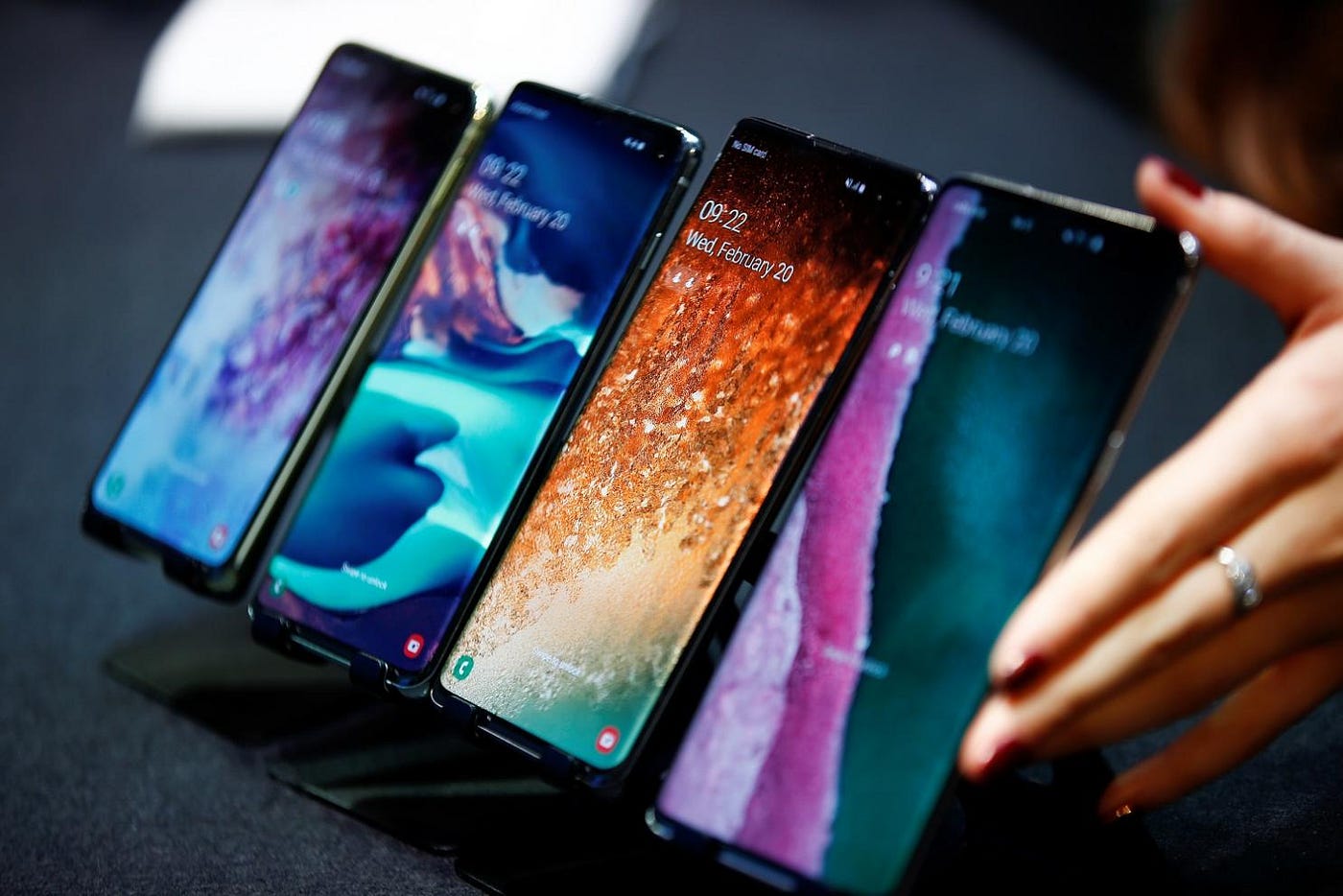
Smartphone bit rate

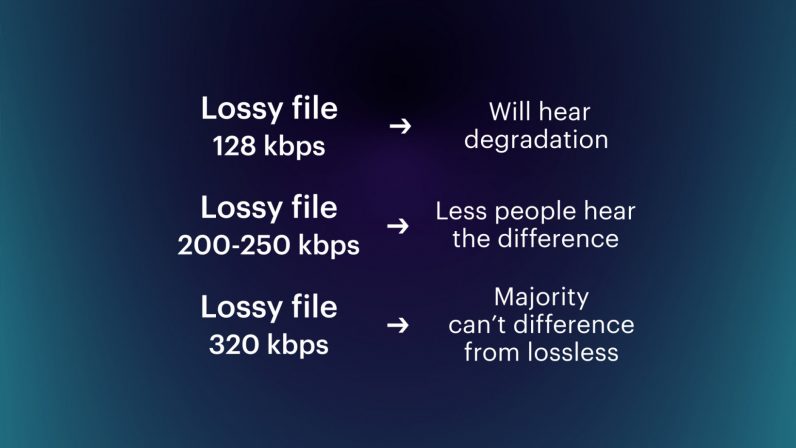
Generally, for lossy codecs like MP3, AAC, WMA, AC3, Vorbis, a voice bit rate of around 128 kbps is sufficient. On the other hand, if the video is geared towards sound quality, it should be around “192-320kbps”.

Three Points to Consider When Considering the Bitrate of Smartphone Videos

There are a few things to keep in mind when considering the bitrate of your smartphone video.

When creating a video, you should use the appropriate bitrate for factors like size, but when considering bitrate, you need to keep three points in mind.

Here, we will introduce three points to keep in mind when considering the bitrate of smartphone videos, so why not refer to what kind of points to keep in mind?

Bit rate notes 1: The numbers are just a guide.
The proper bitrate for smartphone videos is just a guide.

The bitrate of a video involves multiple factors, not just the size of the image. For example, if you want to save a video with a lot of movement in high quality and a video with little movement that you want to save in medium quality, the appropriate bit rate will be different even if the image size is the same.

So, consider the bitrate you need as a guide only.

Bit rate note 2: consider the resolution according to your purpose
Let’s decide the optimal resolution according to the purpose of the smartphone video.

Even if you call it a smartphone video, it does not mean that a video with almost no motion and a video with high motion should have the same resolution. It is important to select the one that suits your purpose, such as high resolution for videos showing precise movements and low resolution for videos with little movement.

Therefore, when considering the resolution of a video, consider what the video is about.

For seminar videos
Since the seminar video is almost motionless, no high resolution is required.

The seminars and training videos aren’t particularly poignant videos, so lower resolutions won’t be a problem. For example, there is not a big difference between a low image quality of about 300 kbps and a high image quality of about 1500 Kbps, so it is recommended to make a light and low quality video.

For promotional videos
For promotional videos, it is a good idea to have a certain resolution.

It is not attractive that the resolution is low and that the video does not look beautiful in the video for internal promotion. However, it depends on the content of the video itself, so if you are not sure about the resolution, it is recommended to prepare a higher resolution and a slightly lower resolution and compare them.

For sports videos
High resolution is best for sports videos.

The bit rate has the characteristic that it is required since the difference with the previous frame is greater, and it is necessary to set it higher for videos with a lot of movement.

Therefore, if the resolution of the sports video is low, the outline will be broken and the color will fade, resulting in a stressful video.

Bit rate note 3: consider file size
The higher the bit rate, the larger the file size.

Of course, it depends on the content of the video, but as the bitrate increases, so does the file size, so this needs to be taken into account.


Free Download Mp4Gain
picture


Mp4Gain Main Window
picture


Mp4Gain Features
picture


Free Download Mp4Gain
picture

What is the standard bitrate for smartphone videos? Part 2

What is the standard bitrate for smartphone videos? Part 2

smartphone bit rate

Video Terms to Remember 1: Resolution
Resolution is the number of vertical and horizontal pixels in a video.

Smartphone BITRATE

The higher the resolution, the better the image will look. For example, if you prepare the same image with the same resolution of “640 x 360” and “2560 x 1440”, the latter will be clearer in detail.

Also, both the resolution and the pixel refer to vertical and horizontal pixels, but in the case of the number of pixels, it is expressed by the total number, so if the resolution is “1980 x 1080”, the number of pixels will be “2,138,400”.

Video term 2: frame rate to remember
Frame rate is the number of still images per second of video.

The frame rate unit is “FPS (Frames Per Second)”. Since a video is made up of a collection of continuous still images, the higher the frame rate, the smoother the video. However, the amount of data will increase accordingly.

Therefore, it is important to set the frame rate to the appropriate size according to the purpose of the video.

Video Term 3: Codec to Remember
A codec is a codec that compresses and decompresses audio and video data.

The larger the size of the video, the greater the amount of data, and the higher the quality, the larger the file size. Therefore, it is necessary to compress the data with a codec.

For example, there are types such as “MPEG-4” and “MPEG-2” for video codecs and “MP3”, “AAC” and “FLAC” for audio codecs.

Estimated bit rate suitable for smartphone videos

For smartphone videos, the standard bit rate is “300 kbps” or “600 kbps”.

Taking as an example the frame size that is often used for inline distribution, if the frame size is 480 x 270 px, 360 x 270 px, the bit rate is “300 kbps” and if the frame size is 640 x 360 px, 480 x 360 px, the bit rate is “600 kbps” will be a guide.

What is the standard bitrate for smartphone videos?

What is the standard bitrate for smartphone videos?

Bitrate

In this article, we’ll give you an overview of bit rates, guidelines for suitable bit rates for smartphone videos, and points to keep in mind when considering bit rates for smartphone videos, so check them out.

smartphone bit rate

What is the important bitrate for smartphone videos?
Bit rate is a term that refers to the amount of data per second.

The amount of data that can be sent and received in one second, and the unit is “bps (bit per second)”. For example, at 1 bps, 1 bit of data can be sent and received per second, and the higher the bit rate, the more data can be transferred.

Therefore, when making smartphone videos, it is necessary to consider the bit rate that viewers can comfortably watch.

Relationship to screen size
The larger the screen size, the greater the amount of data required and, conversely, the smaller the screen size, the less the amount of data.

Therefore, there is a reference bit rate for each screen size. If the screen size is 480 x 360, the bit rate is 500 to 700 Kbps, if it is HD 1280 x 720, it is around 2000 Kbps, and if it is full HD 1920 x 1080, it is around 4000 Kbps It is a guideline for the bit rate.

Three video terms to remember in advance

When creating a video, be aware of the video terminology.

In recent years, there have been many cases of video distribution in companies. However, there are many technical terms in the video, so you need to know the meaning of the terms in order to understand the video properly.

Here are three video terms to remember beforehand, so why not take a look at what they are?

The Truth About High Bitrate Lossy Compression Part 3

The Truth About High Bitrate Lossy Compression Part 3

BITRATE

For most users of the MP3 format, the problem of high quality sound is usually phrased as follows: “256 or 320? Or maybe try VBR?”

Bitrate


And this question haunts them day after day. Not all recordings sound good at 256; there is a strong audible and visible (measured) loss in the high frequency range. When using VBR mode (the so-called variable bit rate stream), it often happens that music sounds better by ear than 256, but this should not be taken as a general rule of thumb. Encode low-value or poor-quality records – you can’t go wrong. I have selected the VBR parameters to get the highest quality for VBR.

For the commercial LQT format, there is only one encoder proprietary to the authors: Liquifier Pro. We push them. Note that the LQT format is originally based on VBR encoding, so there are simply multiple modes for it, such as “bad”, “good”, and “excellent”. Naturally, for our tests we took the “excellent” (audiophile) mode, which results in a stream of 192 to 256, most of the time 200-220 kbps. Let me remind you that the LQT format is based on the MPEG-2 AAC family of algorithms. Also, this is the highest quality AAC implementation to date (tested on analogs).

The OGG format is a relative of the MP3 format, but it contains a different psychoacoustic model and some technical innovations that MP3 does not have. For starters, OGG initially only supports VBR mode. The user sets the approximate bit rate and the encoder tries to compress as closely as possible. The range of variation is extremely wide: 8 to 512 kbps, and it is much more discreet than MP3. The top bar is up to 512 kbit / s, whereas nowadays MP3 encoders really only “pull” up to 320. You may ask “is it possible that even 320 is not enough?” Yes, it happens, but rarely.

Roxette samples
Well, we come to the most interesting part. Let’s start with my auditory sensations.

For MP3 in a 256 kbps stream, noise disturbances at high frequencies are clearly audible. Not only is a considerable part of them absent from the sound, but strong distortion, wheezing, clanging and other “charms” are also mixed in. This is a sign that 256 is clearly not enough, therefore you need to test higher. Let’s take a 320 compressed sample. The sound has changed significantly, this is a completely different matter: the upper part is in place, no differences by ear were found. For the purity of the experiment, let’s see what happens in floating flow mode. We obtain an average bit rate of 290 kbit / s, of which the conclusion suggests that 256 for the sample under study will not be enough. In fact, a sample encoded in VBR mode sounds a little better than 256, but it clearly falls short of 320. In the case of MP3, for high-quality compression, only encoding in 320 kbps mode is adequate, ie , to the maximum of opportunities.

Let’s take OGG as “modified MP3”. There are five approximate bit rates for the encoder: 128, 160, 192, 256 and 350. Well, let’s try 192 and 256. We will not take 350 bit rates, because we already know that MP3 at 320 kbps clearly transmits excellent quality, it seems that better not necessary. For 192 mode, we get an average stream of 226, and for 256 mode, up to 315 kbps. So far the precision. Such a large deviation from the reference point is a signal for sound material that is very difficult to encode; with a sample with a simpler density, the precision will be higher. To be honest, I tried to evaluate 320 MP3 and 315 OGG for a long time and came to the conclusion that they both sound almost identical to the original sound. But they are based on different psychoacoustic models and their sound coloration is different. Personally, I liked the MP3 a bit more. But, this is really a controversial issue; after all, the OGG encoder is just a beta version. When there is a release, I think it should surpass MP3 in quality. Comparing them separately to the original, I was inclined to believe that the OGG has an even closer sound to the original, but there is something wrong with the high frequencies of this encoder. Because of this, MP3 sounds a bit better. I don’t think it is necessary to say that in 350 mode (average bitrate was 365) OGG “perfectly” repeats the original.

Now we are talking about the little-known but widely advertised format as the “highest quality”: the LQT format. And most importantly, it sounds great overall, however after listening to it, I realized that I didn’t like its sound. It doesn’t distort high frequencies, like MP3 256 kbps, but it smears the sound and smears a lot. Loud sounds fade over time.

The Truth About High Bitrate Lossy Compression Part 2

The Truth About High Bitrate Lossy Compression Part 2

Bitrate

I decided to “drop” the three specified formats to get the highest quality sound with the minimum file size.

audio bitrate

For the test, we selected several samples (here a sample is a small fragment cut from a PCM file) from two types of compositions. The first is a very dense and loud sound with amplitude normalization (compacting the sound “vertically” to fit 16-bit from a 24-bit master) and compression of the dynamic range (so that the sound of all instruments is always strong). As the first type (as in my previous tests), the composition Crush On You from the album Have A Nice Day by Roxette was chosen, three samples of 15-20 seconds each of different parts of the composition were examined. The second sample is clean and transparent (acoustic or light orchestral arrangement).

Why these particular records? Roxette samples have very strong dynamic compression (the amplitude value is very often equal to the maximum (which is bad) and leads to overload of the playback equipment and strong distortions).

Roxette sample
In such samples, the encoders have to work in extreme mode, so any distortion becomes easily audible. encoding distortions add to the existing intrinsic distortions of the original. You ask “why then take a sample as a test?” It is necessary and how. The vast majority of albums released today are recorded this way. Therefore, the encoder must adequately accept clipping sound.

With Klaiderman’s samples, the situation is diametrically opposite. The original analog recording after a very high quality digital remastering was recorded to CD and without dynamic compression.

Clayderman sample
Great sound, very nice and smooth highs. We will pay special attention to them during the analysis, we will try to preserve them. But it is these frequencies that will be the most difficult for encoders to transmit.

the truth about high bitrate lossy compression

the truth about high bitrate lossy compression

bitrate lossy

Preface

bitrate lossy

In the understanding of most people, the word music lover is most often associated with a person who not only loves and collects music, but also appreciates high-quality music, and not only in artistic and aesthetic terms. but also the quality of the recording. of the phonogram itself. Think, a few years ago, an audio CD was considered the standard of music quality, but a computer, even in dreams, could not compete with the quality of a CD. However, time is a great joker and he often likes to turn things upside down. It would seem that quite a long time passed, one or two years and … that’s it, the CD on the PC went into the background. Don’t ask “why?”, You know the answer to this question yourself. Everything is to blame for the revolution in the world of sound on a computer: audio compression (hereinafter referred to as audiolo compression which means lossy compression to reduce the size of the audio file), which made it possible to store music on the hard drive, lots of music! In addition, it was possible to exchange it over the Internet. New sound cards have been released, capable of squeezing almost studio quality out of a piece of hardware that seems useless in terms of music. Today, even having a computer that is not very smart in performance, having bought a Creative SoundBlaster Live! And remembering that since the Soviet times there is a good amplifier and good acoustics, you will get nothing but a high-quality music center, the sound of which is inferior only to very expensive audio equipment (mid-range or even high-fidelity hi-fi). ). Add to this the general availability of music files and you know you have the power at your fingertips. And then there is a revolution, and you understand that a compact disc is no longer so convenient, you are fascinated by something completely different: the magic signs of the “MP3”. He cannot eat or sleep; faces the seemingly insoluble question of the “chicken and egg”: how to “squeeze” and, more importantly, how to “squeeze” …

This is where I will help you. This article is the beginning of my new series of informational materials on music on the computer. For over a year maintaining an extensive database of MP3 files, I have accumulated a great deal of research on audio compression. It is these studies that I will try to share with you. Several respected authors have written many articles on audio compression, so I will try not to write what I can easily find in other sources of information. I would like to express my position on the subject under discussion simply and clearly. We will not consider audio compression to be as compact a tool as possible put audio information on your hard drive (so that you can record so many hours of music there). Yes, compression allows you to record music more compactly, but my goal is to minimize quality loss by converting “pure” audio to compressed. That is why only high bitrates and encoders that compress qualitatively are considered in these modes. So it is much more convenient to work with compressed audio – instant access to any track from any album, convenient software for playback. And, of course, the financial issue has not been forgotten either.

Of the audio compression formats that exist today, three deserve attention, in my opinion: MP3 (or MPEG-1 Audio Layer III), LQT (as representative of the MPEG-2 AAC / MPEG-4 family) and the completely new OGG format (Ogg Vorbis) developed by a group of enthusiasts:

MP3 is by far the most widely used of these (mainly because it is free). Let me remind you that it was thanks to the MP3 format that the victorious procession of compressed audio took place. However, as is often the case with pioneers, little by little it is losing ground and giving way to new and better formats.
The second format, LQT, is a representative of a new direction of audio coding algorithms, a representative of the AAC family. This is a fairly high quality, but commercial and highly classified format.
OGG became widely known to the public this summer and is currently developing rapidly, soon (with the release of the Encoder and Decoder) it should beat MP3 with better sound quality with smaller file size.
I will not give a detailed description of technologies and formats here, you can easily find them yourself. There will only be facts, conclusions and recommendations. I plan to present my research separately for each format in separate articles.

What is the video and audio bit rate?

What is the video and audio bit rate?

Bit Rate

Do you like video production or do you value high quality in movies? You’ve probably come across something like bitrate. It always accompanies the technical characteristics of video recordings and its value determines the quality of the image in the file. When working with converters, you will come across this feature more than once, so it is advisable to fully understand what it is responsible for and how it affects the final product: a video or an audio file.

bitrate

To find out what bit rate is, it is worth understanding how video information transmission works. Any video is a rotating sequence of images. In order not to have a “slideshow feel”, the image change speed must be at least 24 frames / sec. Each box has parameters: width and height. The higher they are, the more pixels are placed in an image, the higher the quality.

Each “point” that makes up a frame has a weight and is equal to 1 byte. Let’s take a Full HD picture and calculate its weight – about two megabytes will be released (1920 x 1080 = 2073 600). So one second of video, containing 24 frames, would weigh 48MB. This is where the concept of bitrate comes in: it is the power to compress a video.

Those. the required file, being encoded, loses weight. But due to strong compression, it may also lose quality. Of course, in reality, not everything is so simple; Much depends on the codec used for encoding. This is the name of the direct compression method. So videos in different formats, but with the same bitrate, can produce images of different quality. The concept of “audio bit rate”, denoting the strength of compression, is also applicable, but for an audio stream.

Bit rate types
Delving into the topic, it is worth noting that the bitrate is not always the same. And now we are not talking about a quantitative indicator, but about a division into types. To work competently with media conversion, read about three types of bitrate: constant, variable, and average, which is a hybrid of the first two.

Constant Bit Rate (CBR)
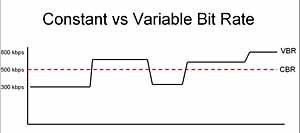
As the name implies, this type of bit rate does not change during file playback. This compression method allows you to fairly accurately determine the size of the output file and ensure consistent quality throughout your listening or viewing session. But in the entertainment industry, constant bitrate is rarely used due to the impossibility of adjusting it. for dynamic playback, because the files get bigger than they could be.

Variable Bit Rate (VBR)
This type of bit rate is flexible and resistant to change, as a result of which it can be adjusted to the playback object and produce an optimal size / quality indicator. For example, for pictures or musical pieces with a reduced information density, the bit rate will decrease, thus reducing the weight of the object.

Average bit rate
This view is a compromise between the previous ones. The problem with variable bitrate is that changes are automated, and sometimes overcompression can occur. Average bitrate allows the user to set the range in which compression variation will occur. True, the technique of its use is not so simple and is mainly used in professional studios when working on serious projects. An additional advantage of the average bitrate is that it allows you to more accurately calculate the file weight even when the compression force changes.

What is the best bit rate for video and sound and what is it?

What is the best bit rate for video and sound and what is it?

Audio bit depth - Wikipedia

Common characteristics of video and audio recordings include the so-called bit rate.

bit rate

Some users do not know how important this figure plays when playing files, along with their size and resolution. What is the bit rate? The bitrate is the number of bits that are used to process and transmit data during a certain period of time. This measurement is used to measure the effective transmission rate on a data stream channel.

In other words, this is the minimum value of the channel capable of passing the flow without delay. The measure of video bit rate is bits per second and its derivatives (kbps, Mbps, etc.). In audio and video transmissions that use degrading compression, this term refers to the degree of compression of the transmission.

Consequently, it indicates the size of the channel within which compression took place. Compression modes In practice, there are three modes of stream compression that cause quality loss: Constant Bit Rate (or CBR). In this encoding option, the initial bit rate is set by the user and then does not change for the entire duration of the audio or video. Its advantage is that it is quite easy to calculate the size of the final file. However, this encoding is not very suitable for audio files that have dynamically changing sound, as it does not provide a good size / quality ratio.

Variable bit rate (or VBR). The bitrate value is selected by the codec, depending on the parameters (the expected quality level). During the encoded fragment, the value of the bit rate may change. When audio is compressed, the required bit rate is set based on the psychoacoustic model. This encoding achieves the best sound quality ratio, but it is difficult to calculate the exact size of an audio or video recording. It can be very different. Average Bit Rate (or ABR).

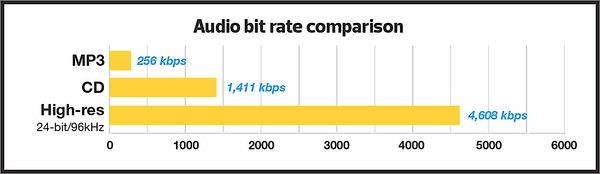
This is a hybrid of the first two modes. The initial value of the bit rate is set by the user, but then independently changed by the program within certain limits. At the same time, the difference with VBR is that the codec uses the maximum and minimum values ​​within the limits set by the user, and does not exceed them. This encoding allows you to set the processing speed in the most flexible way and allows you to determine the file size with greater precision. Where are the Users and AppData folders and what is stored in them What and how is it measured? When quantifying high data rates, metric or decimal prefixes are used. It looks like this: Speed ​​1000 bps = 1 kbps (one kilobit or one thousand bits per second). Speed ​​1,000,000 bps = 1 Mbps (one megabit or one million bits per second). Speed ​​1,000,000,000 bps = 1 Gbps (one gigabit or one billion bits per second). What bit rate should I choose? When it comes to the common MP3 audio format, it is the audio compression that results in data loss. The higher the bit rate, the better the sound quality. Speaking of the choice of the bit rate for this format, we can say the following: 32 kbps: very low quality sound (valid only for voice recording); 96 – May be applicable for low quality audio transmission or voice recording; 128 and 160: allows you to encode music recordings at an entry level; 192 – music encoding in acceptable quality; 256: high quality music recording; 320 is the highest quality that can be achieved in MP3 format. In video formats, this value is calculated differently. For example, for videos on YouTube, a bit rate of 10-16 Mbps at 720p is sufficient. This will achieve a clear image and a small file size. If better image quality is required, this value can be increased to 18-25 Mbps. The highest image quality will be achieved at 50 Mbps and 1080i resolution. In general, the effect of bit rate on video quality is expressed as follows: Yandex.Direct18 + Start your journey from the station Start on your home planet, explore the universe and find intelligent life in the universe. MORE DETAILS XCRAFT.RU 18+ Read Glukhovsky’s new novel “Post” Exclusively on Booknet, a new post-apocalyptic novel by Dmitry Glukhovsky. MORE DETAILS LITNET.COM 400 kbps: low quality video at 240p; 750 kbps, 1 Mbps: can be used for some YouTube videos at 360p and 480p, respectively; up to 1.15 Mbps – compressed video in VCD format; 2.5 and 3.8 are compressed YouTube videos recorded at 720p; 4.5 and 6.8 are sharper, but still compressed YouTube videos using 1080p; 9.8 – DVD video recordings.

Data compression modes: CBR and VBR

Data compression modes: CBR and VBR

CBR and VBR

Often times an inexperienced (and even sophisticated) DVR owner has a question: “What’s behind the CBR and VBR abbreviations in the recording channel settings?”

CBR and VBR in mp4 H264 video files | Internet with a BrainCBR and VBR

In fact, if everything is clear with the video settings (720p, 1080N, 1080p are already established formats in the world of video surveillance), then with the audio settings not everything is so transparent.

The sound from the microphone connected to the recorder is encoded in MP3 format. Today, the MP3 format is the most popular audio file encoding format of all the existing ones. It is generally accepted that the quality of an audio track depends on its bit rate, therefore the most optimal bit rate for an audio track is 192 kbps. This statement, however, is one-sided, because in addition to the bit rate, the sound quality depends on the codec in which the audio was recorded.

There are three main types of MP3 file encoding: CBR, VBR, and ABR. The ABR type is intermediate between the other two and is not used in video surveillance. Therefore, in this article, we will only consider the CBR and VBR encoding types.

CBR (constant bit rate) stands for constant bit rate, which was set by the user during recording or encoding and does not change in the future. That is, regardless of the data type (even if you are recording silence), the number of bits specified by the user is constantly encoded in 1 second. The consequence of this type of encoding is the cumbersome amount of data received, which is a waste of disk space.

VBR (Variable Bit Rate) translates from English as a variable (variable) bit rate. By encoding in VBR, we get a file, the bit rate of which changes depending on the density of the data stream (that is, for example, the bit rate of silence will be less than the bit rate of any sound). This type of encoding continues to improve, reaching new indicators of the amplitude of changes in the bit rate of the data stream. The main disadvantage is that it is impossible to predict the future size of the encoded file. Despite this, this minus sign does not obscure the overall picture in any way – the file size turns out to be smaller than when encoded as CBR. This is due to the fact that the bit rate of silence (s) is lower. Obviously, this format is more acceptable for video surveillance tasks than CBR.

Estimated Compressed Video Quality Parameters

Estimated Compressed Video Quality Parameters

Bitrate

Estimated compressed video quality parameters.

Bitrate

If you have ever used video stream compression programs, you have probably come across parameters such as the size (size) of the output file or its bit rate among the characteristics of the output file, and wondered: how to choose the correct value?

Sound files
As a general rule, these problems do not arise with audio files, because the quality of the sound is determined almost unambiguously by its bit rate (that is, the reproduction rate of the transmission, usually expressed in kilobits per second). If we see that the bit rate of a compressed audio file (mp3) is 128 kpbs (kilobits per second), then we understand that the sound quality corresponds to a CD disc, if it is 64 or 96 kbps, then this already It is low. sound quality, if 256 kbps is High quality studio sound, etc.

Although within itself the sound quality is also characterized by parameters such as the sampling frequency, but as a general rule this parameter is already included in the bit rate and, therefore, the sound quality is usually determined by the Bit rate. Those. if we see an mp3 file with music with a description that is compressed with a quality of 128 kbps, then we already want to say that it is stereo sound with a sampling frequency of 44 or 48 khz.

Introductory
With video, things get a bit more complicated. The video has parameters such as size and frame rate. Therefore, knowing just one bit rate is not enough; you need to additionally know the frame size and the number of frames per second. Therefore, looking at the video parameters, for example, 640×480 (frame size), 25 fps (frames per second), 1300 kbps (bit rate), it is difficult for a beginner to say anything about its quality, even approximately. Similarly, setting the parameter 1300 kbps when compressing video, it is not clear what we get in the output. And this is essential, since the process of recompressing video movies takes several hours.

The quality of the video stream compression is most unequivocally determined by the “bits / pixel” ratio, which means the average number of bits spent in 1 pixel of the image. Also, I will denote this coefficient with the letter K (because I don’t know how it is normally denoted).
If we take a 24-bit color depth encoded in RGB format (that is, when the red, green and blue channels are encoded at 8 bits per channel), then the uncompressed video stream will have a value of K = 24. The Modern video codecs give a good quality picture at a fairly low K value. For XviD and DivX codecs, good image quality will be at a K-value in the range of 0.25-0.35, for H264 – in the range 0.15-0.2 (that is, the video stream is compressed by file size more than 100 times relative to uncompressed). I don’t know the values ​​of other codecs, but the worse (older) the codec is, the higher the value of K, in which there will be a good image quality.

The coefficient is calculated using the following formula:

The code:
K = (size * 8) / (width * height * fps * time)
Where:

size: size of the video stream in bytes
width, height – frame size (width and height) in pixels
fps: number of frames per second
time – video transmission time in seconds
At the same time, don’t forget that 1 kilobyte equals 1024 bytes (not 1000) and consequently 1 megabyte equals 1024 kilobytes = 1048576 bytes.

It should be understood that the above K values ​​for codecs are taken for “average” video. If the video is a hand-drawn cartoon or a flash cartoon, then the quality will be good even with lower values ​​of the coefficient. If the video contains a lot of movement and constant changes in color and brightness (for example, an anthill), then for good quality the video should be compressed with a higher value of the coefficient. If you do not need a clear image (for example, when you need to shoot some physical exercises, but at the same time the clear contours of the face and surrounding objects are not important to us), then the coefficient can be reduced. Etc.

Typically, compression programs ask you to specify the bit rate (usually in kilobits per second) or the size of the target file (usually in kilobytes). Starting from the fact that the bit rate is the file size in bits divided by the time in seconds, the corresponding parameters are calculated using the formulas