What is bit rate? Knowledge of the MP3 audio format. Part 2


Free Download Mp4Gain
picture

What is bit rate? Knowledge of the MP3 audio format. Part 2

bit rate
bit rate

Bitrate is a benchmark indicator of the efficiency of digital music compression.

bit rate.
bit rate

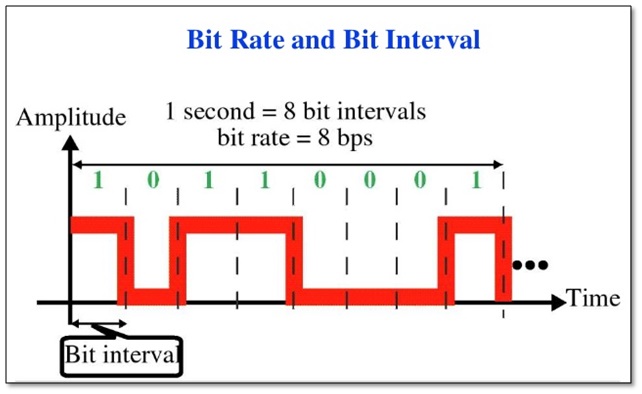
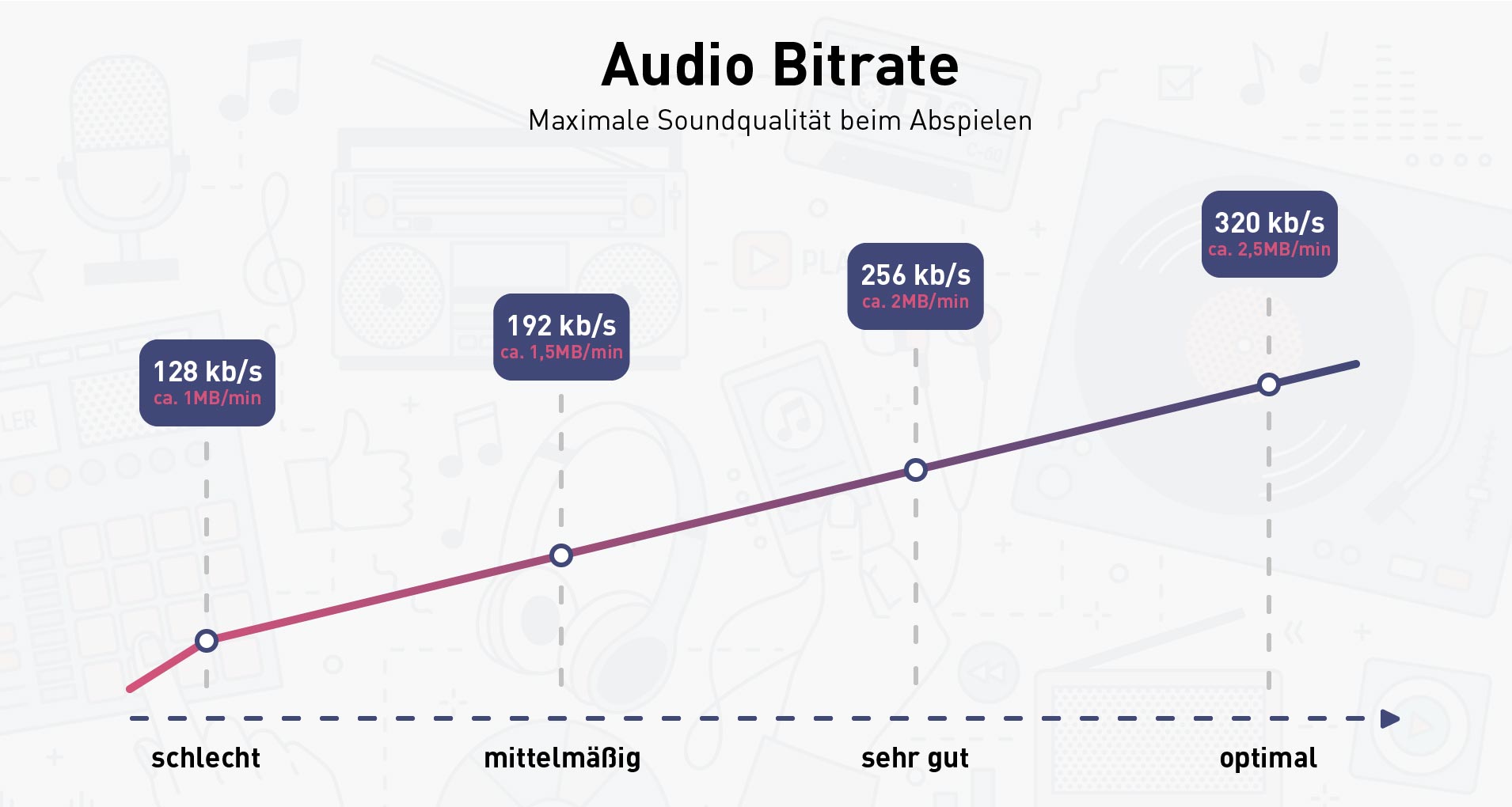
The bit rate represents the number of bits bps (bit per second, bits per second) transmitted per unit of time (1 second). We usually use kbps (in simple terms, it is per second) clock 1000 bits) as the unit. The bit rate of digital music on CD is 1411.2 kbps (ie recording 1 second of CD music requires 1411.2 × 1024 bits of data). The higher the bit rate of the music file, the more data (Bit) must be processed in a unit of time (1 second), and the better the sound quality of the music file. However, when the bit rate is high, the file size increases, which will occupy a large amount of storage capacity. 8 to 320 kbps.

1. WMA (Windows Media Audio, Windows Media Audio)

As a Microsoft media compression method, it is a part of the technology that only compresses audio data in Windows Media Technologies. The sound quality is similar to MP3 and can be compressed with half the technology of MP3. It has the copyrighted Windows Media Rights Manager and can be played by installing it in WMP (Windows Media Player, Windows Media Player). Due to the strong influence of Microsoft and Windows, as well as major copyright reasons, the major American record companies, EMI and BMG, officially confirmed that they use the WMA method developed and produced by Microsoft. It is believed that this advanced method will become even more popular in the future.

2. MP3 (CBR, VBR, ABR)

MP3 is currently the most widely used and widely used lossy compressed digital audio format. It has been explained above and will not be repeated here.

CBR (constant bit rate)

CBR is the oldest and simplest MP3 encoding (compression) method. When this method is used for encoding, the bit rate of the entire file is the same, in other words, the bit rate used by the MP3 file per second is the same. Although the music file has sections of varying complexity, the encoder always keeps the bitrate constant, unless you use the highest sound quality; otherwise the sound quality of the different sections of the MP3 file will vary. The more complex the passage, the worse the sound quality. Its biggest advantage is that the file size is fixed, which is convenient for calculating storage space.

VBR (Variable Bit Rate, Variable Bit Rate)

VBR is a variable encoding rate MP3 compression method. Its principle is to encode the complex part of a song with a high bit rate and the simple part with a low bit rate. Through this dynamic adjustment of the encoding rate, the sound quality can be improved. additionally obtained and the size of the file. Its main advantage is that the entire song can approximately meet our sound quality requirements, but the disadvantage is that the size of the compressed file cannot be estimated during encoding.

Most MP3 players released now support VBR, but although some machines can play songs in VBR format, they can’t display the playing time correctly. Nowadays, a lot of high-quality MP3 music is encoded in VBR.


Free Download Mp4Gain
picture


Mp4Gain Main Window
picture


Mp4Gain Features
picture


Free Download Mp4Gain
picture

What is bit rate? Knowledge of the MP3 audio format.

What is bit rate? Knowledge of the MP3 audio format.


bit rate
bit rate

Digital audio formats are audio signals that are recorded, processed, and reproduced in digital form.

bit rate
bit rate

The emergence of digital audio formats is to meet the needs of high-fidelity playback, storage and transmission. Simply put, early analog audio formats had issues with playback distortion and glitches due to media wear. Since the advent of the CD, digital format audio files have become popular, but another problem has arisen: the limitation of the storage volume, and the CD still has the phenomenon of wear. Saving to hard drive (relatively longer storage time) is not a good solution when storage media (mainly hard drives) are still expensive at the time. The rise of the Internet has created a requirement for long-distance file transmission. Under the restriction of bandwidth, the demand to reduce file size has become more intense. All this has led to the generation of lossy compressed digital audio formats from external factors!

In terms of internal factors, with the improvement of computing and coding capabilities, the progress of various acoustic psychological models has promoted the emergence of various lossy compressed digital audio formats. Some of the most commonly used audio formats in MP3 players are briefly introduced below: MP3 (CBR, VBR, ABR), WMA, WAV, ADPCM, and the emerging audio formats AAC, ASF, and OGG.

Before introducing various digital audio formats, let’s clarify one concept: bitrate.

In the field of computing, all information is digitized. Bit is the smallest unit of data in a computer, it refers to a number of 0 or 1, which is a mathematical binary number, a “0” or “1” , is a bit. For example, when we say a 2-digit number, it means that it is a two-digit binary number, and there are 4 combinations of “00”, “01”, “10” and “11”, which represent 0, 1, 2 and 3 is four numbers.

What sound quality is better than 320 or 128?

What sound quality is better than 320 or 128?

Bit Rate

What are bit rates? How do they affect the quality of music and video? Optimal bit rate for various musical styles

Bit Rate

There is a lot of talk these days that we have lost real music with the advent of compressed audio formats like MP3, AAC and the like. Is it really so? Will lossless music save music? Can an inexperienced listener tell the difference between MP3 and FLAC music? Let’s take a look at this problem.

What is Bitrate?

You’ve probably heard the term “bitrate” before, and you probably have a basic idea of ​​what it means, but it might be a good idea to familiarize yourself with its official definition to find out how it all works.

Bit rate is the number of bits or the amount of data that is processed over a period of time. In audio, this generally means kilobits per second. For example, the music you buy from iTunes is 256 kilobytes per second, which means that every second of the song

The higher the bit rate of the track, the more space it will take up on your computer. Audio CDs typically take up quite a bit of space, so it has become common practice to compress these files so that you can burn more music to your hard drive (or iPod, Dropbox or whatever). This is where the “lossy” and “lossy” formats conflict.

Lossless and Lossy formats: what’s the difference?

When we say lossless, we mean that we haven’t really changed the original file. That is, we copy a track from the CD to our hard drive, but we do not compress it to the point of losing data. Essentially the same as the original CD track.

However, most of the time, you will probably extract your music in Lossy format. That is, you took a CD, copied it to your hard drive, and compressed the tracks so they don’t take up a lot of space. A typical album is probably about 100MB. The same lossless album as (aka Apple Lossless) will be about 300MB in size, so it has become common practice to use lossy formats for faster boot times and more hard drive savings.

The problem is that when you compress a file to save space, you are removing chunks of data. Just like when you take a high-quality image and compress it to JPEG, your computer grabs the raw data and “tricks” certain parts of the image into being basically the same, but with some loss of clarity and quality.