What is bitrate?


Free Download Mp4Gain
picture

What is bitrate?

Bitrate

Bitrate

Bitrate

Bit rate: the number of bits of information used to store or transfer one second of data transmission: video and / or audio recordings, including compressed ones.

Bit rate is expressed in bits per second (bit / s, bps), as well as derived values: kilo (kbps, kbps), mega (Mbps, Mbps), etc.

For streaming video and audio formats (such as MPEG and MP3) that use lossy compression]], the bit rate expresses the degree of compression of the stream. Most of the time, the video and audio bit rate is measured in megabits per second.

Increasing the bitrate provides a significant increase in video recording quality, which is especially noticeable when shooting dynamic scenes and small details.

Encoding modes
There are three compression modes for data transmission:

CBR (constant bit rate): with constant bit rate;
VBR (variable bit rate): with variable bit rate;
ABR (Average Bit Rate): with an average bit rate.

Constant bit rate
Constant Bit Rate, CBR – A variant of streaming data encoding, in which the required bit rate is initially set, which does not change throughout the file.

Its main advantage is the ability to predict the size of the final file fairly accurately.

However, the constant bitrate option is not very suitable for video or audio content, the dynamics of which change over time, as it does not provide an optimal size / quality ratio.

Variable bit rate
With a variable bit rate, the VBR codec selects the value of the bit rate based on the parameters (the level of the desired quality), and during the encoded segment, the bit rate may change.

This method provides the best quality / size ratio for the output file, but its exact size turns out to be very unpredictable. Depending on the nature of the sound (or image, in the case of video encoding), the size of the resulting file may differ several times.

Average bit rate
Average bit rate, ABR is a hybrid of constant and variable bit rates: the value in Mbps is set by the user and the program varies it within certain limits. However, unlike VBR, the codec is careful to use the maximum and minimum possible values, without risking going beyond the average specified by the user. This method allows the most flexible setting of the processing speed and with much higher precision (compared to VBR) in predicting the output file size.


Free Download Mp4Gain
picture


Mp4Gain Main Window
picture


Mp4Gain Features
picture


Free Download Mp4Gain
picture

What is digital audio?

What is digital audio?

Digital Audio

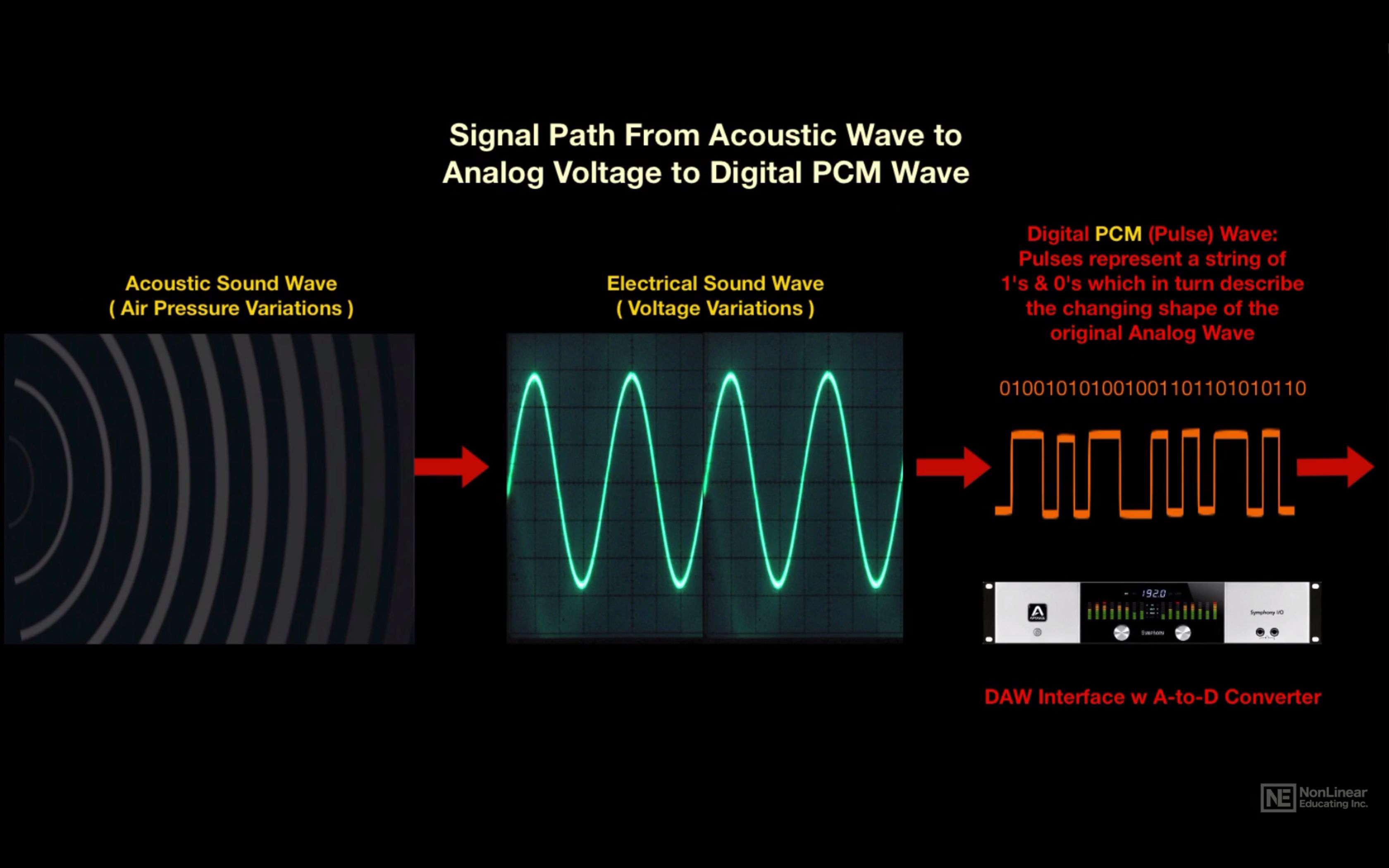
Digital sound is nothing more than a combination of numbers.

DIGITAL AUDIO

With a certain algorithm, sound, such as air pressure, is converted into data streams and encoded for further processing and playback. Depending on the algorithm used, the music file has one format or another, one or another extension.

Remember that along with digital sound, there is analog sound, which is represented by a continuous electrical signal that reflects the change in the sound wave. The analog to digital sound conversion is a setting of the numerical value of the amplitude at a given time with a given density of values. Consequently, the more values ​​that are recorded, the more reliable and accurate the image of the digitized sound fragment is recreated. With such digitization, very voluminous data matrices emerge that, depending on the format used, differ in the sound quality / volume ratio of the final file.

Perhaps the main advantage of digital audio over analog is the ability to store and copy data indefinitely without losing the original quality (whereas when copying from one analog medium to another, a decrease in recording quality is quite noticeable).

The most widespread and popular digital audio format today is MP3 (MPEG Layer 3). It was developed, after a series of intermediate formats and investigations, started in 1987, by the Fraunhofer Institute in Germany.

The developers of the format were faced with the task of simplifying and reducing the cost of shipping long musical fragments. As you know, one minute of a stereo signal from a CD (16 bit, 44.1 kHz sample rate) takes up about ten megabytes of memory. At the same time, unlike text or graphic files, the audio signal cannot be compressed without loss of quality. Thus, modem transmission of an uncompressed composition from an audio CD lasting 3 minutes at a data transfer rate of, say, 24 kbps will take several hours. Scientists at the Fraunhofer Institute managed to achieve multiple file size compression: on average, one minute of a compressed audio signal in MP3 format takes about 1 megabyte. The principle of compression is based on the removal of “unnecessary” sounds from the music file, to which the human ear is immune, or which duplicate each other.

The main factor that determines the relationship between file size and sound quality within a given format is the bit rate. Bit rate is an indicator of how much information a second of sound encodes. The higher it is, the less distortion and the closer the encoded composition is to the original. The most common on the Internet are compositions with 128 and 192 Kbps bitrates. The maximum bitrate supported by programs and devices that work with MP3 is 320 Kbps. In practice, only an expert or a professional who works with sound can notice the differences between an MP3 file with a 320 bit rate.

To optimize the size of MP3 music files while maintaining decent quality, a variable bit rate (abbreviation VBR – variable bit rate) is used. In this case, the encoding program divides the file into fragments of different spectral saturation and encodes them with a suitable bit rate. Most modern MP3 players support variable bit rate playback. A significant advantage of MP3 files is that they can contain the name of the artist, the name of the track and the album, the year of its release, etc. The set of this data is called ID3 tags. Most modern gamers can read and display them on the screen.

In 2001, Swedish Coding Technologies and Thomson Multimedia developed the MP3 Pro codec. It is MP3-based and as a result is fully MP3 backward compatible and only partially forward compatible. It uses SBR (Spectral Band Replication) technology, so the codec provides good quality at low bit rates. However, the encoding quality at medium to high bit rates is inferior to that of most other codecs. For this reason, this format is mainly used for broadcasts on the Internet and demonstrations of fragments of new musical compositions.

Another type of MP3 was the development of MP3 Surround, recently introduced by the creators of MP3: the Fraunhofer Institute. This format repeats all the characteristics of multi-channel sound, while still being compatible with standard stereo MP3: information describing the spatial characteristics of the sound is recorded on an additional track. By playing files of this format on special equipment capable of reading this track, you can obtain surround sound that conforms to the Surround 5.1 standard.

The beginning of the digital age

The beginning of the digital age

digital audio

binary code

digital audio

Although digital audio is the standard of music these days …

It has not always been this way.

Music originally existed only in the form of sound waves.

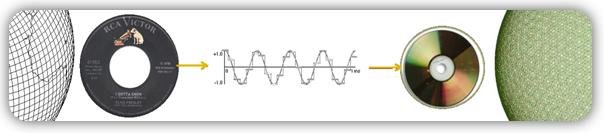
Then, with the development of technology, ways were discovered to convert it to other formats, such as:

Musical notation
electrical signals in cables
radio waves in the atmosphere
request on vinyl record
But more recently, in the age of computers, digital audio has become the main recording format, making it easy to copy and transfer songs.

The device that made this possible is called … digital converter.

Also, on how it works …

2. Digital converters
In recording studios, digital converters exist in 2 versions:

as a standalone device in top studios or …
as part of an audio interface in home studios.
To make binary code out of sound, they take tens of thousands of images (samples) per second to build a rough image of an analog wave.

This image is not entirely accurate, because in the moments between samples, the converter has to guess what is happening.

digital wave

As seen in the graphic above:

the red line shows an analog signal and …
black line shows conversion …
The results are not ideal, but sufficient to produce excellent sound quality.

And the difference depends mainly on …

3. Sampling rate
Take a look at this image:

sampling rate circuit

As can be seen …

By capturing more images per second, higher sampling rates:

Collect more real information,
Use less guesswork,
Creates a cleaner display from an analog signal
And in the end, you get the best sound quality.

Now let’s talk about specific numbers:

Standard sample rates in professional audio:

44.1 kHz (CD)
48 kHz
88.2 kHz
96 kHz
192 kHz
44.1 kHz is the minimum sample rate due to a mathematical principle known as …

Kotelnikov’s theorem (Nyquist-Shannon)
To accurately record digital audio, converters must capture the full spectrum of human hearing between 20 Hz and 20 kHz.

According to Kotelnikov’s theorem …

Capturing a specific frequency requires at least 2 samples per cycle … to measure both the high and low points of a wave.

This means that a sample rate of 40 kHz or more is required to record frequencies up to 20 kHz. Therefore, the sampling frequency of CDs is slightly higher, 44.1 kHz.

Kotelnikov’s theorem

Cons of a high sample rate
Although the higher the sample rate, the higher the sound quality … but this just doesn’t happen.

The cons are:

Requires a lot of computing power
Less clues
Large audio files
So this is a constant search for a compromise. Professional studios find it easier to deal with high sample rates because they have the best equipment.

However, for most home studios, the standard 48 kHz sample rate is appropriate.

How does encoding work in digital audio? Part 5

How does encoding work in digital audio? Part 5

encoding digital audio

DSD offers significant advantages over PCM:

encoding digital audio

more precisely draw a wave;
increased immunity to noise;
an easier way to change and transmit a digital stream;
In theory, it is possible to reduce cost by simplifying DAC circuits, but due to backward compatibility, manufacturers are unlikely to do so.
Originally, SACDs used the DSD x64 format with a sample rate of 2822.4 kHz. The 44.1 kHz audio CD sample rate was taken as the basis, increased 64 times, hence the name x64. The following DSDs are currently in use:

x64 = 2822.4 kHz;
x128 = 5644.8 kHz;
x256 = 11,289.6 kHz;
x512 = 22,579.2 kHz;
declared DSD x1024.

DXD
There is a certain intermediate format between PCM and DSD called DXD – Digital eXtreme Definition. This is, in fact, high definition PCM: 352.8 kHz or 384 kHz with 24 or 32 bit quantization. It is used in studies for the processing and subsequent mixing of materials.

But this approach is flawed: firstly, it does not allow to use all the advantages of DSD, and secondly, the file size is larger than in DSD. At the moment, flagship DACs on the I2S input accept a PCM data stream with a sample rate of up to 768 kHz and a bit depth of up to 32 bits. It’s scary to even consider how much hard drive space an album will take up at this resolution.

DSD has practically separated from SACD. Now, the DSD format can often be found packaged in files with the DSF and DFF extensions. Many turntables have been released with the ability to record in DSF and DFF, lovers of good sound are increasingly digitizing vinyl records in the DSD format. But in recording studios, nobody wants to invest in unpopular formats, so they continue to rivet the sound with a minimum wage: 44.1 × 16.

DSD switching and data transmission
To transfer a digital transmission to DSD, a three-pin connection scheme is used:

DSD Clock Pin (DCLK) – sync;
Data input pin DSD Lch (DSDL) – left channel data;
Data input pin DSD Rch (DSDR): Right channel data.

Unlike I2S, DSD data transmission is extremely simplified. DCLK sets the clock rate of the bit sync, and the left and right channel data is transmitted sequentially through the DSDL and DSDR pins, respectively. Here there are no adjustments, recording and playback in DSD is done little by little. This approach provides the closest approximation to the analog signal, and due to the high frequency, the quantization noise is reduced and the reproduction precision is increased by an order of magnitude.

PDO
DoP is often used to carry DSD data streams, so it’s worth mentioning. DoP is an open standard for transferring DSD data over PCM frames (DSD over PCM). The standard was created to transmit a stream through controllers and devices that do not support direct DSD streaming (not native DSD).

The principle of operation is as follows: in a 24-bit PCM frame, the upper 8 bits are padded with ones; this means that DSD data is currently being transmitted. The remaining 16 bits are sequentially filled with DSD data bits.

For x64 DSD transmission with a single bit rate of 2822.4 kHz, a PCM sample rate of 176.4 kHz (176.4 x 16 = 2822.4 kHz) is required. For DSD x128 transmission at 5644.8 kHz, a PCM sampling rate of 352.8 kHz is already required.

How does encoding work in digital audio? Part 4

How does encoding work in digital audio? Part 4

encoding digital audio

When playing PCM 44.1×16, the most significant bits are simply ignored as they are filled with zeros, or, in the case of older multi-bit DACs, they can go to the next frame. The length of the “word” (WS) may also depend on the player through which the music is played, as well as the driver for the playback device.

encoding digital audio

An alternative to PCM and I2S would be to record the audio signal in DSD. This format was developed in parallel with PCM, although Kotelnikov’s theorem had some influence here. To improve sound quality compared to CDDA, the emphasis was not on increasing the quantization bit, as in the DVD Audio format, but on increasing the sample rate.

DSD
DSD stands for Direct Stream Digital. It originates from Sony and Philips labs, however, just like the other formats discussed in this article.

SACD
DSD first saw the light of day on Super Audio CDs in 2002.

At the time, SACD looked like a masterpiece of engineering, applying a completely new way of recording and playback, very close to analog devices. The implementation was simple and elegant.

The media was even equipped with copy protection, although without it, no pirate was afraid. Under the Sony and Philips brands, they began to produce “closed” devices exclusively for playback, with no possibility of copying discs. Manufacturers sold recording equipment to studios, but kept control over the SACD launch.

Who knows, perhaps the SACD format could gain comparable popularity to Audio CD, if it weren’t for the cost of the playback devices. By unreasonably selling out player prices, Sony and Philips’ own leaders stymied the popularity of their format. And the next mistake put an end to the sale of specialized devices. To promote the Sony PlayStation game console, Sony engineers have added the ability to listen to SACD on it. Hackers immediately hacked the set-top box and began to copy SACD discs into ISO images, which can be burned to a regular DVD disc and played on any competing player; others simply ripped out tracks to play on a computer.

Record labels are good too: contrary to what music lovers expected, they did not take full advantage of the new high-definition format. The studios did not record music from the master tape in DSD, instead they took a digital recording in PCM, remixed and processed everything in a row: limiters, compressors, noise-shaping dithering, and various digital filters. The result was a sound so sterile and dry that even CD Audio could have sounded much better. Thus, listeners’ trust in the SACD was undermined, and at the same time in the new formats in general.

INFO
Unfortunately with vinyl records this vicious practice continues to this day: studios print vinyl from a digital recording, even if they have the recording on the master tape. So on modern vinyl it can easily be 44.1 x 16.

DSD
What is DSD? This is a one-bit stream with a very high sample rate compared to PCM. Also, DSD uses a different type of modulation, PDM (Pulse Density Modulation) – pulse density modulation. Sound recording in this format is done by a one-bit analog-to-digital converter, now these ADCs based on sigma-delta modulation are used everywhere. The recording process looks like this: while the amplitude of the wave increases, the output of the ADC is a logical unit, when the amplitude falls, the output is a logical zero, there can be no average value. It is compared with the previous value of the wave amplitude.

How does encoding work in digital audio? Part 3

How does encoding work in digital audio? Part 3

encoding digital audio

The structure of the digital audio path.

encoding digital audio

When playing music, something like the following happens: the player, using a codec created in the form of a device or program, decompresses the file into a specific format (FLAC, MP3 and others) or reads data from a CD, DVD-Audio or disc SACD, receiving a standard PCM data stream … This sequence is then sent via USB, LAN, S / PDIF, PCI, etc. to the I2S converter. In turn, the converter converts the received data into so-called I2S data interface frames (not to be confused with I2C!).

I2S
I2S is a digital audio transmission serial bus. Now I2S is a standard for connecting a signal source (computer, turntable) to a digital-to-analog converter. It is through it that the vast majority of the DAC connects directly or indirectly. There are other digital audio transmission standards, but they are much less common.

I2S output (input) on PCB
Other articles in this issue:
Xakep # 256. Fight Linux
Problem content
Subscription to “Hacker”
The I2S bus can consist of three, four, or even five pins:

continuous serial clock (SCK) – bit sync clock (can be called BCK or BCLK);
word selection (WS) – frame sync clock (may be called LRCK or FSYNC);
serial data (SD): the signal of the transmitted data (can be called DATA, SDOUT or SDATA). As a general rule, data is transmitted from a transmitter to a receiver, but there are devices that can act as a receiver and transmitter at the same time. In this case, another contact may be present;
Serial data in (SDIN): On this pin, data moves in the receive direction, not transmit.
SD or SDOUT is used to connect a D / A converter and SDIN is used to connect an A / D converter to the I2S bus.

In most cases, there is another pin, the master clock (MCLK or MCK), which is used to synchronize the transmitter and receiver from the same clock to reduce the transmission error rate. For external synchronization of MCLK, two clock generators are used: with a frequency of 22 579 kHz and 24 576 kHz. The first, 22,579 kHz, is for frequencies that are multiples of 44.1 kHz (88.2, 176.4, 352.8 kHz), and the second, 24,576 kHz, is for frequencies that are multiples of 48 kHz (96, 192, 384 kHz). There may also be generators at 45158.4 kHz and 49152 kHz; You’ve probably already noticed how in the world of digital sound they like to double everything.

Frame or I2S frame
In I2S, three contacts are necessarily used: SCK, WS, SD; all other contacts are optional.

On the SCK channel, synchronization pulses are transmitted, under which the frames are synchronized.

The length of the “word” is transmitted over the WS channel and logical states are also used. If the WS pin is a logical unit, then the right channel data is transmitted, if it is zero, the left channel data.

The data bits are transmitted via SD: the amplitude values ​​of the audio signal during quantization, the same 16, 24 or 32 bits. No checksums or service channels are provided on the I2S bus. If the data is lost in transit, there is no way to get it back.

Expensive DACs often have external connectors to connect to I2S. The use of such connectors and cables can have a negative effect on the sound, even the appearance of “artifacts” and stuttering, everything will depend on the quality and length of the cable. Still, I2S is a plug-and-play connector, and the length of the wires from the transmitter to the receiver should tend to zero.

Let’s take a look at how the PCM data stream is transmitted over the I2S bus. For example, when transmitting PCM 44.1 kHz at 16 bits, the length of the word on the SD channel will be these sixteen bits and the length of the frame will be 32 bits (right + left). But most of the time, the transmitters use a 24-bit word length.

How does encoding work in digital audio? Part 2

How does encoding work in digital audio? Part 2

digital audio

The 44.1 kHz sampling rate was calculated from Kotelnikov’s theorem. It is believed that the hearing of the average person cannot pick up sound beyond 19-22 kHz. The frequency was probably 22 kHz and was chosen as the upper limit.

digital audio

22,000 × 2 = 44,000 + 100 = 44,100 Hertz

Where does the 100 Hertz come from? There is a version that this is a small margin in case of errors or oversampling. In fact, Sony chose this frequency for its compatibility with the PAL transmission standard.

The bit depth of the CDDA format is 16 bits, or 65,536 samples, which equates to a dynamic range of approximately 96 dB. Such a large number of samples were not chosen by chance. Firstly, due to the strong influence of quantization noise, and secondly, to provide a formal dynamic range superior to that of the main competitors at the time: cassette records and vinyl records. I’ll cover this in more detail in the section on digital to analog converters.

Development of PCM continued on the principle of multiplying by two. Other sample rates appeared: first, the 48 kHz sample rate was added, and then the frequencies based on it were 96, 192, and 384 kHz. The 44.1 kHz frequency was also doubled to 88.2, 176.4 and 352.8 kHz. Bit depth increased from 16 to 24 and then to 32 bits.

The next after CDDA in 1987 appeared the DAT format – Digital Audio Tape. The sample rate was 48 kHz, the quantization bit did not change. And although the format failed, the 48 kHz sample rate has taken hold in recording studios, as they say, due to the convenience of digital processing.

In 1999, the DVD-Audio format was released, which made it possible to record on a disc six stereo tracks with a sampling frequency of 96 kHz and a 24-bit bit depth, or two stereo tracks with a frequency of 192 kHz, 24 bits.

That same year, the SACD – Super Audio CD format was introduced, but the discs began to be produced only three years later. I’ll tell you more about this format in the DSD section.

These are the main formats that are considered the standard for digital audio recordings on media. Now let’s see how the data is transmitted on a digital audio path.

How does encoding work in digital audio?

How does encoding work in digital audio?

encoding digital audio

Have you ever wondered how sound is reproduced on digital devices? How is a sound signal formed from a combination of ones and zeros?

encoding digital audio

I’m sure I was thinking, since I started reading! But often, even professionals have only a general idea of ​​the modern sound route. In this article, you will learn how the different formats appeared, what a digital-to-analog converter is, what types of DACs exist, and what determines the quality of sound reproduction.

PCM
As you know, in digital audio, almost any format, with rare exceptions, is recorded using a pulse code stream or a PCM stream – pulse code modulation. FLAC, MP3, WAV, Audio CD, DVD-Audio and other formats are just ways to pack, “preserve” the PCM stream.

How it all began
The theoretical foundations of digital sound transmission were developed at the dawn of the 20th century, when scientists tried to transmit an audio signal over a long distance, but not by telephone, but in a rather strange way for that time.

By dividing the sound wave into small parts, it could be sent to the receiver in some kind of mathematical representation. The recipient, in turn, could restore the original waveform and listen to the recording. In addition, scientists were faced with the task of increasing the bandwidth of the “ether”.

In 1933, the theorem of V.A. Kotelnikov. In Western sources, it is called the Nyquist-Shannon theorem. Yes, Harry Nyquist was the first to raise this issue: in 1927 he calculated the minimum sampling frequency for transmitting a waveform, which later received his name “Nyquist frequency”, but Kotelnikov’s theorem was published 16 years earlier .

The essence of the theorem is simple: a continuous signal can be represented in the form of an interpolation series consisting of discrete reports, from which the signal can be reconstructed. In order to roughly restore the original state of the signal, the sample rate must be at least twice the upper cutoff frequency of this signal.

For many years, the theorem was not in demand, until the advent of the digital age. It was then that it found a use. In particular, the theorem was useful in the development of the CDDA (Compact Disc Digital Audio) format, in common people it is called Audio CD or Red Book. The format was released by engineers at Philips and Sony in 1980 and has become the standard for audio CDs.

Format characteristics:

sampling frequency – 44.1 kHz;
quantization capacity – 16 bits.

Digital audio encoding

Digital audio encoding

Digital audio encoding

In fact, one or another digital form of representation of analog audio signals is already a coding method – a sequence of numbers that describes an analog audio signal is itself a digital code.

Digital Audio Encoding

However, the encoding that we are going to talk about now is something else. Now let’s look at the methods of encoding digital audio signals.

A digitized audio signal “in its pure form” is a fairly accurate, but not the most compact, way of recording the original analog signal.

Judge for yourself. To obtain complete information about the original analog signal in the frequency range 0-20 kHz (in the audible frequency range), the analog signal must be sampled at a frequency of at least 40 kHz. Therefore, the CD – DA standard (the standard for recording data on audio CDs familiar to all) establishes the following encoding parameters: recording of two or one channel in PCM format with a sampling frequency of 44.1 kHz and a 16-bit quantization bit depth. One hour of music in this format takes up approximately 600 MB of space (60 minutes * 60 seconds * 2 channels * 44100 samples per second * 2 bytes per sample = approximately 605 MB). Taking into account that, for example, the music collection of an ordinary music lover may have 5,000 tracks with an average length of about 3 minutes each, the amount of memory required to store it in its original digital form is quite significant. Awesome. Therefore, storing relatively large amounts of audio data, ensuring fairly good sound quality, requires the use of various “tricks” to compress the data.

In general, all existing methods for encoding audio information can be conditionally divided into only two types.

1. Lossless data compression (“Lossless Encoding”) is a method of encoding (compacting) digital audio information, which enables one hundred percent recovery of the original data from the compressed transmission (the term ” original data “here means the original form of the digitized audio data). This method of data compression is used in cases where one hundred percent absolute preservation of the quality of the original audio data is required. Lossless compression algorithms that exist today can reduce the volume of data occupied by 20-50% and at the same time guarantee a 100% recovery of the original digital material from the compressed data. The operating mechanisms of such encoders are similar to the operating mechanisms of general data archivers, such as ZIP or RAR, but at the same time they are specially adapted to compress audio data …. Lossless encoding While it is ideal in terms of preserving the quality of audio materials, it cannot provide a high level of compression.

2. There is another more modern way to compact data. This so-called lossy data compression (Engl. “Lossy encoding”) The purpose of encoding is to achieve the highest data compression rate by all means while keeping sound quality at an acceptable level. The idea behind lossy encoding is based on two simple underlying considerations:

original digital audio data is redundant: it contains a lot of unnecessary information that is useless to the ear, which can be removed, thereby increasing the compression ratio;
Requirements for the sound quality of audio material may vary and depend on specific purposes and areas of use.
Lossy encoding is therefore called “lossy”, which results in the loss of some of the audio information. Such encoding leads to the fact that the decoded signal, when reproduced, sounds similar to the original, but in reality it is no longer identical to it. Most lossy coding methods rely on the use of the psychoacoustic properties of the human auditory system, as well as various tricks associated with resampling and resampling the signal. In frequency, during the compression process, the encoder analyzes the audio data to identify various details of the sound that can be ignored. Disguised frequencies, inaudible and inaudible sound details can be sacrificed for a higher compression ratio. Where intelligibility is only important in sound (for example, in telephony, where the presence of frequencies above 4 kHz is not necessary), the audio information during the encoding process undergoes a serious “simplification”, which, together with the use of successful “smart” quantifiers and “greedy” data compression algorithms.

Why are AV hard drives used in digital recording?

Why are AV hard drives used in digital recording?

AV Hard drives


AV HARD DRIVE

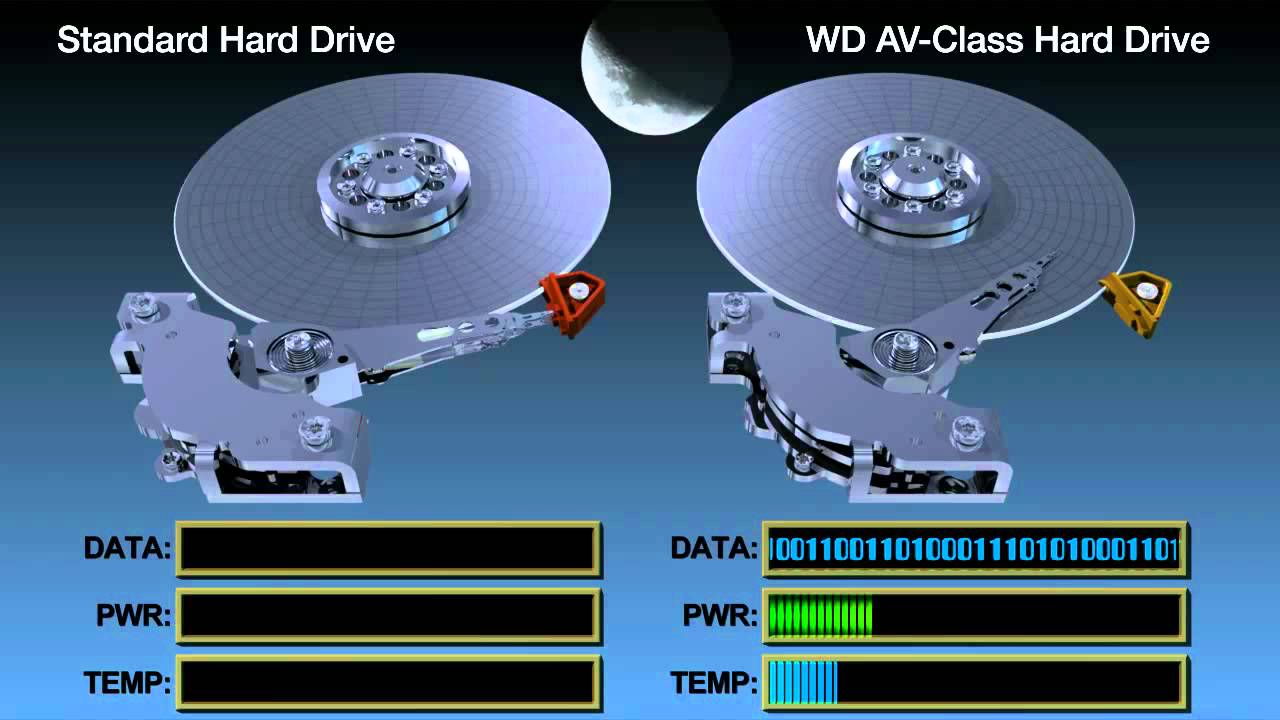
The class of AV (audio / video) hard drives means their ability to
read and write streams of data efficiently and smoothly, without pauses. Reserve Army-
some disks ship with a larger internal buffer and are not interrupted
They read / write the process thermal calibration positioning system.
For digital recording systems with insufficient performance and
amounts of RAM to smooth out possible irregularities in the operation of the
discs, AV discs are the only possible output.

Note that the presence of the abbreviation AV in the designation of the disc
it does not mean that it belongs to the Audio / Video class; must be
It must be explicitly mentioned in the passport of the disc.

However, the specified feature is generally necessary only when working
bot with high-quality video information, whose speed
it is approximately 10 megabytes per second per channel. In the case of sound
systems output the rate of a single 16-bit channel stream with a frequency
The 48 kHz sample rate is two orders of magnitude lower and is only 94 kilograms.
bytes per second. At the same time, almost no workstation
to ensure simultaneous operation with hundreds of channels, as well as
the disk cannot process so much data in parallel,
located in different parts of it. In real applications, multichannel
burning disc to disc, most of the overall disc costs
The howling subsystem relies on head movement between recording areas,
and nothing in the data transfer itself. The low speed of sound flows.
kov makes it more convenient and reliable to store them in the computer’s RAM,
disc thermal calibration compensation within 0.5 – 1 s, instead of
use of expensive and rare AV class discs. Also, it is far from
All conventional discs, thermal calibration has a remarkable effect on the
data stream number.

“Broken” data transmission can also occur when using “unintentional”
correct “operating system (DOS, Windows without 32-bit driver
faith on disk, etc.), insufficient number and size of file buffers
get rid of the operating system and the burning program, the use of low-class discs with
transfer rate of the order of 1-2 megabytes per second and lower, incorrect
connect a disc, etc. In any case, these situations are usually
talk about misconfiguration and hardware and software configuration
parts of the system.