Video basics


Free Download Mp4Gain
picture

Video basics

Video Bitrate


An easy to understand explanation of the difference between bit rate and frame rate!
Video Bitrate

Difference between bit rate and frame rate

In this article, I will explain in an easy to understand way the words “bit rate” and “frame rate” that appear when recording and editing videos.

First of all, I don’t understand the meaning of “bit rate” and “frame rate”.

It is easy to understand content for those people.

To conclude first

Bit rate (kbps) → Amount of information recorded / played back in 1 second
Frame rate (fps) → Number of still images displayed per second
It makes a big difference.

Yes, it is something else entirely!

To summarize more simply

Bit rate: determines the video quality (image quality / sound quality)
Frame rate: determines the smoothness of the video.
Does it look like this.

Video shake is uneven … Picture quality and sound quality are worse than I expected …

These causes are usually related to “bit rate” and “frame rate”.

Now let’s understand the two concepts ~

Table of Contents
Video Basics: What is Bitrate?
There are two types of bit rates
Video Basics: What is Frame Rate?
Remember the general frame rate
resume
Video Basics: What is Bitrate?
What is a bit rate?
Bit rate (kbps) is an important factor in determining video quality.

Bit rate represents “how much information is used to record and play back per second” for a video.

For example, in the case of 5 Mbps (5 M bits per second / 5 megabits), it means that the amount of information equivalent to 5 megabits per second is used.

1 Mbps = 1000 Kbps

The higher the bit rate value, the higher the picture and sound quality, but the larger the file size.

Conversely, the lower the bit rate value, the poorer the picture and sound quality, but the smaller the file size.

bit rate Features
High bit rate High image quality and high sound quality
Large file size
Low bit rate Low image quality / low sound quality
File size is small

The higher the bitrate, the better! If you overthink it, the file size will be too large and the playback device will not be able to keep up with the processing. When exporting a video, you basically choose the best setting from the presets.


Free Download Mp4Gain
picture


Mp4Gain Main Window
picture


Mp4Gain Features
picture


Free Download Mp4Gain
picture

What is the bit rate, which is said to be indispensable for video distribution?

What is the bit rate, which is said to be indispensable for video distribution?

Bitrate

1Bit rate is the number of bits that can be sent and received per second.

Bitrate

Advantages and Disadvantages of Setting a High Video Bitrate
# There are merits such as being able to offer clearer images
#There are disadvantages such as not being able to play fluently
Five What are the factors that affect the image quality of videos?

#frames per second
#resolution
#Codec
6 Relationship between YouTube and bit rate
7 Relationship between video conferencing and bit rate
8summary
One of the important factors affecting the image quality of a video is the “bit rate”. Generally, the higher the video bit rate, the better the image quality. But what is the bitrate of the video? How should I set the bitrate of the video? I wonder if there are a lot of people worried. In this article, we will discuss video and audio bit rates, video bit rate guidelines, advantages and disadvantages of setting a high video bit rate, factors that affect video quality, the relationship between YouTube and bit rates and video conferencing. about.

Bit rate is the number of bits that can be sent and received per second.

Bit rate refers to the number of bits that can be sent and received per second, and the unit is bps, which is short for Bit Per Second.

For example, if it is 100 bps, it means that 100 bits of data can be sent and received per second.

The higher the bit rate value, the more data can be sent and received per second. Video bit for bit rate

There are two types, audio bit rate and rate, and the value calculated by adding these two bit rates is called the oval bit rate.

# Voice bit rate

The audio bit rate refers to the bit rate related to the audio in the video file, and basically the value of the audio bit rate is less than the bit rate of the video. As a guideline for audio bit rate, it is approximately 96 to 128 kbps for lossy codecs such as MP3 and AAC, while it is approximately 192 to 320 kbps for high-quality video.

# Video Bitrate

Video bit rate refers to the bit rate associated with video in a video file. The video bit rate value is large compared to the audio bit rate. The guideline for video bit rate varies greatly depending on the quality of the image to be delivered, and the value varies, but it is also said to be 500 kps at 70 Mbps.

Since the standard audio bit rate is approximately 192 to 320 kbps, the video bit rate occupies most of the oval bit rate when watching the entire video file. Basically, the characteristic of video bitrate is that the higher the value, the better the image quality.

However, it does not mean that the video bit rate value should be high. When viewing an image on a small monitor screen, it can be said that the roughness of the image is not that noticeable even if the bitrate value is a bit low. Even if you increase the value of the video bit rate, you cannot get the feeling that the image quality has improved, and there are many cases where the file size just increases.

Estimated video bit rate
Even if the bit rate value is the same, the image quality will change depending on whether the video content is moving or not. Therefore, it is necessary to determine the bitrate that appears to be optimal for the video. The following is a guide to the proper bit rate for frequently used video resolution when distributing videos on YouTube.

Resolution SD (720 x 480px) 1-2 Mbps (video with a lot of movement) 500kps ~ 1Mbps (video with little movement)
HD resolution (1280 x 720px) 4.5-9Mbps (video with a lot of movement) 2.4-4.5Mbps (video with little movement)
Full HD resolution (1920 x 1080px) 9Mbps-18Mbps (high-motion video) 4.5-9Mbps (low-motion video)
4K resolution (4096 x 2160px) 35 ~ 70Mbps (high motion video) 25-35Mbps (low motion video)

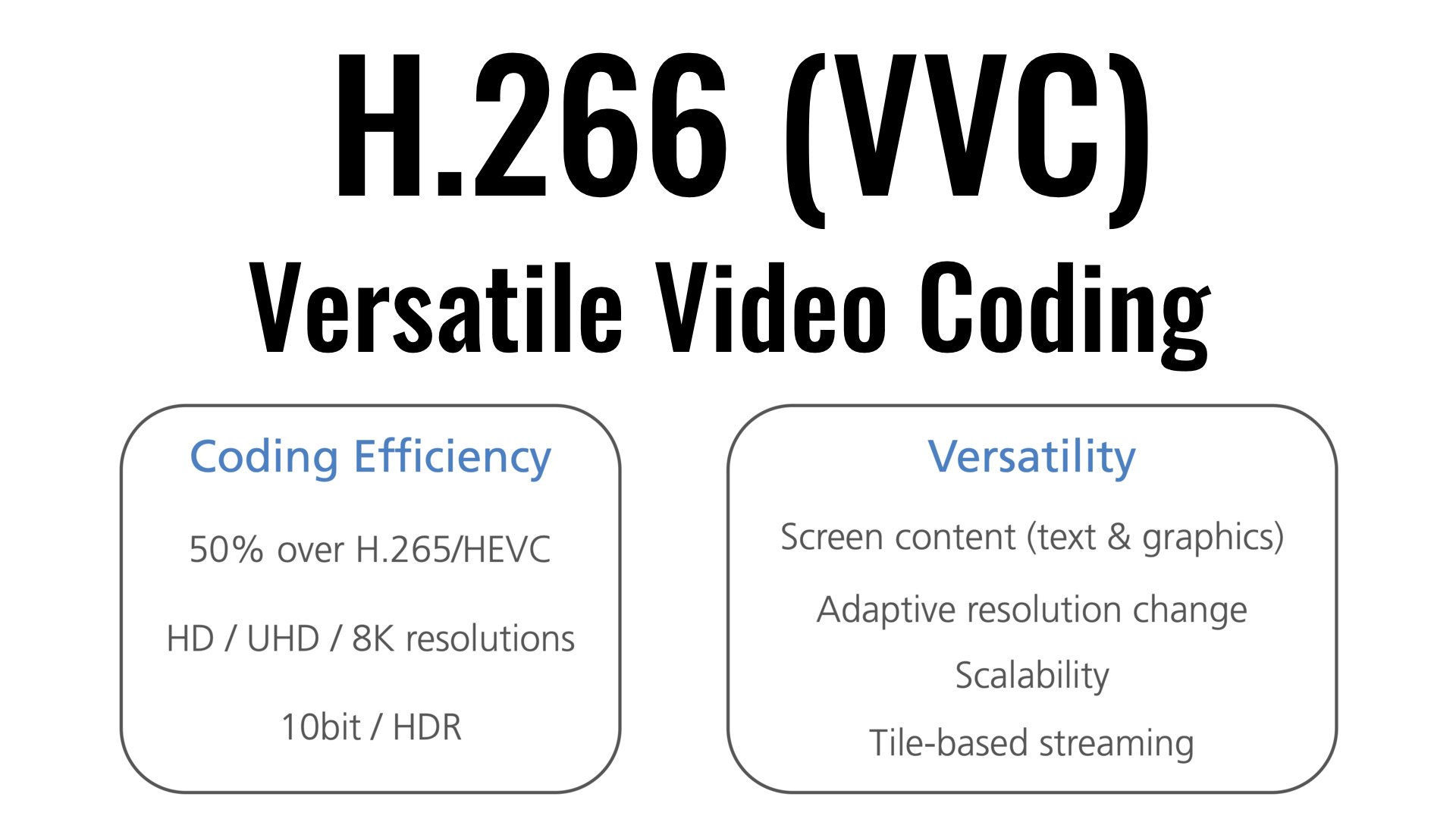
H.266 video encoding method

H.266 video encoding method

H.266

| It was successful in transmitting 4K / 60fps video using a VVC compliant real-time codec – It is possible to provide highly realistic video services at a bit rate less than half that of the method.

H.266/VCC

KDDI R&D Laboratories, Inc. (Headquarters: Fujimino City, Saitama Prefecture, Director: Gen Nakamura, hereinafter “KDDI R&D Laboratories”) is the latest international standard H.266 video encoding method | VVC (Versatile Video Coding) Using a real-time codec system (hereinafter “this system”) compatible with “VVC”), we achieved a demonstration experiment of streaming 4K video at a bit rate of 12 Mbps (megabit / sec) and a frame rate of 60fps (frames / sec.) We have confirmed that stable video quality can be maintained even if the bit rate is reduced to less than half that of the current stream.
Current 4K streaming video is streamed at a frame rate of 60fps, and by using this system, viewers can be provided with a highly realistic video service comparable to 4K streaming, including not only streaming but also mobile lines. . provide a more flexible network configuration.

[Background]
KDDI R&D Laboratories is dedicated to the research and development of compression technology with the aim of realizing a content experience that maintains a high sense of presence by providing the optimal transmission media according to the situation of the user who is viewing the video. Is working.

1. 1. This demo experiment follows the following two VVC research results announced by KDDI R&D Laboratories in September and December 2020.
・ Developed the world’s first newest video encoding method H.266 | VVC Compliant 4K Realtime Encoder (September 1, 2020)
・ The world’s first newest video encoding method H.266 | VVC Compatible Realtime Codec 4K Live Streaming Successful Demo Experiment (Dec 23, 2020)

2. VVC is the latest video encoding method, and is the international standard video encoding method widely used in today’s Internet 4K / 8K video transmission and distribution services. H.265 | HEVC (High Efficiency Video Coding, hereinafter “” Achieves twice the video compression performance of “HEVC”). It was standardized in August 2020 by the international standardization bodies ITU-T and ISO / IEC. In Japan, its adoption is being considered as one of the video coding methods in the sophistication of terrestrial digital television broadcasting, which is being studied by the Ministry of the Interior and Communications (Note 1).

The 3.4K video streaming has a frame rate of 60fps and is superior in reproducibility of high-speed moving scenes compared to 30fps, which is generally used for Internet video distribution, especially in sports scenes. It helps to improve the quality of the experience. In the experiments so far, it was aimed at 30fps and it was difficult to use it for streaming.

[Scheme and results of the demonstration experiment]
On December 21, 2021, a network line was used from Kansai Television Broadcasting Corporation (Kita-ku, Osaka) to the KDDI Research Workshop (Minato-ku, Tokyo) using this system developed by KDDI R&D Laboratories. a video streaming demonstration experiment over.

In the demo experiment, we managed to stream 4K video at 12 Mbps bit rate and 60 fps frame rate, and confirmed that stable video quality can be maintained even if the bit rate is reduced to less than half of the current one. transmission.
We have improved acceleration processing and parallelization processing that are effective for making VVC encoders on multi-core CPU platforms, and we have devised and realized technology that scales not only at a frame rate of 30fps but also at 60fps. .

Factors related to the quality of video and audio data Part 2

Factors related to the quality of video and audio data Part 2

Bit Rate

resolution
This is also an item dedicated to video.

Video Bitrate

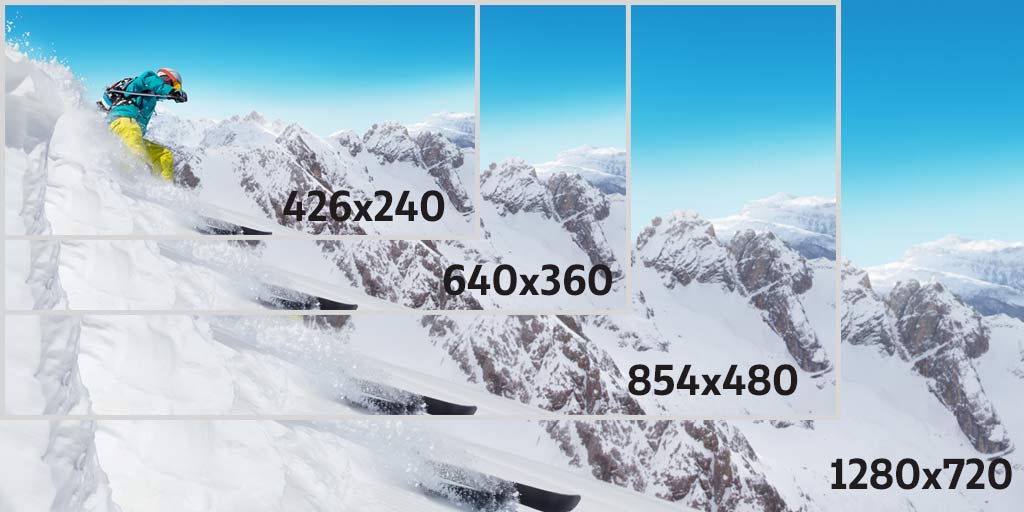
Resolution is a numerical value that represents the density of pixels in an image. We use the unit “dpi (dots per inch)” or “ppi (pixels per inch)”. The “image” in digital is expressed by “a collection of very small colored dots (pixels).” The higher the resolution value, the higher the density of this point and the finer and more natural the image will be.

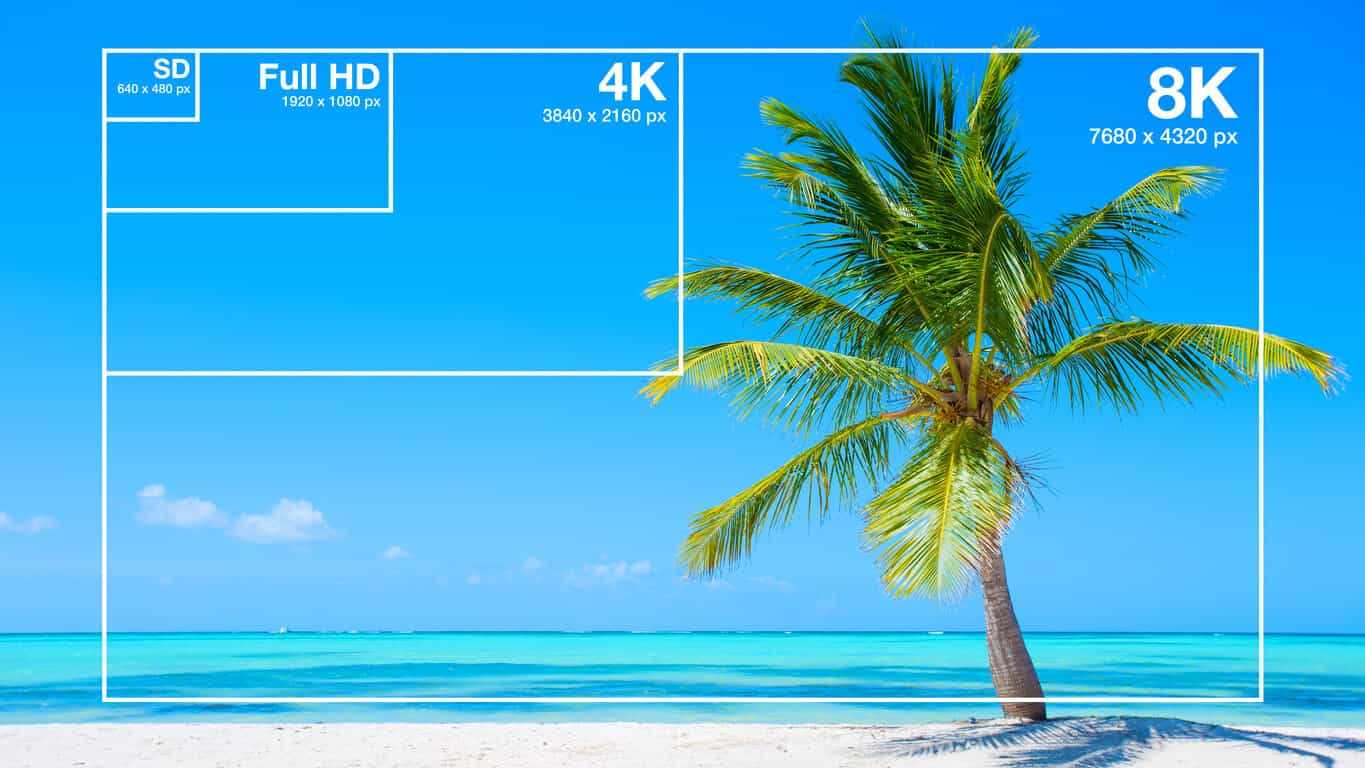
There is also a concept similar to this, which is the concept of resolution using pixels (dots, pixels). Uses pixels [pixel], dots [dot], or pixels as the unit. It is often written as “1920 x 1080 pixels” or “2 million pixels”, and in the case of this video, there are “1920 horizontal and 1080 vertical color points (pixels), and the total number of points is 2,073,600 ( approximately). It means “2 million pieces)”. (* Pixel = dot = pixel)

For resolutions that use “dpi”, it represents the density of pixels per 1 inch (= 0.0254 meters) of a straight line.
For resolutions that use “pixels”, it represents the total number of pixels used in the video.

The exact definition of resolution is the first. However, the latter is also widely recognized. Be careful not to get confused.

▲ Source: Wikipedia “Resolution”

Screen resolution / ratio
In the field of displays, there is also “screen resolution”. This is represented by pixels. Because it uses pixels, it represents the total number of pixels on the screen. You can also express the “screen aspect ratio (screen aspect ratio)” by multiplying it by something like “1920 x 1080 pixels”. If it is “1920 x 1080 pixels”, the aspect ratio of the screen is “16: 9”.

If the aspect ratio of the image and the aspect ratio of the screen do not match, black bands may appear at the top and bottom or left and right when the image is fully displayed (enlarged display), or the image may be to stretch.

Some screen aspect ratios have special names. The following are pixel counts, screen aspect ratios, and commonly used screen names. (* Since most pixel ratios are square, screen aspect ratio = screen aspect ratio)

Known as Horizontal x Vertical Ratio
(horizontal: vertical) Number of pixels
VGA 640 × 480 4: 3 307,200
SVGA 800 × 600 4: 3 480,000
XGA 1024 × 768 4: 3 786,432
SXGA 1280 × 1024 5: 4 1,310,720
WSXGA + 1680 × 1050 16:10 1,764,000
FHD (Full HD) 1920 × 1080 16: 9 2,073,600
WUXGA 1920 × 1200 16:10 2,304,000
Wikipedia: screen resolution that

By the way, continuing from last time, there is too much basic knowledge and it seems frustrating, but please do your best. Knowing this and not knowing it will make a big difference in your video and audio conversion and playback work. Remember it little by little as it is a necessary knowledge to be able to play and convert optimally while maintaining quality without waste.

Factors related to the quality of video and audio data

Factors related to the quality of video and audio data

Video Bitrate

Last time, I wrote about “codecs” and “containers” that determine the format of the video and audio data. Now, I would like to write about each item related to the “quality” of that data.

Bit Rate

Bit rate
Bit rate [bit rate], or bits per second, is a unit of data transfer rate.
It is defined as the number of bits that have passed (transferred) at a given point on the data transfer path per second. Also known as bps [bits per second] and b / s. Other names include “bit rate” and “bit efficiency”, all of which have the same meaning.

In short, it is a unit that expresses “how much data (information) can be transferred”. A large number means that the amount of data passed at a certain point is large and the quality of the video and audio is improved. The greater the amount of data (that is, video / audio information), the higher the image quality and sound quality.

An SI prefix can also be added, and the unit is as follows.

Bits per second [bps: b / s]
Kilobit per second [kbps: kb / s]
Megabit per second [Mbps: Mb / s]
Gigabit per second [Gbps: Gb / s]
Since it is a unit of data transfer speed, it is also used for the speed of Internet lines. There is also a unit called bytes per second, which is expressed as “Bps” or “B / s” by capitalizing b. 1 byte = 8 bits.

For example, with MP3 audio data, the bit rate value can be increased up to “320 kbps”. The higher the number of bit rates, the greater the amount of data transferred and the greater the original data capacity.

The phrase “high bit rate” is essentially incorrect
I often hear the phrase “high / low bit rate”, but this phrase is really inappropriate.

The word bit rate is a unit, not a physical quantity. It is the same as the relationship between “length (physical quantity)” and “meter (unit)”. We say “long” but not “long meter”.

The physical quantities that represent bit rates are called “transfer rate”, “transfer speed”, “transfer efficiency”, “transmission rate”, “transmission speed”, “transmission efficiency”, and so on. However, the phrase “high bit rate” has become mainstream, so you don’t need to worry too much about it. Remember “To be exact …”.

frames per second
This is a value for video data only.

The frame rate [frame rate] is an index that shows how many frames (still images: frames) can be processed per unit of time. Use fps [frames per second] or f / s as the unit.

Digitally speaking, a video is not recorded as a continuous image, but is taken continuously and displayed at high speed like a flip book, so that it “appears to be moving.” I’m doing. It is a method that uses the effect of human residual image.

The “one-by-one still images” are called “frames” or “frames.”

If the frame rate value is large, the number of processed frames per second will increase, resulting in smoother video. If it is 30 fps, 30 frames per second are processed.
Currently, “30 fps” or “29.97 fps” is very widespread. When you increase to 60fps, the video becomes smooth enough and when you decrease to 15fps or less, the video becomes jerky.

Increasing the value of the frame rate will result in a smoother video, but it will be heavier and of higher capacity.

There is no point in raising him innocently

There is no doubt that increasing the value of the frame rate will result in a smoother video, but if the value called “response speed” of the screen or monitor displaying the video is large (that is, slow), the frame rate value will be increased. It may not make sense to increase it.

Response speed is the time it takes for a signal to actually enter. The unit is milliseconds [ms: 1 ms is 1/1000 second of 1 second]. The “Response Speed” on a screen or monitor indicates the speed when changing from “black to white to black”. (Currently the definition is blurry because it handles colors other than black and white, but it is omitted here.)

If this response speed is high, it means that the video (color) change is fast. If the speed is high, the response speed value will be small and it will be able to display “smooth and clear video, even when moving fast.” At low speeds, the value increases and “residual images are likely to occur in videos being played.

What is a bit rate? Part 2

What is a bit rate? Part 2

Video Bitrate

What is oval bitrate?

Bitrate

Bit rates are assigned to video and audio respectively, and the sum of these is called the “oval bit rate” or “total bit rate”.

Windows video properties

The image above is an image of the details tab opened from the video properties, but the “data rate” of the video is the bit rate of the video, the “bit rate” of the audio is the bit rate of audio and the “total bit rate” of the video is the video. It is the oval bitrate that is the sum of the voice and the voice.

I think it is worth knowing that you can check the bitrate from the property, but there are some parts that are not very reliable, so if you want to know precise information, you should verify it with an analysis software like MediaInfo. .

See the following articles on MediaInfo.

How to use MediaInfo | I also checked the codec of the iPhone video | Tokukyu’s bastard K-team | Baseball

MediaInfo is software that can analyze audio and video file codecs, frame rates, bit rates, etc.

https: // Hamanasu Baseball Club.com/mediainfo/ https: // Hamanasu Baseball Club.com/mediainfo/

Relationship between bit rate and resolution
Regarding the relationship between bit rate and resolution, higher resolution videos require a greater amount of information, so inevitably higher bit rates are required.

If the image is just large, the amount of data it contains will also be large.

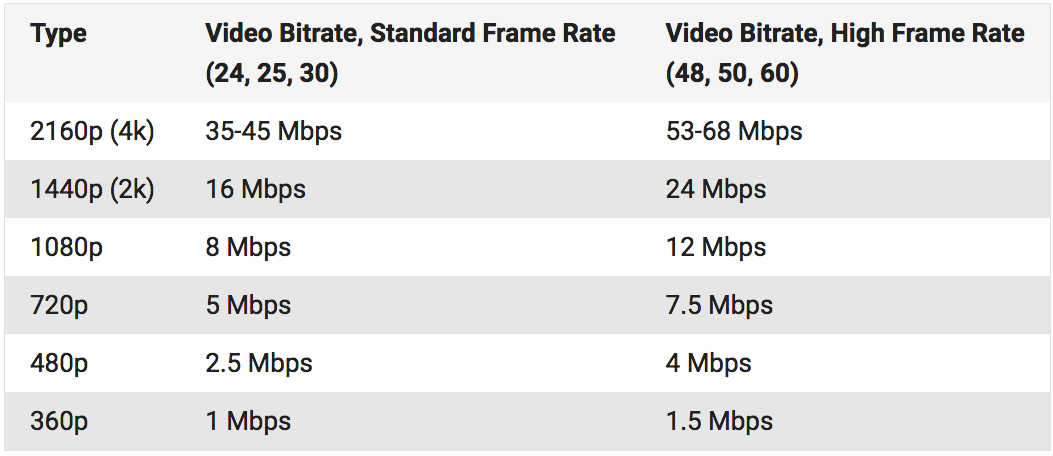
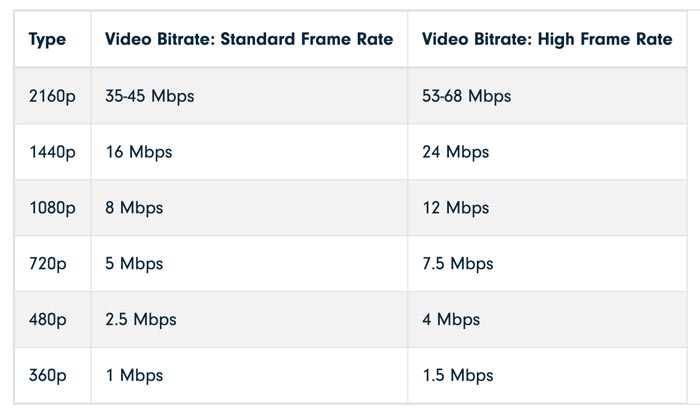
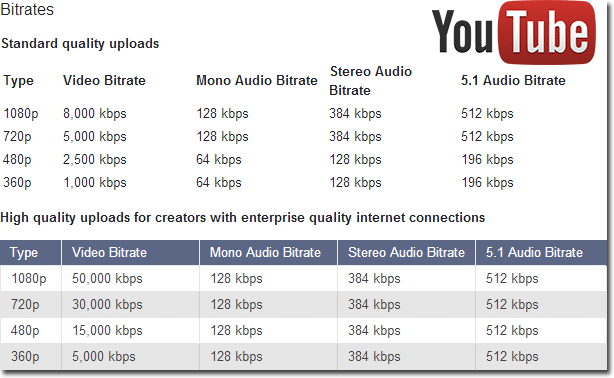
Regarding the relationship between resolution and bitrate when encoding a video, I think the recommended settings on Youtube will be helpful.

Recommended bit rate for Youtube
Note that, like resolution, frame rate increases in proportion to bit rate.

See the following article for the frame rate.

What is the frame rate? | What fps should be set when casting video? | Tokukyu’s bastard K-team | Baseball

Frame rate (fps) is a word that expresses the number of frames (frames) in a video, and it is expressed by the number of frames per second.

Relationship between bit rate and codec
Regarding the relationship between the bit rate and the codec, even if the bit rate is the same, the image quality will be different depending on the codec.

I mentioned earlier that the higher the bitrate, the better the image quality, but this assumes the same codec.

For example, the H.265 codec is said to provide the same image quality at a bit rate of about half that of H.264.

What is a bit rate?

What is a bit rate?

Bitrate

Relationship between encoding settings and image quality

Bitrate

Codec Eye Capture
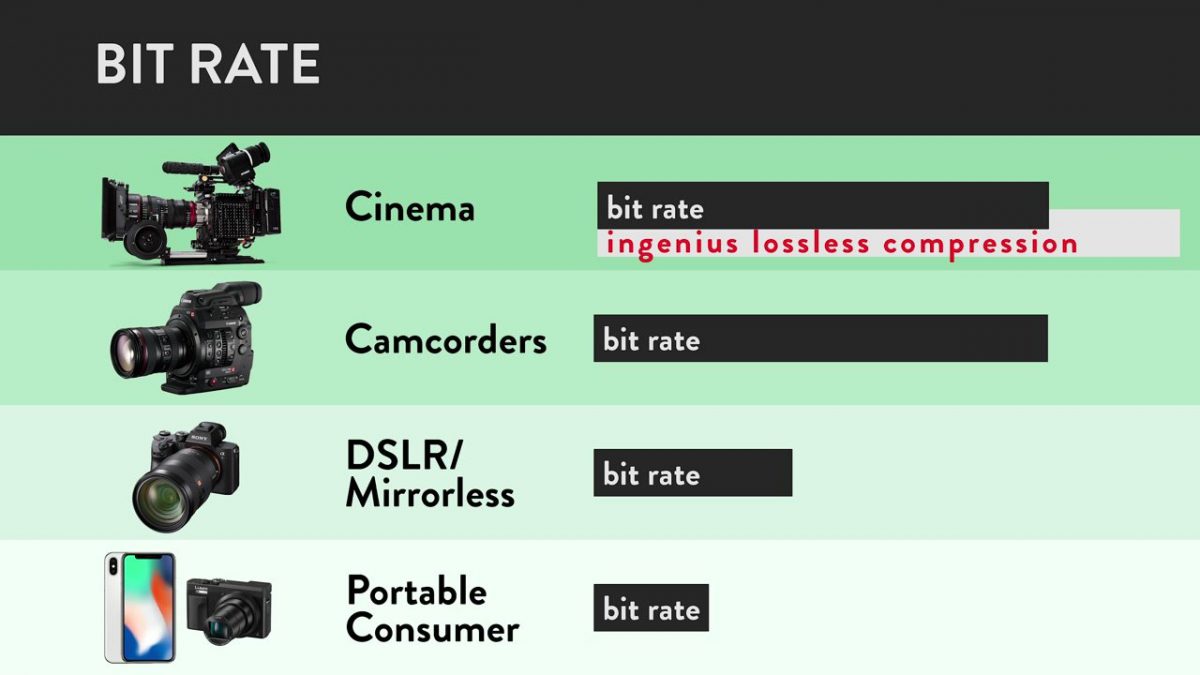
Bit rate is considered to be the number of bits that can be transferred or processed per second, so the unit is expressed in bps (bits per second) and, in the case of moving images, the amount of data in video and audio contained in one second. It would be good.

In other words, if the bit rate is high, the video will have good picture and sound quality, but the data size will increase accordingly.

When considering video editing encoding, it’s basically better to set the bitrate as high as possible within the allowed range of data capacity, but how do you set the bitrate in the first place? I think there are also people who say that.

Filmora Bitrate Settings
The image above is the output screen of the Filmora editing software, but you can see that you can specify the bit rate in the detailed settings.

If the file format is MP4, you can specify a bitrate within the range of 5000 kbps and 2000-30000 kbps by default, but many people are not sure which setting is the best.

In this article, I would like to summarize the bitrate including the settings when editing the video.

What is a bit rate?
What is the difference between high and low bit rates?
What is oval bitrate?
Relationship between bit rate and resolution
Relationship between bit rate and codec
What is the set bitrate?
resume
Sponsor

What is a bit rate?
What is the difference between high and low bit rates?
As I wrote at the beginning, the bit rate is the amount of information per second, that is, a high bit rate can be interpreted as a large amount of data.

As I wrote earlier, a high bit rate means high image quality and high sound quality, and the data size increases accordingly.

Image quality and sound quality are related to the codec, but basically, the higher the bit rate, the better the image quality and sound quality.

However, it is not possible to improve the image quality of the original file in video encoding, so it is important to understand that increasing the bit rate will not improve the image quality of the original file.

What is the bit rate in a video?

What is the bit rate in a video?

Video Bitrate

Bit rate is the amount of data that can be processed within a certain period of time and the transmission speed of the communication, and is generally expressed as the number of bits processed / transmitted in one second (Bit per second / bps).

Video Bitrate


Since the video also shows an image that changes over time, there is a certain amount of data that needs to be processed / displayed within a certain period of time. This is also called the bit rate. Set the required / appropriate value for the video bit rate according to the video specifications (resolution, pitch, frame rate, compression performance, etc.).

That is, each of the video frames requires a large amount of information, because depending on the resolution, it will show many pixels, each with different brightness, colors, etc. There is also sound, which in itself is an important amount of information.

And since the duration of each frame in the video lasts a certain time, graphic information must be forwarded in addition to the audio. This implies that you need to send a number of bits every second to be able to obtain a video with good image and sound quality.

As the amount of bist is smaller, the quality will be less good.

bits Bit rate

bits Bit rate

BITRATE

A value that indicates how many bits of information are processed or transmitted / received per unit of time.

bitrate

Also called transfer fee. The amount of information in one second of audio data and video data is expressed in “bits per second” (bps: bits per second). It is usually used with “k (kilo)” to represent a thousand units or “M (mega)” to represent a million units because the number of digits is large and is expressed as “kbps” or “Mbps” (1kbps is 1000bps, 1 Mbps is 1 million bps). It is often used in the audiovisual (AV) genre, and in the case of audio and image data, the higher the value, the more accurate the information, and the better the sound quality and picture quality. The standard bit rate for MP3, one of the audio compression formats, is 128 kilobits per second (kbps), which compresses the amount of information in an uncompressed WAV file (approximately 1400 kbps) with CD sound quality. to about 1/10. you can see that you are doing it. The bit rate of the video is higher due to the large amount of information, and the high definition terrestrial digital transmission is about 18 megabits per second (Mbps) and the BS high definition digital transmission is about 24 Mbps. a unit that expresses the transfer rate, “bytes per second” (Bps or B / s), which is a reference value that expresses the number of bytes per second. Since 1 byte is 8 bits, Bps can be calculated by dividing bps by 8.

Explanation of the book “Bitrate” that opens when you have a problem with your computer
Bit rate
It is the speed of data communication, which is the amount of data that can be sent and received in a given period of time. The unit is “bps”, which is short for “bits per second”. It is also used to refer to the amount of data used to express one second of video or audio when compressing video or audio. The higher the amount of data (= lower the compression rate), the more faithful it will be to the original, but a high-speed communication line is required.
On the other hand, as the amount of data is reduced (= the compression rate is high), the image quality and sound quality deteriorate, but transmission is possible even in an environment where the communication speed is slow .
⇨  bps, transmission
Source: Asahi Shimbun Publishing Co., Ltd. “Books to open when you have problems with your computer” Information on books to open when you have problems with your computer

Explanation of the “bit rate” dictionary that understands TI terms

Processed per unit of time, or the transfer is a bit number. It is generally expressed as a number per second and uses bps as the unit. It is expressed as a physical quantity, such as the speed of communication on a computer network and the transfer speed in transferring data with a circuit within a computer or peripheral devices. It is also used as a unit to express the amount of information per second when compressing audio and video data, and if this compression method is used, the higher this value, the higher the sound quality and picture quality. ◇ Also called “bit rate”, “bit efficiency” and “bit rate”.

What are aspect ratios, frame rates, bit rates, and codecs? Part 2

What are aspect ratios, frame rates, bit rates, and codecs? Part 2

bitrate

Bit rate

BITRATE

In the context of a video, “bit rate” refers to the amount of data bits that the video creates per second, in units of bps (bits per second). The point is “how much information is packed in one second of the video”.

As a general rule of thumb, everyone knows that the higher the quality of data, like videos, the bigger it gets. If you think of a video as a collection of still images, you can see that there is a lot of “information” that extends the data.

Screen resolution (1920 x 1080 pix is ​​heavier than 640 x 480 pix)
Amount of color information (24-bit color is heavier than monochrome)
Frame rate (24 fps of general animation is heavier than 5 fps of security camera)
Voice quality (heavier with sound than without voice, heavier with high sound quality than with low sound quality)
The more these items are packed, the higher the bit rate and quality of the video. However, the higher the quality, the higher the video capacity.

A video with a large file capacity places a strain on both the communication line and the processing CPU. When distributing video, it will be necessary to consider “how much quality is required” and select the optimal bit rate for each video content purpose.

● Reference: general bit rate example (video / audio / total standard frame rate)

High definition digital transmission: 24 Mbps
DVD video: 10 Mbps
Blu-ray video: 54 Mbps
YouTube HD (1080p) Image quality: 1.5-3 Mbps
YouTube HD (480p) Image quality: 0.5-2 Mbps
In addition to the frame rate and bit rate discussed so far, there is a data compression technology “codec” as an important factor related to the data capacity of video. This will be discussed later.

Codec

It is a word that can be understood in various ways, but in the context of video, it is software that compresses and decompresses audio and video data. I explained that the video will increase in capacity depending on the quality. Even if you want high quality, large files are difficult to handle. That’s where data compression, or codecs, comes into play.

For video files, the video is compressed using the “video codec” and the audio is compressed using the “audio codec”. There are several types, but typical examples are as follows.

Video codecs: MPEG-4, MPEG-2, H.264, VP9, ​​VP8, Xvid, etc.
Audio codecs: MP3, AAC, AC-3, FLAC, LPCM, etc.
It is easy to confuse video file format with codec, but video format is different from codec and is called container. It stands for “container” that combines separate video and audio files into a single file. The codecs that are organized by the container are fixed.

File format: .mp4 .avi .mov .mpeg .flv, etc.
The most frequently distributed video on the Internet is probably “H.264 / MPEG-4 AVC”. There is the advantage that the image quality can be kept as is, even at a low bit rate, and if it is also used on YouTube, it seems to be good to call it the current standard codec.

Video distribution even with the “internal newsletter app”

According to a 2018 survey by J-Stream Inc., which provides video distribution services, “ satisfaction with internal public relations is more than 30% overall, but satisfaction is limited to those who frequently view public relations. internal with videos. more than 50%. “By making good use of video content, you may be able to increase the support base of your company’s internal app / web newsletter. Please give it a try. Of course, videos can also be distributed using the” internal newsletter “of Wis Works.