Advantages and disadvantages of popular audio formats


Free Download Mp4Gain
picture

Advantages and disadvantages of popular audio formats

audio file formats

In the modern music world, there are a large number of audio file formats that are often confusing for the unprepared user.

Audio File Formats

To understand all this, to find out what they are and what they are used for, the presented review will help.

Advantages and disadvantages of popular audio formats

Types of audio formats

Today is the time that all music lovers, not to mention professional musicians and audio editors, need to understand concepts like audio file formats, bit rates, extensions, bit depth, sample rate and many others. for high-quality sound. Sound has gone digital, which means that it can be used for various purposes, for example, for listening to evidence, for presentations, video dubbing. In fact, digital sound, like an image, is a collection of individual pixels, and the more there are, the better the sound image itself. This “pixelated” sound can be edited and processed.

Advantages and disadvantages of popular audio formats
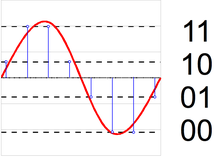
The figure shows an example of a sound wave recording, where the green curve denotes the original sound and the purple columns indicate its digital form. The number of segments per second is the sample rate. In this case, the digital representation of sound is as follows.

Advantages and disadvantages of popular audio formats
An important role in evaluating the quality of audio formats, and consequently sound quality, is a parameter such as bit rate, which shows how many bits or kilobits it takes to record one second of sound. Low bit rates mean low quality sound, large ones mean high quality sound.

Advantages and disadvantages of popular audio formats
But for the storage and further use of audio in one form or another, audio formats are used – digital recordings of audio data. We can say that the format is a kind of container where the sound is stored. Virtually all audio formats can be divided into two broad categories: lossless compressed and lossy compressed.

No loss, no loss
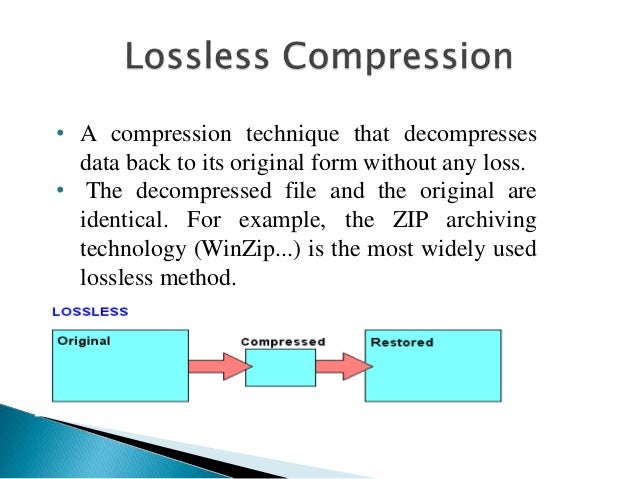
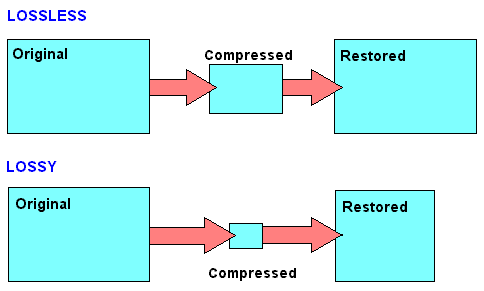
To avoid as much as possible a decrease in sound quality during the compression of an audio file, special methods have been developed to store audio information, avoiding losses, which in fact can be compared with the file, when the information is simply packed in a zip file, the size of which is noticeably smaller than the original data. Subsequently, this data can be clearly restored on each bit. Also, the bit rate itself is not important for these files. These audio files are collectively called Lossless, Music As Is. These algorithms allow you to compress files two to three times. As a result, the size turns out quite large, but at the same time with the preservation of the original sound.

The most popular lossless formats are as follows.

FLAC
The abbreviation is the name “Free Lossless Audio Codec”. Provides complete security of all data in the audio stream, capable of 1.4 to 4x compression with 350-1010 kbps bit rate, used to create audio collections, and used for listening on premium equipment .

Pros:

– high quality;
– a large number of additional features;
– free license.
Disadvantages:

– quite large size;
– on older operating systems, you must additionally download the appropriate players.


Free Download Mp4Gain
picture


Mp4Gain Main Window
picture


Mp4Gain Features
picture


Free Download Mp4Gain
picture

What is a lossless audio format?

What is a lossless audio format?

lossless audio

You might think that the word “lossless” is used for audio formats that use no compression at all.

lossless audio

However, even lossless audio formats use compression to keep file sizes at an acceptable level.

Lossless formats use compression algorithms that preserve the audio data, so the sound is exactly the same as the original source. This is in contrast to lossy audio formats such as AAC, MP3, and WMA, which compress audio using algorithms that discard data. Audio files are made up of sound and silence. Lossless formats are capable of compressing pause to almost zero while retaining all audio data, making it smaller than uncompressed files.

What lossless formats are commonly used for digital music?
Examples of popular lossless formats used to store music:

Commercial

FLAC
Wav
A THE C
Lossless WMA
Impact of Lossless Formats on Music Quality
If you download a lossless music track from an HD music service, you expect the sound to be really high quality. On the other hand, if you convert low-quality music tapes by digitizing them using lossless audio formats, the sound quality will not improve.

Is it possible to convert a lossy song to a lossless song?
It is never a good idea to go from one loss to another. This is because a song that has already been compressed in a lossy format will always be like this. If you convert it to a lossless format, all you get is wasted space on your hard drive or mobile device. You cannot improve the quality of a lossy song using this method.

Commercial

Benefits of Using a Lossless Audio Format for Your Music Library
Using a lossy format like MP3 is still the most common method of storing your music collection. However, there are clear advantages to creating a lossless music library.

Perfect Music CD Backup: Lossless copy of audio files gives you a slightly exact copy of the original music CD. This means that no matter what audio formats come in the future, you will know that you have a perfect copy of the original.
Recovery of loss or damage. Having music in lossless format allows you to recover a damaged original CD or any that has been lost to a blank CD.
Convert to any format. Since your music is in a lossless format, you can convert it to any format and get the highest quality it can support.

Lossless audio compression

Lossless audio compression

Lossless Audio compression

FLAC is perhaps the most popular lossless audio format and encoding codec. Music lovers are gradually switching to this format. WavPack competes with it, but it is not that popular. It’s the same story with Apple Lossless, which reduces the size to 60%.

Lossy file compression

The story here is: quality is better and size is bigger.

Skeptics say that it is almost impossible to distinguish MP3 (320 kbps) from Losless by ear. “And if there is no difference, why pay more?” In fact, on ordinary equipment, it is quite difficult to feel the difference in audio formats, even for music lovers. But there are those who immediately feel this difference (they personally attended the experiment). But when listening to a good device, the difference is huge. The problem is that not everyone can afford a good device.

In what format and with what quality is music heard on the radio?
In fact, we can say that there are currently two main audio formats: lossy (compressed) and lossless (uncompressed). They are classified into many types.

Lossy takes up less disk space, but degrades the quality of the audio track. When compressed using the MPEG protocol (hence the name mp3 – mp4 for files containing video sequences), the hues and transition tones, which are barely noticeable to the ear, are cut off. This makes the file clearer, but it also degrades it. The last place is occupied by the bit rate of that file: the degree of compression of each second of the audio track. The lower the bitrate, the less space the file will occupy and the worse the quality. Thus, a composition of three minutes in mp3 with a bit rate of 320 kilobits per second will occupy up to 3 megabytes on disk; a similar composition with a 96 kilobit bit rate will occupy about 400 kilobytes.

Lossless is as close to the original analog sound * as possible, making it much loved by sound engineers. Lossless formats take up much more disk space even compared to mp3-320. Among these formats, the most common are WAV (standard), FLAC (economic), AIFF (Apple). The former is used most often.

Professional sound recording is done only in uncompressed format. Only with him do the sound engineers work.

On the radio, the situation is somewhat more complicated. This is due to the peculiarities of the work of the media, namely efficiency and commercial profitability. The use of high-capacity servers is expensive and therefore most radio stations encode audio tracks in mp3 format at a bit rate of 256 kilobits per second. However, this is typical mainly of national stations. Equipment purchased from abroad has standard configurations that assume WAV encoding.

Why are software developers focusing on WAV? Because the radio signal cannot propagate without interference. Therefore, the listener still receives a small and sometimes significantly distorted signal. Therefore, broadcasters are faced with a reasonable question: what quality of sound will the listener perceive best: distorted ideal or distorted distortion? For this reason, in Europe and the United States, the WAV standard (AIFF, if the station operates with Apple equipment) is adopted, in Russia – mp3 with a bit rate of 256 kilobits per second.

Digital audio compression methods

Digital audio compression methods

Audio Compression

Lossless compression

Audio Compression

Generally speaking, the meaning of lossless compression is as follows: some pattern is found in the original data, and taking this pattern into account, a second stream is generated, uniquely describing the original. For example, to encode binary sequences with many zeros and few ones, we can use the following replacement:

00> 0
01> 10
10> 110
11> 111

In this case, sixteen bits:

00 01 00 00 11 10 00 00

will be converted to thirteen bits:

0 10 0 0 111 110 0 0

If we write a compressed string without spaces, we can still add spaces in it, which means restoring the original sequence.

FLAC (Free Lossless Audio Codec – Free Lossless Audio Codec)
Coding principle: the algorithm tries to describe the signal with this function so that the result obtained after subtracting it from the original (called difference, remainder, error) can be encoded with the minimum of bits.

When the model is fitted, the algorithm subtracts the approximation from the original to obtain a residual signal (error), which is then losslessly encoded.

Lossy compression (MP3, AAC, WMA, OGG)
Using a lossy compression algorithm, the size of an MP3 file with an average bit rate of 128 kbps is approximately 1/11 of the original file of an Audio CD (uncompressed audio in CD-Audio format has a rate 1411.2 kbps bit rate). MP3 files can be created at high or low bit rates, which affects the quality of the result.

The principle of compression is to reduce the precision of some parts of the sound flow, which is almost indistinguishable for most people. The audio signal is divided into segments of equal length, each of which, after processing, is packed into its own frame (frame). Spectral decomposition requires continuity of the input signal; therefore, the previous and next tables are also used for calculations. The audio signal contains harmonics with a lower amplitude and harmonics that are close to the strongest; Such harmonics are cut off, as the average human ear will not always be able to determine the presence or absence of such harmonics. This characteristic of hearing is called the masking effect. It is also possible to replace two or more close peaks with an averaged one (which, as a rule, leads to sound distortion). The cutoff criterion is determined by the outflow requirement. Since the entire spectrum is relevant, the high frequency harmonics are not cut off, but are only selectively removed to reduce information flow due to rarefaction of the spectrum. After spectral removal, mathematical compression and frame packing methods are applied.

Masking effect
In certain cases, a sound can be hidden by another sound. For example, talking next to a train track can be completely impossible if a train passes. This type of effect is called masking. A weak sound is said to be masked if it becomes indistinguishable in the presence of a louder sound.

Simultaneous masking
Any two sounds, when heard simultaneously, have an impact on the perception of the relative volume between them. A louder sound reduces the perception of a weaker one, until the disappearance of your hearing. The closer the frequency of the masked sound is to the frequency of the masker, the more it will be hidden. The masking effect is not the same when the masked sound is shifted down or up in frequency relative to masking. Low-frequency sound masks high-frequency sound. However, it is important to note that high-frequency sounds cannot mask low-frequency sounds.

Time masking
This phenomenon is similar to frequency masking, but time masking occurs here. When the masking sound is stopped, the masking remains inaudible for some time. Under normal conditions, the effect of temporary masking lasts much less. The masking time depends on the frequency and amplitude of the signal and can be up to 100 ms.
In the case where the masking tone appears later than the masking, the effect is called post-masking. When the masking tone appears before the masking (this is also possible), the effect is called premasking.

Post-stimulus fatigue
Often, after exposure to loud, high-intensity sounds, a person’s hearing sensitivity drops dramatically. Recovery of normal thresholds can take up to 16 hours. This process is called “temporary change in hearing threshold.”

Lossless digital audio formats

Lossless digital audio formats

lossless audio

Uncompressed formats
The first digital audio formats encoded information, as they say, “as is”.

Lossless Audio

This format is, first of all, convenient for the computer itself: there is a simple correspondence between a sequence of digital signals and a sound waveform. Not surprisingly, despite the further development of compressed audio formats, uncompressed formats continue to be actively used in the field of professional (and amateur) sound work. What are these formats?

First, it is the audio CD format itself. For him everything is simple: this is the format in which most audio discs are recorded (unless, of course, several albums have been recorded on them at the same time – in this case, we are talking about a format obviously compressed). The Audio CD format uses Pulse Code Modulation (PCM) to convert “digital” to “analog.” This is the type of conversion that forms the basis of most other audio formats.

Everything is clear with CDs, but what about sound presentation formats on computers? Here, as you can imagine, the biggest computer and software manufacturers were the first to rush in, developing formats like AIFF (Apple) and WAV (Microsoft and IBM), known to computer and operating system users of these developers to this day. from today. Furthermore, Apple, being the undisputed leader in the field of computer multimedia at the time, introduced its format in 1988, ahead of the developers of the WAV format by three years. If you let the computer read the data on the audio CD and translate it into any of these formats, you will get an exact copy, which will take up the same amount of space on your computer’s hard drive as the original on the CD. The only difference will be in the format in which this data will be packed.

It is important to note that the capabilities of these formats exceed those of an audio disc. They allow much greater audio depth (up to 32 bits) and sample rates (AIFF up to 196 kHz, and in WAV, any). But even these parameters were not satisfied with the developers of ultra-high fidelity audio formats. These formats were first used on Super Audio CD (SACD) developed in 1999 by Sony and Philips, and were eventually installed on personal computers for lovers of high-quality sound.

The digital audio format used in SACD is called DSD (Direct Stream Digital). It uses a fundamentally different way of analog-to-digital and digital-to-analog conversion – the waveform is encoded with just one bit at a time. In other words, the “depth” of the sound is only one bit, but this information is updated much more frequently than in most other formats, that is, the sample rate is increased several times. This allows the algorithm to recreate the shape of the sound wave by estimating the density of these pulses in a given time interval.

This way of representing the signal made it possible to avoid non-linear quantization noise. It is true that the higher the frequency of the sound, the lower the number of pulses that encodes it, the precision of the encoding decreases, which means that the constant noise level in relation to the signal, that is, the hiss, increases . But at a high sampling frequency, the level of this hiss becomes critical already in the ultrasound region, which is imperceptible to the ear. At the same time, a much more important task has been accomplished: there is no quantization noise, a kind of “curse” of digital sound. They all “left” with the same inaudible noise. It is not surprising that this format fell in love with critics of “digital”, it seemed to bring it closer to “analog”, eliminating traces of discretion in its sound.

However, it turned out that DSD files are completely unsuitable for editing: they are edited only by converting to PCM (and vice versa when saved), and each such conversion multiplies the amount of noise that soon becomes critical for hearing. . It’s one thing when you record ready-to-use analog material in DSD, which has passed analog mastering. But what should you do when recording and editing new audio material? So, there were formats that went back to pulse code modulation with additional adjustments against quantization noise. Notable among these is DXD (Digital eXtreme Definition), which has found application not only for mastering source data for SACD, but also for listening to high-quality audio on a computer.

Lossless audio compression explained

Lossless audio compression explained

LossLess Audio compression

FLAC is perhaps the most popular lossless audio format and encoding codec.

lossless audio compression

Music lovers are gradually switching to this format. WavPack competes with it, but it is not that popular. It’s the same story with Apple Lossless, which reduces the size to 60%.

Here the story is exactly the opposite: the quality is better and the size is greater.

Skeptics say that it is almost impossible to distinguish MP3 (320 kbps) from Losless by ear. “And if there is no difference, why pay more?” In fact, on ordinary equipment, it is quite difficult to feel the difference in audio formats, even for music lovers. But there are those who immediately feel this difference (they personally attended the experiment). But when listening to a good device, the difference is huge. The problem is that not everyone can afford a good device.

Compressed using special lossless audio codecs, it can be restored with absolute precision if desired.

If you take a normal audio CD disc with analog sound, record it in WAV format for uncompressed sound, then compress WAV using lossless codec, then decompress the resulting sound file into WAV and burn the result to a blank CD , you can get two completely identical audio files COMPACT DISCS.

The advantage of lossless for storing an audio collection is that the quality of the recordings is much higher than that of lossy codecs and they take up less space than uncompressed audio. It is true that lossy files are smaller than lossless music files. Most modern playback programs understand the lossless format. Programs that cannot play it can easily learn it using the lossless plugin. What are lossless audio formats?

Lossless audio formats
A true music lover is unlikely to be satisfied with the sound of music recorded in Ogg Vorbis or MP3 compression formats. Of course, if you listen to audio recordings on home audio equipment, sound defects cannot be heard with your ear, but if you try to play a compressed file on high-quality Hi-Fi equipment, you will immediately find the sound defects. . Of course, creating a collection of quality music on CD or vinyl is not easy. There is a reasonable alternative to this path for lovers of high-quality sound: lossless music. It can be stored on your PC in a way that allows you to keep the original music settings unchanged, even if compression is applied. In this way it simultaneously solves the problems of high-quality music and its compact storage, since audio equipment for listening (headphones, speakers, amplifiers) is quite affordable.

Uncompressed lossless audio formats:

CDDA is an audio CD standard;
WAV: Microsoft Wave;
IFF-8SVX;
IFF-16SV;
AIFF;
Compressed formats:

FLAC;
APE – Monkey’s Audio;
M4A – Apple Lossless – Apple’s high-quality music format;
WV – WavPack;
WMA: Windows Media Audio 9;
TTA – True Audio.
LPAC;
OFR – OptimFROG;
RKA-RKAU;
SHN – Shorten.
FLAC format
The most common format is the. It differs from lossy audio codecs in that no data is removed from the audio stream when it is used. This makes it possible to use it successfully to play music on Hi-Fi and Hi-End equipment, as well as to create an archive from a collection of audio recordings.

The great advantage of the format is its free distribution. This is important for musicians who record music on their own. The format has grown in popularity lately, thanks to which its support is included in the vast majority of multimedia players.

APE format
Unlike FLAC, for the APE format there are only codecs and plugins for the Windows platform. For other platforms, there are expensive third-party software solutions. The algorithm is capable of achieving lossless compression of the audio information between 1.5 and 2 times. It includes three main stages of encoding, of which only one is based on the use of inherent properties of sound for compression. The rest are similar to conventional filing cabinets. Despite the fact that the compression algorithm is distributed free of charge, the licensing restrictions are such that it is practically inaccessible for amateur musicians.

Apple Lossless Format
You can listen to high-quality lossless music using the audio compression codec without sacrificing Apple quality. This format was developed by Apple for use on its own devices. The format is compatible with iPods with special dock connectors and the latest firmware.

MAXIMUM SOUND QUALITY. LOSSLESS FORMAT

MAXIMUM SOUND QUALITY. LOSSLESS FORMAT: WHAT IS IT? HIGH QUALITY MUSIC IN LOSSLESS FORMAT

Lossless Audio

Today there are about three dozen common digital audio formats. Why you need to create so many types of sound files to store one type of content and how to manage all this, you will learn from this material.

Lossless Audio

Surely many users prefer to use their home computer not only as a workhorse, but also as a multimedia center, where they can watch movies or family photos, as well as listen to their favorite music. Although compact digital players or mobile phones are certainly more suitable for listening to musical compositions, but unlike them, a computer can not only play music.

No matter how big the built-in memory of your music player is, it will most likely be difficult to store your entire music library on it. Additionally, using a PC, you can create, edit, organize, and search for music. Also, don’t forget that there are around three dozen common digital audio formats today, and most players are far from omnivorous and can only play a few of them.

So why do you need to create so many music formats to store one type of content? The point is that in the vast majority of cases the sound is stored in a “compressed” form, since one minute of uncompressed composition occupies about 10 MB on the hard disk. On the one hand, this seems not to be much, but on the other, if you are a music lover and your collection consists of several hundred or even thousands of songs, then it is clear that the sound must be compressed to reduce the space it takes up electronic media.

Various special algorithms are used to compress music files, which subsequently determine the structure and presentation of the audio data, or so-called digital audio file formats. All audio formats can be divided into three groups: uncompressed audio formats, lossless compression, and lossy compression.

NO COMPRESSION

One of the most widespread formats related to this type is the well-known WAV. The sound of files with this extension is stored without compression or changes. It is true that much more space is required to store uncompressed files and therefore WAV is more widely used only in professional audio and video applications, where the sound should not have a loss of quality before processing. Storing ordinary musical compositions in this form is an unwarranted waste.

To play WAV files, you do not need any special software, as all media players understand this format, including the standard Windows Media audio player built into the Windows system.

Another format used to store uncompressed audio that is worth mentioning is Apple’s development called AIFF (Audio Interchange File Format). As you may have guessed, it is most commonly used on Macintosh computers running Mac OS X.

LOSSLESS COMPRESSION (NO LOSS)

Lossless compression algorithms for audio files work on the principle of conventional file cabinets. They do not provide the highest level of compression (40 to 60%), while they have virtually no effect on sound quality. It is also worth noting that in this case, the encrypted data can be fully restored to its original form. Therefore, the use of lossless compression is most often used in cases where it is important to preserve the identity of the compressed data with respect to the original.

The most popular audio formats in this group are FLAC (Free Lossless Audio Codec), APE (Monkey’s Audio), WMA (Windows Media Lossless), and ALAC (Apple Lossless Audio Codec). Each has its own pros and cons. For example, the APE codec offers slightly better compression gains, while FLAC is more common. In general, all true music lovers store their music collections in lossless formats, since they do not remove any data from the audio stream, and files created with these codecs can be listened to even on high-quality stereos.

Lossless formats: flac, ape, wv, dts, and other digital audio formats

Lossless formats: flac, ape, wv, dts, and other digital audio formats

Free Lossless Audio Codec

Recently, in the open spaces of the Russian Internet, music in Lossless formats has been found more and more often, which can not fail to delight connoisseurs of free real quality. But sadly, files with the flac, ape, wv, dts permission cause a “RAM” stupor for a common user and he walks in search of his usual mp3. Well what can I say, Epic Fail, comrades?

lossless  audio

This guide provides a detailed description of lossless formats and describes in detail how to read and write such files …

Theory: lossless formats

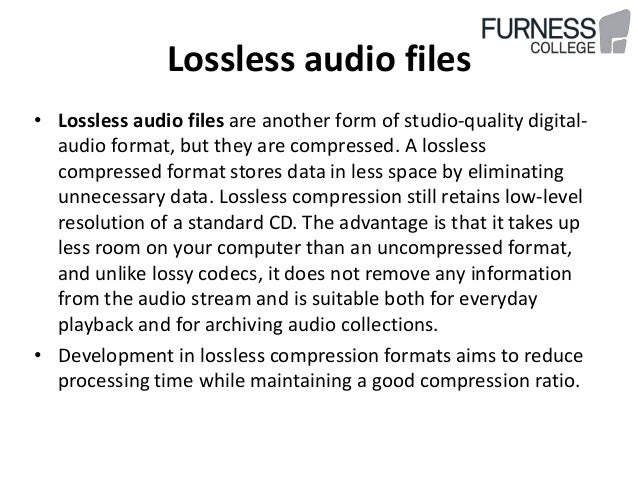
Lossless data compression is an information compression method, whereby encoded information can be retrieved with bit precision. This fully recovers the original data from the compressed state. This type of compression is diametrically different from lossy data compression. As a general rule, each type of digital information has its own lossless compression algorithms.

FLAC and APE codecs are the main Lossless formats today

FLAC (English Free Lossless Audio Codec) is a popular free codec for audio compression. Unlike the lossy Ogg Vorbis, MP3 and AAC codecs, it does not remove any information from the audio stream and is suitable for both daily listening and archiving an audio collection. Today, the FLAC format is compatible with many audio applications.

Monkey’s Audio (APE) is a popular lossless digital audio encoding format. It is distributed free of charge along with open source code and a suite of encoding and playback software, as well as plugins for popular players. Monkey’s audio files use the following extensions: .ape to store audio and .apl to store metadata. Despite being open source, Monkey’s Audio is not free, as its license imposes significant restrictions on its use.

After downloading music on Lossless, you can burn it to CD in the future and listen to it with Hi-Fi (or other) class acoustics, while normal CD quality will be.

For comparison, bitrate:

-mp3 ~ 320 kb / s

-FLAC and APE ~ 1000 kb / s

Theory:

SACD, DVD-Audio, DTS-CD and others multi-channel music formats.

SACD stands for Super Audio Compact Disc, an optical disc format for storing music. It looks like a normal CD, some discs can be seen with the naked eye: their working side is yellow. The sound in SACD is recorded in a completely different format: DSD (Direct Stream Digital) and they are reproduced only in special players.

features:

– Multichannel: 6 channels of audio can be recorded

– A completely different type of recording (DSD), which provides better sound quality compared to a CD.

– Conditional compatibility with older players: there can be two layers to a disc: normal CD (stereo) and one or two SACD variants (stereo / multichannel).

That is, if the disk:

Single Layer (“Single Layer”) – Read-only on SACD players.

Double Layer or “Hybrid” (“Double Layer” or “Hybrid”): Read on both conventional CD players and SACD players.

All SACDs have CD text – text information about album, artist, and track.

Digital audio compression

Digital audio compression

Digital Audio Compression

The concept of loudness is close and understandable not only for a musician, but also for people who are not associated with music. The relationship between the volume of the parts of a piece and the volume of the instruments that are playing simultaneously is called the dynamic range. One of the main tools producers and musicians use to influence dynamic range is the compressor.

Digital Audio Compression

Although the compressor works with a known phenomenon, loudness, in most cases its use occurs spontaneously, randomly, without understanding the essence of what is happening. You can know the general principle of the compressor and the purpose of each handle, but this does not eliminate the stupor at the first experience.

Why do you need a compressor?

The main purpose of the compressor is to automatically change the signal level. It works roughly the same as if you kept your hand constantly on the volume fader, turning it up and down. The difference is that a compressor can react very quickly to changes, much faster and more accurately than a human.

Up to this point, the word compressor meant a whole class of dynamic devices. Using the same basic principles as a conventional compressor, various instruments work for different purposes: limiters, expanders, gates, etc. They are united by working with the volume of individual sounds or the mix as a whole.

The classic compressor is controversial by its very name. Everyone knows that he makes the loudest sound. But the name comes from compress, which means “compression”, and if you ask any sound engineer what a compressor does, you’ll hear the answer: “squash the signal.” The compressor reduces the amplitude of the dynamic bursts, makes them quieter. So what is the main purpose of the compressor: to make it quieter or louder? The answer is both at the same time.

Let’s take an example of voice recording. Very often, in the process of singing, syllables or sounds of different volume are heard. If the singer does not control the dynamics of his performance very well, then such differences create problems for the sound engineer and negatively affect the final result of the work. Silent syllables disappear into the mix, text becomes difficult to distinguish, and if you adjust the volume for a quiet area, in other places the voice begins to “stand out.”

This is where the compressor comes in. It allows you to suppress strong bursts, equalize them with silent fragments. Now you can turn up the volume of the track without fear of some syllables sticking out. So the compressor makes the sound lower and higher at the same time. Three images show the stages of working with sound: a source with large peaks (a), a compressed signal (b) and an increase in the volume level of the entire file (c).

It is especially important to apply compression when recording in a digital environment, when we are forced to adhere to a maximum level of 0 dB, because exceeding this threshold leads to clips and distortion. When clips appear, we lower the preamp level, which means we lower the volume of not only bursts, but quiet areas as well, leading to signal degradation due to quantization and aliasing noise.

The compressor, positioned between the preamp and the digital recording system, operates only on the loudest bursts, reducing their volume and ensuring a smooth soundtrack. Thanks to this, we have the opportunity not to reduce the overall volume of the recorded signal and to maintain the sound quality.

Unfortunately, many modern musicians, without going into the technical characteristics of the compressor, use it everywhere, believing that with its help you can “stretch” any sound in the mix. Also, compressors are often included on the road in extreme conditions. They are only used by experienced sound engineers when there is a real need.

The compressor helps avoid recording problems. The most common causes of problems can be the following:

Non-professionalism of the interpreter (dynamic unevenness).
Mismatched path (bad, mismatched, or inadequate microphones, preamps).
Disadvantages of the digital environment (limited to 0 dB).
Uncomfortable conditions for the singer (small and stuffy room, poor monitoring).
Low qualification of a recording engineer.
If a performer has a voice and can sing into a microphone, and a recording engineer knows her job well and knows how to properly position microphones and set up equipment, a compressor may not be required at all. But this is the ideal situation.

Digital audio compression

Digital audio compression

Digital Audio Compression

Audio data compression is a real problem today. There are two reasons for the need to compress audio data: memory savings when storing audio information, low bandwidth of remote digital information transmission channels. Compression effectively solves the two problems above. Data compression is an algorithmic transformation of data performed to reduce its volume.

Data Compression

It is used for a more rational use of data storage and transmission devices. Compression is based on eliminating the redundancy contained in the original data. To guarantee the parameters necessary for the transmission of voice signals (music) over modern low-speed digital communication channels and to guarantee the specified noise immunity, it is necessary to use highly efficient data compression algorithms. The transmission channel is characterized by a concept such as the capacity of the channel: And the signal – by the volume (signal): …

Both of the above features include dynamic range D, channel width (signal spectrum), and transit time T. Digital audio compressors are used to reduce dynamic range. To improve spectral efficiency, digital filters are used to limit the spectrum of the encoder output signal (according to Nyquist criteria). Among other things, encoders based on the principles of elimination of redundancy (Huffman codes) are used to guarantee a certain information transmission speed. The essence of which is as follows: codes based on the principle of assigning more probable values ​​of the amplitudes of the codewords of shorter length than the improbable ones.

Let’s consider how the types of redundancy described above are eliminated.
Structure of a lossy audio compression encoder The original digital audio signal is divided into frequency subbands and time-segmented into a time-frequency segmentation block. The length of the encoded sample depends on the shape of the temporal function of the audio signal. In the absence of sharp peaks in amplitude, a long sample is used, which provides high-frequency resolution. In the case of abrupt changes in signal amplitude, the length of the encoded sample decreases dramatically, giving a higher time resolution. The decision to change the length of the coded sample is made by the psychoacoustic analysis unit, calculating the value of the psychoacoustic entropy of the signal.
After segmentation, the frequency subband signals are normalized, quantized, and encoded. In the most efficient compression algorithms, it is not the samples of the audio signal that are encoded, but the corresponding MDCT coefficients. (the differential between the coefficients is smaller) The accounting of the auditory perception patterns of a sound signal is carried out in the psychoacoustic analysis unit. Here, according to a special procedure, for each frequency sub-band, the maximum allowable level of quantization distortion (noise) is calculated, in which they are still masked by the useful signal of this sub-band.

The block of dynamic distribution of bits according to the requirements of the psychoacoustic model for each coding subband selects a minimum possible number of them, in which the level of distortions caused by quantization does not exceed the threshold of their audibility calculated by the model psychoacoustic.

This article will consider the functional diagrams of the audio data compression algorithms, based on µ-laws, A. The functional diagram of the compression algorithm based on the A-level compression law is shown in Fig.2. Figure 2. Functional diagram of the compression algorithm based on the A-level compression law A signal (discrete sine) is applied to the input of the compressor. After compression, the signal passes to the adder, where the noise is fed to the second input of the adder, thus simulating the additive noise of the transmission channel.

Then the noisy signal enters the input of the expander, at the output we get the reconstructed signal. The reconstructed and original signal is then fed to the adder, after which the power of the spectral noise is observed.

Simulation results (A = 87.6)
The following graphs are presented: 1-original signal, 2-signal passed through the compressor, 3-recovered signal, 4-noise power at the output of the noise generator, 5-noise power after the expander.