How to Convert MP3 to AAC: Exploring the Technicalities of the Advanced Audio Codec


Free Download Mp4Gain
picture

How to Convert MP3 to AAC: Exploring the Technicalities of the Advanced

MP3 to AAC
MP3 to AAC

Audio Codec


MP3 to AAC
MP3 to AAC


The History of AAC

Advanced Audio Coding (AAC) is a widely used audio codec, designed to be the successor of the MP3 format. It was first introduced by the Moving Picture Experts Group (MPEG) as part of MPEG-2 and later extended as MPEG-4 Part 3. Since its release in 1997, AAC has been recognized for its superior audio quality and compression efficiency.

The development of AAC began in 1988 as part of an international collaboration called the Audio Coding Joint Technical Committee (JTC), consisting of experts from several organizations, including AT&T, Fraunhofer Society, and Sony. The goal was to create an audio codec that could deliver high-quality audio while using less bandwidth and storage space than MP3, which was the dominant audio format at the time.

The result of this collaboration was the creation of the MPEG-2 AAC standard in 1994, which was later extended as MPEG-4 Part 3 to include additional features. Today, AAC is supported by a wide range of devices and platforms, including Apple’s iTunes, iPod, and iPhone, as well as Android devices and various media players.

How AAC Works

AAC is a lossy compression codec, meaning that it achieves high compression rates by discarding some of the audio data. However, unlike MP3, which relies on a perceptual coding algorithm to remove irrelevant audio data, AAC uses a more advanced coding algorithm that takes into account the psychoacoustic properties of human hearing.

AAC achieves this by dividing the audio signal into different frequency bands and applying different quantization noise to each band, based on the sensitivity of human hearing at different frequencies. The result is a more efficient use of the available data rate, allowing AAC to deliver higher audio quality at the same bit rate as MP3.

AAC is also a format container, meaning that it can contain audio data encoded in various formats, including stereo, 5.1 surround sound, and even lossless formats like Apple Lossless and FLAC. This flexibility makes AAC a versatile audio format that can be used for a wide range of applications, from music streaming to professional audio production.

Converting MP3 to AAC Using Mp4Gain

Mp4Gain is a versatile audio and video conversion tool that supports a wide range of formats, including MP3 and AAC. With Mp4Gain, you can convert your MP3 files to AAC quickly and easily, without losing any audio quality.

What is a container format?

A container format is a type of file format that can store different types of data in a single file. In the case of audio and video files, a container format is used to package the different types of data that make up the file, including the video and audio streams, metadata, and any subtitles or closed captions.

The benefits of using AAC

AAC has several benefits over other audio formats. Firstly, it offers improved sound quality at lower bitrates than MP3, which means that files can be compressed to a smaller size without sacrificing quality. This is particularly important for mobile devices with limited storage capacity.

Secondly, AAC offers better performance at high bitrates, making it a popular choice for professionals who need high-quality audio, such as musicians, producers, and sound engineers.

Another benefit of using AAC is that it supports up to 48 channels of audio, compared to MP3’s limit of 2 channels. This makes AAC a popular choice for high-end surround sound systems and immersive audio experiences.

Finally, AAC is widely supported by a range of devices and software, including Apple devices, Android devices, and popular media players like VLC and QuickTime.

How to convert MP3 to AAC with Mp4Gain

Now that you understand the benefits of using AAC, you may want to convert your MP3 files to AAC to take advantage of these benefits. Fortunately, Mp4Gain makes it easy to do this.

To convert MP3 to AAC with Mp4Gain, follow these simple steps:

    1. Open Mp4Gain and select the “Audio Converter” option from the main menu.
    2. Click the “Add Files” button and select the MP3 files you want to convert to AAC.
    3. Select “AAC” as the output format from the list of available formats.
    4. Choose the desired bitrate, sampling rate, and channel configuration for the output file. You can also choose to normalize the volume if you want.
  1. Click the “Convert” button to start the conversion process.

Once the conversion process is complete, you will have high-quality AAC files that can be played on a wide range of devices and media players.

Conclusion

AAC is a high-quality audio format that offers several benefits over other formats, including improved sound quality at lower bitrates, better performance at high bitrates, support for multiple channels of audio, and wide compatibility with devices and software.

If you want to take advantage of these benefits, Mp4Gain makes it easy to convert your MP3 files to AAC. With its simple interface and powerful conversion capabilities, Mp4Gain is the perfect tool for anyone who wants to create high-quality, versatile audio files.


Free Download Mp4Gain
picture


Mp4Gain Main Window
picture


Mp4Gain Features
picture


Free Download Mp4Gain
picture

How does lossless compression work for audio?

How does lossless compression work for audio?

Lossless Audio
Lossless Audio

Lossless audio compression is a crucial technology for digital music distribution and storage. With the rise of streaming services, high-fidelity audio has become a priority for many listeners. However, uncompressed audio files can be quite large, making them impractical for mobile devices and slower internet connections. This is where lossless compression comes in.

Lossless Audio
Lossless Audio

Why is lossless audio compression important?

Lossless compression allows digital audio files to be compressed without losing any of the original data. This means that the sound quality is preserved, while the file size is reduced. With lossless compression, music files can be stored and transmitted more efficiently, without sacrificing quality. In addition, lossless compression makes it possible to enjoy high-fidelity audio on devices with limited storage capacity.

How does lossless compression work?

Lossless compression works by identifying and removing redundancies in the data. This is done through a process called entropy encoding, which analyzes the statistical properties of the audio data to find patterns that can be represented more efficiently. These patterns are then replaced with shorter codes, which are stored in a compressed file. When the file is decompressed, the original data is restored exactly as it was before compression.

Common lossless compression formats

  • FLAC: Free Lossless Audio Codec
  • ALAC: Apple Lossless Audio Codec
  • WAV: Waveform Audio File Format
  • AIFF: Audio Interchange File Format

How to use lossless compression

To use lossless compression for your audio files, you’ll need to choose a suitable codec and software. There are many options available, but some of the most popular choices include FLAC and ALAC. Once you’ve selected a codec, you can use a program like Foobar2000 or dBpoweramp to compress your files. You can also use lossless compression for streaming, by selecting a service that supports lossless audio, such as Tidal or Qobuz.

Lossless compression is an essential tool for anyone who wants to enjoy high-quality audio in a digital format. With lossless compression, you can store and transmit audio files more efficiently, without sacrificing fidelity. Whether you’re an audiophile or a casual listener, lossless compression is an important technology to be aware of.

The History of Lossless Audio Compression: From Analog to Digital

Lossless audio compression has come a long way since the early days of digital audio. In this article, we’ll take a deep dive into the history of lossless audio compression, from its roots in analog tape to the latest developments in digital audio.


Analog Roots

The history of lossless audio compression can be traced back to the days of analog tape. Tape-based audio recording was the dominant technology for several decades, and various techniques were developed to compress audio data without sacrificing quality. One of the most popular techniques was noise reduction, which involved boosting the level of low-level audio signals while reducing the level of high-level signals. This allowed audio to be recorded at a higher signal-to-noise ratio, resulting in a cleaner, clearer sound.

The Digital Revolution

The introduction of digital audio in the 1980s marked a major turning point in the history of lossless audio compression. With digital audio, it became possible to represent audio data as a series of numbers, which could be manipulated and compressed using a wide range of mathematical algorithms. One of the earliest lossless compression algorithms was the Audio Processing Technology (APT) algorithm, which was developed in the early 1990s. APT used a combination of linear prediction and residual coding to compress audio data without losing any information.

The Rise of Lossless Audio Formats

In the early days of digital audio, lossy compression formats like MP3 and AAC dominated the market. These formats achieved high levels of compression by discarding some of the original audio data, resulting in a loss of quality. However, as storage capacity and internet speeds increased, there was a growing demand for high-fidelity audio that could be stored and transmitted efficiently. This led to the development of lossless audio formats like FLAC and ALAC, which could compress audio data without sacrificing quality.

  • FLAC: Free Lossless Audio Codec
  • ALAC: Apple Lossless Audio Codec


The Future of Lossless Audio Compression

The latest developments in lossless audio compression are focused on improving the efficiency and speed of compression algorithms. One promising approach is the use of machine learning, which can be used to identify patterns in audio data that can be compressed more effectively. Another area of focus is the development of lossless compression formats that are optimized for streaming, allowing high-fidelity audio to be delivered over the internet in real time.


What is digital audio?

What is digital audio?

Digital Audio
Digital Audio

How does digital audio work?

Digital Audio
Digital Audio

What is the rate? Of course, I can’t directly explain to you that “rate is bitrate”. When you play sound files with some software, you should notice a small message. For example, “128Kbps”, “1411Kbps”… Some friends also know that under normal circumstances, the larger the number in front of “Kbps”, the better the sound effect, for example, CD is “1411Kbps”. So what exactly do these numbers represent? In a nutshell, how much data is converted into sound per second. The reason CDs sound better than MP3s is that CDs have more information per second than MP3s. For example, compared to a 1411 Kbps CD file, a 128 Kbps MP3 file can convert almost 12 times less data per second than a CD. For the same song, the CD is much more delicate to listen to (of course, there is a group of people in the crowd known as “mushrooms” who can feel that the effect is the same) MP3 expresses the same content with less data and, of course, its level of detail is not as good as that of a CD.


2. Sampling rate.


Sampling rate is also a very common term. The specific form is “XXHz”, where “XX” is a specific number. Such as “44100Hz (44.1KHz)”, “32000Hz (32KHz)” and so on. As mentioned above, digital audio files are made up of many “points”, so the sample rate is actually a standard “quantity” to collect these “points”. Obviously, the sampling rate of “44100 Hz” is higher than that of “32000 Hz”, so more points are collected per time unit (1 second). The more points per unit of time, the more complete the sound information and, of course, the closer to reality. So if the guaranteed rate is the same, the file “44100Hz” is better than “32000Hz” (of course, this is not absolute).


————————————————–


lossy compression


In fact, we are all familiar with lossy compressed audio sources. At present, popular lossy formats mainly include MP3, WMA, OGG, MP3pro, AAC, VQF, ASF, etc.


2.WMV format


The full name of WMA is WindowsMedia Audio, which is an audio format promoted by Microsoft. The WMA format achieves a higher compression ratio by reducing the data stream while maintaining sound quality. The compression ratio can usually reach 1:18, and the generated file size is only half of the corresponding MP3 file.


3.MP3 format


The full name of MP3 is MovingPicture Experts Group Audio Layer Ⅲ. In a nutshell, MP3 is an audio compression technology. Since the full name of this compression method is called MPEGAAudio Layer 3, people call it MP3 for short. It was born in 1993, and its “parents” are the German FaunhofeIIS and the French Thomson.


MP3 uses MPEGAudio Layer 3 technology to compress music into smaller files with a compression ratio of 1:10 or even 1:12. In other words, you can compress files to a smaller size with little loss of sound quality. And it keeps the original sound quality very well. It is precisely because of MP3’s small size and high sound quality that the MP3 format has become almost synonymous with online music. The MP3 format of music per minute is only 1 MB in size, so the size of each song is only 3-4 megabytes. Use an MP3 player to uncompress (decode) MP3 files in real time so that high-quality MP3 music can be played.

What is digital audio?

What is digital audio?

Digital Audio
Digital Audio

How does digital audio work?

Digital Audio
Digital Audio

In our daily lives, we listen to all kinds of music, and most of this music is transmitted in digital form, whether it is listened to or downloaded to a computer or played on an MP3 or CD player. Of course, you will often see various formats like MP3, WMV, APE, etc., but do you understand the meaning of these formats? Below I have compiled some of this content for you, I hope it helps you.


1. Introduction to digital music


Digital audio sources, that is, digital audio formats, first referred to CDs. After the CDs were compressed, a variety of formats suitable for playback on Walkmans were derived. These compressed formats can be divided into two categories: there is lossy and lossless compression. The compression mentioned here refers to converting the audio stream encoded in PCM or WAV format to other formats after special compression processing, so as to achieve the effect of reducing the file size. Lossy/Lossless refers to whether the sound signal retained in the new file is reduced compared to the original PCM/WAV format signal after compression.


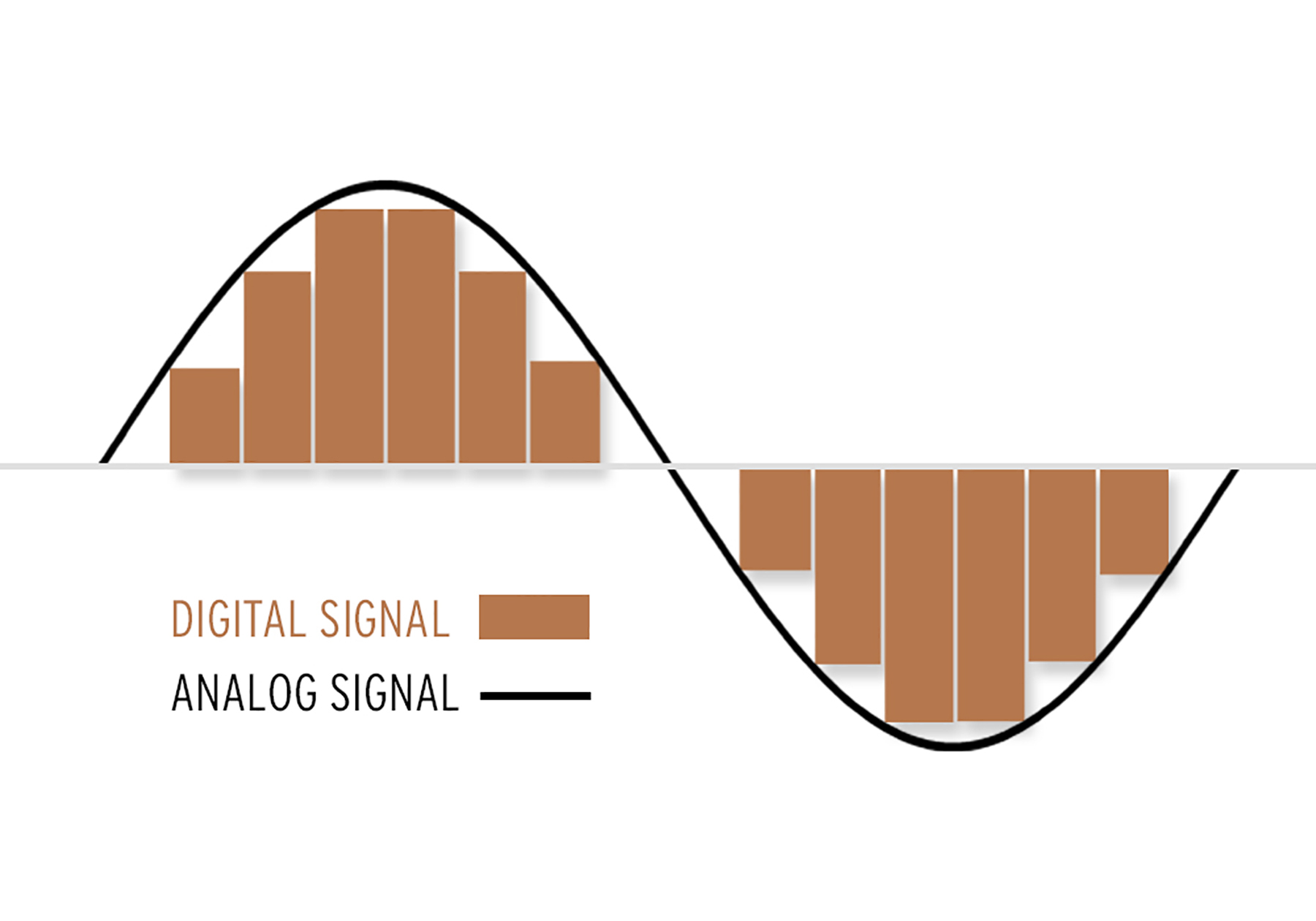
PCM encoding is short for PulseCode Modulation, also known as Pulse Code Modulation, which is one of the digital communication encoding methods. The sampled value is rounded and quantized according to the hierarchical unit, and the sampled value is represented by a set of binary codes to represent the amplitude of the sampled pulse.

The final form of the digital audio signal is still made up of “0/1”. They can be any permutation and combination, such as “0001110101” or “11100001010”. Of course, different combinations have different effects. Seeing this, some friends should have noticed. If the sound is recorded in the form of “00101010”, then the final form is not a “dot”, that is, a simple “change” process. The sound is continuous, how can it be recorded with “dots”? Shouldn’t the sound we hear be segment by segment? The reason is not difficult to understand. Go home and turn on the fluorescent light, can you find the fluorescent light flickering? can not? In fact, fluorescent lights flicker constantly. Have you seen cartoons? They are all connected by a grid of still images. We can also simply understand the images one by one as “dots” one by one. Man against nature

There are limits to the sense of the world, both visual and auditory. The reason cartoons can produce coherent motion is that these “dots” are an illusion that people create when human vision doesn’t respond in time. With the exception of machines, people cannot distinguish these “dots”. So is the sound. If the frequency of the sound flicker is very fast, people cannot distinguish it. Also, when the sound performs a “digital conversion of analog signals” (D/A conversion), the decoder chip has already connected these “dots” coherently, so we hear a very coherent sound.