What is the difference between MP3 and AAC? Part 3


Free Download Mp4Gain
picture

What is the difference between MP3 and AAC? Part 3

aac vs mp3

Finally, let’s review the important MP3 and AAC compatible devices.


MP3 o AAC

MP3s are compatible with almost all music-playing devices, such as personal computers, smartphones, and audio devices. Therefore, it is generally better to save the file in MP3 format.

As for AAC, it is a recommended storage format for iPad / iPhone users and those who use iTunes, Apple’s official music player, because it is compatible with Apple devices. Even if you import the sound source from a CD with iTunes or purchase paid music content from iTunes, it will be saved in AAC format.

Which is better, MP3 or AAC?

Unsplash logo Photo by marksolarski
In this article, I explained about MP3 and AAC music file storage formats. Finally, if you do not know what is the storage format that I should use, to leave and save the music files in MP3 format, it can be said that it is the best. MP3s have many playable devices and the sound quality is not that different from AAC.

Also, files saved in MP3 format can be easily converted to AAC files using iTunesw. When saving as MP3, it can also support post file conversion, so if you have problems with the save format, it is better to select the MP3 format. Also, if you’re targeting Apple devices, try saving music by choosing an AAC format that doesn’t need to be converted.


Free Download Mp4Gain
picture


Mp4Gain Main Window
picture


Mp4Gain Features
picture


Free Download Mp4Gain
picture

What is the difference between MP3 and AAC? Part 2
What is the difference between MP3 and AAC? Part 2

AAC Vs. MP3

The disadvantage of the “lossy compression format” used by MP3 / AAC is that the compressed data file cannot be restored to its original size (the original sound quality of music content).
aac vs mp3

There is a music content compression format called “lossless compression format”, which has a relatively large data size and can restore the original sound quality when playing music files.

There is not much difference between the two compression formats, but if you want better sound quality, you should use the “lossless compression format”. In the next chapter, we will further compare the differences between MP3 and AAC formats.

Comparison of MP3 and AAC

Unsplash Logo Photo by duck58cth
We will compare MP3 and AAC in terms of sound quality and compression rate (bit rate).

Sound quality

As mentioned above, MP3 and AAC are compression methods that use the “lossy compression format”, so there is not a big difference in sound quality between the two formats. The sound quality of MP3 and AAC differs depending on the compression rate (bit rate) of the music content file. So what exactly is the compression rate (bitrate)? The next section describes (compression bit rate).

Compression rate (bit rate)

format Compression rate (bit rate)
64kbbp 96kbbp 128 kbbp 160 kbp 192 kbbp 256 kbbp 320kbbp

MP3 Upper Limit Frequency 8.3 kHz 11.7 kHz 15.2 kHz 18.6 kHz 21.3 kHz 22.0 kHz 22.0 kHz

MP3 size 123kB 184kB 245kB 308kB 372kB 494kB 616kB

AAC upper limit frequency 13.5 kHz 15.2 kHz 18.7 kHz 19.1 kHz 19.6 kHz 20.0 kHz 20.0 kHz

AAC size 127kB 188kB 249 KB 310kB 368kB 490kB 613kB

The comparison table above shows the compression rate (bit rate) of MP3 and AAC, and the upper limit of frequency and data size (capacity). The higher the value of the compression rate (bit rate), the higher the upper limit for frequency and data size (capacity), and the better the sound quality.

Although the compression rate (bit rate) of MP3 and AAC is the same, the data size (capacity) and the upper limit frequency are different, so please compare the sound quality using the table above as a guide.

Proper use of MP3 and AAC

In this chapter at the end of this article, we will introduce how to use MP3 and AAC correctly. Even if you read the comparative explanation of MP3 and AAC presented so far, many people may not get it right. How to use MP3 and AAC correctly should be judged by the compression rate (bit rate).

Bit rate

As discussed in the previous chapter, the higher the value expressed in “kbbs” called the compression rate (bit rate), the better the sound quality. However, MP3 and AAC have the same compression rate (bit rate) but different upper limit frequencies.

128 kbps to 160 kbps is adopted for general MP3 / AAC music files. This is because you can watch various music genres like J-POP and Jazz with high sound quality. You can fully enjoy music with your PC speakers and audio equipment.

Then I will explain the characteristics of the compression rate (bit rate) of 128 kbps or less and the compression rate (bit rate) of 160 kbps or more, and which file format should be used, MP3 or AAC.

Less than 128 kbps

A compression rate (bit rate) of less than 128 kbps does not improve the sound quality of music, etc., and is not suitable for the music content storage file format. Suitable as a conversation-focused radio sound source. Also, if it is less than 128 kbps, the AAC format has a higher frequency upper limit, so the sound quality is said to be better than MP3.

192 kbps or higher

The compression rate (bit rate) of 192 kbps or higher reproduces even delicate sounds like classical music. If you have a good ear, you can clearly tell the difference in sound quality.

When the compression rate (bit rate) is 192 kbps or higher, the MP3 format has a higher upper limit frequency and is said to have a higher sound quality. The data size (capacity) is almost the same as that of AAC, so it is recommended to save it in MP3 format.

Digital audio: a simple but deep explanation about digital audio. Part 1

Sound is a phenomenon that implies a propagation of waves generally produced by a vibratory movement of a body. The propagation of sound implies a transport of energy without carrying out a transport of matter.

digital audio

As the sound is produced by a wave movement when applying the Fourier transform we can express it by a sum of sinusoidal curves that correspond to pure tones that can be characterized by the magnitudes of any wave such as:

-Period It is the time elapsed between two equivalent points of a wave.
– Wavelength It is the real distance a wave travels from its highest point to the next equivalent point.
-Frequency It is the magnitude that measures the number of repetitions in a space of time.
-Amplitude It is the distance between the furthest point of the wave with the equilibrium point.

These magnitudes give the sound a series of characteristics such as:

-Duration: Determines the length or short of the sound due to the time, measured in seconds, it occupies.
-Intensity: Determines the high or low sound due to what we know in relative terms as volume, which is measured in decibels (it is a logarithmic scale).
-Timbre: Determines the proper nuance of each instrument or sound source due to the different harmonics that compose it.
– Hue: Determines the acute or serious sound due to the frequency it has. The frequency is measured in hertz (Hz).

If we carefully consider it, we will see that the initial concept of Mp3Gain was intensity, which is measured in decibels and represents the loudness we perceive.

digital audio

Digital audio

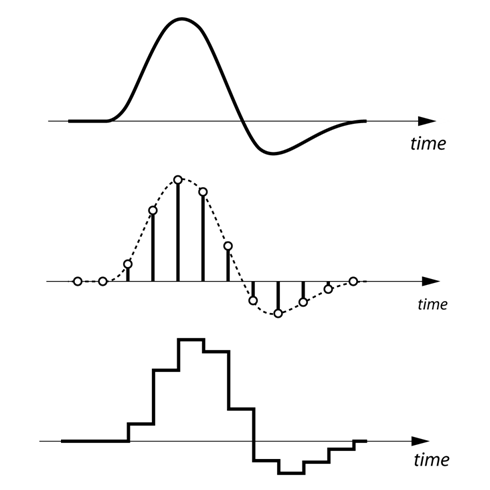
Digital audio is the digital coding of an electrical signal that represents any sound wave. This electrical signal is picked up for example by a microphone, which takes the sound whose nature is analog and transforms it into electricity that still has the same type of analog nature, then through the necessary hardware and software it can be transformed into binary information, turning Something continuous in discreet. This process involves two tasks: sampling and digital quantification of the electrical signal.

Within the digital audio there are different types of formats to represent the audio:

-PCM: They contain all the information received from the analog to digital converter, without any omission of data. This makes the type of formats that have the best quality in the digital world. WAV is an example of this type of format in question.

-Compressed: It is similar to the previous one, but specific compression techniques are used in which “non-essential” information can be lost to reduce the size of the final file. They usually have good quality in relation to the weight of the file, but as noted above, information is lost, so those with sufficiently developed / trained ears might perceive that there is something strange in a song for example. On the one hand we have formats such as MP3 and OGG that compress with loss, compared to FLAC that compresses without loss. Obviously between one format and the other there is a notable difference in the size of the final file.

-Descriptive: They are used primarily to make music and contain mainly a description of what would be the “score” of the song. With this description, the algorithm, which reproduces the song, can take a sound source with samples of the instruments that the composition needs, to synthesize the final sound based on the indications of the “score”. Examples of this format are MIDI and tracker formats (MOD, XM, IT, etc.). The difference between MIDI and tracker formats is that the latter bring built-in sound sources into the file, so the final file weighs more than using MIDI. However, with MIDI we will need to obtain a sound source on our own or use the one that brings the default sound card (which is not usually too good).