Which is better, MP3, FLAC or WAV? Part 2
The right audio file format can do more with less
M4A
M4A is a format compatible with Apple products such as iPhone and iPod, and corresponds to MPEG-4 video files. M4A files have lossless compression and can be edited multiple times without quality loss. Compared to other audio file formats, M4A has similar quality but smaller file size.
CCA
Like MP3, Advanced Audio Coding (AAC) files are also lossy formats. However, AAC files are of much higher quality in their original state than all other audio file formats, and AAC files are generally similar in size to MP3, but slightly higher in quality.
In addition, AAC also offers variable bitrate or constant bitrate encoding, and AAC files are also open source, which means you don’t have to pay royalties to create and share them (unlike MP3 files). .
AAC files are usually used in iTunes, but can also be used in other player devices and game consoles.
undefined
OGA
Like AAC, OGA files are open source and use lossy compression. They use a variable bit rate to reduce file size without reducing the overall sound quality. In practice, OGA files tend to be of higher quality than MP3s, but many programs don’t support OGA.
FLAC
Like M4A, FLAC is a lossless format, but unlike M4A, FLAC is an open source encoding and has a more efficient compression algorithm that reduces the file to 50% to 70% of its original size. This format is popular with audiophiles as a way to collect music in its highest quality form. Because it is open source, it is compatible with many devices and programs.
PCM, WAV and AIFF
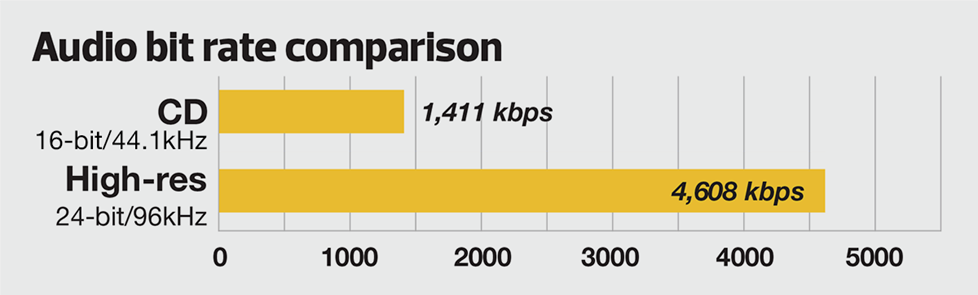
PCM (Pulse-Code Modulation) is an uncompressed audio file format commonly used on CDs and DVDs. This format uses a “sample rate” and a “bit depth”, where the sample rate represents the sample rate of the original audio file and the bit depth represents how many bits are used to define each sample.
WAV (Waveform Audio File Format) is generally used as a format for storing PCM audio files, which makes it more suitable for Windows computers.
AIFF (Audio Interchange File Format, Audio Interchange File Format) like WAV is commonly used to store audio files in PCM format (except Mac).
How to choose the correct audio file format
Choosing the right format completely depends on the audio file you intend to use, you should choose a format that expresses the sound quality of the desired audio file, unnecessary high quality audio files can be difficult to move, share, convert and manage . Consider the following two cases:
If you plan to edit audio files (such as podcasts), use uncompressed formats (including PCM, WAV, and AIFF) so that the quality of the audio files is maintained each time you edit and save the file. Once completed, it can be generated in a compressed format that is easy to share.
If you are an audiophile and want to listen to your music in high fidelity, choose a lossless compressed file format, including FLAC, WMA, M4A. It uses less storage space than uncompressed formats, but still retains the original full file quality.
If you don’t care about the quality of audio files, want to share files on the Internet, or need to save hard disk space, choose a format that uses lossy audio file compression, including MP3, OGA, AAC. Fortunately, lossy compression has gotten so good in recent years that most people can’t tell the difference between lossy and lossless compression.
In conclusion
In summary, the most popular types of audio files are:
MP3
M4A
CAA
OGA
FLAC
WAV
PCM
AIFF
In some cases it is better to use one file format than the other, in which case you should convert between the two file formats. To programmatically convert between audio or video file types, you can use Filestack’s Audio Transcoding API or Video Transcoding API. The Filestack API also supports splitting audio files from video files, cropping or resizing video files, video file thumbnails, and more.