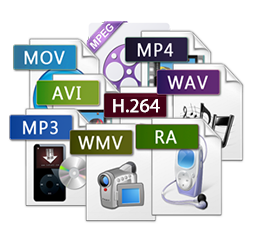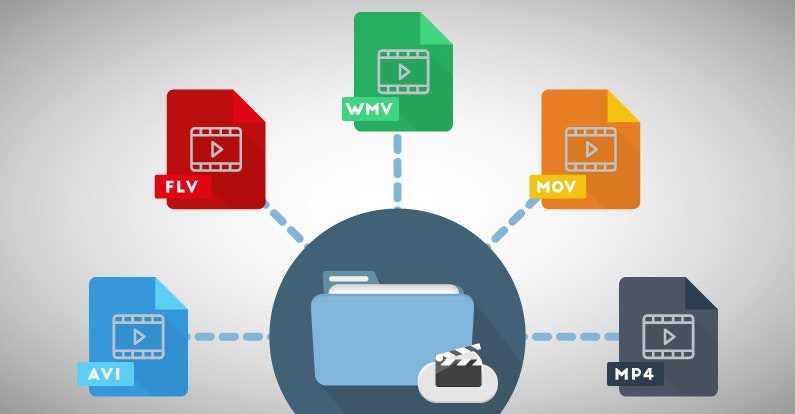
Deal with digital video formats


Free Download Mp4Gain
picture

Deal with digital video formats

Digital Video Formats

With the advent of the first computers, and with them digital storage devices, a gradual transition from analog to fully digital technology began. With it, we got a number of undeniable advantages (ease of copying and processing) and a big digital data storage problem. How to avoid quality loss when processing video, we will tell you in our article.

digital video formats

How much does the video weigh

PAL or SECAM video is a sequence of images displayed at 25 frames per second. A digital frame contains 720×576 pixels, that is, 414 thousand 720 elements (pixels). Each point can be one of 16.7 million colors and occupy 3 bytes on the computer. Consequently, one frame is approximately 1.2 MB. At the standard frequency, we get a figure of about 30MB per second, that is, storing just one hour of video (along with sound) without compression will cost 107GB. It seems intimidating, but it is already acceptable now.

But the progress of the video doesn’t stop. The highest possible quality is now achieved in HDTV (high definition TV), this format implies a resolution of 1920 x 1080 pixels, that is, all things being equal, a series of frames calculated for one second will already take 148 MB (521 GB per hour).

In order to avoid such volumes of stored video and waste of computing resources, as well as to be able to distribute video clips, various video compression methods have been developed. The achievements in the development of digital technology achieved over 15 years are actively used in everyday life, in video broadcasts, home devices (video cameras, DVD players) and on the Internet. Depending on the type of codec, you can achieve different compression rates and different “weight” of the finished film.

How compression occurs

Unlike universal archivers (such as WinRar or WinZip), video compression occurs with some loss, the amount of which depends on the selected codec. This is due to the fact that the algorithms of conventional filing cabinets practically do not compress the video information (as well as the sound). Modern compression algorithms use extensive logical analysis of the video to extract duplicate fragments between frames and reduce the size of the final file. When played, the compressed information is “expanded” and then displayed to the user. On a low-power computer, it can take a long time to break down images compressed with some codecs.

Various codecs are used to compress video

Most popular codecs

The most common codecs today are the MPEG family. It was based on the compression of photographs. We are all familiar with compact images with the JPG extension, and many can even distinguish a highly compressed image (with a cubic structure) from a high-quality one (with the naked eye, comparable to the original). The anatomical features of the human eye allow it to imperceptibly compress the image ten times using the JPEG encoder.

Strong compression

Maximum quality

In the given examples, you can see which artifacts, so-called cubes, appear in the photo that are incorrectly compressed (with a high compression ratio) and their absence in the photo with the correct compression. Such loss of quality with high compression by most codecs, including JPEG, is irreversible.


Free Download Mp4Gain
picture


Mp4Gain Main Window
picture


Mp4Gain Features
picture


Free Download Mp4Gain
picture

What is digital video?

What is digital video?

Digital Video

Digital video is a set of technologies for recording, processing, transmitting and storing images and sound from digital television. The main difference from analog video is that the video signal and sound are encoded and transmitted not in their original form, but after analog-digital conversion into video and sound data streams. In most cases, digital video is compressed to reduce the amount of data that is transmitted and stored. Digital video can be delivered to various video media through digital interfaces in the form of streams or files.

Digital Video

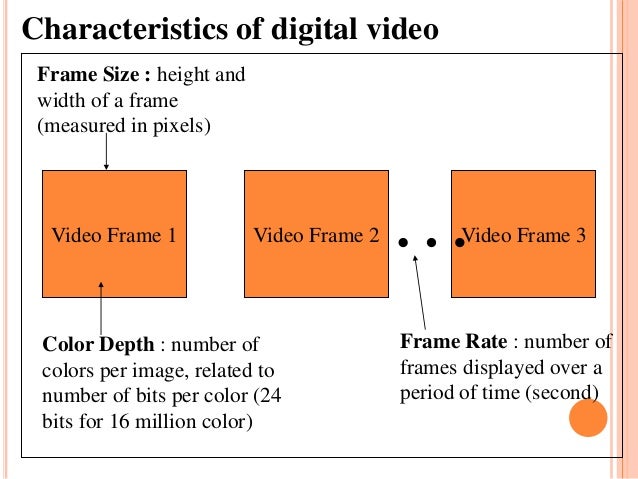
Digital video has five main characteristics: screen resolution, frame rate, color depth, bit rate (video transmission width), and image quality.

Screen resolution (resolution): indicates the number of dots (pixels) horizontally and vertically that make up the image (video frame) on the screen.
When recording the resolution, the value of the number of dots per line (horizontal resolution) is indicated first and then the number of lines involved in the image (vertical resolution).
For example, for the European PAL video standard, the frame size is 720×576 pixels, for the North American NTSC standard – 720×480, for high definition video (HD 720p) – 1280×720, and for the new HDTV standard (Full HD) – 1920×1080 pixels.
As you probably understand, the higher the screen resolution, the better the video quality.

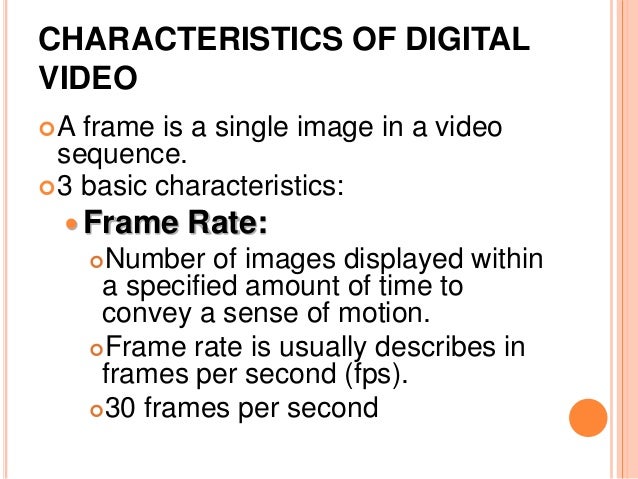
Frame rate, frame rate (frames per second (FPS), frame rate, frame rate): the number of frames per unit of time in television and cinema. The concept was first used by photographer Edward Muybridge, who carried out chronophotography experiments of moving objects with multiple cameras in a row. The generally accepted unit of measurement is frames per second.
– 24 – the world standard for the frequency of filming and projection;
– 25 – the filming frequency used in the production of films and television reports for their translation to the European decomposition standard 625/50;
– 30 – Standard video playback speed.

Color depth (color resolution) is a characteristic that indicates the number of colors that can participate in the formation of a video image.
The number of colors in digital video is measured in bits. So 1 bit can take two different values ​​(0 or 1) and it only allows encoding two colors (usually black and white), respectively. With two bits, you can encode 4 colors (22 = 4), with three bits – 8 colors (23), four – 16 (24) and so on.
Typically, color resolution is described by special color models. In computer technology, the RGB (red-green-blue) model is used, which can be represented by the following most common color depth modes: 8 bits (256 colors), 16 bits (65,536 colors) and 24 bits (16,777. 216 colors). By the way, the human eye, according to various opinions, can perceive 5-10 million shades of color.

A pixel is the smallest element in a digital image in bitmap graphics. It is square in shape. “Pixel” is a word made up of the words “image” and “element”. The physical size of a pixel is not set by the user, but is determined by the characteristics of the display device. The more pixels a display device has, the finer details in the image can be displayed.

Video bit rate is the amount of information transmitted per second. From this it follows that the higher the video bit rate, the better it is, the clearer the image, the less artifacts, etc. And it takes more hard drive space to store this video and consequently more time to transfer it over the network.

Image quality is a characteristic designed to evaluate the quality of the processed video compared to the original and is determined by a set of values ​​for resolution, color depth, and video transmission speed.

HD. High definition video. Most of the HD formats in use provide a resolution of 1920 x 1080 or 1280 x 720. There is a significant difference between the 1080 and 720 standards: the former uses 2.25 more pixels per frame.
This difference significantly increases the demands of 1080 data processing in terms of compression time, decompression speed, and size of the storage area. All 720 formats are progressive. The 1080 format is a combination of progressive and interlaced frame types. Computers and their monitors are inherently progressive, whereas television broadcasts

Digital video characteristics

Digital video characteristics

digital video characteristics

Frame Rate.

DIGITAL VIDEO CHARACTERISTICS

The standard video signal playback speed is 30 frames / s (for cinema this figure is 24 frames / s). Each frame consists of a certain number of lines, which are drawn not sequentially, but after one, resulting in two half-frames, or the so-called “fields”. Therefore, each second of an analog video signal consists of 60 fields (half frames). This process is called interlaced video. Meanwhile, the computer monitor uses the “progressive scan” method to draw the screen. (progressive scan), in which the lines of the frame are formed sequentially, from top to bottom, and the full frame is drawn 30 times every second. Of course, this method is called non-interlaced video. This is the main difference between computer and television method of video signal formation </p>

Color depth (Color Resolution).

This metric is complex and measures the number of colors displayed simultaneously on the screen. Computers process color in RGB (red-green-blue) format, while video uses other methods. One of the most common color models for video formats is YUV. Each of the RGB and YUV models can be represented by different levels of color depth (maximum number of colors) The RGB color model usually has the following color depth modes: 8 bit / pixel (256 colors), 16 bit / pixel (65,535 colors) and 24 bit / pixel (16.7 million colors). For the YUV model, the following modes are used: 7 bits / pixel (4: 1: 1 or 4: 2: 2, approximately 2 million colors), and 8 bits / pixel (4: 4: 4, approximately 16 million colors)

Screen resolution (Spatial Resolution).

Another characteristic is the screen resolution, or, in other words, the number of dots that make up the image on the screen. Since PC and Macintosh monitors are typically designed for native resolutions, many consider this to be the standard format. Unfortunately, it is not. There is no direct connection between the resolution of analog video and computer display & nbsp; Standard analog video provides a full-screen image without the size limitations often associated with computer video. Television standard NTSC (National Television Standards Committe), developed by the US National Television Standards Committee. Used in North America and Japan, it has a resolution of 768 by 484. The PAL standard (Phase Alternative), which is common in Europe, has a slightly higher resolution – 768 by 576 pixels

Since the resolution of analog video and computer video is different, when converting analog video to digital format, sometimes you have to scale and reduce the image, which leads to some loss of quality

The era of digital video

The era of digital video

Digital Video

In 1989, the Svema factory produced the last batch of amateur film in 8mm format. Five years ago the last laboratory for the development of this film was closed, and soon after, all the necessary chemicals disappeared from the sale … Thus, before our eyes, the era of home cinema ended and the era of amateur video began. . However, the latter, in turn, existed even fewer and, it seems, exactly the same fate awaits you: video is moving to digital formats.

Digital Video

So if you have a computer, buying an analog video camera and a board to digitize an analog signal (even a relatively cheap one, like MiroVideo DC20 / 30) seems at least a pointless waste of money today. The age of analog video is irrevocably a thing of the past, and we recommend that our magazine readers, before it’s too late, sell outdated analog hardware. Today, you can still get a third of the price for them, and if you’re lucky, even half …

Also, the same fate awaits television. For example, the state standard for high-definition color television (1,125 lines per frame), adopted in the United States in late 1996, has been successfully introduced into regular television broadcasting for the past three years. Inexpensive set-top boxes were launched for existing 525-line analog color televisions, and a decision was made in 2006 to stop broadcasting in analog format entirely.

All these innovations will gradually lead to the fact that fans of traditional videotapes will have to say goodbye to their clumsy “video boxes”: current alternative technologies are of much better quality, and moreover, they have a constant tendency to become cheaper. (Potentially, with increasing popularity, they will cost even less, than analog formats that have already reached their “ceiling”).

The excellent quality of DVD video recorded in MPEG-2 format is already capable of encouraging the average viewer to switch. The only limiting factor at the moment is that DVDs cannot yet be burned at home.

The hurdle is quite serious: many of us like to shoot home videos on amateur camcorders, rewrite movies, and play around with video editing. Furthermore, even with the massive proliferation of DVD-RAM in the foreseeable future, camcorders are unlikely to switch to new media (although Sony has already released digital cameras that use MD discs as media).

However, in addition to digital video DVDs, the MPEG-2 compression algorithm (albeit somewhat simplified and modified) is used in modern digital video in DV format (as opposed to the classic MPEG algorithm with I, B and P frames, in DV the data is recorded on cassettes using compression based on I-frames only). Furthermore, in the DV format, unlike Motion-JPEG, both intra-frame compression, in which each frame is compressed by itself, without taking into account the information of adjacent frames, and inter-field compression, which applies analyzing still images in adjacent frames using the same background. These compression algorithms produce very few artifacts. At the same time, video in DV (I-MPEG) format looks much better than the current de facto standard for non-linear editing systems: M-JPEG (Motion-JPEG) and,

For storing large amounts of video data at 500 TVL (TVL) resolution in component format with separate chrominance and luminance signals (Y, RY and BY) and 4: 1: 1 sampling (4: 2: 0 ) on small media, DV format uses 5: 1 compression (fixed stream – 3.6 MB / s). At the same time, Sony experts say that the quality of DV images is not inferior to the modern professional standard Betacam SP used in studio video equipment (differences appear only in the case of additional video processing as a result of compression image and some loss of color information during sampling). Professional modifications to the DV standard are also being successfully introduced: Sony’s DVCAM and Panasonic’s DVCPRO (in the latest implementations of these formats, the same 4: 2: 2 sampling is used as in Betacam SP).

Excellent consumer digital cameras already exist on the mass market.

Video compression formats

Video compression formats

video file formats

Before building a video surveillance system, a technician will have to solve a number of critical problems and tasks. Along with the choice of cameras, servers, and software, it is necessary to select the optimal compression format for the system’s video transmission. The main formats for video surveillance systems are MJPEG, MPEG-4 and H.264 (MPEG-4 part 10). Controversy “Which format is better?” Similar to the disputes “what is the future for: analog or ip?”, have been going on for several years, but experts still cannot reach a consensus. In this article we will talk about the characteristics of the formats, the parameters that must be taken into account when choosing, and the technologies used to analyze video streams.

Video File Formats

Compress video

The videos from the IP surveillance cameras reach the server in compressed form. Compression generally involves removing features that are almost invisible to the human eye, although compression is sometimes done without loss of information. Compressed video stream requires less network bandwidth and less free hard disk space. To view or analyze the video, the resulting stream must be unzipped; apply the reverse conversion algorithm to compression. The combination of compression and decompression algorithms is called a video codec. Video codecs of different standards are not compatible with each other; video information compressed with one codec, as a rule, cannot be decompressed with another.

There are several types of compression.

Lossless compression allows you to obtain an image after decoding that does not differ from the original frame.
Lossy compression loses information after decoding.

Several lossy compression implementations are possible:

lossy percentage compression – loss is so insignificant to the human eye that the frame before and after decoding is virtually indistinguishable to the operator;
lossy compression – the differences between the frames before and after decoding are noticeable, but still not very pronounced, all the information necessary to analyze the events is saved;
Lossy Compression: Low-quality streaming video compression, causing artifacts (noticeable video distortion) during decoding. The appearance of artifacts leads to a decrease in image clarity, the appearance of fields of the same color (when different color tones are combined in one), the appearance of image blockages (pixelation, graininess). The presence of artifacts leads to false results of the analysis of the video stream by the system software.
In the compression process, to reduce the size of the video stream, the amount of color tones in the image are reduced, color resolutions are lowered, and small details in the image that are invisible to the human eye are removed; predict changes based on data already received; remove duplicate pixel values.

Video compression formats

There are many compression formats, MJPEG, MPEG-4 and H.264 are the most popular in video surveillance.

MJPEG format

For the MJPEG compression format, a video sequence is a sequence of still images: JPEG images. Compression occurs individually for each frame (intraframe). We get total independence from individual images. When playing a video file, the image quality is still good: from the MJPEG format you can always get frames with a clear image of the events that take place, it does not require high processor performance, but significantly loads the network and requires a large amount of disk space. This format is characterized by image blocking artifacts, fields of the same color. Camera data is lossy, so it’s impossible to say there is no distortion. Another thing is that if the camera is correctly adjusted, the human eye in JPEG hardly notices distortion.

MPEG-4 and H.264 formats

For MPEG-4 and H.264 formats, compression is performed both within a frame and for a series of frames (between frames). H.264 video (MPEG-4 optimized or MPEG-4part 10) is not a sequence of individual images, but a chain of related data – video streaming. The advantages of this format are that not all frames are saved, but only the reference image and its subsequent changes.

When a significant part of the image remains unchanged, the resulting video size is much smaller than for MJPEG. In case the MJPEG format can send a set of images of 200 KB each, the H.264 format will send a reference image of 200 KB and its subsequent changes, which are much smaller.

MAIN VIDEO FORMATS

Video Formats

When watching a movie with pictures or an explanatory video, the idea of ​​the video format usually plays a secondary role or even does not play any role. However, the format does get interesting when it comes to marketing, placement or embedding of the video across the various channels.

So get familiar with the top nine video formats from our article and become a video format expert in no time.

Video formats

Container and Codec.

Before dealing intensively with individual video formats, two basic terms should first be clarified:

Video formats are so-called file containers that adapt to different content. In addition to audio and video files, menu structures or subtitles can also be integrated into a container. When the movie plays, the elements of the container are decoded.

Files are compressed within the container using codecs, which affects the quality and size of the file. If a video is played, the files contained in the container are decompressed again using the corresponding codec.

Understanding the functions of containers and codecs is critical to understanding the following nine video formats.

MPEG-1 (.mpg / .mpeg).

MPEG stands for Motion Picture Expert Group, a group of experts who dealt with the subject of video compression as early as the 1980s. MPEG is both a container and a codec. MPEG-1 is the Video CD standard and is therefore out of date. The high storage requirements and the fact that HD (high definition) is not supported mean that MPEG-1 cannot compete with the newer video formats.

Advantages: high distribution, wide acceptance of devices.
Cons: Very outdated, poor video quality (not suitable for HD).

MPEG-2 (.mpg / .mpeg / .vob / .m2p / .ts).
MPEG-2 is the further development of MPEG-1 and is the basis for DVDs. The codec for the MPEG-2 format is called H.262. The file extension on DVDs is .vob, while the MPEG format for camera recordings is usually a .ts file.

Advantages: wide distribution, DVD standard.
Disadvantages: low compression, large file size.

MPEG-4 (.mp4).

The successor to MPEG-2 is the MPEG-4 format. Mp4 files are designed for high HD image quality with low storage capacity. The most common codec is the H.264 standard. In rare cases, DivX and Xvid codecs are used. MPEG-4 is widely used on HD TV and Blu-Ray. At Apple, .mp4 files can generally be found under the abbreviation .m4v. Videos posted on the Internet are usually in .mp4 format.

Advantages: standard on the web, high compression, high quality, flexible use.
Disadvantage: intensive computing power for encoding and decoding.

QuickTime (.mov).
QuickTime is a standard developed by Apple. The QuickTime architecture is the basis for various video editing programs such as Adobe Premiere or Final Cut (Apple’s editing program). MOV files are mainly used for editing and less for actual use. Apart from QuickTime Player, the format is compatible with some multimedia player programs.

Advantage: Standard for professional video editing.
Disadvantage: low acceptance by end devices.

AVI (.avi).
Audio Video Interleave (AVI) files were Microsoft’s answer to Apple’s QuickTime architecture. In the early years of the format, good image quality cost high storage capacities, which could be improved a bit with new codecs like DivX. AVI is accepted and reproduced by a large number of end devices, but it turns out to be bulky with many technical details. Direct transmission is not possible, menus and chapters are not supported, and there is no automatic way to save the correct aspect ratio.

Advantages: widespread use, wide acceptance.
Disadvantages: inflexible, bulky.

WMV / ASF (.wmf / .asf).
ASF is the successor to the AVI format. However, it is known as the WMV (Windows Media Video) codec. The Microsoft codec is similar to MPEG-4, but it is less common. Unlike the previous AVI, the transmission is possible without problems.

Advantages: High compression, good video quality.
Disadvantage: less common.

MKV (.mkv).
Matroska is a container format with the file extension .mkv. Its namesake is the Russian matryoshka dolls, which can be stacked on each other to save space and look cool. This same principle is the goal of the container. The video format allows for different codecs and additional information. Depending on the device, this flexibility can also be a problem during playback.

Video Formats A to Z – Everything You Need to Know About It

Video File Formats

Codecs are not only available for video, but also for audio and images. For example, when the software needs to create a video file, it uses a codec for video and audio and creates a video file from it.

Video Formats

What are codecs?

Codecs, as their name suggests, encode (German = “encrypt” or “translate”) and decode (“decrypt”) information. The English word codec means a system of rules or agreements. Its origin is found in the English words En code (encoding) and De code (decoding). The codec “translates” a video from one format, which can be the original or an already encoded format, to other video formats and vice versa.

The task of the codec is to “know” how the data is compressed and how it can be restored (= replayed). Playback software and programs, for example Windows Media Player or the free-to-use, portable VCL player, benefit from codecs.

Often times, it can automatically recognize the codec in a file and find the correct codec to play it back. Or put another way: as long as a player recognizes the codec and has access to it, they can play the corresponding file. In this case, the user cannot make any difference in what video format a video file is available.

A professional video or movie is never tied to a specific compression method or video codec and formats. Depending on the application (distribution on TV, such as web content or on Blu-Ray Disc), a movie or video can appear in many different forms.

From a technical point of view, a codec is a pair of algorithms that encodes or decodes digital data.

Tech professionals will find that some of the formats in this article are called codecs, but not strictly codecs. In a more strict sense, a codec is only defined as a codec if there is an encoder on one side and a decoder as a “counterpart” on the other. If it is only encoded or only compressed, or vice versa, only decoded or only decompressed, this does not correspond to the scientific definition of a codec. However, this distinction is ignored in everyday video formats.

Codecs determine how data is compressed.

What does compression mean?

With today’s technology standards, the image information of an average high definition movie is at least 131GB, without sound. This amount of data makes it impossible for a movie to fit on a commercially available data medium (Video DVD, Blu-ray Disc).

The smaller the amount of data in a video file, the easier it will be to stream, edit, or save that file. However, at the same time, the quality of a movie or video should not be visibly reduced. Therefore, compression algorithms use sophisticated mechanisms and simplify and summarize the data. From an algorithmic point of view, the “least important” information is not saved. They are lost during the compression process and can no longer be rebuilt by decompression.

The newer codecs achieve sensational compression rates of up to 1: 500. Older video compression methods, still used today in the form of older codecs, can, conversely, “only” achieve values ​​of 1: 5 (= 100 times worse!).

Video compression originates from the compression of a single image (so-called still image compression). Codecs for single image compression optimize each image individually and one after the other. Modern video formats thus achieve a compression ratio of 1:10 on all video.

Newer codecs have optimized this process: they use similarities between individual partial images wherever they exist, resulting in huge savings potential at 25 individual images per second. This can also be seen in the compression rates, which with the new methods are well above 1: 100, and this with little loss of quality.

Video encoding and compression processes for video formats will only gain market acceptance if the largest possible group of users can use them. That is why there are not only codecs established by global corporations like Microsoft and Apple, but also codecs that have been standardized by international organizations. The best known body of this type is the Moving Expertes Group (MPEG). Good to know: because MPEG cooperates with the International Telecommunication Union (ITU), for example, cooperating partners assign different names to identical procedures. This is why H.264, MPEG-4 AVC, MPEG-4 / Part 10 or ISO / IEC 14496-10 are the same format.

What are video formats?

Video Formats

The term explains how video data is or has been recorded on a data carrier. The type of video data recording is basically defined by four different reference points. These are:

the movie format (image resolution and aspect ratio). Check out Part 1 of this article series titled Film Formats
the refresh rate (also called the refresh rate). The frame rate is specified in hertz (Hz) or as fps (frames per second, German = images per second)
color depth, which describes the ability to differentiate between color values ​​and brightness values
the soundtrack
Regardless of the purpose for which you want to create a video, the video format determines its quality and usability.

video formats

The data formats are NOT the same as the video formats. The data format establishes how video data is presented in a purely technically structured manner and is read (interpreted) by software on a computer system for processing.

Data formats have nothing to do with video format, movie formats, frame rates, color depths, and sound. Normal users rarely come into contact with data formats when communicating with movies and videos. The situation is different with data and video formats.

Video formats (“formatted videos”) can be identified by their file extensions (for example, * .mp4 or * .mov or * .mpg). Video formats can be classified according to different criteria, depending on the subject: for example, according to the size and quality of the file (compression) or according to the content type of a file (container formats).

Movie format / aspect ratio difference

Just as data formats represent different things, the terms movie format and video format are NOT identical. In film format in which the question is understood thereafter for film and video, size and in what aspect ratio a film or video is on a recorded disc. Movie format and rotation formats are synonymous, while recording format, image format, image size, and projection format as subgroups further specify the term movie format.

Why is the video format important?

The video format is not important. But only if you watch your videos directly on your smartphone or upload your own videos directly to the Internet. But anyone who wants to communicate professionally with videos will want to edit their movies and will quickly have to deal with not only the content, but the technical quality as well.

Even those who “only” want their movies to be accessible to the public via YouTube or Vimeo or who want to embed their social video on their website via one of these video platforms will notice at the latest that there is something like a technical framework if the video file is not sent to upload is accepted. YouTube, for example, succinctly reports in this case: Before you can upload these types of files, you need to convert them to YouTube-compatible video formats. (The next chapter on conversion provides information on what this means and means.)

Comparison of all video formats (2020)

MP4, MOV or AVI?

MP4

Every video fan at some point comes across the question: which video format is best for me?

Usually there is no general answer.

Avi

But don’t worry in this updated 2020 definitive guide, we’ve listed all the common formats as well as all the pros and cons of them.

After this post, you will know exactly which video format is right for you, what you can use each format for, and what advantages and disadvantages each is associated with.

To ensure you a pleasant reading flow, we have listed all the points in this article as a link below. If you are particularly interested in a topic, just click on the link and you will find the correct paragraph.

1. WMV

2. MJPEG

3. MPEG I and MPEG II

4. MPEG IV

5. MPEG VII

6. MKV

7. AVI

8. MOV

9. MP4

10. FLV

11. RM

12. OGG

13. MTS

But before going through each video format, a brief introduction to understand the individual formats.

Anyway, why are there so many formats?

The choice of video formats is great because many companies want to implement their own file format. Video formats are actually file containers with different content, initially only image and sound, which can be saved separately. Containers can contain more information such as captions, menu structures, time codes, or comments for further processing.

Sound and picture can be compressed inside the container with a wide variety of codecs. A codec uses algorithms to convert data packets, digital audio or video files in such a way that they save space. Depending on the codec that can be viewed, the quality of a video may differ in image and sound quality.

You have to know that:
1. The video format answers the following question: how digital video data is technically recorded.

2. There are formats that keep the data compressed (= reduced, lossy) or uncompressed.

3. The type of compression is determined by the so-called codecs.

4. By far the most popular types are: MP4, WebM, and OGG.

5. Video formats like MP4 can contain additional information like images, texts.

6. It is possible to copy (= transcode) from one video format to another.

1. WMV

Although WMV files take up very little disk space, they are not really widely used. Despite the fact that Microsoft planned and pushed it with great expectations.
Of course, the fact that they take up very little space makes them sacrifice in quality. The WMV player by essence is Windows Media Player, which although it is available for many platforms, is still a brake that you basically need to have the Microsoft media player to be able to reproduce it.

Advantages: very high compression possible

Disadvantage: very little used

2. MJPEG

Motion JPEG (MJPEG) is a video codec in which each individual image is compressed separately as a JPEG image. Unlike MPEG-compressed videos, MJPEG-compressed videos have a quality that is independent of image movement. This standard is often used in older digital cameras. Due to the individual compression of all individual images, with this format it is possible to cut a frame from a video clip accurately without the need to recode it, which is generally only possible with MPEG keyframes.

Advantages: high compression, high quality, web standard, very flexible

Disadvantage: computationally intensive

3. MPEG 1 and 2 (Moving Image Expert Group) * .mpg

Video format developed by a group of experts with standardized compression methods. The advantages of MPEG movies are comparatively small files with good image quality, but low resolution. In practice, MPEG-II movies are far superior to MPEG-I movies in terms of resolution and image quality.

Advantage: widespread use, can be played on almost any device

Disadvantage: outdated, no HD, correspondingly poorer video quality

4. MPEG 4 (Moving Image Experts Group) * .mp4

Video format developed by a group of experts with standardized compression methods.

Originally, the aim of MPEG-4 was to support systems with low resources or narrow bandwidths (mobile phones, videophones, …) with a relatively small loss of quality. Since H.263, an ITU standard for video compression and decoding, had already met these requirements successfully, it was integrated into MPEG-4 as part 2 without major changes.

MPEG-4 movies are even more compressed and do not have a noticeable loss of quality: very small files with very good resolution. In practice, MPEG-4 places somewhat higher demands on the performance of the computer, since highly compressed data must first be “decompressed” again when played back.

Advantages: high compression, high quality, web standard, very flexible

Disadvantage: computationally intensive

5. MPEG 7

MPEG-7 is an ISO standard (ISO / IEC 15938) that was adopted in 2002 and was defined by the Moving Picture Experts Group, or MPEG for short. MPEG-7 is not a real compression standard, but it is used to describe multimedia data with the help of meta information and is stored in the form of one or more XML documents. It can be added to the time code, for example, to mark certain events or, for example, to synchronize the lyrics with a song.

Advantages: good content organization

Disadvantages: many complex XML schemas

6. MKV

One could suppose that it is based on a concept that we could qualify as similar to other containers such as MP4 and AVI, the Matroska Video (MKV) format is open source, which makes it different to a good extent .. MKV has the ability to be a container of a number, we would say that there are unlimited video and audio channels in addition to multilingual subtitles in a file, which is why it could be said that today it occupies a predominant place on the Internet when it comes to competing with other formats.

Advantages: good video quality, very good compression compression.

Disadvantage: certain playback limitations, depending on the device.

7. AVI

AVI takes its name from “Audio Video Interleave”. AVI is one of the most widely used formats and can be played almost everywhere.
It has been widely known for many years since Microsoft gave it a lot of strength and it has been one of its base formats..

Advantage: wide distribution

Disadvantage: inflexible

8. MOV

This format was developed by Apple and achieved a lot of acceptance. I used QuickTime Player from the beginning. An advantage of MOV is that it is possible to use many different CODECS for either compressing audio files or video files. It is compatible with practically all platforms (Mac and Windows, iOS, iPhone and iPad.)

Advantage: It has earned a place that puts it as a standard format for professionally produced work

Disadvantage: Not all devices are capable of playing it

9. MP4

It can be said that it comes from or is based, in some way, on QuickTime, MP4 has earned the most important place when it comes to being the ideal format to be shared on networks. MP4 has almost no loss and has a great quality surpassing many of its competitors. MP4 is compatible with most computers and phones.

Advantages: video compression without noticeable loss of quality

Web standard

Versatile in use

Cons: not suitable for streaming

10. FLV

FLV or Flash Video format is mainly used for streaming video files online through Adobe Flash Player. FLV video files retain good quality even after being compressed, so users can upload videos online faster. Now its almost dead since Flash does not work in most web browsers.

Advantages: high compression.

Disadvantage: almost dead.

11. RM (Real Average) * .rm

A collective term for the file formats of the software maker RealNetworks, in particular the Real-Audio audio format and the Real-Video video format. It is used primarily in streaming applications. Real files are lossy, but the quality of real video files is still comparatively good, especially with high compression.

Files compressed with RealVideo are lossy. The quality of RealVideo files is generally comparatively good with high compression, older versions are poor with low compression compared to MPEG for example. However, the quality of the newer versions is comparable to MPEG-4 video codecs like Xvid or DivX as well as Windows Media Video 9. RealVideo usually occurs in the RealMedia container and then has its file extension .rv, .ram, .rm, or .rmvb.

Pros: RTP support

Disadvantages: compressed real video movies are lossy

12.Ogg .ogg

Ogg is a container file format for multimedia files, so it can hold audio, video, and text data at the same time. Ogg was designed with the goal of offering a free and unrestricted software patent alternative to proprietary formats for efficient storage and streaming of multimedia content. The ability to transmit is the decisive design feature: everything that is packaged in an Ogg container can be transmitted without additional adjustments. This distinguishes Ogg from formats that are only capable of streaming in certain ways (like Matroska) or not capable of live streaming (like MP4). Ogg streams can be grouped and chained without having to adjust the individual stream.

Ogg Theora is not very common in the video field. However, it is enjoying increasing popularity in the open source scene. For HD videos, the Matroska format, which is also free, is gaining more and more ground outside of the open source scene, so it remains to be seen what role Ogg Theora will play in the future.

Advantage:

– Diversity of platforms

– open source code

– Easy to handle

5.1 surround information: playback without pauses

Disadvantage:

– High bit rate ranges

13. MTS

MTS is a video format for HD video from camcorders from manufacturers such as Panasonic and Sony. This format produces a high-quality video that is larger than the same video in any other format. The format is only compatible with some devices. If you want to play an MTS file on an Android or iOS device, for example, it is almost impossible. Only Blu-ray players, the Sony PlayStation 3, and a handful of other devices support the MTS format. To use MTS videos on other devices, you need to convert MTS to MP4. Of course, MTS files can also be converted to other popular formats like AVI, MKV, and WMV.

Advantages: high quality

Cons: inflexible

Well now that we have reviewed all the formats, the following question arises:

What is the best video format?

The different video formats have very different capabilities, some allow you to have many different tracks, some with subtitles and several audio tracks simultaneously. Obviously each format is only capable of being processed by some specific codecs. So, if we see that some can contain many tracks and that each one uses a different codec, we will understand that the resulting size will be very different, as well as the quality and resolution. That is, each format will offer very different results.

However, there is no clear answer to the question of what is the best video format. However, you could say that a particular format is the best and a good all-rounder.

MP4: a good all-rounder

The MP4 format is always right. All common browsers and operating systems support it. It also combines HD image quality with a small file size. This allows the user to save the video to hard drive or cloud, share it with others, play it on common mobile devices, or upload it to a video platform.

Video formats for mobile and web devices
Videos intended for a mobile device should take up little space. The MP4 format, which is compatible with iOS and Android, is ideal here. MOV format is also possible for Apple devices.

When asked which video format is best for a video on a website, the user needs to consider what formats the browser supports. Again, MP4 is the best option due to its high compatibility. The Google WebM video format works flawlessly, at least on Microsoft and Android devices.

Technical factors in video formats

In each video file format, each factor performs a function: each video has a frame rate and a color depth, a format, and a soundtrack. Depending on these four factors, the video takes on a certain aspect and size. For example, the higher the resolution of the film format and the higher the frame rate, the more information should be included. Therefore, such a file will also take up more space on your hard drive. By compressing the file, its size can be reduced, but this generally comes at the expense of quality.

Video formats

advice

Different video formats not only determine the quality and size of the file, but also determine which devices can play it. That is why video formats are generally chosen based on the media that will be used to play the video file.

Video Formats

Common video formats on different platforms

The most widely used video platform on the net is obviously YouTube. However, the social network Facebook also has wide coverage. On both websites you can upload multiple videos and share them with a large audience. Therefore, common video formats must be actively supported on both platforms. The same is true if you want to upload the different video formats to the platforms. Among other things, both providers accept the following video formats:

  • MOV
  • MP4
  • AVI
  • WMF
  • FLV
  • WebM

However, the time it takes for the platform to make the video and convert it depends on both the file size and the chosen video format, so you should choose the appropriate video format. This also applies to embedding video formats on your website.

The different video formats: advantages and disadvantages
Basically, we need to distinguish containers (container formats) from codecs. When we talk about video formats, we generally mean the container format, which contains video, audio, and metadata. The container ensures that all the information within a file can be retrieved. Instead, the so-called codec is used to encode the video, which mainly refers to the type and strength of compression. The most popular codecs are H.264, H.265, VP8 and VP9. To encode a video, you need a video editing program.

The MP4 file format

The MP4 file format has long been one of the most popular video formats on the web. Thanks to good compression coupled with good video file quality, excellent compromises can be achieved. The codecs used for MP4 are mainly H.264 or H.265.

Advantage

The format offers a good compromise between image quality and compression and is particularly compelling due to the simple ability to bundle multiple audio tracks and additional elements into a single format.

Disadvantages

MP4 files are often heavily compressed using standard codecs, making processing and creation difficult.

The AVI file format

The abbreviation AVI stands for Audio Video Interleave and means that in this format the video and audio tracks are directly linked to each other. The format is widespread, but technically obsolete.

Advantage

This format is mainly characterized by a very high level of acceptance. There is hardly any player and hardly any browser that does not support AVI files.

Disadvantages

The technical limitations of the file format and, above all, the lack of ability to use multiple audio tracks mean that fewer and fewer users are using the AVI file format.

The MKV file format

The MKV format is currently one of the most popular video formats on the net. It is a powerful container format that can integrate not only video files but also audio tracks, menus, and many other functions.

Advantage

The MKV format is particularly compelling due to the high quality of video files and the wide range of functions in which the format can be used. The format can only be used with the appropriate codec, but it is freely available on the net.

Disadvantages

The disadvantages of the format are mainly the low compression properties, so it is not possible to create very compact files.

The MOV file format

This video format was developed by Apple and is designed primarily for use with Quicktime. However, the format is no longer up to date and is therefore rarely used for network applications.

Advantage

The advantages of the format are mainly the ease of use in the Apple environment and the very high compression, which allows to obtain small files.

Disadvantages

Due to the very high compression of video files, a consequent loss of images and information occurs.