Sample rate and bit rate


Free Download Mp4Gain
picture

Sample rate and bit rate

Sample Rate and Bit rate

If the file size is reduced (code at a lower bit rate), the sound quality tends to deteriorate. How much should it really be? .. ..
sample rate bit rate

When compressing using audio encoding (AAC, MP3, etc.), the compression rate is determined by the bit rate at the time of encoding. Specifically, if you set a low bitrate, the compression rate will be high and the file size when saved will be small, but what is the bitrate for the original sound source (PCM) without compression in the first place?

If you save it as PCM, the sound quality of the original sound will be obtained, but it can be a little inconvenient to save it without worrying about the file size. Also, depending on the application, I think the original sound size has enough memory capacity and the communication speed is correct. Therefore, I would like to write about the sample rate and bit rate that are often heard in digital audio.

The bit rate of digital audio is determined by the sampling frequency, the number of bits assigned to a sample (number of quantization bits), and the number of channels (stereo, monaural, etc.).

PCM bit rate (uncompressed) = sample rate x number of quantization bits x number of channels
As I wrote a bit last time, in file containers like wav and mp4 format, this information is attached as a header, so that the application can see the header and play it back. The compression rate of the encoding is determined by the bit rate specified at the time of encoding for this PCM (uncompressed) bit rate.
For example, as many of you know about music CDs, with 44.1 kHz stereo, this is the next bit rate.

Music CD bit rate: 44100Hz x 16bit x 2ch (stereo) = 1411.2kbps
When encoding this with MP3, AAC, etc., you will naturally need to specify a bitrate less than 1,411.2 kbps. For example, when encoding at 256 kbps, the compression rate is approximately 18% and the file size is 1/5 or less when the original sound is 100%.

Encode Music CDs at 256 kbps: 256 kbps / 1,411.2 kbps = approximately 18%
Generally, the sample rates of audio devices actually connected to a PC are 48 kHz and 44.1 kHz for music, 16 kHz and 8 kHz for audio such as microphones and headphones, and 32 kHz, 24 kHz, 22.05 kHz. , etc.

The bit rate of PCM (uncompressed sound source) with 16-bit quantization bits is as follows.

Stereo (for music) PCM 16-bit bit rate (example)
Sampling frequency Number of quantization bits Number of channels Bit rate Comments
48 kHz 16 2 1,536 kbps
44.1 kHz 16 2 1,411.2 kbps Music CD
32 kHz 16 2 1,024 kbps
24 kHz 16 2 768 kbps
22.05 kHz 16 2 705.6 kbps
16-bit monaural PCM bit rate (for audio) (example)
Sampling frequency Number of quantization bits Number of channels Bit rate Comments
32 kHz 16 1 512 kbps Super Wide Band
24 kHz 16 1 384 kbps
16 kHz 16 1 256 kbps Broadband
8 kHz 16 1 128 kbps Narrowband

Sampling rate

If you check the web, there are explanations such as the sampling required to convert analog waveforms to digital conversion. For example, it shows how many samples of an audio signal input from a microphone are taken per second and digitized. The larger the sample, the greater the range that can be recorded. When an analog waveform is digitized, the frequency that can be expressed is half the sampling frequency (sampling theorem). For example, with a sampling frequency of 48 kHz, it can be expressed up to 24 kHz. At 8 kHz (narrow band) and 16 kHz (wide band), which are often used for audio, you can only hear up to 4 kHz and 8 kHz, respectively. The higher the sample rate, the higher the bit rate.


Free Download Mp4Gain
picture


Mp4Gain Main Window
picture


Mp4Gain Features
picture


Free Download Mp4Gain
picture

Sample rate and bit depth

Sample rate and bit depth

uno2

When describing digital recording devices, two fundamental concepts are used: sample rate and bit depth. In this article, we will see what it is.

Sampling rate
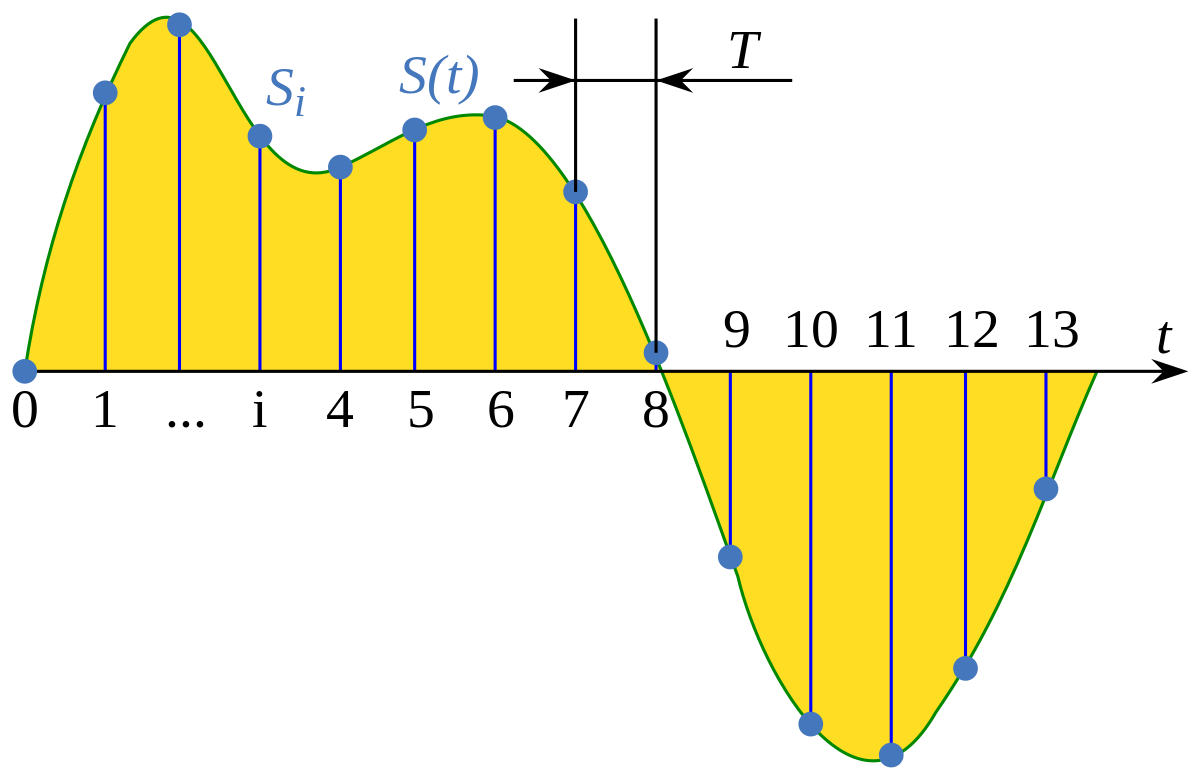
The sample rate is the rate at which the logger captures samples of the input signal. When recording sound in digital form, in fact, individual samples or, in other words, values ​​of sound intensity are recorded at separate points in time.

The sample rate for recording devices is usually the following standard values: 44.1 kHz; 48 kHz and 96 kHz. The higher the sample rate, the more samples will be taken in 1 second and the better the digital sound quality we will get as a result.

What is the meaning of these numbers? They mean the number of times the recorder reads the sound intensity value from the input signal per second. The sample rate is measured in kilohertz (kHz), 1 kHz = 1000 samples per second.

For example, if the recording is made with a sampling frequency of 48 kHz, this means that the sound recorder measures and records the sound intensity value 48,000 times per second.

This number may seem unimaginably huge, but here the phenomenon called Nyquist frequency is worth remembering. The Nyquist frequency is named after the person who first discovered it. Defines the highest sound frequency that can be recorded at a given sample rate.

In short, the maximum tone that can be digitally fed is about half the sample rate.

Therefore, when recording at a sampling frequency of 48 kHz, the maximum audio frequency that can be recorded is 24 kHz. This is sufficient, considering that the human ear hears frequencies on average from 20 Hz to 20 kHz.

Bit depth
When talking about digital recording devices, you can often hear the words “16-bit”, “24-bit”, and so on. Some mean the number of information units with which the value of each sample obtained from the digital recording can be represented.

The higher the value of this number, the more accurately you can record the value of each sample and the higher the sound quality you will get as a result.

Do not think that the greater the number of bits, that is, the greater the bit depth, the greater the intensity value that can be set. Here is meant representation precision.

Modern recorders are usually 24 bits wide. It should be noted that recording with a large bit depth takes up a lot of space on the storage device, but this is not so important, because modern media has a huge volume and is becoming more and more affordable.

Why can the difference in bitrate make it sound great (high, medium, low)?

Why can the difference in bitrate make it sound great (high, medium, low)?

Bit Depth vs. Bit Rate

Reply:
Just to make sure this is clear, let’s differentiate

BIT RATE BIT DEPTH

sample rate vs bit depth

as much as

Bit rate

how they relate to audio in the digital domain …

Sampling frequency:

The sample rate is specified as a frequency (samples per second), for example, 44.1 kHz for CD. Other common values ​​are 48, 88.2, 96, 176.4, and 196 kHz, although some formats (such as DSD) have sample rates greater than 2.8 MHz. The sample rate indicates

how often the audio signal is measured

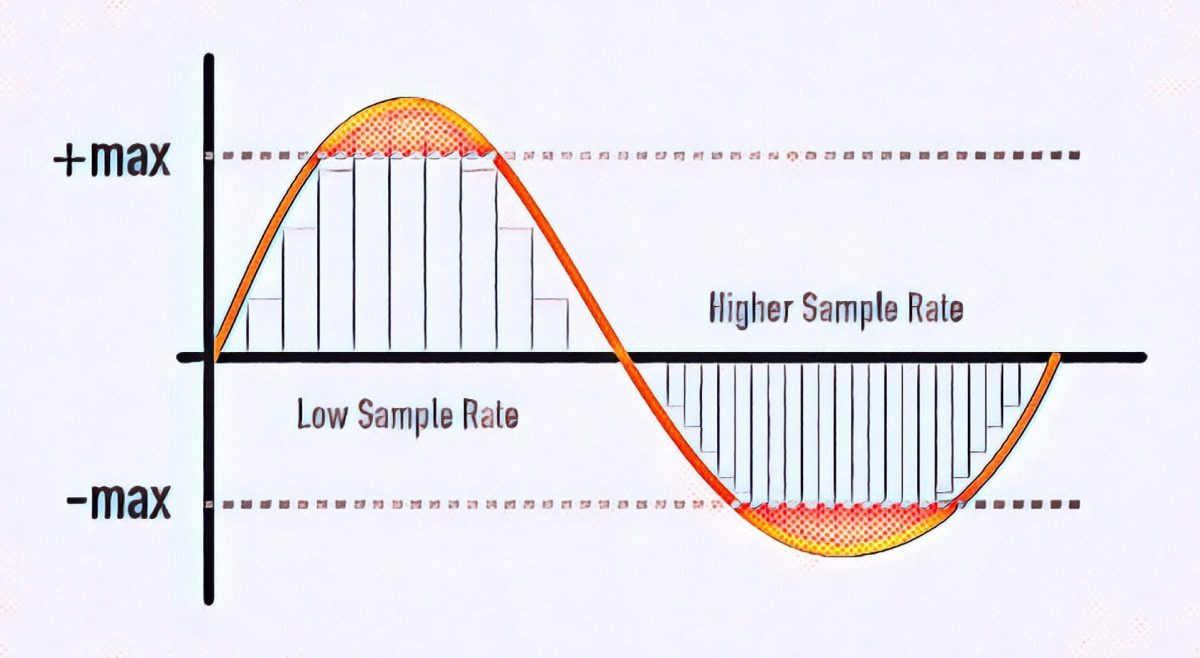
While some people view lower readings as a tiered bar graph, I prefer to view them as a child bitmap. If you take the outline of a horse and simplify it to 20 points so the child can connect, it’s not so much that you end up with steps (using straight and curved lines to connect 20 correctly spaced points can lead to a decent figure), but there won’t be without subtlety. Whereas with 200 (or 2000) points, you could approximate the wavy strands along the horse’s mane.

In audio, a lower sample rate does not make the sound “bad” (eg, fuzzy, fuzzy, or distorted), but rather limits the maximum frequency (pitch) that can be recorded / played back as intended.

Nyquist theorem formula

, The 44.1 kHz sampling rate was chosen for CD because it can record and play back frequencies up to 20 kHz. To record a spoken word (such as a speech, a sermon, or an audiobook), it would be difficult to detect a much lower sample rate, as the human voice has less and less harmonic information above 10 kHz.

Depth bits:

Considering that the sampling frequency determines how

often

audio signal is measured, bit depth indicates

scale accuracy

Since we are talking about digital audio, we describe this measurement scale in bits, where each bit is 0 or 1, and we concatenate a certain number of them to represent the value. When we have 8 bits, there are 256 possible numerical values, including zero. With 16 bits, there are 65,536 possible values. A 24-bit register can use 16,777,216 values.

When we convert analog audio to digital representation (A-to-D) and vice versa (D-to-A), we find interesting mathematical relationships. Each bit (digital) doubles the number of possible values ​​… And doubling the amplitude (approximately 4 times the power) of the sound wave (analog) corresponds to + 6 dB of loudness. Therefore, we can estimate the maximum dynamic range * of a digital recording at 6 dB / bit. Therefore, 8-bit recording has ~ 48 dB of dynamic range, 16-bit recording (such as a CD) has ~ 96 dB, and 24-bit recording has ~ 144 dB.

* For those of you unfamiliar with this term, dynamic range basically describes the difference between the quietest and loudest sound waves that can be recorded / played back. The CD has a difference of approximately 96 dB, which can be used to represent the most subtle pause compared to the incredibly loud burst of the cannon at Tchaikovsky’s climax.

1812 Overture

,

Three quick notes for those interested in delving into the rhythm …

There is a formula for the actual dynamic range of a digital recording that may differ slightly from the previous estimate, but it is a fairly minimal deviation, so an estimate of 6 dB / bit is what you normally see in quotes.
The latest 32-bit floating point representations combine a 24-bit number and an 8-bit exponent to represent many more possible values ​​than 24-bit registers. The dynamic range estimate is getting a bit dubious, but suffice it to say it’s well above 144 dB.
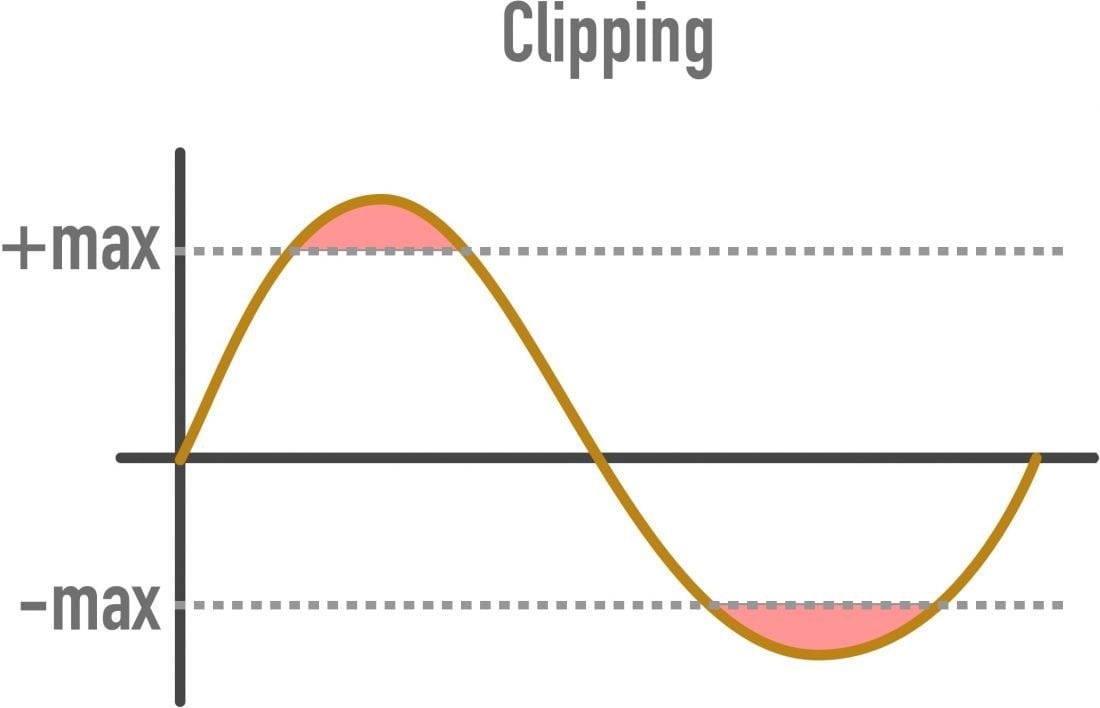
Using a lower bit depth, while you might think in terms of warp plugins with names like “bit-grinder”, doesn’t have to sound “bad” (eg fuzzy, fuzzy, or distorted), but just represents a reduced dynamic range. But since a 16-bit recording with a dynamic range of 96 dB (65,536 numerical values) cannot be represented in 8 bits (48 dB and 256 numerical values), to reduce the bit depth of the already digitized audio, a mathematical correction of the numbers down. (for example, 65535 becomes 255) using a compressor or limiter, which can cause the quietest recording bits to be lost so that the difference between soft and loud parts is <48 dB. Without such scheme, the transformation will cause clipping (numerical values ​​above the maximum),
Bit rate:

In digital audio, the bit rate is a measure of

how many bits are transmitted / processed per second

Sample rate and bit depth

Sample rate and bit depth

Sample Rate Bit Depth

When describing digital recording devices, two fundamental concepts are used: sample rate and bit depth. In this article, we will see what it is.

Sample Rate, Bit Depth

Sampling rate
The sample rate is the rate at which the logger captures samples of the input signal. When recording sound in digital form, in fact, individual samples or, in other words, the sound intensity values ​​are recorded at separate points in time.

The sample rate for recording devices is usually the following standard values: 44.1 kHz; 48 kHz and 96 kHz. The higher the sample rate, the more samples will be taken in 1 second and the better the digital sound quality we will get as a result.

What is the meaning of these numbers? They mean the number of times the recorder reads the sound intensity of the input signal per second. The sample rate is measured in kilohertz (kHz), 1 kHz = 1000 samples per second.

For example, if the recording is carried out at a sampling frequency of 48 kHz, this means that the sound recorder measures and records the sound intensity value 48,000 times per second.

This amount may seem unimaginably huge, but a phenomenon called the Nyquist frequency is worth remembering here. The Nyquist frequency is named after the person who first discovered it. Defines the highest sound frequency that can be recorded at a given sample rate.

In short, the maximum tone that can be digitally fed is about half the sample rate.

Therefore, when recording at a sampling frequency of 48 kHz, the maximum audio frequency that can be recorded is 24 kHz. This is sufficient, considering that the human ear hears frequencies on average from 20 Hz to 20 kHz.

Bit depth
When talking about digital recording devices, you can often hear the words “16-bit”, “24-bit”, and so on. Some mean the number of information units with which the value of each sample obtained from the digital recording can be represented.

The higher the value of this number, the more accurately you can record the value of each sample and the higher the sound quality you will get as a result.

Do not think that the greater the number of bits, that is, the greater the bit depth, the greater the intensity value that can be set. Here is meant representation precision.

Modern recorders are typically 24-bit wide. It should be noted that recording with a large bit depth takes up a lot of space on the storage device, but this is not so important, because modern media has a huge volume and is becoming more and more affordable.