WHAT IS A CODEC AND WHAT IS IT FOR?
CODEC is an abbreviation of CODifier-DECodifier, which already indicates its functions. In the case of MP3, it deals with processing the sound, applying various compression methods to reduce the size necessary for its storage, and conversely, to reconstruct the sound from the encoded information. The codecs can be found in the form of an executable file, a DLL, or less frequently, incorporated into the code of another program. The DLL format allows the same codec to be easily used by different programs, while the executable format is usually more flexible in terms of configuration, although it is more complex to use.
WHAT DOES “PSYCHOCAUSTIC COMPRESSION” MEAN?
This very complicated word refers to the main compression technique that MP3 uses (although it is not the only one), which simply consists of eliminating the information (sound, in this case) that, in theory, is not able to perceive the ear human. I say “in theory” because, depending on the compression ratio that is applied, that loss may be more or less noticeable, hence some files do not sound as good as would be desired. The different codec also do not use psychoacoustic principles in the same way, so the quality they achieve will not be the same.
DOES THE SOURCE ORIGIN INFLUENCE THE MP3 QUALITY?
Evidently. The ideal is to start from an original CD. Analog sources, such as vinyl records or tapes, have lower quality in themselves, no matter how much we “digitize” or “improve” them with some programs. Recorded CDs may contain errors (which will end up being noises when played), and we usually do not know from which source they have been recorded (perhaps from previously encoded MP3 files). Re-encoding an already compressed music file, in the same or another format, is also a mistake, since quality is always lost.
DO THE PROGRAMS WE USE TO EXTRACT AND CODIFY THE QUALITY OF MP3?
It also seems obvious, so much so that this point should not be here. But many people do not take it into account, without knowing the reasons very well.
DOES THE QUALITY OF PLAYERS INCLUDE IN THE QUALITY OF MP3?
To hear it, you already know the answer, don’t you? J. To have it stored on the hard drive or on a CD, nope. Jokes aside, and in theory, all decoders should get the same sound from an MP3 file. But unfortunately this is not the case, usually because they do not strictly conform to the MP3 standard. You can find the best explanations on this topic here.

DOES THE QUALITY OF THE SOUND CARD AND SPEAKERS INCLUDE IN THE QUALITY OF THE MP3?
Well, I think you already know where the shots are going, we will not continue along this line. But nobody says “is that MP3 does not sound good” when it has a Sound Blaster 16 (what times those!) And some 800 W TurboPowerSound speakers that cost € 18 uros.
WHAT IS BITRATE?
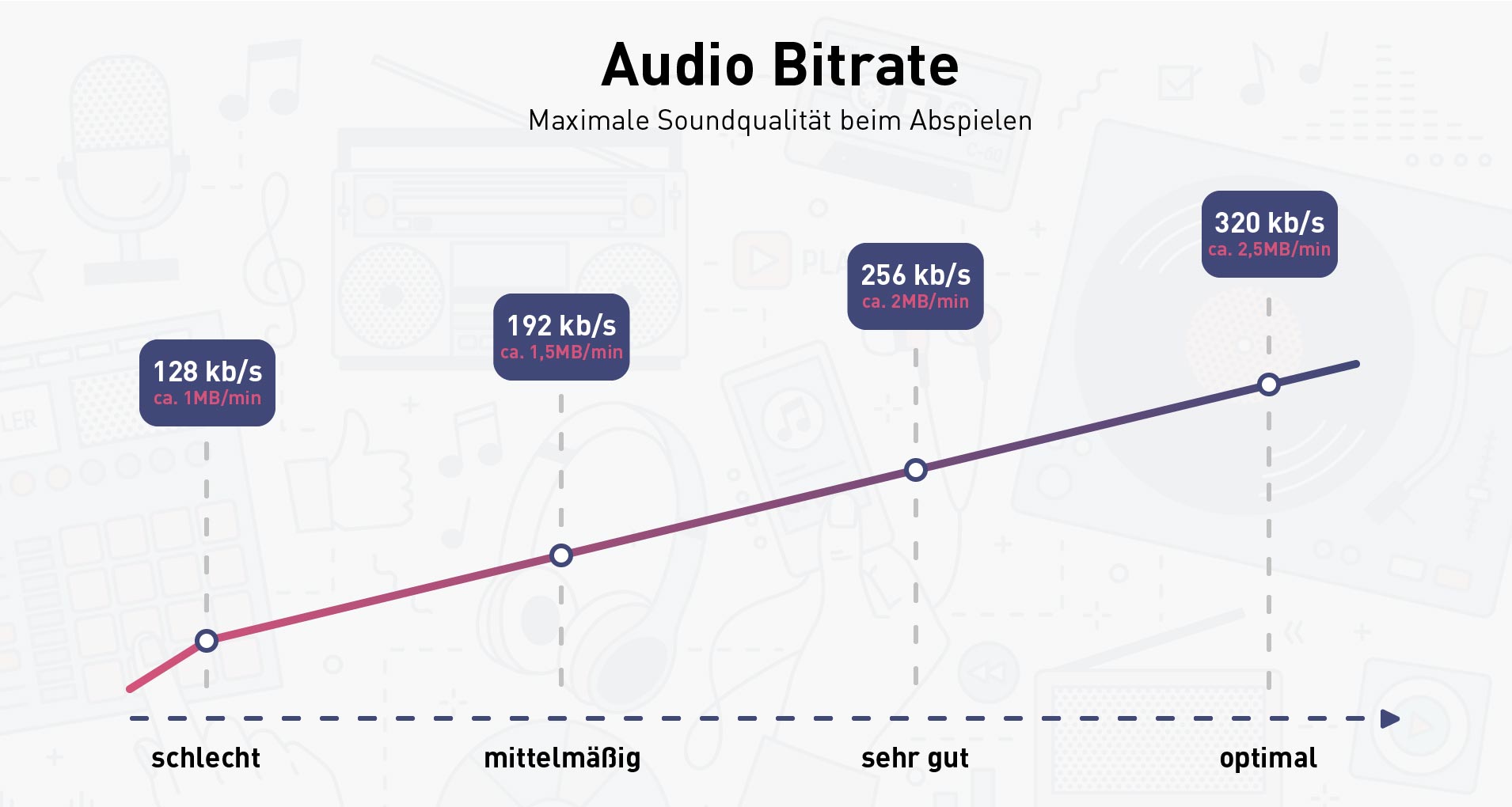
It is the number of bits that are used to encode a second of sound, if we talk about MP3. It is measured in Kbps (kilobits per second).
As there is often confusion, we will give an example. If we have a 4-minute MP3 encoded at 128 Kbps:
-One second occupies: 128 Kbits x (1 Byte / 8 bits) = 16 KBytes.
-The complete song: 16 KBytes / second x (4 minutes x 60 seconds / 1 minute) = 3840 KBytes = 3.75 MBytes.
The formulas could be more correct, but this is not a mathematical thesis and I think they are enough to understand us.
WHAT DOES CBR, VBR and ABR MEANS, AND WHAT IS THE DIFFERENCE?
They are different coding methods. CBR means “Constant BitRate”, VBR “Variable BitRate” and ABR “Average BitRate”. It is easy to deduce that if CBR is used, the bitrate remains fixed, and if VBR is used, the bitrate changes. ABR can be considered a variant of VBR in which the objective is to achieve a certain final size, since we can set the average bitrate to be used (although it will never be as accurate as CBR).
The great advantage of VBR is that it uses more bits when the fragment to be encoded is more complex, and less when there are silences or it is simpler, so that we will achieve the highest quality using the minimum possible space. If the final size is not the deciding factor, it is the most recommended option.
WHAT IS THE BEST MP3 CODEC TO COMPRESS MUSIC? WHAT IS YOUR BEST CONFIGURATION?
The first question is easy to answer: LAME. In many different tests, done independently and with means that probably none of us will ever have, LAME is considered again and again as the best codec. And since there is no commercial motivation, since it is free distribution software, we can give full validity to these tests. The Fraunhofer codec and some of its “versions” could be valid in certain circumstances, but … do we need to use a commercial or pirate codec with a free and legal substitute? I think not (and from here, what each one does, is his own thing). For me, codec MP3 = LAME.
The second question is much harder to answer. There is no configuration that is perfect for everything (because if not, the modifiable options would be left over and everything would be much easier) J. But there are some recommended options in general, which we can establish with the assurance that the result will be of good quality. I have to admit that I barely change them, but as in this case (and in many others) there are no absolute truths, everyone has to try until they establish the one that best suits their preferences (or their ears).
The first thing that we must be clear about is that, in an MP3 file, size and quality are conflicting terms. We have to look for a practical middle ground. I put that term between 128 and 192 Kbps (some will say it is too low … I will try to justify my opinion). In principle, the purists established the CD quality at 256 kbps CBR. That is, using that bitrate, the sound of the CD and that of the MP3 file were absolutely indistinguishable. But, right now, LAME is already very developed. It uses the most advanced techniques, and manages to do perfectly things that other codecs are not able to solve properly (VBR, Joint-Stereo), which allows you to improve the quality and reduce the size.
In r3mix.net, after the corresponding tests, they have established an “ideal” configuration based on quality criteria. This configuration is so accepted, that in the latest versions of CDex, and other programs, it is already included as one of the preset configurations. But be careful: this does not mean that this is the only option, nor that it will always achieve the highest possible quality. Another thing is that using this option our ear can differentiate the results of the original audio CD, and this is where the “trick” of MP3 compression is.
After having used this configuration, I have observed that, although there are important variations, the average of the files is about 170-175 kbps, and that they rarely go beyond those 192 Kbps that I mentioned before, so I consider that overcoming that bitrate does not it will hardly improve the quality, but it will significantly increase the size. Although I repeat, there will always be someone to whom this bitrate seems insufficient, and will use even 320 Kbps, which is the maximum supported by LAME.
The second part is to take into account the equipment we have. If the MP3s are not going to sound through a card, an amplifier and very good quality speakers, the bitrate can be adjusted a little more without practically noticing variation in quality. The average 160 Kbps seems like a very reasonable amount to me, and that’s how I usually code my CDs. And I can say that they don’t sound bad at all. If someone is able to do a “blind” test and differentiate between several files encoded (correctly) at 160 and 192 Kbps, you really have to congratulate him on his ear.
Finally, if we consider size as a decisive factor, we could go down to 128 Kbps, but considering that the quality may already be too compromised. Summarizing:
Configuration that seems more appropriate for practical purposes, and looking for a high quality (about 192 Kbps):
-Joint-Stereo -> Get reduce the final size without losing quality. Sometimes, where there is a lot of variation between channels and with high bitrates, it could be configured as Stereo.
-VBR MTRH Quality 1 or R3Mix Preset -> Change the bitrrate according to the needs of each moment, improving the quality without increasing the size with respect to CBR (normally).
-Bitrate minimum 64 Kbps -> To compress to the maximum silences and very simple fragments.
-Bitrate maximum 256 Kbps -> So you have room to improve the quality in complicated fragments.