
Digital audio has been around for a long time, so there will surely be a host of audio formats. Here are some of the most common, what sets them apart and what they should be used for.
Before talking about everyday audio formats, it’s important that you understand the basics, and that means you understand PCM. Then we will move to compressed formats.
PCM audio: where it all begins
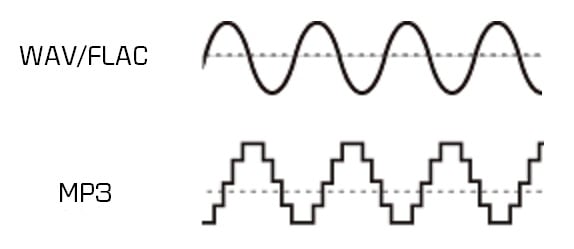
Pulse code modulation was created in 1937 and is the best approximation to analog audio. That is, an analog waveform is approximated at regular intervals. PCM is characterized by two properties: sample rate and bit depth. The sample rate measures the frequency (in times per second) that the amplitude of the waveform is measured and the bit depth measures the possible digital values. In terms of audio formats, this is basically the basics.
Where the sound is continuous in the real world. This is not the case in the digital world. In some ways this is more confusing for audio than video, so let’s take a look at the video as a comparison. What we interpret as ‘movement’ or think of ‘flowing’ and being in constant motion is actually a series of still images. Also, the amplitude of sound waves in digital format is not “smooth” or constantly changing. It changes based on certain criteria at predefined intervals.
I know there are many things here that may not be second nature unless you are an engineer, physicist, or audiophile, so let’s take a closer look with an analogy. Let’s say the water flowing from an open tap is your “analog” audio source. We can compare the temperature of the water with the amplitude of an audio wave; It is a property that must be measured so that you can enjoy it properly. Sampling is the number of times per second that you dip your finger into running water. The more times you insert your finger, the more “continuous” the temperature changes will be. If you dip your finger into running water 44,100 times per second, it’s almost like staying under it all the time, right? That is the basic idea behind sampling.
As mentioned above, PCM is the foundation of digital audio along with its variants. PCM tries to model a waveform, to the most of its uncompressed glory. It’s special, it’s ready to be caught in a digital signal processor, and it’s more or less universally playable. Most other formats manipulate audio through algorithms, so they must be decoded during playback. PCM audio is considered “lossless”, it is not compressed and therefore takes up a lot of hard disk space.
Uncompressed packet: WAV, AIFF
Both WAV and AIFF are PCM-based lossless audio container formats, with some minor changes to data storage. PCM audio comes in these formats for most people, depending on whether you’re using Windows or OS X, and they can be converted to each other with no loss of quality. Both are also considered “lossless”, are uncompressed, and are a stereo (2ch) PCM audio file sampled at 44.1 kHz (or 44100 times per second) at 16 bits (“CD quality”) approximately 10 MB per minute. If you are recording at home with a view to mixing, this is what you will want to use as it is of the highest quality.
Lossless Formats
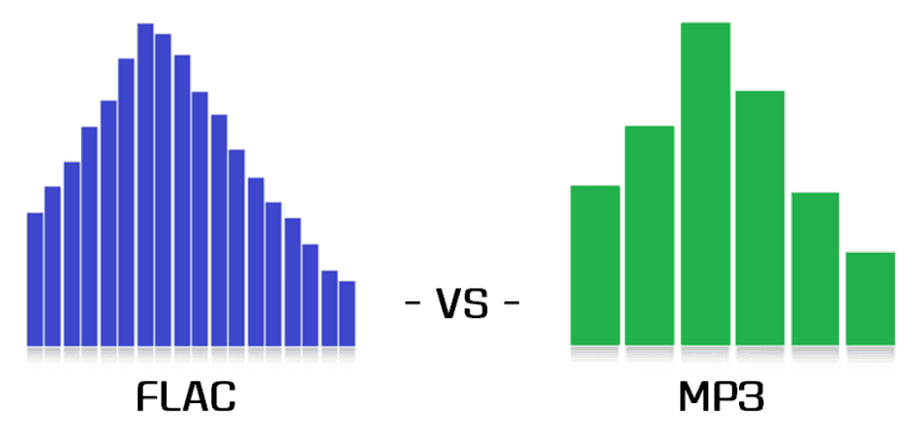
Lossless formats: FLAC, ALAC, APE The free lossless audio codec, Apple’s lossless audio codec, and Monkey’s audio are all formats that compress audio, the same way everything compresses in the digital world: using algorithms. The difference between compressed files and FLAC files is that FLAC is specifically designed for audio, so it has better compression rates without data loss. Usually you will see about half the size of WAVs. In other words, a “CD quality” stereo sound FLAC file runs at about 5MB per minute.
The downside is that if you want to manipulate the audio, you can convert it to WAV.
no loss of quality
. If you are an audiophile and listen to a lot of music with dynamic range, these formats are for you. If you have a large set of speakers, cans, or earplugs, these sizes will cast the tones to show them off. Loss formats: MP3, AAC, WMA, Vorbis Image through
Lossy Formats
Most of the formats you see in everyday use are “lossy”; some degree of audio quality is sacrificed for a significant increase in file size. An average “CD quality” MP3 runs about 1MB per minute. Big difference from PCM, right? This is called compression, but unlike lossless formats, if you remove it in lossy formats, you won’t really be able to get that quality back. Different lossy formats use different algorithms to store data, so they generally vary in file size for comparable quality. Lossy formats also use bitrate to refer to audio quality, which is generally seen as “192 kbit / s” or “192 kbps.” Higher numbers mean more data is being pumped in, so there is more retention of details. Here are some details of the most popular formats: MP3: MPEG 1 Audio Layer 3, the most common lossy audio codec. Despite a ton of patent issues, it’s still incredibly popular. Who doesn’t lie about MP3s?
Vorbis – A free and open source lossy format most commonly used in PC games like Unreal Tournament 3. FOSS fans, like many Linux users, are sure to see a lot of this format.
AAC – Advanced Audio Coding, a standardized format now used with MPEG4 video. It is highly supported due to its compatibility with DRM (eg Apple’s FairPlay), its improvements over MP3, and because no license is required to stream or distribute content in this format. Apple fans probably have enough on AAC.
WMA: Windows Media Audio, Microsoft’s lossy audio format. It was developed and used to avoid licensing issues with the MP3 format, but due to major enhancements and DRM support, as well as lossless implementation, it still exists. It was very popular before iTunes became the champion of DRMed music.
Loss formats are what you use for all the things you listen to and save. They are designed to save hard drive space. The format you choose will depend on the digital audio player you use, the amount of space you have, the size of a high-quality nitpicker, and many excessive variables. Today computers will play anything, most audio players (except Apple, of course) will create multiple lossy formats, and more and more do FLAC and APE. Apple keeps MP3, ALAC and AAC.
Isn’t the audio quality subjective?
It absolutely is. Ultimately, it’s the ears that consume the most of these things, but that’s all the more reason to think about quality seriously. When I started building my digital music collection, I couldn’t really tell the difference between 128 kbit MP3s and audio CDs. In my ears there was no noticeable difference. However, over time, I realized that 256 kbit sounded much better, and after getting some really nice (and expensive!) Headphones, I went back to audio CDs full time! It also depends on the genre of music.
There are TONS of variables here folks, make no mistake about it. It was a while before I decided to use FLAC for some music and 320kbps MP3 for the rest. The point I’m trying to make is that you have to experiment to see what works best for you and your music, but keep in mind that as your tastes change, your perceptions, your gear, and the importance of quality will change as well. And all of this gets even more complicated when you’re not just talking about music, but also voice tracks, sound effects, white and brown noise, etc. There’s a whole world of sounds out there, so don’t be discouraged! If you learn what you can do and listen to yourself, you can use this information to leverage your future audio projects. I leave you with the best advice I’ve ever received: “Do what sounds good.”


