Audio normalization or compression


Free Download Mp4Gain
picture

The function of a compressor is to reduce the dynamic range of the signal, that is, the level difference between the strongest and weakest signal parts.

Why compression or normalize?

At the time of analog, the limited dynamics of the main musical supports (vinyl, audio and video cassettes) did not allow to reproduce the dynamics of a classical, jazz or even rock orchestra in the case of the audio cassette. Therefore, the signal was compressed to avoid distortion in the transmission medium.
audio compression or normalization

Now that the music is converted to 16-bit or more, recorded in digital format, and then streamed to CD / DVD or downloaded, the dynamics of the media is enough to faithfully reproduce the dynamics of almost any orchestra. The old technical limitations have disappeared, therefore compression is no longer essential.

However, whatever the musical genre, some sources (voices) are compressed almost systematically. The goal of modern compression is therefore to optimize sound recording, either to get closer to reality or, conversely, to create a less faithful but denser, more controlled, more powerful sound, etc., or even a sound. totaly new.

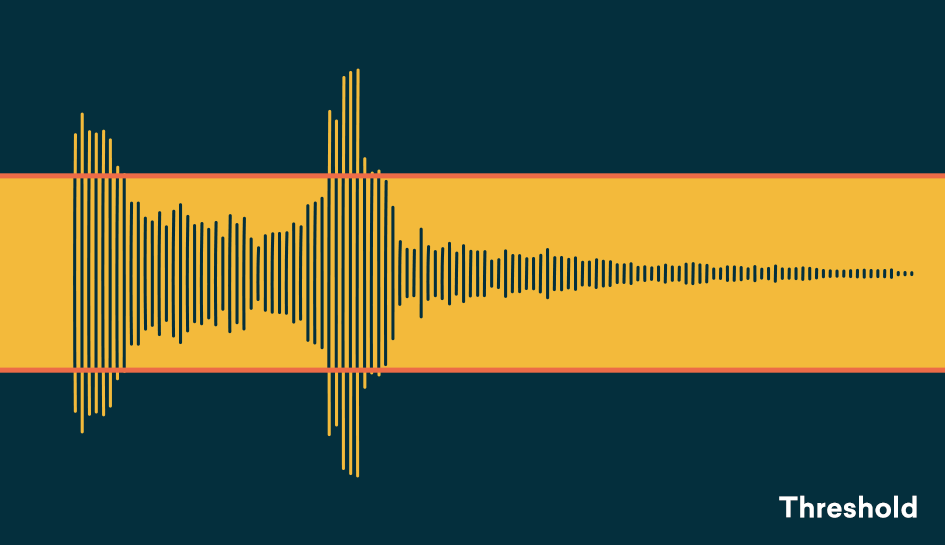
And to do all this, the compressor is satisfied with a simple principle: it reduces dynamics by attenuating the signal level when the latter exceeds a given threshold level.

Level settings

– Threshold (threshold level, in dB)

This parameter determines the threshold level from which the compressor is triggered. As long as the input signal level remains below the threshold, the compressor does not start and no treatment is applied. As soon as the source signal exceeds the threshold level, compression is applied.

– Ratio (compression ratio)

The ratio determines the amount of level reduction applied to the part of the signal that exceeds the threshold level, the rest of the signal is not processed. Depending on the compressor, the ratio can vary from 1: 1 to Inf: 1. Quésaco?

Set up a compressor

With a 1: 1 ratio, no compression is applied, the level of the input signal is equal to that of the output signal. With a ratio of 2: 1, the level of the signal portion that exceeds the threshold is divided by 2 in the output signal. With a 3: 1 ratio, it is divided by 3, etc. When the compression ratio is infinite (Inf: 1 ratio), the compressor behaves like a limiter: the output signal never exceeds the threshold level, regardless of the input level.

Therefore, the compression intensity applied to the signal is a compromise between the threshold and the compression rate setting:

The lower the threshold, the larger the compressed signal portion.
The higher the ratio, the greater the level reduction applied to the signal portion above the threshold.
Depending on the compressors, you may find other parameters, for example, an input level setting instead of the threshold, or a gain setting (also called the offset or output level) that amplifies the signal to compensate for the drop in level resulting from compression.

Time settings

– Attack (attack, in ms)

Attack corresponds to the time the compressor needs to reach the given ratio when the signal level exceeds the threshold level. A quick attack of a few milliseconds triggers strong compression as soon as the signal level exceeds the threshold; With a slower attack, the compressor passes the first transients of the signal peaks, keeping one side alive and well cut.

Set up a compressor

– Launch (launch, in ms and s)

Release corresponds to the time the compressor needs to return to the 1: 1 unit ratio when the source signal falls below the threshold level. A quick launch of a few tens of ms allows the original character to stay alive. Slower relaxation improves instrument resonance and reverberation, but can cause compression of the first peak transients when the latter are close together.

– Knee (literally knee!)

The Knee parameter determines the increase in compression, that is, the transition between the compression ratio of the unit (1: 1, no compression) and the compression ratio set to ratio.

Applications

At the output, the compressor can be used as a limiter to control signal peaks and prevent distortion from occurring in the analog / digital conversion stage.
When taking and mixing, light compression can bring out weak parts of the signal and thus reveal certain details.
In the mix, the compressor allows you to increase the average level of the audio volume output.


Free Download Mp4Gain
picture


Mp4Gain Main Window
picture


Mp4Gain Features
picture


Free Download Mp4Gain
picture

Destructive compression vs non-destructive

Destructive compression is compression obtained by losing information. This means that if you extract the compressed signal with this technique, you will not find the start signal.

Destructive Vs Non-Destructive Audio compression

In destructive compression techniques, there are basically methods that take advantage of the properties of the human ear. The latter listens to frequencies between 20 Hz and 20 kHz. If a song contains frequencies outside this range, we can easily delete them without losing the audio quality because the ear does not hear them. In fact, frequencies between 2 kHz and 5 kHz are generally heard correctly. In fact, less than 5 dB is required to hear frequencies in this band, while more than 20 dB is required to hear frequencies below 100 Hz or above 10 kHz. These results can be used to reduce the size of the files. For example, we can conclude that all frequencies above 15 kHz are suppressed.

audio compression

MP3 also uses the principle of masked frequencies. If in a frequency group some have a much higher noise level than others, it is not necessary to keep the frequencies low – we will not hear them. Imagine yourself in your garden listening to the birds sing. The chord goes over your head (even very high). We no longer listen to birds because the sound they make is much quieter than that of the plane. It is as if the birds no longer exist or have stopped singing. Obviously, it is not necessary to code all the frequencies present in a song so that the human ear can always perceive it well. Finally like the two ways

What do we find among non-destructive techniques?

Mainly coding techniques.

Let’s explain. A sound is a frequency. A second of music is therefore a sequence of frequencies. Imagine that in the series of samples that make up a second of music (remember that there are 44,100), we have the same frequency several times in succession, for example 10 times. If instead of storing these 10 points, we only store 1 and the number of times it is repeated, we must encode 2 digits and not 10. If we also apply this method to frequencies which are no longer identical, but very dense together (so close that the average human ear cannot distinguish them), we can still save space. This time, the compression is destructive because we are replacing one frequency with another frequency (almost identical).

MP3 also uses the algorithm of Huffman (1952) as a method of encoding information. This method is used in all compression algorithms (compression of text files, compression of images, compression of sound). It is based on the use of a variable length code and the probability that an event (in this case a frequency) will occur. The more a frequency appears, the shorter the code (low number of bits to display it). The file is read for the first time and a table appears with the frequencies that appear and the number of times they appear. We derive the right code. This encryption was last used. It is the final phase of compression. This is non-destructive coding.

MP3 works on the properties of the ear, first to reduce the size of a part, then processes the stereo sound and possibly applies encodings which end with Huffman encoding.

The use of all the reduction options mentioned depends on the location you want to give within 1 minute of your tablet and therefore on the compression speed to apply.
To encode MP3 audio files, we are talking more in terms of bit rate than compression rate.
Bit rate is the number of bits allowed in 1 second.
Therefore, we have the following relationship: the more we want to compress a song (so that it takes up the least space possible), the lower the bit rate.

Choice of compression ratio (bit rate)

Obviously, the more you compress, the worse the sound quality.
You have to compromise the file size and audio quality.
This commitment can be dictated by your needs, but also by the use you want to make of your MP3 files. It may not even be demanding if your MP3s are intended for your portable music player and are too demanding to be listened to on a stereo system.

Mp3: Audio Compression.

Audio Digitization.

Sound is a continuous wave that propagates through air or other media, formed by
pressure differences, so that it can be detected by measuring the pressure level in a
point. Sound waves have the proper and measurable characteristics of waves in general,
such as reflection, refraction and diffraction. As it is a continuous wave, a
digitization process to represent it as a series of numbers. Currently, most of
the operations carried out on sound signals are digital, since both storage and
processing and transmission of the signal in digital form offers very significant advantages over
analog methods. Digital technology is more advanced and offers greater possibilities, less
sensitivity to transmission noise and ability to include error protection codes,
as well as encryption. With the appropriate decoding mechanisms, moreover, they can be treated
simultaneously signals of different types transmitted on the same channel. The disadvantage
main aspect of the digital signal is that it requires a much greater bandwidth than that of the signal
analog, hence an exhaustive study is carried out regarding data compression,
some of whose techniques will be the center of our study.
The digitization process consists of two phases: sampling and quantization. In the sampling,
Divide the time axis into discrete segments: the sampling frequency will be the inverse of time
that mediates between one measurement and the next. At this time the quantization is performed, which, in its
In the simplest way, it is simply to measure the signal value in amplitude and save it.

Nyquist’s theorem guarantees that the frequency necessary to sample a signal that has its
Higher components at a given frequency f is at least 2f. Therefore, the range being
higher than human hearing around 20 Khz., the frequency that guarantees a sampling
suitable for any audible sound will be about 40 Khz. Specifically, to get sound
High-quality frequencies of 44.1 Khz are used, in the case of CD, for example, and up to 48 Khz.
in the case of the DAT. Other typical values ​​are submultiples of the first, 22 and 11 Khz. According to
nature of the application of course the appropriate frequencies can be much lower
such that the voice process is usually carried out at a frequency of between 6 and 20 Khz. or
even less. Regarding quantization, it is evident that the more bits used for the
axis division of amplitude, the “finer” the partition will be and therefore the less error in attributing
a concrete amplitude to the sound at every moment. For example, 8 bits offer 256 levels of
quantization and 16, 65536. The dynamic range of human hearing is about 100 dB. The
axis division can be performed at equal intervals or according to a certain density function,
looking for more resolution in certain sections if the signal in question has more components in a certain
intensity zone, as we will see in the coding techniques.
The complete process is usually called PCM (Pulse Code Modulation) and so we
We will refer to it hereinafter. It has been described in a very simplistic way, mainly
because it is widely discussed and is well known, being the field of study of
this work. However, we will go into detail at any time that is necessary for the
development of the exhibition.
1.2 Coding and Compression.
Before describing compression and encoding systems, we must pause briefly.
analysis of human auditory perception, to understand why a quantity
Significant information that the PCM provides can be discarded. The heart of the matter,
as far as we are concerned, it is based on a phenomenon known as masking.
The human ear perceives a frequency range between 20 Hz. And 20 Khz. First of all, the
sensitivity is higher in the area around 2-4 Khz., so that the sound is more
hardly audible the closer to the ends of the scale. Second is the
masking, whose properties exhaustively use the most interesting algorithms:
when the component at a certain frequency of a signal has high energy, the ear cannot
perceive lower energy components at close frequencies, both lower and higher. TO
a certain distance from the masking frequency, the effect is reduced so much that
negligible; the range of frequencies in which the phenomenon occurs is called the critical band
(critical band). Components belonging to the same critical band influence each other and
they do not affect nor are affected by those that appear outside it

Audio Data compression

Data compression or the technique that changed everything

Without pretending to extend ourselves in the description of this critical concept, it is important to know that compression is understood as a scheme that allows, by means of a “decision” algorithm based on a series of “rules” (which in the case of audio are masking and audibility threshold) reduce the amount of data to transmit a certain message. In other words: if the song “x” occupies, in the format used to encode the sound of a CD, 1 million bits, the data compression allows that song to be reproduced with maximum intelligibility using only 50,000 of those bits.

In this way, the download of a complete CD from a certain website could be carried out in a reasonable period of time. But, of course, the price to pay was high in terms of quality because such “castration” of the original message (which in turn was not “continuous”, analog, but also digital, although “linear”, without compression) meant removing many nuances of music, a disaster that in reality did not care for many consumers but it did worry, and a lot, those who bet on that High Fidelity in the reproduction of the sound that we are so passionate about and who received a wound that was almost fatal . In this sense, it is worth knowing that the “philosophical” keys to data compression are summarized in two terms: redundancy and irrelevance. In the first case, it is about reordering the available data to eliminate the ones that are repeated (for whatever reason: security, etc.), a bit like a “zip” computer file. It is a formal remodeling that does not affect the sound message at all (but it does save space to transmit / save data, making it very practical), so in this case, we are talking about lossless compression or “lossless” ” It is the second term that has the greatest scope in terms of sound quality because the idea of ​​irrelevance implies deleting irrelevant data from a certain message. And, of course, who decides what is relevant or not? Well, an algorithm, a program that, obviously, can be more or less sophisticated but still makes decisions with which everyone will agree. It is easy to understand: what may be irrelevant to such a person and / or the team may not be so to someone else. The fact is that here musical information is deleted, which, fundamentally, can no longer be recovered. Well, the algorithms in which there are losses of musical information are known as “lossy” or lossless coding algorithms. From what has been said, it is easily deduced that the difference between the concepts “lossless” and “lossy” is the one that marks the border between high and low quality digital audio, between high resolution (with recording studio quality formats or “Studio Master” on the cusp) and that “practical” sound (in principle for portable players and cars) and very often unnatural formats like the once ubiquitous MP3, which, we insist, almost ruined with the improvements provided by the CD.
ADSL, the key to accessing High End audio via the Internet
Basically it was a purely technical progress that, logically, had to come. A progress that allowed breaking the limitations that prevented downloading a song recorded in PCM at 16 bits / 44’1 kHz and, over time, the files with much higher resolution than for a good decade and a half are the usual ones in studios of recording. So, thanks to ADSL, the High End in audio via the Internet, and therefore “without physical support” is available to everyone. At this point, it will be good to briefly review the small “soup” of acronyms with which we can find ourselves, otherwise the result of the availability of open and “closed” environments (Windows, Mac), in what CODEC’s (algorithms that compress and decompress data (in this case of music) refers to the fact that compression is the norm.


AAC (Advanced Audio Coding): It was designed to be the successor to MP3 and, although it is a lossy CODEC, the results in terms of sound quality are superior to those of MP3 for the same bit rate. The AAC has adopted a wide range of portable audio devices such as the iPod and its derivatives for use.
AIFF (Audio Interchange File Format): It is the version of WAV created by Apple. Works with uncompressed (ie “lossless”) files that maintain full resolution and size.
 

ALE (Apple Lossless Encoder), also known as ALAC (Apple Lossless Audio Codec): Uses lossless compression to save storage space. Once unzipped for listening, the file will be bit by bit identical to a full size WAV or AIFF encoded file. As in AIFF or FLAC, in ALE / A files