What is the proper audio bitrate?


Free Download Mp4Gain
picture

What is the proper audio bitrate?

proper audio bitrate

Bit rate refers to the number of bits (bits) transmitted per second.

proper audio bitrate

The unit is bps (Bit per second) The higher the bit rate, the faster the data transmission speed.

Bitrate in sound refers to the amount of binary data per unit of time after converting an analog sound signal to a digital sound signal, which is an indirect measure of audio quality.


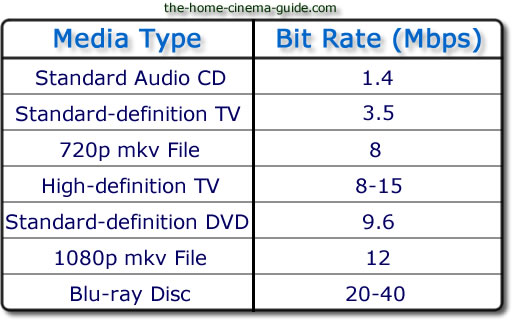
Bitrate refers to the sampling rate at which digital sound is converted from analog to digital format. The higher the sampling rate, the better the quality of the restored sound. As a benchmark for the efficiency of digital music compression, bit rate indicates the rate of the number of bits bps (bit per second, bits per second) transmitted per unit of time (1 second). The unit is usually kbps (1000 bits per second in colloquial terms). The bit rate of digital music on CD is 1411.2 kbps (that is, to burn 1 second of CD music, 1411.2 × 1024 data bits are required), the high BIT RATE of the digital music file music means that it should be processed in a unit of time (1 second) The amount of data (BIT) is large, which means that the sound quality of the music file is good. However, when the BITRATE is high, the file size increases, which will take up a lot of memory capacity. The most commonly used bitrate for music files is 128 kbps, and MP3 files can generally use 8 to 320 kbps. In the same way, most of them are 32-256 Kbps. Of course, the wider the rate, the better, but 320 Kbps is the highest level at the moment.


Bitrate calculation formula
The basic algorithm is: [Bit rate] (kbps)=[file size] (bytes) X8/[time] (seconds)/1000

Special algorithm for audio files: [bit rate] (kbps) = [quantization sample point] (kHz) × [bit depth] (bit/sampling point) × [number of channels] (typically 2)

For example, the D5 drive has a capacity of 4.3G, which takes into account different audio formats, so it is calculated as 600M (so the remaining capacity is 4.3*1000-600=3700M), so the video file should not be larger than 3.7G, in this example, take the capacity of the video file is 3.446G, and the length of the video is 100 minutes (6000 seconds). The calculation result: the bit rate is approximately equal to 4933kbps.


Various code rate principles
1. Bitrate is proportional to quality, but file size is also proportional to bitrate.

2. If the bitrate exceeds a certain value, it has little effect on the image quality.

3. DVD capacity is limited, whether it is 4.3G standard, overdubbed or D9, there are limits.


Free Download Mp4Gain
picture


Mp4Gain Main Window
picture


Mp4Gain Features
picture


Free Download Mp4Gain
picture

Common bit rates of audio formats

Common bit rates of audio formats

Common bit rates
Common bit rates

High bitrate does not necessarily mean good sound quality

Common bit rates
Common bit rates

Recently, I met some friends who don’t know what format to choose when encoding audio and what bitrate to use, and the impact on sound quality is not very clear. This article strives to tell you briefly.

Because there is some high bitrate audio that is transcoded from low bitrate live streams, the bitrate increases, but the sound quality does not improve. Pay attention to premium audio sales that claim to be high. -online bit rates, don’t be fooled;

Many of those lossless audio files known as flac are sold in high quality bitrate aac or mp3 format and then converted to flac format.

2. The high quality bit rate of the most common audio (usually high quality, not the highest)

mp3: 128kbps

aac (LC): 112kbps

aac(EL): 96kbps

aac (HE-v2): 48kbps

They are now commonly used in music, the most common ones are actually mp3, aac, and m4a, mp4 are actually packet formats, ie they use a uniform standard, making it easy to identify people; second, in the mp4 of our common videos General audio uses LC-AAC;

3. Other audio codecs

opus and amr are usually used for low bitrate audio files (such as voice, streaming audio with low requirements, opus is usually used in webrtc)

Video bit rate

Video bit rate

Video bit rate
Video bit rate

Today, we are going to popularize the concept of bitrate in video playback.

Video bit rate
Video bit rate

When formulating RMVB/RM, the main consideration is network communication and the purpose is to use unpleasant network speed to deliver visually acceptable image quality. Therefore, the characteristic of RMVB/RM encoding format is that better video quality can be obtained at lower bit rate. However, in the case of high bitrate, it is not as good as other encoding formats. It is also an RM/RMVB suffixed file, and its internal encoding format is subdivided into R8/R9/R10, etc., but in general, the above-mentioned characteristics are maintained. It’s just that the compression rate is higher, so RMVB is not used in the field of HD encoding. RMVB looks for a high compression rate and acceptable image quality, so it often compresses some details that are not easy to notice. At first glance, the image is good, but if you look closely, you will find that the image is not sharp, the layers are not clear, and it always gives people a feeling of being blurry all the time. The audio encoding part of the RMVB/RM suffix file also has that situation. The sound compression rate is very high, but it can only be heard. Don’t expect beautiful sound.


The popularity of RMVB is due to the fact that the REAL format is suitable for low-speed network transmission and can achieve acceptable image quality with a smaller file size. Second, with the use of RMVB, relatively full-featured transcoding software and solutions have begun to appear, which is convenient for video lovers and expands the video source. However, as network speeds get faster, better encoders like H264 appear, and because RMVB is not suitable for high-definition video production, and if other hardware manufacturers want to support the format RMVB/RM, you have to pay REAL quite expensive The patent fee caused many hardware manufacturers to stop supporting RMVB files. RMVB documentation is not the completely overwhelming advantage it once was.


Many video files spread on the Internet now have suffixes like AVI, MKV, MP4 and 3GP. Among them, MKV is mainly used for HD video files, MP4, 3GP, etc. They are mainly used in mobile phones and portable devices, etc. AVI is more widely used, not only in high-definition video files, but also in portable devices.


The video encoding format used by VCD is MPEG1, and DVD is MPEG2. Both VCD and DVD are mainly used for home video and audio playback, and generally speaking, VCD is encoded with MPEG1 as a fixed bit rate encoding. DVD can support dynamic bit rate MPEG2 encoding.

In order to ensure the clarity of the image when the image changes drastically, the default encoding rate is high, the standard encoding rate of VCD is 1152Kbps, and the DVD is more open. According to the playing time of the movie, it is generally set between 5000Kbps -8000Kbps, so as not to waste DVD discs Under the premise of capacity, please use a higher bit rate as much as possible to get a higher definition. MPEG1 and MPEG2 are not very effective in the case of ultra-low bit rate, and if the bit rate increases too much, the indications generated by the image effect are not obvious. MKV is encoded in H.264 for high definition video and the 1080p image reaches a bit rate of 30 Mbps.


Note:

VBR: “variable bit rate”, VBR encoding means that the encoder’s output bit rate (or decoder’s input bit rate) can be adaptively adjusted based on the complexity of the encoder’s input source signal , to keep The output quality remains the same instead of keeping the output bitrate the same. VBR is suitable for storage (not very suitable for streaming) and can use limited storage space more efficiently: use more codewords to encode high-complexity segments and use fewer codewords to encode low-complexity segments .

CBR: “fixed bit rate”, CBR encoding means that the output bit rate of the encoder (or the input bit rate of the decoder) must be a fixed (constant) value. CBR is very useful when performing multimedia communications on a channel with limited bandwidth, because the higher bit rate is limited at this time, and CBR can use that channel more easily. But CBR is not suitable for storage,

video bit rate

Video bit rate

Video Bitrate
Video Bitrate

Today, we are going to popularize the concept of bitrate in video playback.

Video Bitrate
Video Bitrate

Data rate refers to the data flow used by a video file in a unit of time, also called bit rate, sampling rate, and bit stream rate. A popular understanding is that it is the most important part of image quality control in video encoding. Generally, the unit we use is kb/s or Mb/s. Generally speaking, at the same resolution, the higher the code stream of the video file, the lower the compression ratio and the higher the image quality. The higher the bit stream, the higher the sampling rate per unit time, the higher the data stream, the higher the accuracy, the closer the processed file is to the original file, the better the image quality, the clearer the image quality and the higher the decoding capability of the playback device is required.


Of course, the larger the code stream, the larger the file size. The calculation formula is file size = time X code rate/8. For example, a 720P RMVB file with a 1 Mbps stream of 90 minutes is common on the Internet and its volume is = 5400 seconds × 1 Mb/8 = 675 MB.


Generally speaking, a video file includes both image and sound, such as an RMVB video file, which contains both video information and audio information. Audio and video have their own sampling methods and different bit rates, that is, the same video Audio and video file bit rate is not the same. And what we’re talking about is the bitrate of a video file, which generally refers to the sum of the bitrate of the audio and video information in the video file.


Taking the most popular and familiar RMVB video file in China as an example, VB in RMVB refers to VBR, which is short for Variable Bit Rate. The Chinese meaning is variable bit rate, which means that RMVB adopts the dynamic encoding method. , use a higher sampling rate for complex dynamic images (singing and dancing, flying cars, wars, actions, etc.), and use a lower sampling rate for static images, make rational use of resources and achieve the image quality and volume effect


The most fundamental difference between code rate and sample rate is that the code rate is for the source file.


There are many types of encoding formats. With the continuous advancement of technology, various encoding formats have been produced for different purposes. The compression rates of different encoding formats are different and have their own characteristics. Some of them can maintain high image quality in the case of low bitrate, but in the case of high bitrate, the image quality indication is not great and some are suitable for high bit rates. High definition image is maintained, but may not work well at low bit rates. Present some common ones.

How does bitrate affect video quality?

How does bitrate affect video quality?

How does bitrate affect video quality


To understand how bitrate affects video quality, we first need to understand how video compression works.

Video Bitrate vs Resolution

When you’re compressing video, the compression algorithm does two things:

Convert video from “pixel domain” to “frequency domain” by DCT (Discrete Cosine Transform). If you are not familiar with DCT, you can read our previous article: How to explain DCT to a 5-year-old?

Some of the information in the frequency domain is discarded through a technique called quantization, with the expectation that the human eye will not perceive this loss of information.

Essentially, when you compress a video, you’re throwing away some information while hoping there’s no loss in video quality. When you overcompress the video, you throw away a lot of information, and the human eye perceives the encoding loss. If you don’t compress the video too much, the file size will be huge, while the video quality will be excellent.

This is known as the “rate-distortion exchange (RDT)” in video compression, and the lower the bitrate, the worse the video quality (assuming the resolution is fixed).

What does RTD mean?

Let’s look at the example below. We use FFmpeg to compress the example video (CrowdRun) to 1.5 mbps and 5 mbps, respectively. With the video screenshots below, can you tell me which one is from the higher bitrate video and which one is from the lower bitrate video?


Obviously the bitrate in the image above is lower and the bitrate in the image below is higher. When using a bitrate of 5 mbps @ 1080p, the video quality is excellent. For the same video, when we use a bitrate of 1.5 mbps, the video quality of CrowdRun becomes very poor.

But is it always like this? Does low bitrate always produce poor quality video? We answer this question with a simple experiment.

Let’s test the “low bitrate = low quality” hypothesis using animated videos. For the following video, we used the popular Simpsons trailer and compressed the video to 2.5mbps and 1mbps using H.264/AVC (make sure all encoder settings are consistent).

Bitrate vs. Video Resolution

Bitrate vs. Video Resolution

Bitrate vs. Video Resolution

which is more important for streaming video?

Bitrate vs. Video Resolution

Many people have this confusion because these two factors can have a profound effect on the encoder’s output.

How do you think it should be chosen?

Choose 1080p or 720p?

Choose 5mbps or 3mbps?

Choose 1080p@5mbps or 1080p@7mbps?

If you don’t know what to choose, great. That’s why I wrote this article: to explain the relationship between bitrate and resolution in simple terms, and to help you choose the right encoder settings.

Let’s start by understanding bitrate.

What is the bitrate of the video?

Video bitrate or bit rate refers to the number of bits transmitted per second of video information. The code rate unit is usually:

kbps or kilobits per second

mbps or megabits per second

When you are compressing video, you usually need to set the video compression software not to exceed a certain bit rate.

For example, if you set the video compression software’s bitrate to 3mbps, the software will compress the video at 3mb per second (on average) and stream it to the decoder or player. This is the code rate.

When you talk about bitrate, you’re really talking about: the relationship between video compression and video quality loss. The more you compress, the lower the quality of the video (and this is not always the case, as we will see later).

When compressing video, the following algorithms can be used for speed control, these are:

CBR (Constant Bitrate) – It is best to keep the bitrate constant if video quality is lost.

VBR (Variable Bitrate) – Maintains consistent video quality, allowing for bitrate fluctuations.

Capped VBR – Keep the video quality as constant as possible, allowing the bitrate to fluctuate within a set range.

This article will not discuss the above frequency control methods in detail. Friends who want to know more, welcome to read: Understanding Frequency Control Modes: What are CBR, VBR, CRF and Capped-CRF?

So when we talk about the bit rate, we should pay attention to the following points:

The quality of high bitrate video is usually higher than that of low bitrate video. I say generally, because the video quality reaches a certain point where it will no longer improve (no matter how much the bitrate increases).

The code rate refers to bits (bit) instead of bytes (byte).

The bit rate alone does not determine the quality of the video, you have to take into account factors like resolution, frame rate, screen size, etc.

Codecs for video compression: H.264/AVC, HEVC, VP9, ​​AV1? If you change the video codec and its settings (or encoding tools), the same bitrate will provide a very different video quality.

Do you really know what the correct audio bitrate is? Part 2

Do you really know what the correct audio bitrate is? Part 2

correct audio bitrate

What is the proper bitrate (what is the bitrate setting)

correct audio bitrate

What is the general bitrate of MP4 playback video? Why can’t my MP4 download video play…
The bit rate is 256, the audio sample rate is 4100, the frame rate is 15, and the video resolution depends on the size of your screen. I suggest you download a storm transcoding format converter.

video bit rate
And what we call the bitrate size of a video file generally refers to the sum of the bitrate of the audio and video information in the video file. Taking the most popular and familiar RMVB video file in China as an example, VB in RMVB refers to VBR, that is, V

What is the proper bitrate setting?
The mp4 video bit rate is generally set to 29.97 frame rate is the best, please use the format factory software to transfer, and the default bit rate is generally ok; next is encoding mode. VBR (Variable Bitrate) dynamic bit rate is not fixed

What is the bitrate of the mp4 video?
The bitrate of mp4 video is usually set to around 800. The basic algorithm is: bitrate (kbps) = file size (KB) * 8 / time (seconds), for example, D5 disk, capacity 4

When H.264 is output, what is the proper bitrate setting?
From the blog of jefry_xdz. 1. What is the video bitrate? Video bitrate is the output of video data (amount of video color, amount of brightness, number of pixels) per second

Common bit rates of common audio formats
2. The most common high quality audio bitrate (usually high quality, not highest quality) mp3: 128 kbps aac (LC): 112 kbps aac (HE): 96 kbps aac (HE-v2) : 48 kbps Now commonly used in music, most common

Proper Bitrate Settings for Mp4 Files
If you want to convert and use it on your mobile phone, the video bitrate is: 350. The higher the number, the clearer the file capacity. Video frame rate: 12 is the lowest. 128 sample rate.

What is the suitable bit rate (1080p25 frame rate is suitable)
2.6 Bit rate encoding: VBR, variable bit rate, that is, to deal with simple images with low bit rate, and deal with complex images to automatically increase the bit rate, so that the average bit rate can be the same as CBR video bit rate of the same size, and can be of higher clarity. 1 time is the analysis and processing once, 2 times the effect is better but

How to set the audio bitrate in the video
The audio bit rate is suitable and the audio bit rate is modified. Audio bit rate is the rate at which a digital channel transmits digital signals called the data transfer rate or bit rate. Simply put, the higher the bitrate, the better the audio and video quality, but encoded files

What is the proper audio bitrate?
What is the proper audio bitrate? Do you really know? Thousands of reads 2021-07-23 13:28:02 What is the appropriate audio bitrate? This is a professional question. Audio bitrate, let alone audio

…how to choose the bitrate when converting audio
Swift Video Format Converter is an easy-to-use and versatile video and audio format conversion software. Friends can easily use this software to convert the video formats they need. Not only that, the fast video format converter supports various types of video formats including

Do you really know what the correct audio bitrate is?

Do you really know what the correct audio bitrate is?

correct audio bitrate

What is the proper bitrate (what is the bitrate setting)

correct audio bitrate

Although the editor is not a music maker, I have also consulted some relevant materials to share a detailed explanation of audio bitrate with you, hoping to help you 1. WAV is generally 1411 kbps, the sound quality is theoretically the best, but in fact, the sound quality is different from other formats Lossless makes no difference, too big

What is the proper bitrate (what is the bitrate setting)
Summary: Now 720p video minimum recommended bitrate is above, h.264 encoding, 2M bitrate is adequate, 1080p is enough to get a HD video, convert it with different bitrates and then compare the image quality. The most used is: h.264 code

Do you really know what the correct audio bitrate is?
3. The larger the MP3, the better, the maximum is 320 (HQ), and there are 256, 192, 128, etc. The above is the proper explanation of several common audio bit rates. Of course, it is not very complete to share with you. After all, the editor is not

What is the proper bitrate setting (bitrate bitrate)
●The bit rate value is compared with the actual audio: 16Kbps = phone quality 24Kbps = increase in phone quality, shortwave transmission, longwave transmission, European standard medium wave transmission 40Kbps = US standard medium wave transmission 56 Kbps = voice 64 Kbps = boost

About audio bitrate
For standard definition, set it to around 6m! Next, let’s take a look at the frame rate, because to account for the smoothness and stability of the image after conversion, it is recommended that the frame rate and

What is the appropriate video bitrate (recommended bitrate for the size and resolution of the video)?
At present, 720p video recommended minimum bitrate is above, h.264 encoding and 2M bitrate is adequate; 1080p is 4M enough to get a high definition video, convert it with different bit rates and then compare the image quality. The most commonly used are: h.264 encoding, 1080P, 2.5M bit rate or more.

Video Format Conversion Bitrate Question

Video Format Conversion Bitrate Question

Video Format Conversion Bitrate Question

If the original video bitrate is 2Mbps, then I set the output bitrate to 2Mbps, will the image quality be reduced?


Video Format Conversion Bitrate Question


A video, the number of images it consists of every second, is called the frame rate of the video. Common frame rates are 24000/1001=23.976, 30000/1001=29.970, 60000/1001=59.940, 25,000, 50,000, etc. This number is the number of images flashed in one second. For example, 23,976 means 24,000 images in 1001 seconds. The frame rate of the video can be constant (cfr, Const Frame-Rate) or variable (vfr, Variable Frame-Rate)

The definition of bitrate is the volume of the video file divided by time. The unit is usually Kbps (Kbit/s) or Mbps (Mbit/s). Note that 1B(Byte)=8b(bit). So a 24 minute 900MB video:
Volume: 900 MB = 900 MByte = 7200 Mbit
Time: 24min = 1440s
Bit rate: 7200/1440 = 5000Kbps = 5Mbps

When the length of the video file is basically the same (for example, the current episode is about 24 minutes), bitrate and volume are basically equivalent, and both are parameters used to describe the size of the video. Files with the same length and resolution have different volumes, which are actually different bit rates.
Bitrate can also be interpreted as the total amount of data used to record the video per unit of time. The higher the bitrate of the video, the more data is used to record the video and the possible interpretation is that the video may be of better quality. (Note that it’s only potential. We’ll discuss why high bitrate doesn’t necessarily equal high image quality later.)

3.
Bit depth, which is what we usually call 8 bits and 10 bits, refers to precision. 8 bits means that each channel is represented by an 8 bit integer (0~255), and 10 bits is shown by a 10 bit integer (0~1023). 16 bit is 0 ~ 65535
(Note that the above expression is not rigorous. When the video is encoded, it is not necessarily possible to use the whole range from 0 to 255, but it can be reserved and only a part is used, such as 16 to 235. We will not detail it here )

Your monitor is 8-bit, which means it can display all intensities from 0~255 for each channel of RGB. However, the color depth of the video is the color depth of YUV. When playing, YUV must be converted to RGB by calculation. Therefore, the 10-bit high precision is indirect, which increases the precision during the operation so that the final color is more delicate.

How to understand the 8 bit screen, you need to play 10 bit:
The radius of a circle is 12.33 m, find its area and keep two decimal places.
The precision of the radius is given to two decimal places, and the result also requires two decimal places, so how high should the precision of pi be? Only two decimal places? Taking pi = 3.14, the area is calculated to be 477.37 square meters. Taking pi = 3.1416, the area is calculated to be 477.61 square meters. The precision of pi is high enough, and the area is calculated to be 477.61 square meters. So taking pi=3.1416 is enough, but 3.14 is not enough.

In other words, even if the precision of the final result is lower, it does not mean that the numbers involved in the operation and the operation process can maintain a lower precision. Based on the premise that the final output is 8-bit RGB, this is why 10-bit YUV still has the precision advantage over 8-bit YUV. In fact, after 8-bit YUV conversion, the coverage accuracy is about 26% of 8-bit RGB, and the accuracy after 10-bit conversion can cover about 97%. Do you want your 8-bit screen to display 97% accuracy? Look at 10 bit.

8-bit precision is not enough, mainly in the low-brightness area, and it is easy to form color banding.