Mp4 Normalize – Mp4 Loudness Normalization


Free Download Mp4Gain
picture

Mp4 Normalize – Mp4 Loudness Normalization

Mp4Gain can normalize the volume and loudness of the most popular video formats.

Initially when trying to do a volume leveler or volume enhancer (volume louder), it was only possible to do it for an mp3.

It was not possible to normalize mp3 for other audio formats. Moreover, initially there were no formats such as Ogg, FLAC, etc.

For some time now, we have not only made Mp4Gain able to normalize the loudness of the most important audio formats, but we have also achieved something incredible: normalizing mp4 files.

In fact, we have managed to normalize videos of the main formats. We have also got Mp4Gain to be used as an audio and video converter.

You can take a video and convert it from one format to another and convert an audio file from one format to another. It can also extract the audio from a video file and convert it to an audio format, getting audio in any of its main formats.

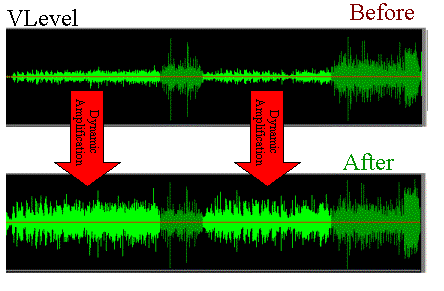
Mp4Gain’s volume normalization is so advanced that not only does it make everyone sound at the same level of audio gain, but each video (or each song in the case of audio files) has volume consistency, preventing there are parts that sound louder and other parts that sound barely audible.

We recommend you download and try Mp4Gain on your windows computer so that you can enjoy the results, without a doubt it is the best and most powerful normalizer with the possibility of normalizing audio and video files.


Free Download Mp4Gain
picture


Mp4Gain Main Window
picture


Mp4Gain Features
picture


Free Download Mp4Gain
picture

Mp3 – Subjective perception of sound: timbre

Mp3 – Subjective perception of sound: timbre

Audio Timbre mp3

Tone is a concept that we often come into contact with in our daily lives, and it can even be said that it is an essential concept.

Mp3 timbre

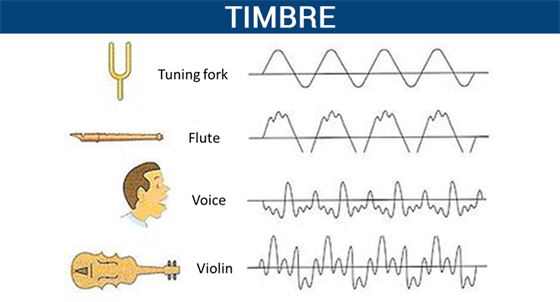
In high school physics textbooks, timbre, along with pitch and volume, are considered the three basic attributes of sound. Although we often deal with the word doorbell, and doorbell has more mature applications in many respects, doorbell is actually a very vague concept. What physical phenomenon determines the timbre? Why can we only use vague words like light and shadow, thickness and warmth to describe timbre?

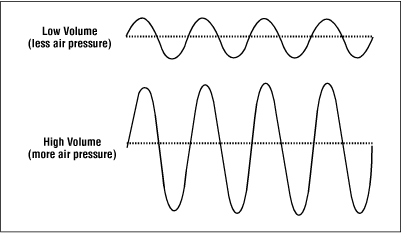
Pitch and volume are well understood and correspond to physical phenomena: pitch corresponds to the vibrational frequency of an object, and volume corresponds to the object’s vibrational amplitude. However, we were unable to find a physical phenomenon that corresponds to the timbre. There are also no precise words to describe the timbre in our language.

We can create great music by precisely controlling the combination of pitch, duration, and volume. So can we control timbre like we control pitch and duration?

What exactly is pitch? What physical processes are involved in the timbre?

This is something that many people have been exploring and researching for the last few hundred years. But to this day, there is still no perfect answer.

In this article, I have classified some of the research results of my predecessors and presented some of my own thoughts. I hope that it can give everyone a systematic understanding of timbre, and I hope to inspire those who are interested in studying timbre in the future.

This article will start with the definition of timbre, discuss what timbre is, the subjective perception of timbre, the main factors that affect timbre, the description of timbre in language, the application of timbre in music, and personal perspectives for timbre. doorbell investigation. This article also proposes a sound classifier model for the timbre. At the same time, there are some conjectures that I have not been able to study in the article. I will check them out in the future.

The definition of sound
There are many definitions of timbre.

The word timbre comes from the French γ€€γ€€. In old French it referred to the sounds produced by different musical instruments.

In his music textbook “Fundamentals of Music Theory,” Li Chongguang noted that “timbres are different due to the nature, shape, and number of harmonics of the sounding body.”

The American Standards Association (ASA) defines ringing from the opposite perspective. It does not define what timbre is, but what timbre it is not: “timbre is any other difference between sounds of the same loudness, pitch, and duration.”

All the above definitions tell us what tone it is. But none of these definitions is as clearly linked to the corresponding physical laws as other physical properties.

Like pitch and frequency of vibration, like speed and time and displacement, like color and wavelength.

Why can’t the word timbre clearly correspond to a certain physical phenomenon? I think this is due to the complexity of the timbre.

How does the normalization of an mp3 work?

How does the normalization of an mp3 work?

mp3 volume normalizer

The normalization of the loudness of an mp3 is based on perception.

How MP3 Compression Works

The human ear has its peculiarities and the study of these have allowed the development of the normalization algorithm for mp3 files.

Initially what was needed was simply to reduce the space an audio file took up, while maintaining high quality.

We must remember that in the early years of the internet, it was very slow and hard drives had very little capacity. What made it impossible to download a wav file (this option is still not used today), which is the one with the “original” quality because the wav takes up a lot of space.

So the normalization algorithm of an mp3 was based on being able to understand how the human ear works to be able to discard information without sacrificing quality, based on the way we perceive music and thus, the mp3 file, which occupies much less space ( a tenth of the original) sounds almost the same as the original.

But… what information can be discarded without the human ear noticing? How is it achieved that even discarding information, an mp3 sounds almost the same as the original?

The first thing is to discard all the sounds that are not perceived by the human ear, but are nevertheless present in the original music wav file. Because the human ear can only perceive sounds in a range of frequencies, any lower frequency will not be heard and any higher frequency will not be heard either. So it’s safe to rule out silences, and also to rule out low and high frequencies that are beyond our ability to perceive.

But there are other phenomena in human hatred, such as the so-called masking. It happens that if we listen to a frequency at high volume and immediately after (or even at the same time) we listen to another instrument or sound with a similar frequency, our ear will not perceive this second sound… Then it is also possible to discard these sounds that are masked by first. Almost all frequency redundancy can be discarded without the human ear being able to perceive it.

So if we take a wav file and remove all the frequencies that are outside of our hearing range and also the masking, we will have been able to reduce the new audio considerably. If we also add a compression (like the one used for a .zip file), we will have a reduction so great that the new file will weigh one tenth of the original.

This allows the new file to be much more manageable than the original and to take up much less space on the hard drive, which was of crucial importance in those years.

This method that we are explaining in general was the one that was used two decades ago or more. Today Mp4Gain uses much more modern and complex methods, which provide more surprising results.

In addition, Mp4Gain is capable of normalizing not only mp3 files, but all popular audio formats and it can also normalize videos. And this is based on more modern, efficient and state-of-the-art algorithms, which provides a much better result.

Generally speaking, we have provided a non-technical explanation of how audio files were compressed to make an mp3.

We advise you to download Mp4Gain and check its quality for yourself. You guys are going to love it.

Loudness Normalization – Mp4Gain

Loudness Normalization – Mp4Gain

Loudness Normalization

Mp4Gain is the most advanced normalizer and practically the only loudness normalizer that is still current and updated according to new technology and new formats.

Loudness Normalization

In fact, it is the only one that handles the most popular audio and video formats. You can even extract the audio from any cvideo and save it as an audio format (mp3, acc, m4a, flac, ogg, etc).

These are the formats that Mp4Gain handles:

Video formats:

mp4, flv, avi
mpg, 3gp, wmv

Audio formats:

mp3, mp2, flac
ogg, m4a, acc
wav ac3

And very soon we will add more formats…

In fact, Mp4Gain offers other features, such as the ability to alter the pitch of a song without changing its speed and vice versa.

In fact, normalization offers a whole series of parameters that will allow you to achieve exactly what you are looking for. You can add the option to include Replay Gain, for example…

It also offers the option that, within the same song or video, all its parts have a similar sound. Avoiding, in this way, the existence in the audio or video file, parts that are very loud and others that have a very low volume.

Of course you can equalize as you like, to improve the quality of the audio.

For all these reasons, we believe that it is best that you download a copy of Mp4Gain and try it for free on your computer.

The program is very simple to use, you could practically say that it is intuitive. In other words, it is possible to use Mp4Gain without needing to read any manual, since it usually only loads the songs or videos and clicks the normalize button and that’s it.

Never again will you suffer from the situation that your different audio or video files have a very different loudness, forcing you to manipulate the volume knob to manually compensate for the difference in volume levels.

Download it today and give it a try.

Loudness Normalization: Why is it necessary to Normalize the loudness of an audio or a video?

Loudness Normalization: Why is it necessary to Normalize the loudness of an audio or a video?

Loudness

The war of volume or loudness war.

Already in the 1940s and in later decades, in the middle of the vinyl record era, a volume war was experienced.

The goal was to make a song sound louder on the radio, louder than other songs and louder than advertising.

Sure, the limitations of vinyl didn’t allow the ability to indiscriminately increase volume to be possible.

Loudness normalization

But with the advent of CDs and digital music it was possible to push the loudness of a song to the max. The situation is that the digitization of the audio allowed it to be manipulated quite precisely, achieving dynamic normalizations that actually ended the dynamics of the music and then played all the time at maximum volume.

By the 90s, groups like Red Hot Chilli Peppersm and their album Californication took this war of loudness to levels rarely seen.

But why did they do that?

Some research on human hearing showed that people did not find that a song sounded better if it had louder loudness.

Every artist, every producer, and every hardware manufacturer has figured out a way to make their production sound louder, louder.

Digitally many limiters and compressors pointed in that direction and made a lot of music sound almost to the point of distortion.

Each one wanted their music to stand out, among other things for being louder and having a greater sound, a higher volume level.

If to this recipe we add the appearance of the mp3 and a great variety of encoders, and also that ordinary people did not understand the effect that the bit rate could produce, then many mp3s with different qualities were generated.

The possibility of sharing these mp3s filled people with mp3s that each had very different sounds. Both for its production and for its coding.

Then a new need appeared: normalize the music to avoid these disparities in loudness, in the volume of the songs.

The holy grail of normalization had to be found.

Many ideas were found, many experiments. The situation matured and certain products like Mp3Doctor and Mp4Gain matured to the point where they actually managed to find the solution: a dynamic standardization that will work well with today’s advanced player equipment.

Then Mp4Gain made the leap, achieving that even videos could not be normalized.

Audio could already be normalized in its main formats (mp34, aac, ogg, floac, etc) with Mp3Doctor, but Mp4Gain added the possibility of these dynamic normalization to video in its main formats (mp4, 3gp, flv, avi, etc. )

Audio normalization for beginners

What’s more annoying when listening to music is that you have to manipulate the volume control for every song that plays. If you have a computer, a tool allows you to uniformize the atmosphere from track to track while the songs are playing. This is called normalization. Three main means are used to achieve this result more or less effectively.

Audio normalization

Normalization through detection of maximum volume

The player or audio processing software analyzes the sound of the track and detects the highest amplitude. If it is less than the maximum gain value that is imposed, the signal is automatically boosted by the number of decibels required to reach and reach this value in all samples on the track. If the highest amplitude is equal to or greater than the maximum gain value, nothing is done.

Normalization

This method has only one advantage: the avoidance of saturation. However, the drawbacks are many.

This form of normalization cannot be applied in real time, as it is assumed that the maximum signal value is known in advance, which is hardly the case with live audio sources (playback or recording). Also, this type of normalization turns out to be totally ineffective when the overall sound of the song is low, but interrupted by small ridges that can be parasitic. When these peaks reach or exceed the maximum gain value, nothing happens and the overall sound is always reduced, especially if these peaks last only a few fractions of a second.

Normalization in detecting maximum volume is almost never used by reading software. Many audio processing software or even audio CD burning offers this option, such as Audacity and Nero.

Normalization by medium volume detection

Here, the player or audio processing software analyzes the sound of the track and does not detect the highest amplitude, but the average amplitude of the signal. Thus, the volume of the song will automatically increase or decrease by the number of decibels required to reach the imposed value, as appropriate.

Also known as RMS, this method has the advantage that the sound is fairly accurately balanced from one song to another, even if there are sharp peaks in the volume.

However, normal normalization of volume detection, like the previous method, cannot be applied in real time and is ipso facto unsuitable for live audio sources. In addition, saturation can occur if the imposed value to be achieved is not sufficient. It is recommended to use normalization values ​​small enough to avoid this problem as much as possible.

Many reading software programs use this normalization mode, but they all work better or worse than the others. .

Sound compression / modern normalization

The mp4gain audio processingΒ  software performs the audio signal analysis, analysis that will lead to increase or decrease the volume of certain areas of the signal according to a complete set of fairly complex parameters inherent in the signal itself. Ultimately, the loud sounds will be attenuated, the weak sounds will improve when multiple presets are reached.

This is the best normalization method if the sound processing values ​​are well established, in which case the sound volume becomes very constant and without saturation, regardless of the source and signal type, in real time or No

However, this type of normalization requires some processing power from the processor. Although the results achieved are much more professional and the only ones that really achieve what the 2020 ear is looking for. Mp4Gain has the most efficient response to normalize audio, either from audio files of the most popular formats or from video files, including the most commonly used formats.

Audio Normalization, understand what it is about

Audio Normalization, understand what it is about

Difference between Peak level and RMS in Audio

Something that is mentioned a lot, for example when audio recordings are produced, is about the so-called Peak Level and RMS, Peak and RMS (Root Mean Square), which are detected by meters (software, or hardware) But… What are they exactly these values?

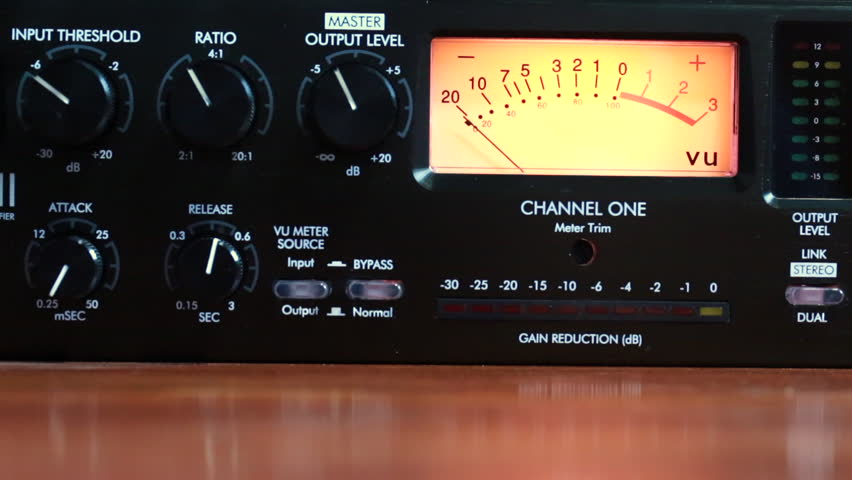
Tube Compressor-Limiter

It is important that someone who does not record audio but simply listens to understands these differences.
This will make you a true expert, even if you are just someone who has a good collection of music, but knows how to distinguish who is normalizing and understands the subject.

DIFFERENCES

The Peak value will inform us of all those maximum values ​​that occur in our music in real time. To understand us … If we have, for example, a recorded song where a drummer emphasizes playing the tarola or a cymbal, we will see that our peak meter will show a higher value for a moment, because it is the one that is sounding louder in that instant. This meter will work with fast attack times, to be able to immediately measure these peaks and maybe use a limiter to avoid them.

What is RMS?

The RMS value, however, will mark the average value of the loudness or volume of our music … how does that do it? , for this it will use attack times, much longer longer. To be clearer … This value will give a reference of the energy level or volume (how high or low is the volume that is playing) but will not be affected by the peaks.

When we say that it has a slower attack value, this means that it does not measure variations so quickly, but rather that it is “slow” to react and therefore shows us something that could be an “average” volume level.

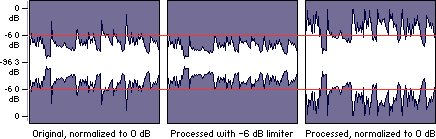
In any case, the suitable normalizer must be a mixture of limiter (that device that prevents the music from distorting because it has exceeded the maximum possible level) and a compressor, which is the one that prevents the peaks from exceeding a level and also prevents them from Volume drops drop more than a preset value.

In this way the music always remains within a medium range, without exceeding a limit neither up nor down.

Professionally recorded or broadcast music is always limited and compressed to keep it playing its best within a suitable range.

The only software that does exactly this is the Mp4Gain. That is why it has been accepted not only by amateurs, but by professionals.

Audio Level normalization

The audio levels of the material produced in a radio station
In general, in radio they do not tend to stay within standardized levels for their audio editions (spots), it is not necessary to know much about levels, since an audio processor compresses and limits everything on air.
Radio Studio Compressor

The console operator does not understand anything about dynamic range, something that has no practical use in the air. And this is how many radios work with adjustments that β€œwork” in the air by trial and error, and not always with the most demanding criteria. successful.

Dynamic range compression

Level normalization

In radio, an editor does not know or manage any level convention, so it could be said that level normalization is not widely used. However, a good professional practice would be that all the material generated by a station β€œsounds” at the same level. Not to the air, because to the air if it is transmitted normalized or compressed and limited, but inside the station. And for this, there are two ways:

The material is processed “by ear” by comparison.
An RMS value is defined and all publishers normalize their mixes to that average level.

Regarding the first point, differences of up to +/- 2 dB will be absolutely acceptable. But a very common vice is to overcompress the edits, or sometimes the voices, seeking to hear the compact and aggressive sound of the FM on studio monitoring. That sound should be determined on-air by the streaming processor, not the publisher. Editors generally abuse processes like Normalize RMS (Sound Forge) and β€œmaximizers”; Wave Hammer (Sound Forge / Vegas) Ultramaximizer and L1 (Waves). Ideally, how much to “squeeze” the dynamics of the edited material should be a function of the type of processor the radio has. At this point it is possible to clarify a fairly common confusion: STANDARDIZATION has nothing to do with making an audio sound “strong” or “powerful”. Using normalization for that purpose is a beginner’s mistake.

The second option is the most accurate way of working -although this precision is not necessary- normalizing all the editions to a given RMS value. This does not impact the sound in the air but it does the internal prolixity of the station. RMS is not an accurate measurement of loudness or “volume”, but for what you need in radio it is enough.

The streaming audio processor knows nothing about the level of the audio file. The processor receives an audio level from the console and works accordingly. What affects the behavior of the processor is the dynamics of the material, if it has dynamics or is super-compressed / limited.

Normal working values

The level at which operator-editors generate material has two well-defined extremes to avoid: very high levels of compression / cliping and excessively low material (less than 24 dB RMS). When we talk about level, we must be clear about the differences between peak level and average level.

PEAK level

Regarding the peak level, the logical maximum limit is digital cliping. Needless to say, a cliping mix is ​​unacceptable.
It is advisable that the maximum peak level is not 0 dBfs, as this will generate overshoot cliping in the D / A converters and especially if the compressed material (MP3) is exported.
An appropriate value for the material on a radio is maximum peak – 1dBfs (the recommendation if using mp3 compression is -3 dBfs). But this does not mean that it should be -1 dB. If no peak reaches the established maximum it is not a problem as long as the material complies with the appropriate working level. The peak level does not matter, but in general the signal will always reach the maximum peak level.

Listening level (RMS)

The “listening level” or mix level is determined by the RMS or “average” value of the material. This is true even if the publisher has never measured the RMS value of their audios. In general the radio editor “compresses”, “maximizes” or -conception error by- “normalizes” your edits “so that they sound”. And in that “so that they sound”, it is taking the cuts to a certain value.

The question that arises is what should that value be? How much should the final mix β€œsqueeze”? The final value should not be a value that generates excessive compression, as this is the task of the transmission processor. How to compress is a topic of discussion for another article, since it is fine spinning and the radios in general do not take into account these aspects. In general lines we will say:

If the radio has a simple analog processor, type M31 or Solidyne 362, they will perform better with material that has a more compact sound (more compression).
If the station has a high-end digital processor, and especially if it works with a highly processed sound in the air, it is not recommended or necessary to excessively maximize the material generated by the station, because these audio equipment respond better when the material is origin is not over compressed.


But what if the file level is very low? It depends. Depending on the PC-Console connection, the operator typically has at least 15 dB of gain range for level correction from the PC. In turn, if the level is low with the fader on, the AGC of the processor has between 10 and 20 dB more correction to compensate the level in the air. But if the file were generated too low, it could fall outside the operator / processor correction range and go low on air.

GENERAL AND ELEMENTARY CONCLUSIONS:

Different materials generated in the radio must sound at the same level, either by ear or measured RMS.
It should not be overcompressed, much less cliping.
The peak level should not exceed -1 dB.
It should not be too low as it may fall outside the processor’s AGC / operator correction ranges.

Put in values:

RMS values ​​between -16 to -13 dB RMS are acceptable.
Values ​​between -13 and -10 dB RMS generally indicate strong compression.
Values ​​less than -10 dB RMS indicate excessive compression, not recommended as it generates a very loud but “muffled” sound that cannot be “improved” by the air processor.

Audio normalization explained

Audio normalization – Audio normalization

Audio normalization is the application of a constant amount of amplification of a sound recording to bring the amplitude of a target level (standard). Because the same amount of gain over the entire recording, the signal-to-noise ratio and relative dynamics are unchanged.

Two basic types of audio normalization exist. Peak normalization adjusts the recording based on the highest signal level present in the recording. Loudness normalization adjusts the recording based on perceived loudness.

Normalization differs from dynamics compression, which applies varying levels of gain across a recording to fit the level within a minimum and maximum range. Normalization adjusts the gain with a constant value over the entire recording.

Normalization is one of the functions usually provided by a digital audio workstation.

Peak normalization

One type of normalization is peak normalization, where the gain is changed to bring the highest PCM sample value or analog signal peak to a certain level – usually 0 dBFS the loudest level allowed in a digital system.

Peak normalization

Since it only goes to the highest level, only peak normalization does not take into account the apparent loudness of the content. As such, peak normalization is commonly used to change the volume so as to ensure optimal use of the available dynamic range during the mastering phase of a digital recording. In combination with compression / restriction, however, peak normalization becomes a feature that can provide a volume advantage over off-peak normalized material. This feature of digital recording systems, compression and limiting followed by peak normalization, sets contemporary trends in program loudness.

Loudness normalization

Another type of normalization is based on a measurement of loudness, where the gain is changed to bring the average amplitude to a target level. This average can be a simple measurement of average power, such as the RMS value, or it can be a measure of human perceived loudness, such as that offered by ReplayGain, Soundcheck and EBU R128.

Loudness Normalization

For example, YouTube reference level -14 LUFS, so if a program analyzed at -10 LUFS, YouTube will decrease the level 4 dB to the reference of -14 LUFS.

Loudness normalization was made in different volume combat when listening to different music in a series. Before loudness normalization, one song in a playlist would be quieter than the rest, so the end listener would have to put a volume knob to adjust the playback volume.

Depending on the dynamic range of the content and the target level, loudness normalization may result in peaks that exceed the storage medium. Software offering such normalization usually offers the option of using dynamic range compression to avoid clipping when this happens. In this situation, signal-to-noise ratio and relative dynamics changed.

Volume normalization, an explanation

Audio Normalization: Make Your Audio & Video Consistently Loud

Audio normalization is a process in which the amplitude (volume) of an audio recording is increased or decreased in a constant relationship over time, so that the maximum amplitude or the maximum effective value or the perceived volume (volume) reaches a predetermined level, the standard. If the signal has multiple tracks, they all undergo the same correction.

Normalize Audio

Example: normalization of peaks to -3 dB:
A collection of digital recordings is made with a peak modulation standard of -3dB FS.
A new stereo recording is measured. The highest maximum level is -5.5 dB FS on the left track, -5.7 dB FS on the right track.
Normalization consists of applying a constant gain of 5.5 – 3 = 2.5 dB.
Standardization requires two passes. The first determines the maximum level, the second applies the correction to the entire recording.

Audio Normalization

Maximum normalization changes the level, but not the dynamics of the sound.
Volume normalization or perception of loudness often includes compression that changes the dynamics of sound.

Peak normalization

Peak normalization applies a constant gain to a recording to bring the highest peak to a target level, 89% professional audio (-1 dBFS true peak (True Peak)).

The sound dynamics of the recording are more or less preserved, except that maintaining a low distortion level after multiplication of all samples may involve the application of a known quantization error decorrelation noise. under the name redithering (tingling of the least significant bit) 2, which slightly increases the background noise level.

Volume normalization

The purpose of volume normalization is to bring all sound elements in a collection to the same sound volume level, so you can hear them without having to adjust the volume. In fact, the normalization of the maximum level in no way guarantees a homogeneity of the perceived sound volume (Loudness).

A simple approach to volume normalization, which is provided by various software programs, is to normalize the RMS value of the integrated signal within a few tenths of a second. The most advanced machines use extensive algorithms for more accurate evaluation of the perceived noise level. The European Broadcasting Union published a recommendation 1 in 2011, which provides a relatively simple method for this evaluation.

If the standard is not low enough, volume normalization involves compression for recordings whose sound dynamics would be higher than implied when setting the standard from the maximum level. If not, the signal peaks would exceed the quantization limits.

In the simplest implementation, volume normalization collects volume data during the first pass, determines the gain or attenuation necessary for the maximum volume to reach the norm, and applies this correction to the second pass. If the elements of the collection have the same characteristics, from form factor to top factor and dynamics, as is the case with popular music collections or recorded speech, this approach produces satisfactory results.

Extensive implementations use a standard that includes not only the volume of the sound, but also the maximum maximum values ​​and dynamics of the sound. They collect loudness levels and maximum values