Advantages and disadvantages of digital sound


Free Download Mp4Gain
picture

Advantages and disadvantages of digital sound

digital sound

From the point of view of a normal user, there are many benefits: the compactness of modern storage media allows you, for example, to transfer all the disks and records in your collection to a digital representation and save for many years in three small ones.

Digital Sound

one-inch hard drive or on a dozen or two CDs; you can use special software and thoroughly “clean” old records from reels and records, removing noise and crackle from their sound; It can also not only correct the sound, but also beautify it, add richness, volume, restore frequencies. In addition to the listed manipulations with sound at home, the Internet also comes to the rescue of the audio lover. For example, the network allows people to share music, listen to hundreds of thousands of different Internet radio stations, and also to show your sound creativity to the public, and for this you only need a computer and the Internet. And finally, recently, a large number of various portable digital audio equipment has appeared, the capabilities of which even for the most average representative often make it easy to carry a collection of music with a duration equivalent to tens of hours on the road. . .

From a professional’s point of view, digital audio offers truly endless possibilities. If the previous radio and sound studios were located on several tens of square meters, now they can be replaced by a good computer, which surpasses ten of those studios combined in capabilities and is much cheaper than one in terms of cost. This removes many financial barriers and makes recording more accessible to both the professional and the simple amateur. Modern software lets you do what you want with sound. Previously, various sound effects were achieved with the help of ingenious devices that did not always live up to technical thinking or were simply handcrafted devices. Today, the most complex and hitherto unimaginable effects are achieved by pressing a couple of buttons. Of course,

Of course, digital technology has its drawbacks, too. Many (professionals and amateurs) note that the analog sound was heard with greater intensity. And this is not just a tribute to the past. As we said before, the digitization process introduces a certain error in the sound, in addition, various digital amplifier equipment introduces the so-called “transistor noise” and other specific distortions. Perhaps there is no precise definition of the term “transistor noise”, but we can say that they are chaotic oscillations in the high frequency region. Although the human hearing aid can perceive frequencies up to 20 kHz, it appears that the human brain picks up higher frequencies. And it is on a subconscious level that a person still feels analog sound cleaner than digital.

However, the digital representation of data has an indisputable and very important advantage: with a saved medium, the data it contains does not distort over time. If the magnetic tape becomes degaussed over time and the recording quality is lost, if the record is scratched and pops and crackles are added to the sound, then the CD / hard disk / electronic memory is readable (if preserved) or not , and there is no aging effect. It is important to note that we are not talking about audio CDs here (CD-DA is a standard that establishes the parameters and format for recording on audio CDs), since even though it is a carrier of digital information, the effect of aging still won’t get away. This is due to the peculiarities of storing and reading audio data from an audio CD.


Free Download Mp4Gain
picture


Mp4Gain Main Window
picture


Mp4Gain Features
picture


Free Download Mp4Gain
picture

Digital Audio Storage Methods – PART 2

Digital Audio Storage Methods – PART 2

Digital Audio

Due to the use of the new SBR (Spectral Band Replication) technology, the codec performs notably better than other formats at low bit rates; however, the quality of encoding at medium and high bit rates is generally inferior to the quality of almost all the codecs described. Therefore, MP3 Pro is more suitable for streaming audio over the Internet, as well as creating previews of songs and music. however, the quality of encoding at medium and high bit rates is often lower than the quality of almost all the codecs described.

Digital Audio

Therefore, MP3 Pro is more suitable for streaming audio over the Internet, as well as creating previews of songs and music. however, the quality of encoding at medium and high bit rates is often lower than the quality of almost all the codecs described. Therefore, MP3 Pro is more suitable for streaming audio over the Internet, as well as creating previews of songs and music.

Speaking of the methods of storing sound in digital form, one cannot help but remember the data carriers. The familiar audio CD, which appeared in the early 1980s, has become mainstream in recent years (which is associated with a sharp reduction in the cost of media and drives). And before that, digital data carriers were magnetic tape cassettes, but not ordinary ones, but specially designed for so-called DAT recorders. Nothing extraordinary: tape recorders are like tape recorders, but the price for them has always been high, and that pleasure was not too difficult for everyone. These recorders were used primarily in recording studios. The advantage of such recorders is that despite the use of familiar media, the data on them was stored in digital form and there was practically no loss during reading / writing on them (which is very important for studio processing and recording. sound storage). Today, a large number of different storage media have appeared, in addition to the usual compact discs. The media are improved and every year they become more accessible and compact. This opens up great opportunities in the field of creating mobile audio players. Today a large number of different models of portable digital players are already on sale. And we can assume that this is far from the peak of the development of this type of technology. This opens up great opportunities in the field of creating mobile audio players. Today a large number of different models of portable digital players are already on sale. And we can assume that this is far from the peak of the development of this type of technology. This opens up great opportunities in the field of creating mobile audio players. Today a large number of different models of portable digital players are already on sale. And we can assume that this is far from the peak of the development of this type of technology.

Digital audio storage methods

Digital audio storage methods

digital audio

There are many different ways to store digital audio. As we said, digitized sound is a set of signal amplitude values ​​taken at regular intervals. Thus, first, a block of digitized audio information can be written to a file “as is”, that is, a sequence of numbers (amplitude values). In this case, there are two ways to store information.

DIGITAL AUDIO

The first is PCM (Pulse Code Modulation), a method of digitally encoding a signal by recording the absolute values ​​of the amplitudes (there are signed or unsigned representations). In this way, the data is recorded on all audio CDs.

The second method – ADPCM (Adaptive Delta PCM – adaptive relative pulse code modulation) – records signal values ​​not at all, but in relative changes in amplitudes (increments). Second, you can compress or simplify the data so that it takes up less memory than when it was written “as is.” There are also two ways here.

Lossless Data Encoding (Lossless Encoding) – is an audio encoding method that enables data recovery from a fully compressed stream. This method of data compaction is used when it is essential to maintain the quality of the original data. For example, after mixing sound in a recording studio, the data should be saved to the file in its original quality for possible later use. Today’s lossless encoding algorithms (for example, Monkeys Audio) can reduce the volume of data occupied by 20-50%, but at the same time ensure one hundred percent recovery of the original data from the data obtained after compression. Such encoders are a kind of data archivers (such as ZIP, RAR and others), only designed for audio compression.

There is also a second encoding path, which we will dwell on in a little more detail, lossy data encoding (lossy encoding). The purpose of such encoding is to achieve the sound similarity of the reconstructed signal to the original by any means with the least possible amount of packed data. This is achieved through the use of various algorithms that “simplify” the original signal (eliminating “unnecessary” details for the hearing impaired), leading to the fact that the decoded signal is no longer identical to the original, but only sounds similar. There are many compression methods, as well as programs that implement these methods. The most famous are MPEG-1 Layer I, II, III (the latter is the well-known MP3), MPEG-2 AAC (advanced audio encoding), Ogg Vorbis, Windows Media Audio (WMA), TwinVQ (VQF), MPEGPlus, TAC and others. On average, the compression ratio provided by such encoders is in the range of 10-14 (times). It should be noted that at the heart of all lossy encoders is the use of the so-called psychoacoustic model, which is simply involved in “simplifying” the original signal. More precisely, the mechanism of such encoders analyzes the coded signal, in the process of which the signal sections are determined, in certain frequency regions of which there are nuances inaudible to the human ear (masked or inaudible frequencies), after which are removed. of the original signal. Therefore, the degree of compression of the original signal depends on the degree of its “simplification”; Strong compression is achieved by “aggressive simplification” (when the encoder “considers” various nuances unnecessary), such compression naturally leads to strong quality degradation, as not only imperceptible but also significant sound details can be removed .

As we said, there are a lot of modern lossy encoders. The most common format is MPEG-1 Layer III (known as MP3). The format gained its popularity quite deservedly: it was the first widespread codec of its kind, achieving such a high level of compression with excellent sound quality. Today, there are many alternatives to this codec, the choice is up to the user. Unfortunately, the scope of the article does not allow us to provide tests and comparisons of existing codecs here, however, the authors of the article will allow themselves to provide some information that is useful when choosing a codec.

So the advantages of MP3 are the widespread use and a fairly high encoding quality, which is objectively improved thanks to the development of various MP3 encoders by enthusiasts (for example, the Lame encoder). A powerful alternative to MP3 is the Microsoft Windows Media Audio codec (.WMA and .ASF files).

The beginning of the digital age

The beginning of the digital age

digital audio

binary code

digital audio

Although digital audio is the standard of music these days …

It has not always been this way.

Music originally existed only in the form of sound waves.

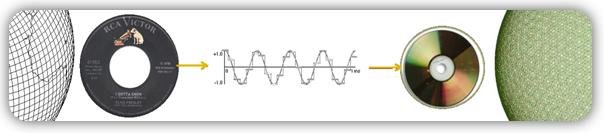
Then, with the development of technology, ways were discovered to convert it to other formats, such as:

Musical notation
electrical signals in cables
radio waves in the atmosphere
request on vinyl record
But more recently, in the age of computers, digital audio has become the main recording format, making it easy to copy and transfer songs.

The device that made this possible is called … digital converter.

Also, on how it works …

2. Digital converters
In recording studios, digital converters exist in 2 versions:

as a standalone device in top studios or …
as part of an audio interface in home studios.
To make binary code out of sound, they take tens of thousands of images (samples) per second to build a rough image of an analog wave.

This image is not entirely accurate, because in the moments between samples, the converter has to guess what is happening.

digital wave

As seen in the graphic above:

the red line shows an analog signal and …
black line shows conversion …
The results are not ideal, but sufficient to produce excellent sound quality.

And the difference depends mainly on …

3. Sampling rate
Take a look at this image:

sampling rate circuit

As can be seen …

By capturing more images per second, higher sampling rates:

Collect more real information,
Use less guesswork,
Creates a cleaner display from an analog signal
And in the end, you get the best sound quality.

Now let’s talk about specific numbers:

Standard sample rates in professional audio:

44.1 kHz (CD)
48 kHz
88.2 kHz
96 kHz
192 kHz
44.1 kHz is the minimum sample rate due to a mathematical principle known as …

Kotelnikov’s theorem (Nyquist-Shannon)
To accurately record digital audio, converters must capture the full spectrum of human hearing between 20 Hz and 20 kHz.

According to Kotelnikov’s theorem …

Capturing a specific frequency requires at least 2 samples per cycle … to measure both the high and low points of a wave.

This means that a sample rate of 40 kHz or more is required to record frequencies up to 20 kHz. Therefore, the sampling frequency of CDs is slightly higher, 44.1 kHz.

Kotelnikov’s theorem

Cons of a high sample rate
Although the higher the sample rate, the higher the sound quality … but this just doesn’t happen.

The cons are:

Requires a lot of computing power
Less clues
Large audio files
So this is a constant search for a compromise. Professional studios find it easier to deal with high sample rates because they have the best equipment.

However, for most home studios, the standard 48 kHz sample rate is appropriate.

How does encoding work in digital audio? Part 5

How does encoding work in digital audio? Part 5

encoding digital audio

DSD offers significant advantages over PCM:

encoding digital audio

more precisely draw a wave;
increased immunity to noise;
an easier way to change and transmit a digital stream;
In theory, it is possible to reduce cost by simplifying DAC circuits, but due to backward compatibility, manufacturers are unlikely to do so.
Originally, SACDs used the DSD x64 format with a sample rate of 2822.4 kHz. The 44.1 kHz audio CD sample rate was taken as the basis, increased 64 times, hence the name x64. The following DSDs are currently in use:

x64 = 2822.4 kHz;
x128 = 5644.8 kHz;
x256 = 11,289.6 kHz;
x512 = 22,579.2 kHz;
declared DSD x1024.

DXD
There is a certain intermediate format between PCM and DSD called DXD – Digital eXtreme Definition. This is, in fact, high definition PCM: 352.8 kHz or 384 kHz with 24 or 32 bit quantization. It is used in studies for the processing and subsequent mixing of materials.

But this approach is flawed: firstly, it does not allow to use all the advantages of DSD, and secondly, the file size is larger than in DSD. At the moment, flagship DACs on the I2S input accept a PCM data stream with a sample rate of up to 768 kHz and a bit depth of up to 32 bits. It’s scary to even consider how much hard drive space an album will take up at this resolution.

DSD has practically separated from SACD. Now, the DSD format can often be found packaged in files with the DSF and DFF extensions. Many turntables have been released with the ability to record in DSF and DFF, lovers of good sound are increasingly digitizing vinyl records in the DSD format. But in recording studios, nobody wants to invest in unpopular formats, so they continue to rivet the sound with a minimum wage: 44.1 × 16.

DSD switching and data transmission
To transfer a digital transmission to DSD, a three-pin connection scheme is used:

DSD Clock Pin (DCLK) – sync;
Data input pin DSD Lch (DSDL) – left channel data;
Data input pin DSD Rch (DSDR): Right channel data.

Unlike I2S, DSD data transmission is extremely simplified. DCLK sets the clock rate of the bit sync, and the left and right channel data is transmitted sequentially through the DSDL and DSDR pins, respectively. Here there are no adjustments, recording and playback in DSD is done little by little. This approach provides the closest approximation to the analog signal, and due to the high frequency, the quantization noise is reduced and the reproduction precision is increased by an order of magnitude.

PDO
DoP is often used to carry DSD data streams, so it’s worth mentioning. DoP is an open standard for transferring DSD data over PCM frames (DSD over PCM). The standard was created to transmit a stream through controllers and devices that do not support direct DSD streaming (not native DSD).

The principle of operation is as follows: in a 24-bit PCM frame, the upper 8 bits are padded with ones; this means that DSD data is currently being transmitted. The remaining 16 bits are sequentially filled with DSD data bits.

For x64 DSD transmission with a single bit rate of 2822.4 kHz, a PCM sample rate of 176.4 kHz (176.4 x 16 = 2822.4 kHz) is required. For DSD x128 transmission at 5644.8 kHz, a PCM sampling rate of 352.8 kHz is already required.

How does encoding work in digital audio? Part 4

How does encoding work in digital audio? Part 4

encoding digital audio

When playing PCM 44.1×16, the most significant bits are simply ignored as they are filled with zeros, or, in the case of older multi-bit DACs, they can go to the next frame. The length of the “word” (WS) may also depend on the player through which the music is played, as well as the driver for the playback device.

encoding digital audio

An alternative to PCM and I2S would be to record the audio signal in DSD. This format was developed in parallel with PCM, although Kotelnikov’s theorem had some influence here. To improve sound quality compared to CDDA, the emphasis was not on increasing the quantization bit, as in the DVD Audio format, but on increasing the sample rate.

DSD
DSD stands for Direct Stream Digital. It originates from Sony and Philips labs, however, just like the other formats discussed in this article.

SACD
DSD first saw the light of day on Super Audio CDs in 2002.

At the time, SACD looked like a masterpiece of engineering, applying a completely new way of recording and playback, very close to analog devices. The implementation was simple and elegant.

The media was even equipped with copy protection, although without it, no pirate was afraid. Under the Sony and Philips brands, they began to produce “closed” devices exclusively for playback, with no possibility of copying discs. Manufacturers sold recording equipment to studios, but kept control over the SACD launch.

Who knows, perhaps the SACD format could gain comparable popularity to Audio CD, if it weren’t for the cost of the playback devices. By unreasonably selling out player prices, Sony and Philips’ own leaders stymied the popularity of their format. And the next mistake put an end to the sale of specialized devices. To promote the Sony PlayStation game console, Sony engineers have added the ability to listen to SACD on it. Hackers immediately hacked the set-top box and began to copy SACD discs into ISO images, which can be burned to a regular DVD disc and played on any competing player; others simply ripped out tracks to play on a computer.

Record labels are good too: contrary to what music lovers expected, they did not take full advantage of the new high-definition format. The studios did not record music from the master tape in DSD, instead they took a digital recording in PCM, remixed and processed everything in a row: limiters, compressors, noise-shaping dithering, and various digital filters. The result was a sound so sterile and dry that even CD Audio could have sounded much better. Thus, listeners’ trust in the SACD was undermined, and at the same time in the new formats in general.

INFO
Unfortunately with vinyl records this vicious practice continues to this day: studios print vinyl from a digital recording, even if they have the recording on the master tape. So on modern vinyl it can easily be 44.1 x 16.

DSD
What is DSD? This is a one-bit stream with a very high sample rate compared to PCM. Also, DSD uses a different type of modulation, PDM (Pulse Density Modulation) – pulse density modulation. Sound recording in this format is done by a one-bit analog-to-digital converter, now these ADCs based on sigma-delta modulation are used everywhere. The recording process looks like this: while the amplitude of the wave increases, the output of the ADC is a logical unit, when the amplitude falls, the output is a logical zero, there can be no average value. It is compared with the previous value of the wave amplitude.

How does encoding work in digital audio? Part 3

How does encoding work in digital audio? Part 3

encoding digital audio

The structure of the digital audio path.

encoding digital audio

When playing music, something like the following happens: the player, using a codec created in the form of a device or program, decompresses the file into a specific format (FLAC, MP3 and others) or reads data from a CD, DVD-Audio or disc SACD, receiving a standard PCM data stream … This sequence is then sent via USB, LAN, S / PDIF, PCI, etc. to the I2S converter. In turn, the converter converts the received data into so-called I2S data interface frames (not to be confused with I2C!).

I2S
I2S is a digital audio transmission serial bus. Now I2S is a standard for connecting a signal source (computer, turntable) to a digital-to-analog converter. It is through it that the vast majority of the DAC connects directly or indirectly. There are other digital audio transmission standards, but they are much less common.

I2S output (input) on PCB
Other articles in this issue:
Xakep # 256. Fight Linux
Problem content
Subscription to “Hacker”
The I2S bus can consist of three, four, or even five pins:

continuous serial clock (SCK) – bit sync clock (can be called BCK or BCLK);
word selection (WS) – frame sync clock (may be called LRCK or FSYNC);
serial data (SD): the signal of the transmitted data (can be called DATA, SDOUT or SDATA). As a general rule, data is transmitted from a transmitter to a receiver, but there are devices that can act as a receiver and transmitter at the same time. In this case, another contact may be present;
Serial data in (SDIN): On this pin, data moves in the receive direction, not transmit.
SD or SDOUT is used to connect a D / A converter and SDIN is used to connect an A / D converter to the I2S bus.

In most cases, there is another pin, the master clock (MCLK or MCK), which is used to synchronize the transmitter and receiver from the same clock to reduce the transmission error rate. For external synchronization of MCLK, two clock generators are used: with a frequency of 22 579 kHz and 24 576 kHz. The first, 22,579 kHz, is for frequencies that are multiples of 44.1 kHz (88.2, 176.4, 352.8 kHz), and the second, 24,576 kHz, is for frequencies that are multiples of 48 kHz (96, 192, 384 kHz). There may also be generators at 45158.4 kHz and 49152 kHz; You’ve probably already noticed how in the world of digital sound they like to double everything.

Frame or I2S frame
In I2S, three contacts are necessarily used: SCK, WS, SD; all other contacts are optional.

On the SCK channel, synchronization pulses are transmitted, under which the frames are synchronized.

The length of the “word” is transmitted over the WS channel and logical states are also used. If the WS pin is a logical unit, then the right channel data is transmitted, if it is zero, the left channel data.

The data bits are transmitted via SD: the amplitude values ​​of the audio signal during quantization, the same 16, 24 or 32 bits. No checksums or service channels are provided on the I2S bus. If the data is lost in transit, there is no way to get it back.

Expensive DACs often have external connectors to connect to I2S. The use of such connectors and cables can have a negative effect on the sound, even the appearance of “artifacts” and stuttering, everything will depend on the quality and length of the cable. Still, I2S is a plug-and-play connector, and the length of the wires from the transmitter to the receiver should tend to zero.

Let’s take a look at how the PCM data stream is transmitted over the I2S bus. For example, when transmitting PCM 44.1 kHz at 16 bits, the length of the word on the SD channel will be these sixteen bits and the length of the frame will be 32 bits (right + left). But most of the time, the transmitters use a 24-bit word length.

How does encoding work in digital audio? Part 2

How does encoding work in digital audio? Part 2

digital audio

The 44.1 kHz sampling rate was calculated from Kotelnikov’s theorem. It is believed that the hearing of the average person cannot pick up sound beyond 19-22 kHz. The frequency was probably 22 kHz and was chosen as the upper limit.

digital audio

22,000 × 2 = 44,000 + 100 = 44,100 Hertz

Where does the 100 Hertz come from? There is a version that this is a small margin in case of errors or oversampling. In fact, Sony chose this frequency for its compatibility with the PAL transmission standard.

The bit depth of the CDDA format is 16 bits, or 65,536 samples, which equates to a dynamic range of approximately 96 dB. Such a large number of samples were not chosen by chance. Firstly, due to the strong influence of quantization noise, and secondly, to provide a formal dynamic range superior to that of the main competitors at the time: cassette records and vinyl records. I’ll cover this in more detail in the section on digital to analog converters.

Development of PCM continued on the principle of multiplying by two. Other sample rates appeared: first, the 48 kHz sample rate was added, and then the frequencies based on it were 96, 192, and 384 kHz. The 44.1 kHz frequency was also doubled to 88.2, 176.4 and 352.8 kHz. Bit depth increased from 16 to 24 and then to 32 bits.

The next after CDDA in 1987 appeared the DAT format – Digital Audio Tape. The sample rate was 48 kHz, the quantization bit did not change. And although the format failed, the 48 kHz sample rate has taken hold in recording studios, as they say, due to the convenience of digital processing.

In 1999, the DVD-Audio format was released, which made it possible to record on a disc six stereo tracks with a sampling frequency of 96 kHz and a 24-bit bit depth, or two stereo tracks with a frequency of 192 kHz, 24 bits.

That same year, the SACD – Super Audio CD format was introduced, but the discs began to be produced only three years later. I’ll tell you more about this format in the DSD section.

These are the main formats that are considered the standard for digital audio recordings on media. Now let’s see how the data is transmitted on a digital audio path.

How does encoding work in digital audio?

How does encoding work in digital audio?

encoding digital audio

Have you ever wondered how sound is reproduced on digital devices? How is a sound signal formed from a combination of ones and zeros?

encoding digital audio

I’m sure I was thinking, since I started reading! But often, even professionals have only a general idea of ​​the modern sound route. In this article, you will learn how the different formats appeared, what a digital-to-analog converter is, what types of DACs exist, and what determines the quality of sound reproduction.

PCM
As you know, in digital audio, almost any format, with rare exceptions, is recorded using a pulse code stream or a PCM stream – pulse code modulation. FLAC, MP3, WAV, Audio CD, DVD-Audio and other formats are just ways to pack, “preserve” the PCM stream.

How it all began
The theoretical foundations of digital sound transmission were developed at the dawn of the 20th century, when scientists tried to transmit an audio signal over a long distance, but not by telephone, but in a rather strange way for that time.

By dividing the sound wave into small parts, it could be sent to the receiver in some kind of mathematical representation. The recipient, in turn, could restore the original waveform and listen to the recording. In addition, scientists were faced with the task of increasing the bandwidth of the “ether”.

In 1933, the theorem of V.A. Kotelnikov. In Western sources, it is called the Nyquist-Shannon theorem. Yes, Harry Nyquist was the first to raise this issue: in 1927 he calculated the minimum sampling frequency for transmitting a waveform, which later received his name “Nyquist frequency”, but Kotelnikov’s theorem was published 16 years earlier .

The essence of the theorem is simple: a continuous signal can be represented in the form of an interpolation series consisting of discrete reports, from which the signal can be reconstructed. In order to roughly restore the original state of the signal, the sample rate must be at least twice the upper cutoff frequency of this signal.

For many years, the theorem was not in demand, until the advent of the digital age. It was then that it found a use. In particular, the theorem was useful in the development of the CDDA (Compact Disc Digital Audio) format, in common people it is called Audio CD or Red Book. The format was released by engineers at Philips and Sony in 1980 and has become the standard for audio CDs.

Format characteristics:

sampling frequency – 44.1 kHz;
quantization capacity – 16 bits.

Digital audio encoding

Digital audio encoding

Digital audio encoding

In fact, one or another digital form of representation of analog audio signals is already a coding method – a sequence of numbers that describes an analog audio signal is itself a digital code.

Digital Audio Encoding

However, the encoding that we are going to talk about now is something else. Now let’s look at the methods of encoding digital audio signals.

A digitized audio signal “in its pure form” is a fairly accurate, but not the most compact, way of recording the original analog signal.

Judge for yourself. To obtain complete information about the original analog signal in the frequency range 0-20 kHz (in the audible frequency range), the analog signal must be sampled at a frequency of at least 40 kHz. Therefore, the CD – DA standard (the standard for recording data on audio CDs familiar to all) establishes the following encoding parameters: recording of two or one channel in PCM format with a sampling frequency of 44.1 kHz and a 16-bit quantization bit depth. One hour of music in this format takes up approximately 600 MB of space (60 minutes * 60 seconds * 2 channels * 44100 samples per second * 2 bytes per sample = approximately 605 MB). Taking into account that, for example, the music collection of an ordinary music lover may have 5,000 tracks with an average length of about 3 minutes each, the amount of memory required to store it in its original digital form is quite significant. Awesome. Therefore, storing relatively large amounts of audio data, ensuring fairly good sound quality, requires the use of various “tricks” to compress the data.

In general, all existing methods for encoding audio information can be conditionally divided into only two types.

1. Lossless data compression (“Lossless Encoding”) is a method of encoding (compacting) digital audio information, which enables one hundred percent recovery of the original data from the compressed transmission (the term ” original data “here means the original form of the digitized audio data). This method of data compression is used in cases where one hundred percent absolute preservation of the quality of the original audio data is required. Lossless compression algorithms that exist today can reduce the volume of data occupied by 20-50% and at the same time guarantee a 100% recovery of the original digital material from the compressed data. The operating mechanisms of such encoders are similar to the operating mechanisms of general data archivers, such as ZIP or RAR, but at the same time they are specially adapted to compress audio data …. Lossless encoding While it is ideal in terms of preserving the quality of audio materials, it cannot provide a high level of compression.

2. There is another more modern way to compact data. This so-called lossy data compression (Engl. “Lossy encoding”) The purpose of encoding is to achieve the highest data compression rate by all means while keeping sound quality at an acceptable level. The idea behind lossy encoding is based on two simple underlying considerations:

original digital audio data is redundant: it contains a lot of unnecessary information that is useless to the ear, which can be removed, thereby increasing the compression ratio;
Requirements for the sound quality of audio material may vary and depend on specific purposes and areas of use.
Lossy encoding is therefore called “lossy”, which results in the loss of some of the audio information. Such encoding leads to the fact that the decoded signal, when reproduced, sounds similar to the original, but in reality it is no longer identical to it. Most lossy coding methods rely on the use of the psychoacoustic properties of the human auditory system, as well as various tricks associated with resampling and resampling the signal. In frequency, during the compression process, the encoder analyzes the audio data to identify various details of the sound that can be ignored. Disguised frequencies, inaudible and inaudible sound details can be sacrificed for a higher compression ratio. Where intelligibility is only important in sound (for example, in telephony, where the presence of frequencies above 4 kHz is not necessary), the audio information during the encoding process undergoes a serious “simplification”, which, together with the use of successful “smart” quantifiers and “greedy” data compression algorithms.