Video Compression: Relationship to Resolution

Higher resolution videos require higher bit rates. (Because it increases the amount of information per frame / second)

For example
Video “1280 x 720”
Video “1920 x 1080”
If you have two videos, the latter requires more bitrate. “1280 x 720” may be sufficient bit rate, but “1920 x 1080” is not sufficient.
For “Recommended bit rate” for “Resolution”, see Youtube recommended bit rate.
Recommended encoding settings for uploaded videos (details) – YouTube Help
→ https://support.google.com/youtube/answer/1722171?hl=ja
Relationship to frame rate
If the frame rate doubles, the bit rate will inevitably double.
This is because “the number of frames per second” is doubled.
For example
30 fps (2 Mbps)
60 fps (2 Mbps)
If there are two videos,
For 60 fps, “60 sheets at 2 Mbps” should be displayed, while
For 30fps, you only need to display “30 sheets at 2Mbps”, so the bitrate is actually half.
Reference: What is the frame rate? Difference between VFR (variable) and CFR (fixed)
It is not good to increase the bitrate too much
Bit rate = it is useless to rise above a certain level
It does not mean that you need to increase the bit rate.
For example, even if you encode a video with an original image quality of 100 at an ultra-high bit rate, the image quality will not exceed 100. (If possible, 99, etc.)
It is often the case that the image quality is 95 at a 5 Mbps bit rate, but the image quality is only 96 even if a 10 Mbps bit rate is assigned.
In such cases, it is useless to assign a bit rate of 10 Mbps.
The bit rate is to maintain the image and sound quality of the original video. It is not intended to raise the bottom.
High bit rate = high playback load
The higher the bitrate, the more playback load will be placed on the PC.
If you use a unnecessarily high bit rate, you will end up with the worst video, “Although the image quality is normal, the playback load is extremely high and the file size is a huge waste.”
So if you want to encode it for your own storage,
Video resolution
Video content
Let’s think about the bitrate to be assigned.
Related: How to Calculate Video Bitrate [Ratio to File Size]
However, if you want to post to Youtube, it will be encoded on the Youtube side and set to a suitable bitrate, so it’s okay if you encode at an ultra-high bitrate for now.
Related: Enco conditions and methods for videos published on Youtube
Resume
In short, it looks like the following.
If you want to make a video that emphasizes the quality of the image
→ Increase the video bit rate
If you want to make a video that emphasizes the sound quality
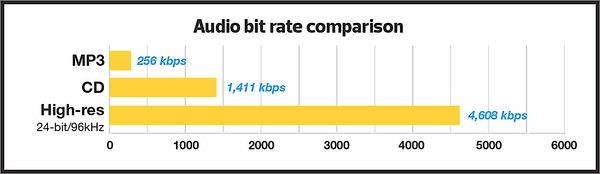
→ Increase the audio bit rate (increase the sample rate and bit depth)
When you want to make a video that emphasizes movement (smoothness)
→ Increase the frame rate of the video (simply doubling the frame rate requires doubling the bit rate)
Reference: What is the frame rate? Difference between VFR (variable) and CFR (fixed)
Reference: How to Change the Frame Rate (fps) of a Video
By the way, it is a bit rate encoding method.
CBR
Vbr
APR
The “image quality” and the “sound quality” also depend on this, so be careful with this as well.
Reference: Difference between CBR (fixed), VBR (variable) and ABR (average) [bit rate]