How MP3 files work


Free Download Mp4Gain
picture

The MP3 movement is one of the most incredible phenomena that the music industry has ever seen. Unlike other similar phenomena, such as the introduction of cassette tape or CD, MP3 technology did not start with the industry, but with a huge audience of music lovers on the Internet. The digital MP3 music format has had, and will continue to have a great impact on how people collect, listen and distribute the music.

If you have wondered how MP3 files work, or simply want to know what uses can be given, read on. This article will give some features of this popular sound format.

MP3 format

If you know something about how CD’s work, then you know how they store music. A CD stores a song in the form of digital information. The data on a CD uses a decompressed high resolution format. This is what happens when a CD is created:

The music is sampled (fractionated) 44,100 times per second. Each of these parts has a size of 16 bits.
Pieces of these fractions or “samples” are taken from the left and right channels in a stereo system.
With a simple formula we realize how great a single song can be.

Fractions * bits * channels = X bits per second

In our case it would be 44,100 for 16 bits per 2 channels, which would give us 1,411,200 bits per second. 1.4 million bits per second equals 176,000 bytes per second. If the average of a song is 3 minutes, then the average of a song on a CD is 32 million bytes of space. That is a lot of space for a song, and it is especially great if we consider that we are downloading music with a 56K Modem, which will take us a few hours.

The MP3 format is a compression system for music. This format allows you to reduce the number of bytes in a song without damaging the sound quality. The goal of the MP3 format is to compress a CD quality song without letting you see the difference. With MP3, a 32 MB song from a CD, compresses up to 3 MB. This allows you to download a song in minutes instead of hours, and store hundreds of songs on your computer’s hard drive.

Compression and quality

Is it possible to compress a song without damaging the quality? To perform this compression, the use of algorithms is needed, in the same way that we use them to compress other formats, such as graphics, text files, applications, etc. A very popular algorithm for compressing sound is the “perceptual noise shaping” technique. This algorithm uses characteristics of the human ear such as:

There are certain sounds that the human ear cannot hear.
There are certain sounds that the human ear hears better than others.
Its there are two sounds playing at the same time, we can hear the one that is louder, and not the lowest.
Using factors like these, certain parts of the song can be eliminated without significantly damaging the quality of the song for the listener. When you have created the MP3 file, what you have is music with a quality close to that of a conventional CD. It doesn’t sound exactly the same because some things have been removed, but it’s very close.

Using the MP3 format

The MP3 movement – consisting of the MP3 format itself and the ability of websites to distribute it – have done several things in the music world:

It has made it easy for anyone to distribute music at a low cost, or even for free.
It has made accessing music simple and instant.
He has taught people to manipulate music on a computer.
One of the strengths of this format is the ability to edit, create and modify music files thanks to powerful computer software tools. Thanks to these tools, it is extremely easy for anyone:

Download an MP3 file from a website and play it instantly.
Transform or “rip” a song from a CD, to the MP3 format, and listen to it later.
Record a song yourself, convert it to MP3, and make it available to everyone on the Internet.
Convert MP3 files into CD files and make your own audio CD’s with MP3 files downloaded from the Internet.
Have thousands of hours of music stored on one or more hard drives.
Upload MP3 files to portable players and listen to them wherever you want.
To do all this, all you need is a computer with a sound card, speakers, an Internet connection, a CD / DVD player / recorder, and an MP3 player.



Free Download Mp4Gain
picture


Mp4Gain Main Window
picture


Mp4Gain Features
picture


Free Download Mp4Gain
picture

Audio quality: Bitrate in MP3 files

In many cases, the term Bitrate is used, which is the bit rate per second that a multimedia file (Audio or Video) has. Currently the MP3 music format is one of the most widespread (Although there are currently other more current formats such as OGG Vorbis, AAC, Flac, Monkey Audio, …) however the audio quality is variable, this is due to the characteristics with which the MP3 in question has been compressed, including:

Mode: It can be of two types mainly:

Mono: With a single channel (The right and left channel go together, not separated which gives worse audio quality).

Stereo: Two channels (Right and Left, improve audio quality).

Sampling frequency:

Audio CDs use 44,100 Hz (22,050 Hz per channel), although there are higher frequencies such as 48,000 Hz used in DVDs and lower, the higher the frequency, the higher the quality.
Bits: Audio CDs have 16 Bits (Although MP3 can be compressed at a lower quality such as 8 Bits).
Bitrate (Bit Rate per second): Audio CDs have about 1,400 Kbps (44100 Hz * 16 Bits * 2 channels), meaning that an Audio CD would have a bitrate of 1,400 Kbps (In MP3 format the maximum Bitrate is 320 Kbps, however, it is assumed that an MP3 with a 128 Kbps Bitrate has a quality similar to CD, although in many cases to achieve a quality similar to CD it is necessary to use a Bitrate of 192 Kbps, and to obtain CD quality it is necessary use 256 Kbps or 320 Kbps).

Some of the most common Bitrates are:

8 Kbps Mono: Telephone Sound.
16 Kbps Mono: Better quality than shortwave.
32 Kbps Mono: Better quality than AM.
64 Kbps Stereo: Better quality than FM.
112 – 128 Kbps: Quality close to CD.
160 Kbps: Quality closer to CD.
192 Kbps: Virtually CD quality.
256 Kbps: Quality CD practically undisputed from an original CD.
320 Kbps: CD quality.

Coding method: It can be of two types:

VBR (Variable Bit Rate, Bit Rate Variable): Encodes the file in MP3 with a variable Bitrate.
CBR (Constant Bit Rate, Constant Bit Rate): Encodes the MP3 file with a fixed Bitrate.

In addition, another factor that influences the encoding of the MP3 file is the CODEC (Encoder-Decoder) used, one of the most common and the best result is LAME (Lame Ain’t an MP3 Encoder) which is also free.

One point to keep in mind is that if we recompress an MP3 file that originally has a 128 Kbps bitrate and convert them to 192 Kbps for example, audio quality is not really gained because the MP3 format has some quality loss (MP3 is a loss algorithm, also called lossy). which has occurred when converting the original file (Ex: CD Audio or a 320 Kbps MP3 to a 128 Kbps MP3) so this recompression does not make much sense since we will not gain in audio quality (As they say where there is no one can not get) and the only thing we will achieve in any case is to increase the initial size of the file.

The opposite case (Recompress a 320 Kbps MP3 file for example at 192 Kbps) if it makes some sense because in this case although we lose some audio quality we reduce the weight (Kilobytes or Megabytes) of each MP3 file somewhat.


In conclusion, it can be said that if we need to encode / compress an MP3 file with good quality, the “ideal” would be to do so:

To be able to start from an Audio CD, although an MP3 at 320 or 256 Kbps could also be valid for a recompression of the file.
In stereo mode (With two channels, right and left).
With at least 44100 Khz sampling rate and 16 Bits.
With a minimum bitrate of 192 Kbps or at most 256 Kbps (Using 320 Kbps would give higher quality but also increase the file size considerably).
Use the LAME Codec (Lame Ain’t an MP3 Encoder).

What it is and how to perform a volume normalization on your MP3


What it is and how to perform a volume normalization on your MP3

Have you ever heard the term audio normalization, without being sure of what it meant? As a lover of music and technology, I also encountered such a doubt many years ago. Basically, giving a short definition, it is about the standardization of the volume, or rather, of the audio spectrum with respect to other subjects, usually of the same disc.

And that, to put it more simply, is the equalization of the volume of the different tracks on a disc. The reasons are many, and usually if the tracks are extracted from the same job they already have the same volume and gain, but what happens if we want to make a mixtape? For example, we decided to make a compilation called The Best 100 Rock Songs in History. Surely have songs from The Beatles or The Rolling Stones, and therefore from different albums. Depending on the year, type of mastering, etc. etc., we can end up with a CD that contains many different volumes, something that can be annoying when listening. That is just one of the reasons to normalize our MP3 collection.

There are add-ons for players that allow us to normalize on the fly. In fact we can say that programs like Spotify already do this by means of the option to equalize volume of all the songs, however the application that I present below allows us to permanently normalize modifying MP3 files and many other formats, both audio and Of video..

This is Mp4Gain, which stands out for its simplicity of use and is presented under an interface that is ideal to understand exactly what a normalization is and see the before and after. When we open the application we find a window in which we have a grid, which will be populated when we add files or folders, and a keypad with various options.

How do we normalize? Simply change the gain through the specific menu for this.

By pressing OK the application will start working and save our files with the same gain, so it is ideal that before doing the first tests we make a backup. It must also be taken into account that it is an operation that can take time, something that depends on the speed of our processor, the number of issues to normalize and also the size and quality of them.

Audio normalization

Audio normalization

audio normalization

The normalization of the audio level is something that is achieved by applying a constant and maintained amount of gain, in volume, to an audio recording to bring the average peak amplitude to a desired level that has been previously defined. To which the same amount of gain is applied to the entire range, the signal-to-noise ratio generally does not change. Normalization differs from dynamic range compression, which applies different levels of gain to a recording so that the amplitude is within a minimum and maximum range. Standardization is one of the most common functions provided by a digital audio workstation.

Peak normalization

One type of normalization is peak normalization, in which the gain is changed to bring the highest PCM value or the highest peak of an analog signal to a given level.1

Since it only searches for the highest level, it does not take into account the apparent volume of the content. As such, peak normalization is generally used to change the volume in such a way as to ensure optimum use of the distribution medium in the mastering stage of a recording. loudness normalization.

Normalization of loudness

Another type of normalization is based on a loudness measure, in which the gain is changed to bring the average amplitude to an objective level. This average may be a simple measurement of average power, such as the RMS value, or it may be a measure of the loudness perceived by humans, such as that offered by ReplayGain.

Depending on the dynamic range of the content and the target level, the normalization of the loudness can lead to peaks that exceed the limits of the recording medium. Some software has the option of using dynamic range compression to avoid saturation when this happens. In this situation, the signal-to-noise ratio is altered.

volume booster

Modern Audio Normalization

Currently Mp4Gain uses an audio normalizationn that is more similar to that used in modern recording studios or live music group recitals.

It is a normalization of volume focused from a new perspective.

Under this new paradigm, not only does it achieve that all songs have the gain of loudness at the best possible level, but it also achieves that each instrument and / or voice obtains a level of gain that makes it audible. Achieve an optimized level of volume gain normalization.

There is no other normalizer in the market that obtains this level of result. People with training in hearing listening can easily notice the difference., very similar to that obtained with expensive hardware in radio stations or in recording studios or in recital consoles, combining limiters, modern compressors and other processors.
All these results that offer expensive hardware equipment, Mp4Gain does for a few dollars.

In fact, the opposite result is achieved than that achieved with masking, because with masking, which is a method used to compress music, you can no longer perceive some sounds that are behind a more audible sound, that is what is called masking, which leads to the loss of audio quality.

Mp4Gain manages to highlight hidden instruments and sounds, performing an audio normalization by frequency bands to achieve this.

That is why we say that Mp4Gain achieves the same results as those obtained through a series of hardware equipment (limiters, compressors, normalizers, etc.) that are very expensive, while Mp4Gain costs only a few dollars.

Digital Audio – Beginners guide

The Cost of a High Sampling Rate

Although it is true that high sampling rates produce better sound quality … that comes at a price.

That price translates into:

Higher processing load.
Less number of tracks.
Heavier audio files.
So you always give something in return. Professional studies can support higher sampling rates because they use better equipment.

But for most home studios, people often find that the standard 48 kHz configuration is the best.

Following…

4. Bit Depth

In order to understand what bit depth is, we first have to know what bits are.

A bit (or binary digit) is a single unit of binary code, with a value of 1 or 0.

The more bits, the more possible combinations. For example…

As you can see in the diagram below, 4 bits allow a total of 16 combinations.

4 bits

When used to encode information, each of these numbers is assigned a specific value.

As the number of bits increases, the possible values ​​grow exponentially.

4 Bits = 16 possible values
8 Bits = 256 possible values
16 Bits = 16,536 possible values
24 Bits = 16,777,215 possible values
With the bit depth in the digital audio, each value is assigned a specific amplitude of the waveform.

The greater the bit depth, the greater the volume increase between high and low … and a greater dynamic range in the recording.

A good rule of thumb is: for every extra bit, the dynamic range increases by 6dB.

For example:

4 Bits = 24 dB
8 Bits = 48 dB
16 Bits = 96 dB
24 Bits = 144 dB
In the end, what this means is that… the greater the bit depth, the less noise.

Because by adding more processing margin (or headroom), the useful signal (at the high end of the spectrum) can be recorded higher above the background noise (at the low end of the spectrum).

small vs large bit depths

Following…

5. Quantization Noise

Impressive that a 24-bit recording can result in almost 17 million possible values, right?

However, that remains much less than the infinite number of possible values ​​that exist in an analog signal.

Therefore, in almost all samples, the actual value is somewhere between two possible values. The solution of the converter is simply to round it or “quantify” it to the nearest value.

The resulting distortion, known as quantization noise, takes place in 2 phases of the recording process:

at the beginning, during the A / D conversion, and
at the end, during mastering
With mastering, the sampling frequency / bit depth of the final track is usually reduced by converting to the final digital format (CD, mp3, etc.).

When that happens, some of the information is erased and “re-quantized”, generating more distortion in the sound.

The most frequent solution to deal with this problem is …

6. Dither

When reducing a 24-bit file to 16 bits, the screen is used to mask much of the resulting distortion …

Adding a low level of “random noise” to the audio signal.

As it can be difficult to visualize the concept in audio, to explain it, we usually turn to the popular analogy of the screen plot.

Is that how it works:

When a color photo is converted to black and white, a mathematical estimate is made to determine if each color pixel should be “quantized” in a black pixel, or a white one …

As is the case when digital audio samples are quantized.

As you can see in this picture, the “before” photo is pretty bad, right?

dither

But with the plot …

a small number of white pixels are randomly distributed in black parts, and …
a small number of black pixels are randomly distributed in white parts …
By adding that “random noise” to the image, the “after” photo looks much better. Well, the screen in the audio works very similarly.

Following…

7. Latency

The GREAT PROBLEM of current digital studies is the amount of latency that accumulates in the signal chain, especially with DAWs.

With all the calculations that are processed, the audio signal takes time to leave the system between a few milliseconds and a few DOCENAS of milliseconds.

Between 0-11 ms of latency – it is short enough, so a normal person does not notice it.
Between 11-22 ms – an annoying delay is heard which it is difficult to get used to.
More than 22 ms – there is so much delay that it is impossible to play or sing at tempo with the track.
In a normal digital signal chain there are usually 4 phases that contribute to the total latency:

A / D conversion
DAW Buffer
Delay of the Plugins
A / D conversion
The A / D and D / A conversion are the least harmful, contributing to total latency with less than 5 ms.

But nevertheless…

The DAW buffer and certain plugins (including compressors and virtual instruments) can add up to 20, 30 or 40 ms or

Beginner’s Guide to Digital Audio for Recording Music

62c-digital audio When recording at home began to become popular …

It happened for a simple reason:

The analog equipment of the past decades was being slowly but inexorably replaced …

For a new generation of audio interfaces and other digital equipment that was cheaper and easier to use.

And that trend has continued since then.

Today … digital audio is the standard in almost all studios, both professional and amateur.

However, surprisingly, there are few people who really understand what it is about.

So let’s see what it is about:

1. The Rise of the Digital Age

binary code Although digital audio is the standard in today’s music …

It has not always been that way.

Originally, music information only existed as sound waves in the air.

Then, as technology progressed, people discovered new ways to convert that information to other formats, including:

notes on a page
electrical signals inside a cable
radio waves in the atmosphere
relief on vinyl records
But in the end, with the rise of computers, digital audio ended up being the dominant format in the music production industry, since it allowed copying and transporting songs in a simple and free way.

And the device that made all that possible was … the digital converter.

Let’s see how they work …

2. Digital Converters

In recording studios there are 2 types of digital converters:

Those that are an independent device, which are normally seen in more advanced studies, or …
Those that are integrated into the audio interfaces, which are usually seen in home studios.
To convert the audio to binary code, they take tens of thousands of samples (samples) per second to make an “approximate” image of the analog waveform.

The image is not accurate because in the intervals between samples, the converter basically has to guess what is happening.

Digital waveform

As you can see in the diagram, in which:

the red line is the analog signal, and …
the black line is the conversion …
The results are not perfect, but they are good enough to generate excellent sound quality.

How excellent? That depends largely on …

3. Sample Rate

Check out this image:

sample rate diagram

As you can see…

When taking more samples per second, the highest sampling rate:

Collect more real information,
Go less to the estimate, and
It generates a much more accurate image of the analog signal.
Logically, the end result is … better sound quality.

Let’s talk about specific data:

Normal sampling frequencies in professional audio range around:

44.1 kHz (audio CD)
48 kHz
88.2 kHz
96 kHz
192 kHz
The minimum of 44.1kHz is due to a mathematical principle known as …

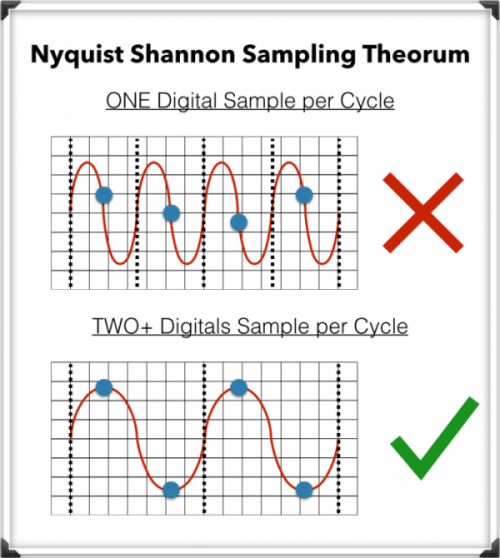
The Nyquist-Shannon Sampling Theorem

To record digital audio accurately, converters have to capture the entire human listening spectrum, which is between 20Hz – 20kHz.

According to the Nyquist-Shannon Sampling Theorem …

To capture a specific frequency, at least 2 samples are needed for each cycle … to measure both the upper and lower points of the sound wave.

That means that recording frequencies of up to 20kHz require a sampling rate of 40kHz or more, which explains why the audio CDs are just above that minimum, at 44.1kHz.

Explanation of advanced mp3 conversion settings


In this article we are going to address the audio coding settings that affect the sound quality. Understanding how conversion settings work can help you select the optimal sound coding properties in terms of file size relative to sound quality.

What is the bit rate?

The bit rate is the amount of data consumed to transmit the audio sequence per unit of time. For example, a bit rate of 128 kbps (kilobits per second) means that a second sound is encoded with 128,000 bits (1 byte = 8 bits). If you convert this into kilobytes, a second of sound occupies about 16 KB.

Therefore, the higher the bit rate of a track, the more space it will occupy on the computer. However, with the same format, a higher bit rate allows you to record the best quality sound. For example, if you convert an audio CD to MP3, the 256 kbps bit rate will provide much better sound quality than the 64 kbps bit rate.

Because today’s hard disk space is relatively cheap, it is recommended to convert to MP3 with a bit rate of at least 192 kbps or higher.

The bit rate can also be classified as constant or variable.

The difference between constant bit rate (CBR) and variable bit rate (VBR)

The constant bit rate means that the encoding of each audio segment consumes a constant amount of bits. However, the structure of the sound may be different, and the coding of a segment of silence requires much less bits than the coding of a segment of intense sound. Unlike the constant bit rate, the variable bit rate adjusts the quality of the coding at various intervals. Thus, intervals that are simple in terms of coding will use a lower bit rate, while more complex intervals will be coded with a higher bit rate. The use of a variable bit rate allows for better sound quality without increasing the file size.

What is the sampling frequency?

This term is used in the conversion of analog signal to digital form and defines the number of samples (signal level sample measurements) per second needed to convert a signal.

CBR vs VBR – which one to choose?

When you are going to pass a music CD to MP3 or AAC format you will have seen two different encoding options, the CBR and the VBR. Do you know the diference?

► The best turntables of 2019: purchase, configuration and more
CBR (Constant bitrate) encoding

CBR is a type of encoding in which a fixed bit rate is always used, so if we encode a song at 192 Kbps, the resulting file will have a bitrate of 192 Kbps for the entire duration of the song.

It is the speed at which data is processed or transferred.
It is usually measured in seconds and the most common units are:
Kb / s or Kbps (remember that the lower case “b” is bits, not bytes).
Mb / s or Mbps.
Also called: bitrate, bit-rate and BR.
The main advantage of using CBR is that the coding is a bit faster (compared to VBR). However, the resulting files are not as well optimized in size and quality.


CBR coding also has another advantage and we know in advance the transfer rate we need. For example, if we set a bitrate of 300 Kbps, we already know that with a 320 Kbps connection we will be able to transmit the data without suffering cuts, so it is usually used in real-time transmissions or streaming.

VBR encoding (bitrate variable)

VBR is an encoding method that allows a variable bit rate, this means that the bitrate of an audio file can increase or decrease dynamically depending on the complexity of the sound.

If the music is very simple or there is silence for a few seconds the bitrate can go down and then go back up in the more complex areas of a song.

What is bitrate? Bitrate video, audio, internet and more

HomeAudio Y VideoWhat is Bitrate? Bitrate video, audio, internet and more …
What is bitrate? Bitrate video, audio, internet and more …

Surely we have heard the word bitrate countless times when an expert user refers to a video or audio in digital format, and we have come to know that it is the element that defines the flow of data. But what exactly is bitrate? The question arises because not only in these fields is this parameter used.

Like the resolution and the final format of the digital video or audio, another determining factor to obtain excellent quality in an image or sound is, without a doubt, bitrate, a parameter that perhaps is not always taken into account and that not only applies to the field of audio or video. That is why in this article we will find a lot of information to perfectly understand what bitrate is.

Bitrate: Why it is so important in our digital life

Electronic devices have reached unthinkable operating speeds just a few years ago, and that is why today we hope that our device, be it a smartphone or a tablet, a computer or a hard disk, will respond to us at the moment and without hesitation. In this they have to see many and varied factors, but one of the most important is the bit rate at which it can exchange or process information.

The term bit rate, used in computing and telecommunications systems, basically refers to the amount of bits that can be transmitted in a given unit of time through a transmission system or between two digital devices. Depending on the context in which the term is used, the bit rate, or bitrate in English, is measured in Kbit / s or Mbps, kilobits per second or megabits per second, respectively.

Regardless of the unit of measurement for defining bitrate, higher numbers always mean better and higher quality values, although we must not forget that low bit rate values ​​can also mean less signal processing by the hardware, very convenient in equipment such as smartphones, tablets or netbooks.

Bit rate on the Internet

In the case of the bit rate applicable to the Internet, the higher bit rate is better, since the content we receive from the network arrives faster. In other words, the higher the bitrate we get from our ISP, the better the connection and we can work much more comfortably.

A higher bitrate in an Internet connection means streaming movies and video in high definition, playing online with no delay and downloading really large files without problems and in a few seconds.

In the event that we want to know exactly what the bitrate of our connection is, we can do so easily and comfortably by accessing with our browser a site that is responsible for performing this test. One of the best in the market is speedtest.net.

Bit rate in audio and video

If we talk about audio and video, the meaning of the term bit rate differs a bit from what we use for the Internet. In this context, the bit rate refers to the amount of data stored for every second of data that they reproduce. To take an example, an MP3 file of a 320 kbps song offers a much higher quality than the same 128 kbps encoded file, obviously as long as both files have been created from the same source.

But we must always remember that if the source from which we obtained the files was of poor quality, then the copy will also be of poor quality, it has been encoded at 128 kbps or 320 kbps.

This also happens with videos, a much higher bit rate will offer a much better viewing quality than a video with the same resolution but at a lower bit rate.

The bit rate could be expected to increase each time the resolution grows as a larger amount of data is being processed. This means that while high bitrate rates can offer excellent display quality, they also require much more effort to process part of the hardware, forcing it, especially in modest and older hardware, to produce pauses and cuts.

Another aspect that we must also take into account since it is very important, is that video file formats use different sets of compression algorithms, which could also offer high quality with a more discrete bit rate. However, the extra process load for these types of videos can also complicate the processor and the systems involved in decoding.

The quality of YouTube videos leaves much to be desired: they need an update


When we watch a video on the platform, we can usually appreciate that, despite finding videos in 1080p resolution, the compression applied by the platform is too aggressive. This causes the final quality of the video we are watching to differ greatly from that of the original file. The codec that YouTube uses is H.264 / MPEG-4 AVC, using various profiles or “levels” that specify the maximum resolution, frames per second and maximum bitrate of each quality.

We have analyzed a few videos, and we have taken a fairly representative one that is available on both Vimeo and YouTube to see how both platforms compress the videos. In addition, we have seen the maximum and minimum bitrate that each video can have according to the YouTube Help page for each resolution. The audio, as we discussed in summer, reaches 128 Kbps, leaving 320 Kbps only for YouTube Red users.

What sound quality (bitrate) do YouTube videos have?

The bitrate for 1080p videos is too low: 4K is the way to go
The bitrates that YouTube says it assigns to each video are the following, with the profile level in parentheses:

4K / 2160p
60 fps: Between 20,000 and 51,000 Kbps (L5.2)
30 fps: Between 13,000 and 34,000 Kbps (L5.1)
1440p
60 fps: Between 9,000 and 18,000 Kbps (L5.1)
30 fps: Between 6,000 and 13,000 Kbps (L5.0)
1080p
60 fps: Between 4,500 and 9,000 Kbps (L4.2)
30 fps: Between 3,000 and 6,000 Kbps (L4.1)
720p
60 fps: Between 2,250 and 6,000 Kbps.
30 fps: Between 1,500 and 4,000 Kbps.
480p: Between 500 and 2,000 Kbps.
360p: Between 400 and 1,000 Kbps.
240p: Between 300 and 700 Kbps.

In our tests, the bitrates we obtained for the previous video were the following:

4K at 30 fps
Vimeo: 19.4 Mbps (file size: 943 MB) (capture)
YouTube: 17 Mbps (file size: 821 MB) (capture)
1080p at 30 fps
Vimeo: 4.31 Mbps (file size: 219 MB) (capture)
YouTube: 3.2 Mbps (file size: 160 MB) (capture)
vimeo vs youtube compression

As we see, Vimeo files occupy more not only because of the lower compression of the videos, whose quality is superior to the naked eye, but that Vimeo’s sound quality doubles that of YouTube, since it reaches 256 Kbps by 128 Kbps from YouTube. So that you can see the difference in image quality, you can open the same New Zealand Ascending video on YouTube and Vimeo, and we have also left four captures at the same moment of each video so you can save them and see comfortably the video difference.

Digital audio


Digital audio is the representation of sound signals through a set of binary data. A complete digital audio system usually begins with a transceiver (microphone) that converts the pressure wave that represents the sound to an analog electrical signal.

This analog signal goes through an analog signal processing system, in which limitations in frequency, equalization, amplification and other processes such as compaction can be performed. The equalization aims to counteract the particular frequency response of the transceiver used so that the analog signal closely resembles the original audio signal.

After analog processing the signal is sampled, quantified and encoded. Sampling takes a discrete number of analog signal values ​​per second (sampling rate) and quantification assigns discrete analog values ​​to those samples, which means a loss of information (the signal is no longer the same as the original). The coding assigns a sequence of bits to each discrete analog value. The length of the bit sequence is a function of the number of analog levels used in the quantization. The sampling rate and the number of bits per sample are two of the fundamental parameters to choose when you want to digitally process a certain audio signal.

The digital audio formats try to represent that set of digital samples (or a modification) of them efficiently, so that it is optimized depending on the application, either the volume of the data to be stored or the processing capacity necessary to obtain the starting samples. In this sense there is a very widespread audio format that is not considered digital audio: the MIDI format. MIDI does not start from digital samples of sound, but stores the musical description of the sound, being a representation of the score of the same.

The digital audio system usually ends the reverse process to that described. The set of samples they represent are obtained from the stored digital representation. These samples go through a digital-analog conversion process providing an analog signal that after a processing (filtering, amplification, equalization, etc.) affects the output transceiver (speaker) that converts the electrical signal to a pressure wave that represents Sound.

Digital audio quality

The quality of the digital audio depends strongly on the parameters with which that sound signal has been acquired, but they are not the only important parameters for determining the quality.

One way to estimate the quality of digital sound is to analyze the signal difference between the original sound and the sound reproduced from its digital representation. According to this strategy we can talk about a specific signal to noise ratio. For audio systems that perform lossless digital compressions, this measure will be determined by the number of bits per sample and the sampling rate.

The number of bits per sample determines a number of quantification levels and these a signal-to-noise ratio of carrier peak that depends quadratically on the number of bits per sample in the case of uniform quantification. The sampling rate establishes a higher level for the spectral components that can be represented, and linear distortion may appear in the output signal and aliasing (or spectral overlap) if the signal filtering is not adequate.

For digital systems with another type of compression, the signal to noise ratio can indicate very small values ​​even if the signals are identical to the human ear.

The reason is that the signal to noise ratio is not a good parameter of sound quality measurement because the quality perceived by the listener is determined by the response of the human ear to the sound waves, which does not perceive many of the possible differences Logically, if the signals are very similar, the ear cannot differentiate them, but they can also be very different and can be perceived as the original signal. Therefore, the evaluation of the quality of a digital system through sensitivity parameters of the human ear and specific tests with specialized listeners seems more appropriate.

It is in this sense that the quality of digital audio systems is evaluated today. Both MPEG and Dolby Digital (AC-3), which establish perceptual compressions, perform test benches to estimate the quality of the encodings.